Page 253 of 612
2535-5. Using an external device
5
Audio system
COROLLA_TMMMS_TMMC_U (OM12F00U)
CAUTION
■Caution while driving
Do not connect USB memory or operate the controls.
NOTICE
■To prevent damage to USB memory
● Do not leave USB memory in the vehi cle. The temperature inside the vehi-
cle may become high, resulting in damage to the device.
● Do not push down on or apply unnecessary pressure to the USB memory
while it is connected.
● Do not insert foreign objects into the port.
Page 254 of 612
2545-5. Using an external device
COROLLA_TMMMS_TMMC_U (OM12F00U)
P. 2 2 7
■Operating portable audio devices connected to the audio system
The volume can be adjusted using the vehicle's audio controls. All other
adjustments must be made on the portable audio device itself.
■ When using a portable audio devi ce connected to the power outlet
Noise may occur during playback. Use the power source of the portable
audio device.
Using the AUX port
This port can be used to connect a portable audio device and lis-
ten to it through the vehicle’ s speakers. Press until “AUX”
is displayed.
Connecting a portable player
Page 255 of 612
255
5
Audio system
COROLLA_TMMMS_TMMC_U (OM12F00U)
5-6. Using Bluetooth® devices
Bluetooth® audio/phone
The following can be performed using Bluetooth® wireless com-
munication:
■Bluetooth® audio
The Bluetooth
® audio system enables you to enjoy music played
on a portable player from the vehi cle speakers via wireless com-
munication.
This audio system supports Bluetooth
®, a wireless data system
capable of playing portable audio music without cables. If your
portable player does not support Bluetooth
®, the Bluetooth®
audio system cannot be used.
■Bluetooth® phone (hands-free phone system)
This system supports Bluetooth
®, which allows you to make or
receive calls without using cables to connect a cellular phone to
the system, and without oper ating the cellular phone.
Page 256 of 612
2565-6. Using Bluetooth® devices
COROLLA_TMMMS_TMMC_U (OM12F00U)
Device registration/connection flow
1. Register a Bluetooth® device to be used with the audio
system ( P. 261)
2. Connect a registered Bluetooth® device to be used
( P. 262, 263)
To be used for audio
To be used for hands-free phone
3. Set automatic connection of the device ( P. 264)
4. Check the Bluetooth® connection condition
( P. 257)
5. Use Bluetooth® audio
( P. 272)5. Use Bluetooth® phone
( P. 275)
Page 257 of 612
2575-6. Using Bluetooth® devices
5
Audio system
COROLLA_TMMMS_TMMC_U (OM12F00U)
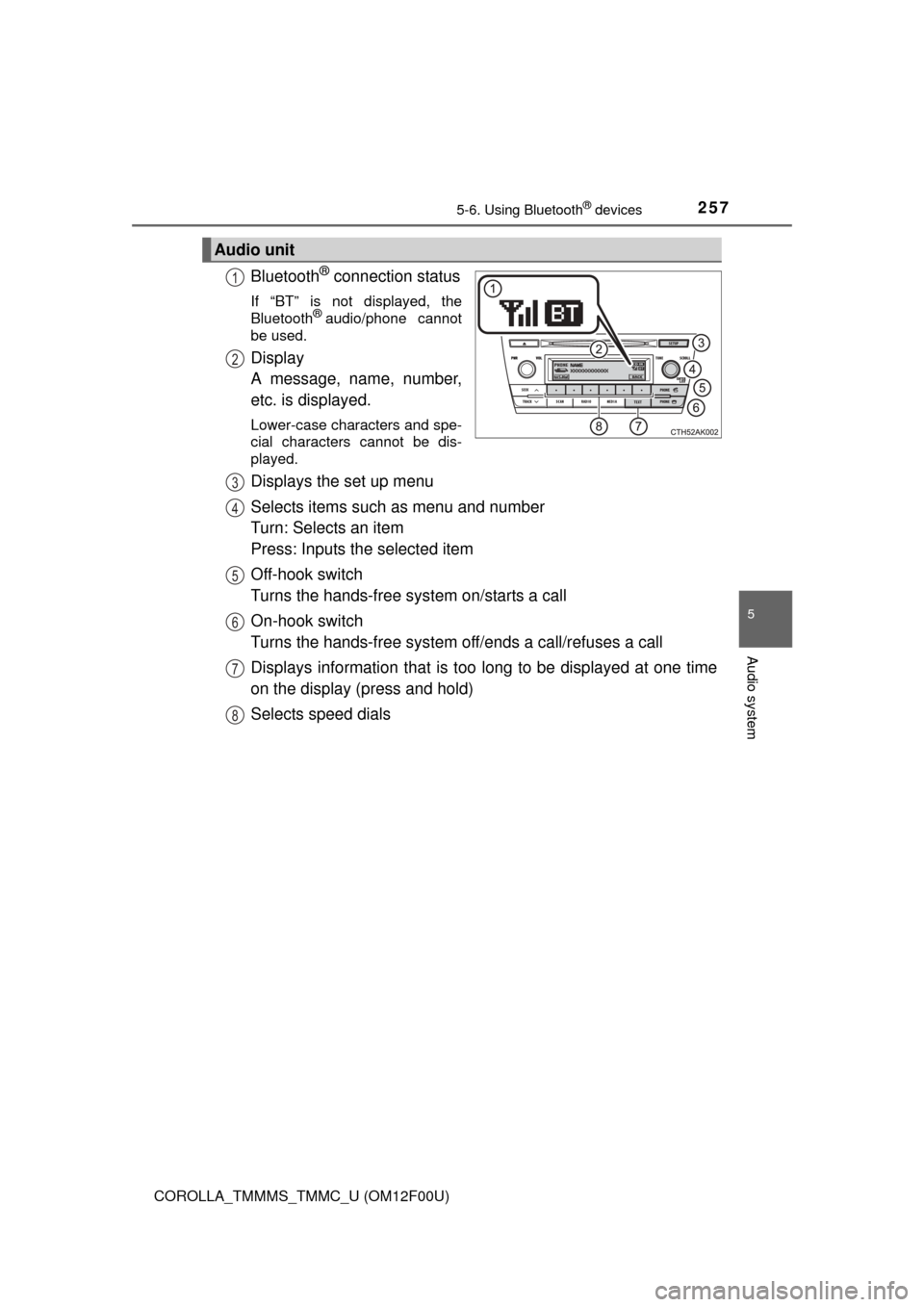
Bluetooth® connection status
If “BT” is not displayed, the
Bluetooth® audio/phone cannot
be used.
Display
A message, name, number,
etc. is displayed.
Lower-case characters and spe-
cial characters cannot be dis-
played.
Displays the set up menu
Selects items such as menu and number
Turn: Selects an item
Press: Inputs the selected item
Off-hook switch
Turns the hands-free system on/starts a call
On-hook switch
Turns the hands-free system off/ends a call/refuses a call
Displays information that is t oo long to be displayed at one time
on the display (press and hold)
Selects speed dials
Audio unit
1
2
3
4
5
6
7
8
Page 258 of 612
2585-6. Using Bluetooth® devices
COROLLA_TMMMS_TMMC_U (OM12F00U)
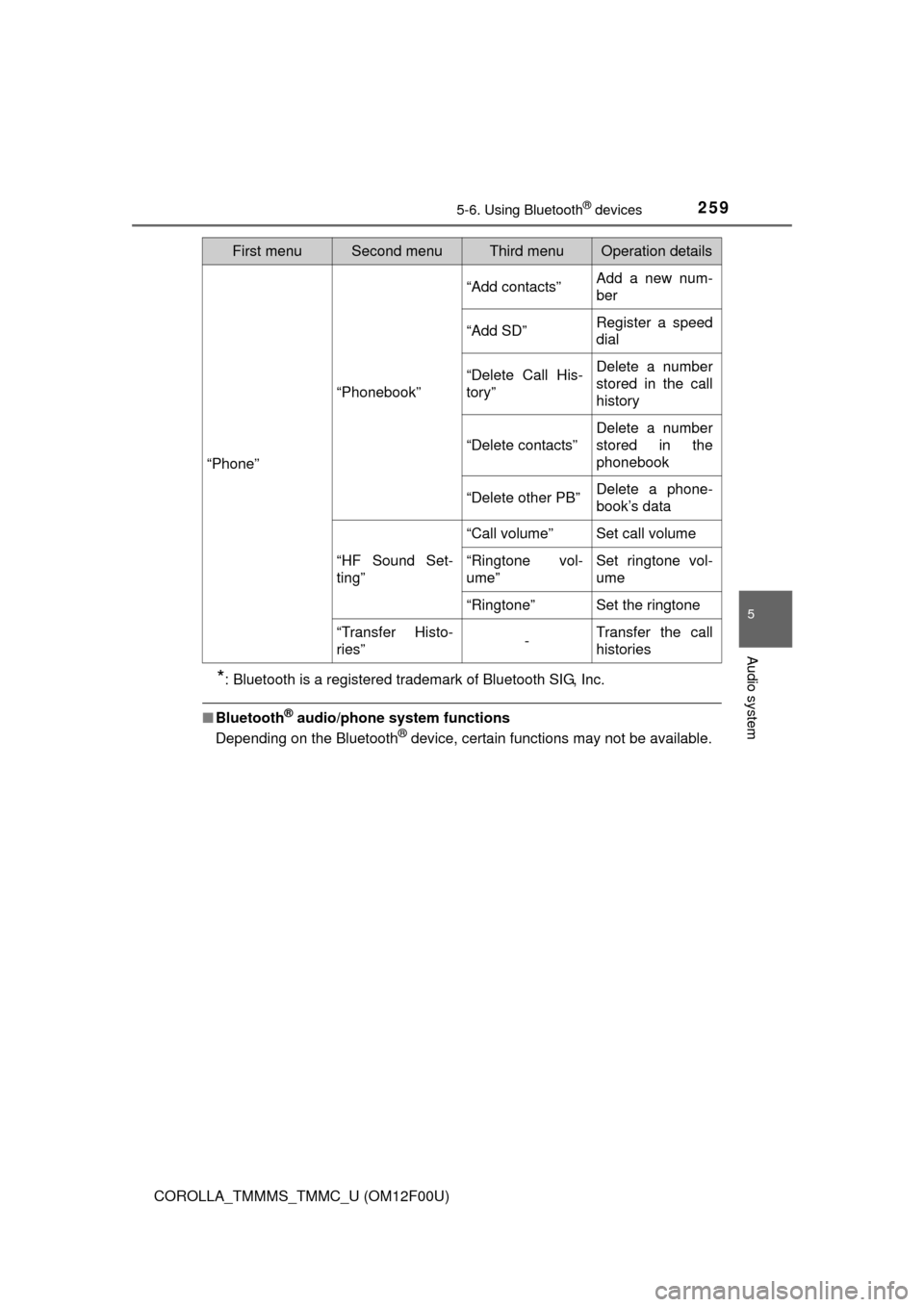
To enter a menu, press and navigate menus by using :
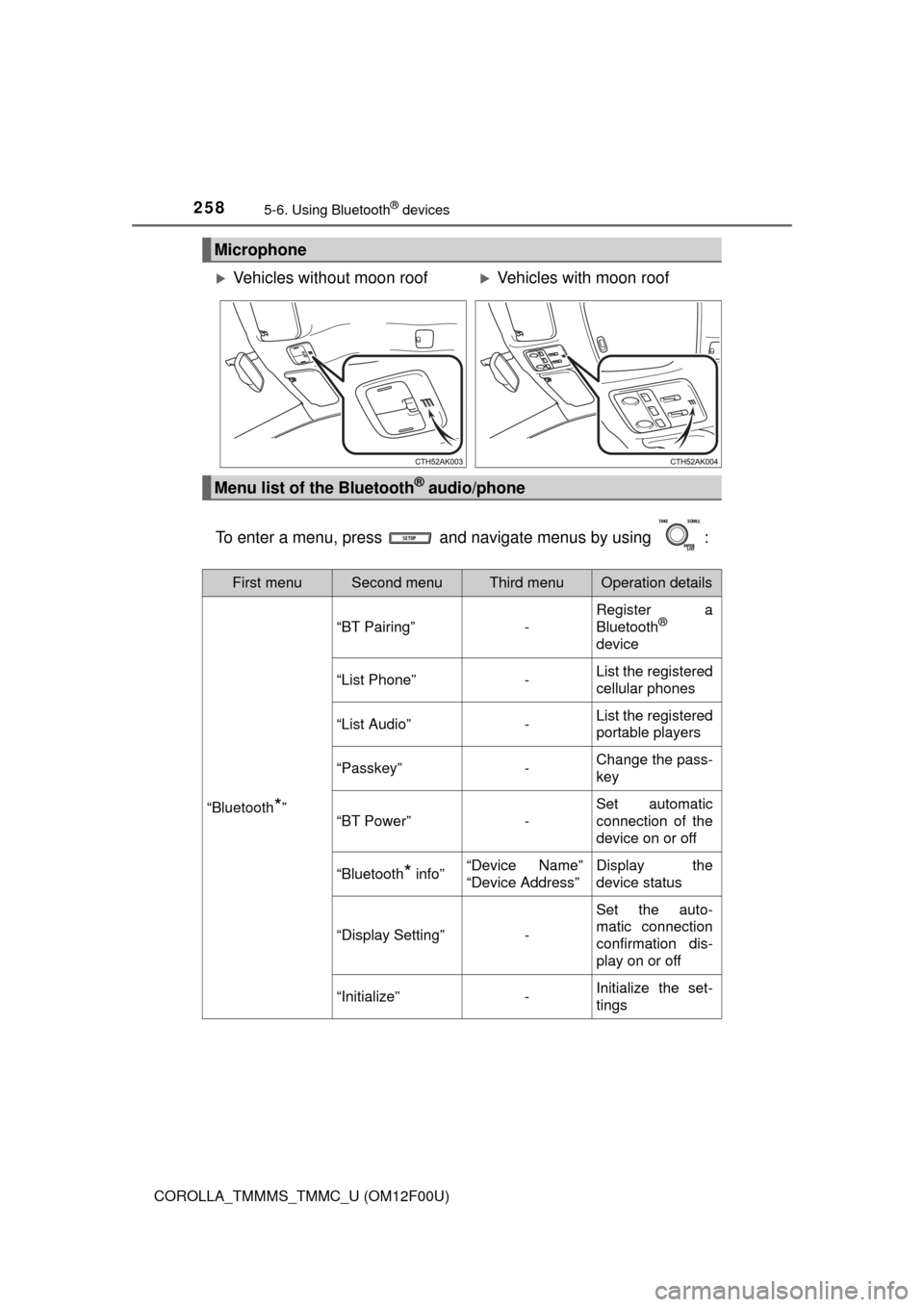
Microphone
Vehicles without moon roofVehicles with moon roof
Menu list of the Bluetooth® audio/phone
First menuSecond menuThird menuOperation details
“Bluetooth*”
“BT Pairing”-
Register a
Bluetooth®
device
“List Phone”-List the registered
cellular phones
“List Audio”-List the registered
portable players
“Passkey”-Change the pass-
key
“BT Power”-
Set automatic
connection of the
device on or off
“Bluetooth* info”“Device Name”
“Device Address”Display the
device status
“Display Setting”-
Set the auto-
matic connection
confirmation dis-
play on or off
“Initialize”-Initialize the set-
tings
Page 259 of 612
2595-6. Using Bluetooth® devices
5
Audio system
COROLLA_TMMMS_TMMC_U (OM12F00U)
*: Bluetooth is a registered trademark of Bluetooth SIG, Inc.
■Bluetooth® audio/phone system functions
Depending on the Bluetooth® device, certain functions may not be available.
“Phone”
“Phonebook”
“Add contacts”Add a new num-
ber
“Add SD”Register a speed
dial
“Delete Call His-
tory”Delete a number
stored in the call
history
“Delete contacts”
Delete a number
stored in the
phonebook
“Delete other PB”Delete a phone-
book’s data
“HF Sound Set-
ting”
“Call volume”Set call volume
“Ringtone vol-
ume”Set ringtone vol-
ume
“Ringtone”Set the ringtone
“Transfer Histo-
ries”-Transfer the call
histories
First menuSecond menuThird menuOperation details
Page 260 of 612
2605-6. Using Bluetooth® devices
COROLLA_TMMMS_TMMC_U (OM12F00U)
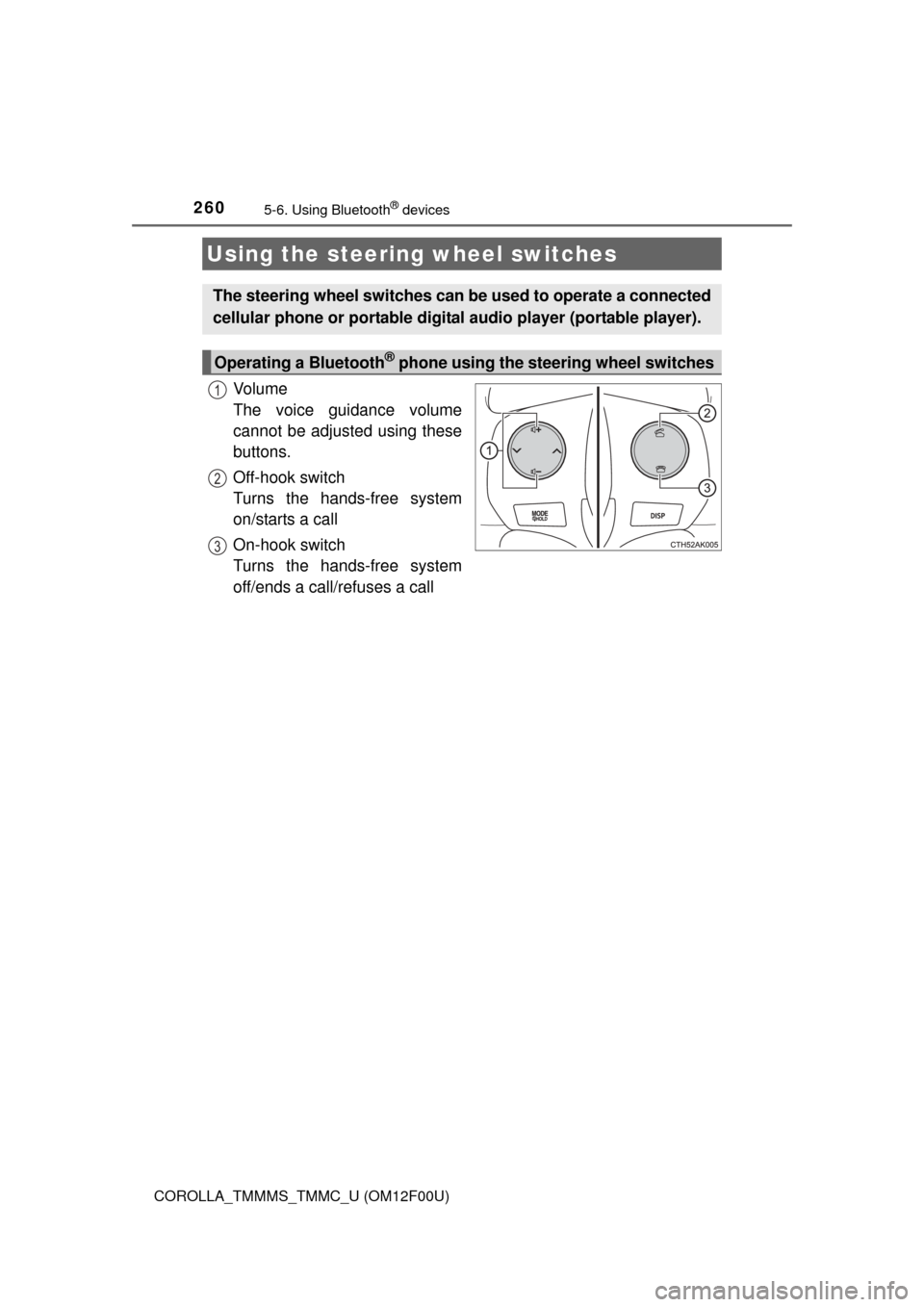
Vo l u m e
The voice guidance volume
cannot be adjusted using these
buttons.
Off-hook switch
Turns the hands-free system
on/starts a call
On-hook switch
Turns the hands-free system
off/ends a call/refuses a call
Using the steering wheel switches
The steering wheel switches can be used to operate a connected
cellular phone or portable digita l audio player (portable player).
Operating a Bluetooth® phone using the steering wheel switches
1
2
3