Page 223 of 612

2235-1. Basic Operations
5
Audio system
COROLLA_TMMMS_TMMC_U (OM12F00U)
CAUTION
■U.S.A.
FCC ID: ACJ932PTA184
NOTE:
This device complies with Part 15 of the FCC Rules.
Operation is subject to the following two conditions:
(1) this device may not cause harmful interference and
(2) this device must accept any interference received, including interference
that may cause undesired operation.
FCC WARNING:
Changes or modifications in construction not expressly approved by the
party responsible for compliance could void the user’s authority to operate
the equipment.
Radio frequency exposure. This device is approved for Mobile Application
only and, to comply with applicable FCC radio frequency exposure regula-
tions, must be used with a distance of at least 7.9 in. (20 cm) between the
antenna and the body of any person at all time during use.
■ U.S.A. and Canada
● Part 15 of the FCC Rules
FCC Warning:
Any unauthorized changes or modifications to this equipment will void the
user’s authority to operate this device.
Page 225 of 612
2255-1. Basic Operations
5
Audio system
COROLLA_TMMMS_TMMC_U (OM12F00U)
NOTICE
■To prevent battery discharge
Do not leave the audio system on longer than necessary when the engine is
off.
■ To avoid damaging the audio system
Take care not to spill drinks or other fluids on the audio system.
Page 226 of 612
2265-1. Basic Operations
COROLLA_TMMMS_TMMC_U (OM12F00U)
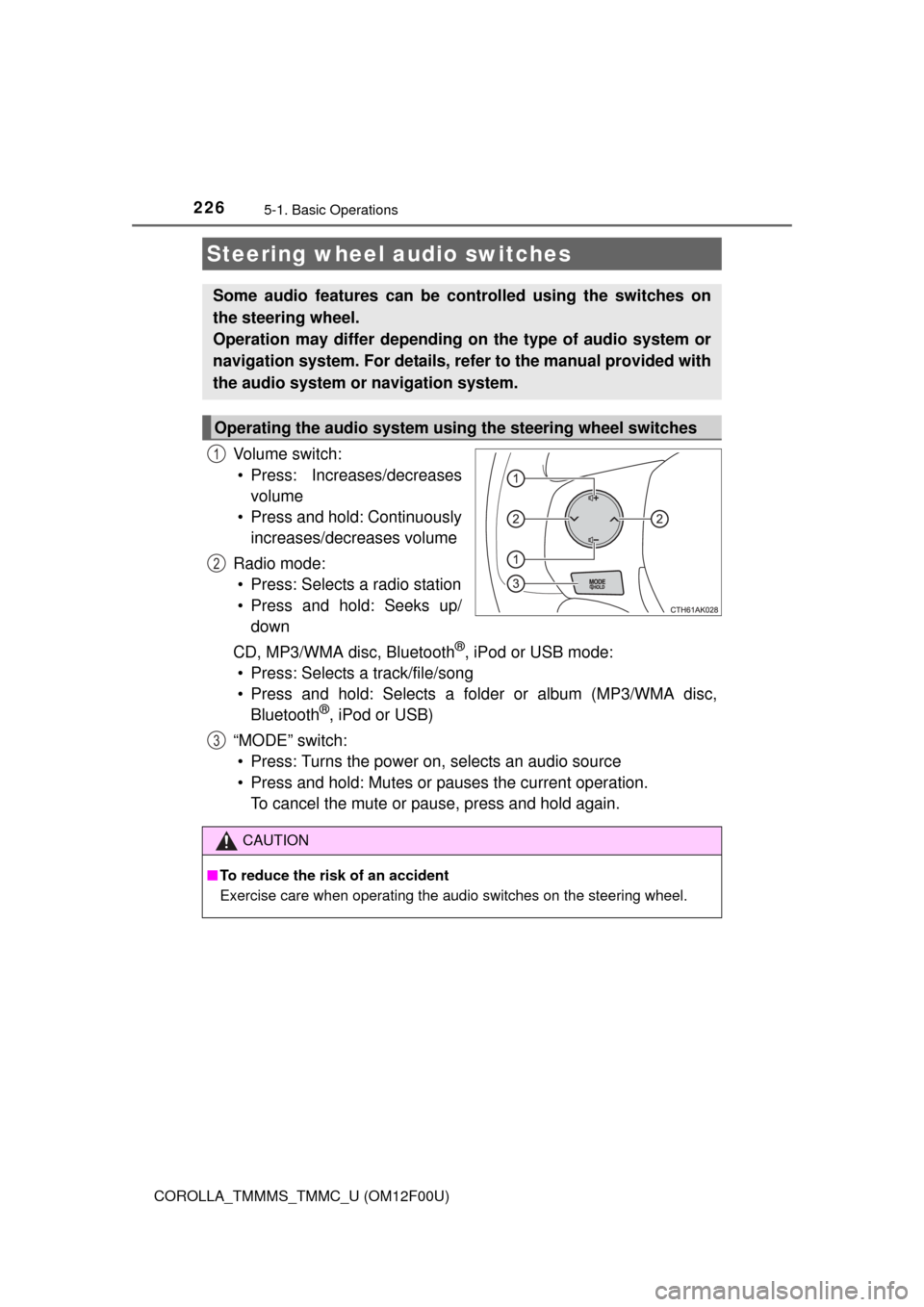
Vo l u m e s w i t c h :• Press: Increases/decreases volume
• Press and hold: Continuously increases/decreases volume
Radio mode: • Press: Selects a radio station
• Press and hold: Seeks up/ down
CD, MP3/WMA disc, Bluetooth
®, iPod or USB mode:
• Press: Selects a track/file/song
• Press and hold: Selects a folder or album (MP3/WMA disc, Bluetooth
®, iPod or USB)
“MODE” switch: • Press: Turns the power on, selects an audio source
• Press and hold: Mutes or pauses the current operation. To cancel the mute or pause, press and hold again.
Steering wheel audio switches
Some audio features can be c ontrolled using the switches on
the steering wheel.
Operation may differ depending on the type of audio system or
navigation system. For details, refer to the manual provided with
the audio system or navigation system.
Operating the audio system using the steering wheel switches
1
2
3
CAUTION
■ To reduce the risk of an accident
Exercise care when operating the audio switches on the steering wheel.
Page 227 of 612
2275-1. Basic Operations
5
Audio system
COROLLA_TMMMS_TMMC_U (OM12F00U)■
iPod
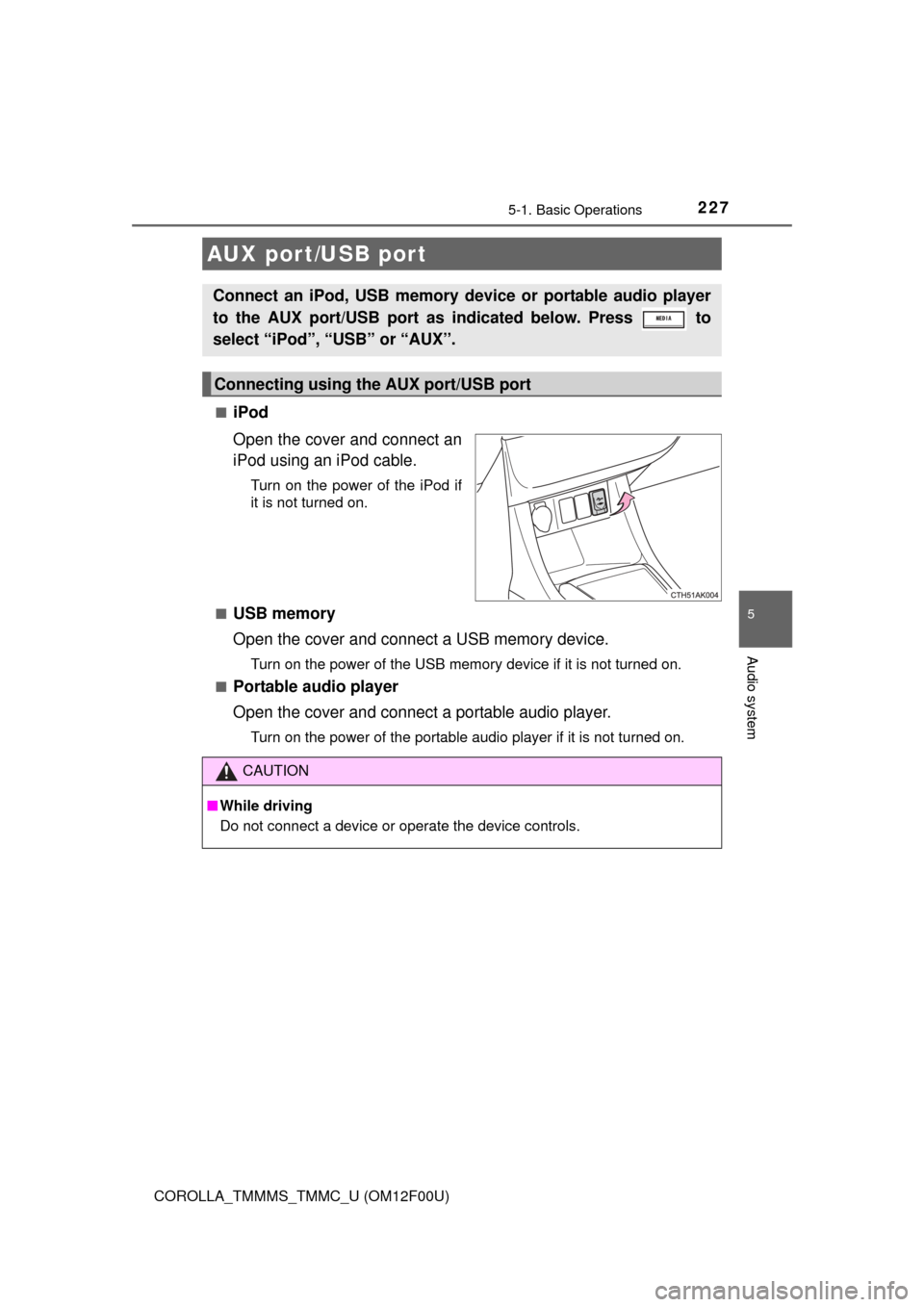
Open the cover and connect an
iPod using an iPod cable.
Turn on the power of the iPod if
it is not turned on.
■
USB memory
Open the cover and connect a USB memory device.
Turn on the power of the USB memory device if it is not turned on.
■
Portable audio player
Open the cover and connect a portable audio player.
Turn on the power of the portable audio player if it is not turned on.
AUX port/USB port
Connect an iPod, USB memory device or portable audio player
to the AUX port/USB port as indicated below. Press to
select “iPod”, “USB” or “AUX”.
Connecting using the AUX port/USB port
CAUTION
■ While driving
Do not connect a device or operate the device controls.
Page 228 of 612
228
COROLLA_TMMMS_TMMC_U (OM12F00U)
5-2. Using the audio system
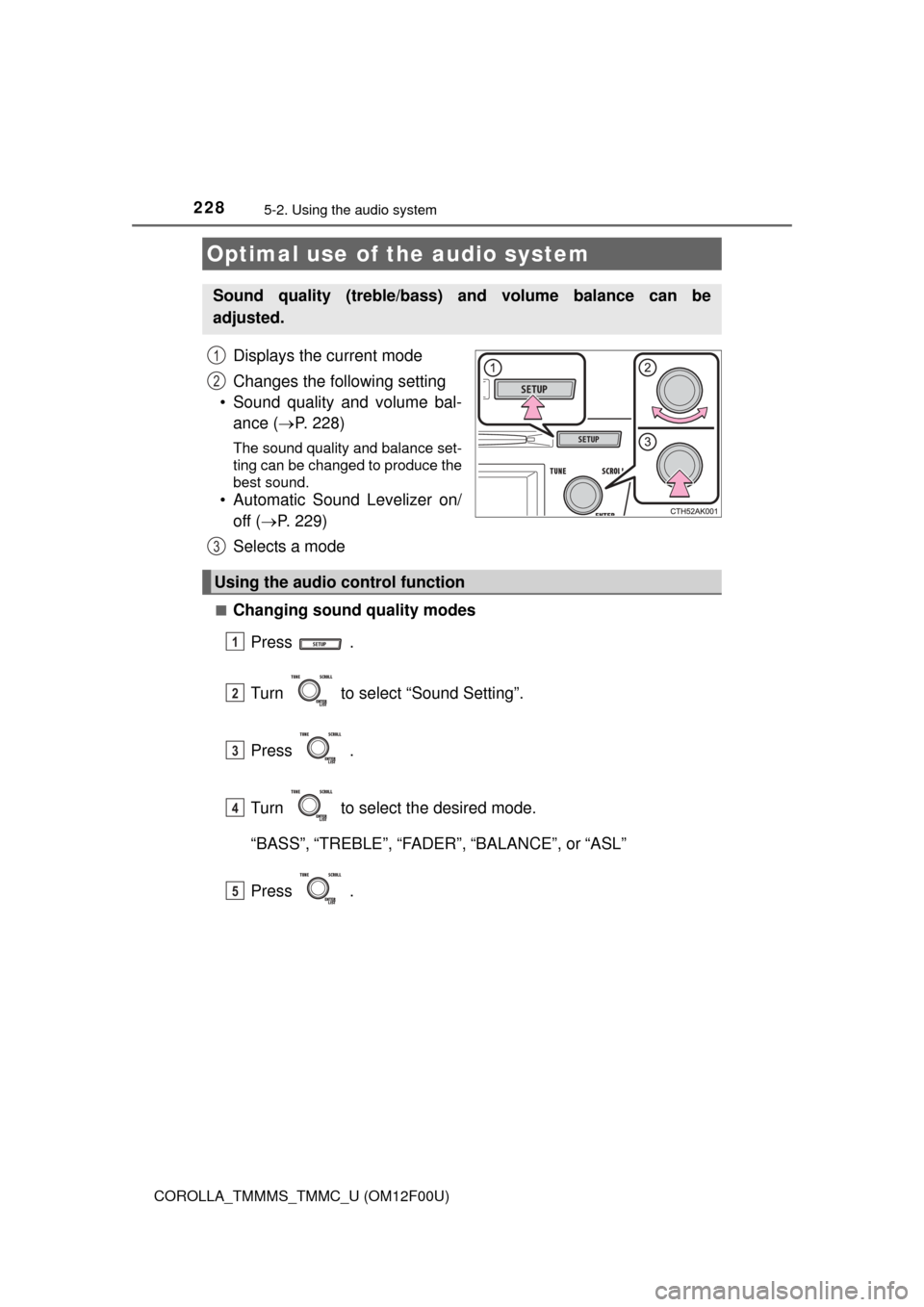
Displays the current mode
Changes the following setting
• Sound quality and volume bal- ance ( P. 228)
The sound quality and balance set-
ting can be changed to produce the
best sound.
• Automatic Sound Levelizer on/
off ( P. 229)
Selects a mode
■Changing sound quality modes
Press .
Turn to select “Sound Setting”.
Press .
Turn to select the desired mode.
“BASS”, “TREBLE”, “FADER”, “BALANCE”, or “ASL”
Press .
Optimal use of the audio system
Sound quality (treble/bass) and volume balance can be
adjusted.
1
2
3
Using the audio control function
1
2
3
4
5
Page 229 of 612
2295-2. Using the audio system
5
Audio system
COROLLA_TMMMS_TMMC_U (OM12F00U)■
Adjusting sound quality
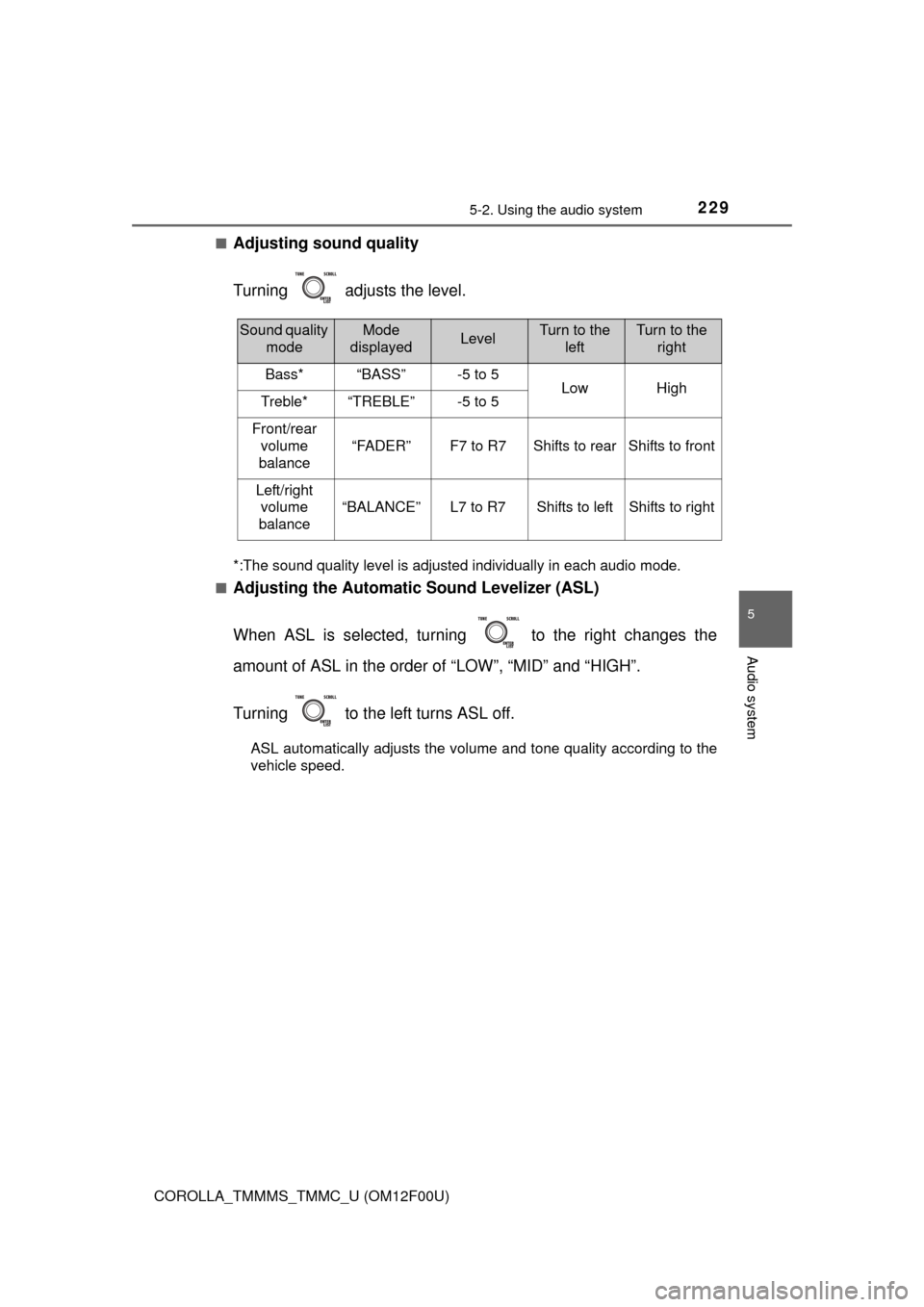
Turning adjusts the level.
*:The sound quality level is adjusted individually in each audio mode.
■
Adjusting the Automatic Sound Levelizer (ASL)
When ASL is selected, turning to the right changes the
amount of ASL in the order of “LOW”, “MID” and “HIGH”.
Turning to the left turns ASL off.
ASL automatically adjusts the volume and tone quality according to the
vehicle speed.
Sound quality modeMode
displayedLevelTurn to the leftTurn to the right
Bass*“BASS”-5 to 5LowHighTreble*“TREBLE”-5 to 5
Front/rear
volume
balance
“FADER”F7 to R7Shifts to rearShifts to front
Left/right volume
balance
“BALANCE”L7 to R7Shifts to leftShifts to right
Page 231 of 612
2315-3. Using the radio
5
Audio system
COROLLA_TMMMS_TMMC_U (OM12F00U)■
Scanning preset radio stations
Press and hold until you hear a beep.
Preset stations will be played for 5 seconds each.
When the desired station is reached, press again.
■Scanning all radio stations within rangePress .
All stations with reception will be played for 5 seconds each.
When the desired station is reached, press again.
■When the battery is disconnected
Station presets are erased.
■ Reception sensitivity
●Maintaining perfect radio reception at all times is difficult due to the continu-
ally changing position of the antenna, differences in signal strength and sur-
rounding objects, such as trains, transmitters, etc.
● The radio antenna is mounted inside the rear window. To maintain clear
radio reception, do not attach metallic window tinting or other metallic
objects to the antenna wire mounted inside the rear window.
● When is used, automatic station selection may not be possible.
Scanning radio stations
1
2
1
2
Page 232 of 612
232
COROLLA_TMMMS_TMMC_U (OM12F00U)
5-4. Playing audio CDs and MP3/WMA discs
Insert a disc.
Press and remove the disc.
CD player operation
Insert a disc or press to begin listening to a disc.
Power
Vo l u m e
Eject a disc
Repeat play
Random playback
Select a track/file or display
track/folder listDisplays text message
Playback
Select a folder (MP3/WMA
discs only), fast-forward or
reverse
Search playback
Select a track/file
Loading CDs or MP3 and WMA discs
Ejecting CDs or MP3 and WMA discs
1
2
3
4
5
6
7
8
9
10
11