Page 452 of 648
4527-3. Do-it-yourself maintenance
AVENSIS_OM_OM20C20E_(EE)
■If the coolant level drops within a short time after replenishing
Visually check the radiator, hoses, engine coolant reservoir cap, drain cock
and water pump.
If you cannot find a leak, have any authorized Toyota dealer or repairer, or
another duly qualified and equipped professional, test the cap and check for
leaks in the cooling system.
■ Coolant selection
XGasoline engine
Only use “Toyota Super Long Life Coolant” or similar high quality ethylene
glycol based non-silicate, non-amine, non- nitrite, and non-borate coolant with
long-life hybrid organic acid technology.
“Toyota Super Long Life Coolant” is a mixture of 50% coolant and 50% deion-
ized water. (Enabled: -35 °C [-31 °F])
XDiesel engine
Only use “Toyota Genuine Premium Long Life Coolant 1WW/2WW” or equiv-
alent. “Toyota Genuine Premium Long Life Coolant 1WW/2WW” concen-
trated product always needs to be mixed as 50% coolant and 50% deionized
water. (Enabled: -35 °C [-31 °F])
For more details about engine coolant, contact any authorized Toyota dealer
or repairer, or another duly qualified and equipped professional.
WARNING
■ When the engine is hot
Do not remove the coolant reservoir cap.
The cooling system may be under pressure and may spray hot coolant if the
cap is removed, causing serious injuries, such as burns.
NOTICE
■When adding engine coolant
Coolant is neither plain water nor stra ight antifreeze. The correct mixture of
water and antifreeze must be used to provide proper lubrication, corrosion
protection and cooling. Be sure to read the antifreeze or coolant label.
■ If you spill coolant
Be sure to wash it off with water to prevent damage to parts or paint.
AVENSIS_OM_OM20C20E_(EE).book Page 452 Thursday, January 29, 2015 1:47 PM
Page 453 of 648
4537-3. Do-it-yourself maintenance
AVENSIS_OM_OM20C20E_(EE)
7
Maintenance and care
Check the radiator, condenser and intercooler (diesel engine) and
clear any foreign objects.
If any of the above parts are extremely dirty or you are not sure of
their condition, have your vehicle checked by any authorized Toyota
dealer or repairer, or another duly qualified and equipped profes-
sional.
Check the battery as follows.
■Caution symbol
The meanings of each caution symbol on the top of the battery are
as follows:
Radiator, condenser and intercooler
WARNING
■ When the engine is hot
Do not touch the radiator, condenser or intercooler, as they may be hot and
cause serious injuries, such as burns.
Battery
No smoking, no naked
flames, no sparksBattery acid
Shield eyesNote operating
instructions
Keep away from chil-
drenExplosive gas
AVENSIS_OM_OM20C20E_(EE).book Page 453 Thursday, January 29, 2015 1:47 PM
Page 454 of 648
4547-3. Do-it-yourself maintenance
AVENSIS_OM_OM20C20E_(EE)■
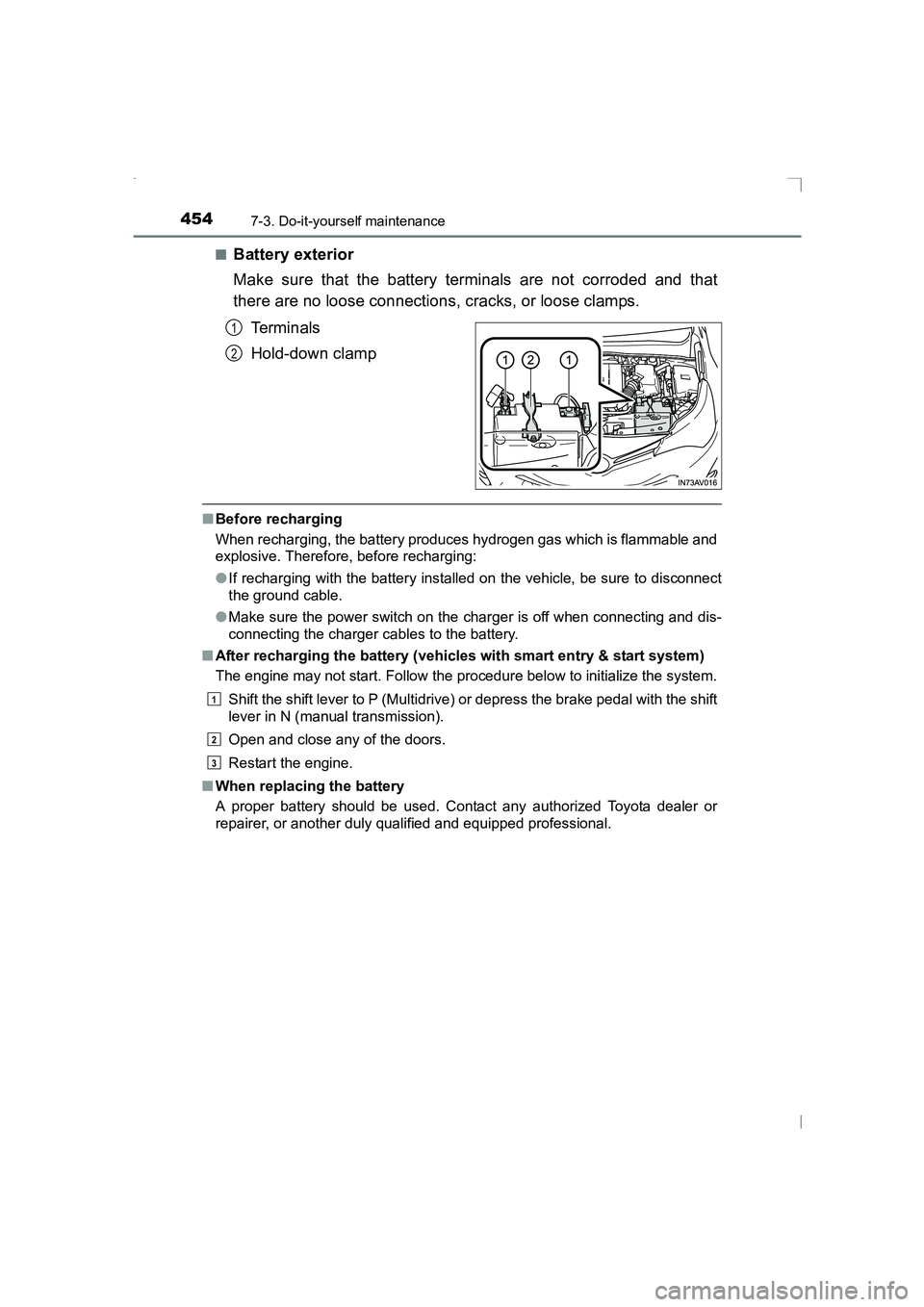
Battery exterior
Make sure that the battery terminals are not corroded and that
there are no loose connections, cracks, or loose clamps.
Te r m i n a l s
Hold-down clamp
■Before recharging
When recharging, the battery produces hydrogen gas which is flammable and
explosive. Therefore, before recharging:
●If recharging with the battery installed on the vehicle, be sure to disconnect
the ground cable.
● Make sure the power switch on the charger is off when connecting and dis-
connecting the charger cables to the battery.
■ After recharging the battery (vehic les with smart entry & start system)
The engine may not start. Follow the procedure below to initialize the system.
Shift the shift lever to P (Multidrive) or depress the brake pedal with the shift
lever in N (manual transmission).
Open and close any of the doors.
Restart the engine.
■ When replacing the battery
A proper battery should be used. Contact any authorized Toyota dealer or
repairer, or another duly qualified and equipped professional.
1
2
1
2
3
AVENSIS_OM_OM20C20E_(EE).book Page 454 Thursday, January 29, 2015 1:47 PM
Page 456 of 648
4567-3. Do-it-yourself maintenance
AVENSIS_OM_OM20C20E_(EE)
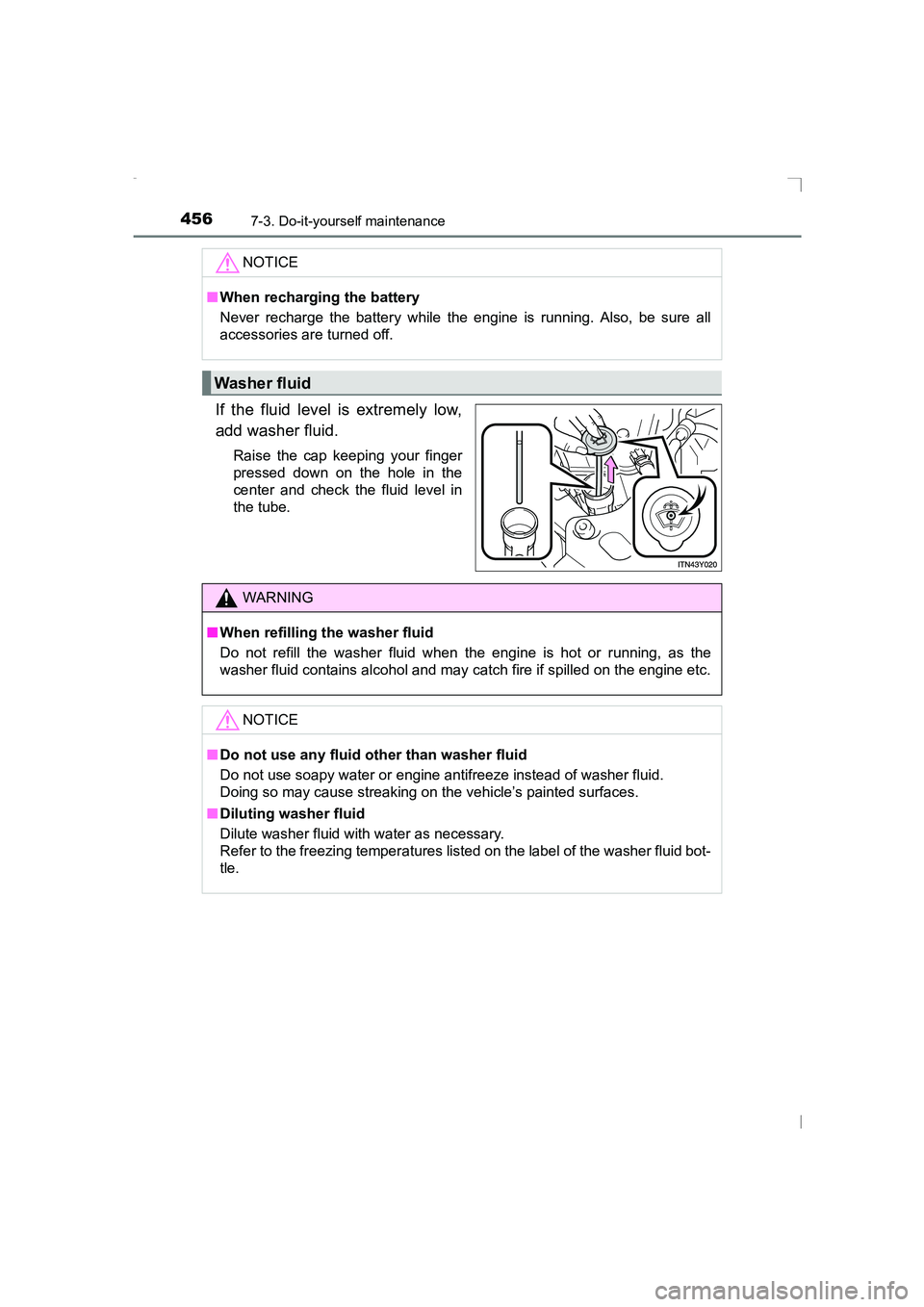
If the fluid level is extremely low,
add washer fluid.
Raise the cap keeping your finger
pressed down on the hole in the
center and check the fluid level in
the tube.NOTICE
■
When recharging the battery
Never recharge the battery while the engine is running. Also, be sure all
accessories are turned off.
Washer fluid
WARNING
■ When refilling the washer fluid
Do not refill the washer fluid when the engine is hot or running, as the
washer fluid contains alcohol and may catch fire if spilled on the engine etc.
NOTICE
■Do not use any fluid other than washer fluid
Do not use soapy water or engine antifreeze instead of washer fluid.
Doing so may cause streaking on the vehicle’s painted surfaces.
■ Diluting washer fluid
Dilute washer fluid with water as necessary.
Refer to the freezing temperatures list ed on the label of the washer fluid bot-
tle.
AVENSIS_OM_OM20C20E_(EE).book Page 456 Thursday, January 29, 2015 1:47 PM
Page 457 of 648
4577-3. Do-it-yourself maintenance
AVENSIS_OM_OM20C20E_(EE)
7
Maintenance and care
The water in the fuel filter needs to be drained every 20000 km (12000
miles).
Have the fuel filter drained by any authorized Toyota dealer or
repairer, or another duly qualified and equipped professional.
Fuel filter (diesel engine)
NOTICE
■When there is water in the fuel filter
Do not drive continuously with water accumulated in the fuel filter. This will
cause damage to the fuel injection pump.
AVENSIS_OM_OM20C20E_(EE).book Page 457 Thursday, January 29, 2015 1:47 PM
Page 461 of 648
4617-3. Do-it-yourself maintenance
AVENSIS_OM_OM20C20E_(EE)
7
Maintenance and care
■How to initialize the tire pressure warning systemPark the vehicle in a safe place and turn the engine switch to the
“LOCK” position (vehicles without smart entry & start system) or
off (vehicles with smart entry & start system).
Initialization cannot be performed while the vehicle is moving.
Adjust the tire inflation pressure to the specified cold tire inflation
pressure level. ( →P. 613)
Make sure to adjust the tire pressure to the specified cold tire inflation
pressure level. The tire pressure warning system will operate based on
this pressure level.
Turn the engine switch to the “ON” position (vehicles without
smart entry & start system) or IGNITION ON mode (vehicles with
smart entry & start system).
XVehicles with monochrome display
Press the “DISP” switch until the settings screen appears.
(→ P. 108)
Press and hold the “DISP” switch to enter the adjustment mode.
Press the “DISP” switch until the menu of tire pressure warning
system appears.
Press and hold the “DISP” switch to display the menu.
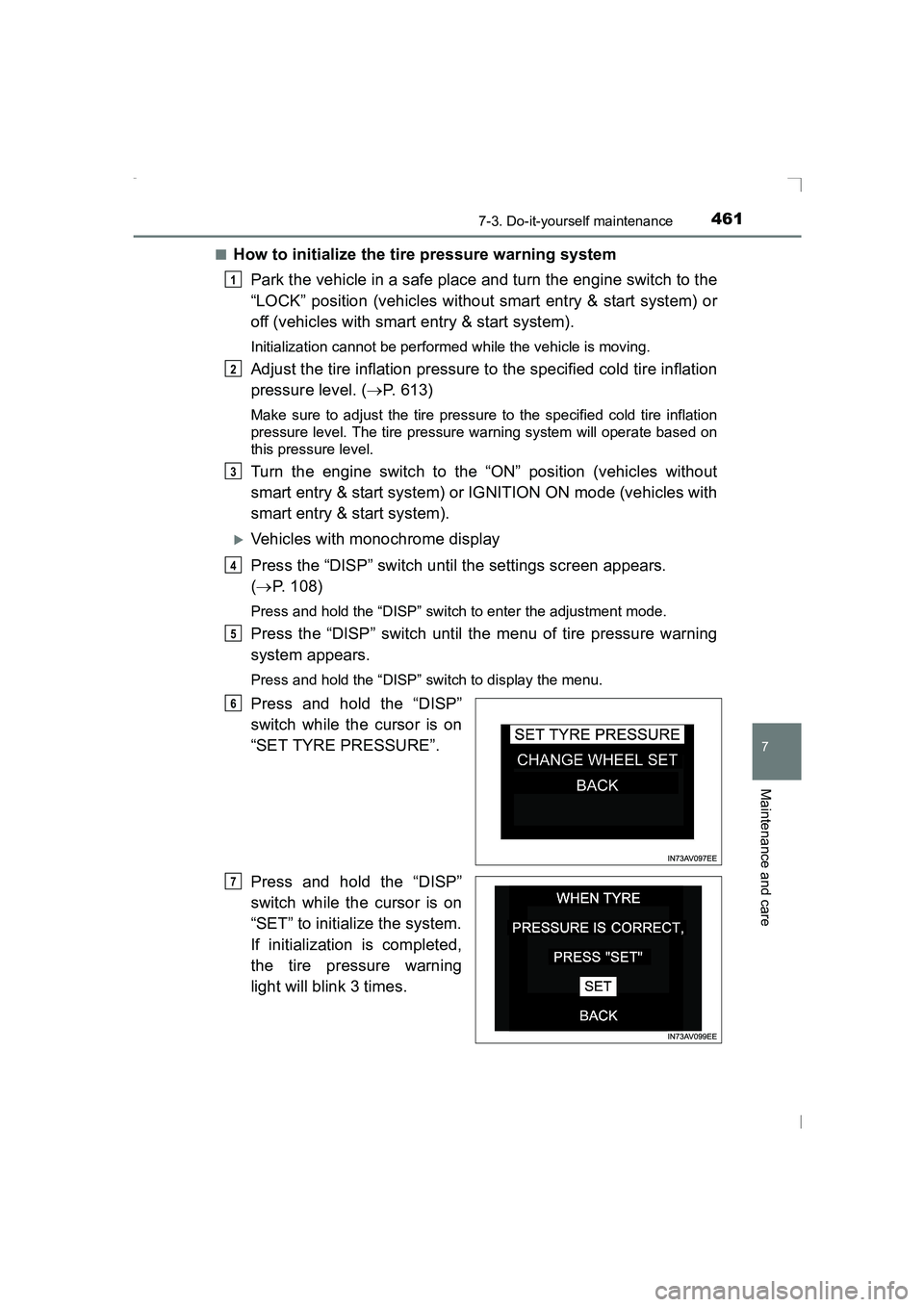
Press and hold the “DISP”
switch while the cursor is on
“SET TYRE PRESSURE”.
Press and hold the “DISP”
switch while the cursor is on
“SET” to initialize the system.
If initialization is completed,
the tire pressure warning
light will blink 3 times.
1
2
3
4
5
6
7
AVENSIS_OM_OM20C20E_(EE).book Page 461 Thursday, January 29, 2015 1:47 PM
Page 466 of 648
4667-3. Do-it-yourself maintenance
AVENSIS_OM_OM20C20E_(EE)■
Situations in which the tire pressure warning system may not operate
properly (if equipped)
●In the following cases, the tire pressure warning system may not operate
properly.
• If non-genuine Toyota wheels are used.
• A tire has been replaced with a tire t hat is not an OE (Original Equipment)
tire.
• A tire has been replaced with a tire that is not of the specified size.
• Tire chains etc. are equipped.
• An auxiliary-supported run-flat tire is equipped.
• If a window tint that affects the radio wave signals is installed.
• If there is a lot of snow or ice on the vehicle, particularly around the
wheels or wheel housings.
• If the tire inflation pressure is extremely higher than the specified level.
• If tires not equipped with the tire pr essure warning valves and transmit-
ters are used.
• If the ID code on the tire pressure warning valves and transmitters is not
registered in the tire pressure warning computer.
• If the wheel set selected does not match the wheel set fitted to the vehi- cle, in case a second wheel set has been registered.
● Performance may be affected in the following situations.
• Near a TV tower, electric power plant, gas station, radio station, large dis-
play, airport or other facility that generates strong radio waves or electri-
cal noise
• When carrying a portable radio, cellular phone, cordless phone or other wireless communication device
● When the vehicle is parked, the time taken for the warning to start or go off
could be extended.
● When tire inflation pressure declines rapidly for example when a tire has
burst, the warning may not function.
■ The initialization operation (vehicles with the tire pressure warning sys-
tem)
●Make sure to carry out initialization after adjusting the tire inflation pressure.
Also, make sure the tires are cold before carrying out initialization or tire
inflation pressure adjustment.
● If you have accidentally turned the engine switch to the “LOCK” position
(vehicles without a smart entry & start system) or off (vehicles with a smart
entry & start system) during initialization, it is not necessary to restart the ini-
tialization again as initialization will restart automatically when the engine
switch has been turned to the “ON” position (vehicles without a smart entry
& start system) or IGNITION ON mode (vehicles with a smart entry & start
system) for the next time.
● If you accidentally start the initialization when initialization is not necessary,
adjust the tire inflation pressure to the specified level when the tires are
cold, and conduct initialization again.
AVENSIS_OM_OM20C20E_(EE).book Page 466 Thursday, January 29, 2015 1:47 PM
Page 480 of 648
4807-3. Do-it-yourself maintenance
AVENSIS_OM_OM20C20E_(EE)
Air conditioning filter
Turn the engine switch to the “LOCK” position (vehicles without
smart entry & start system) or off (vehicles with smart entry & start
system).
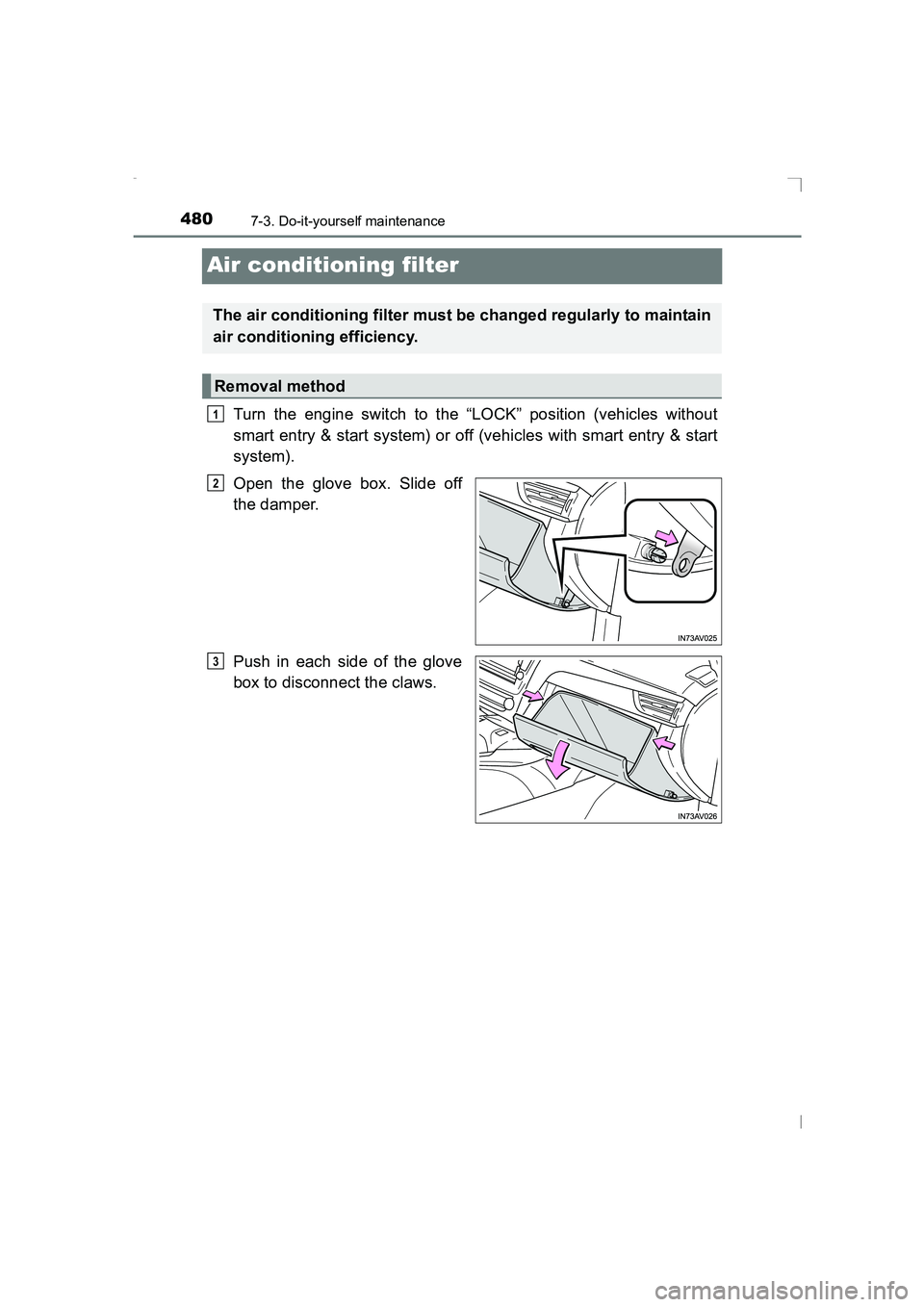
Open the glove box. Slide off
the damper.
Push in each side of the glove
box to disconnect the claws.
The air conditioning filter must be changed regularly to maintain
air conditioning efficiency.
Removal method
1
2
3
AVENSIS_OM_OM20C20E_(EE).book Page 480 Thursday, January 29, 2015 1:47 PM