2015 SKODA OCTAVIA trailer
[x] Cancel search: trailerPage 134 of 268

›START STOP deactivate
» page 126, Manually deactivating/activating the
system .›
Fully depress and hold the brake pedal with your left foot.
›
Fully depress the accelerator pedal with your right foot.
›
Release the brake pedal.
The vehicle starts off with maximum acceleration.
›
Reactivate the TCS and START-STOP when the desired speed has been
reached.
WARNINGRapid acceleration, particularly on slippery roads, can lead to loss of control
of the vehicle – risk of accident!
Running-in and economical driving
Introduction
This chapter contains information on the following subjects:
Running-in
132
Tips for economical driving
132
DriveGreen function
133
The fuel consumption, degree of pollution and vehicle wear depend on driving
style, road condition, weather conditions and the like.
Running-in
Driving in the engine
The engine has to be run in during the first 1500 kilometres. During this period,
the driving style decides on the quality of the driving-in process.
During the first 1 000 km we recommend not driving faster than 3/4 of the
maximum permissible engine speed, not to drive at full throttle and to dis-
pense with the trailer.
In the area of 1,000 to 1,500 kilometres the engine load can be increased up
to the maximum permitted engine speed.
New tyres
New tyres have to be “run in” since they do not offer optimal grip at first.
Drive especially carefully for the first 500 km or so.
New brake pads
New brake pads have to first “grind in” because these do not initially have the
best possible braking effect.
Drive especially carefully for the first 200 km or so.
Tips for economical driving
To achieve the lowest possible fuel consumption, the following instructions
must be observed.
Looking ahead when driving
Avoid unnecessary acceleration and braking.
Switch in an energy saving and timely manner Observe the recommended gear » page 41.
Avoid full throttle and high speeds
Fuel consumption can be reduced by half if only three-quarters of the possible
top speed of your vehicle is used.
Reducing idling
If the vehicle is fitted with the START STOP system there is an automatic re-
duction of the idling. If the engine is stopped on vehicles without START-STOP
system, such as when waiting in a traffic jam, the fuel economy is already
greater after 30 - 40 s than the fuel quantity which is required for engine re-
start.
Avoid short distances
When driving a short distance of less than about 4 km, the engine cannot
reach its operating temperature. As long as the engine has not reached oper-
ating temperature, the fuel consumption is significantly higher than with the
engine hot.
Pay attention to the correct tyre inflation pressure being maintained
Further information » page 205.
Avoid unnecessary ballast
Per 100 kg of weight, consumption increases by about 0.3 l/100 km. At a speed
of 100 - 120 km/h, a vehicle fitted with a roof rack cross member without a load
will use about 10 % more fuel than normal due to the increased aerodynamic
drag.
Saving electricity
Only turn on electrical consumers (e.g. seat, window and mirror heating and
the like) for as long as necessary.
132Driving
Page 138 of 268

Traction control (TCS)136Electronic differential lock (EDL and XDS)137
Driver Steering Recommendation (DSR)
137
Brake Assist (HBA)
137
Hill Start Assist (HHC)
137
Multi collision brake (MCB)
138
Trailer stabilization system (TSA)
138
This chapter describes the functions of the brake and stabilization systems.
The error display is in Chapter » page 31, Warning lights .
The brake and stabilization systems are automatically activated each time the
ignition is switched on, unless otherwise indicated.
WARNINGThe general information relating to the use of assistance systems must be
observed » page 135, in section Introduction .
Stability Control (ESC)
Read and observe
on page 136 first.
The ESC improves vehicle stability in dynamic driving situations, such as when
the vehicle starts to skid.
The ESC monitors whether the desired direction of the current vehicle motion
is occurring. In case of any deviation (e.g. oversteer), the ESC automatically
brakes individual wheels to maintain the desired direction.
During an intervention of the system, the warning light flashes in the instru-
ment cluster.
Enable/disable ESC Sport
The activation of the ESC sports allows a sportier driving style. With a slight
over or under steering of the vehicle take no ESC interventions take place and
the TCS is restricted so that the spinning of the wheels of the driven axle can
occur.
The activation or deactivation of the ESC sports can be done in one of two
ways. ▶ By pressing the Symbol key for the activation and briefly pressing the but-
ton for the deactivation » Fig. 155 on page 136 .
▶ Infotainment » Owner´s Manual Infotainment , chapter CAR - vehicle set-
tings .
Upon activation, in the instrument cluster the indicator light comes on and
the display shows the following message.ESC sport: directional stabil. restricted.ESC SPORT
Upon deactivation, in the instrument cluster the control indicator
turns off
and the display shows the following message.
Stabilisation control (ESC) activated.ESC ON
Anti-lock braking system (ABS)
Read and observe
on page 136 first.
ABS prevents the wheels locking when braking. Thus helping the driver to
maintain control of the vehicle.
The intervention of the ABS is noticeable from the pulsating movements of
the brake pedal which is accompanied by noises.
When the ABS system is active, do not brake periodically or reduce the pres- sure on the brake pedal.
Traction control (TCS)
Fig. 155
System button: Vehicle with ESC / vehicle without ESC
Read and observe
on page 136 first.
TCS prevents the spinning of the wheels of the driven axle. TCS reduces the
drive power transmitted to the wheels in the case of slipping wheels. Thus, for
example, driving on road surfaces with low grip is made easier.
136Driving
Page 140 of 268

Multi collision brake (MCB)Read and observe
on page 136 first.
The MCB helps to decrease speed after a collision through automatic braking
interventions and to stabilize the vehicle. This reduces the risk of a subse-
quent crash due to uncontrolled vehicle movement.
The automatic brake interventions can take place only if the following condi-
tions are met.
A head-on or side collision occurred.
The impact speed was higher than approx. 10 km/h.
The brakes, the ESC and other required electrical systems remain function-
al after impact.
The accelerator pedal is not actuated.
Trailer stabilization system (TSA)
Read and observe
on page 136 first.
The TSA helps the combination stable in situations where the trailer sways
and then the whole trailer combination.
TSA brakes the individual wheels of the towing vehicle in order to damp the
rocking motion of the entire vehicle combination.
The following conditions are required for the correct TSA function. The trailer was shipped from the factory or purchased from the ŠKODA
genuine accessories.
The trailer is electrically connected to the towing vehicle by means of the
trailer socket.
The parking aid is activated.
The speed is higher than approx. 60 km/h.
Further information » page 167, Hitch and trailer .
OFF ROAD-mode
Introduction
This chapter contains information on the following subjects:
Operation
139
Hill Descent Assistant
139
ESC OFF ROAD
140
TCSOFF ROAD
140
EDS OFF ROAD
140
ABS OFF ROAD
140
The OFF ROAD mode includes several features that help to overcome difficult
navigable routes when travelling on non-paved roads.
But even with OFF ROAD mode activated, your vehicle is never a true SUV.
WARNING■ The general information relating to the use of assistance systems must
be observed » page 135, in section Introduction .■
A lack of fuel can cause irregular engine running or cause the engine to
shut down. This would lead the OFF ROAD mode to lose its effectiveness -
risk of accident!
CAUTION
■ The OFF ROAD mode is not designed for the use on common roads.■All four wheels must be fitted with the same tyres approved by the manufac-
turer to ensure theOFF ROAD mode operates correctly.138Driving
Page 142 of 268

NoteDuring an active intervention of the assistant, the brake lights do not light up.
ESC OFF ROADRead and observe
and on page 138 first.
The ESC OFF ROAD makes driving on a dirt roads easier, as no ESC interven-
tions occur when the vehicle is over or under steered.
TCSOFF ROAD
Read and observe
and on page 138 first.
The TCS OFF ROAD makes starting and driving on an unpaved surface easier as
it partially allows wheel-spin.
Note
When disabled, the TCS » page 136 OFF ROAD mode works without the sup-
port of the TCS OFF ROAD.
EDS OFF ROAD
Read and observe
and on page 138 first.
The EDS supports OFF ROAD vehicle traction when driving on a surface with
different grip under the drive wheels or when driving over bumps.
A spinning wheel or wheels are braked earlier and with more force than with
the intervention of the standard EDS system.
ABS OFF ROAD
Read and observe
and on page 138 first.
The ABS OFF ROAD supports the driver when braking on an unpaved surface
such as gravel, snow, etc.
The system generated by a controlled locking of the wheels braked wheel be-
fore a “wedge” of piled material, which shortens the braking distance.
The system is only available, if the front wheels are in the straight-ahead posi-
tion.
The system operates at speeds of up to 50 km/h.
Parking aid (ParkPilot)
Introduction
This chapter contains information on the following subjects:
Function
141
Display in the Infotainment display
142
Activation / deactivation
142
Automatic system activation when moving forward
143
The parking aid (hereinafter referred to as system) draws attention via acous-
tic signals or the Infotainment display when manoeuvring around obstacles in
the vicinity of the vehicle.
WARNING■ The general information relating to the use of assistance systems must
be observed » page 135, in section Introduction .■
Moving persons or objects may not be recognized by the system sensors.
■
Under certain circumstances, surfaces of certain objects and types of
clothing cannot reflect the system signals. For this reason, such people or
objects may not be recognised by the system sensors.
■
External noise sources may affect the signals of the system sensors. Un-
der adverse conditions, this may cause objects or people not to be recog-
nised by the system.
■
You should satisfy yourself before reversing that there is no small obsta-
cle, such as a rock, thin post, trailer drawbar etc., in front or behind your ve-
hicle. Such obstacles may not be recognised by the system sensors.
CAUTION
■ Keep the system sensors » Fig. 157 on page 141 clean, and free from snow
and ice, and do not cover with any objects of any kind, otherwise the system
functioning may be limited.■
Under adverse weather conditions (heavy rain, water vapour, very low or
high temperatures, etc.), the system function may be limited - “incorrect recog-
nition of obstacle”.
■
Accessories additionally installed on the vehicle rear, such as bicycle carriers,
can impair the system function.
Note
The display of obstacles in the Infotainment black and white display is descri-
bed in the » Owner´s Manual Infotainment , chapter CAR - vehicle settings .140Driving
Page 143 of 268

FunctionFig. 157
Installation position of the sensors on the left side of the vehicle:
front/rear
Fig. 158
Sampled areas and range of the
sensors
Read and observe and on page 140 first.
The system uses ultrasound waves to calculate the distance between the
bumper and an obstacle. Depending on the vehicle equipment, the ultrasonic
sensors are located in the back or in the front bumper » Fig. 157.
Depending on the equipment, the following system versions can exist
» Fig. 158 .
▶ Version 1: warns of obstacles in the areas
C
,
D
.
▶ Version 2: warns of obstacles in the regions
A
,
B
,
C
,
D
.
▶ Version 3: warns of obstacles in the regions
A
,
B
,
C
,
D
,
E
.
Approximate range of sensors (in cm)Area » Fig. 158Version 1
(4 sensors)Version 2
(8 sensors)Version 3
(12 sensors)A-120120B-6090C160160160D606090E--90
Audible signals
The interval between the acoustic signals becomes shorter as the clearance is
reduced. A continuous tone sounds from a distance of approx. 30 cm - danger
area. From this moment on do not continue driving!
The acoustic signals can be set in the Infotainment » Owner´s Manual , chap-
ter CAR - Vehicle Settings .
Towing a trailer
When towing, or when another accessory is connected to the trailer socket on-
ly the areas
A
and
B
» Fig. 158 are active in the system.
Note
■
If not all fields around vehicles with Version 3 are shown after the system is
activated, the vehicle will need to be moved a few metres forwards or back-
wards.■
The signal tones for front obstacle recognition are factory-set to be higher
than for rear obstacle recognition.
141Assist systems
Page 149 of 268

›Depress the brake pedal and wait until the steering wheel automatically ro-
tates into the required position, the symbol goes out.›
Carefully drive forwards.
›
If the backwards arrow is flashing in the display » Fig. 165 -
, select reverse
gear again or move the selector lever into position R .
The display shows the
icon (brake pedal).
›
Depress the brake pedal and wait until the steering wheel automatically ro-
tates into the required position, the symbol
goes out.
›
Carefully move backwards.
You can repeat these steps several times in succession.
As soon as the parking procedure is completed, an audible signal sounds and
the following message appears in the display:
Park Assist stopped. Take over steer-ing!
Departing from a parallel parking space
Read and observe
and on page 145 first.
The system supports the driver when leaving a parking space of a parallel
parking space.
Leaving a parking space process
›
Press the symbol button once
» Fig. 164 on page 146 .
The following message is displayed:
Park Assist: indicate and engage reverse!›
Activate the turn signal for side of the vehicle where the parking space is out
of which you wish to manoeuvre.
›
Select reverse gear or move the selector lever into position R.
The further procedure is analogous to that for reverse parking.
›
Follow the system instructions shown in the display.
As soon as the parking procedure is completed, an audible signal sounds and
the following message appears in the information display:
Please take over steer-ing and drive on.Automatic brake assist
Read and observe
and on page 145 first.
Automatic brake assist when speeding
If a velocity of 7 km / h is exceeded during the parking manoeuvre for the first
time, the speed will be automatically reduced by the system to less than 7 km /
h. This prevents the parking manoeuvre from aborting.
Automatic emergency braking
If the system detects a risk of collision during parking, automatic emergency
braking takes place to prevent a collision.
The parking is terminated by the emergency braking.
CAUTION
The automatic emergency braking is not triggered by the system when the
parking process stops due to the speed of 7 km/h being exceeded!
Information messages
Read and observe
and on page 145 first.
The information messages are shown in the instrument cluster display.
Park Assist stopped. Speed too high.
If a speed of 50 km / h is exceeded while searching for a parking space, the
system with the key symbol is must be reactivated.
Speed too high. Take over steering!
The parking is terminated if the speed exceeds 7 km / hr.
Park Assist stopped. Driver steer. intervent.
The parking procedure is terminated due to a driver steering intervention.
Park Assist stopped. ASR deactivated.
The parking procedure cannot be carried out because the TCS system is deac-
tivated » page 135 , Braking and stabilisation systems . Activate the TCS.
ASR deactivated. Take over steering!
The parking procedure was ended because TCS was deactivated during the
parking procedure.
Trailer: Park Assist stopped.
147Assist systems
Page 150 of 268

The parking process cannot be performed with a trailer or when another ac-
cessory is connected to the trailer socket.Time limit exceeded. Take over steering!
The parking procedure was ended because the time limit of 6 minutes was
passed.
Park Assist currently not available.
The system cannot be activated because a fault exists on the vehicle. Seek
help from a specialist garage.
Park Assist stopped. Currently not available.
The parking procedure was ended because a fault exists on the vehicle. Seek
help from a specialist garage.
Park Assist faulty. Workshop!
The parking procedure is not possible because a fault exists in the system.
Seek help from a specialist garage.
ASR intervention. Take over steering!
The parking procedure is terminated by a TCS intervention.
Aut. parking space exit not possible. Space too small.
The manoeuvring procedure using the system is not possible. The parking gap
is too small.
Braking intervention. Speed too high.
The speed was too high during the parking and was automatically reduced.
Cruise Control System
Introduction
This chapter contains information on the following subjects:
Functioning
148
Operating Description
149
The Cruise Control System (CCS) maintains a set speed without you having to
actuate the accelerator pedal.
The state where the CCS maintains the speed is referred to hereinafter as the
control .
WARNING■
The general information relating to the use of assistance systems must
be observed » page 135, in section Introduction .■
After pressing the clutch pedal, no interrupted control occurs! For exam-
ple, if a different gear is engaged and the clutch pedal is released, control is
continued.
Functioning
Fig. 166
MAXI DOT display (monochrome): Examples of status displays
the CCS
148Driving
Page 152 of 268
NoteDuring control, speed can be increased by pressing the accelerator pedal. Re-
leasing the accelerator pedal will cause the speed to drop again to the set
speed.
Adaptive Cruise Control (ACC)
Introduction
This chapter contains information on the following subjects:
Operation
150
Automatic stop-start
151
Operation Overview
152
Start control
152
Stop/resume control
152
Set/change the desired speed
153
Set the clearance level
153
Special driving conditions
154
Information messages
155
The automatic distance control (hereinafter referred to as ACC) maintains the
set speed or the distance to the vehicle ahead without the accelerator or
brake pedal being pressed.
The front of the vehicle and the distance to the vehicle ahead is monitored by
a radar sensor » page 135.
The state in which the ACC maintains the speed or the proximity is described
as control from here on.
WARNING■
The general information relating to the use of assistance systems must
be observed » page 135, in section Introduction .■
The driver must always be ready to take over steering of the vehicle him-
self (accelerate or brake).
■
The ACC does not react when approaching a stationary obstacle, such as
traffic jams, vehicle breakdowns or vehicles waiting at a traffic light.
■
The ACC does not respond to crossing or oncoming objects.
■
If the ACC does not decelerate fast enough, immediately apply the vehi-
cle's foot brake.
WARNINGFor safety reasons, do not use the ACC under the following conditions.■When driving in turning lanes, motorway exits or construction sites, to
avoid an unwanted acceleration to the stored speed.■
When visibility is poor, (e.g. fog, heavy rain, thick snowfall).
■
When road conditions are poor (e.g. ice, slippery road, gravel, dirt road).
■
When driving around “sharp” bends.
■
When riding on a steep gradient / high slope.
■
When driving through places where metal objects (such as metal build-
ings, railroad tracks, etc.) can be found.
■
When driving through very divided and enclosed spaces (such as large-ca-
pacity garages, car ferries, tunnels and the like.).
Note
■ The ACC is designed primarily for use on motorways.■The ACC reduces the speed by automatically releasing the accelerator or by
means of a braking procedure as appropriate. If the brakes are used for an au-
tomatic speed reduction at any moments, then the brake light illuminates.■
In case of failure of more than one brake light on the vehicle or on the con-
nected trailer, the ACC becomes unavailable.
■
The control automatically cancels the engagement of the brake supportive
assistance systems (e.g. ESC) or when the maximum permitted engine speed is
exceeded.
Operation
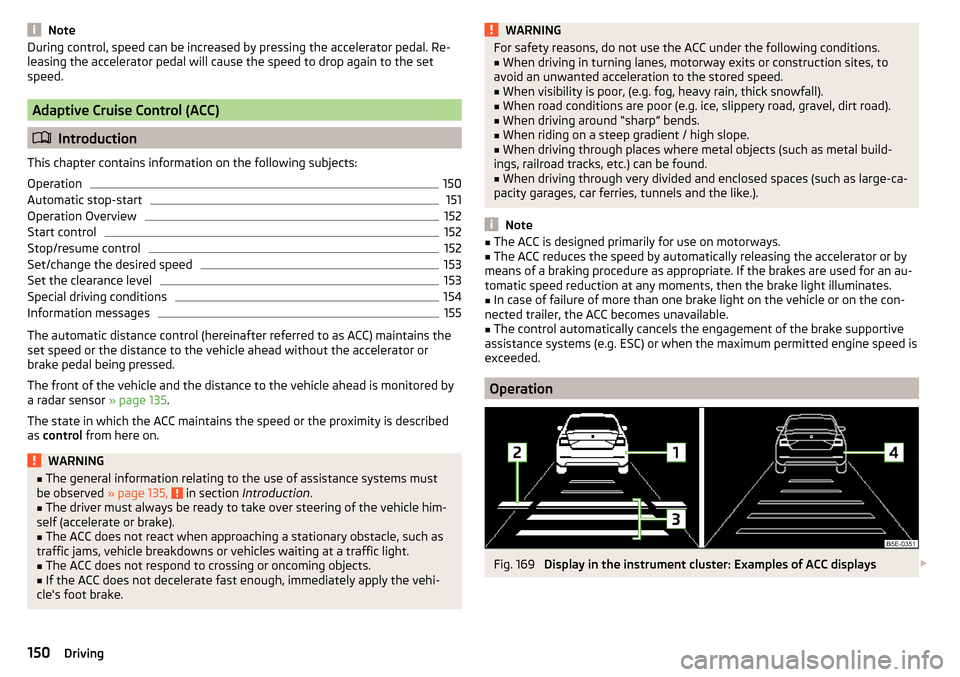
Fig. 169
Display in the instrument cluster: Examples of ACC displays
150Driving