2015 SKODA OCTAVIA trailer
[x] Cancel search: trailerPage 156 of 268

Special driving conditionsFig. 172
Special conditions: Cornering / narrow vehicles or vehicles travel-
ling side by side
Fig. 173
Special conditions: Lane changes of other vehicles / stationary
vehicles
Read and observe
on page 150 first.
The following and similar situations require special attention of the driver.
When cornering
When driving around long bends the ACC may respond to a vehicle in the adja-
cent lane » Fig. 172 -
. Your own vehicle is regulated with respect to this vehi-
cle and will no longer respond to the vehicle ahead.
In such cases, control should be disabled by accelerating, applying the brake or
pressing the button on the operating lever .
» Fig. 171 on page 152 .
Narrow vehicles or vehicles travelling side by side
Narrow vehicles or vehicles travelling side by side are not detected by the ra-
dar sensor until they are within the sensor's range » Fig. 172 -
.
If necessary, slow down the car by applying the brake.
Other vehicles changing lanes
Vehicles that change onto the lane with a small proximity » Fig. 173 -
do not
have to be detected by the radar sensor in time. The result may be a delayed
ACC response.
If necessary, slow down the car by applying the brake.
Stationary vehicles
The ACC does not detect stationary objects! When a vehicle detected by the
ACC turns or sheers off and there is a stationary vehicle in front of this vehicle,
» Fig. 173 -
the ACC does not respond to the stationary vehicle.
In such cases, take over the steering and stop the vehicle by applying the foot
brake.
When overtaking
When your vehicle is being controlled (the speed is lower than that which is
stored) and the indicator is activated, the ACC interprets this situation as
meaning that the driver intends to overtake. The ACC automatically acceler-
ates the vehicle, thereby reducing the proximity to a vehicle ahead.
If the vehicle changes to the fast lane and no vehicle is detected ahead, the
ACC accelerates until the set speed is reached and then keeps it constant.
Acceleration can be cancelled at any time by touch on the brake pedal or
pressing the button on the lever
» Fig. 171 on page 152 .
Vehicles with special load or special body parts
Other vehicles with a load or with body parts protruding from the sides, back
or top of the vehicle contour may not be detected by the ACC.
Control should therefore be disabled whenever you are driving behind or over-
taking such a vehicle.
Towing a trailer
When towing, or in when another accessory is connected to the trailer socket
the ACC control is set with a lower rate. The manner of driving should there-
fore be adapted to this limitation.154Driving
Page 157 of 268

Information messagesRead and observe
on page 150 first.
The information messages are shown in the instrument cluster display.
ACC: no sensor view!
The sensor is soiled or covered.
Stop the vehicle, switch off the engine and clean the sensor or remove the
item causing the lack of visibility » Fig. 154 on page 135 .
If the message appears again after starting the engine, the position of the lev- er should be
» Fig. 171 on page 152 adjusted.
ACC not available.
The ACC is not available for an unknown reason.
Stop the vehicle, switch off the engine and then start it again. If the ACC is still
not available, push the lever into position . Seek help from a specialist ga-
rage.
Error: ACC
There is an ACC system error.
Push the lever into position . press. Seek help from a specialist garage.
Speed limit
Increase the speed accordingly and start control
» page 152.
Front Assist
Introduction
This chapter contains information on the following subjects:
Operation
155
Distance warning (dangerous distance)
156
Warning and automatic braking
156
Disable/enable
156
Information messages
157The Front Assist (hereinafter referred to as system) warns you of the danger of
a collision with a vehicle or another obstacle in front of the vehicle, and tries to
avoid a collision or mitigate its consequences by automatically applying the
brakes where necessary.
The area in front of the vehicle is monitored by a radar sensor » page 135.WARNING■
The general information relating to the use of assistance systems must
be observed » page 135, in section Introduction .■
The system does not respond to crossing or oncoming objects.
CAUTION
In case of failure of more than one brake light on the vehicle or on the electri-
cally connected trailer, the system becomes unavailable.
Operation
Read and observe
and on page 155 first.
The system support is provided in the following manner.▶ Alerts you about a dangerous proximity to the vehicle ahead.
▶ Warns you of an impending collision.
▶ Prepares the brakes for emergency braking prior to a detected danger.
▶ Assists with a brake action triggered by the driver.
▶ If the driver fails to respond to a detected danger, automatic braking is per-
formed.
The system can work only if the following basic conditions are met. The system is activated.
TCS is enabled » page 135, Braking and stabilisation systems .
The vehicle is travelling forwards at a speed of more than approx. 5 km/h.
Note
The system can be impaired or may not be available, for example when driving
in “sharp ”curves or with an ESC engagement » page 136.155Assist systems
Page 160 of 268

Engine / drive
The vehicle acceleration is more dynamic than in Normal
mode.
Front axle differential lock
The driving force distribution between the front wheels is adapted to the spor-
ty driving style.
Adaptive Cruise Control (ACC)
The acceleration is quicker than in
Normal
mode with distance control
» page 150 .
Xenon headlight
The headlamps adapt to the driving style more dynamically than in mode
Nor-mal
» page 70 .
ProActive passenger protection
The first level of protection is deactivated » page 160.
Engine noise
The engine noise is noticeable in the interior more intensely than in
Normal
mode.
Eco
mode
Read and observe
on page 157 first.
This mode is suitable for a relaxed style of driving and helps to save fuel.
Selecting this mode primarily affects the function of the following systems.
Engine / drive
Vehicle acceleration is more relaxed than in
Normal
mode.
The recommended gear is controlled such to achieve the lowest possible fuel
consumption » page 41.
When the START-STOP system was deactivated manually » page 124, it is au-
tomatically activated.
The automatic gearbox is set automatically to mode E » page 129 .
Adaptive Cruise Control (ACC)
Acceleration occurs more relaxed than in
Normal
» page 150 mode with distance
control.
Xenon headlight
The system is in economic mode » page 70. The headlamps are in basic setting
and do not adapt to the direction of travel.
Air conditioning (Climatronic)
The air conditioning is controlled so as to save energy. For this reason, for ex-
ample, it may take longer to reach the desired interior temperature in modeNormal
.
Note
■ The mode Eco is not available when towing a trailer or when another acces-
sory is connected to the trailer socket. If the vehicle is in drive mode Eco
and a
trailer is hitched up or another accessory is connected, the vehicle is automati-
cally set to the driving mode
Normal
.
■
The maximum vehicle acceleration (kick down function) is possible also in
driving mode
Eco
.
Individual
mode
Read and observe
on page 157 first.
In the mode
Individual
each system can be set independently » page 159,
Individ-ual
mode settings .
Off-road
mode
Read and observe
on page 157 first.
The mode
Off-road
is suitable for driving outside paved roads.
Further information » page 138, OFF ROAD-mode .
Note
The mode Off-road is deactivated after switching off and switching on the igni-
tion and the mode Normal
is set automatically.158Driving
Page 165 of 268

WARNING■The general information relating to the use of assistance systems must
be observed » page 135, in section Introduction .■
Vertical traffic signs must always take precedence over the traffic signs
shown in the display. The driver is always responsible for correctly assess-
ing the traffic situation.
■
Traffic signs may not be recognised at all by the system, or may be recog-
nised incorrectly. As a result, the traffic signs may not be displayed at all, or
the wrong one may appear.
■
On the system side, only a traffic sign display is undertaken, neither a
warning when limit is exceeded or driving speed adjustment is undertaken!
■
Speed specifications on the displayed road signs refer to the country-spe-
cific speed units. For example, the display
on the display can therefore
refer to km/h or mph depending on the country.
Note
The system is only available in some countries.
Function
Fig. 181
Camera viewing range for traffic
sign recognition
Fig. 182
Display in the instrument cluster: Display examples
Read and observe
on page 163 first.
Description of indications and displayed traffic signs
Display » Fig. 182Display of detected traffic signs in the menu item Driving data → Road signAdditional display (monochromatic display)Additional display (colour display)
The system can display in the display the following recognized traffic sign.
▶ Speed limits.
▶ Overtaking prohibited.
Additional signs, such as 'when wet' or signs which only apply for a limited
time can also be displayed.
The system works on the basis of the data captured by the camera and is only
able to show traffic signs which are in the camera's “viewing range” » Fig. 181.
Data from the camera is supplemented by information from the Infotainment
Navigation. This is the reason why traffic signs with maximum speeds can also
be shown on sections of roads which do not have any traffic signs.
Mode when towing a trailer
For vehicles with a factory-fitted towing device the display for the trailer oper- ation applicable road signs can be enabled or disabled in the Infotainment dis-
play » Owner´s Manual Infotainment , chapter CAR - vehicle Settings .
The system may not be available or may only be available to a limited extent
in the following situations.
▶ Poor visibility conditions, e.g. fog, heavy rain, thick snowfall.
▶ The camera is blinded by the sun.
▶ The camera is blinded by the oncoming traffic.
163Assist systems
Page 169 of 268
Hitch and trailer
Hitch
Introduction
This chapter contains information on the following subjects:
Description
167
Adjusting the ready position
168
Correctly adjusted ready position
168
Assembling the bar ball – Step 1
169
Assembling the bar ball – Step 2
169
Check proper fitting
170
Removing the bar ball – Step 1
170
Removing the bar ball – Step 2
171
Mount accessories
171
The maximum trailer drawbar load is 75 kg.
For vehicles with all-wheel drive, the maximum trailer nose weight is 80 kg.
With G-TEC-vehicles, the maximum trailer drawbar load is 56 kg .
The draw bar load information on the type plate of the towing device is merely
a test value for the towing device. The vehicle-specific information is detailed
in the vehicle documents.
WARNING■ Before each time you make a journey when using the ball rod, check that
it is seated correctly and is secured in the mounting recess.■
Do not use the ball rod if it is not correctly inserted into the mounting re-
cess and secured.
■
Do not use the towing hitch if it is damaged or if there are parts missing.
■
Do not perform any modifications or changes to the towing device.
■
Keep the mounting recess of the towing device clean at all times. Such
dirt prevents the ball rod from being attached securely!
CAUTION
■ Take care when using the ball rod - there is a risk of paint damage to the
bumper.■
When the ball rod is removed always place the cover onto the mounting re-
cess - there is a danger of soiling the mounting recess.
Note■ Operation and maintenance of the tow hitch » page 186.■The towing vehicle by means of the detachable ball rod » page 222.■
If the towing device is removed completely, it must be replaced with the
original reinforcement of the rear bumper which is part of the mount for the
towing eye.
Description
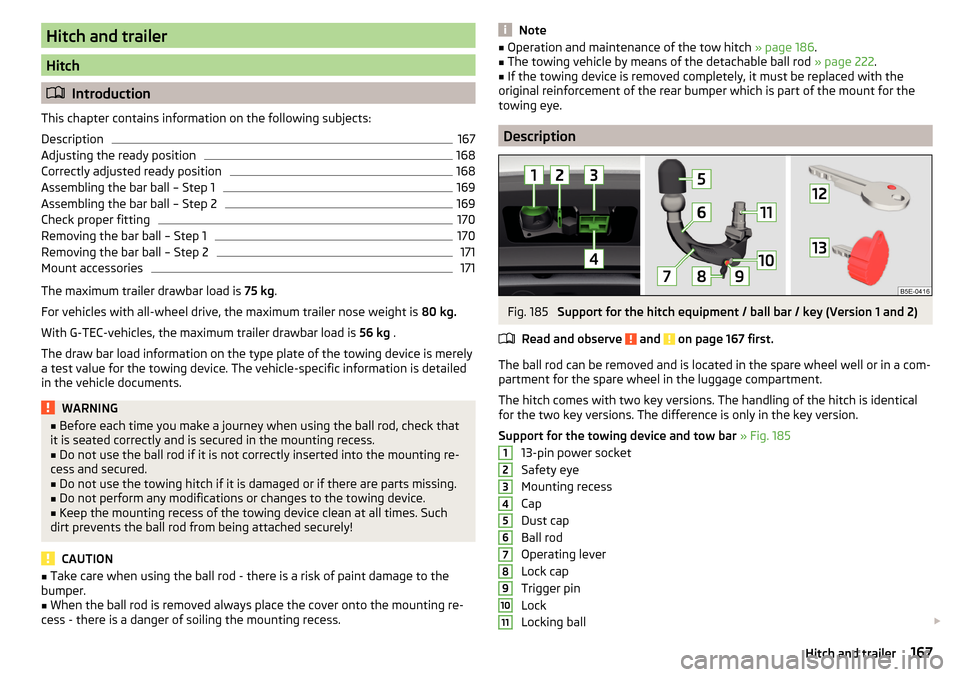
Fig. 185
Support for the hitch equipment / ball bar / key (Version 1 and 2)
Read and observe
and on page 167 first.
The ball rod can be removed and is located in the spare wheel well or in a com-
partment for the spare wheel in the luggage compartment.
The hitch comes with two key versions. The handling of the hitch is identical
for the two key versions. The difference is only in the key version.
Support for the towing device and tow bar » Fig. 185
13-pin power socket
Safety eye
Mounting recess
Cap
Dust cap
Ball rod
Operating lever
Lock cap
Trigger pin
Lock
Locking ball
1234567891011167Hitch and trailer
Page 171 of 268

CAUTIONIn the ready position, the key cannot be removed nor turned into a different
position.
Assembling the bar ball – Step 1
Fig. 189
Insert ball rod / trigger bolt in the extended state
Read and observe
and on page 167 first.
Insert ball rod - applies to both key versions
›
Remove the cover for the mounting recess
4
» Fig. 185 on page 167 in a
downwards direction.
›
Adjust the ball rod to the ready position » page 168.
›
Grip the tow bar from underneath » Fig. 189 and insert into the mounting re-
cess in arrow direction
1
until you hear it click into place » .
The lever
A
automatically turns upwards in the direction of arrow
2
and the
release pin
B
pops out (both its red and green parts are visible) » .
If lever
A
does not turn automatically, or if the release pin
B
does not pop
out, remove the ball rod from the mounting recess by turning lever
A
down-
wards as far as it can go. Clean the contact surfaces on the ball rod and the
mounting recess.
WARNING■ Keep your hands outside the lever's range of motion when attaching the
ball rod – risk of finger injuries!■
Never attempt to pull the operating lever violently upwards to turn the
key. Doing so would mean the ball rod is not attached correctly!
Assembling the bar ball – Step 2Fig. 190
Lock lock: Key Version 1 / key Version 2
Fig. 191
Place cap on the lock
Read and observe and on page 167 first.
To begin with, follow the first step for the ball rod assembly » page 169.
Applies to the key version 1
›
Turn key
A
in the direction of arrow
1
so that the green marking is pointing
upwards » Fig. 190 .
›
Remove the key in the direction of the arrow
2
.
Applies to key version 2
›
Turn the key
B
in the direction of arrow
3
so that the conclusions release
points down » Fig. 190.
›
Remove the key in the direction of the arrow
4
.
Applies to both key versions
›
Fit and press cap
C
onto the lock in the direction of arrow
5
» Fig. 191 .
›
Check that the ball rod is securely attached » page 170, Check proper fitting .
169Hitch and trailer
Page 173 of 268

WARNINGNever remove the tow bar while the trailer is still coupled.
Note
We recommend putting the protective cover onto the ball head before remov-
ing the tow bar.
Removing the bar ball – Step 2
Fig. 195
Release ball bar
Read and observe and on page 167 first.
To begin with, follow the first step for the ball rod assembly » page 170.
Release ball head - applies to both key versions
›
Grasp the ball rod from below » Fig. 195 .
›
Push release pin
A
in the direction of arrow
1
to the stop, and simultane-
ously push operating lever
B
in the direction of arrow
2
to the stop .
The ball rod is released in this position and falls freely into the hand. If it does
not fall freely into the hand, use your other hand to push it upwards.
At the same time, the ball rod latches into the ready position and is therefore
ready to be re-fitted »
.
›
Place the cap
4
» Fig. 185 on page 167 onto the mounting recess.
WARNINGNever allow the ball rod to remain unsecured in the boot. This could cause
damage to the boot upon sudden braking, and could put the safety of the
occupants at risk.
CAUTION
■ If lever B is held firmly and not pushed downwards to the stop, it will move
back up after the ball rod is removed and will not latch into the ready position.
The ball rod will then need to be brought into this position before the next
time it is fitted » page 168, Adjusting the ready position .■
Store the ball rod in the box in the ready position and with the key facing up-
wards - otherwise there is a risk of damage to the key!
■
Do not use excessive force when handling the operating lever (e.g. do not
climb on it)!
Note
Remove any dirt from the ball rod before stowing it away in the box with the
vehicle tool kit.
Mount accessories
Fig. 196
Depiction of the maximum per-
missible protrusion of the ball
head of the towing hitch and of
the permissible total weight of
the accessory including the load,
depending on the load centre of
gravity
Read and observe and on page 167 first.
An accessory (e.g. bicycle carrier) can be mounted on the ball head of the tow-
ing hitch.
If this accessory is used, the maximum permissible protrusion of the ball head
of the towing hitch and the permissible total weight of the accessory including
the load must be observed.
The maximum permissible protrusion of the ball head of the towing hitch is
70 cm » Fig. 196 .
171Hitch and trailer
Page 174 of 268

The total permitted weight of the accessory including load changes with in-
creasing distance of the load centre of gravity from the ball head of the towing
hitch.Distance of the load
centre of gravity from the ball headPermissible total weight of the accessory, including load» Fig. 196Vehicles with front-wheel driveVehicles with four-wheel driveG-TEC vehicles0 cmA75 kg75 kg56 kg30 cmB75 kg75 kg56 kg60 cmC35 kg35 kg28 kg70 cmD0 kg0 kg0 kgWARNING■Never exceed the permissible gross weight of the accessory including
load - there is a risk of damaging the towing device.■
Never exceed the permissible protrusion of the ball head including towing
device - there is a risk of damaging the towing device.
Note
We recommend that you use accessories from ŠKODA Original Accessories.
Trailer
Introduction
This chapter contains information on the following subjects:
Attaching and detaching trailers
172
Loading a trailer
173
Trailer load
173
Trailer operation
176
Anti-theft alarm system
177
The trailer can be hitched to the ball head of the towing device.
Attaching and detaching trailersFig. 197
Swivel out the 13-pin power
socket, safety eyelet
Connect and disconnect
›
Fit the ball rod.
›
Grip the 13-pin socket at point
A
and swing out in the direction of the arrow
» Fig. 197 .
›
Lift off protective cap
5
» Fig. 185 on page 167 .
›
Place the trailer onto the ball head.
›
Plug the trailer cable into 13-pin socket
A
» Fig. 197 .
If the trailer that is to be towed has a 7-pin connector, you can use a suitable
adapter from ŠKODA Original Accessories.
›
Hook the breakaway cable of the trailer to the security eyelet
B
.
The breakaway cable of the trailer must sag in all trailer positions relative to
the vehicle (sharp curves, reversing and the like).
Uncoupling takes place in reverse order.
172Driving