2015 SKODA OCTAVIA remote control
[x] Cancel search: remote controlPage 82 of 268

Exterior mirrorsFig. 70
Exterior mirror operation
Read and observe on page 79 first.
The rotary knob can be moved into the following positions (depending on ve-
hicle equipment)
Adjust the left mirror
Adjust the right mirror
Switch off mirror control
Mirror heater
Fold in both mirrors housings, to fold back move the knob to another posi-
tion
The mirror heating only works when the engine is running.
Adjust the position
The mirror can be adjusted to the desired position by moving the knob in the
direction of the arrow » Fig. 70.
The movement of the mirror surface is identical to the movement of the rotary
knob.
If the electrical mirror setting fails at any time, the mirrors can be adjusted by
hand by pressing on the edge of the mirror surface.
Synchronous adjustment of the mirror
›
The synchronous adjustment of the mirrors is activated in the Infotainment
» Owner´s Manual Infotainment , chapter CAR - vehicle settings .
›
Turn the knob for the mirror control to the position for the driver mirror ad-
justment.
›
Adjust the mirror to the desired position.
Automatically folding in and folding back both exterior mirrors
The exterior mirrors are automatically collapsed after locking the vehicle in the
park position.
The exterior mirrors are folded out automatically after unlocking the vehicle in
the driving position.
Automatic folding in / out of both mirror housings can be activated or deactiva-
ted in the Infotainment » Owner´s Manual Infotainment , chapter CAR - vehicle
settings .
Mirror with automatic dimming
The exterior mirror blackout is controlled together with the automatic dimming
interior mirror » page 79.
Memory function for mirrors
Applies to vehicles with electrically adjustable driver's seat.
It is possible to save the current setting of the exterior mirror when saving the
driver's seat position with » page 84, Memory Function of the electrically ad-
justable seat or » page 84 , Memory function of the remote control key .
Fold in passenger's mirror
Applies to vehicles with electrically adjustable driver's seat.
The passenger-side mirror can be tilted to the stored position to improve the
view to the curb when reversing.
Operating conditions. The function is activated in Infotainment » Owner´s Manual Infotainment ,
chapter CAR - vehicle settings .
The mirror setting has been previously stored, » page 84, Memory Func-
tion of the electrically adjustable seat or » page 84 , Memory function of
the remote control key .
The reverse gear is engaged.
The knob for the mirror control is in the position for the passenger mirror
adjustment.
The mirror returns to its initial position after the rotary knob is put into anoth-
er position or if the speed is more than 15 km/h.WARNINGDo not touch the exterior mirror surfaces, if the exterior mirror heating is
switched on - hazard of burning. 80Using the system
Page 83 of 268

CAUTION■Never adjust exterior mirrors with the fold-in function by hand - risk of
damaging the electric mirror actuator!■
When the mirror is swung by external influences (due to impact during ma-
noeuvring, for example), then first fold-in the mirror by turning the knob and
wait for a loud clapping noise.
Seats and head restraints
Seats and head restraints
Introduction
This chapter contains information on the following subjects:
Manually adjusting seats
82
Adjusting the front seats electronically
82
Head restraints - adjusting height
82
Headrests - removing and installing
83
Memory Function of the electrically adjustable seat
84
Memory function of the remote control key
84WARNING■ Only adjust the driver's seat when the vehicle is stationary – risk of acci-
dent!■
Caution when adjusting the seat! You may suffer injuries or bruises as a
result of adjusting the seat without paying proper attention.
■
The electric front seat adjustment is functional even with the ignition off.
Therefore, when leaving the vehicle, never leave people who are not com-
pletely independent, such as children, unattended in the vehicle - there is a
danger of injury!
■
Do not transport any objects on the front passenger seat except objects
(e.g. child safety seat) provided for this purpose – risk of accident!
Note
■ After a certain time, play can develop within the adjustment mechanism of
the backrest angle.■
For safety reasons, it is not possible to store the seat position in the electric
seat memory and remote control key memory if the inclination angle of the
seat backrest is more than 102° in relation to the seat cushion.
■
Each time you store the position of the electrically adjustable driver's seat
and exterior mirrors, the existing setting is deleted.
81Seats and head restraints
Page 86 of 268

Memory Function of the electrically adjustable seatFig. 76
Memory buttons and SET button
Read and observe on page 81 first.
The pre-set buttons on the driver's seat make it possible to save the driver's
seat and exterior mirror positions.
Each of the three memory buttons
B
» Fig. 76 can be assigned a set position.
Storing driver's seat and exterior mirror settings for driving forward
›
Switch on the ignition.
›
Adjust the seat and the two mirrors to the desired position.
›
Press the button (Position
A
» Fig. 76 ).
›
Within 10 seconds after pressing the
button, press the desired memory
button
B
.
An acknowledgement sound confirms the storage.
Saving front passenger mirror settings for reversing
The function of lowering the passenger mirror surface when reversing must be
enabled in Infotainment » Owner´s Manual Infotainment , chapter CAR - Vehi-
cle Settings .
›
Switch on the ignition.
›
Press the required memory button
B
» Fig. 76 .
›
Turn the knob for the external mirror control to the position for the passen-
ger side mirror adjustment » page 80.
›
Engage reverse gear.
›
Adjust the front passenger's mirror to the desired position.
›
Disengage reverse gear.
The set position of the exterior mirror is stored.
Retrieving the saved settingIgnitionDriver's doorPress the required memory button B
» Fig. 76Switched offOpenShortClosedLongActivatedOpenLongClosedLong
Stopping the ongoing adjustment ▶ Press any button on the driver's seat or the button on the remote control
key.
Note
Each time new seat and exterior mirror settings for forward travel are saved,
the passenger exterior mirror setting for reverse travel must also be saved
again.
Memory function of the remote control key
Read and observe
on page 81 first.
The automatic storage of the driver's seat position and exterior mirror posi-
tions when locking the vehicle can be turned on in the memory of the remote
control key (hereafter referred to as automatic storage function).
This function can also be enabled or disabled in the Infotainment » Owner´s
Manual Infotainment , chapter CAR - vehicle settings .
Enable automatic storage
›
Unlock the vehicle with the remote control key.
›
Press and hold any memory button
B
» Fig. 76 on page 84 .
›
After the seat has assumed the position stored under this button, at the
same time press the button on the remote control key within 10 seconds.
The successful activation of the automatic storage function for each key is
confirmed by an acoustic signal.
Storing driver's seat and exterior mirror settings for driving forward
›
Enable automatic storage.
When automatic storage is activated, the current positions of the driver's seat
and the external mirrors are saved in the memory of the remote control key
each time the vehicle is locked.
84Using the system
Page 87 of 268

When the vehicle is next unlocked using the same key, the driver's seat and
the external mirrors assume the positions stored in the memory of this key.
Saving front passenger mirror settings for reversing
The function of lowering the passenger mirror surface when reversing must be
enabled in Infotainment » Infotainment Owner´s Manual , chapter CAR - Vehi-
cle Settings .›
Unlock the vehicle with the relevant remote control key.
›
Switch on the ignition.
›
Turn the knob for the external mirror control to the position for the passen-
ger side mirror adjustment » page 80.
›
Engage reverse gear.
›
Adjust the front passenger's mirror to the desired position.
›
Disengage reverse gear.
The adjusted position of the exterior mirror is stored in the remote control key
memory.
Disable the function of automatic storage
›
Unlock the vehicle with the remote control key.
›
Press the button (Position
A
» Fig. 76 on page 84 ) and hold.
›
Press the button on the remote control key within 10 seconds.
The successful deactivation of the automatic storage function for each key is confirmed by an acoustic signal.
Stopping the ongoing adjustment
›
Press any button on the driver's seat or the button on the remote control
key.
Seat features
Introduction
This chapter contains information on the following subjects:
Seat heaters
85
Front armrest setting
86
Rear armrest setting
86
Folding front passenger seat
86
Seat backrests
87
Long cargo channel in the rear seat backrest
88Seat heatersFig. 77
Buttons for heating the front seats/rear seats
The seat backrests and surfaces of the front seats and the outer rear seats
can be heated electrically.
The seat heating can only be switched on when the engine is running.
Buttons for the seat heating » Fig. 77
Left seat heating
Right seat heating
Switching on
›
Press the button or
» Fig. 77 .
Pressing once switches the seat heating on at its maximum level.
With repeated pressing of the switch, the intensity of the heating is reduced
until it is switched off.
The level of the seat heating is indicated by the number of illuminated warning
lights underneath/in the switch.
If the engine is switched off and then turned on again within 10 mins with the
driver seat heating switched, then the driver's seat heating is automatically
turned on again.
85Seats and head restraints
Page 119 of 268

Opening›Turn regulator B » Fig. 138 or » Fig. 139 upwards.
Closing›
Turn regulator
B
» Fig. 138 or » Fig. 139 downwards.
Depending on the setting of the air distribution on the front panel of the heat-
er, the manual air conditioning or the Climatronic, the following air vents are
active.
Set the direction of the air outletActive air outlet nozzles » Fig. 138 and
» Fig. 139 1. 2 . 41. 2 . 4 . 5 . 7 3. 4 . 64 . 5 . 73 . 4 . 5 . 6 . 7
CAUTION
To ensure that the heating, the manual air conditioning and the Climatronic
systems work properly, do not block up the air outlet vents with any objects.
Auxiliary heating (auxiliary heating and ventilation)
Introduction
This chapter contains information on the following subjects:
Switching on/off
118
Radio remote control
119
Functional requirements of the auxiliary heating (auxiliary heating and ventila-
tion)
The charge state of the vehicle battery is sufficient.
The fuel supply is adequate (the warning light is not illuminated in the
instrument cluster).
Aux. heating
The auxiliary heating can be used when both when stationary, when the en-
gine is switched off, to preheat the vehicle and also while driving (e.g. during
the heating phase of the engine).
The auxiliary heating warms up the coolant by combusting fuel from the vehi-
cle tank. This heats the air flowing into the passenger compartment (if the
blower is turned on).
The auxiliary heating also warms up the engine.
Auxiliary ventilation
The auxiliary ventilation enables fresh air to flow into the vehicle interior by
switching off the engine, whereby the interior temperature is effectively de-
creased (e.g. with the vehicle parked in the sun).WARNING■ The auxiliary heating (auxiliary heating and ventilation) (hereinafter refer-
red to as aux. heating) must never be operated in closed rooms (e.g. garag-
es) – risk of poisoning!■
The auxiliary heating must not be allowed to run during refuelling – risk
of fire.
■
The exhaust pipe of the auxiliary heating is located on the underside of
the vehicle. If you want to use the heater, do not park the car in places
where the exhaust fumes can come into contact with flammable materials
such as dry grass, undergrowth, leaves, spilled fuel etc. - risk of fire.
CAUTION
■ The exhaust pipe of the auxiliary heating, which is located on the underside
of the vehicle, must not be clogged and the exhaust flow must not be blocked.■
If the auxiliary heating is running, the vehicle battery discharges.
■
The air inlet in front of the windscreen must be free (e.g. of ice, snow or
leaves) to ensure that the auxiliary heating operates properly.
117Heating and ventilation
Page 120 of 268
Note■The auxiliary heating only switches the blower on, if it has achieved a coolant
temperature of approx. 50 °C.■
At low outside temperatures, this can result in a formation of water vapour in
the area of the engine compartment. This is quite normal and is not an operat-
ing problem.
■
So that warm air can flow into the vehicle interior after switching on the aux.
heating, you must maintain the comfort temperature normally selected by you,
leave the fan switched on and leave the air outlet vents in open. It is recom-
mended to put the air flow in the position
or
.
Switching on/off
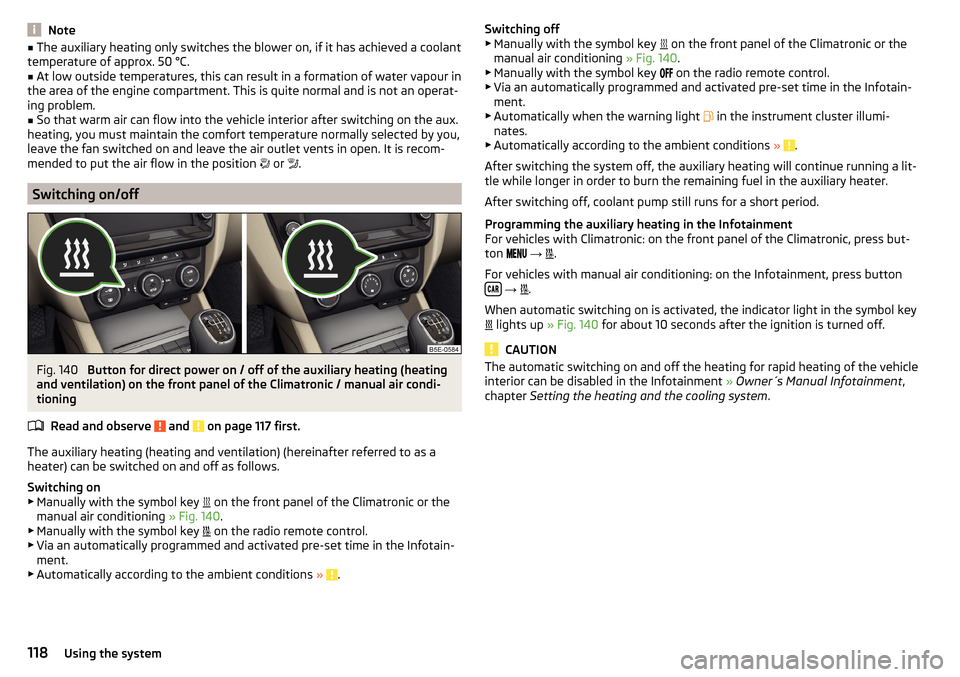
Fig. 140
Button for direct power on / off of the auxiliary heating (heating
and ventilation) on the front panel of the Climatronic / manual air condi-
tioning
Read and observe
and on page 117 first.
The auxiliary heating (heating and ventilation) (hereinafter referred to as a
heater) can be switched on and off as follows.
Switching on
▶ Manually with the symbol key on the front panel of the Climatronic or the
manual air conditioning » Fig. 140.
▶ Manually with the symbol key on the radio remote control.
▶ Via an automatically programmed and activated pre-set time in the Infotain-
ment.
▶ Automatically according to the ambient conditions »
.
Switching off
▶ Manually with the symbol key on the front panel of the Climatronic or the
manual air conditioning » Fig. 140.
▶ Manually with the symbol key
on the radio remote control.
▶ Via an automatically programmed and activated pre-set time in the Infotain-
ment.
▶ Automatically when the warning light
in the instrument cluster illumi-
nates.
▶ Automatically according to the ambient conditions »
.
After switching the system off, the auxiliary heating will continue running a lit-
tle while longer in order to burn the remaining fuel in the auxiliary heater.
After switching off, coolant pump still runs for a short period.
Programming the auxiliary heating in the Infotainment
For vehicles with Climatronic: on the front panel of the Climatronic, press but-
ton
→
.
For vehicles with manual air conditioning: on the Infotainment, press button
→
.
When automatic switching on is activated, the indicator light in the symbol key
lights up
» Fig. 140 for about 10 seconds after the ignition is turned off.
CAUTION
The automatic switching on and off the heating for rapid heating of the vehicle
interior can be disabled in the Infotainment » Owner´s Manual Infotainment ,
chapter Setting the heating and the cooling system .118Using the system
Page 121 of 268

Radio remote controlFig. 141
Radio remote control
Read and observe and on page 117 first.
Using the radio remote control, the aux. heating and ventilation (hereinafterreferred to as heater) can be switched on or off.
Function and description of the radio remote control » Fig. 141
Warning light
Aerial
Switch on the auxiliary heating
Switch off the auxiliary heating
To switch the auxiliary heating on or off, hold the remote control vertically,
with the aerial
B
» Fig. 141 pointing upwards. The antenna must not be cov-
ered with the fingers or the palm of the hand during this process.
The auxiliary heating can only be switched on/off safely using the radio re-
mote control, if the distance between the radio remote control and the vehicle
is at least 2 m.
After pressing the button, the warning light in the remote control gives the
user different kinds of feedback.
Display warning light A » Fig. 141MeaningLights up green for around 2 seconds.The auxiliary heating has been
switched on.Lights up red for around 2 seconds.The auxiliary heating has been
switched off.Slowly flashes green for around 2 sec-
onds.The ignition signal was not received.ABDisplay warning light A » Fig. 141MeaningQuickly flashes green for around 2
seconds.The auxiliary heating is blocked, e. g
because the tank is nearly empty or
there is a fault in the auxiliary heat-
ing.Flashes red for around 2 seconds.The switch off signal was not re-
ceived.Lights up orange for around 2 sec-
onds, then green or red.The battery is weak, however the
switching on or off signal was re-
ceived.Lights up orange for around 2 sec-
onds, then flashes green or red.The battery is weak, however the
switching on or off signal was not re-
ceived.Flashes orange for around 5 seconds.The battery is discharged, however
the switching on or off signal was not
received.
Replace the battery » page 223.
CAUTION
■
The radio remote control comprises electronic components and must there-
fore be protected against water, severe impacts and direct sunlight.■
When the battery is fully charged, the range of the remote control is a few
hundred metres. Obstacles between the radio remote control and the vehicle,
bad weather conditions and a weaker battery can clearly reduce the range.
119Heating and ventilation
Page 225 of 268

Remote control
Introduction
This chapter contains information on the following subjects:
Replacing the battery in the remote control key
223
Synchronising the remote control
223
replace battery in the remote control the auxiliary heating (auxiliary
heating)
223
CAUTION
■ We recommend having faulty rechargeable batteries replaced by a ŠKODA
service partner.■
Pay attention to the correct polarity when changing the battery.
Note
If a key has an affixed decorative cover, this will be destroyed when the bat-
tery is replaced. A replacement cover can be purchased from a ŠKODA Partner.
Replacing the battery in the remote control key
Fig. 230
Remove cover/take out battery
Read and observe
on page 223 first.
The battery change is carried out as follows.
›
Flip out the key.
›
Press off the battery cover
A
» Fig. 230 with your thumb or by using a flat
screwdriver in region
B
.
›
Open the battery in the direction of the arrow
1
.
›
Remove the discharged battery in the direction of arrow
2.› Insert the new battery.›Insert the battery cover A and press it down until it clicks audibly into place.
Synchronising the remote control
Read and observe
on page 223 first.
If the vehicle does not unlock when pressing the remote control, the key may
not be synchronised. This can occur when the buttons on the remote control
key are actuated a number of times outside of the operative range of the
equipment or the battery in the remote control key has been replaced.
Synchronise the key as follows.
›
Press any button on the remote control key.
›
Unlock the door with the key via the lock cylinder within 1 minute of pressing
the button.
replace battery in the remote control the auxiliary heating
(auxiliary heating)
Fig. 231
Radio remote control: Battery
cover
Read and observe on page 223 first.
The battery is located under a cover on the back of the radio remote control
» Fig. 231 .
›
Insert a flat, blunt object, such as a coin, into the gap of the battery cover.
›
Turn the cover against the direction of the arrow up to the mark to open the
cover.
›
Replace the battery.
›
Return the battery cover.
›
Turn the cover in the direction of the arrow up to the initial marking, engage.
223Emergency equipment, and self-help