2015 SKODA OCTAVIA fog light
[x] Cancel search: fog lightPage 137 of 268

Assist systems
General information
Introduction
This chapter contains information on the following subjects:
Radar sensor
135WARNINGThe following general information regarding the use of assistance systems
must be observed.■
The assistance systems only serve to support and do not relieve the driv-
er of the responsibility for driving the vehicle.
■
The increased safety provision, as well as the increased occupant protec-
tion provided by the assistance systems must not tempt you to take risks -
risk of accident!
■
Adjust the speed and driving style to the current visibility, weather, road
and traffic conditions.
■
The assistance systems have physical and system-related limitations. For
this reason, the driver may experience some undesired or delayed system
responses in certain situations. You should therefore always be alert and
ready to intervene!
■
Only activate, deactivate or set the assistance systems so that you have
the vehicle fully under control in every traffic situation - risk of accident!
Radar sensor
Fig. 154
Mounting location of the radar
sensor
Read and observe on page 135 first.
The radar sensor » Fig. 154 (From here on referred to as sensor) is used to as-
sess the traffic situation in front of the vehicle.
The sensor can distinguish objects by radiating and receiving electromagnetic waves.
The sensor is a component of the ACC » page 150 and Front Assist
» page 155 systems.
The sensor function may be impaired in the events of one of the following. ▶ The sensor is soiled by mud, snow and the like.
▶ The area in front and around the sensor is obscured by labels, auxiliary lights
and similar.
▶ When visibility is poor, (e.g. fog, heavy rain, thick snowfall).
If the sensor is covered or dirty, the corresponding message appears in the in-
strument cluster display for the ACC system » page 155 or Front Assist system
» page 157 .
WARNING■
If you suspect that the sensor is damaged, deactivate the ACC system
» page 150 and Front Assist system » page 155. Have the sensor checked
by a specialist garage.■
The sensor can become misaligned by collisions or by damage to the front
of the vehicle, the wheel arch or the underside of the vehicle. This can lead
to impaired function of the sensor - risk of accidents! Have the sensor
checked by a specialist garage.
■
The area in front and around the sensor should not be obscured by labels,
auxiliary lights and similar. This can lead to impaired function of the sensor
- risk of accidents!
CAUTION
Remove the snow with a brush and the ice with a solvent-free de-icer.
Braking and stabilisation systems
Introduction
This chapter contains information on the following subjects:
Stability Control (ESC)
136
Anti-lock braking system (ABS)
136
135Assist systems
Page 152 of 268
NoteDuring control, speed can be increased by pressing the accelerator pedal. Re-
leasing the accelerator pedal will cause the speed to drop again to the set
speed.
Adaptive Cruise Control (ACC)
Introduction
This chapter contains information on the following subjects:
Operation
150
Automatic stop-start
151
Operation Overview
152
Start control
152
Stop/resume control
152
Set/change the desired speed
153
Set the clearance level
153
Special driving conditions
154
Information messages
155
The automatic distance control (hereinafter referred to as ACC) maintains the
set speed or the distance to the vehicle ahead without the accelerator or
brake pedal being pressed.
The front of the vehicle and the distance to the vehicle ahead is monitored by
a radar sensor » page 135.
The state in which the ACC maintains the speed or the proximity is described
as control from here on.
WARNING■
The general information relating to the use of assistance systems must
be observed » page 135, in section Introduction .■
The driver must always be ready to take over steering of the vehicle him-
self (accelerate or brake).
■
The ACC does not react when approaching a stationary obstacle, such as
traffic jams, vehicle breakdowns or vehicles waiting at a traffic light.
■
The ACC does not respond to crossing or oncoming objects.
■
If the ACC does not decelerate fast enough, immediately apply the vehi-
cle's foot brake.
WARNINGFor safety reasons, do not use the ACC under the following conditions.■When driving in turning lanes, motorway exits or construction sites, to
avoid an unwanted acceleration to the stored speed.■
When visibility is poor, (e.g. fog, heavy rain, thick snowfall).
■
When road conditions are poor (e.g. ice, slippery road, gravel, dirt road).
■
When driving around “sharp” bends.
■
When riding on a steep gradient / high slope.
■
When driving through places where metal objects (such as metal build-
ings, railroad tracks, etc.) can be found.
■
When driving through very divided and enclosed spaces (such as large-ca-
pacity garages, car ferries, tunnels and the like.).
Note
■ The ACC is designed primarily for use on motorways.■The ACC reduces the speed by automatically releasing the accelerator or by
means of a braking procedure as appropriate. If the brakes are used for an au-
tomatic speed reduction at any moments, then the brake light illuminates.■
In case of failure of more than one brake light on the vehicle or on the con-
nected trailer, the ACC becomes unavailable.
■
The control automatically cancels the engagement of the brake supportive
assistance systems (e.g. ESC) or when the maximum permitted engine speed is
exceeded.
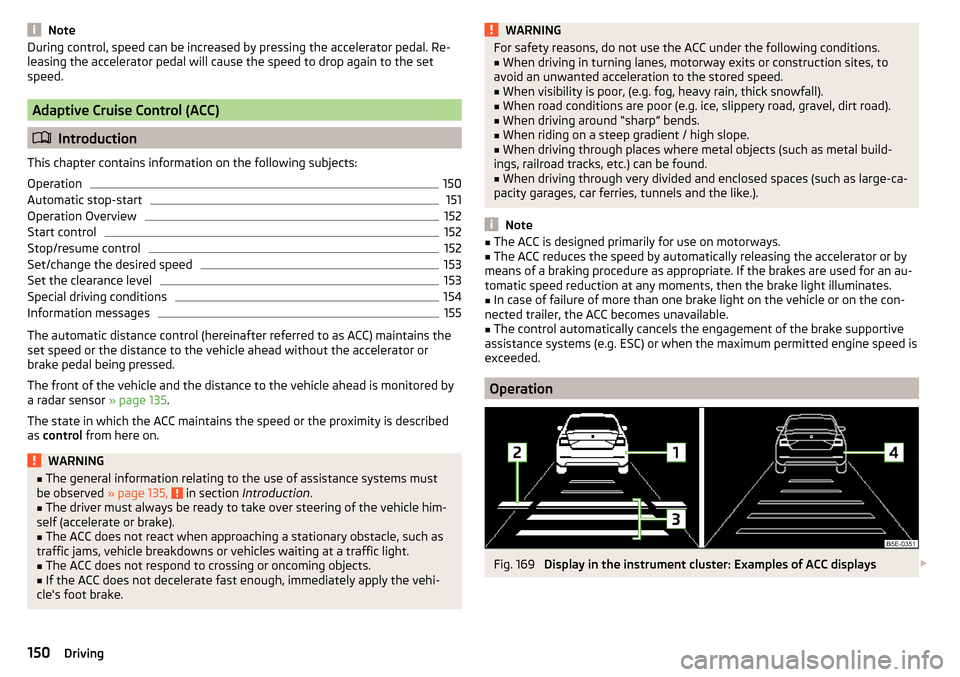
Operation
Fig. 169
Display in the instrument cluster: Examples of ACC displays
150Driving
Page 163 of 268

When the vehicle approaches a detected line between lanes, the system
makes a light movement of the steering wheel in the opposite direction to the
boundary line. This corrective steering intervention can be manually overrid-
den at any time.WARNING■ The general information relating to the use of assistance systems must
be observed » page 135, in section Introduction .■
Lane Assist can help you keep the vehicle within the lane. However, it
does not steer the vehicle for you. The driver retains full responsibility for
steering at all times.
■
Some objects on the road may be incorrectly detected as lines. As a re-
sult, an incorrect steering intervention may take place.
WARNINGThe detection capability of the camera may be limited by various external
influences. In such cases, the assistant may not detect the line between
two lanes at all or not properly. The detection capability of the camera may
be restricted in the following situations, for example.■
When visibility is poor, (e.g. fog, heavy rain, thick snowfall).
■
When driving around “sharp” bends.
■
The camera is blinded by the sun.
■
The camera is blinded by the oncoming traffic.
■
The viewing range of the camera is impeded by a vehicle travelling ahead.
■
The camera viewing range is obstructed by an obstacle.
CAUTION
Do not attach any stickers or similar objects to the windscreen to avoid impair-
ing the functions of the systems.
Note
■ The system is designed for driving on motorways and roads with adequate
longitudinal markings.■
The system can detect both continuous and broken lines.
OperationFig. 179
Monochromatic display of the instrument cluster: Examples of
system indications
Fig. 180
Colour display of the instrument cluster: Examples of system in-
dications
Read and observe
and on page 161 first.
System displays » Fig. 179 and » Fig. 180
The system is activated, but not ready to intervene.
The system is active and ready to intervene.
The system intervenes when approaching the right-hand boundary lane.
Adaptive lane assist ensues (boundary lines on both sides of the vehicle
detected).
The system can intervene when the following basic conditions are present. The system is activated.
The vehicle speed is no more than about 65 km/h.
161Assist systems
Page 232 of 268

No.Consumer8Lambda probe9Ignition, glow plug system, engine components10Fuel pump, ignition11Electrical auxiliary heating system12Electrical auxiliary heating system13Automatic gearbox14Windscreen heater - right15Horn16Ignition, fuel pump17ABS, ESC, motor control unit, relay coil for the heated windscreen18Databus, battery data module19Windscreen wipers20Alarm21Windscreen heater - left22Engine control unit23Starter24Electrical auxiliary heating system31Not assigned32Not assigned33Not assigned34Haldex clutch35Not assigned36Not assigned37Aux. heating38Not assigned
Bulbs
Introduction
This chapter contains information on the following subjects:
Bulb arrangement in the headlights
231
Replacing the low beam bulb
231Change bulb for long-distance, daytime running lights and parking light
switch232
Change bulb for additional parking light
232
Change bulb for fog light switch - Variant 1
232
Change bulb for fog light switch - Variant 2
233
Replacing the bulb for the licence plate light
233
Rear Light
234
Replacing bulbs in the rear light - Variant 1
235
Replacing bulbs in the rear light - Variant 2
235
Some manual skills are required to change a bulb. For this reason, we recom-
mend having bulbs replaced by a specialist garage or seeking other expert help
in the event of any uncertainties.
▶ Switch off the ignition and the relevant lights before replacing a bulb.
▶ Faulty bulbs must only be replaced with the same type of bulbs. The designa-
tion is located on the light socket or the glass bulb.
A stowage compartment for replacement bulbs is located in a plastic box in
the spare wheel or underneath the floor covering in the luggage compartment.
We recommend having the headlight settings checked by a specialist garage
after replacing a bulb in the low, high or fog beam.
In case of failure of a xenon gas discharge lamp or an LED diode, visit a special- ist garage.
WARNING■ Always read and observe the warnings before completing any work in the
engine compartment » page 194.■
Accidents can be caused if the road in front of the vehicle is not suffi-
ciently illuminated and the vehicle cannot or can only be seen with difficul-
ty by other road users.
■
Bulbs H7 H8 and H15 are pressurised and may burst when changing the
bulb - risk of injury! We therefore recommended wearing gloves and safety
glasses when changing a bulb.
■
Do not carry out any work on the Xenon gas discharge lamps - risk of
death!
CAUTION
Do not take hold of the glass bulb with naked fingers (even the smallest
amount of dirt reduces the working life of the light bulb). Use a clean cloth,
napkin, or similar. 230Do-it-yourself
Page 234 of 268

Change bulb for long-distance, daytime running lights and parking
light switchFig. 245
Bulbs for main beam, daytime
running lights, and parking light
Read and observe and on page 230 first.
›
Turn the protective cap
B
» Fig. 243 on page 231 in direction of the arrow.
›
Pull the holder until it stops in the arrow direction
1
» Fig. 245 .
›
Remove the holder in the direction of the arrow
2
.
›
Insert the bulb holder with the new bulb and turn opposite to arrow direction
1
as far as the stop.
›
Insert the protective cap
B
» Fig. 243 on page 231 and turn it in the direction
opposite to the arrow.
Change bulb for additional parking light
Fig. 246
Headlights with Xenon light: Bulb for additional parking light
Read and observe
and on page 230 first.
›
Turn the protective cap
B
» Fig. 243 on page 231 in direction of the arrow.
›
Remove the bulb holder with the bulb by jiggling it out in the direction of the
arrow
1
» Fig. 246 .
›Grasp the lamp socket at the places marked by arrows.›Remove the faulty bulb from the holder in the direction of the arrow 2.›
Insert a new bulb in the bulb holder up to the stop.
›
Replace the bulb holder in the headlamp with the bulb.
›
Insert the protective cap
B
» Fig. 243 on page 231 and turn it in the direction
opposite to the arrow.
Change bulb for fog light switch - Variant 1
Fig. 247
Remove the fog lamp / bulb change - Version 1
Read and observe
and on page 230 first.
Remove the protective grille and headlight
›
Insert in opening
A
» Fig. 247 the clamps for removing the full wheel covers
» page 212 , Vehicle tool kit .
›
Loosen the protective grille by pulling the hook in the direction of arrow
1
.
›
Remove the protective grille in the direction of the arrow
2
.
›
Unscrew the screws
B
with the screwdriver from the tool kit.
›
With the key
2
» page 212 , Vehicle tool kit unlock the locking
C
in direction
of arrow
3
.
›
Remove the headlight in the direction of arrow
4
.
232Do-it-yourself
Page 235 of 268

Replacing the light bulb›Press the latch on the connector in the direction of arrow 5.›
Remove the key in the direction of the arrow
6
.
›
Pull the lamp holder until it stops in the arrow direction
7
.
›
Remove the lamp holder in the direction of the arrow
8
.
›
Insert the new bulb into the headlight and turn counter to the direction of
arrow
7
as far as the stop.
›
Fit the connector.
Refit the headlight and grille
›
Replace the fog light by inserting it in the opposite direction of the arrow
4
» Fig. 247 and tighten.
›
Insert the protective grille and carefully press it in.
The protective grille must engage firmly.
Change bulb for fog light switch - Variant 2
Fig. 248
Remove the fog lamp / bulb change - Version 2
Read and observe and on page 230 first.
Remove cover and headlight
›
Insert in opening
A
» Fig. 248 the clamps for removing the full wheel covers
» page 212 , Vehicle tool kit .
›
Remove the cover by pulling the hook in the direction of arrow
1
.
›
Unscrew the screws
B
with the screwdriver from the tool kit.
›
Remove the headlight in the direction of arrow
2
.
›
Remove the headlight in the direction of arrow
3
.
Replacing the light bulb
›
Press the latch on the connector in the direction of arrow
4
.
›
Remove the key in the direction of the arrow
5
.
›
Pull the lamp holder until it stops in the arrow direction
6
.
›
Remove the lamp holder in the direction of the arrow
7
.
›
Insert the new bulb into the headlight and turn counter to the direction of
arrow
6
as far as the stop.
›
Fit the connector.
Refitting the headlight and grille
›
Replace the fog light by inserting it in the opposite direction of the arrow
3
» Fig. 248 and tighten.
›
Replace the cover and press in gently.
The cover must engage securely.
Replacing the bulb for the licence plate light
Fig. 249
Remove the number plate light/replace the bulb
Read and observe
and on page 230 first.
›
Open the boot lid.
233Fuses and light bulbs
Page 252 of 268

Avoiding damage to your vehicle134
B
Bags on the backs of the front seats
96
Ball head Check fitting
170
Ready position168
Ball rod Ready position
168
Battery In the remote control key
223
Belts11
Belt tensioners13
Bonnet Closing
195
Opening195
Boot Class N1 vehicles
107
See Boot lid59
Boot lid automatic locking
59
Closing59
Opening59
Brake information messages
32
warning light32
Brake Assist (HBA)137
Brake booster127
brake fluid specification
201
Brake fluid200
Checking200
information messages32
Brake linings warning light
36
Brake pedal (automatic transmission) Warning light
37
Brakes Brake booster127
Brake fluid200
Braking and stabilisation systems135
Handbrake127
Running-in132
Brakes and parking126
Brake system135
Braking Information on braking
126
Bulbs Replacing
230
Buttons in the doors electric window lifters
62
C
Camera Lens care
185
Camera lens care
185
Car computer see multifunction display
41
Care and maintenance178
Cargo element106
Caring for the vehicle exterior Towing hitch
186
Car park128
Car park ticket holder90
Carrier Roof rack
110
Cavity protection185
Central locking53
Problems57
Central locking button55
Change bulb for additional parking light
232
bulb for fog lights - Version 1232
bulb for fog lights - Version 2233
bulb for high beam232
bulb for the parking light232
bulb in the rear light - Version 1235
bulb in the rear light - Version 2235
daytime running light bulb232
light bulb in tail light234
Changing Engine oil
197
Wheels213
Changing a wheel Follow-up tasks
216
Preparation213
Changing wheels Wheel removal and fix
216
Charging a vehicle battery203
Check Fit ball head properly
170
Checking Battery electrolyte level
202
Brake fluid200
Coolant199
Engine oil198
Oil level198
Windscreen washer fluid196
Checks Statutory checks
178
Children and safety20
Child safety Side airbag
22
Child safety lock57
Child safety seat Use of child safety seats
22
Child seat Classification
22
ISOFIX23
on the front passenger seat21
TOP TETHER25
Use of ISOFIX child seats24
Chrome parts Refer to vehicle maintenance
184
Cigarette lighter92
250Index
Page 255 of 268

Fog lights72
Warning light36
Fold in passenger's mirror80
Footmats128
see footmats128
Force limit Electric boot lid
60
Power windows63
Sliding/tilting roof65
Front airbag15
Front Assist155
Disable/enable156
Distance warning156
Information messages157
Operation155
Radar sensor135
Warning and automatic braking156
Warning light40
Front door warning light75
fuel lead-free petrol
190
Fuel189
CNG193
Diesel191
Natural gas reserve display30
Petrol / Diesel reserve display30
refer to Fuel189
Refuelling189
Refuelling - natural gas192
Warning light36
Fuel consumption239
Fuel filter Warning messages
39
Fuel reserve Warning light
36
Fuses Assignment
226
Assignment of fuses in the dash panel228
Colour coding226
Fuse assignment in the engine compartment 229
Plastic clip229
Replacing226
G
Gear change Gear recommendation
41
Information on the selected gear41
Gear changing Gear stick
128
General view Cockpit
27
Genuine parts179
Glasses compartment95
Glow plug system Warning light
34
H
Handbrake
127
Warning light32
Hazard warning light system73
HBA137
Head airbag18
Headlight cleaning system Headlight cleaning system
78
Headlights Bulb arrangement
231
Driving abroad74
Headlight cleaning system78
Headlights with CORNER function73
Headrest Removing and installing
83
Head restraints82
Adjust height82
Heater Windscreen and rear window
76
Heating112
Air distribution control115
Controls113
Exterior mirrors80
Seats85
HHC137
High-beam assistant71
High beam assistant Warning light
39
Hill Start Assist (HHC)137
Hitch167
Drawback load167
Hook103
Horn27
I
Ice scrapers
184
Ignition lock121
Immobilizer120
Individual settings Locking
56
Unlocking56
Inertia reel13
Information system40
Compass point display49
Door warning40
Eco-tips49
Gear recommendation41
Lap timer48
MAXI DOT display44
Multifunction display41
operation42
Service interval display49
Stop watch48
Information system operation42
Infotainment4
Instrument cluster28
Auto-check control40
Counter for distance driven30
Display29
Overview28
Revolutions counter29
253Index