2015 SKODA FABIA ECU
[x] Cancel search: ECUPage 83 of 220

Clothes hookFig. 85
Clothes hooks
Read and observe on page 74 first.
The clothes hooks are located on the handles of the headliner above each of
the rear doors » Fig. 85.
The maximum permissible load of each of the hooks is 2 kg.
WARNING■ Never leave any heavy or sharp-edged objects in the pockets of the items
of clothing hung up.■
Do not use hangers to hang the clothes - there is a risk of limiting the ef-
fectiveness of head airbags.
■
Ensure that any clothes hanging from the hooks do not impair your vision
to the rear.
Storage pockets on the backs of the front seats
Fig. 86
Map pockets
Read and observe on page 74 first.
The Storage pockets » Fig. 86 are intended for the Storage e.g. of maps, maga-
zines, etc.
WARNINGNever put heavy items in the map pockets – risk of injury.
CAUTION
Never put large objects into the map pockets, e.g. bottles or objects with sharp
edges - risk of damaging the pockets and seat coverings.
Storage pockets on the inner sides of the front seats
Fig. 87
Storage pocket
Read and observe on page 74 first.
The storage pockets are located on the inner sides of the front seats » Fig. 87.
The storage pockets are used for storing small and light objects, such as mo-
bile phones, etc.
The maximum permissible load of each of the pockets is 150 g.
WARNINGDo not exceed the maximum permissible load of the pockets. Heavy objects
are not secured sufficiently – risk of injury!
CAUTION
Never put large objects into the map pockets, e.g. bottles or objects with sharp
edges - risk of damaging the pockets and seat coverings.81Transporting and practical equipment
Page 84 of 220

Storage compartment in the rear centre consoleFig. 88
Storage compartment: Version 1 / version 2
Read and observe
on page 74 first.
The open storage compartment is in the rear of the centre console » Fig. 88.
AUX and USB inputs
Fig. 89
Installation locations of the AUX
and USB inputs
Read and observe on page 74 first.
The AUX input is above the storage compartment in the front centre console
and is identified with the mark
» Fig. 89 .
The MDI input is above the storage compartment in the front centre console
and is identified by the symbol .
Additional information » Owner´s Manual Infotainment .
Tablet holder
Introduction
This chapter contains information on the following subjects:
Install/remove
82
Handle holder
83
External devices (e.g. tablet, smartphone, etc.) measuring min. 122 mm and
max. 195 mm can be secured in the support.
The maximum permissible load of the compartment is 750 g.
CAUTION
Never exceed the maximum permissible load of the holder - there is a risk of
damage or functional impairment.
Install/remove
Fig. 90
Position adapter/install holder
82Operation
Page 85 of 220

Fig. 91
Remove holder/remove Adapter
Read and observe
on page 82 first.
Fitting
›
Attach the opened adapter to the guide rods of the head restraint » Fig. 90.
›
Clip in the adapter in the direction of arrow
1
» .
›
Clip in the holder in the direction of arrow
2
into the adapter.
Removing
›
Pull on the locking strap
A
in the direction of arrow
3
» Fig. 91 .
›
Remove the holder from the bracket in the direction of arrow
4
.
›
Press the adapter and remove in the direction of the arrow
5
from the guide
rods of the headrest.
WARNINGCarefully clip in the adapter - it is a risk of injuring your finger.
Handle holder
Fig. 92
Tilt and rotate holder
Fig. 93
Adjust holder size
Read and observe on page 82 first.
Tilt and rotate holder
The holder may be tilted 30° in the direction of arrow
1
and rotated through
360° in the direction of arrow
2
» Fig. 92 .
Adjust holder size
›
Pull out the securing tab
A
in the direction of arrow
3
and move part
B
in
direction of arrow
4
to the desired position » Fig. 93.
Luggage compartment and transport of cargo
Introduction
This chapter contains information on the following subjects:
Fastening elements
84
Fixing nets
85
Multifunction pocket
85
Hooks
85
Storage compartments in the luggage compartment
86
Luggage compartment cover
86
Other positions of the luggage compartment cover
87
Roll-up cover
87
Storage compartments under the floor
88
Cargo element
88
Flexible storage compartment
88
Class N1 vehicles
89
83Transporting and practical equipment
Page 86 of 220

When transporting cargo the instructions below must be followed
▶ When transporting heavy objects, the driving characteristics change due to
the shift in the centre of gravity. The speed and style of driving must be ad-
justed accordingly.
▶ The cargo is stowed in the luggage compartment. To prevent this from mov-
ing, it should be secured with suitable lashing straps to the lashing eyes or
secured with fixing nets.
▶ Distribute loads as evenly as possible.
▶ Place heavy objects as far forward as possible.
▶ Items carried in the luggage compartment must be stowed in such a way
that no objects are able to slip forward under sudden driving manoeuvres or
braking – risk of injury.
▶ Match the tyre pressure to the load.
▶ When transporting loads in the luggage compartment that has been en-
larged by folding the rear seats forward, ensure the safety of the passengers
transported on the other rear seats.
In the event of an accident, even small and light objects gain so much kinetic energy that they can cause severe injuries.
The magnitude of the kinetic energy is dependent on the speed at which the
vehicle is travelling and the weight of the object.
Example: In the event of a frontal collision at a speed of 50 km/h, an object
weighing 4.5 kg produces energy corresponding to 20 times its own weight.
This means that it results in a weight of approx. 90 kg “ ”.
Luggage compartment light
The warning light turns on when tailgate is opened.
The warning light turns off when the tailgate is closed.
If the boot lid is open and the ignition switched off, the light will extinguish
automatically after around 10 minutes.WARNING■ Never exceed the maximum permissible load of the respective fasteners,
nets, hooks etc., as heavy objects are not sufficiently secured - there is a
risk of injury!■
If the cargo is tied down with unsuitable or damaged lashing straps, inju-
ries can occur in the event of braking manoeuvres or accidents.
WARNING (Continued)■ Loose cargo can be thrown forward during a sudden manoeuvre or in case
of an accident, and can injure the occupants or other road users.■
Loose cargo could hit a deployed airbag and injure occupants – danger of
death!
CAUTION
■ Never exceed the maximum permissible load of the respective fasteners,
nets, hooks etc. - these could be damaged.■
Please ensure that the heating elements for the rear window heater are not
damaged as a result of abrasive objects.
Fastening elements
Fig. 94
Fasteners
Read and observe and on page 84 first.
The fasteners are located on both sides of the luggage compartment.
Overview of the fasteners » Fig. 94
Lashing eyes for securing cargo, fastening nets and multifunction pocket
Fastener for securing fastening nets and multifunction pocket
Lashing eye for securing fastening nets and multifunction pocket
The upper front lashing eye
C
is located behind the folding rear seat backrest.
The maximum permissible load of the individual lashing eyes
A
is 350 kg.
CAUTION
The lashing eyes A cannot be used for attaching bags and nets when the var-
iable loading floor is in the upper position » page 891)
.ABC1)
Applies to vehicles with a variable loading floor.
84Operation
Page 87 of 220
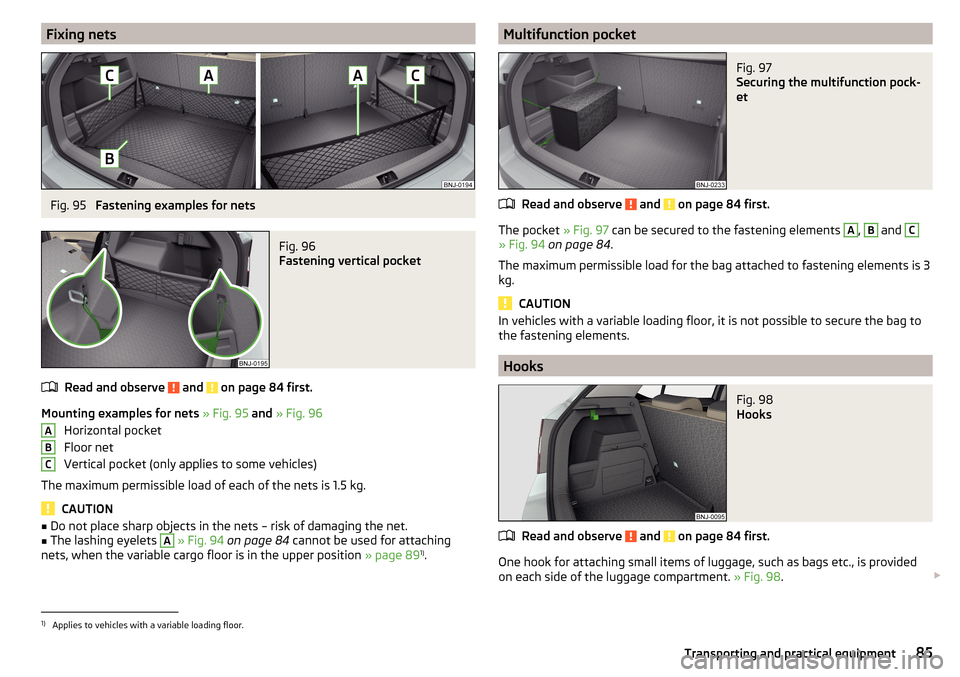
Fixing netsFig. 95
Fastening examples for nets
Fig. 96
Fastening vertical pocket
Read and observe and on page 84 first.
Mounting examples for nets » Fig. 95 and » Fig. 96
Horizontal pocket
Floor net
Vertical pocket (only applies to some vehicles)
The maximum permissible load of each of the nets is 1.5 kg.
CAUTION
■ Do not place sharp objects in the nets – risk of damaging the net.■The lashing eyelets A » Fig. 94 on page 84 cannot be used for attaching
nets, when the variable cargo floor is in the upper position » page 891)
.ABCMultifunction pocketFig. 97
Securing the multifunction pock-
et
Read and observe and on page 84 first.
The pocket » Fig. 97 can be secured to the fastening elements
A
,
B
and
C
» Fig. 94 on page 84 .
The maximum permissible load for the bag attached to fastening elements is 3
kg.
CAUTION
In vehicles with a variable loading floor, it is not possible to secure the bag to
the fastening elements.
Hooks
Fig. 98
Hooks
Read and observe and on page 84 first.
One hook for attaching small items of luggage, such as bags etc., is provided
on each side of the luggage compartment. » Fig. 98.
1)
Applies to vehicles with a variable loading floor.
85Transporting and practical equipment
Page 89 of 220

CAUTION■When closing the boot lid, jamming and damage to the cover or the side trim
panel can occur if handled incorrectly. The following guidelines must be ob-
served. ■ The holders B
on the cover must be resting completely on the pins
C
on
the side panel » Fig. 100.
■ The items which are transported must not exceed the height of the cover.
■ The cover must not be jammed in the surrounding seal of the luggage com-
partment lid when it is in the raised position. ■ There must be no object in the gap between the cover in the raise position
and the rear backrest.
Other positions of the luggage compartment cover
Fig. 101
Luggage compartment cover: stowed behind the rear seats/in
the lower position
Read and observe
and on page 84 first.
The luggage compartment cover can be placed in the following positions:
» Fig. 101
Behind the rear seat backrests
In the lower position
Store cover in the lower position
›
Press the top of the cover in the arrow direction » Fig. 101 -
.
In the front area, slots
B
» Fig. 100 on page 86 on the cover must be fully en-
gaged with the bolts on the side trim. In the back, the cover must be secured
at both ends under the latching.
In the lower position, the cover is designed for storing small objects up to a
weight of 2.5 kg in total.
Roll-up coverFig. 102
Roll-up cover: Pull out/roll/remove
Read and observe
and on page 84 first.
Pulling out
›
Grasp the cover on the handle
A
and pull it out in the direction of the arrow
1
until it clicks » Fig. 102.
Rolling up
›
Push the cover in the area of handle
A
in the direction of the arrow
2
» Fig. 102 .
The cover rolls up automatically.
Removing
The fully rolled luggage compartment cover can be removed.
›
Press on the side of the cross bar in the direction of arrow
3
and remove
the cover in the arrow direction
4
» Fig. 102 .
Inserting
›
First insert the cover on the left side.
›
Press on the side of the cross bar in the direction of arrow
3
and insert the
cover against arrow direction
4
» Fig. 102 .
WARNINGNo objects should be placed on the foldable boot cover. This could endan-
ger the vehicle occupants during sudden braking or vehicle impact.87Transporting and practical equipment
Page 90 of 220
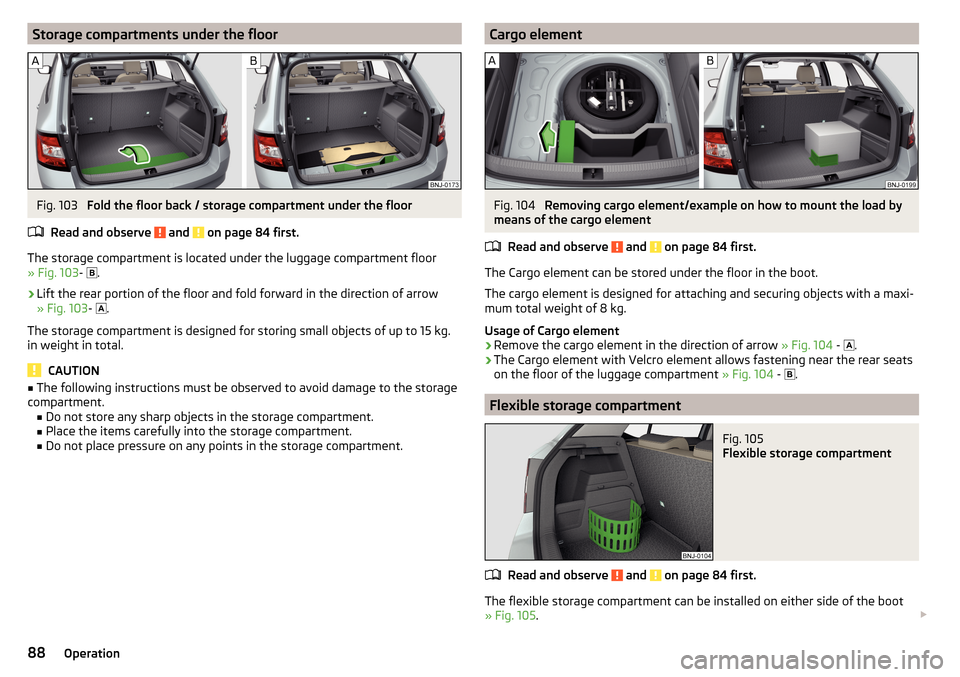
Storage compartments under the floorFig. 103
Fold the floor back / storage compartment under the floor
Read and observe
and on page 84 first.
The storage compartment is located under the luggage compartment floor
» Fig. 103 -
.
›
Lift the rear portion of the floor and fold forward in the direction of arrow
» Fig. 103 -
.
The storage compartment is designed for storing small objects of up to 15 kg. in weight in total.
CAUTION
■ The following instructions must be observed to avoid damage to the storage
compartment. ■ Do not store any sharp objects in the storage compartment.
■ Place the items carefully into the storage compartment.
■ Do not place pressure on any points in the storage compartment.Cargo elementFig. 104
Removing cargo element/example on how to mount the load by
means of the cargo element
Read and observe
and on page 84 first.
The Cargo element can be stored under the floor in the boot.
The cargo element is designed for attaching and securing objects with a maxi-
mum total weight of 8 kg.
Usage of Cargo element
›
Remove the cargo element in the direction of arrow » Fig. 104 -
.
›
The Cargo element with Velcro element allows fastening near the rear seats
on the floor of the luggage compartment » Fig. 104 -
.
Flexible storage compartment
Fig. 105
Flexible storage compartment
Read and observe and on page 84 first.
The flexible storage compartment can be installed on either side of the boot
» Fig. 105 .
88Operation
Page 91 of 220

The storage compartment is designed for storing small objects with a maxi-
mum total weight of 8 kg.
Fitting›
Place both ends of the storage compartment into the openings on the right
side panel of the boot.
›
Push the storage compartment down to lock it.
Removing
›
Grasp the storage compartment on the two upper corners.
›
Remove the storage compartment by pulling upwards and then towards you.
Class N1 vehicles
Read and observe
and on page 84 first.
In class N1 vehicles that are not fitted with a protective grille, a lashing set that
complies with the EN 12195 standard (1-4) must be used for fastening the load.
Proper functioning of the electrical installation is essential for safe vehicle op-
eration. It is important to ensure that the electrical installation is not damaged
during the adjustment process or when the storage area is being loaded and
unloaded.
Variable loading floor in the luggage compartment
Introduction
This chapter contains information on the following subjects:
Setting in the upper position
89
Setting in the lower position
90
Removing/inserting
90
Folding / Securing
91
The maximum permissible load of the variable loading floor is 75 kg. For the
transport of heavy loads, adjust the variable loading floor to the lower position
or remove it from the vehicle.
Setting in the upper positionFig. 106
Set the variable loading floor to the upper position
The variable loading floor in the lower position can be set to the upper position
as follows.
›
Grasp the variable loading floor at handle
A
» Fig. 106 .
›
Lift the variable loading floor in the direction of arrow
1
and move partially
backwards in the direction of arrow
2
.
›
Lift the variable loading floor in the front area and place on edge
C
.
›
Insert the variable loading floor into slots
B
up to the stop in the direction of
arrow
3
.
›
Place the variable loading floor in the direction of arrow
4
.
Note
When in the upper position, there is space for storing items underneath the
variable loading floor.89Transporting and practical equipment