2015 Seat Altea ignition
[x] Cancel search: ignitionPage 53 of 236
Dash panel
The function “Winter tyres” sends an optical
and an acoustic signal when the vehicle rea-
ches the set speed.
Example menu “Winter tyres”In the menu
Winter tyresFunction
Name of menu displayed
X km/hThe current set speed is displayed
or ---or dashes will appear if the function is
deactivated
On / OffIf the function is activated or deactivated
+10 km/hThe set value increases by 10 km/h
-10 km/hThe set value decreases by 10 km/h
BackThe menu “Winter tyres” is closed and
the last displayed menu is shown. Note
For electronic and vehicle equipment one or
more of these menus will be displayed. Main menu
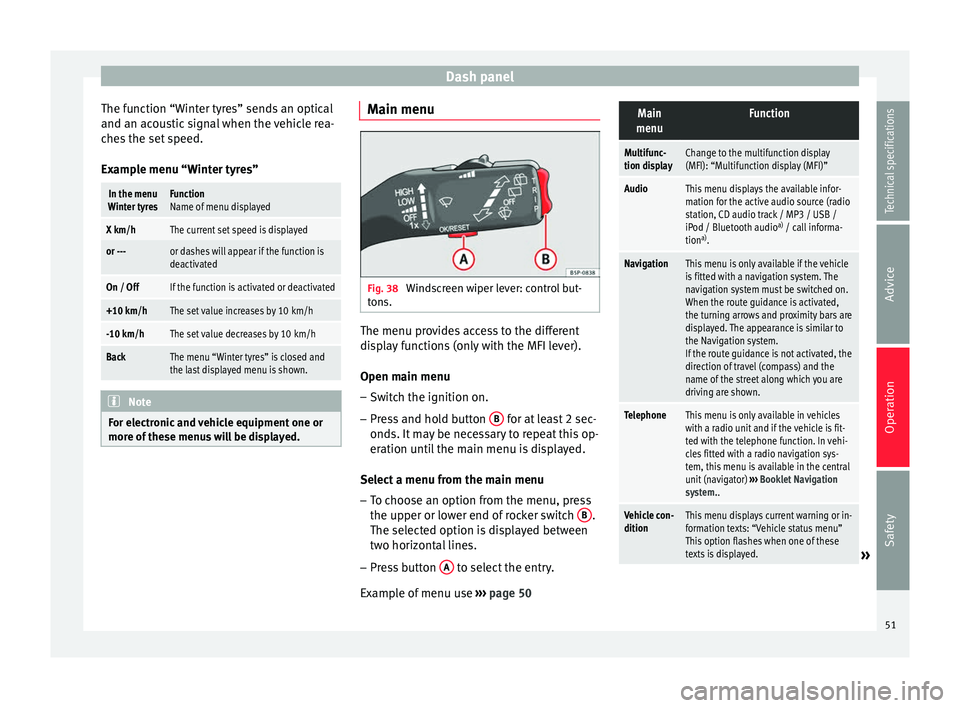
Fig. 38
Windscreen wiper lever: control but-
tons. The menu provides access to the different
display functions (only with the MFI lever).
Open main menu
– Switch the ignition on.
– Press and hold button B for at least 2 sec-
onds. It may be necessary to repeat this op-
eration until the main menu is displayed.
Select a menu from the main menu
– To choose an option from the menu, press
the upper or lower end of rocker switch B .
The selected option is displayed between
two horizontal lines.
– Press button A to select the entry.
Example of menu use ››› page 50
Main
menuFunction
Multifunc-
tion displayChange to the multifunction display
(MFI): “Multifunction display (MFI)”
AudioThis menu displays the available infor-
mation for the active audio source (radio
station, CD audio track / MP3 / USB /
iPod / Bluetooth audio a)
/ call informa-
tion a)
.
NavigationThis menu is only available if the vehicle
is fitted with a navigation system. The
navigation system must be switched on.
When the route guidance is activated,
the turning arrows and proximity bars are
displayed. The appearance is similar to
the Navigation system.
If the route guidance is not activated, the
direction of travel (compass) and the
name of the street along which you are
driving are shown.
TelephoneThis menu is only available in vehicles
with a radio unit and if the vehicle is fit-
ted with the telephone function. In vehi-
cles fitted with a radio navigation sys-
tem, this menu is available in the central
unit (navigator) ››› Booklet Navigation
system..
Vehicle con-
ditionThis menu displays current warning or in-
formation texts: “Vehicle status menu”
This option flashes when one of these
texts is displayed.
» 51
Technical specifications
Advice
Operation
Safety
Page 54 of 236

OperationMain
menuFunction
Configura-
tionThis option allows the time, the speed
warning when using winter tyres, units,
language, independent heating, the
Light and visibility menu and the Conven-
ience menu to be reset.
a) Only in vehicles fitted with a radio navigation system. Note
For electronic and vehicle equipment one or
more of these menus will be displayed. Multifunction display menu (MFI)
Fig. 39
Windscreen wiper lever: control but-
tons. Fig. 40
Controls on the steering wheel: con-
trol buttons. The multifunction display (MFI) shows you in-
formation on the journey and fuel consump-
tion. It has two automatic memories:
1 - Trip
memory and 2 - Total memory . The selected
memory is shown on the upper right hand
section of the display at all times.
Open the multifunction display menu
Select the Multifunction display menu
from the main menu ››› page 51 and
press the OK button on the windscreen
wiper lever or the multifunction steering
wheel*.
Selecting a memory To change from one memory to another,
briefly press button A
››› Fig. 36
››› page 50 on the windscreen wiper lev-
er or the OK button on the multifunction
–
– steering wheel
››› Fig. 37
›
›› p
age 50
while the ignition is switched on.
Resetting a memory Select the memory where you wish to
erase the values.
Hold down button A on the windscreen
wiper lever or the OK button on the mul-
tifunction steering wheel* for at least 2
seconds.
The trip memory 1
c
o
llects the travel and
consumption data from the moment the igni-
tion is switched on until it is switched off. If
the journey is continued within two hours of
switching off the ignition, the new values will
be added to the existing trip recorder memo-
ry. The memory will automatically be deleted
if the journey is interrupted for more than 2
hours.
The total memory 2 co
llects the journey data
for any number of individual journeys (even if
the ignition is switched off for longer than 2
hours) up to a total of 19 hours and 59 mi-
nutes of travel time or 1,999 km (1,250
miles) of distance travelled. The memory will
automatically be deleted if one of the named
values is reached.
On-screen display
The following data can be viewed on the mul-
tifunction display using rocker switch B ›››
Fig. 36
›
›› p
age 50 on the windscreen wiper
–
–
52
Page 55 of 236

Dash panel
lever or by pressing button or
››› Fig. 37
on the multifunction steering wheel*:
● Distance
● Average speed
● Driving speed
● Speed warning at --- km/h
● Journey duration
● Current fuel consumption
● Average fuel consumption
● Operating range
● Outside temperature
Distance travelled in km (miles)
The display shows the distance travelled
since the ignition was switched on.
The maximum display value in both memo-
ries is 1,999 km. The memory will automati-
cally be deleted once this value has been
reached.
Average speed in km/h (mph) After starting the ignition, the average speed
will be shown after a distance of approxi-
mately 100 metres has been travelled. Until
then dashes will appear in the display. The
display will be updated every five seconds
while the vehicle is in motion. km/h (mph) - Driving speed
Driving speed is digitally shown in the dis-
play.
Speed warning at --- km/h
This function may help you to keep within the
speed limits. Press the OK button on the
windscreen wiper lever A or the multifunc-
tion steering wheel* to select the current
speed. The instrument panel display gives
the selected speed, for example, Speed
warning 120 km/h . You have 5 seconds to re-
set the s
peed to between 30 km/h (18 mph)
and 250 km/h (155 mph) using rocker switch B or buttons
or
on the multifunction
steering wheel*. Press the OK button or wait
5 seconds until the speed is stored and the
warning is activated. If the set speed is ex-
ceeded, an audible warning is heard and a
warning message is displayed until the
speed is reduced to at least 4 km/h (2 mph)
below the stored speed. The function is
switched off by pressing the OK button
again. Speed warning --- km/h (miles) is now
di s
played on the instrument panel.
Trip duration in h and min The display shows the amount of time which
has elapsed since the ignition was switched
on.
The maximum display value in both memo-
ries is 19 hours and 59 minutes. The memory will automatically be deleted once this value
has been reached.
Current fuel consumption in l/100 km or l/hour
The dis
play will show the current fuel con-
sumption in litres/100 km whilst the vehicle
is in motion or in litres/hour when the vehicle
is in a stationary position with the engine
running.
Using this display you can see how your driv-
ing style affects fuel consumption
››› page 117.
Av
erage fuel consumption in l/100 km
The average fuel consumption will be shown
after a distance of approximately 100 metres
has been travelled. Until then dashes will ap-
pear in the display. The display will be upda-
ted every five seconds while the vehicle is in
motion. The amount of fuel used will not be
shown.
Km (miles) - Fuel range
The fuel range is calculated using the figures
for tank content and current fuel consump-
tion. This shows how far the vehicle can trav-
el using the same conditions as a reference.
Personal selection of display
The driver can establish which displays are
shown on the instrument panel display as re-
quired: »
53
Technical specifications
Advice
Operation
Safety
Page 65 of 236

Opening and closing
Opening and closing Central locking Basic functions The central locking system enables you to
lock and unlock all doors and the rear lid by
just pushing the button.
Description
Central locking can be activated by using any
of the following options:
● the key , by inserting it into the driver door
cylinder and r ot
ating it manually,
● the central lock button in the vehicle interi-
or ›››
page 65
.
● the radio frequency remote control , using
the buttons on the key ›››
page 67.
Various functions are available to improve
the vehicle safety: “Safe” locking system
Selective unlocking system*
Automatic speed-dependent locking and
unlocking system*
Self-locking system to prevent involunta-
ry unlocking
Emergency unlocking system
–
–
–
–
– Unlocking the vehicle*
Press button
››› Fig. 50 on remote
c ontr
ol to unlock all the doors and rear
lid.
Locking the vehicle* Press button
››› Fig. 50 on the remote
c ontr
ol to lock all doors and the rear lid
or turn the key in the door to lock all
doors and the rear lid. WARNING
● Never leave children or disabled persons in
the vehicle. In case of emergency, they may
not be able to leave the vehicle or manage on
their own.
● Never allow children to play in or around
the vehicle. A locked vehicle can be subjected
to extremely high and low temperatures, de-
pending on the time of year, thus causing se-
rious injuries/illness. It could even have fatal
consequences. Close and lock both the rear
lid and all the other doors when you are not
using the vehicle.
● Always take you car keys with you when
you leave the vehicle. Misuse of the keys, for
example, by children, may result in serious
damage and accident.
– The engine may accidentally be started
and be out of control.
– If the ignition is switched on, the electric
equipment could be activated with risk of –
– injury, for example, in the electric win-
dows.
– The doors can be locked using the remote
control key. This could become an obsta-
cle for assistance in an emergency situa-
tion.
– Always take the key with you when you
leave the vehicle.
● Never remove the key from the ignition if
the vehicle is in motion. The steering lock
could suddenly engage, and you would not be
able to steer the vehicle. Note
● While the driver door is open, the vehicle
cannot be locked with the remote control.
This avoids the user from forgetting his key
inside the vehicle.
● If the driver door is unlocked with the key
shaft, only the driver door is unlocked, the
rest of the doors remain locked. When the ig-
nition is switched on, the door “deadlock”
function is deactivated (although the doors
remain locked) and the central lock button is
activated. See ››› page 68.
● If the c
entral locking or anti-theft alarm are
faulty, the driver door control lamp remains
lit for approx. 30 seconds after the vehicle
locks.
● For anti-theft security, only the driver door
is fitted with a lock cylinder. 63
Technical specifications
Advice
Operation
Safety
Page 66 of 236

Operation
“Safe” security system* This is an anti-theft device which consists of
a double lock for the door locks and a deacti-
vation function for the boot in order to pre-
vent forced entry.
Activating the “deadlock”
– Press once the locking button on the re-
mote control. or
– Turn the k
ey once in the driver door lock to
lock. A w
arning lamp in the driver door
flashes to indicate the “deadlock” is work-
ing. The warning lamp flashes for approx. 2
seconds at short intervals and then more
slowly.
Deactivating the “deadlock” when the
vehicle is locked
– Press the lock button on the remote con-
trol twice within 2 seconds. The vehicle is
loc k
ed without activating the “deadlock”.
The driver door warning lamp flashes for
approx. 2 seconds and then goes out. It
flashes again after around 30 seconds.
The doors can be unlocked and opened from
the inside if the “deadlock” has not been ac-
tivated. You will have to pull the door release
lever once. When the “deadlock” is off, the
anti-theft alarm* ›››
page 68 remains active.
The v
ehicle interior monitoring system* and
the anti-tow system are deactivated*. WARNING
Nobody should remain in the vehicle if the
“deadlock” system mechanism has been acti-
vated. It is not possible to open the doors
from the inside. Locked doors could delay as-
sistance in an emergency. People could be-
come trapped inside in an emergency. Selective unlocking system*
This system allows to unlock either just the
driver door or all the vehicle.
Using the remote control, press the unlock
button on the remote
once. The “Safe”
system for all the vehicle is deactivated, only
the driver door is unlocked and both the
alarm and the warning lamp are also turned
off.
Unlocking all doors and the luggage
compartment
The unlock button on the remote control
must be pressed twice so that all doors
and the luggage compartment can be
opened.
Press twice within 2 seconds to deactivate
the “Safe” system for all vehicle, to unlock all
doors and to use the luggage compartment.
The warning lamp and the alarm (only vehi-
cles fitted with one) are turned off. Automatic speed-dependent locking
and unlocking system* This is a safety system which prevents access
to the vehicle from the outside when it is run-
ning (e.g. when stopped at a traffic light).
Locking
The doors and boot will lock automatically if
the speed of 15 km/h (9 mph) is exceeded.
If the vehicle is stopped and one of the doors
is opened, when the vehicle moves off again
and exceeds a speed of 15 km/h (9 mph),
the unlocked door(s) will lock once more.
Unlocking
The driver door automatically unlocks when
the key is removed from the ignition.
Each door can be unlocked and opened inde-
pendently from the inside (for example, when
a passenger gets out). To do it, simply oper-
ate the lever inside the door.
WARNING
The door handles must not be operated when
the vehicle is running: the door would open. 64
Page 67 of 236

Opening and closing
Automatic locking system for
involuntary unlocking* It is an anti-theft system and prevents the un-
intentional unlocking of the vehicle.
If the vehicle is unlocked and none of the
doors (including the boot) are opened within
30 seconds, it re-locks automatically. This
function prevents the vehicle from remaining
unlocked if the unlock button is pressed by
mistake.
Emergency unlocking system If the airbags are triggered during an acci-
dent, the vehicle is unlocked, except for the
luggage compartment. It is possible to lock
the vehicle from inside with the central lock-
ing, after turning the ignition off and back on
again.
If the doors must be locked from the outside,
see “Emergency locking of the doors”.
Unlocking and locking - Manual
personalisation Activating selective unlocking
With the driver door open, turn the key to un-
lock for approx. 3 seconds. Deactivating selective unlocking
With the driver door open, turn the key to
lock for approx. 3 seconds.
The turn signal lamps flash to confirm activa-
tion or deactivation.
Activation of automatic locking
Press the lock button
on the central lock-
ing button for 3 seconds.
Deactivation of automatic locking
Press the unlock button on the central
locking button for 3 seconds.
The lock button lamp flashes to confirm acti-
vation or deactivation.
Central lock button Fig. 47
Detailed view of the centre console:
central locking button. The central lock button allows you to lock and
unlock the vehicle from the inside.
Locking the vehicle
– Press the button
››› .
Unlocking the doors
– Press button .
The central lock button also works with the
ignition switched off, except when the “safe”
system is activated.
Please note the following if you lock your ve-
hicle with the central lock button: ● Locking the doors and rear lid prevents ac-
cess from the outside (for safety reasons, e.g.
when s t
opped at a traffic light).
● The driver door and/or front passenger
door cannot be locked if any of the vehicle
doors (except the boot) are open. This avoids
the user from forgetting his key inside the ve-
hicle.
● Repeated operation of the central locking
will deactivate the central lock button for 30
seconds. Once this time has passed, the but-
ton if operative again.
● There is a danger of leaving the key inside
the vehicle if the vehicle is locked by the cen-
tral locking button when the driver door is
closed and any of the rear doors open. On
closing any of the rear doors, the vehicle
locks and the keys remain inside it. »
65
Technical specifications
Advice
Operation
Safety
Page 68 of 236

Operation
● All doors can be unlocked separately from
inside the vehicle. Do this by pulling the door
release lever once
. WARNING
● If the vehicle is locked, children and disa-
bled people may be trapped inside it.
● The central lock button is not operative in
the following cases:
● When the vehicle is locked from the outside
(with the remote control or the key).
● While the ignition is not activated after un-
locking the door lock cylinder with the key. Note
● Vehicle locked, amber button .
● Vehicle unlocked, red button . Childproof lock
Fig. 48
Childproof lock on the left hand side
door. The childproof lock prevents the rear doors
from being opened from the inside. This sys-
tem prevents minors from opening a door ac-
cidentally while the vehicle is running.
This function is independent of the vehicle
electronic opening and locking systems. It
only affects rear doors. It can only be activa-
ted and deactivated manually, as described
below:
Activating the childproof lock
– Unlock the vehicle and open the door in
which you wish to activate the childproof
lock.
– With the door open, rotate the slot in the
door using the ignition key, clockwise for
the left-hand side doors and anti-clockwise
for the right-hand side doors ››› Fig. 48 . D
e activating the childproof lock
– Unlock the vehicle and open the door
whose childproof lock you want to deacti-
vate.
– With the door open, rotate the slot in the
door using the ignition key, clockwise for
the right-hand side doors, and anti-clock-
wise for the left-hand side doors ››› Fig. 48.
Once the c
hildproof lock is activated, the
door can only be opened from the outside.
The childproof lock can be activated or deac-
tivated by inserting the key in the slot when
the door is open, as described above.
Keys
Set of keys Fig. 49
Set of keys.66
Page 69 of 236

Opening and closing
The set of keys belonging to your vehicle con-
sists of the following items:
● one remote control key ››› Fig. 49 A with
folding key bit,
● one key without remote control B ,
● a plastic key tab* C .
Duplicate keys
If you need a replacement key, go to a Techni-
cal Service with your vehicle identification
number. WARNING
● An incorrect use of the keys can cause seri-
ous injuries.
● Never leave children or disabled persons in
the vehicle. In case of emergency, they may
not be able to leave the vehicle or manage on
their own.
● An uncontrolled use of the key could start
the engine or activate any electric equipment
(e.g. electric windows), causing risk of acci-
dent. The doors can be locked using the re-
mote control key. This could become an ob-
stacle for assistance in an emergency situa-
tion.
● Never forget the keys inside the vehicle. An
unauthorised use of your vehicle could result
in injury, damage or theft. Always take the
key with you when you leave the vehicle.
● Never remove the key from the ignition if
the vehicle is in motion. Otherwise, the steer- ing could suddenly block and it would be im-
possible to steer the vehicle.
CAUTION
There are electronic components in the re-
mote control key. Avoid wetting and hitting
the keys. Radio frequency remote control
Locking and unlocking the vehicle Fig. 50
Assignment of buttons on the remote
control key. Fig. 51
Range of the radio frequency remote
control. The radio frequency remote control key is
used to lock and unlock the vehicle from a
distance.
By using button
4
››› Fig. 50 on the control,
the k ey
shaft is released.
Unlocking the vehicle
››› Fig. 50 1 .
Locking the vehicle
››› Fig. 50 2 .
Unlocking the rear lid. Press button ›››
Fig. 50 3 until all the turn signals on the
vehicle flash briefly. When the unlocking but-
ton
3 is pressed, you have 2 minutes to
open the door. Once this time has passed, it
will lock again.
Moreover, the battery indicator on the key
››› Fig. 50 (arrow), will flash.
The r emot
e control transmitter and the bat-
teries are integrated in the key. The receiver »
67
Technical specifications
Advice
Operation
Safety