Page 70 of 316

1.64
šSide light warning light
áMain beam headlight tell-
tale
kDipped beam headlight tell-
tale
fRear fog lights tell-tale
�Automatic main beam head-
light indicator light
Please refer to the information
on “External signals and lights” in
Section 1.
cLeft-hand direction indicator
tell-tale
bRight-hand direction indica-
tor tell-tale
MLow fuel level warning light
It lights up orange when the ig-
nition or the engine is switched on and
goes off after a few seconds.
If it comes on orange while driving and
is accompanied by a beep, fill up with
fuel as soon as possible. There is only
approximately 30 miles (50 km) worth
of fuel left.A
If no lights or sounds are ap-
parent, this indicates a fault
in the instrument panel. This
indicates that it is essential
to stop immediately (as soon as traf-
fic conditions allow). Ensure that the
vehicle is correctly immobilised and
contact an approved Dealer.
Instrument panelA: lights up when the
driver’s door is opened.
In some cases, the appearance of a
warning light is accompanied by a mes-
sage.
The © warning light means
you should drive very carefully to
an approved dealer as soon as pos-
sible. If you fail to follow this recom-
mendation, you risk damaging your
vehicle.
Warning light ® re-
quires you to stop immedi-
ately, for your own safety,
as soon as traffic conditions allow.
Switch off the engine and do not re-
start it. Contact an approved Dealer.
The display of information shown below DEPENDS ON THE VEHICLE EQUIPMENT \
AND COUNTRY.
WARNING LIGHTS (1/6)
Page 75 of 316
1.69
WARNING LIGHTS (6/6)
The display of information shown below DEPENDS ON THE VEHICLE EQUIPMENT \
AND COUNTRY.
On the rear-view mirror B
�Passenger airbag ON
Please refer to the information
on “Child safety: deactivating/activating
the front passenger airbag” in Section 1.
¹Passenger airbag OFF
Please refer to the information
on “Child safety: deactivating/activating
the front passenger airbag” in Section 1.
B
ßDriver’s seat belt reminder
and, depending on the vehi-
cle, front passenger seat belt re-
minder.
This lights up in the rear-view mirror
when the ignition is started then, if the
driver or front passenger seat belt (if
this seat is occupied) is not fastened
and the vehicle has reached approxi-
mately 12 mph (20 km/h), it flashes and
a beep sounds for around 120 seconds.
Note: an object placed on the passen-
ger seat base can activate the warning
light.
Page 76 of 316
1.70
DISPLAYS AND INDICATORS (1/4)
Instrument panel A
You can customise your instrument
panel with the content and colours of
your choice.
From the multifunction screen, select:
– one of the Multi-Sense modes.
Please refer to the information on
“Multi-Sense” in Section 3;
– menu “System” then “User profile”. Refer to the handbook for the equip-
ment.
Rev counter 1(graduations x 1000)
Speedometer 2
This is displayed differently according
to how the instrument panel is custom-
ised.
Overspeed buzzer
Depending on the vehicle and country,
a buzzer sounds for approximately
10 seconds every 40 seconds, as long
as the vehicle is travelling in excess of
72 mph (120 km/h).
2
1
3
A
Driving style indicator 3
Please refer to the information on “Eco-
driving” in Section 2.
Trip computer and warning
system
Refer to the information on the “Trip
computer and warning system” in
Section 1.
Page 90 of 316
1.84
VEHICLE SETTINGS CUSTOMISATION MENU
Adjusting the settings
Select the function to modify:
a) unlocking the driver’s door;
b) automatic locking of the doors while driving;
c) hands-free function;
d) indicator audio volume;
e) internal welcome sound;
f) external welcome;
g) reading lamp in automatic mode;
h) rear windscreen wiping in reverse gear;
i) configuration of the driving style indi- cator;
j) Active noise control.
Select “ON” or “OFF” to activate or de-
activate the function.
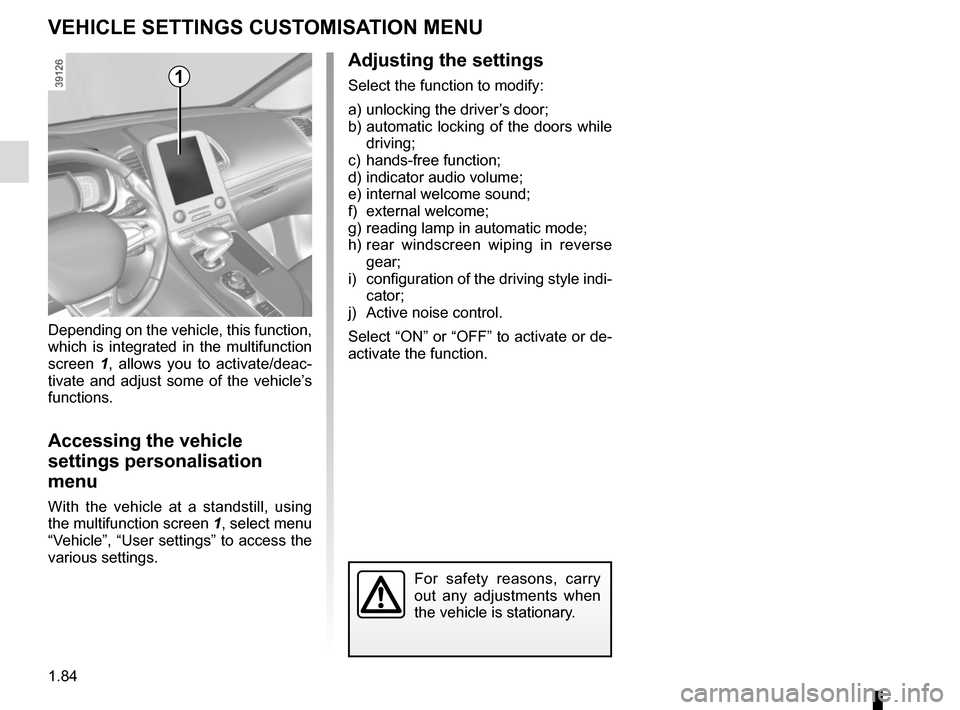
Depending on the vehicle, this function,
which is integrated in the multifunction
screen
1, allows you to activate/deac-
tivate and adjust some of the vehicle’s
functions.
Accessing the vehicle
settings personalisation
menu
With the vehicle at a standstill, using
the multifunction screen 1, select menu
“Vehicle”, “User settings” to access the
various settings.
1
For safety reasons, carry
out any adjustments when
the vehicle is stationary.
Page 99 of 316

1.93
Operating faults
When the message “Check auto li-
ghting” appears on the instrument
panel, the system is deactivated.
Consult an approved dealer.
EXTERIOR LIGHTING AND SIGNALS (3/5)
Switching off the lights
There are two possibilities:
– manually, move ring 3 to position 0;
– automatically, the lights will go out when the engine is switched off, the
driver’s door is opened or the vehicle
is locked. In this case, the next time
the engine is started the lights will be
switched back on according to the
position of the ring 3.
Lights-on reminder buzzer
If the lights are on after the engine is
switched off, a warning beep sounds
when the driver’s door is opened to
warn you that the lights are still on.
Adjusting the headlight beam
height
The headlight adjustment is automatic,
based on the vehicle load.
Daytime running lights
function
The daytime running lights come on
automatically (at the front only) with no
action on stalk 1 at the time of starting
engine, and they go off once the engine
is switched off.
Operating faults
When the message “Check lighting”
with warning light
© is displayed
and warning light
k flashes on the
instrument panel, this indicates that
there is a lighting fault.
Consult an approved dealer.
3
2
1
Page 125 of 316

2.13
ELECTRONIC PARKING BRAKE (1/3)
Note:
To indicate that the electronic parking
brake is released, a beep sounds and
the message “Apply parking brake” ap-
pears on the instrument panel:
– with the engine running: when the driver’s door is opened;
– with the engine switched off (eg. when the engine stalls): when a front
door is opened.
In this case, pull and release switch 2 to
apply the assisted parking brake.
Automatic releasing of the
electronic parking brake
The brake will be released as soon as
the vehicle starts and accelerates.
Automatic operation
The assisted parking brake can be
used to immobilise the vehicle when
the engine is stopped by pressing
button 1.
In all other cases:
– engine standby for vehicles fitted with Stop and Start function,
– engine has stalled etc.,
the assisted parking brake is not ap-
plied automatically. Manual mode must
be used.
Please refer to «Starting/stopping the
engine» and «Stop and Start function"
in Section 2. For certain country-specific model ver-
sions, the automatic brake application
function is not activated. Refer to the in-
formation on “Manual operation”.
To confirm that the electronic parking
brake is applied, the message “Parking
brake on” and warning light
}
on the instrument panel and warning
light 3 on the switch 2 light up.
After the engine is switched off, indi-
cator light 3 goes out several minutes
after the electronic parking brake has
been applied and indicator light
}
goes out when the vehicle is locked.
Before leaving the vehi-
cle, check that the assisted
parking brake is fully ap-
plied. Warning light 3 on
switch 2 and warning light
}
on the instrument panel light up to
show that the parking brake is ap-
plied but go out when the doors are
locked.
1
3
2
Page 127 of 316

2.15
Operating faults
– If there is a fault, the © warning
light illuminates on the instrument
panel accompanied by the “Check
parking brake” message and, in
some cases, the
} warning
light.
Please contact an authorised dealer
as soon as possible.
– If there is an assisted parking brake fault, the warning light
® comes
on, along with the message “Braking
system fault”, a beep and, in some
cases, the warning light
}.
This means that you must stop as
soon as traffic conditions allow.
Versions with an automatic
gearbox
For safety reasons, automatic release
is deactivated when the driver’s door
is open or not shut properly and the
engine is running (in order to prevent
the vehicle from moving without the
driver). The “Release parking brake
manually” message appears on the
instrument panel when the driver de-
presses the accelerator.
ELECTRONIC PARKING BRAKE (3/3)
It is therefore essential to
immobilise the vehicle by
engaging first gear (manual
gearbox) or position P (au-
tomatic gearbox). If the slope re-
quires it, chock the vehicle.
Never leave your vehicle
without moving the selec-
tor lever to position P or N.
This is because when the
vehicle is stationary with the engine
running and a gear engaged, the
vehicle may begin to move if you
accelerate.
There is a risk of accidents.If no lights or sounds are
apparent, this indicates
a fault in the instrument
panel. This indicates that
it is essential to stop immediately
(as soon as traffic conditions allow).
Ensure that the vehicle is correctly
immobilised and contact an appro-
ved Dealer.
In the event of message
“Electric failure DANGER”
or “Check battery”, manu-
ally activate the electronic
parking brake by pulling switch 2 (or
position the gear lever in P for au-
tomatic gearboxes) before stopping
the engine.
Risk of loss of immobilisation of the
vehicle.
Contact an authorised dealer.
Page 159 of 316
2.47
CRUISE CONTROL/SPEED LIMITER: speed limiter function (2/3)Exceeding the limit speed
It is possible to exceed the limit speed
at any time. To do this: press the acce-
lerator pedal firmly and fully (beyond
the resistance point).
While the speed is being exceeded, the
speed limiter flashes red on the instru-
ment panel.
Then, release the accelerator: the
speed limiter function will return as
soon as you reach a speed lower than
the stored speed.
Limited speed cannot be maintained
If driving up or down a steep gradient,
the system is unable to maintain the
limited speed: the stored speed flashes
red on the instrument panel and a beep
sounds at regular intervals to inform
you.
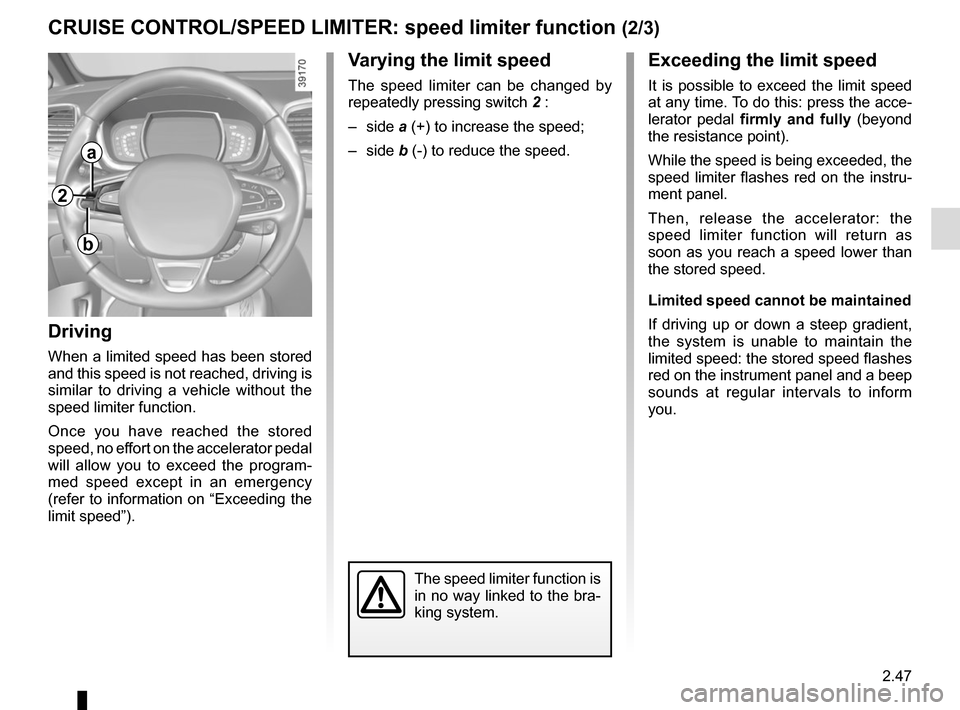
Varying the limit speed
The speed limiter can be changed by
repeatedly pressing switch 2 :
– side a (+) to increase the speed;
– side b (-) to reduce the speed.
Driving
When a limited speed has been stored
and this speed is not reached, driving is
similar to driving a vehicle without the
speed limiter function.
Once you have reached the stored
speed, no effort on the accelerator pedal
will allow you to exceed the program-
med speed except in an emergency
(refer to information on “Exceeding the
limit speed”).
The speed limiter function is
in no way linked to the bra-
king system.
a
b
2