Page 4 of 292
2
Partner-2-VU_en_Chap00a_Sommaire_ed01-2015
Key 18
Remote control 18
Alarm
20
Doors
21
Rear roof flap
25
T
ailgate 26
Central locking
27
Instrument panel
28
Date and time
29
W
arning lamps
32
Fuel gauge
40
Coolant
40
Under-inflation detection
41
Service indicator
43
Lighting dimmer
44
Steering wheel
adjustment
45
Manual gearbox
45
Gear shift indicator
46
6-speed electronic
gearbox
47
Stop & Start
49
Starting and stopping
52
Hill start assist
53
Driving
recommendations
54Lighting
55
Wipers
58
Trip computer
60
Cruise control
61
Speed limiter
64
Heating /
Air conditioning
manual
67
digital
69
Demisting and
defrosting
72
Front seats
74
Individual passenger
seat
75
Multi-Flex bench seat
76
Configurations
78
Front fittings
79
Courtesy lamps
81
Crew cab
82
Load space
84
Roof bars
86
Mirrors
87
Electric windows
89
READY TO SET OFF SAFETY
Exterior 5
Interior 6
left hand drive
6 right hand drive
7
Instruments and controls
8 left hand drive
8 right hand drive
1
1
Technical data - Maintenance
12 Horn
90
Hazard warning lamps 90
Parking brake
90
Parking sensors
91
Reversing camera
93
Anti-lock braking
system (ABS)
94
EBA
94
ASR and DSC
95
Grip control
96
Active City Brake
98
Seat belts
102
Airbags
104
Carrying children
108
Deactivating the passenger's
front airbag
1
10
Recommended seats
1
13
Installation
1
14
EASE OF USE and
COMFORT
ECO-DRIVING
Environment 15
Eco-driving 16
The "Visual Search"
(visual
index) section
assists you in finding the
controls and functions
and their associated page
numbers on the schematic
outlines of the vehicle.
Instruments and controls
left hand drive
13 right hand drive
14
4-14
15-17 18-54
55-8990-116
OVERVIEW
1.
2. 3.
4. 5.
Contents
Page 15 of 292
13
Partner-2-VU_en_Chap01_vue-ensemble_ed01-2015
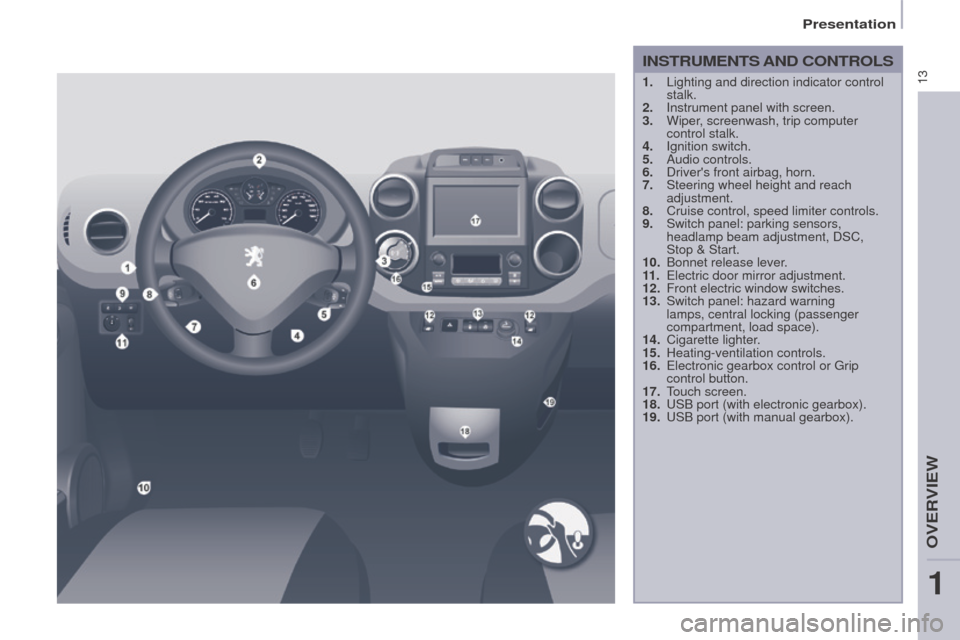
INSTRUMENTS AND CONTROLS
1. Lighting and direction indicator control
stalk.
2.
Instrument panel with screen.
3.
Wiper
, screenwash, trip computer
control stalk.
4.
Ignition switch.
5.
Audio controls.
6.
Driver's front airbag, horn.
7.
Steering wheel height and reach
adjustment.
8.
Cruise control, speed limiter controls.
9.
Switch panel: parking sensors,
headlamp beam adjustment, DSC,
Stop
& Start.
10.
Bonnet release lever
.
11 .
Electric door mirror adjustment.
12.
Front electric window switches.
13.
Switch panel: hazard warning
lamps, central locking (passenger
compartment, load space).
14.
Cigarette lighter
.
15.
Heating-ventilation controls.
16.
Electronic gearbox control or Grip
control button.
17.
T
ouch screen.
18.
USB port (with electronic gearbox).
19.
USB port (with manual gearbox).
1
OVERVIEW
Presentation
Page 16 of 292
14
Partner-2-VU_en_Chap01_vue-ensemble_ed01-2015
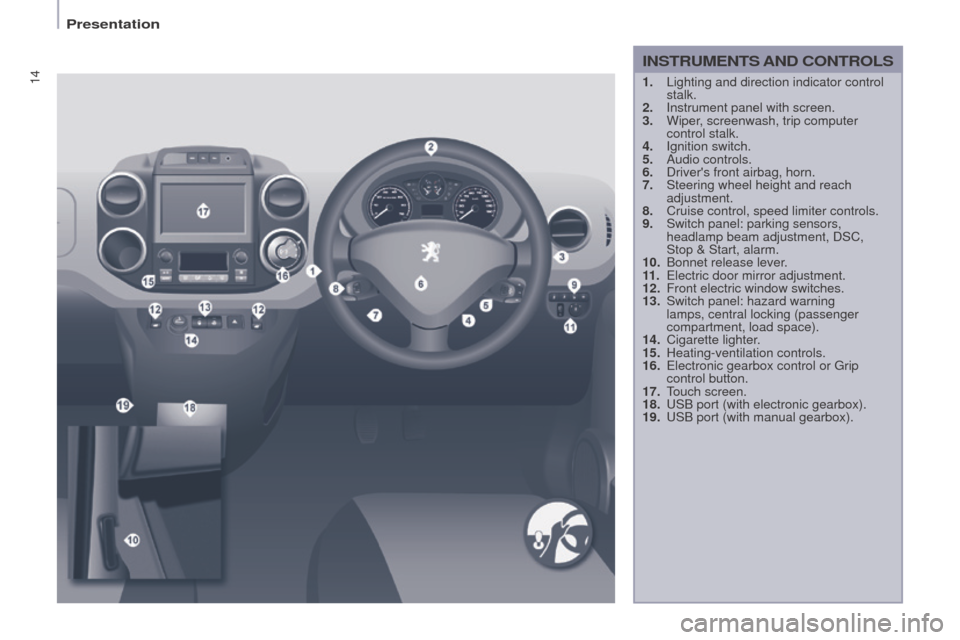
1. Lighting and direction indicator control
stalk.
2.
Instrument panel with screen.
3.
Wiper
, screenwash, trip computer
control stalk.
4.
Ignition switch.
5.
Audio controls.
6.
Driver's front airbag, horn.
7.
Steering wheel height and reach
adjustment.
8.
Cruise control, speed limiter controls.
9.
Switch panel: parking sensors,
headlamp beam adjustment, DSC,
Stop & Start, alarm.
10.
Bonnet release lever
.
11 .
Electric door mirror adjustment.
12.
Front electric window switches.
13.
Switch panel: hazard warning
lamps, central locking (passenger
compartment, load space).
14.
Cigarette lighter
.
15.
Heating-ventilation controls.
16.
Electronic gearbox control or Grip
control button.
17.
T
ouch screen.
18.
USB port (with electronic gearbox).
19.
USB port (with manual gearbox).
INSTRUMENTS AND CONTROLS
Presentation
Page 35 of 292
33
Partner-2-VU_en_Chap03_Pret-a-partir_ed01-2015
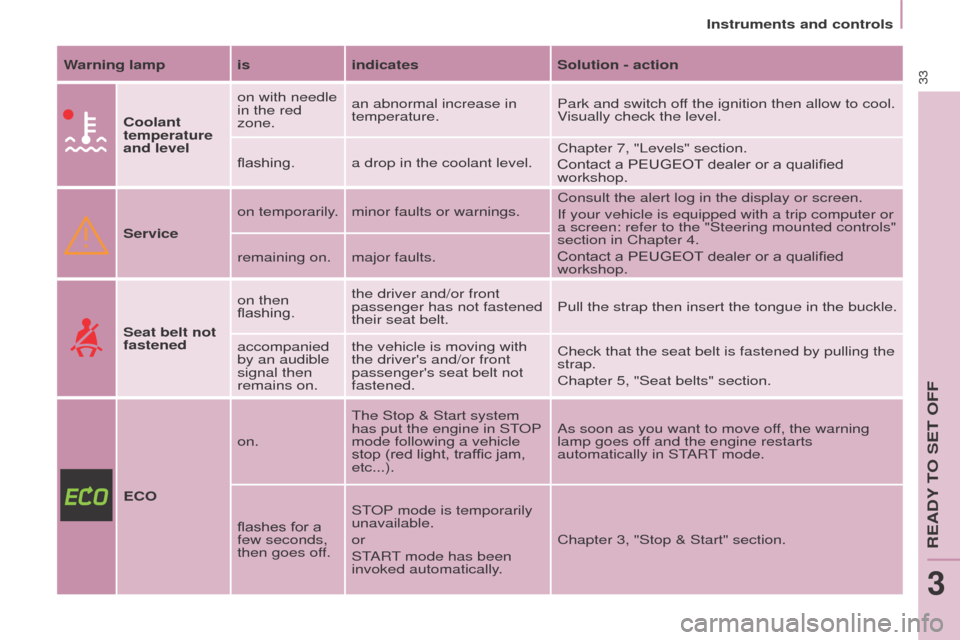
Warning lamp isindicatesSolution - action
Coolant
temperature
and level on with needle
in the red
zone.
an abnormal increase in
temperature.
Park and switch off the ignition then allow to cool.
Visually check the level.
flashing. a drop in the coolant level. Chapter 7, "Levels" section.
Contact a PEUGEOT
dealer or a qualified
workshop.
Service on temporarily. minor faults or warnings.
Consult the alert log in the display or screen.
If your vehicle is equipped with a trip computer or
a screen: refer to the "Steering mounted controls"
section in Chapter 4.
Contact a PEUGEOT dealer or a qualified
workshop.
remaining on. major faults.
Seat belt not
fastened on then
flashing.
the driver and/or front
passenger has not fastened
their seat belt.
Pull the strap then insert the tongue in the buckle.
accompanied
by an audible
signal then
remains on. the vehicle is moving with
the driver's and/or front
passenger's seat belt not
fastened.
Check that the seat belt is fastened by pulling the
strap.
Chapter 5, "Seat belts" section.
ECO on.
The Stop & Start
system
has put the engine in STOP
mode following a vehicle
stop (red light, traffic jam,
etc...). As soon as you want to move off, the warning
lamp goes off and the engine restarts
automatically in START mode.
flashes for a
few seconds,
then goes off. STOP mode is temporarily
unavailable.
or
START mode has been
invoked automatically.
Chapter 3, "Stop & Start" section.
Instruments and controls
READY TO SET OFF
3
Page 62 of 292
60
Partner-2-VU_en_Chap04_Ergonomie_ed01-2015
TRIP COMPUTER
A
few definitions
Range: displays the distance which
can travelled with the remaining fuel
detected in the tank, basd on the
average consumption over the last few
miles (kilometres).
This displayed value may vary
significantly following a change in the
vehicle speed or the relief of the route. Current fuel consumption:
only
calculated and displayed above
20 mph (30 km/h).
Average fuel consumption: this is the
average fuel consumption since the
last trip computer zero reset.
Distance travelled: calculated since
the last trip computer zero reset.
Distance remaining to the
destination: calculated with reference
to the final destination, entered by
the user. If guidance is activated, the
navigation system calculates it as a
current value.
Average speed: this is the average
speed calculated since the last trip
computer zero reset (ignition on).
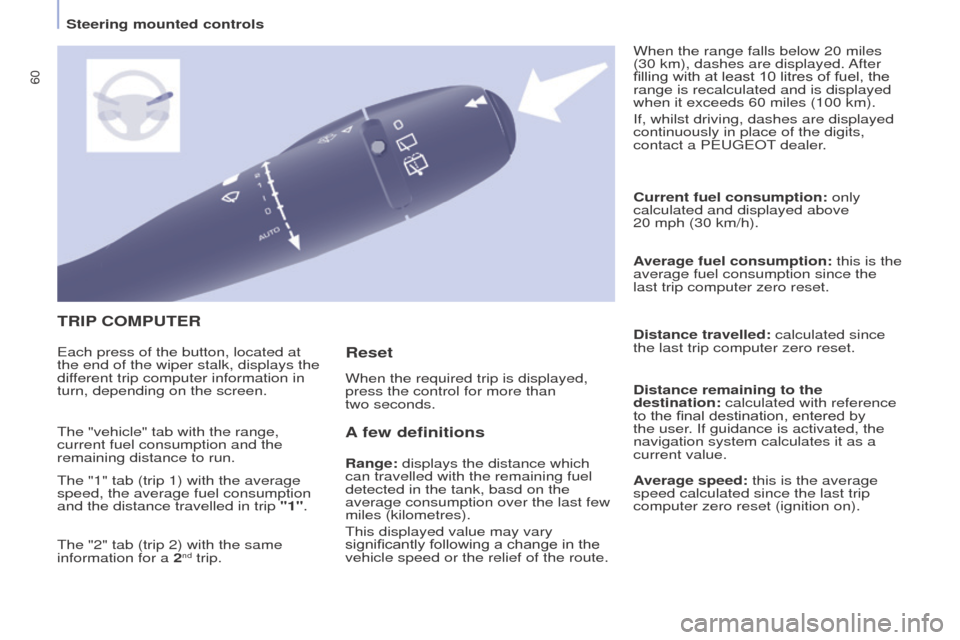
Each press of the button, located at
the end of the wiper stalk, displays the
different trip computer information in
turn, depending on the screen.
When the required trip is displayed,
press the control for more than
two seconds. When the range falls below 20 miles
(30 km), dashes are displayed. After
filling with at least 10 litres of fuel, the
range is recalculated and is displayed
when it exceeds 60 miles (100 km).
If, whilst driving, dashes are displayed
continuously in place of the digits,
contact a PEUGEOT dealer.
The "vehicle" tab with the range,
current fuel consumption and the
remaining distance to run.
The "1" tab (trip 1) with the average
speed, the average fuel consumption
and the distance travelled in trip "1".
The "2" tab (trip 2) with the same
information for a 2
nd trip.
Reset
Steering mounted controls
Page 175 of 292
173
Partner-2-VU_en_Chap10a_SMEGplus_ed01-2015
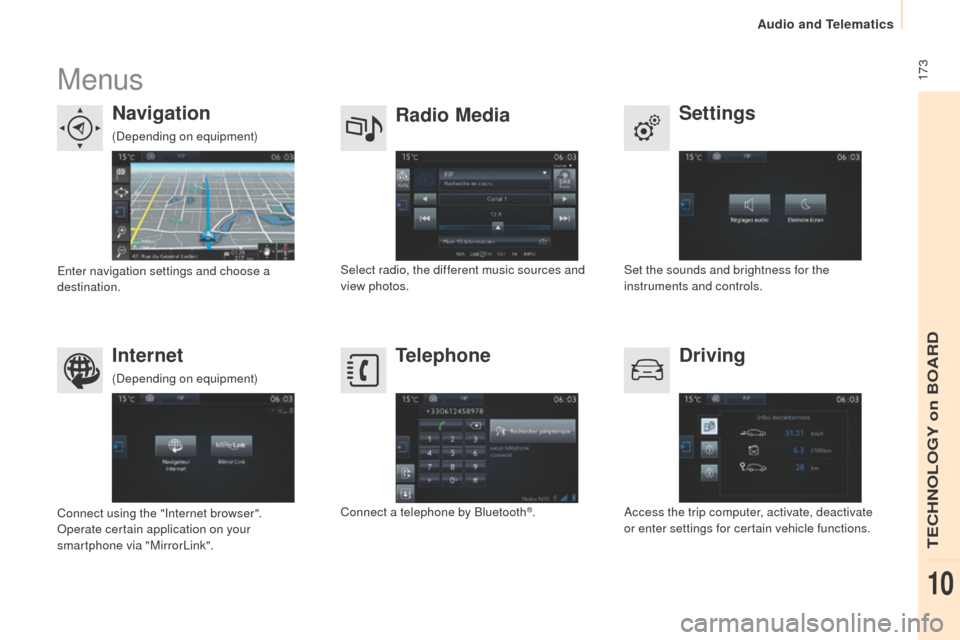
Menus
Settings
Radio Media
Navigation
Driving
Internet Telephone
Set the sounds and brightness for the
instruments and controls.
Select radio, the different music sources and
view photos.
Enter navigation settings and choose a
destination.
Access the trip computer, activate, deactivate
or enter settings for certain vehicle functions.
Connect using the "Internet browser".
Operate certain application on your
smartphone via "MirrorLink". Connect a telephone by Bluetooth
®.
(Depending on equipment)
(Depending on equipment)
TECHNOLOGY on BOARD
10
Audio and Telematics
Page 234 of 292
232
Partner-2-VU_en_Chap10b_RD45_ed01-2015
First steps
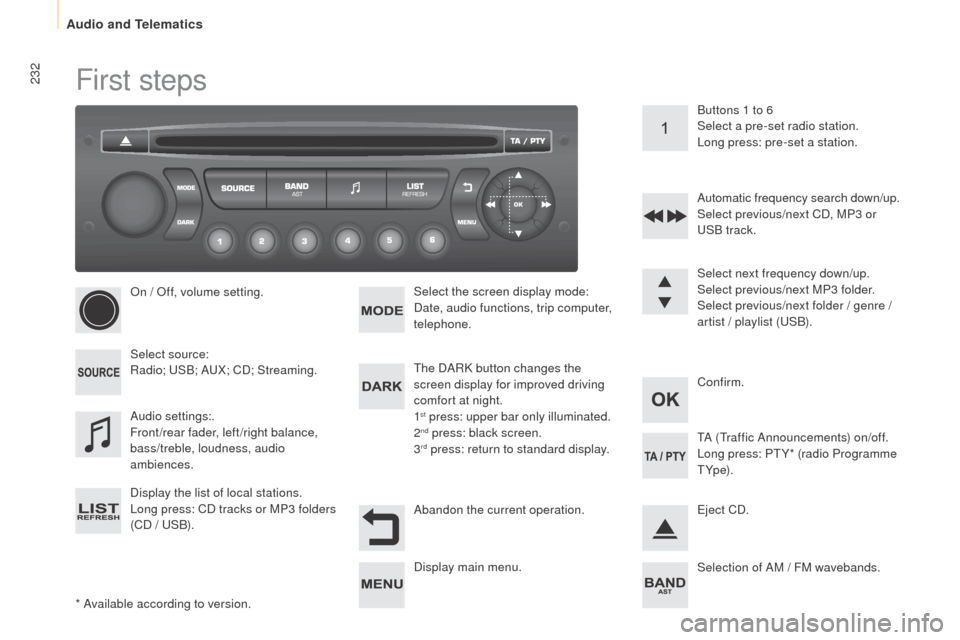
* Available according to version.On / Off, volume setting.
Select source:
Radio; USB; AUX; CD; Streaming.
Display the list of local stations.
Long press: CD tracks or MP3 folders
(CD / USB).
Select the screen display mode:
Date, audio functions, trip computer,
telephone.
Audio settings:.
Front/rear fader, left/right balance,
bass/treble, loudness, audio
ambiences. The DARK button changes the
screen display for improved driving
comfort at night.
1
st press: upper bar only illuminated.
2nd press: black screen.
3rd press: return to standard display. Select next frequency down/up.
Select previous/next MP3 folder.
Select previous/next folder / genre /
artist / playlist (USB).
Abandon the current operation. Confirm. Buttons 1 to 6
Select a pre-set radio station.
Long press: pre-set a station.
Automatic frequency search down/up.
Select previous/next CD, MP3 or
USB track.
Eject CD.
Display main menu. TA (Traffic Announcements) on/off.
Long press: PT Y* (radio Programme
T Yp e).
Selection of AM / FM wavebands.
Audio and Telematics
Page 236 of 292
234
Partner-2-VU_en_Chap10b_RD45_ed01-2015
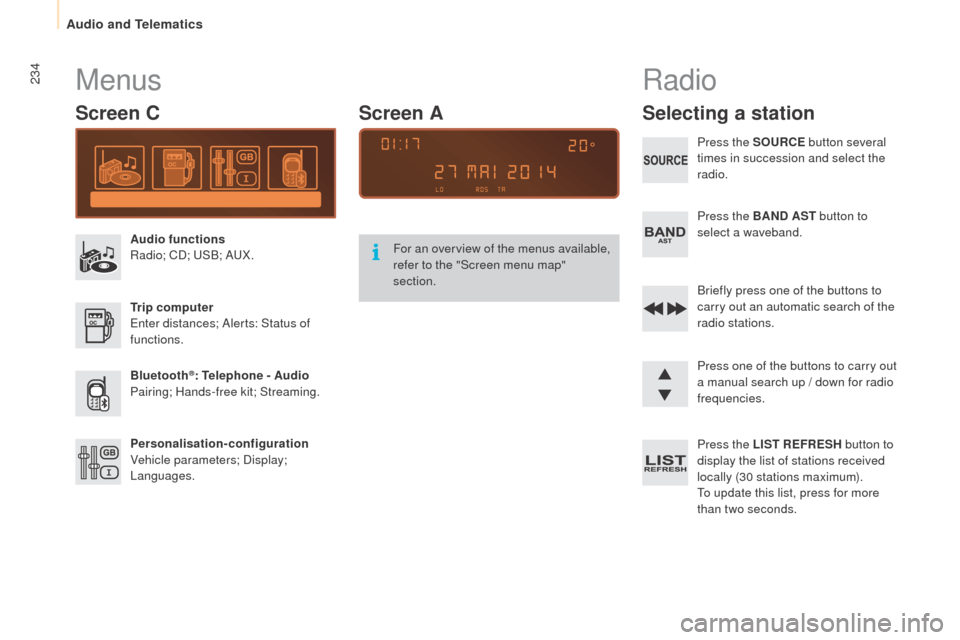
Menus
Screen C
Audio functions
Radio; CD; USB; AUX.
Trip computer
Enter distances; Alerts: Status of
functions.
Bluetooth
®: Telephone - Audio
Pairing; Hands-free kit; Streaming.
Personalisation-configuration
Vehicle parameters; Display;
Languages. For an overview of the menus available,
refer to the "Screen menu map"
section.
Screen A
Radio
Selecting a station
Press the SOURCE
button several
times in succession and select the
radio.
Press the BAND AST button to
select a waveband.
Briefly press one of the buttons to
carry out an automatic search of the
radio stations.
Press one of the buttons to carry out
a manual search up / down for radio
frequencies.
Press the LIST REFRESH button to
display the list of stations received
locally (30 stations maximum).
To update this list, press for more
than two seconds.
Audio and Telematics