Page 21 of 292
19
Partner-2-VU_en_Chap03_Pret-a-partir_ed01-2015
Good practice
Take care not to allow the remote
control to come into contact with
grease, dust, rain or a damp
environment.
A heavy object attached to the key
(key ring, ...) weighing on the shaft
of the key in the switch, may cause a
malfunction.
REMOTE CONTROL
Reinitialising the remote control
Following changing of the remote
control battery or disconnection of the
vehicle battery, the remote control may
have to be reinitialised.
Wait at least one minute before using
the remote control.
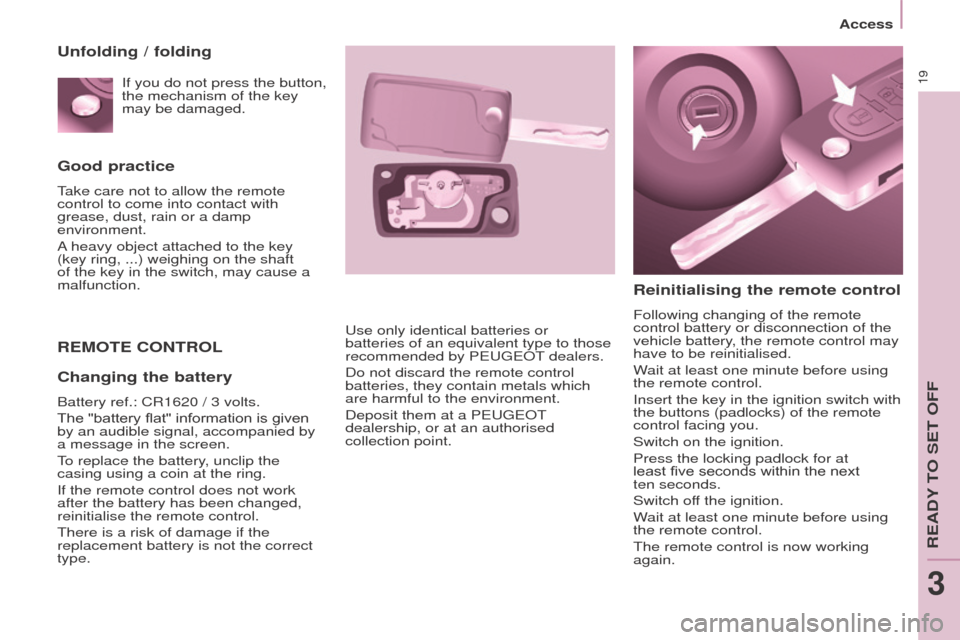
Insert the key in the ignition switch with
the buttons (padlocks) of the remote
control facing you.
Switch on the ignition.
Press the locking padlock for at
least five seconds within the next
ten
seconds.
Switch off the ignition.
Wait at least one minute before using
the remote control.
The remote control is now working
again.
Use only identical batteries or
batteries of an equivalent type to those
recommended by PEUGEOT dealers.
Do not discard the remote control
batteries, they contain metals which
are harmful to the environment.
Deposit them at a PEUGEOT
dealership, or at an authorised
collection point.
Unfolding / folding
Changing the battery
Battery ref.: CR1620 / 3 volts.
The "battery flat" information is given
by an audible signal, accompanied by
a message in the screen.
To replace the battery, unclip the
casing using a coin at the ring.
If the remote control does not work
after the battery has been changed,
reinitialise the remote control.
There is a risk of damage if the
replacement battery is not the correct
type. If you do not press the button,
the mechanism of the key
may be damaged.
Access
READY TO SET OFF
3
Page 172 of 292
170
Partner-2-VU_en_Chap10a_SMEGplus_ed01-2015
First steps
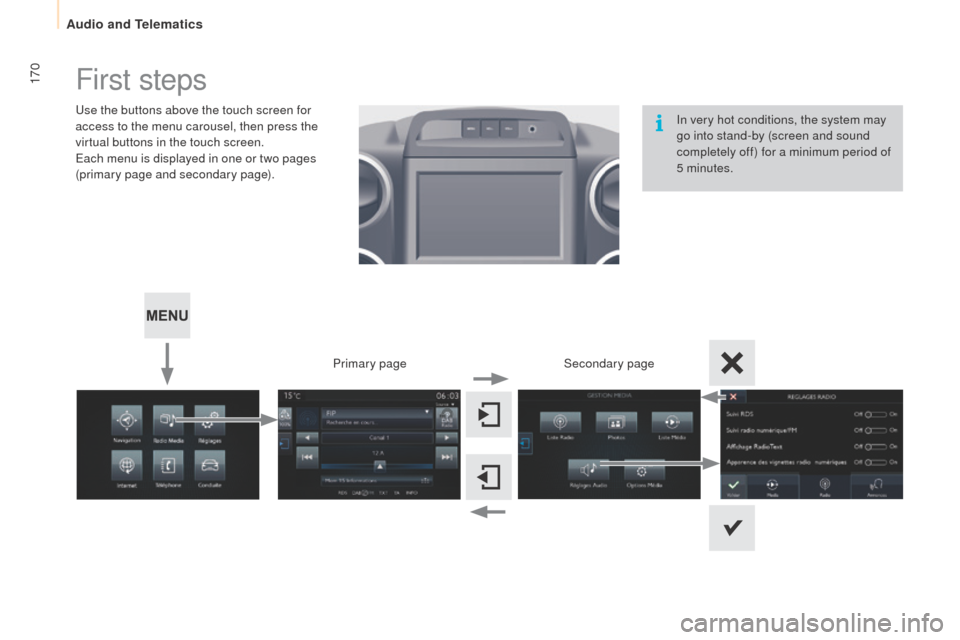
Use the buttons above the touch screen for
access to the menu carousel, then press the
virtual buttons in the touch screen.
Each menu is displayed in one or two pages
(primary page and secondary page).Secondary page
Primary page In very hot conditions, the system may
go into stand-by (screen and sound
completely off) for a minimum period of
5 minutes.
Audio and Telematics
Page 173 of 292
171
Partner-2-VU_en_Chap10a_SMEGplus_ed01-2015
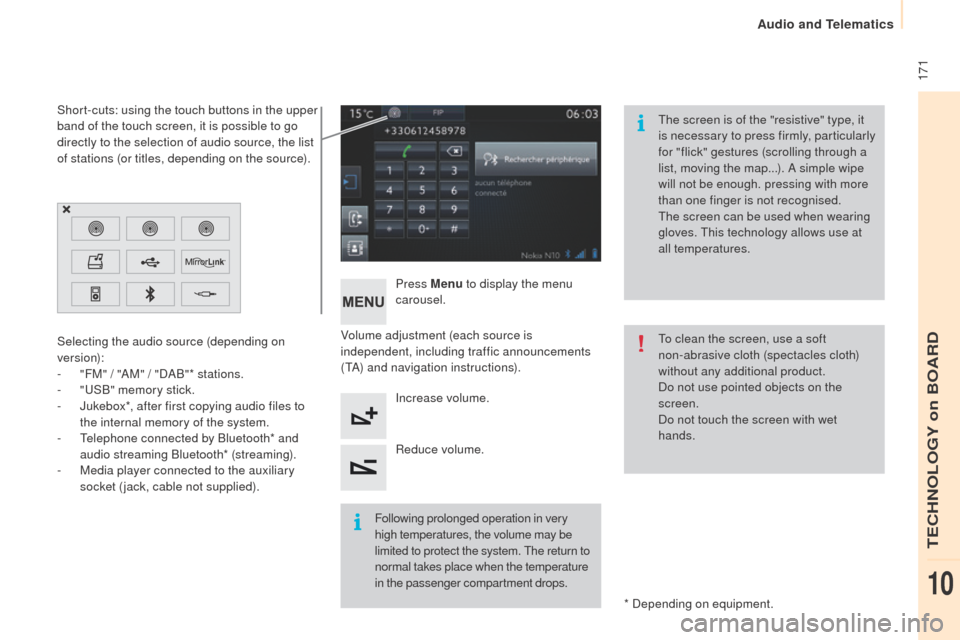
Volume adjustment (each source is
independent, including traffic announcements
(TA) and navigation instructions).Press Menu
to display the menu
carousel.
Increase volume.
Reduce volume.
Selecting the audio source (depending on
version):
-
"
FM" / "AM" / "DAB"* stations.
-
"
USB" memory stick.
-
J
ukebox*, after first copying audio files to
the internal memory of the system.
-
T
elephone connected by Bluetooth* and
audio streaming Bluetooth* (streaming).
-
M
edia player connected to the auxiliary
socket (jack, cable not supplied).
* Depending on equipment.
Short-cuts: using the touch buttons in the upper
band of the touch screen, it is possible to go
directly to the selection of audio source, the list
of stations (or titles, depending on the source).
The screen is of the "resistive" type, it
is necessary to press firmly, particularly
for "flick" gestures (scrolling through a
list, moving the map...). A simple wipe
will not be enough. pressing with more
than one finger is not recognised.
The screen can be used when wearing
gloves. This technology allows use at
all temperatures.
Following prolonged operation in very
high temperatures, the volume may be
limited to protect the system. The return to
normal takes place when the temperature
in the passenger compartment drops. To clean the screen, use a soft
non-abrasive cloth (spectacles cloth)
without any additional product.
Do not use pointed objects on the
screen.
Do not touch the screen with wet
hands.
TECHNOLOGY on BOARD
10
Audio and Telematics
Page 174 of 292
172
Partner-2-VU_en_Chap10a_SMEGplus_ed01-2015
Steering mounted controls
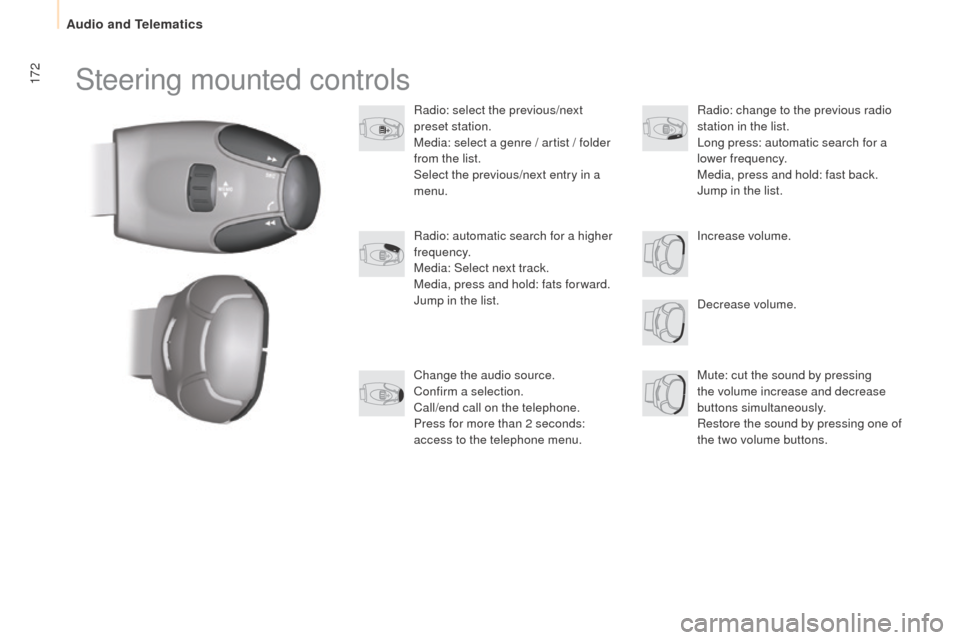
Radio: select the previous/next
preset station.
Media: select a genre / artist / folder
from the list.
Select the previous/next entry in a
menu.Decrease volume.
Radio: automatic search for a higher
frequency.
Media: Select next track.
Media, press and hold: fats for ward.
Jump in the list.
Mute: cut the sound by pressing
the volume increase and decrease
buttons simultaneously.
Restore the sound by pressing one of
the two volume buttons. Radio: change to the previous radio
station in the list.
Long press: automatic search for a
lower frequency.
Media, press and hold: fast back.
Jump in the list.
Change the audio source.
Confirm a selection.
Call/end call on the telephone.
Press for more than 2 seconds:
access to the telephone menu. Increase volume.
Audio and Telematics
Page 198 of 292
196
Partner-2-VU_en_Chap10a_SMEGplus_ed01-2015
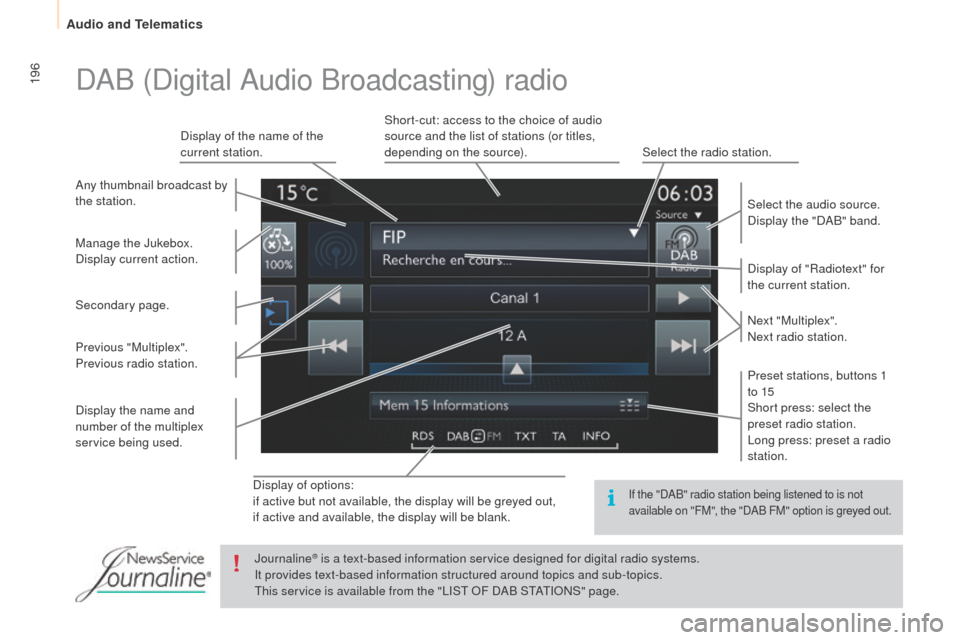
Display of options:
if active but not available, the display will be greyed out,
if active and available, the display will be blank.Display of "Radiotext" for
the current station.
Manage the Jukebox.
Display current action. Select the audio source.
Display the "DAB" band.
Display of the name of the
current station.
Short-cut: access to the choice of audio
source and the list of stations (or titles,
depending on the source).
Select the radio station.
Any thumbnail broadcast by
the station.
Preset stations, buttons 1
to 15
Short press: select the
preset radio station.
Long press: preset a radio
station. Next "Multiplex".
Next radio station.
Secondary page.
Display the name and
number of the multiplex
service being used. Previous "Multiplex".
Previous radio station.
DAB (Digital Audio Broadcasting) radio
If the "DAB" radio station being listened to is not
available on "FM", the "DAB FM" option is greyed out.
Journaline® is a text-based information service designed for digital radio systems.
I
t provides text-based information structured around topics and sub-topics.
This service is available from the "LIST OF DAB STATIONS" page.
Audio and Telematics
Page 202 of 292
200
Partner-2-VU_en_Chap10a_SMEGplus_ed01-2015
Bluetooth® audio streaming
Streaming allows audio files on your telephone
to be played via the vehicle's speakers.
Connect the telephone: see the "Telephone"
section, then " Bluetooth".
Choose the " Audio" or "All" profile.
If play does not start automatically, it may be
necessary to start the audio playback from the
telephone.
Control is from the peripheral device or by
using the audio system buttons.
Once connected in streaming mode,
the telephone is considered to be a
media source.
It is recommended that you activate
"Repeat " on the Bluetooth peripheral.
Connecting Apple® players
Connect the Apple® player to the USB port
using a suitable cable (not supplied).
Play starts automatically.
Control is via the audio system. The classifications available are those
of the portable device connected
(artists / albums / genres / playlists /
audiobooks / podcasts).
The default classification used is by
artist. To modify the classification used,
return to the first level of the menu
then select the desired classification
(playlists for example) and confirm
to go down through the menu to the
desired track.
The version of software in the audio system
may not be compatible with the generation of
your Apple
® p l aye r.
Audio and Telematics
Page 234 of 292
232
Partner-2-VU_en_Chap10b_RD45_ed01-2015
First steps
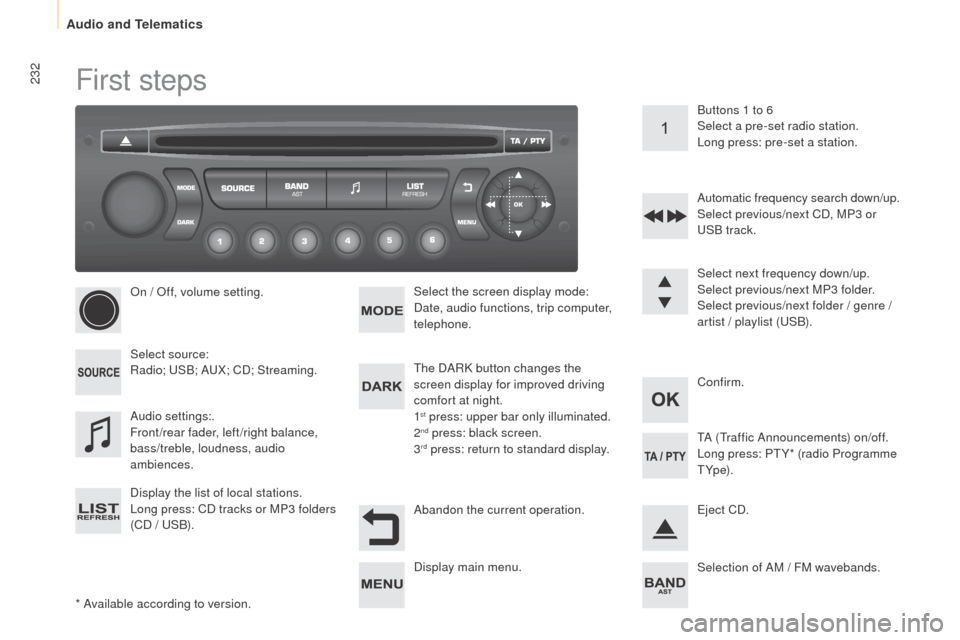
* Available according to version.On / Off, volume setting.
Select source:
Radio; USB; AUX; CD; Streaming.
Display the list of local stations.
Long press: CD tracks or MP3 folders
(CD / USB).
Select the screen display mode:
Date, audio functions, trip computer,
telephone.
Audio settings:.
Front/rear fader, left/right balance,
bass/treble, loudness, audio
ambiences. The DARK button changes the
screen display for improved driving
comfort at night.
1
st press: upper bar only illuminated.
2nd press: black screen.
3rd press: return to standard display. Select next frequency down/up.
Select previous/next MP3 folder.
Select previous/next folder / genre /
artist / playlist (USB).
Abandon the current operation. Confirm. Buttons 1 to 6
Select a pre-set radio station.
Long press: pre-set a station.
Automatic frequency search down/up.
Select previous/next CD, MP3 or
USB track.
Eject CD.
Display main menu. TA (Traffic Announcements) on/off.
Long press: PT Y* (radio Programme
T Yp e).
Selection of AM / FM wavebands.
Audio and Telematics
Page 235 of 292
233
Partner-2-VU_en_Chap10b_RD45_ed01-2015
Steering mounted controls
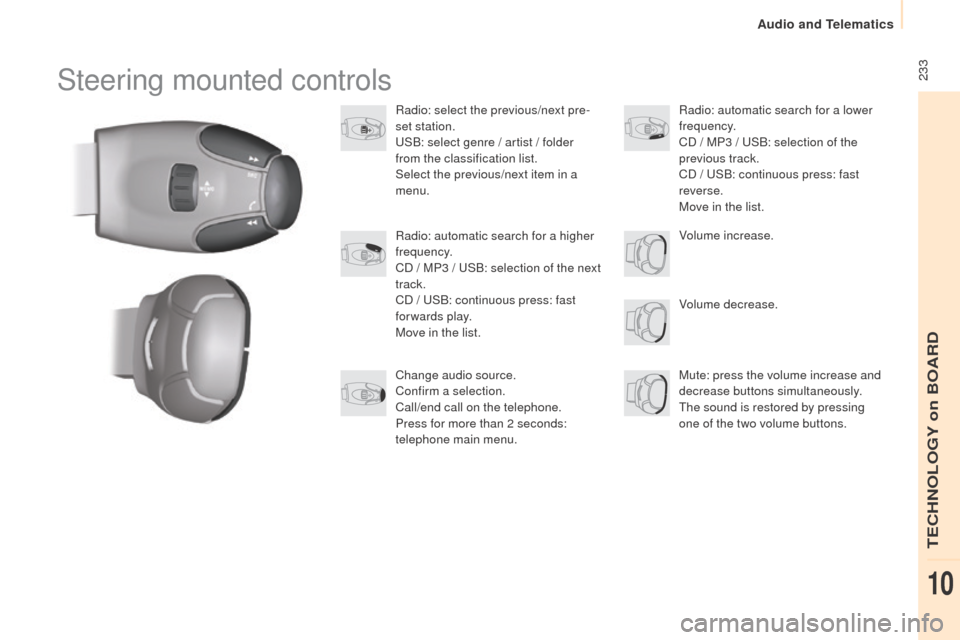
Radio: select the previous/next pre-
set station.
USB: select genre / artist / folder
from the classification list.
Select the previous/next item in a
menu.Volume decrease.
Radio: automatic search for a higher
frequency.
CD / MP3 / USB: selection of the next
track.
CD / USB: continuous press: fast
forwards play.
Move in the list.
Mute: press the volume increase and
decrease buttons simultaneously.
The sound is restored by pressing
one of the two volume buttons. Radio: automatic search for a lower
frequency.
CD / MP3 / USB: selection of the
previous track.
CD / USB: continuous press: fast
reverse.
Move in the list.
Change audio source.
Confirm a selection.
Call/end call on the telephone.
Press for more than 2 seconds:
telephone main menu. Volume increase.
TECHNOLOGY on BOARD
10
Audio and Telematics