Page 121 of 348
23. Electronic Vehicle Information Center (EVIC) Dis-
play
The Electronic Vehicle Information Center (EVIC) fea-
tures a driver-interactive display that is located in the
instrument cluster. For further information, refer to
“Electronic Vehicle Information Center (EVIC)” in “Un-
derstanding Your Instrument Panel.”
EVIC Service Item Display
•Service Warning light – If Equipped
NOTE:The “Scheduled Servicing Plan” in-
cludes car maintenance at fixed intervals, refer
to the�Maintenance�chapter. This message is
displayed automatically along with the warn-
ing light when the key is turned to MAR-ON - 1242 miles
(2,000 km) before these deadlines and reappears every
124 miles (200 km). Below 124 miles (200 km) servicing
indications are more frequent. The indication will appearin miles or kilometers according to the�Unit Of Measure-
ment�settings. When the next scheduled service is ap-
proaching and the key is turned to MAR-ON, the word
Service will appear on the display, followed by the
number of miles or kilometers left. Contact a dedicated
Alfa Romeo Dealership. The operations in the “Sched-
uled Servicing Plan” will be performed and the message
will be reset.
24. Odometer Display
The odometer display shows the total distance the ve-
hicle has been driven.
U.S. Federal regulations require that upon transfer of
vehicle ownership, the seller certify to the purchaser the
correct mileage that the vehicle has been driven. If your
odometer needs to be repaired or serviced, the repair
technician should leave the odometer reading the same
as it was before the repair or service. If s/he cannot do so,
4
UNDERSTANDING YOUR INSTRUMENT PANEL 119
Page 122 of 348

then the odometer must be set at zero, and a sticker must
be placed in the door jamb stating what the mileage was
before the repair or service. It is a good idea for you to
make a record of the odometer reading before the repair/
service, so that you can be sure that it is properly reset, or
that the door jamb sticker is accurate if the odometer
must be reset at zero.
25. Transmission Fault Indicator
This light will illuminate (together with a mes-
sage in the EVIC and a buzzer) to indicate a
transmission fault. Contact your authorized
dealer if the message remains after restarting
the engine.
26. Door Mirror Defrost Indicator
This indicator will illuminate when the Door
Mirror Defrost button on the instrument panel
is pushed to the ON position.27. Electronic Stability Control (ESC) Activation/
Malfunction Indicator Light
If the “ESC Activation/Malfunction Indicator
Light” comes on continuously with the engine
running, a malfunction has been detected in
the ESC system. If this light remains on after
several ignition cycles, and the vehicle has been driven
several miles (kilometers) at speeds greater than 30 mph
(48 km/h), see your authorized dealer as soon as possible
to have the problem diagnosed and corrected.
NOTE:
•Each time the ignition is turned to ON/RUN, the
ESC system will be ON, even if it was turned off
previously.
•The ESC system will make buzzing or clicking
sounds when it is active. This is normal; the sounds
will stop when ESC becomes inactive following the
maneuver that caused the ESC activation.
120 UNDERSTANDING YOUR INSTRUMENT PANEL
Page 138 of 348
NOTE:The “Scheduled Servicing Plan” includes car
maintenance at fixed intervals, refer to the�Maintenance�
chapter. This message is displayed automatically along
with the
warning light when the key is turned to
MAR-ON - 1242 miles (2,000 km) before these dead-
lines and reappears every 124 miles (200 km). Below
124 miles (200 km) servicing indications are more
frequent. The indication will appear in miles or kilo-
meters according to the�Unit Of Measurement�set-
tings. When the next scheduled service is approaching
and the key is turned to MAR-ON, the word Service
will appear on the display, followed by the number of
miles or kilometers left. Contact a dedicated Alfa
Romeo Dealership. The operations in the “Scheduled
Servicing Plan” will be performed and the message
will be
reset.Day Lights — If Equipped
This function may be used to activate / deactivate the
Daytime Running Lamps.
Proceed as follows to switch this function on or off:
1. Briefly push theSET/BACKbutton to display the
three submenus.
2. Briefly push theSET/BACKbutton. “On” or “Off”
will flash on the display (according to previous set-
ting).
3. Push and release the UP
or DOWNbutton for
setting.
4. Briefly push theSET/BACKbutton to go back to the
menu screen, or push and hold the button (approxi-
mately one second) to go back to the main screen
without storing the settings.
136 UNDERSTANDING YOUR INSTRUMENT PANEL
Page 139 of 348
Exit Menu
This function closes the initial menu screen.
Briefly push theSET/BACKbutton to go back to the
main screen.
Push and release the
button to return to the first
menu option (Speed Buzzer).
Push and releasethebutton to return to the last
menu option (Daylights).
Change Engine Oil Indicator System
Your vehicle is equipped with an engine oil
change indicator system. The “Change Engine Oil” mes-
sage will flash in the EVIC display for approximately 10
seconds and the Oil Pressure Warning Light will illumi-
nate. The “Change Engine Oil” message in the EVIC and
the Oil Pressure Warning Light will turn off after ap-
proximately 10 seconds.NOTE:The reset of the Oil Change message must be
performed by an authorized dealer.
Trip Computer
The Trip Computer is located in the instrument cluster. It
features a driver-interactive display (displays informa-
tion such as trip information, range, fuel consumption,
average speed, and travel time).
Trip Button
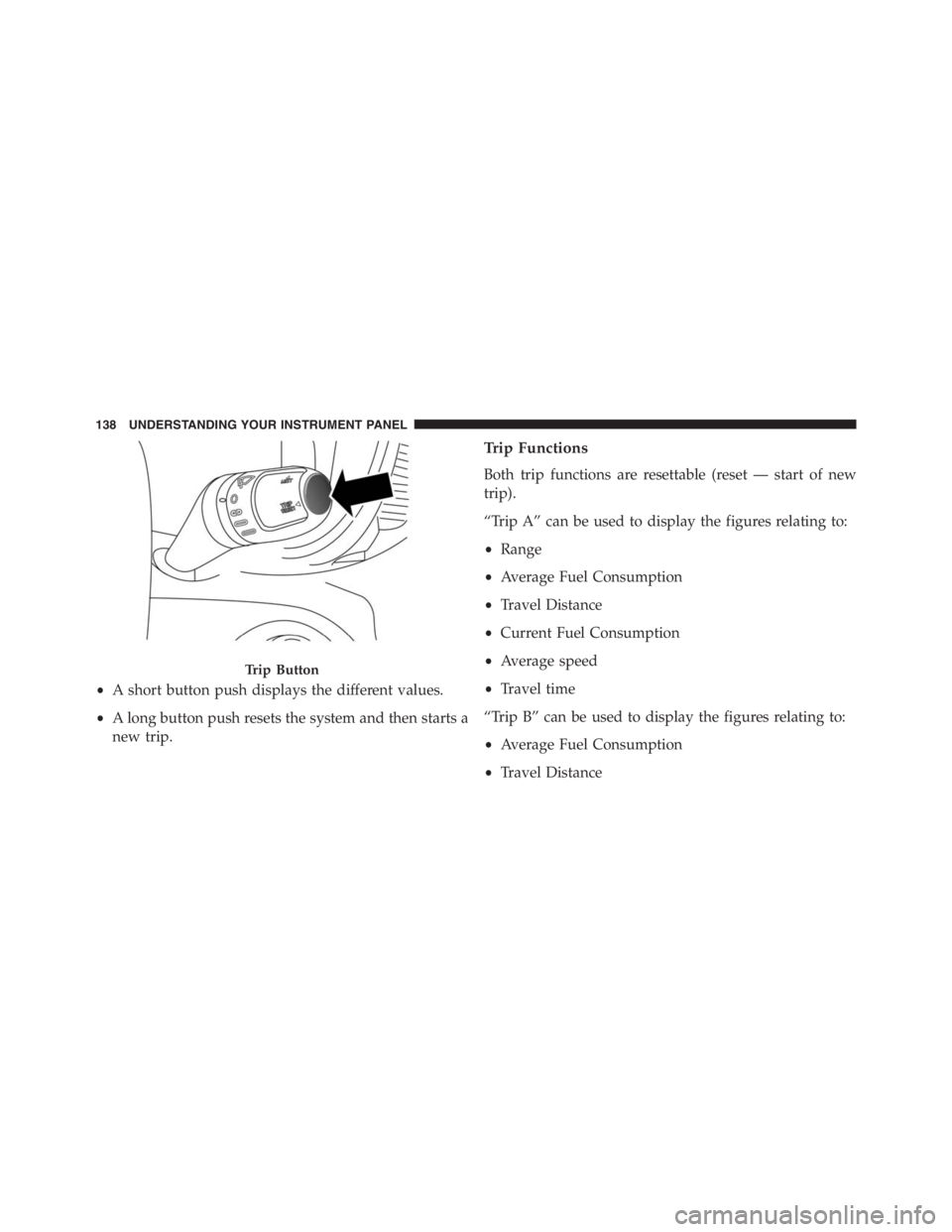
TheTRIPbutton, located on the right steering column
stalk, can be used to display and to reset the trip values.
4
UNDERSTANDING YOUR INSTRUMENT PANEL 137
Page 140 of 348
•A short button push displays the different values.
•A long button push resets the system and then starts a
new trip.
Trip Functions
Both trip functions are resettable (reset — start of new
trip).
“Trip A” can be used to display the figures relating to:
•Range
•Average Fuel Consumption
•Travel Distance
•Current Fuel Consumption
•Average speed
•Travel time
“Trip B” can be used to display the figures relating to:
•Average Fuel Consumption
•Travel Distance
Trip Button
138 UNDERSTANDING YOUR INSTRUMENT PANEL
Page 141 of 348
•Average speed
•Travel time
NOTE: “Trip B” functions may be excluded (see “Trip
B Data”). “Range” and “Instantaneous consumption”
cannot be reset.
New Trip
To reset:
•Push and hold theTRIPbutton to reset the system
manually.
•When the “Trip distance” reaches 9999.9 miles or
kilometers or when the “Travel time” reaches 999.59
(999 hours and 59 minutes), the system is reset auto-
matically.
•Disconnecting/Reconnecting the battery resets the
system.NOTE:If the reset operation occurs in the presence of
the screens concerning Trip A or Trip B, only the infor-
mation associated with Trip A or Trip B functions will be
reset.
Start Of Trip Procedure
With the ignition on, push and hold theTRIPbutton for
over one second to reset.
Exit Trip
To exit the Trip function, wait until all the values have
been displayed or hold theMENUbutton for longer than
one second.
Briefly push and release theMENUbutton to go back to
the menu screen or push and hold theMENU(approxi-
mately one second) to go back to the main screen without
storing settings.
4
UNDERSTANDING YOUR INSTRUMENT PANEL 139
Page 143 of 348

•Distance less than 30 miles (or 50 km).
•The vehicle is parked for a long time with the engine
running.
NOTE:The range depends on several factors: driving
style, type of route (freeway, residential, mountain roads,
etc.), conditions of use of the car (load, tire pressure, etc.).
Trip planning must take into account the above notes.
Average Fuel Consumption
This value shows the approximate average consumption
since the last reset.
Travel Distance
This value shows the distance covered since the last reset.
Current Fuel Consumption
This indicates the fuel consumption. The value is con-
stantly updated. The message “----” will appear on the
display if the car is parked with the engine running.
Average Speed
This value shows the vehicle’s average speed as a func-
tion of the overall time elapsed since the last reset.
Travel Time
This value shows the time elapsed since the last reset.
Tire Pressure Values
This screen will display OK at each Tire Pressure Moni-
toring sensor. Refer to “Tire Pressure Monitoring System”
in “Starting And Operating.”
RADIO SYSTEM
The radio system consists of:
•Supply cables for radio, speakers and aerial;
•Radio;
•Aerial on front bumper;
4
UNDERSTANDING YOUR INSTRUMENT PANEL 141
Page 180 of 348

This guarantees greater braking stability for the vehicle,
preventing sudden locking of the rear wheels and the
consequent instability of the vehicle.
Four-Wheel Anti-Lock Brake System (ABS)
The Four-Wheel ABS is designed to aid the driver in
maintaining vehicle control under adverse braking con-
ditions. The system operates with a separate computer to
modulate hydraulic pressure, to prevent wheel lock-up
and to help avoid skidding on slippery surfaces.
The system’s pump motor runs during an ABS stop to
provide regulated hydraulic pressure. The pump motor
makes a low humming noise during operation, which is
normal.
The ABS includes an amber ABS Warning Light. When
the light is illuminated, the ABS is not functioning. The
system reverts to standard non-anti-lock brakes. Turningthe ignition Off and On again may reset the ABS if the
fault detected was only momentary.
WARNING!
•When the ABS intervenes and you feel the brake
pedal pulsating, do not reduce the pressure, but
hold it down firmly and confidently; in doing so
you will brake in the shortest distance possible,
depending on the current road conditions.
•For maximum efficiency of the braking system, a
bedding-in period of about 311 miles (500 km) is
required: during this period it is advisable to avoid
sharp, repeated and prolonged braking.
•If the ABS intervenes, this indicates that the grip of
the tires on the road is nearing its limit: you must
slow down to a speed compatible with the avail-
able grip.
(Continued)
178 STARTING AND OPERATING