Page 30 of 348

When one of the two buttons is pushed briefly, the
window moves in stages; if the button is held down to
open,�continuous automatic�operation is activated.
If the button is pushed again the window will stop in its
current position. If the button is pushed for several
seconds, the window lowers automatically (only with
ignition key in MAR-ON position).
Continuous Automatic Operation
This is activated by pushing one of the two buttons for
longer than half a second. The window will stop when it
is fully opened, or when the button is pushed again.
It can be used on both the driver side and passenger side,
only for lowering the window.
Electric Window System Reset
After a break in power supply for the control units
(battery replaced or disconnected or protective fuses forthe electric window control units replaced), the auto-
matic operation of the windows must be restored.
The restoration procedure must be performed as de-
scribed below with the doors closed:
1. Completely open the driver’s door window keeping
the operating button pushed for at least three seconds
after the (lower) end of travel position is reached.
2. Completely raise the driver side window and hold the
button down for at least three seconds once the
(upper) end of travel position has been reached.
3. Proceed in the same way as described in points 1 and
2 for the passenger side door.
4. Make sure that the reset is correct by checking that the
windows work automatically.
28 THINGS TO KNOW BEFORE STARTING YOUR VEHICLE
Page 54 of 348
skin, eyes, nose, or throat. If you have skin or eye
irritation, rinse the area with cool water. For nose or
throat irritation, move to fresh air. If the irritation
continues, see your doctor. If these particles settle on
your clothing, follow the garment manufacturer ’s in-
structions for cleaning.
Do not drive your vehicle after the air bags have de-
ployed. If you are involved in another collision, the air
bags will not be in place to protect you.
WARNING!
Deployed air bags and seat belt pretensioners cannot
protect you in another collision. Have the air bags,
seat belt pretensioners, and the seat belt retractor
assemblies replaced by an authorized dealer imme-
diately. Also, have the Occupant Restraint Controller
System serviced as well.NOTE:
•Air bag covers may not be obvious in the interior trim,
but they will open during air bag deployment.
•After any collision, the vehicle should be taken to an
authorized dealer immediately.
Enhanced Accident Response System
In the event of an impact, if the communication network
remains intact, and the power remains intact, depending
on the nature of the event the ORC will determine
whether to have the Enhanced Accident Response Sys-
tem perform the following functions:
•Cut off fuel to the engine.
•Flash hazard lights as long as the battery has power or
until the ignition is cycled to OFF.
52 THINGS TO KNOW BEFORE STARTING YOUR VEHICLE
Page 55 of 348
•Turn on the interior lights, which remain on as long as
the battery has power or until the ignition is cycled to
OFF.
•Unlock the doors automatically.
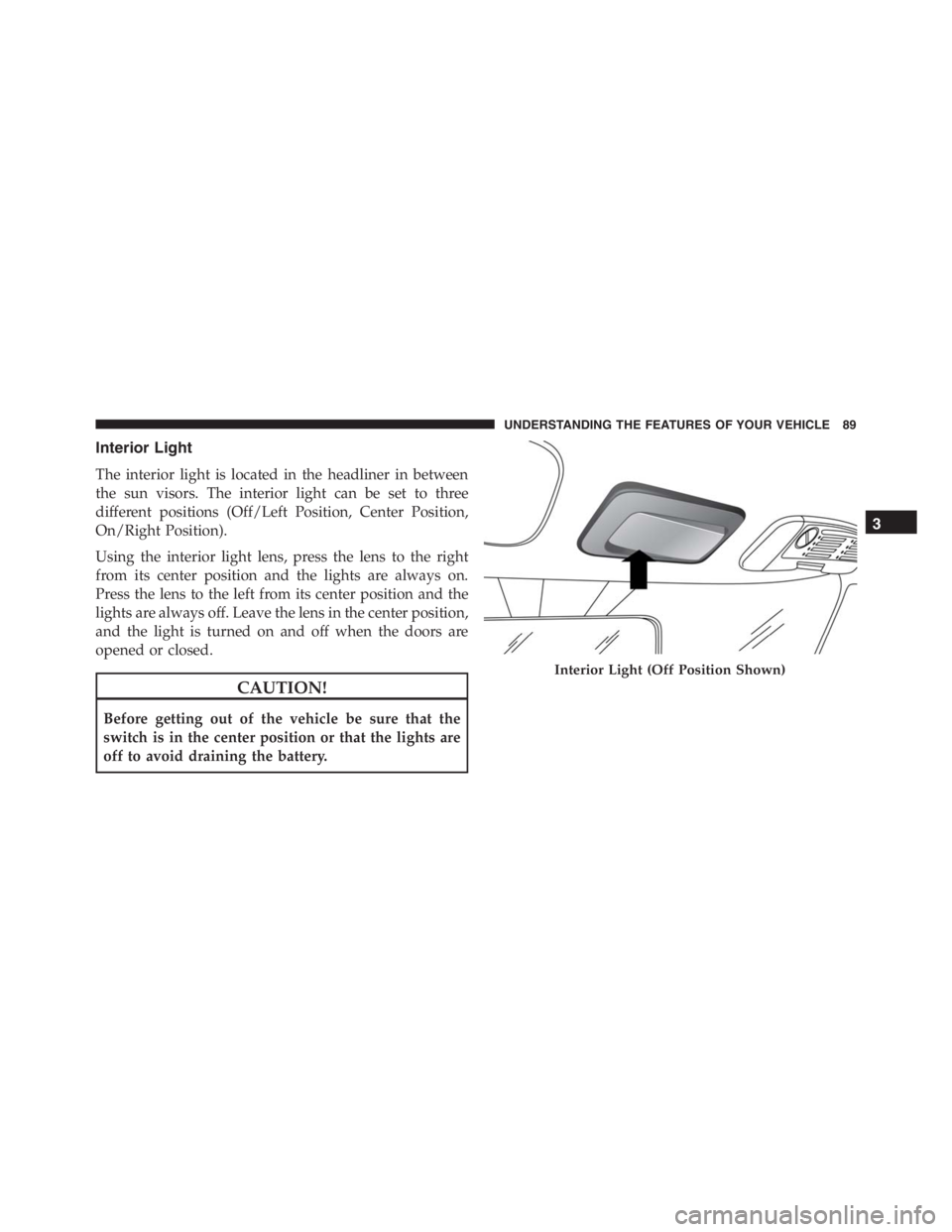
System Reset Procedure
Depending on the nature of the event the left and right
turn signal lights, located in the instrument panel, may
both be blinking and will continue to blink until the
ignition switch is turned to the OFF position. In order to
move your vehicle to the side of the road, you must
follow the system reset procedure.Customer Action Customer Will See
1. Turn ignition OFF.
(Turn Signal Switch Must
be placed in Neutral
State).
2. Turn ignition ON. Left Turn Light is OFF.
Right Turn Light
BLINKS.
3. Turn Right Turn Signal
Switch ON.Right Turn Light is ON
SOLID. Left Turn Light
BLINKS.
4. Turn Left Turn Signal
Switch ON.Left Turn Light is ON
SOLID. Right Turn Light
BLINKS.
5. Turn Right Turn Signal
Switch ON.Right Turn Light is ON
SOLID. Left Turn Light
BLINKS.
2
THINGS TO KNOW BEFORE STARTING YOUR VEHICLE 53
Page 56 of 348

6. Turn Left Turn Signal
Switch ON.Left Turn Light is ON
SOLID. Right Turn Light
is ON SOLID.
7. Turn Left Turn Signal
Switch OFF. (Turn Signal
Switch Must be placed in
Neutral State).Left Turn Light is OFF.
Right Turn Light is OFF.
8. Turn ignition OFF. System is now reset and
the engine may be
started.
9. Turn Hazard Flashers
OFF (Manually).
If a reset procedure step is not completed within 45
seconds, then the turn signal lights will turn off and the
reset procedure must be performed again in order to be
successful.Air Bag Warning Light
The air bags must be ready to inflate for your protection
in a collision. The Air Bag Warning Light
monitors the internal circuits and interconnect-
ing wiring associated with air bag system elec-
trical components.
The ORC monitors the readiness of the electronic parts of
the air bag system whenever the ignition switch is in the
START or ON/RUN position. If the ignition switch is in
the OFF position the air bag system is not on and the air
bags will not inflate.
The ORC contains a backup power supply system that
may deploy the air bags even if the battery loses power or
it becomes disconnected prior to deployment.
Also, the ORC turns on the Air Bag Warning Light in the
instrument panel for approximately four to eight seconds
for a self-check when the ignition is first turned to the
54 THINGS TO KNOW BEFORE STARTING YOUR VEHICLE
Page 91 of 348
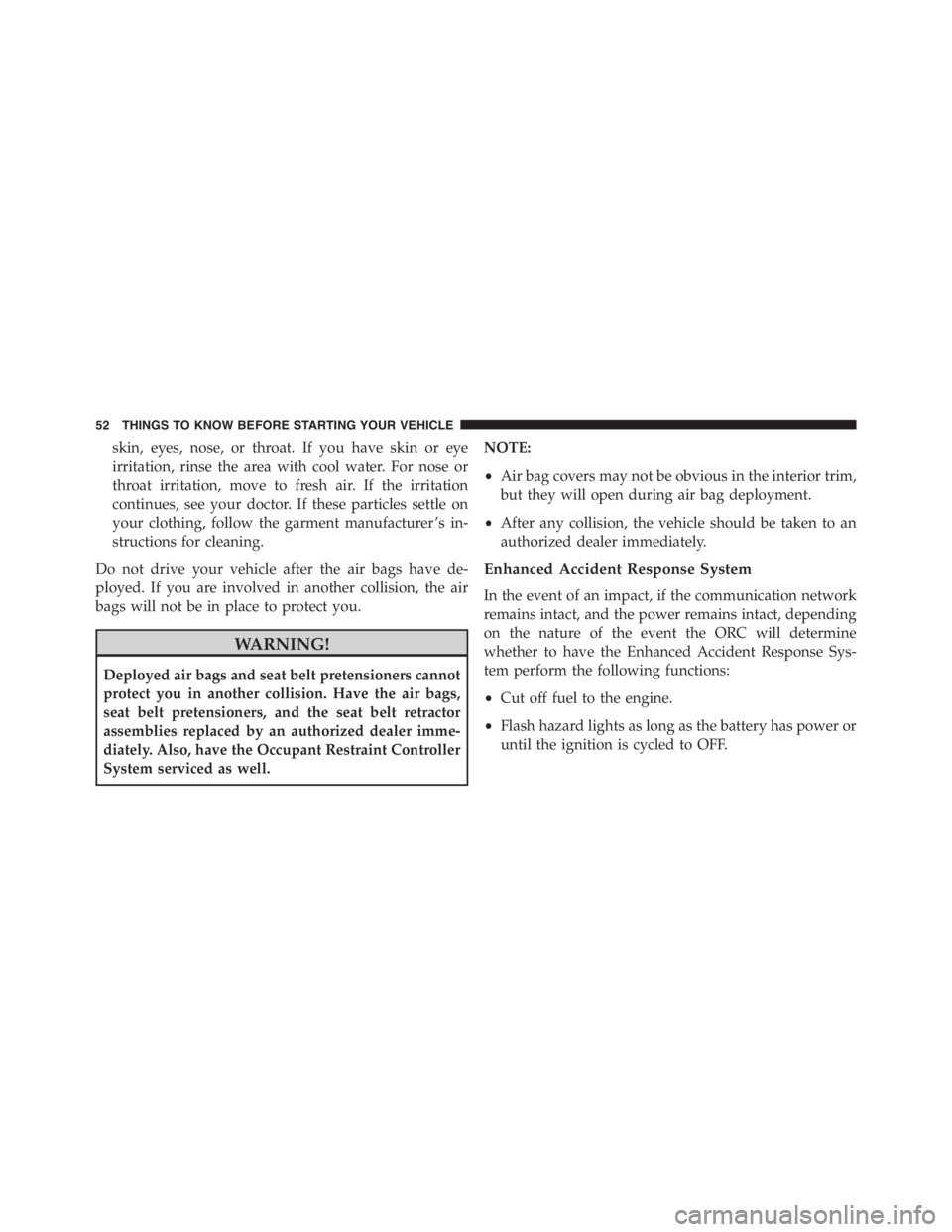
Interior Light
The interior light is located in the headliner in between
the sun visors. The interior light can be set to three
different positions (Off/Left Position, Center Position,
On/Right Position).
Using the interior light lens, press the lens to the right
from its center position and the lights are always on.
Press the lens to the left from its center position and the
lights are always off. Leave the lens in the center position,
and the light is turned on and off when the doors are
opened or closed.
CAUTION!
Before getting out of the vehicle be sure that the
switch is in the center position or that the lights are
off to avoid draining the battery.
Interior Light (Off Position Shown)
3
UNDERSTANDING THE FEATURES OF YOUR VEHICLE 89
Page 104 of 348
WARNING!
To avoid serious injury or death:
•Only devices designed for use in this type of outlet
should be inserted into any 12 Volt outlet.
•Do not touch with wet hands.
•Close the lid when not in use and while driving the
vehicle.
•If this outlet is mishandled, it may cause an electric
shock and failure.
CAUTION!
•Many accessories that can be plugged in draw
power from the vehicle’s battery, even when not in
use (i.e., cellular phones, etc.). Eventually, if
plugged in long enough, the vehicle’s battery will
discharge sufficiently to degrade battery life and/or
prevent the engine from starting.
•Accessories that draw higher power (i.e., coolers,
vacuum cleaners, lights, etc.) will degrade the bat-
tery even more quickly. Only use these intermit-
tently and with greater caution.
•After the use of high power draw accessories, or
long periods of the vehicle not being started (with
accessories still plugged in), the vehicle must be
driven a sufficient length of time to allow the
generator to recharge the vehicle’s battery.
102 UNDERSTANDING THE FEATURES OF YOUR VEHICLE
Page 141 of 348
•Average speed
•Travel time
NOTE: “Trip B” functions may be excluded (see “Trip
B Data”). “Range” and “Instantaneous consumption”
cannot be reset.
New Trip
To reset:
•Push and hold theTRIPbutton to reset the system
manually.
•When the “Trip distance” reaches 9999.9 miles or
kilometers or when the “Travel time” reaches 999.59
(999 hours and 59 minutes), the system is reset auto-
matically.
•Disconnecting/Reconnecting the battery resets the
system.NOTE:If the reset operation occurs in the presence of
the screens concerning Trip A or Trip B, only the infor-
mation associated with Trip A or Trip B functions will be
reset.
Start Of Trip Procedure
With the ignition on, push and hold theTRIPbutton for
over one second to reset.
Exit Trip
To exit the Trip function, wait until all the values have
been displayed or hold theMENUbutton for longer than
one second.
Briefly push and release theMENUbutton to go back to
the menu screen or push and hold theMENU(approxi-
mately one second) to go back to the main screen without
storing settings.
4
UNDERSTANDING YOUR INSTRUMENT PANEL 139
Page 228 of 348
HAZARD WARNING FLASHER
The Hazard Warning flasher switch is located on the
center console.
Press the switch to turn on the Hazard Warning
flasher. When the switch is activated, all direc-
tional turn signals will flash on and off to warn oncoming
traffic of an emergency. Press the switch a second time to
turn off the Hazard Warning flasher.
This is an emergency warning system and it should not
be used when the vehicle is in motion. Use it when your
vehicle is disabled and it is creating a safety hazard for
other motorists.
When you must leave the vehicle to seek assistance, the
Hazard Warning flasher will continue to operate even
though the ignition is placed in the OFF position.
NOTE:With extended use the Hazard Warning flasher
may wear down your battery.
IF YOUR ENGINE OVERHEATS
In any of the following situations, you can reduce the
potential for overheating by taking the appropriate ac-
tion.
•On the highways — slow down.
•In city traffic — while stopped, place the transmission
in NEUTRAL, but do not increase engine idle speed.
NOTE:There are steps that you can take to slow down
an impending overheat condition:
•If your air conditioner (A/C) is on, turn it off. The A/C
system adds heat to the engine cooling system and
turning the A/C off can help remove this heat.
•You can also turn the temperature control to maximum
heat, the mode control to floor and the blower control
to high. This allows the heater core to act as a
supplement to the radiator and aids in removing heat
from the engine cooling system.
226 WHAT TO DO IN EMERGENCIES