2015 NISSAN LEAF battery
[x] Cancel search: batteryPage 220 of 412
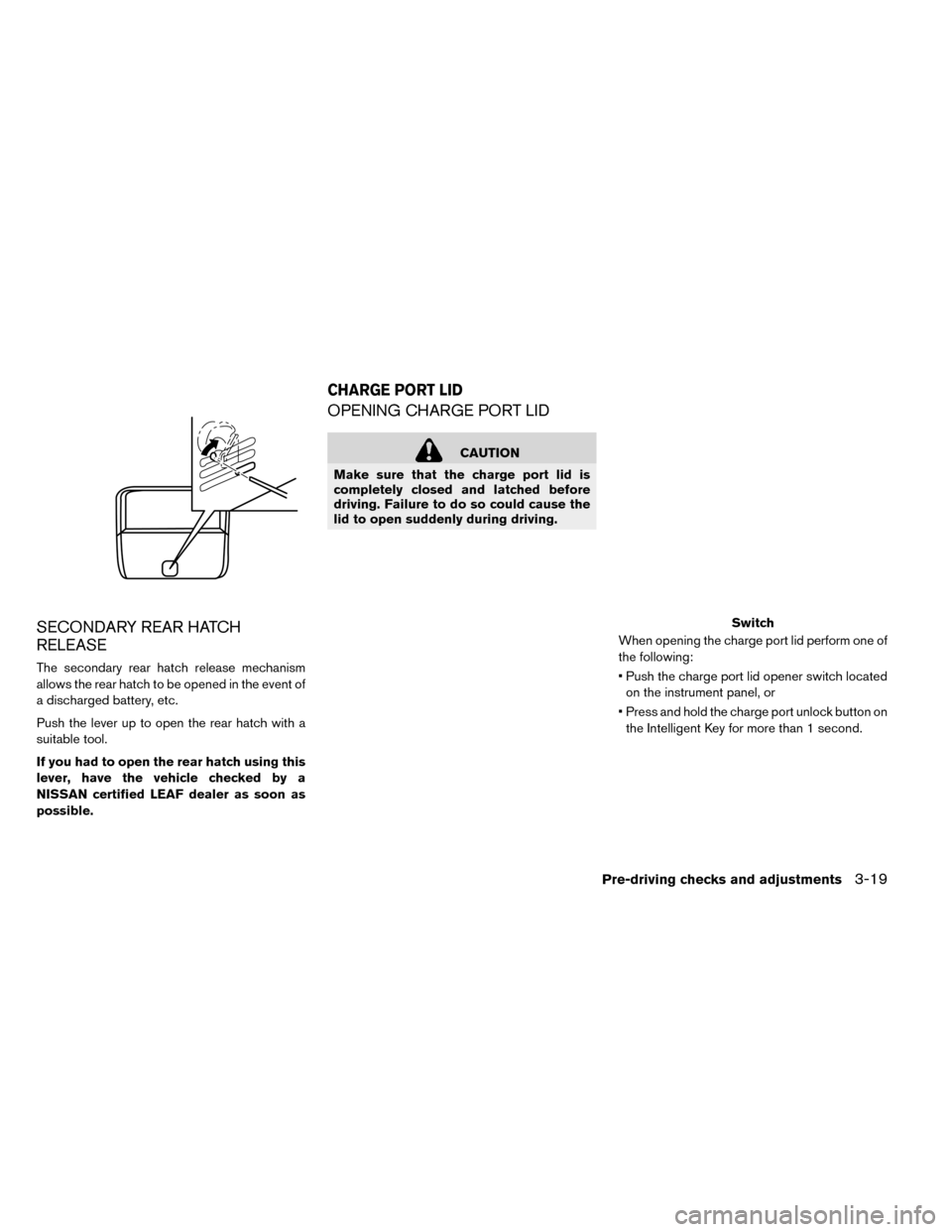
SECONDARY REAR HATCH
RELEASE
The secondary rear hatch release mechanism
allows the rear hatch to be opened in the event of
a discharged battery, etc.
Push the lever up to open the rear hatch with a
suitable tool.
If you had to open the rear hatch using this
lever, have the vehicle checked by a
NISSAN certified LEAF dealer as soon as
possible.
OPENING CHARGE PORT LID
CAUTION
Make sure that the charge port lid is
completely closed and latched before
driving. Failure to do so could cause the
lid to open suddenly during driving.
When opening the charge port lid perform one of
the following:
• Push the charge port lid opener switch locatedon the instrument panel, or
• Press and hold the charge port unlock button on the Intelligent Key for more than 1 second.
Switch
CHARGE PORT LID
Pre-driving checks and adjustments3-19
Page 241 of 412
Air flow control:
Press the MODE button to change the air flow
mode.
— Air flows from the center and sideventilators.
— Air flows from the center and sideventilators and foot outlets.
— Air flows mainly from the footoutlets.
— Air flows from the defroster outletsand foot outlets.
Temperature control:
Turn the temperature control dial to set the de-
sired temperature.
The temperature range is between 60°F (16°C)
and 90°F (32°C) .
Ventilation:
1. Press the AUTO button so that the indicator light turns off.
2. Press the HEAT button and A/C button if the indicator lights are on so that both indicator
lights turn off.
Note
The ventilation mode requires a lower
power consumption, so cruising distance
will increase.
Air recirculation:
Press the intake air control
button to
change the air circulation mode. When the indi-
cator light illuminates, the flowing air is recircu-
lated inside the vehicle.
Outside air circulation:
Press the intake air control
button to
change the air circulation mode. When the indi-
cator light does not illuminate, the flowing air is
drawn from outside the vehicle.
Automatic air intake control:
To set the automatic control mode, press and
hold the
(intake air control) button. The
indicator light will blink twice and the inside/
outside circulation will then be controlled auto-
matically. When in automatic mode, the indicator
light will come on when inside air recirculation is
active.
Note
• Odors from inside and outside the vehicle
can build up in the air conditioner unit.
Odor can enter the passenger compart-
ment through the vents.
• When parking, set the heater and air con-
ditioner controls to turn off air recircula-
tion to allow fresh air into the passenger
compartment. This should help reduce
odors inside the vehicle.
Climate Ctrl. Timer
The air conditioner starts to operate at the time of
day and day of the week specified in the settings.
This pre heats or pre cools the vehicle to a factory
preset temperature in the passenger compart-
ment before driving while the charger is con-
nected to vehicle. This helps reduce power con-
sumption from the Li-ion battery.
As the temperature is set to the factory default
setting, the user cannot adjust the temperature.
The Climate Ctrl. Timer operates the air condi-
tioner using power from the charger. Electric
power from the Li-ion battery is not used.
Once the Climate Ctrl. Timer is set, it automati-
cally starts when the set time is reached. It is
4-14Display screen, heater, air conditioner, audio and phone systems
Page 249 of 412
Air flow control:
Press the MODE button to change the air flow
mode.
— Air flows from the center and sideventilators.
— Air flows from the center and sideventilators and foot outlets.
— Air flows mainly from the footoutlets.
— Air flows from the defroster outletsand foot outlets.
Temperature control:
Press the temperature control
,
button to set the desired temperature.
The temperature range is between 60°F (18°C)
and 90°F (32°C) .
Ventilation:
1. Press the AUTO button so that the indicator light turns off.
2. Press the HEAT button and A/C button if the indicator lights are on so that both indicator
lights turn off.
Note
The ventilation mode requires a lower
power consumption, so cruising distance
will increase.
Air recirculation:
Press the air recirculation
button to
change the air circulation mode. When the indi-
cator light illuminates, the flowing air is recircu-
lated inside the vehicle.
Outside air circulation:
Press the intake air control
button to
change the air circulation mode. When the indi-
cator light does not illuminate, the flowing air is
drawn from outside the vehicle.
Automatic air intake control:
To set the automatic control mode, press and
hold the
(intake air control) button. The
indicator light will blink twice and the inside/
outside circulation will then be controlled auto-
matically. When in automatic mode, the indicator
light will come on when inside air recirculation is
active.
Note
• Odors from inside and outside the vehicle
can build up in the air conditioner unit.
Odor can enter the passenger compart-
ment through the vents.
• When parking, set the heater and air con-
ditioner controls to turn off air recircula-
tion to allow fresh air into the passenger
compartment. This should help reduce
odors inside the vehicle.
Climate Ctrl. Timer
The air conditioner starts to operate at the time of
day and day of the week specified in the settings.
This pre heats or pre cools the vehicle to a set
temperature in the passenger compartment be-
fore driving while the charger is connected to
vehicle. This help reduce power consumption
from the Li-ion battery.
The Climate Ctrl. Timer operates the air condi-
tioner using power from the charger. Electric
power from the Li-ion battery is not used.
The Climate Ctrl. Timer function allows two dif-
ferent timer settings. Each timer charge function
can be set to activate on a different day of the
week.
4-22Display screen, heater, air conditioner, audio and phone systems
Page 252 of 412
8. The indicator of “Timer 1” illuminates after theClimate Ctrl. Timer is set. Use the same pro-
cedure to set the Timer 2 setting.
9. Place the power switch to the OFF position, and then connect the charge connector to the
vehicle.
Operation tips:
• The Climate Ctrl. Timer will only start when the power switch is in the “OFF” position. Always
turn the power switch to the “OFF” position after
the Climate Ctrl. Timer is set.
• Touch “Timer 1” or “Timer 2” to turn off the Climate Ctrl. Timer function. After this operation
has been performed, the indicator turns off and
the Climate Ctrl. Timer function will be turned
off. The start and stop time settings are not
deleted even if the Climate Ctrl. Timer function
is turned off. • If OFF is selected for a day of the week, the
Climate Ctrl. timer will not operate on that day.
The system will wait until the next charging timer
set to perform charging.
• While the Climate Ctrl. Timer operates, the Cli- mate Ctrl. Timer indicator and the charging sta-
tus indicator lights flash. If the Climate Ctrl.
Timer is set to activate, the Climate Ctrl. Timer
indicator illuminates.
• If the timer charge function and the Climate Ctrl. Timer are in operation at the same time due to
an overlap of the timer settings, either function
can be set to be preferentially provided with
electric power. For the details of “Timer Priority”
settings, refer to separate LEAF Navigation
System Owner’s Manual.
• The temperature in the passenger compartment may not be comfortable if entering the vehicle
too soon before or too long after the scheduled
time of departure.
• Air conditioning is limited to the capacity of the electric power when the charge connector is
connected. Therefore, the temperature may not
reach the factory default setting due to limita-
tions in air conditioning performance, if ambient
temperature is excessively high or low, or if the charge connector is connected to a 120V
outlet.
• While the battery is being charged, the Climate Ctrl. Timer cannot be operated until the Li-ion
battery available charge gauge reached the full
mark. When the battery is not being charged,
the Climate Ctrl. Timer can be operated, even if
the Li-ion battery available charge gauge has
not reached the full mark.
• When the climate control is set on first priority, the Climate Ctrl. Timer works regardless of the
remaining battery energy.
• If the Climate Ctrl. Timer starts its operation while the vehicle is being charged, the charging
time will be prolonged.
• Operating the Climate Ctrl. Timer or remote climate control in an environment with low tem-
perature may decrease the rate of battery
charge.
• The Climate Ctrl. Timer settings cannot be modified while it is operating. If timer settings
are modified while the Climate Ctrl. Timer is
operating, these changes will be reflected the
next time the Climate Ctrl. Timer operates.
Display screen, heater, air conditioner, audio and phone systems4-25
Page 253 of 412
• When charging is set as the first priority, theClimate Ctrl. Timer does not start until 10 seg-
ments of the Li-ion battery available charge
gauge are illuminated.
• When the climate control is set as the first priority, the climate control system will be turned
on as scheduled by the Climate Ctrl. Timer
regardless of the remaining battery energy.
• Even when the climate control is set as the first priority, the climate control system will be turned
off when the climate control spends more elec-
tric than the charging Li-ion battery.
• The Li-ion battery may not charge or may even become discharged if the Climate Ctrl. Timer or
remote climate control is used in low ambient
temperatures.
Remote climate control
This vehicle incorporates a communication de-
vice that is called a TCU (Telematics Communi-
cation Unit) . The communication connection be-
tween this unit and NISSAN CARWINGS Data
Center allows for various remote function ser-
vices.
Even when away from the vehicle, climate control
can be started by accessing the NISSAN CAR- WINGS Data Center website using a cellular
phone or a personal computer.
When operation is started, or at the set start time,
the NISSAN CARWINGS Data Center accesses
the vehicle. When the vehicle receives a com-
mand for remote operation, the climate control
immediately turns ON and operates for the speci-
fied period of time. Confirmation of the ON/OFF
of the climate control operation can be checked
by accessing the website or by e-mail.
Establishing the CARWINGS™ service is neces-
sary before using the service. See LEAF Naviga-
tion System Owner’s Manual.
WARNING
• Radio waves could adversely affect electric medical equipment. For more
information, contact your electric
medical equipment manufacturer for
the possible effect on pacemakers be-
fore using the remote climate control. • Even if the remote climate control is
set, the temperature in the passenger
room may become high if the system
automatically stops. Do not leave chil-
dren or adults who would normally re-
quire the support of others alone in
your vehicle. Pets should not be left
alone either. On hot, sunny days, tem-
peratures in a closed vehicle could
quickly become high enough to cause
severe or possibly fatal injuries to
people or animals.
NOTE:
•To check the Li-ion battery charging status
using an internet enabled smart phone or
personal computer.
– The vehicle must be located in a cellu- lar phone coverage area.
– The cellular phone must be located in an area with cellular phone coverage.
– The computer must be connected to the internet.
• Some cellular phones are not compatible
with this system and cannot be used to
check the Li-ion battery charging status.
Confirm this beforehand.
4-26Display screen, heater, air conditioner, audio and phone systems
Page 254 of 412
Operating tips:
• When the charge connector is connected, theclimate control operates using electric power.
When the charge connector is disconnected
from the vehicle, the climate control operates
using vehicle battery electric power.
• The climate control can be operated for a maxi- mum of 2 hours when the charge connector is
connected to the vehicle, or a maximum of 15
minutes when the charge connector is
disconnected.
• The remote climate control will only start to operate when the power switch is in the OFF
position. Be sure to check that the power switch
is in the OFF position.
• Remote climate control operation is not avail- able when the vehicle is in an area of cellular
communication range.
• Communication becomes unavailable when the vehicle is not used for two weeks or more.
When the power switch is placed in the ON
position, communication with the NISSAN
CARWINGS Data Center can be restored.
• Air conditioning is limited to the capacity of the electric power when the charge connector is
connected to the vehicle. Therefore, the tem-
perature may not reach a comfortable level due to performance of the air conditioning being
limited, if the outside temperature is excessively
high or low, or if the charge connector is con-
nected to a 120V outlet.
• If the power switch is in the ON position or the charge connector is disconnected, while the
remote climate control is being operated, re-
mote climate control operation is automatically
stopped and an e-mail is sent.
• If remote climate control operation is started while the vehicle is in normal charge mode, the
climate control operates in climate control pri-
ority mode and charging is continued.
• If remote climate control operation is started and charging is stopped while the vehicle is in
quick charge mode, climate control operation is
also stopped.
• If the quick charge connector is connected and charging is not performed, remote climate con-
trol operation starts using the battery electric
power of the vehicle.
Temperature settings
This procedure sets the temperature of Climate
Ctrl. timer and remote climate control.
1. Push the Zero Emission menu button. Touch “SETTING”. 2. Touch “Timer/Remote – Set Climate Temp”.
3. Set the temperature and the touch “OK”.
Display screen, heater, air conditioner, audio and phone systems4-27
Page 256 of 412
FM RADIO RECEPTION
Range: FM range is normally limited to 25 – 30 mi
(40 – 48 km) , with monaural (single channel) FM
having slightly more range than stereo FM. External
influences may sometimes interfere with FM station
reception even if the FM station is within 25 mi
(40 km) . The strength of the FM signal is directly
related to the distance between the transmitter and
receiver. FM signals follow a line-of-sight path, ex-
hibiting many of the same characteristics as light.
For example, they will reflect off objects.
Fade and drift: As your vehicle moves away from
a station transmitter, the signals will tend to fade
and/or drift.Static and flutter: During signal interference from
buildings, large hills or due to antenna position
(usually in conjunction with increased distance
from the station transmitter) , static or flutter can
be heard. This can be reduced by adjusting the
treble control to reduce treble response.
Multipath reception: Because of the reflective
characteristics of FM signals, direct and reflected
signals reach the receiver at the same time. The
signals may cancel each other, resulting in mo-
mentary flutter or loss of sound.
AM RADIO RECEPTION
AM signals, because of their low frequency, can
bend around objects and skip along the ground.
In addition, the signals can be bounced off the
ionosphere and bent back to earth. Because of
these characteristics, AM signals are also sub-
ject to interference as they travel from transmitter
to receiver.
Fading: Occurs while the vehicle is passing
through freeway underpasses or in areas with
many tall buildings. It can also occur for several
seconds during ionospheric turbulence even in
areas where no obstacles exist.
Static: Caused by thunderstorms, electrical
power lines, electric signs and even traffic lights.
SATELLITE RADIO RECEPTION
When the satellite radio is used for the first time
or the battery has been replaced, the satellite
radio may not work properly. This is not a mal-
function. Wait more than 10 minutes with satellite
radio ON and the vehicle outside of any metal or
large building for satellite radio to receive all of
the necessary data.
No satellite radio reception is available and “NO
SAT” is displayed when the SAT band option is
selected unless optional satellite receiver and
antenna are installed and a SiriusXM® Satellite
Radio service subscription is active. Satellite ra-
dio is not available in Alaska, Hawaii and Guam.
Satellite radio performance may be affected if
cargo carried on the roof blocks the satellite radio
signal.
If possible, do not put cargo over the satellite
antenna.
A build up of ice on the satellite radio antenna can
affect satellite radio performance. Remove the
ice to restore satellite radio reception.
Display screen, heater, air conditioner, audio and phone systems4-29
Page 263 of 412
• Operating procedure of the Bluetooth® audiowill vary depending on the devices. Make sure
how to operate your audio device before using it
with this system.
• The Bluetooth® audio may be stopped under the following conditions: – Receiving a call on the Hands-Free Phone System.
– Checking the connection to the hands-free phone.
• Do not place the Bluetooth® audio device in an area surrounded by metal or far away from the
in-vehicle Bluetooth® module to prevent tone
quality degradation and wireless connection
disruption.
• While an audio device is connected through the Bluetooth® wireless connection, the battery
power of the device may discharge quicker than
usual.
• This system supports the Bluetooth® Audio Distribution Profile (A2DP, AVRCP) .
BLUETOOTH® is a trademark
owned by Bluetooth SIG, Inc. and licensed to
Visteon.FM-AM-SAT RADIO WITH
COMPACT DISC (CD) PLAYER
(MODELS WITHOUT NAVIGATION
SYSTEM)
1. FM·AM band select button
2. CD EJECT button 3. XM band select button
4. DISP (display) button
5. Color display
6. iPod MENU button
7. Radio CAT (category)/REW (rewind) button
for SEEK/CAT
8. Radio SCAN tuning button
4-36Display screen, heater, air conditioner, audio and phone systems