2015 NISSAN ARMADA 4WD
[x] Cancel search: 4WDPage 123 of 510
Cruise main switch indicator
This indicator illuminates when the cruise control
main switch is pushed. The indicator turns off
when the main switch is pushed again. When the
cruise main switch indicator illuminates, the
cruise control system is operational.
Cruise set switch indicator light
The light comes on while the vehicle speed is
controlled by the cruise control system. If the light
blinks while the engine is running, it may indicate
the cruise control system is not functioning prop-
erly. Have the system checked by a NISSAN
dealer.
NISSAN Intelligent Key® battery dis-
charge indicator (NISSAN Intelligent Key®
model)
This indicator illuminates when the Intelligent Key
battery is running out of power.
If this indicator illuminates, replace the battery
with a new one. For additional information, refer
to “Battery replacement” in the “Maintenance and
do-it-yourself” section of this manual.
Transfer 4LO position indicator (
model)
This indicator illuminates when the 4WD shift
switch is set in the 4LO position with the ignition
switch placed in the ON position.If the 4WD shift switch is set in the 4LO position
and the indicator blinks, stop the vehicle, drive
slowly forward and the indicator will turn on.
When you shift between 4H and 4LO, stop the
vehicle, move the shift lever to the N (Neutral)
position, then depress and turn the 4WD shift
switch to 4LO or 4H.
The transfer case may be damaged if you shift the
switch while driving.
You cannot move the transfer 4WD shift switch
between 4H and 4LO unless you have first
stopped the vehicle and moved the shift lever to
N (Neutral) . Make sure the transfer 4LO position
indicator illuminates when you shift the 4WD shift
switch to 4LO.
The indicator may blink while shifting from
one drive mode to the other.
4WD shift indicator (
model)
While the engine is running, the 4WD shift indi-
cator will illuminate the position selected by the
4WD shift switch.
The 4WD shift indicator may blink while
shifting from one drive mode to the other.
Automatic transmission position indicator
When the ignition switch is placed in the ON
position, this indicator shows the shift lever posi- tion. For additional information, refer to “Driving
the vehicle” in the “Starting and driving” section
of this manual.
Loose fuel cap warning
This warning appears when the fuel-filler cap is
not tightened correctly after the vehicle is refu-
eled. For additional information, refer to “Fuel-
filler cap” in the “Pre-driving checks and adjust-
ments” section of this manual.
Check tire pressure warning
This warning appears when the low tire pressure
warning light in the meter illuminates and low tire
pressure is detected. If this warning appears,
stop the vehicle and adjust the tire pressure to
the recommended COLD tire pressure shown on
the Tire and Loading Information label. For addi-
tional information, refer to “Low tire pressure
warning light” in this section and “Tire Pressure
Monitoring System (TPMS)” in the “Starting and
driving” section.
Outside temperature indicator
This displays the temperature reading outside the
vehicle at the present time.
2-28Instruments and controls
Page 353 of 510
5 Starting and driving
Precautions when starting and driving................5-2
Exhaust gas (carbon monoxide) ..................5-2
Three-way catalyst ..............................5-2
Tire Pressure Monitoring System (TPMS) ..........5-3
On-pavement and off-road driving
precautions ....................................5-5
Avoiding collision and rollover . . ..................5-5
Off-road recovery ...............................5-6
Rapid air pressure loss ..........................5-6
Drinking alcohol/drugs and driving ................5-7
Driving safety precautions .......................5-7
Ignition switch .....................................5-9
NISSAN Intelligent Key® (if so equipped) .........5-9
Ignition switch positions ........................ 5-10
Automatic transmission ......................... 5-11
Key positions ................................. 5-12
NISSAN Vehicle Immobilizer System .............5-12
Before starting the engine ......................... 5-13
Starting the engine ............................... 5-13
Driving the vehicle ................................ 5-14
Engine protection mode ........................ 5-14
Automatic transmission ......................... 5-15
Parking brake .................................... 5-19Cruise control
.................................... 5-20
Precautions on cruise control ...................5-20
Cruise control operations .......................5-20
Break-in schedule ................................ 5-21
Fuel efficient driving tips ........................... 5-22
Increasing fuel economy ........................... 5-23
Using 4-wheel drive (4WD)
(if so equipped) .................................. 5-23
Transfer case shifting procedures . . .............5-24
Parking/parking on hills ............................ 5-30
Power steering ................................... 5-31
Brake system .................................... 5-31
Brake precautions ............................. 5-31
Anti-lock Braking System (ABS) .................5-32
Vehicle Dynamic Control (VDC) system .............5-33
Rear sonar system (if so equipped) .................5-35
Front and Rear Sonar System (if so equipped) .......5-36
Cold weather driving .............................. 5-37
Freeing a frozen door lock ......................5-37
Antifreeze ..................................... 5-37
Battery ....................................... 5-37
Draining of coolant water .......................5-38
Tire equipment ................................ 5-38
Page 361 of 510
●To avoid raising the center of gravity
excessively, do not exceed the rated
capacity of the roof rack and evenly
distribute the load. Secure heavy loads
in the cargo area as far forward and as
low as possible. Do not equip the ve-
hicle with tires larger than specified in
this manual. This could cause your ve-
hicle to roll over.
● Do not grip the inside or spokes of the
steering wheel when driving off-road.
The steering wheel could move sud-
denly and injure your hands. Instead
drive with your fingers and thumbs on
the outside of the rim.
● Before operating the vehicle, ensure
that the driver and all passengers have
their seat belts fastened.
● Lower your speed when encountering
strong crosswinds. With a higher center
of gravity, your NISSAN is more affected
by strong side winds. Slower speeds
ensure better vehicle control.
● Do not drive beyond the performance
capability of the tires, even with 4WD
engaged. ●
For 4WD equipped vehicles, do not at-
tempt to raise two wheels off the
ground and shift the transmission to
any drive or reverse position with the
engine running. Doing so may result in
drivetrain damage or unexpected ve-
hicle movement which could result in
serious vehicle damage or personal
injury.
● Do not attempt to test a 4WD equipped
vehicle on a 2-wheel dynamometer
(such as the dynamometers used by
some states for emissions testing) , or
similar equipment even if the other two
wheels are raised off the ground. Make
sure you inform test facility personnel
that your vehicle is equipped with 4WD
before it is placed on a dynamometer.
Using the wrong test equipment may
result in drivetrain damage or unex-
pected vehicle movement which could
result in serious vehicle damage or per-
sonal injury.
● Accelerating quickly, sharp steering
maneuvers or sudden braking may
cause loss of control. ●
If at all possible, avoid sharp turning
maneuvers, particularly at high speeds.
Your NISSAN four-wheel drive vehicle
has a higher center of gravity than a
passenger car. The vehicle is not de-
signed for cornering at the same speeds
as passenger cars.
● Always use tires of the same type, size,
brand, construction (bias, bias-belted,
or radial) , and tread pattern on all four
wheels. Install tire chains on the rear
wheels when driving on slippery roads
and drive carefully.
●
Be sure to check the brakes immediately
after driving in mud or water. For addi-
tional information, refer to “Brake sys-
tem” in this section for “Wet brakes”.
● Avoid parking your vehicle on steep
hills. If you get out of the vehicle and it
rolls forward, backward or sideways,
you could be injured.
● Whenever you drive off-road through
sand, mud or water as deep as the
wheel hub, more frequent maintenance
may be required. For additional infor-
mation, refer to “Periodic maintenance”
in the “NISSAN Service and Mainte-
nance Guide.
5-8Starting and driving
Page 376 of 510
●Keep your engine tuned up.
● Follow the recommended scheduled main-
tenance.
● Keep the tires inflated to the correct pres-
sure. Low tire pressure increases tire wear
and lowers fuel economy.
● Keep the wheels in correct alignment. Im-
proper alignment increases tire wear and
lowers fuel economy.
● For vehicles equipped with
, use 4H
or 4L position only when necessary. Four-
wheel drive operation lowers fuel economy.
● Use the recommended viscosity engine oil.
For additional information, refer to “Engine
oil and oil filter recommendations” in the
“Technical and consumer information” sec-
tion of this manual.
WARNING
● For 4WD equipped vehicles, do not at-
tempt to raise two wheels off the
ground and shift the transmission to
any drive or reverse position with the
engine running. Doing so may result in
drivetrain damage or unexpected ve-
hicle movement which could result in
serious vehicle damage or personal
injury.
● Do not attempt to test a 4WD equipped
vehicle on a 2-wheel dynamometer
(such as the dynamometers used by
some states, provinces or territories for
emissions testing) , or similar equip-
ment even if the other two wheels are
raised off the ground. Make sure you
inform test facility personnel that your
vehicle is equipped with 4WD before it
is placed on a dynamometer. Using the
wrong test equipment may result in
drivetrain damage or unexpected ve-
hicle movement which could result in
serious vehicle damage or personal
injury.
CAUTION
● Do not drive the vehicle in the 4H or 4LO
position on dry hard surface roads. Driv-
ing on dry, hard surfaces in 4H or 4LO
may cause unnecessary noise, tire wear
and increased fuel consumption.
If the 4WD warning light turns on when
you are driving on dry hard surface
roads:
– in the 4H position, shift the 4WD shift switch to 2WD.
– in the 4LO position, stop the vehicle, move the shift lever to the N position
with the brake pedal depressed, and
shift the 4WD shift switch to 2WD.
● If the warning light is still on after the
above operation, have your vehicle
checked by a NISSAN dealer as soon as
possible.
● The transfer case may be damaged if
you continue driving with the warning
light blinking.
INCREASING FUEL ECONOMYUSING 4-WHEEL DRIVE
(4WD) (if so equipped)
Starting and driving5-23
Page 377 of 510
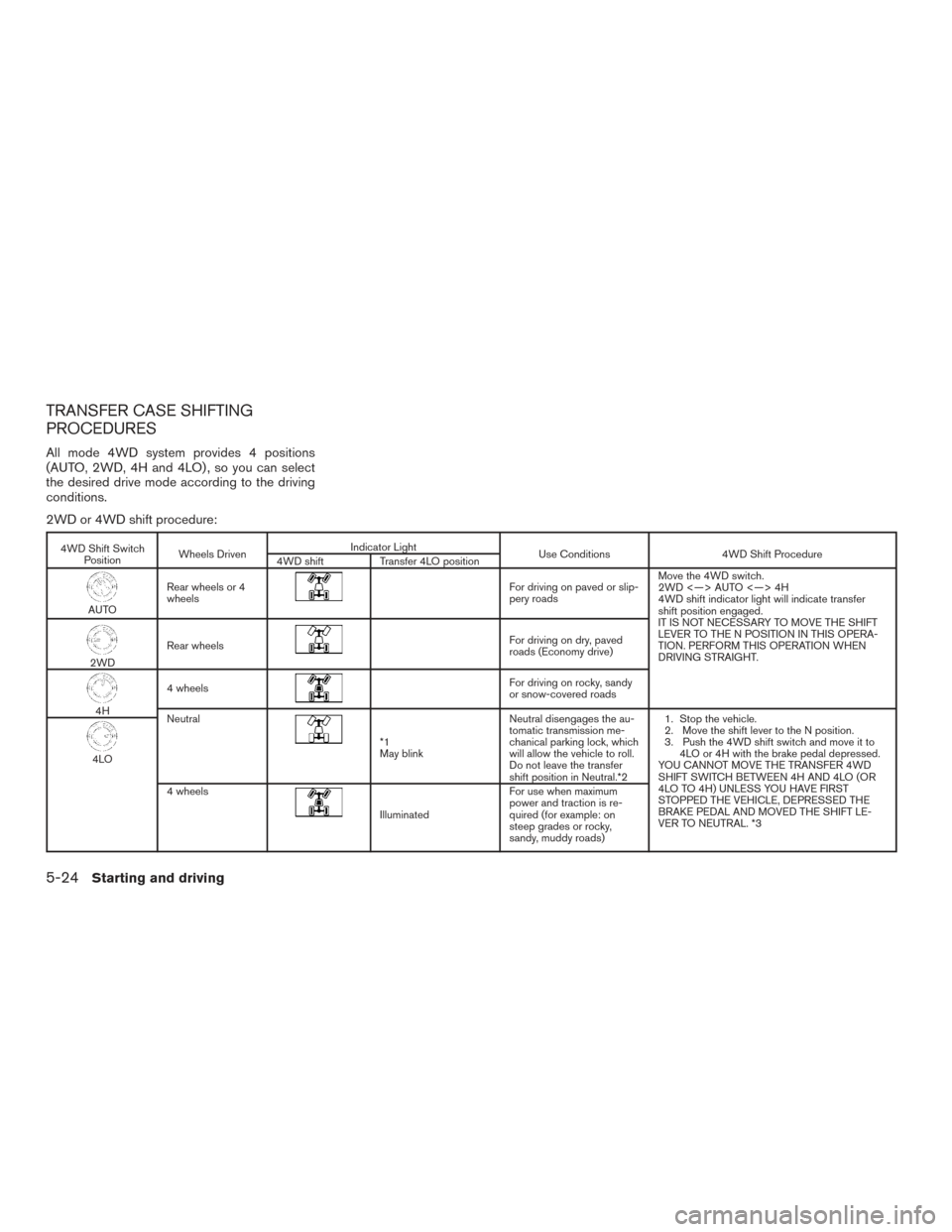
TRANSFER CASE SHIFTING
PROCEDURES
All mode 4WD system provides 4 positions
(AUTO, 2WD, 4H and 4LO) , so you can select
the desired drive mode according to the driving
conditions.
2WD or 4WD shift procedure:
4WD Shift SwitchPosition Wheels Driven Indicator Light
Use Conditions4WD Shift Procedure
4WD shift Transfer 4LO position
AUTORear wheels or 4
wheels
For driving on paved or slip-
pery roads Move the 4WD switch.
2WD <—> AUTO <—> 4H
4WD shift indicator light will indicate transfer
shift position engaged.
IT IS NOT NECESSARY TO MOVE THE SHIFT
LEVER TO THE N POSITION IN THIS OPERA-
TION. PERFORM THIS OPERATION WHEN
DRIVING STRAIGHT.
2WD
Rear wheels
For driving on dry, paved
roads (Economy drive)
4H4 wheels
For driving on rocky, sandy
or snow-covered roads
Neutral
*1
May blink Neutral disengages the au-
tomatic transmission me-
chanical parking lock, which
will allow the vehicle to roll.
Do not leave the transfer
shift position in Neutral.*2 1. Stop the vehicle.
2. Move the shift lever to the N position.
3. Push the 4WD shift switch and move it to
4LO or 4H with the brake pedal depressed.
YOU CANNOT MOVE THE TRANSFER 4WD
SHIFT SWITCH BETWEEN 4H AND 4LO (OR
4LO TO 4H) UNLESS YOU HAVE FIRST
STOPPED THE VEHICLE, DEPRESSED THE
BRAKE PEDAL AND MOVED THE SHIFT LE-
VER TO NEUTRAL. *3
4LO
4 wheels
Illuminated For use when maximum
power and traction is re-
quired (for example: on
steep grades or rocky,
sandy, muddy roads)
5-24Starting and driving
Page 378 of 510
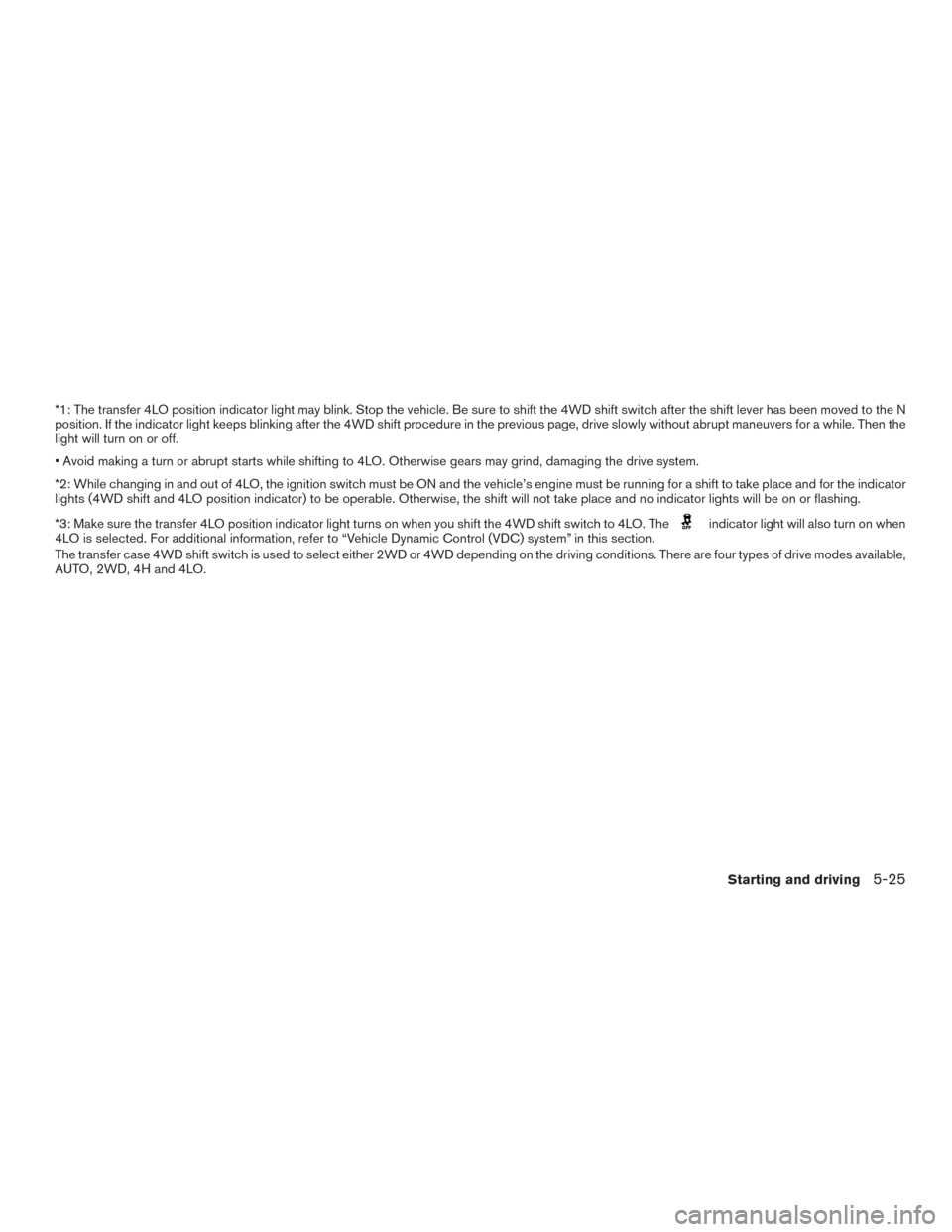
*1: The transfer 4LO position indicator light may blink. Stop the vehicle. Be sure to shift the 4WD shift switch after the shift lever has been moved to theN
position. If the indicator light keeps blinking after the 4WD shift procedure in the previous page, drive slowly without abrupt maneuvers for a while. Then the
light will turn on or off.
• Avoid making a turn or abrupt starts while shifting to 4LO. Otherwise gears may grind, damaging the drive system.
*2: While changing in and out of 4LO, the ignition switch must be ON and the vehicle’s engine must be running for a shift to take place and for the indicator
lights (4WD shift and 4LO position indicator) to be operable. Otherwise, the shift will not take place and no indicator lights will be on or flashing.
*3: Make sure the transfer 4LO position indicator light turns on when you shift the 4WD shift switch to 4LO. The
indicator light will also turn on when
4LO is selected. For additional information, refer to “Vehicle Dynamic Control (VDC) system” in this section.
The transfer case 4WD shift switch is used to select either 2WD or 4WD depending on the driving conditions. There are four types of drive modes available,
AUTO, 2WD, 4H and 4LO.
Starting and driving5-25
Page 379 of 510
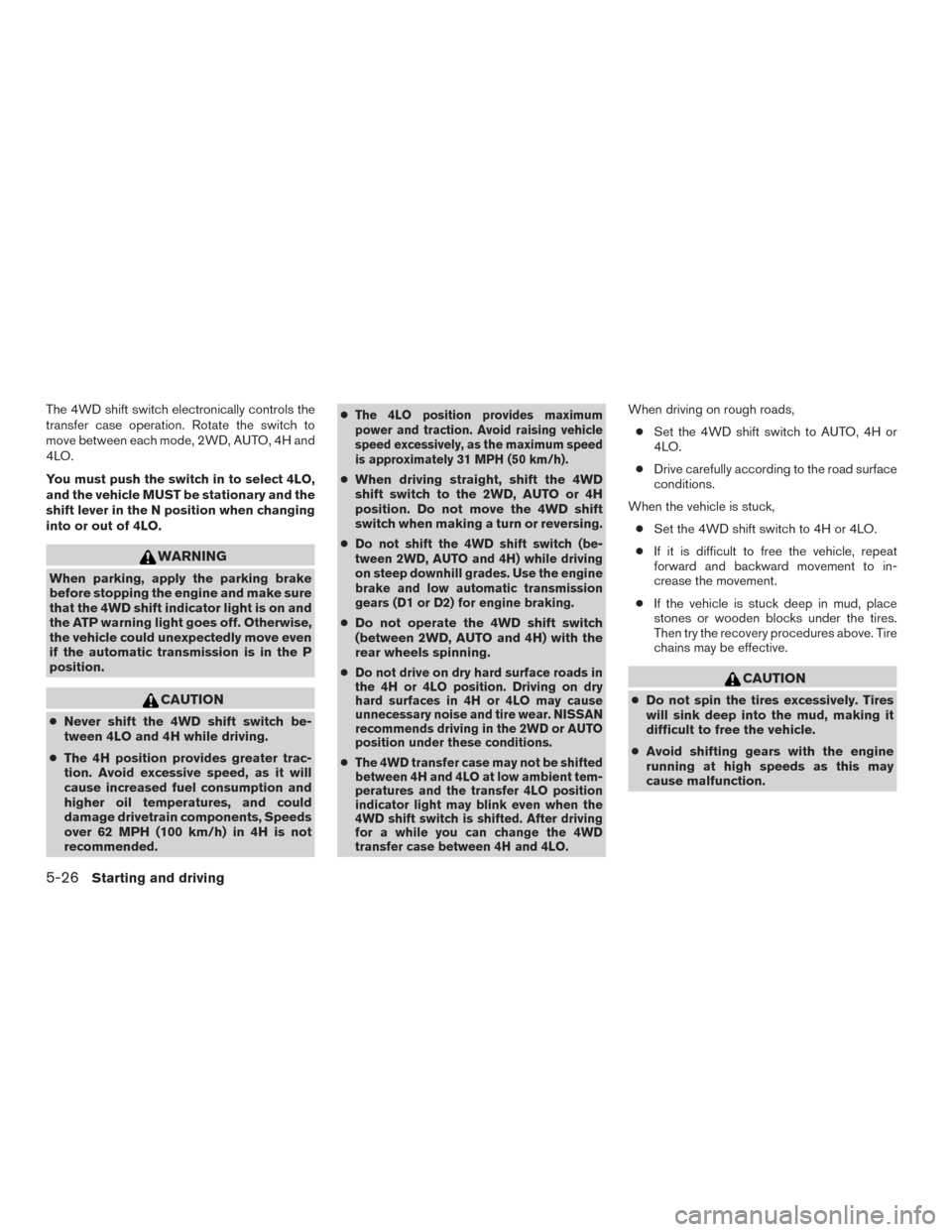
The 4WD shift switch electronically controls the
transfer case operation. Rotate the switch to
move between each mode, 2WD, AUTO, 4H and
4LO.
You must push the switch in to select 4LO,
and the vehicle MUST be stationary and the
shift lever in the N position when changing
into or out of 4LO.
WARNING
When parking, apply the parking brake
before stopping the engine and make sure
that the 4WD shift indicator light is on and
the ATP warning light goes off. Otherwise,
the vehicle could unexpectedly move even
if the automatic transmission is in the P
position.
CAUTION
●Never shift the 4WD shift switch be-
tween 4LO and 4H while driving.
● The 4H position provides greater trac-
tion. Avoid excessive speed, as it will
cause increased fuel consumption and
higher oil temperatures, and could
damage drivetrain components, Speeds
over 62 MPH (100 km/h) in 4H is not
recommended. ●
The 4LO position provides maximum
power and traction. Avoid raising vehicle
speed excessively, as the maximum speed
is approximately 31 MPH (50 km/h).
● When driving straight, shift the 4WD
shift switch to the 2WD, AUTO or 4H
position. Do not move the 4WD shift
switch when making a turn or reversing.
●
Do not shift the 4WD shift switch (be-
tween 2WD, AUTO and 4H) while driving
on steep downhill grades. Use the engine
brake and low automatic transmission
gears (D1 or D2) for engine braking.
● Do not operate the 4WD shift switch
(between 2WD, AUTO and 4H) with the
rear wheels spinning.
●
Do not drive on dry hard surface roads in
the 4H or 4LO position. Driving on dry
hard surfaces in 4H or 4LO may cause
unnecessary noise and tire wear. NISSAN
recommends driving in the 2WD or AUTO
position under these conditions.
●The 4WD transfer case may not be shifted
between 4H and 4LO at low ambient tem-
peratures and the transfer 4LO position
indicator light may blink even when the
4WD shift switch is shifted. After driving
for a while you can change the 4WD
transfer case between 4H and 4LO.
When driving on rough roads,
● Set the 4WD shift switch to AUTO, 4H or
4LO.
● Drive carefully according to the road surface
conditions.
When the vehicle is stuck, ● Set the 4WD shift switch to 4H or 4LO.
● If it is difficult to free the vehicle, repeat
forward and backward movement to in-
crease the movement.
● If the vehicle is stuck deep in mud, place
stones or wooden blocks under the tires.
Then try the recovery procedures above. Tire
chains may be effective.
CAUTION
● Do not spin the tires excessively. Tires
will sink deep into the mud, making it
difficult to free the vehicle.
● Avoid shifting gears with the engine
running at high speeds as this may
cause malfunction.
5-26Starting and driving
Page 380 of 510
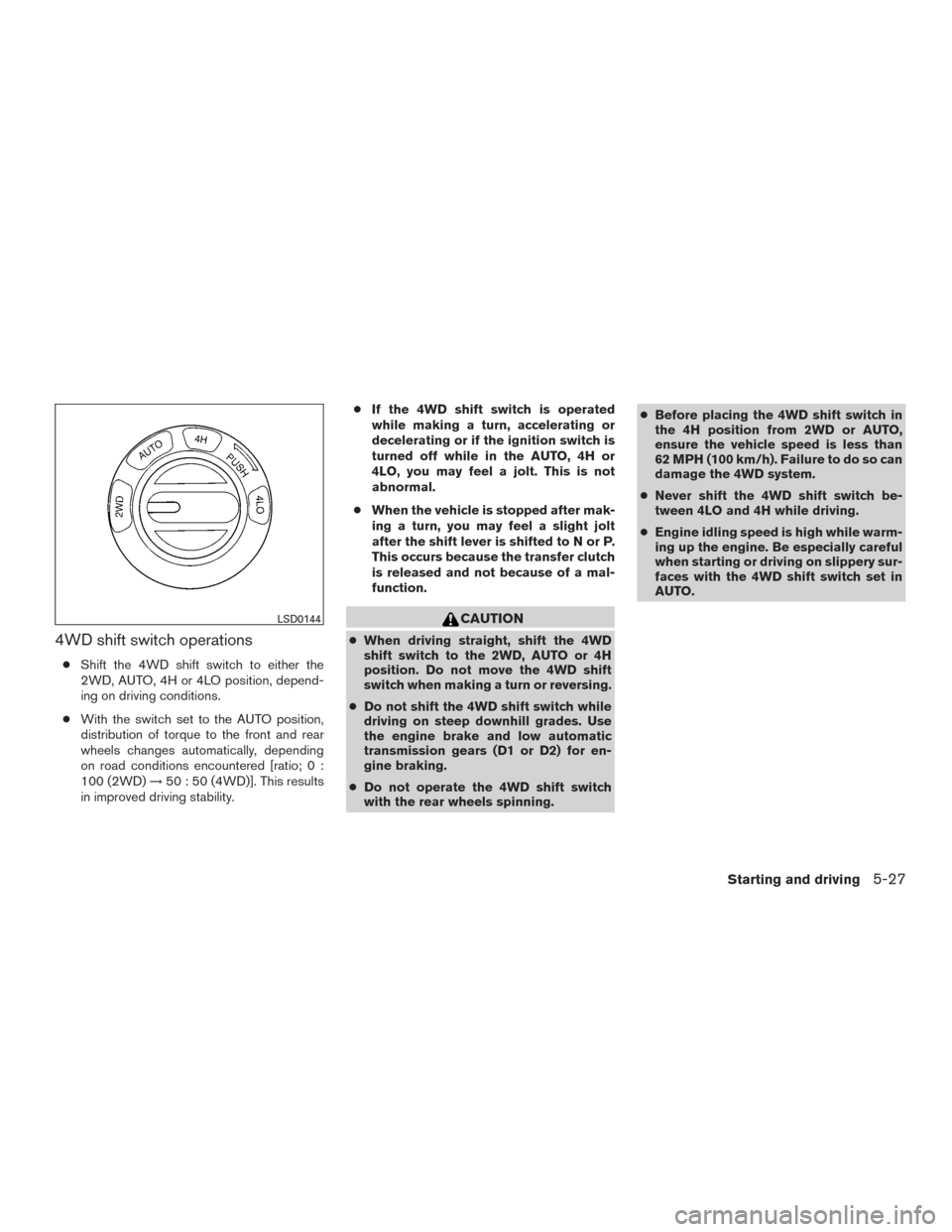
4WD shift switch operations
●Shift the 4WD shift switch to either the
2WD, AUTO, 4H or 4LO position, depend-
ing on driving conditions.
● With the switch set to the AUTO position,
distribution of torque to the front and rear
wheels changes automatically, depending
on road conditions encountered [ratio; 0 :
100 (2WD) →50 : 50 (4WD)]. This results
in improved driving stability. ●
If the 4WD shift switch is operated
while making a turn, accelerating or
decelerating or if the ignition switch is
turned off while in the AUTO, 4H or
4LO, you may feel a jolt. This is not
abnormal.
● When the vehicle is stopped after mak-
ing a turn, you may feel a slight jolt
after the shift lever is shifted to N or P.
This occurs because the transfer clutch
is released and not because of a mal-
function.
CAUTION
● When driving straight, shift the 4WD
shift switch to the 2WD, AUTO or 4H
position. Do not move the 4WD shift
switch when making a turn or reversing.
● Do not shift the 4WD shift switch while
driving on steep downhill grades. Use
the engine brake and low automatic
transmission gears (D1 or D2) for en-
gine braking.
● Do not operate the 4WD shift switch
with the rear wheels spinning. ●
Before placing the 4WD shift switch in
the 4H position from 2WD or AUTO,
ensure the vehicle speed is less than
62 MPH (100 km/h). Failure to do so can
damage the 4WD system.
● Never shift the 4WD shift switch be-
tween 4LO and 4H while driving.
● Engine idling speed is high while warm-
ing up the engine. Be especially careful
when starting or driving on slippery sur-
faces with the 4WD shift switch set in
AUTO.
LSD0144
Starting and driving5-27