2015 NISSAN ARMADA 4WD
[x] Cancel search: 4WDPage 381 of 510
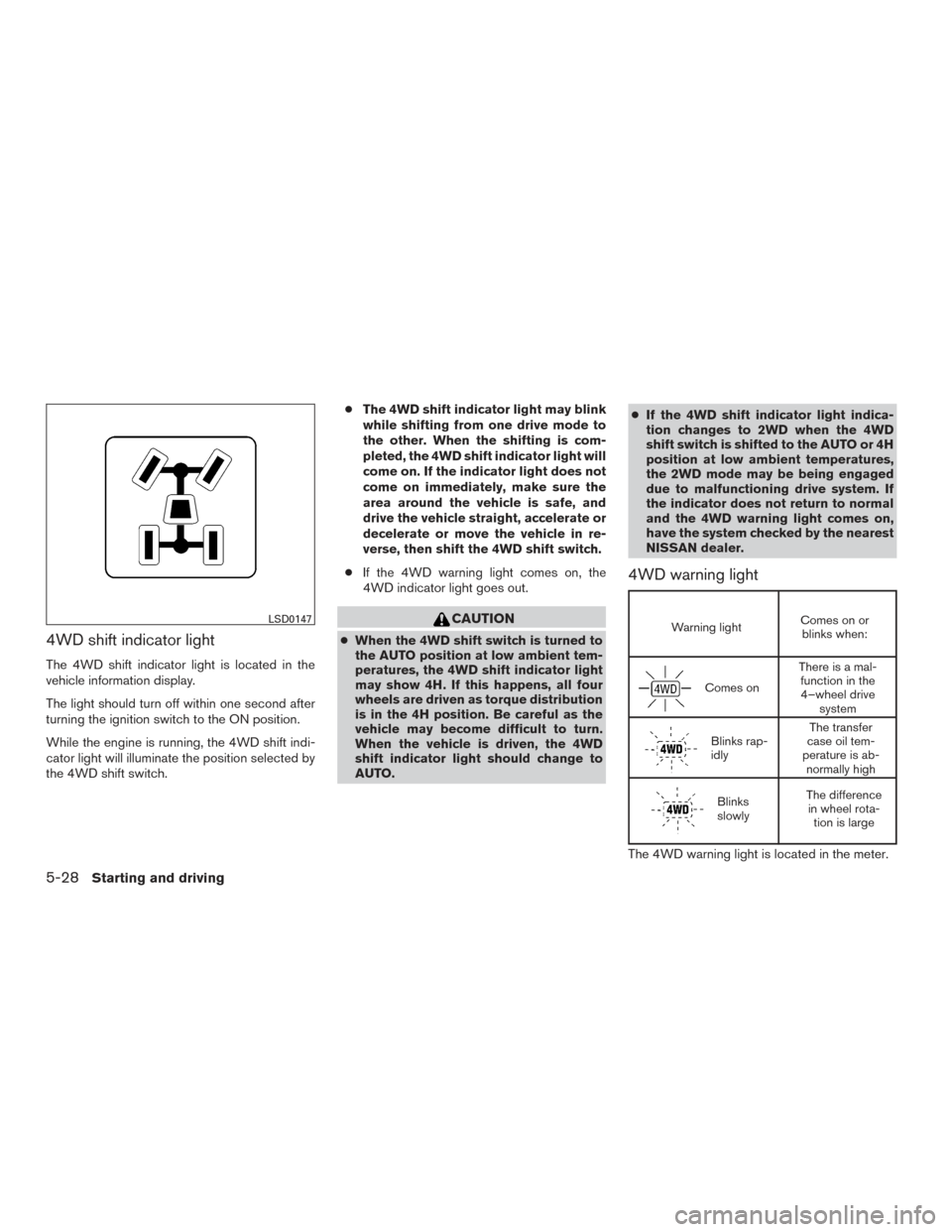
4WD shift indicator light
The 4WD shift indicator light is located in the
vehicle information display.
The light should turn off within one second after
turning the ignition switch to the ON position.
While the engine is running, the 4WD shift indi-
cator light will illuminate the position selected by
the 4WD shift switch.●
The 4WD shift indicator light may blink
while shifting from one drive mode to
the other. When the shifting is com-
pleted, the 4WD shift indicator light will
come on. If the indicator light does not
come on immediately, make sure the
area around the vehicle is safe, and
drive the vehicle straight, accelerate or
decelerate or move the vehicle in re-
verse, then shift the 4WD shift switch.
● If the 4WD warning light comes on, the
4WD indicator light goes out.
CAUTION
● When the 4WD shift switch is turned to
the AUTO position at low ambient tem-
peratures, the 4WD shift indicator light
may show 4H. If this happens, all four
wheels are driven as torque distribution
is in the 4H position. Be careful as the
vehicle may become difficult to turn.
When the vehicle is driven, the 4WD
shift indicator light should change to
AUTO. ●
If the 4WD shift indicator light indica-
tion changes to 2WD when the 4WD
shift switch is shifted to the AUTO or 4H
position at low ambient temperatures,
the 2WD mode may be being engaged
due to malfunctioning drive system. If
the indicator does not return to normal
and the 4WD warning light comes on,
have the system checked by the nearest
NISSAN dealer.
4WD warning light
Warning light Comes on or
blinks when:
Comes on There is a mal-
function in the4–wheel drive system
Blinks rap-
idly The transfer
case oil tem-
perature is ab- normally high
Blinks
slowly The difference
in wheel rota- tion is large
The 4WD warning light is located in the meter.
LSD0147
5-28Starting and driving
Page 382 of 510
The 4WD warning light comes on when the igni-
tion switch is turned to ON. It turns off soon after
the engine is started.
If any malfunction occurs in the 4WD system
when the ignition switch is ON, the warning light
will either remain illuminated or blink.
If the 4WD warning light comes on, the 4WD
shift indicator light goes out.
High-temperature transfer case oil makes the
warning light blink rapidly (about twice per sec-
ond) . If the warning light blinks rapidly during
operation, stop the vehicle in a safe place imme-
diately. Then if the light goes off after a while, you
can continue driving.
A large difference between the diameters of front
and rear wheels will make the warning light blink
slowly (about once per two seconds) . Change
the 4WD shift switch into 2WD and do not drive
fast.
CAUTION
●If the warning light comes on or blinks
slowly during operation or rapidly after
stopping the vehicle for a while, have
your vehicle checked by a NISSAN
dealer as soon as possible. ●
Shifting between 4H and 4LO is not
recommended when the 4WD warning
light turns on.
● When the warning light comes on, the
2WD mode may be engaged even if the
4WD shift switch is in AUTO or 4H. Be
especially careful when driving. If corre-
sponding parts are malfunctioning, the
4WD mode will not be engaged even if
the 4WD shift switch is shifted.
● Do not drive the vehicle in the 4H or 4LO
position on dry hard surface roads. Driv-
ing on dry, hard surfaces in 4H or 4LO
may cause unnecessary noise, tire wear
and increased fuel consumption.
If the 4WD warning light turns on when
you are driving on dry hard surface
roads:
– in the AUTO or 4H position, shift the 4WD shift switch to 2WD.
– in the 4LO position, stop the vehicle, move the shift lever to the N position
with the brake pedal depressed, and
shift the 4WD shift switch to 2WD. ●
If the warning light is still on after the
above operation, have your vehicle
checked by a NISSAN dealer as soon as
possible.
● The transfer case may be damaged if
you continue driving with the warning
light blinking.
Starting and driving5-29
Page 386 of 510
Normal operation
The ABS operates at speeds above3-6mph(5
- 10 km/h). The speed varies according to road
conditions.
When the ABS senses that one or more wheels
are close to locking up, the actuator rapidly ap-
plies and releases hydraulic pressure. This action
is similar to pumping the brakes very quickly. You
may feel a pulsation in the brake pedal and hear a
noise from under the hood or feel a vibration from
the actuator when it is operating. This is normal
and indicates that the ABS is operating properly.
However, the pulsation may indicate that road
conditions are hazardous and extra care is re-
quired while driving.The Vehicle Dynamic Control (VDC) system uses
various sensors to monitor driver inputs and ve-
hicle motion. Under certain driving conditions,
the VDC System helps to perform the following
functions:
● Controls brake pressure to reduce wheel
slip on one slipping drive wheel so power is
transferred to a non slipping drive wheel on
the same axle.
● Controls brake pressure and engine output
to reduce drive wheel slip based on vehicle
speed (traction control function) .
● If the 4WD transfer case is shifted into 4LO
the
indicator light will come on and
the VDC system will be turned off. For addi-
tional information, refer to “Using 4-wheel
drive (4WD)” in this section.
● Controls brake pressure at individual wheels
and engine output to help the driver maintain
control of the vehicle in the following condi-
tions:
– understeer (vehicle tends to not follow the steered path despite increased steer-
ing input)
– oversteer (vehicle tends to spin due to certain road or driving conditions) The VDC system can help the driver to maintain
control of the vehicle, but it cannot prevent loss of
vehicle control in all driving situations.
When the VDC system operates, the
indi-
cator in the instrument panel flashes so note the
following:
● The road may be slippery or the system may
determine some action is required to help
keep the vehicle on the steered path.
● You may feel a pulsation in the brake pedal
and hear a noise or vibration from under the
hood. This is normal and indicates that the
VDC system is working properly.
● Adjust your speed and driving to the road
conditions.
For additional information, refer to “Slip indicator
light” and ”Vehicle Dynamic Control (VDC) OFF
indicator light” in the ”Instruments and controls”
section of this manual.
If a malfunction occurs in the system, the
indicator light will come on in the instrument
panel. The VDC system automatically turns off
when these indicator lights are off.
The VDC OFF switch is used to turn off the VDC
system. The
indicator illuminates to indi-
cate the VDC system is off.
VEHICLE DYNAMIC CONTROL (VDC)
SYSTEM
Starting and driving5-33
Page 407 of 510
Four-wheel drive models
NISSAN recommends that towing dollies be
used when towing your vehicle or place the ve-
hicle on a flat bed truck as illustrated.
CAUTION
Never tow 4WD models with any of the
wheels on the ground as this may cause
serious and expensive damage to the
transfer case and transmission.
Two-wheel drive models
NISSAN recommends that your vehicle be towed
with the driving (rear) wheels off the ground or
place the vehicle on a flat bed truck as illustrated.
LCE2145
LCE2154
6-14In case of emergency
Page 473 of 510
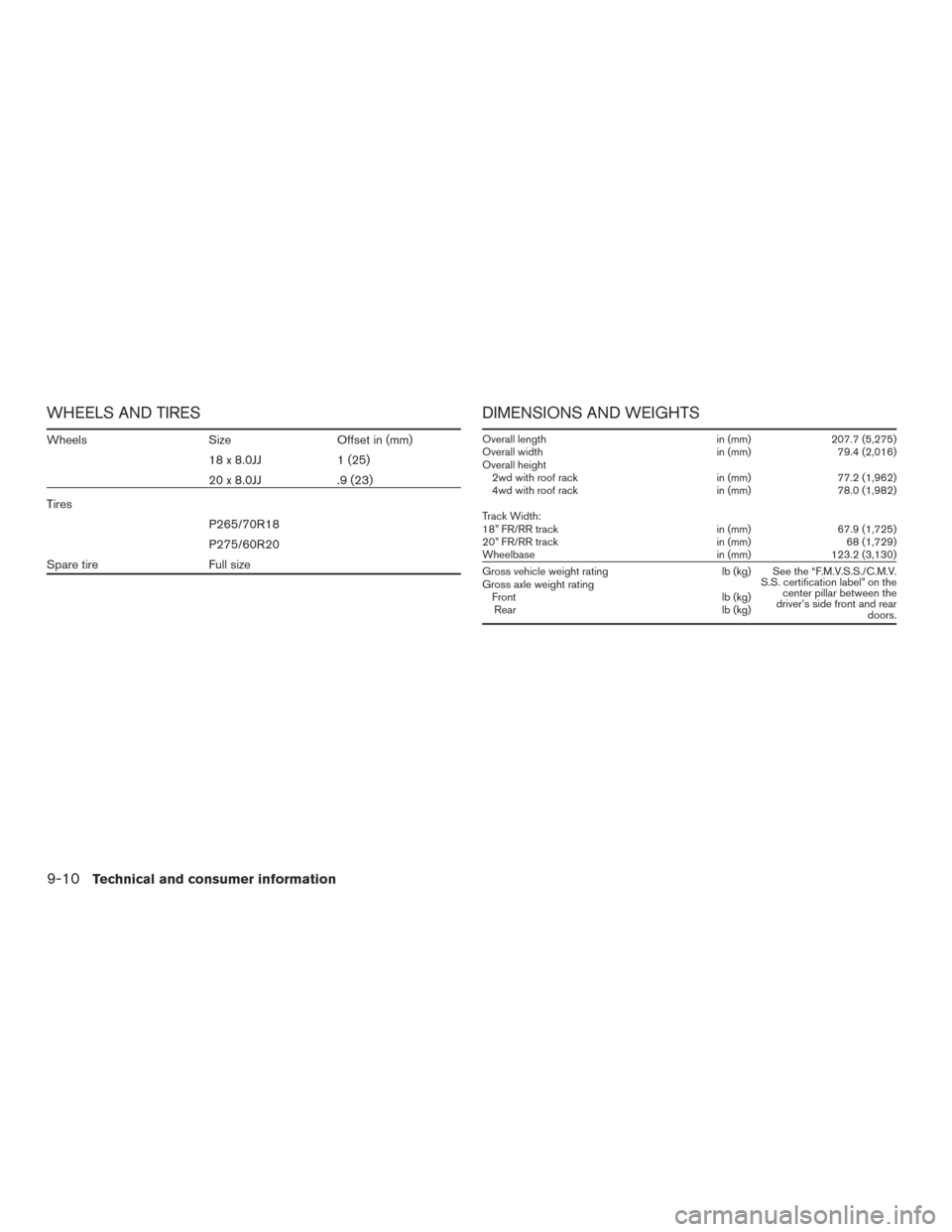
WHEELS AND TIRES
WheelsSizeOffset in (mm)
18x8.0JJ 1(25)
20 x 8.0JJ .9 (23)
Tires P265/70R18
P275/60R20
Spare tire Full size
DIMENSIONS AND WEIGHTS
Overall length in (mm)207.7 (5,275)
Overall width in (mm)79.4 (2,016)
Overall height 2wd with roof rack in (mm)77.2 (1,962)
4wd with roof rack in (mm)78.0 (1,982)
Track Width:
18” FR/RR track in (mm)67.9 (1,725)
20” FR/RR track in (mm)68 (1,729)
Wheelbase in (mm)123.2 (3,130)
Gross vehicle weight rating lb (kg) See the “F.M.V.S.S./C.M.V.
S.S. certification label” on thecenter pillar between the
driver’s side front and rear doors.
Gross axle weight rating
Front lb (kg)
Rear lb (kg)
9-10Technical and consumer information
Page 485 of 510
The available towing capacity may be less than
the maximum towing capacity due to the passen-
ger and cargo load in the vehicle.
Remember to keep trailer tongue weight be-
tween 10 - 15% of the trailer weight or within the
trailer tongue load specification recommended
by the trailer manufacturer. If the tongue load
becomes excessive, rearrange the cargo to ob-
tain the proper tongue load. Do not exceed the
maximum tongue weight specification shown in
the “Towing load/specification” chart even if the
calculated available tongue weight is greater
than 15%. If the calculated tongue weight is less
than 10%, reduce the total trailer weight to match
the available tongue weight.
Always verify that available capacities are within
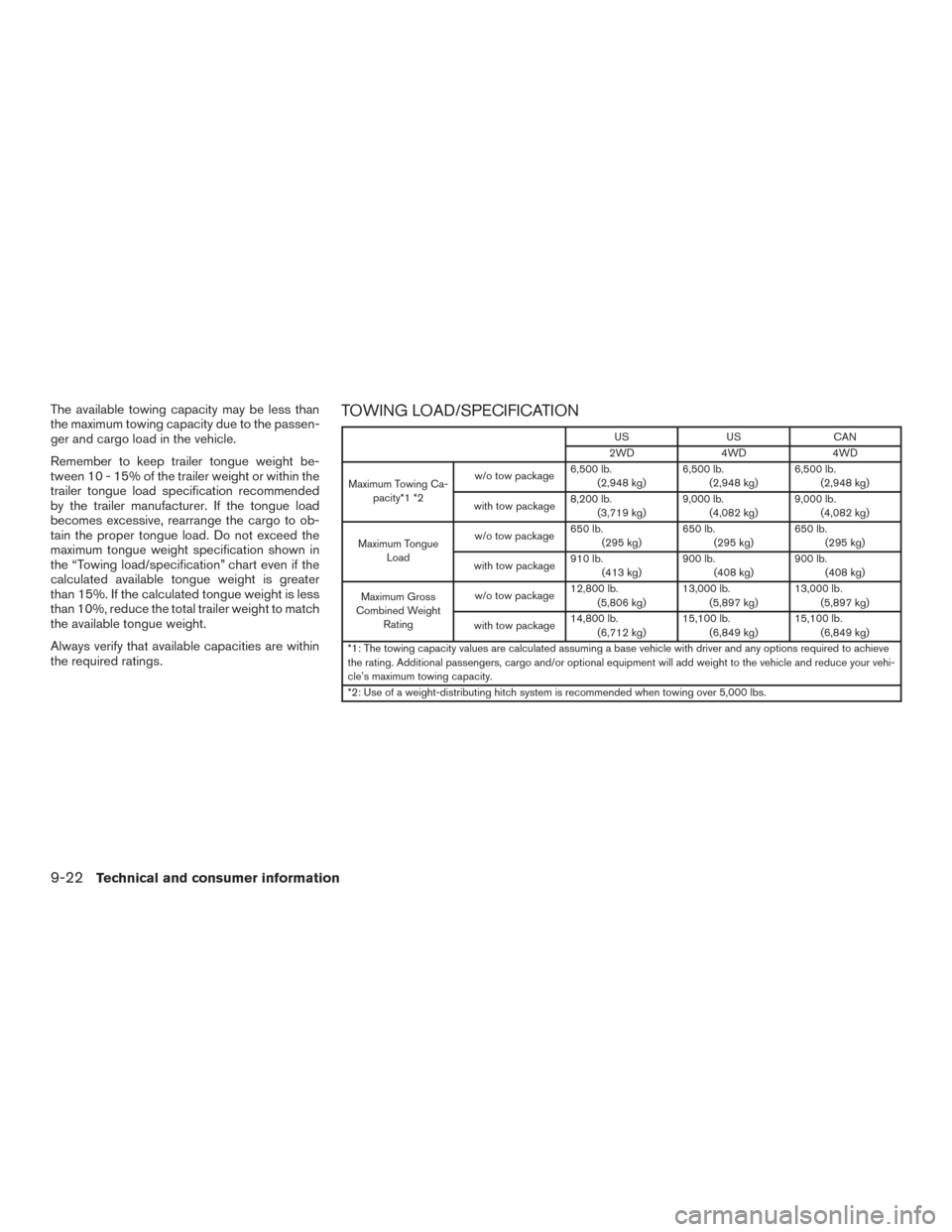
the required ratings.TOWING LOAD/SPECIFICATION
USUSCAN
2WD 4WD4WD
Maximum Towing Ca- pacity*1 *2 w/o tow package
6,500 lb.
(2,948 kg) 6,500 lb.
(2,948 kg) 6,500 lb.
(2,948 kg)
with tow package 8,200 lb.
(3,719 kg) 9,000 lb.
(4,082 kg) 9,000 lb.
(4,082 kg)
Maximum Tongue Load w/o tow package
650 lb.
(295 kg) 650 lb.
(295 kg) 650 lb.
(295 kg)
with tow package 910 lb.
(413 kg) 900 lb.
(408 kg) 900 lb.
(408 kg)
Maximum Gross
Combined Weight Rating w/o tow package
12,800 lb.
(5,806 kg) 13,000 lb.
(5,897 kg) 13,000 lb.
(5,897 kg)
with tow package 14,800 lb.
(6,712 kg) 15,100 lb.
(6,849 kg) 15,100 lb.
(6,849 kg)
*1: The towing capacity values are calculated assuming a base vehicle with driver and any options required to achieve
the rating. Additional passengers, cargo and/or optional equipment will add weight to the vehicle and reduce your vehi-
cle’s maximum towing capacity.
*2: Use of a weight-distributing hitch system is recommended when towing over 5,000 lbs.
9-22Technical and consumer information
Page 492 of 510
Always block the wheels on both vehicle and
trailer when parking. Parking on a slope is not
recommended; however, if you must do so:
CAUTION
If you move the shift lever to the P (Park)
position before blocking the wheels and
applying the parking brake, transmission
damage could occur.1. Apply and hold the brake pedal.
2. Have someone place blocks on the downhill side of the vehicle and trailer wheels.
3. After the wheel blocks are in place, slowly release the brake pedal until the blocks ab-
sorb the vehicle load.
4. Apply the parking brake.
5. Shift the transmission into P (Park) .
6. Make sure the
indicator light (if so
equipped) indicates the transfer case is in
4H, 4L, or 2H and that the ATP light is off. If
the
indicator light is flashing, or the
ATP light is ON, make sure the transmission
is in P (Park) (A/T) and turn the 4WD switch
to 2WD or 4H. For additional information,
refer to “Automatic transmission park warn-
ing light” in the “Instruments and controls” section and “Using four wheel drive (4WD)”
in the “Starting and driving” section of this
manual.
7. Turn off the engine.
To drive away: 1. Start the vehicle.
2. Apply and hold the brake pedal.
3. Shift the transmission into gear.
4. Release the parking brake.
5. Drive slowly until the vehicle and trailer are clear from the blocks.
6. Apply and hold the brake pedal.
7. Have someone retrieve and store the blocks. ● While going downhill, the weight of the
trailer pushing on the tow vehicle may de-
crease overall stability. Therefore, to main-
tain adequate control, reduce your speed
and shift to a lower gear. Avoid long or
repeated use of the brakes when descend-
ing a hill, as this reduces their effectiveness
and could cause overheating. Shifting to a
lower gear instead provides “engine brak-
ing” and reduces the need to brake as fre-
quently. ●
If the engine coolant temperature rises to a
high temperature, refer to “If your vehicle
overheats” in the “In case of emergency”
section of this owner’s manual.
● Trailer towing requires more fuel than normal
circumstances.
● Avoid towing a trailer for your vehicle’s first
500 miles (805 km) .
● For the first 500 miles (805 km) that you do
tow, do not drive over 50 mph (80 km/h).
● Have your vehicle serviced more often than
at intervals specified in the recommended
Maintenance Schedule in the “NISSAN Ser-
vice and Maintenance Guide”.
● When making a turn, your trailer wheels will
be closer to the inside of the turn than your
vehicle wheels. To compensate for this,
make a larger than normal turning radius
during the turn.
● Crosswinds and rough roads will adversely
affect vehicle/trailer handling, possibly caus-
ing vehicle sway. When being passed by
larger vehicles, be prepared for possible
changes in crosswinds that could affect ve-
hicle handling.
Technical and consumer information9-29
Page 500 of 510
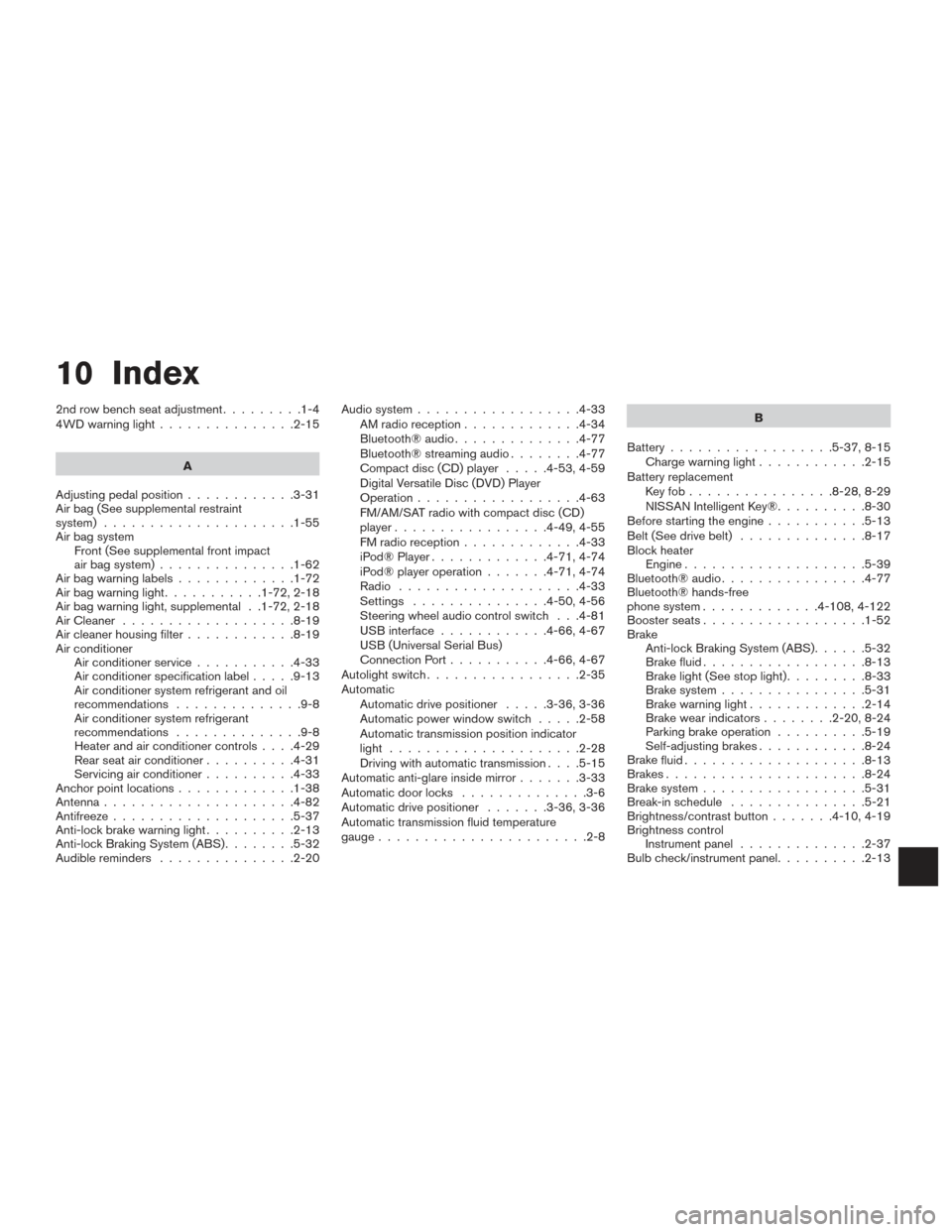
10 Index
2nd row bench seat adjustment.........1-4
4WDwarninglight...............2-15
A
Adjusting pedal position ............3-31
Air bag (See supplemental restraint
system) .....................1-55
Air bag system Front (See supplemental front impact
air bag system) ...............1-62
Airbagwarninglabels.............1-72
Airbagwarninglight...........1-72,2-18
Air bag warning light, supplemental . .1-72, 2-18
AirCleaner ...................8-19
Air cleaner housing filter ............8-19
Air conditioner Air conditioner service ...........4-33
Air conditioner specification label .....9-13
Air conditioner system refrigerant and oil
recommendations ..............9-8
Air conditioner system refrigerant
recommendations ..............9-8
Heater and air conditioner controls ....4-29
Rear seat air conditioner ..........4-31
Servicing air conditioner ..........4-33
Anchor point locations .............1-38
Antenna .....................4-82
Antifreeze ....................5-37
Anti-lock brake warning light ..........2-13
Anti-lock Braking System (ABS) ........5-32
Audible reminders ...............2-20 Audio system
..................4-33
AMradioreception.............4-34
Bluetooth®audio..............4-77
Bluetooth® streaming audio ........4-77
Compact disc (CD) player .....4-53,4-59
Digital Versatile Disc (DVD) Player
Operation ..................4-63
FM/AM/SAT radio with compact disc (CD)
player.................4-49,4-55
FMradioreception.............4-33
iPod® Player .............4-71,4-74
iPod® player operation .......4-71,4-74
Radio ....................4-33
Settings ...............4-50,4-56
Steering wheel audio control switch . . .4-81
USB interface ............4-66,4-67
USB (Universal Serial Bus)
Connection Port ...........4-66,4-67
Autolight switch .................2-35
Automatic Automatic drive positioner .....3-36,3-36
Automatic power window switch .....2-58
Automatic transmission position indicator
light .....................2-28
Driving with automatic transmission ....5-15
Automatic anti-glare inside mirror .......3-33
Automatic door locks ..............3-6
Automatic drive positioner .......3-36,3-36
Automatic transmission fluid temperature
gauge.......................2-8 B
Battery ..................5-37, 8-15
Charge warning light ............2-15
Battery replacement Keyfob................8-28,8-29
NISSAN Intelligent Key® ..........8-30
Before starting the engine ...........5-13
Belt (See drive belt) ..............8-17
Block heater Engine ....................5-39
Bluetooth® audio ................4-77
Bluetooth® hands-free
phone system .............4- 108, 4-122
Boosterseats..................1-52
Brake Anti-lock Braking System (ABS) ......5-32
Brake fluid ..................8-13
Brakelight(Seestoplight).........8-33
Brake system ................5-31
Brakewarninglight.............2-14
Brakewearindicators........2-20,8-24
Parking brake operation ..........5-19
Self-adjusting brakes ............8-24
Brake
fluid ....................8-13
Brakes ......................8-24
Brake system ..................5-31
Break-inschedule ...............5-21
Brightness/contrast button .......4-10,4-19
Brightness control Instrument panel ..............2-37
Bulb check/instrument panel ..........2-13