2015 MITSUBISHI OUTLANDER ECU
[x] Cancel search: ECUPage 279 of 446
Bluetooth® 2.0 interface (if so equipped) 5-202 Features and controls
5
N00580100055
1. Press the SPEECH button (except for vehicles with Mitsubishi Multi-Commu- nication System) or
PICK-UP button (for
vehicles with Mitsubishi Multi-Commu- nication System). 2. Say “Phonebook.”3. The voice guide will say “Select one of the following: new entry, edit number, edit name, list names, delete, erase all, or import contact.”
Say “Edit name.”
4. The voice guide will say “Please say thename of the entry you would like to edit, or say list names.”
Say the name you want
to edit. 5. The voice guide
will say “Changing
6. The voice guide will say “Name please.” Say the new name you
want to register.
7. The registered name will be changed. When the change is complete, the system will return to the main menu.
N00580200043
1. Press the SPEECH button (except forvehicles with Mitsubishi Multi-Commu-nication System) or PICK-UP button (for vehicles with Mitsubishi Multi-Commu- nication System). 2. Say “Phonebook.” 3. The voice guide will
say “Select one of
the following: new entry, edit number, edit name, list names, delete, erase all, or import contact.” Sa
y “List names.”
4. Bluetooth
® 2.0 interface will read out the
entries in the phonebook in order. 5. When the voice guide is done reading thelist, it will say “End of list, would you like to start from the beginning?” When you want to check the list again from thebeginning, answer “Yes.” When you are done, answer “No” to return to the previous or main menu.
N00580300057
1. Press the SPEECH button (except forvehicles with Mitsubishi Multi-Commu-nication System) or
PICK-UP button (for
vehicles with Mitsubishi Multi-Commu- nication System).2. Say “Phonebook.” 3. The voice guide will say “Select one of the following: new entry, edit number,edit name, list names, delete, erase all, or import contact.” Say “Delete.”
Editing a name
NOTE
Say “List names,” and the names registered in the phonebook are read out in order. Referto “Vehicle phonebook: Listening to the list of registered na
mes” on page 5-202.
Listening to the list of registered names
NOTE
You can call, edit or
delete a name that is
being read out.Press the SPEECH button and say “Call” tocall the name, “Edit name” to edit it, or “Delete” to delete it. The system will beep and then execute yourcommand. If you press the SPEECH button and say “Continue” or “Previous” while the list is being read, the system will advance or rewind the list. Say “C
ontinue” to proceed to
the next entry or “Previous” to return to the previous entry.
Deleting a telephone number
BK0211800US.book 202 ページ 2014年3月12日 水曜日 午後2時42分
Page 294 of 446
Cup holders
Features and controls 5-217
5
N00527301417
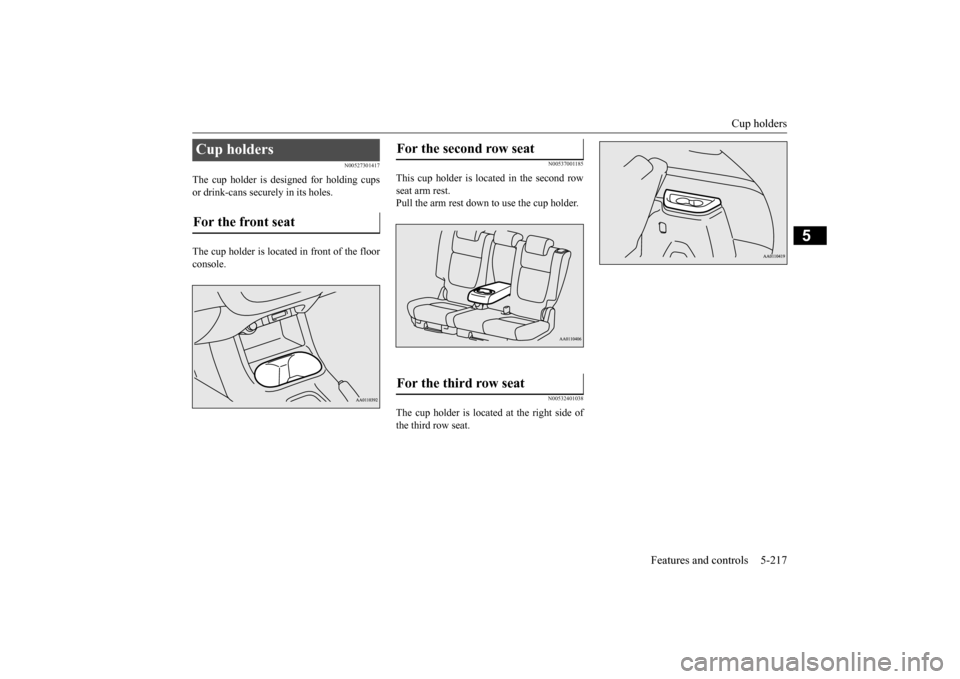
The cup holder is designed for holding cups or drink-cans secu
rely in its holes.
The cup holder is located in front of the floor console.
N00537001185
This cup holder is located in the second rowseat arm rest. Pull the arm rest down to use the cup holder.
N00532401038
The cup holder is located at the right side of the third row seat.
Cup holders For the front seat
For the second row seat For the third row seat
BK0211800US.book 217 ページ 2014年3月12日 水曜日 午後2時42分
Page 296 of 446
Cargo area cover (if so equipped)
Features and controls 5-219
5
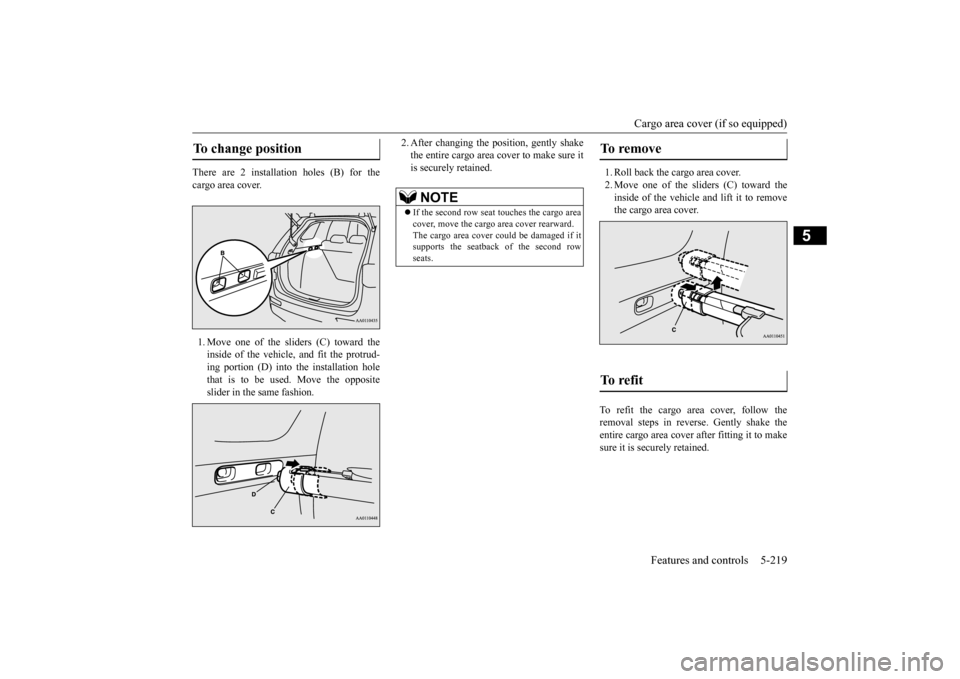
There are 2 installation holes (B) for the cargo area cover. 1. Move one of the sliders (C) toward the inside of the vehicle, and fit the protrud- ing portion (D) into the installation hole that is to be used. Move the oppositeslider in the same fashion.
2. After changing the position, gently shake the entire cargo area cover to make sure itis securely retained.
1. Roll back the cargo area cover. 2. Move one of the sliders (C) toward the inside of the vehicle and lift it to remove the cargo area cover.
To refit the cargo area cover, follow the removal steps in reverse. Gently shake theentire cargo area cover after fitting it to make sure it is securely retained.
To change position
NOTE
If the second row seat
touches the cargo area
cover, move the cargo
area cover rearward.
The cargo area cover co
uld be damaged if it
supports the seatback of the second row seats.
To remove To refit
BK0211800US.book 219 ページ 2014年3月12日 水曜日 午後2時42分
Page 298 of 446
Luggage hooks
Features and controls 5-221
5
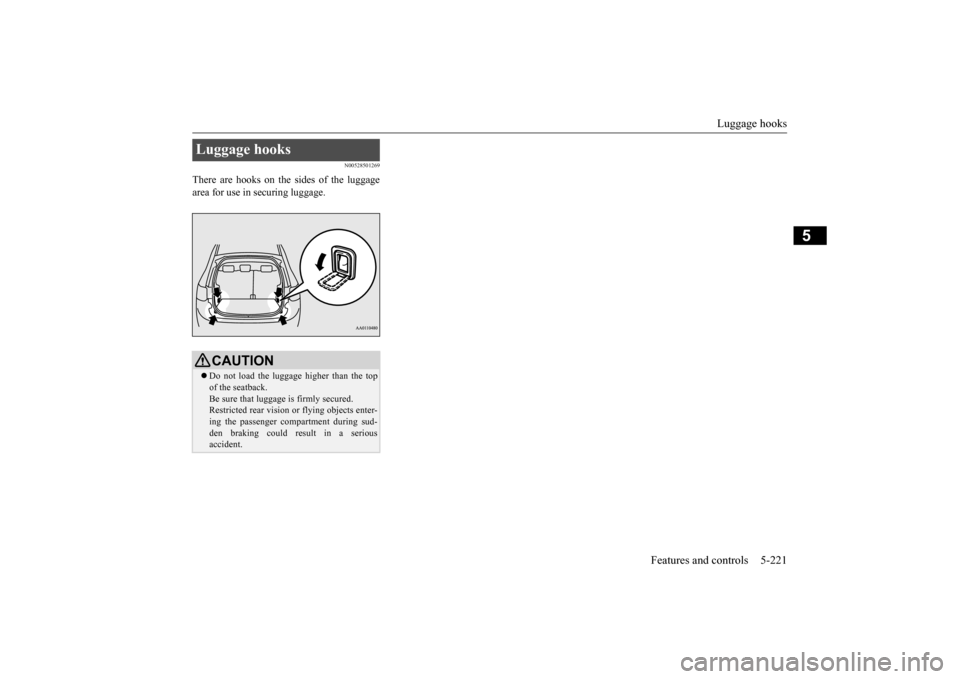
N00528501269
There are hooks on the sides of the luggage area for use in securing luggage.Luggage hooks
CAUTION Do not load the luggage higher than the top of the seatback.Be sure that luggage
is firmly secured.
Restricted rear vision
or flying objects enter-
ing the passenger compartment during sud-den braking could re
sult in a serious
accident.
BK0211800US.book 221 ページ 2014年3月12日 水曜日 午後2時42分
Page 302 of 446
Floor mat
Driving safety 6-3
6
N00628600033
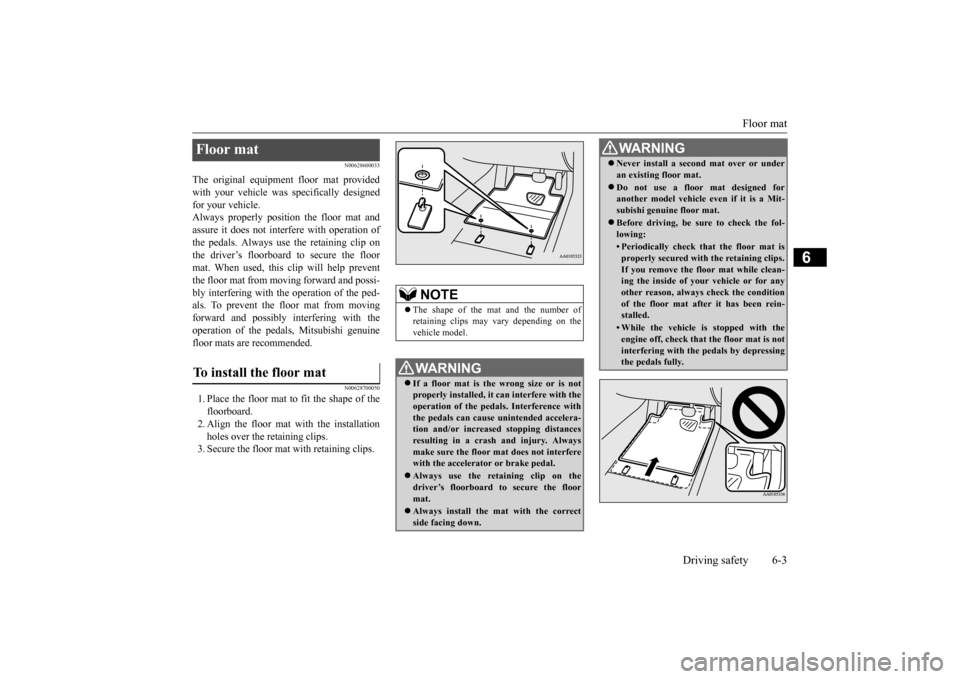
The original equipment floor mat provided with your vehicle was
specifically designed
for your vehicle.Always properly positio
n the floor mat and
assure it does not inte
rfere with operation of
the pedals. Always use the retaining clip onthe driver’s floorboard to secure the floor mat. When used, this clip will help prevent the floor mat from moving forward and possi- bly interfering with the operation of the ped- als. To prevent the floor mat from movingforward and possibly interfering with the operation of the pedals, Mitsubishi genuine floor mats are recommended.
N00628700050
1. Place the floor mat to fit the shape of thefloorboard.2. Align the floor mat with the installation holes over the retaining clips. 3. Secure the floor mat with retaining clips.Floor mat To install the floor mat
NOTE
The shape of the mat and the number of retaining clips may vary depending on the vehicle model.WA R N I N G If a floor mat is the
wrong size or is not
properly installed, it can interfere with theoperation of the pedals. Interference with the pedals can cause unintended accelera- tion and/or increased stopping distancesresulting in a cras
h and injury. Always
make sure the floor mat does not interfere with the accelerator or brake pedal. Always use the reta
ining clip on the
driver’s floorboard to secure the floormat. Always install the mat with the correct side facing down.
Never install a second mat over or under an existing floor mat. Do not use a floor mat designed for another model vehicle ev
en if it is a Mit-
subishi genuine floor mat. Before driving, be sure to check the fol- lowing:• Periodically check that the floor mat isproperly secured with the retaining clips.If you remove the fl
oor mat while clean-
ing the inside of you
r vehicle or for any
other reason, always
check the condition
of the floor mat afte
r it has been rein-
stalled.• While the vehicle is stopped with theengine off, check that
the floor mat is not
interfering with the pedals by depressingthe pedals fully.WA R N I N G
BK0211800US.book 3 ページ 2014年3月12日 水曜日 午後2時42分
Page 310 of 446
Trailer towing
Driving safety 6-11
6
N00630601112
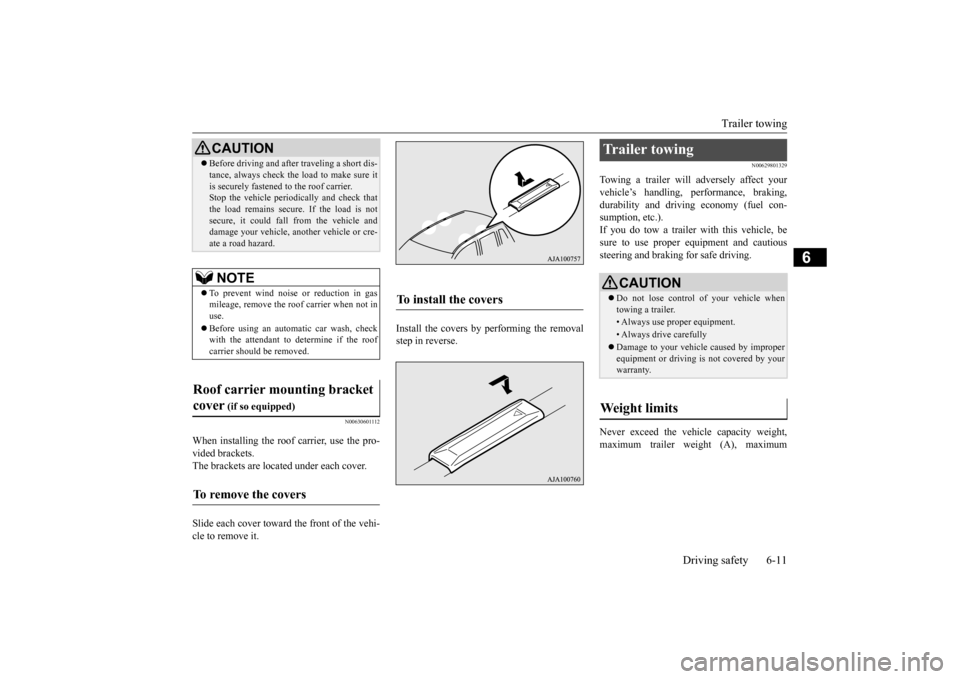
When installing the roof carrier, use the pro- vided brackets. The brackets are located under each cover. Slide each cover toward
the front of the vehi-
cle to remove it.
Install the covers by performing the removal step in reverse.
N00629801329
Towing a trailer will adversely affect your vehicle’s handling, performance, braking, durability and driving economy (fuel con-sumption, etc.). If you do tow a trailer
with this vehicle, be
sure to use proper e
quipment and cautious
steering and braking for safe driving. Never exceed the vehi
cle capacity weight,
maximum trailer weight (A), maximum
Before driving and after traveling a short dis- tance, always check the load to make sure itis securely fastened to the roof carrier.Stop the vehicle periodi
cally and check that
the load remains secure. If the load is not secure, it could fall from the vehicle anddamage your vehicle,
another vehicle or cre-
ate a road hazard.NOTE
To prevent wind noise or reduction in gas mileage, remove the roof carrier when not in use. Before using an automatic car wash, check with the attendant to determine if the roofcarrier should be removed.
Roof carrier mounting bracket cover
(if so equipped)
To remove the covers
CAUTION
To install the covers
Trailer towing
CAUTION Do not lose control of your vehicle when towing a trailer.• Always use proper equipment.• Always drive carefully Damage to your vehicle caused by improper equipment or driving is not covered by your warranty.
Weight limits
BK0211800US.book 11 ページ 2014年3月12日 水曜日 午後2時42分
Page 312 of 446
Trailer towing
Driving safety 6-13
6
Choose a proper hitch and ball, and make sure it is installed at a height that is compati- ble with the trailer.Use a good equalizing hitch which uniformly distributes the trailer tongue load throughout the frame. A safety chain must al
ways be used between
the towing vehicle and the trailer. Leave suf- ficient slack in the chain for turns. The chain
should cross under the trailer tongue to pre- vent the tongue from dropping to the groundin case it becomes damaged or separated. For correct safety chai
n procedures, consult
your authorized Mitsub
ishi Motors dealer.
Your vehicle will need service more often when you’re towing a trailer. Refer to “WAR- RANTY AND MAINTENANCE MAN-UAL”. Especially important in trailer operation are manual transaxle oil, automatic transaxle fluid, engine oi
l, rear axle oil, belt,
cooling system and brake system. Each of these is covered in this manual. For details, please refer to the “Vehicle careand maintenance” section. Check periodically to se
e that all hitch nuts
and bolts are tight.
Mitsubishi Motors recommends that any trailer having a total we
ight of 1,250 lbs (567
kg) or more (2400 models), 1,400 lbs (635kg) or more (3000 mode
ls) be equipped with
its own electric or surge-type brakes. If you choose electric br
akes, be sure they are
electrically actuated. Do not attempt to tap into your vehicle’s hydraulic system. No mat- ter how successful it
may seem, any attempt
to attach trailer brakes to your vehicle’s hydraulic system will lower braking effec- tiveness and create a potential hazard. Trailer lights and equipment must comply with federal, state,
and local regulations.
Check with your local
recreational vehicle
dealer for the requirements in your area, and use only equipment designed for your vehi-cle. Since lighting and wiring vary by trailer type and brand, you should have a qualified tech- nician install a suitable
connector between the
vehicle and the trailer. Improper equipment or installation can cause
damage to your vehi-
Trailer hitches
WA R N I N GIf you make any holes in the body of your vehicle for installing
a trailer hitch, be
sure to seal the holes later when you remove the hitch. If
you don’t seal them,
deadly carbon monoxide (CO) from your exhaust can enter your vehicle. Refer to “Exhaust system” on page 9-24.NOTE
Mitsubishi Motors recommends that sway control be used whenever you are towing, to improve towing stability. For further informati
on, please contact your
authorized Mitsubish
i Motors dealer.
Safety chains
CAUTIONNever tow a trailer wi
thout using a safety
chain securely attached to both the trailer and the vehicle. If the
coupling unit or hitch
ball experiences a probl
em, the trailer may
separate from
your vehicle.
Maintenance when trailer tow- ing
Trailer brakes Trailer lights
BK0211800US.book 13 ページ 2014年3月12日 水曜日 午後2時42分
Page 335 of 446
Audio Files (MP3/WMA/AAC) 7-20 Comfort controls
7
Discs that have not
been finalized cannot
be played back. Even if recorded using the correct format on a recorder or computer, application software settings and environments; discpeculiarities, damage,
or marking; or dirt
or condensation on the lens inside the product may render the disc unplayable. Depending on the disc
, some functions
may not be used, or the disc may not play back. Do not use discs with cracks or warps. If the disc has sticke
rs affixed, remains
from removed stickers, or affixed adhe- sive, then do not use the disc. Discs that have decora
tive labels or stick-
ers may not be used.
This product will play
back audio CDs, how-
ever please be aware of the following points regarding CD standards. Ensure that you use discs with on the label surface. Playback of other than standard CDs is not guaranteed. Even
if the audio can be
played back, the audio quality cannot beguaranteed. When playing back other than standard CDs, the following may occur.
• There may be noise during playback. • There may be jumping in the audio.• The disc may not be recognized. • The first track may not be played back. • It may take longer than usual until startof playback of tracks. • Playback may start from within the track.• Some parts may not be played back. • Tracks may freeze during playback. • Tracks may be displayed erroneously.
N00715600027
This product can play back MP3/WMA/AACformat audio files recorded on CD-ROM, CD-R/RW, and USB devices. There are limitations on the files and media that can be used, therefore read the followingprior to recording MP3/WMA/AAC format audio files on discs or USB devices. Additionally, ensure y
ou read the user manu-
als for your CD-R/RW drive and the writing software, and ensure these are used correctly. If the MP3/WMA/AAC
format audio files
includes title informati
on or other data, then
this can be displayed.
Nonstandard CDs
Audio Files (MP3/WMA/AAC)
CAUTION CD-ROM and CD-R/RW media can only play back MP3 fo
rmat audio files.
Actions such as copying audio CDs or files and either distributing these to others for free or for charge, or uploading files via the Inter-net or other means to servers is an infringe- ment of the law. Do not append the file
extensions “.mp3”,
“.wma”, or “.m4a”, to other than MP3/WMA/AAC format
files. Playing back
discs with these types of files recorded upon them may cause the files to be incorrectly identified for playback, which may lead toloud noise, resulting in speaker damage or accident.NOTE
Depending on the condition of the disc recorder or recording software used, correctplayback may not be po
ssible. In these cases,
refer to the user manual for your product or software. Depending on your computer’s operating system, version, softwa
re, or settings, files
may not have a file
extension appended. In
these cases, append
the file extensions
“.mp3”, “.wma”, or “.m4a” when copying the files. Files larger than 2GB in size cannot be played back.
BK0211800US.book 20 ページ 2014年3月12日 水曜日 午後2時42分