2015 MITSUBISHI OUTLANDER lights
[x] Cancel search: lightsPage 190 of 446
Lane Departure Warning System (LDW) (if so equipped)
Features and controls 5-113
5
N00581100023
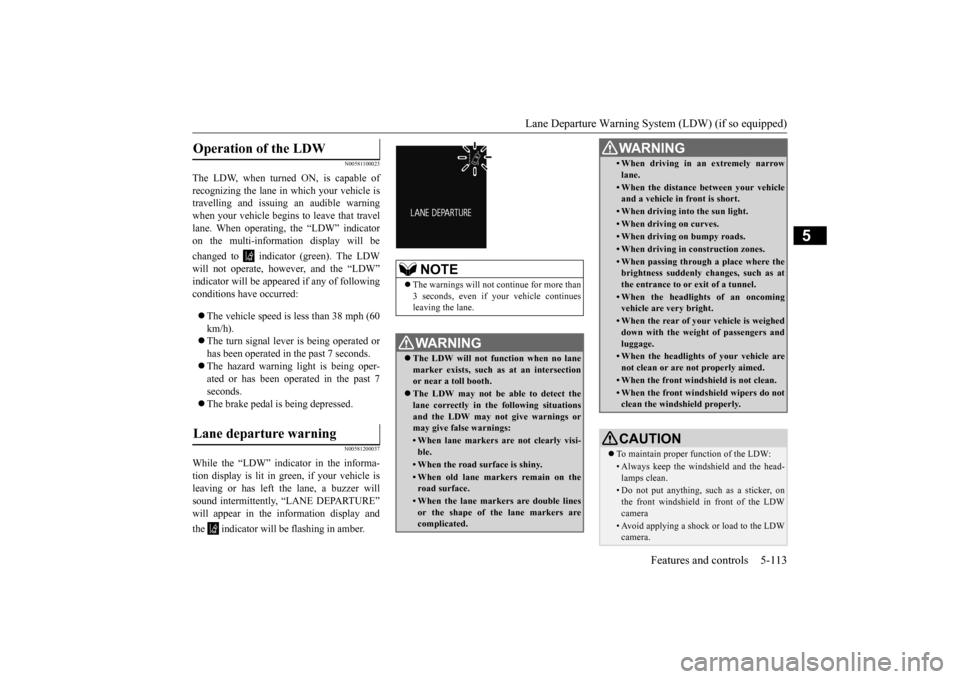
The LDW, when turned ON, is capable of recognizing the lane in which your vehicle is travelling and issuing an audible warningwhen your vehicle begins to leave that travel lane. When operating,
the “LDW” indicator
on the multi-information display will be changed to indicator (green). The LDW will not operate, however, and the “LDW” indicator will be appeared if any of following conditions have occurred: The vehicle speed is less than 38 mph (60 km/h). The turn signal lever is being operated or has been operated in the past 7 seconds. The hazard warning light is being oper- ated or has been operated in the past 7 seconds. The brake pedal is being depressed.
N00581200037
While the “LDW” indicator in the informa- tion display is lit in gr
een, if your vehicle is
leaving or has left the lane, a buzzer will sound intermittently, “LANE DEPARTURE” will appear in the information display and the indicator will be flashing in amber.Operation of the LDW
Lane departure warning
NOTE
The warnings will not
continue for more than
3 seconds, even if your vehicle continues leaving the lane.WA R N I N G The LDW will not function when no lane marker exists, such as at an intersection or near a toll booth. The LDW may not be able to detect the lane correctly in th
e following situations
and the LDW may not
give warnings or
may give false warnings:• When lane markers are not clearly visi-ble.• When the road surface is shiny.• When old lane markers remain on the road surface.• When the lane markers are double linesor the shape of the lane markers are complicated.
• When driving in an extremely narrowlane.• When the distance
between your vehicle
and a vehicle in
front is short.
• When driving into the sun light.• When driving on curves.• When driving on bumpy roads.• When driving in construction zones.• When passing through a place where the brightness suddenly changes, such as at the entrance to or exit of a tunnel.• When the headlights of an oncomingvehicle are very bright. • When the rear of your vehicle is weigheddown with the weight of passengers and luggage.• When the headlights
of your vehicle are
not clean or are not properly aimed.• When the front windshield is not clean.• When the front windshield wipers do not clean the windshield properly.CAUTION To maintain proper function of the LDW:• Always keep the windshield and the head- lamps clean.• Do not put anything, such as a sticker, onthe front windshield in front of the LDWcamera • Avoid applying a shock or load to the LDWcamera. WA R N I N G
BK0211800US.book 113 ページ 2014年3月12日 水曜日 午後2時42分
Page 197 of 446

Instrument cluster 5-120 Features and controls
5
N00519001402
CAUTION The reference lines for
distance and vehicle
width are intended to i
ndicate the distance to
a flat object such as a level, flat road surface. They may not indicate correct distance depending on the shape of an obstacle.For example, when there is an object behind the vehicle that has u
pper sections projecting
in the direction of the
vehicle, the reference
lines on the screen will
indicate that point A
is the farthest point an
d point B is the closest
point to the vehicle. In
reality, point A and B
are actually the same distance from the vehi- cle, and point C is fa
rther off than point A
and B.Case 2 A- Actual objects B- Objects shown on the screen
NOTE
Mirror image is displayed on the screen. Monitor brightness is adjusted automatically by sensors. It is possible to change the display language of the screen. For details, please refer to the separatedowner’s manual for “Mitsubishi Multi-Com- munication System”. Under certain circumst
ances, it may become
difficult to see an image on the screen, even when the system is functioning correctly. • In a dark area, such as at night. • When water drops or
condensation are on
the lens. • When sun light or he
adlights shine directly
into the lens.
Instrument cluster 1- Tachometer
P.5-121
Type 1 Type 2
BK0211800US.book 120 ページ 2014年3月12日 水曜日 午後2時42分
Page 199 of 446

Multi Information display - Type 1 5-122 Features and controls
5
N00555001334
The multi information display displays warn- ings, the odometer, trip odometer, servicereminder, engine cool
ant temperature, fuel
remaining, outside temper
ature, selector lever
position, average and momentary fuel con-sumption, driving range, average speed, etc.
It is also possible to change elements such as the language and units used on the multiinformation display. [With ignition switch
or operation mode in
OFF]
NOTE
You can adjust to 8 different levels for when the front side-marker
and parking lights are
illuminated and when they are not. If the vehicle is equipped with the automatic light control, the light
switch is in a position
other than the “OFF” pos
ition and it is suffi-
ciently dark outside the vehicle, the meter illumination switches automatically to theadjusted brightness. The brightness level
of the instruments is
stored when the ignition switch is turned to the “OFF” or “LOCK”
position or the opera-
tion mode is put in OFF. If you press and hold the button for longer than about 2 second when the front side-marker and parking li
ghts are illuminated,
the brightness level changes to the maximum level. Pressing and holding the button forlonger than about 2 second again returns the brightness level to
the previous level.
Multi Information display - Type 1
1-
Warning display screen
P.5-128
2- Information screen
P.5-124
Interrupt display screen
P.5-127
3- Door ajar warning display screen
P.5-128
4- Odometer
P.5-129
BK0211800US.book 122 ページ 2014年3月12日 水曜日 午後2時42分
Page 219 of 446
Multi Information display - Type 2 5-142 Features and controls
5
N00574901039
The odometer indicates the total distance the vehicle has traveled.
N00575001037
The trip odometer indicates the distance trav-eled between two points. To return the display to 0, hold down the multi information display switch for about 2 seconds or more. Only the currently dis- played value will be reset. Example If trip odometer is
displayed, only trip
odometer wi
ll be reset.
Both trip odometers and can count up to 9999.9 miles/kilometers. When a trip odometer goes past 9999.9miles/kilometers, it returns to 0.0 miles/ kilometers. When disconnecting the battery terminal, the memories of trip odometer displays
and are cleared, and their displays
return to “0.0 miles/kilometers”.
N00578900027
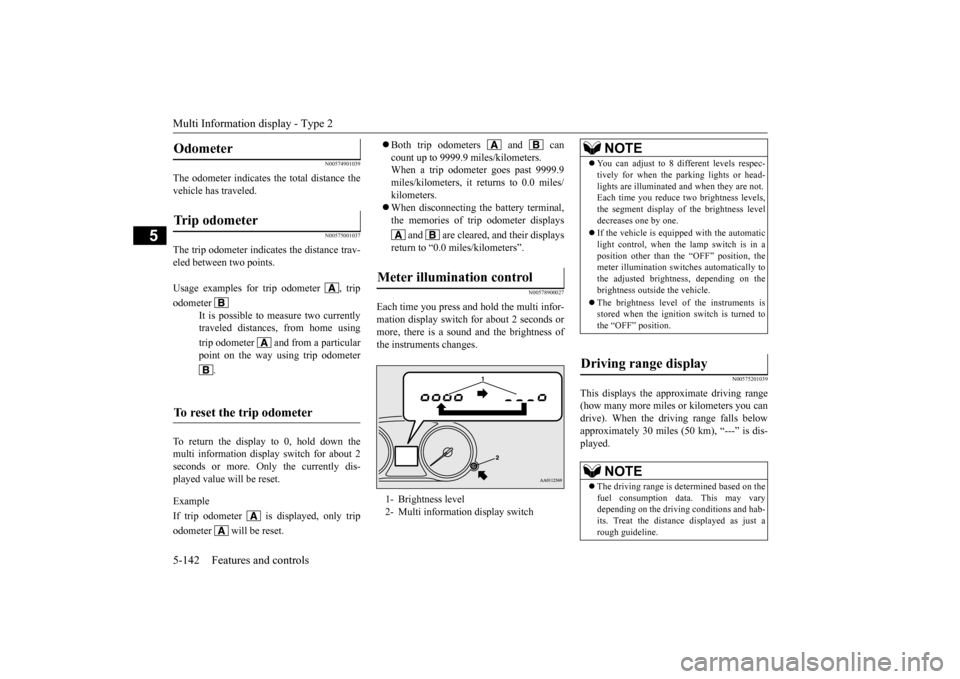
Each time you press and hold the multi infor- mation display switch
for about 2 seconds or
more, there is a sound and the brightness of the instruments changes.
N00575201039
This displays the approximate driving range (how many more miles
or kilometers you can
drive). When the driving range falls below approximately 30 miles
(50 km), “---” is dis-
played.
Odometer Trip odometer Usage examples for trip odometer , trip odometer
It is possible to measure two currently traveled distances, from home using trip odometer and from a particular point on the way using trip odometer
.
To reset the trip odometer
Meter illumination control 1- Brightness level 2- Multi informati
on display switch
NOTE
You can adjust to 8 di
fferent levels respec-
tively for when the parking lights or head-lights are illuminated a
nd when they are not.
Each time you reduce tw
o brightness levels,
the segment display of the brightness level decreases one by one. If the vehicle is equipped with the automatic light control, when the lamp switch is in aposition other than th
e “OFF” position, the
meter illumination switches automatically to the adjusted bright
ness, depending on the
brightness outside the vehicle. The brightness level
of the instruments is
stored when the ignition switch is turned to the “OFF” position.
Driving range display
NOTE
The driving range is determined based on the fuel consumption data. This may vary depending on the drivi
ng conditions and hab-
its. Treat the distance
displayed as just a
rough guideline.
BK0211800US.book 142 ページ 2014年3月12日 水曜日 午後2時42分
Page 225 of 446
Indicator light, warning light, and information screen display list (multi information display - Type 1) 5-148 Features and controls
5
N00557701058 N00557801307
Indicator light, warning light, an
d information screen display list (multi information display -
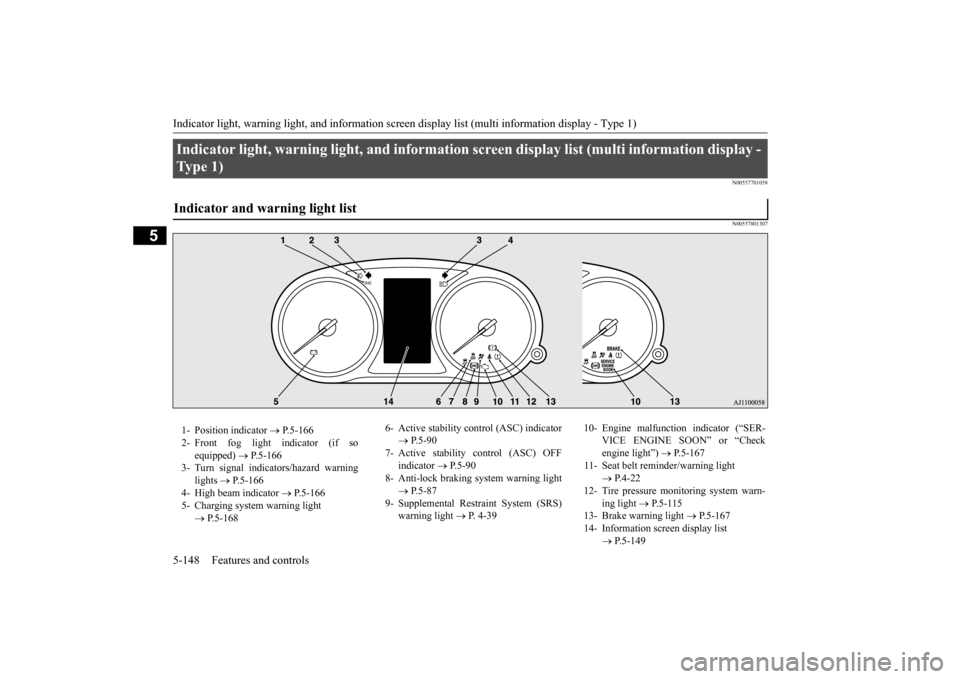
Ty p e 1 ) Indicator and warning light list 1- Position indicator
P.5-166
2- Front fog light indicator (if so
equipped)
P.5-166
3- Turn signal indicators/hazard warning
lights
P.5-166
4- High beam indicator
P.5-166
5- Charging system warning light
P.5-168
6- Active stability c
ontrol (ASC) indicator
P.5-90
7- Active stability control (ASC) OFF
indicator
P.5-90
8- Anti-lock braking
system warning light
P.5-87
9- Supplemental Restraint System (SRS)
warning light
P. 4-39
10- Engine malfunction indicator (“SER-
VICE ENGINE SOON” or “Check engine light”)
P.5-167
11- Seat belt reminder/warning light
P.4-22
12- Tire pressure monitoring system warn-
ing light
P.5-115
13- Brake warning light
P.5-167
14- Information screen display list
P.5-149
BK0211800US.book 148 ページ 2014年3月12日 水曜日 午後2時42分
Page 227 of 446
Indicator light, warning light, and information screen display list (multi information display - Type 1) 5-150 Features and controls
5
N00558001250
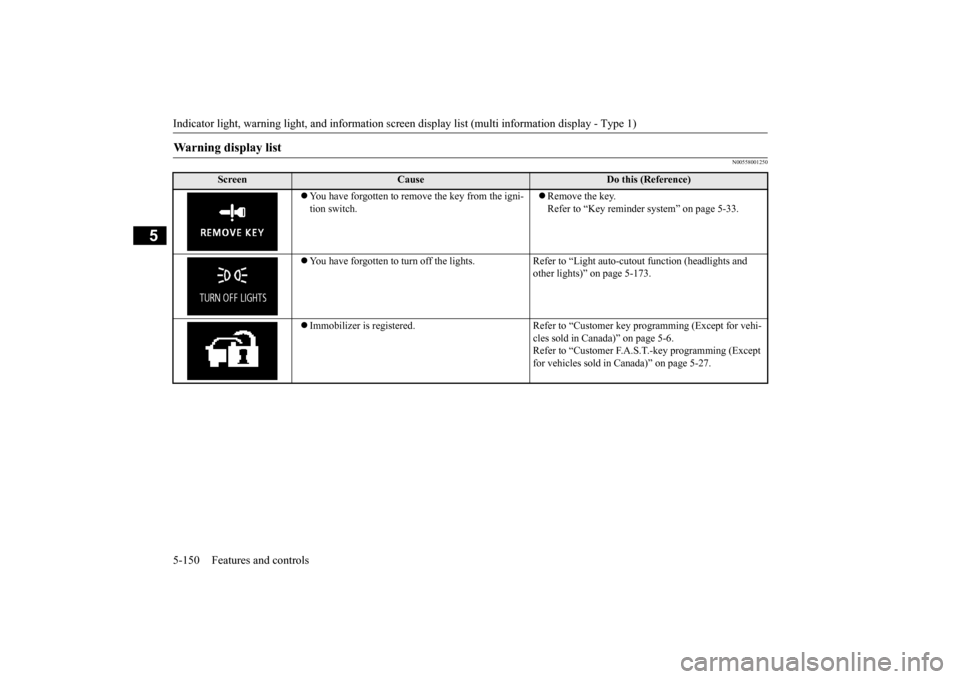
Warning display list
Screen
Cause
Do this (Reference)
You have forgotten to remove the key from the igni- tion switch.
Remove the key. Refer to “Key reminder
system” on page 5-33.
You have forgotten to turn off the lights. Refer
to “Light auto-cutout function (headlights and
other lights)” on page 5-173.
Immobilizer is registered. Refer to “C
ustomer key programming (Except for vehi-
cles sold in Canada)” on page 5-6.Refer to “Customer F.A.S.
T.-key programming (Except
for vehicles sold in Canada)” on page 5-27.
BK0211800US.book 150 ページ 2014年3月12日 水曜日 午後2時42分
Page 242 of 446
Indicator and warning light package (multi information display - Type 2)
Features and controls 5-165
5
N00519801875
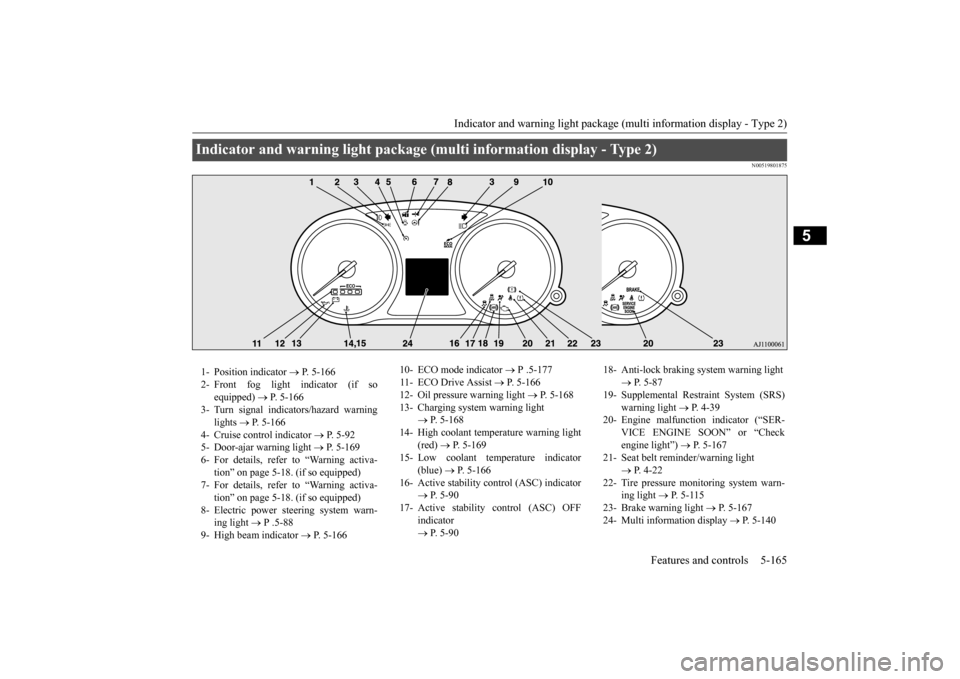
Indicator and warning light package (mu
lti information display - Type 2)
1- Position indicator
P. 5-166
2- Front fog light indicator (if so
equipped)
P. 5-166
3- Turn signal indicators/hazard warning
lights
P. 5-166
4- Cruise control indicator
P. 5-92
5- Door-ajar warning light
P. 5-169
6- For details, refer to “Warning activa-
tion” on page 5-18. (if so equipped)
7- For details, refer to “Warning activa-
tion” on page 5-18. (if so equipped)
8- Electric power steering system warn-
ing light
P .5-88
9- High beam indicator
P. 5-166
10- ECO mode indicator
P .5-177
11- ECO Drive Assist
P. 5-166
12- Oil pressure warning light
P. 5-168
13- Charging system warning light
P. 5-168
14- High coolant temperature warning light
(red)
P. 5-169
15- Low coolant temperature indicator
(blue)
P. 5-166
16- Active stability control (ASC) indicator
P. 5 - 9 0
17- Active stability
control (ASC) OFF
indicator P. 5 - 9 0
18- Anti-lock braking system warning light
P. 5-87
19- Supplemental Restra
int System (SRS)
warning light
P. 4 - 3 9
20- Engine malfuncti
on indicator (“SER-
VICE ENGINE SOON” or “Check engine light”)
P. 5-167
21- Seat belt remi
nder/warning light
P. 4-22
22- Tire pressure monitoring system warn-
ing light
P. 5-115
23- Brake warning light
P. 5-167
24- Multi information display
P. 5-140
BK0211800US.book 165 ページ 2014年3月12日 水曜日 午後2時42分
Page 243 of 446
Indicators 5-166 Features and controls
5
N00519900127 N00520000216
The arrows will flash in time with the corre- sponding exterior turn signals when the turnsignal lever is used. Both arrows will flash
when the hazard warn-
ing flasher swit
ch is pressed.
N00520100086
A blue light comes on when the headlights are on high beam.
N00520200175
This indicator comes on while the front foglights are on.
N00551300026
This indicator light illuminates while the position lights are on.
N00575601020
This indicator comes on in blue while thecoolant temperature is low.
N00579200027
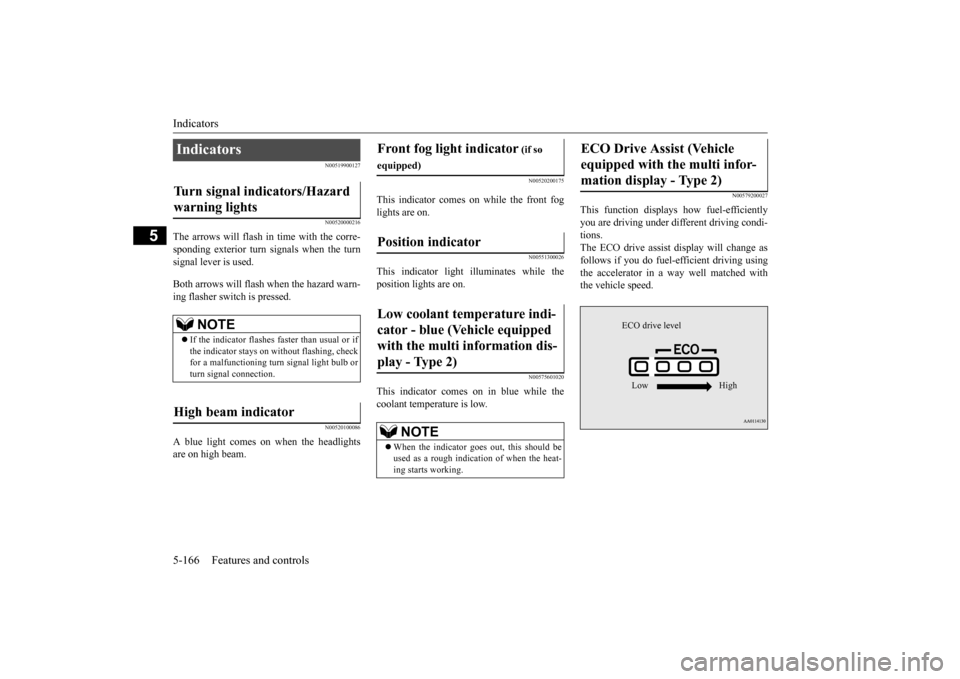
This function displays
how fuel-efficiently
you are driving under different driving condi- tions. The ECO drive assist di
splay will change as
follows if you do fuel-efficient driving using the accelerator in a way well matched with the vehicle speed.
Indicators Turn signal indicators/Hazard warning lights
NOTE
If the indicator flashes faster than usual or if the indicator stays on wi
thout flashing, check
for a malfunctioning turn signal light bulb orturn signal connection.
High beam indicator
Front fog light indicator
(if so
equipped)Position indicator Low coolant temperature indi- cator - blue (Vehicle equipped with the multi information dis- play - Type 2)
NOTE
When the indicator goes out, this should be used as a rough indication of when the heat-ing starts working.
ECO Drive Assist (Vehicle equipped with the multi infor-mation display - Type 2)
ECO drive level Low High
BK0211800US.book 166 ページ 2014年3月12日 水曜日 午後2時42分