2015 MITSUBISHI OUTLANDER lights
[x] Cancel search: lightsPage 18 of 446

If this problem occurs...
Quick index 2-9
2
The continuously variable trans- mission (CVT) makes no shift change when accelerating. The initial movement of the vehicle is slow when the vehicle starts moving. (for vehicles with CVT)
There may be a problem in the CVT. If the or warning lights on the multi-inform
ation display (Color liquid crystal display
type) will not turn off, or if they come on
frequently, please have th
e vehicle checked at your
nearest Mitsubishi Motors dealer.
P. 5-73
A tire is punctured.
1. Park the vehicle in a safe place where the surface is flat and level. 2. Replace the flat tire with the spare tire.
P. 8 - 6
Problem
Do this
Ref. Page
BK0211800US.book 9 ページ 2014年3月12日 水曜日 午後2時42分
Page 78 of 446

5
Features and controlsBreak-in recommendations ..............................................................5-3 Keys .................................................................................................5-3 Electronic immobilizer (Anti-theft starting system) ........................5-4Keyless entry system (if so equipped) ..............................................5-7 Free-hand Advanced Security Tr
ansmitter (F.A.S.T.-key) (if so
equipped).....................................................................................5-12Door locks ......................................................................................5-31 Power door locks ......
...........
...........
...........
...........
...........
.........
.....5-33
Child safety locks for rear door ..........
...........
.........
.........
.........
.....5-35
Liftgate (except for vehi
cles equipped with the
power liftgate) ....5-35
Power liftgate (if so equipped) .......................................................5-36 Inside liftgate release .....................................................................5-43Theft-alarm system ........................................................................5-44 Power window control ...................................................................5-47 Sunroof (if so equipped) .................................................................5-50Parking brake .................................................................................5-52 Steering wheel height and reach adjustment ..................................5-53 Inside rearview mirror ...................................................................5-53Outside rearview mirrors ...............................................................5-54 Ignition switch ...............................................................................5-55 Steering wheel lock (if so equipped) ..............................................5-57Starting the engine .........................................................................5-58 Automatic transaxle (if so equipped)..............................................5-60 Continuously variable transmission
(CVT) (if so equipped)..........5-67
Electronically controlled
4WD system (if so equipped).................5-74
S-AWC (Super-All Wheel Control) (if
so equipped) .....................5-77
4-wheel drive operation .................................................................5-80Inspection and maintenance followi
ng rough road operation ........5-82
Cautions on the handling of 4-wheel dr
ive vehicles ..................... 5-83
Service brake ................................................................................. 5-84 Hill start assist (if so equipped) ...................................................... 5-85Brake assist system ........................................................................ 5-86 Anti-lock braking system .............................................................. 5-86 Electric power steering system (EPS) ........................................... 5-88Active stability control (ASC) ....................................................... 5-89 Cruise control ................................................................................ 5-92 Adaptive Cruise Control System (ACC) (if so equipped) .............. 5-96Forward Collision Mitigation System
(FCM) (if so equipped) .... 5-106
Lane Departure Warning System (LDW
) (if so equipped)........... 5-111
Tire pressure monitoring system ................................................. 5-114Rear-view camera (if so equipped)............................................... 5-118 Instrument cluster ........................................................................ 5-120 Multi Information display - Type 1 ............................................. 5-122Multi Information display - Type 2 ............................................. 5-140 Indicator light, warning light, and
information screen display list
(multi information display - Type 1) ....................................... 5-148Indicator and warning light package
(multi information display - Type
2) .............................................................................................. 5-165 Indicators ..................................................................................... 5-166Warning lights .............................................................................. 5-167 Information screen display (Vehicle equipped with the multi informa- tion display - Type 1) ............................................................... 5-169Combination headlights and dimmer switch ............................... 5-171 Headlight leveling switch (if so equipped)................................... 5-176 Turn signal lever .......................................................................... 5-176Hazard warning flasher switch .................................................... 5-177
BK0211800US.book 1 ページ 2014年3月12日 水曜日 午後2時42分
Page 79 of 446
5
Features and controlsECO mode switch ........................................................................ 5-177 Front fog light switch (if so equipped) ......................................... 5-178 Wiper and washer switch ............................................................ 5-178Electric rear window def
ogger switch ......
...........
...........
............. 5-183
Horn switch ................................................................................. 5-184 Link System (if so equipped) ....................................................... 5-184 Bluetooth
® 2.0 interface (if so equipped) .................................... 5-185
USB input terminal (if so equipped) ............................................ 5-206 Sun visors .................................................................................... 5-20912 V power outlets ...................................................................... 5-210 Interior lights ............................................................................... 5-211 Storage spaces ............................................................................. 5-213Cup holders ................................................................................. 5-217 Bottle holders .............................................................................. 5-218 Cargo area cover (if so equipped) ............................................... 5-218Assist grips .................................................................................. 5-220 Coat hooks ................................................................................... 5-220 Luggage hooks ............................................................................ 5-221BK0211800US.book 2 ページ 2014年3月12日 水曜日 午後2時42分
Page 84 of 446
Keyless entry system (if so equipped)
Features and controls 5-7
5
N00562301094
Your electronic immo
bilizer operates on a
radio frequency subject to Federal Communi- cations Commission (FCC)
Rules (For vehi-
cles sold in U.S.A.
) and Industry Canada
Rules (For vehicles so
ld in Canada). This
device complies with part 15 of FCC Rulesand Industry Canada
licence-exempt RSS
standard(s). Operation is subject to the following two con- ditions. This device may not
cause harmful inter-
ference. This device must ac
cept any interference
received, including interference that may cause undesired operation.
N00509001920
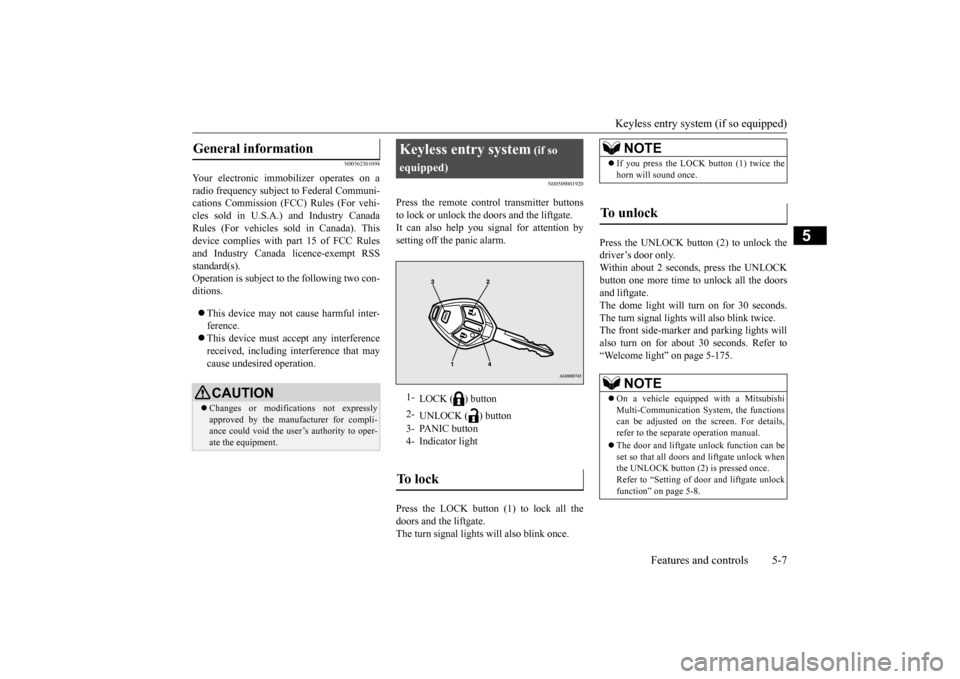
Press the remote control transmitter buttonsto lock or unlock the doors and the liftgate.It can also help you signal for attention by setting off the panic alarm. Press the LOCK button (1) to lock all the doors and the liftgate. The turn signal lights will also blink once.
Press the UNLOCK button (2) to unlock the driver’s door only.Within about 2 seconds, press the UNLOCK button one more time to unlock all the doors and liftgate.The dome light will turn on for 30 seconds. The turn signal lights will also blink twice. The front side-marker
and parking lights will
also turn on for about 30 seconds. Refer to “Welcome light” on page 5-175.
General information
CAUTION Changes or modifica
tions not expressly
approved by the manufacturer for compli- ance could void the user’s authority to oper-ate the equipment.
Keyless entry system
(if so
equipped)1-
LOCK ( ) button
2-
UNLOCK ( ) button
3- PANIC button 4- Indicator lightTo l o c k
NOTE
If you press the LOCK button (1) twice the horn will sound once.
To unlock
NOTE
On a vehicle equipped with a Mitsubishi Multi-Communication System, the functionscan be adjusted on the screen. For details, refer to the separa
te operation manual.
The door and liftgate unlock function can be set so that all doors and liftgate unlock when the UNLOCK button (2) is pressed once. Refer to “Setting of door
and liftgate unlock
function” on page 5-8.
BK0211800US.book 7 ページ 2014年3月12日 水曜日 午後2時42分
Page 85 of 446

Keyless entry system (if so equipped) 5-8 Features and controls
5
The horn and turn signal lights of the keyless entry system answerback function can be changed as required. This is done with thekey removed from the ignition switch. The answerback function can be set in the following three ways. Each time the answerba
ck function is set, a
chime will sound to tell you the condition of the answerback function. 1. Remove the key from
the ignition switch.
2. Open the driver’s door and turn the com-bination headlights and dimmer switch to the “OFF” position.
3. Press the LOCK button (1) for 4 to 10 sec- onds and press the UNLOCK button (2)during this time. 4. Release in sequence the UNLOCK and LOCK buttons within 5 seconds of press-ing the UNLOCK button in step 3.
The answerback function can be turned ON or OFF separately. 1. Remove the key from the ignition switch. 2. Open the driver’s door and turn the com- bination headlights and dimmer switch tothe “OFF” position. 3. Press the UNLOCK button (2) for 4 to 10 seconds and press the LOCK button (1)during this time. 4. Release in sequence the UNLOCK and LOCK buttons within 5 seconds of press-ing the LOCK button in step 3.
N00543601115
The door and liftgate
unlock function can be
set to the following two conditions.Each time the door and
liftgate unlock func-
tion is set, a chime wi
ll sound to tell you the
condition of the door and liftgate unlockfunction.
Answerback function
NOTE
The answerback functi
on will not operate if
any of the doors are open.
Horn deactivation/reactivation
One chime: The horn will not sound. Two chimes: The horn will sound. Four chimes: The hor
n will sound if the
LOCK button is pressed twice within 1 second.
NOTE
On a vehicle equippe
d with a Mitsubishi
Multi-Communication System, the functions can be adjusted on the screen. For details, refer to the separa
te operation manual.
Turn signal lights deactiva- tion/reactivation
Number of chimes
To l o c k
To u n l o c k
One chime One flash Two flashes Two chimes One flash No flash Three chimes No flash Two flashes Four chimes Two flashes One flash Five chimes No flash One flash Six chimes Two flashes No flash Seven chimes
No flash No flash
NOTE
On a vehicle equippe
d with a Mitsubishi
Multi-Communication System, the functions can be adjusted on the screen. For details, refer to the separate operation manual.
Setting of door and liftgate unlock function
BK0211800US.book 8 ページ 2014年3月12日 水曜日 午後2時42分
Page 86 of 446
Keyless entry system (if so equipped)
Features and controls 5-9
5
1. Remove the key from the ignition switch. 2. Open the driver’s door and turn the com-bination headlights and dimmer switch to the “OFF” position. 3. Press the LOCK button (1) for 4 to 10 sec-onds and press the UNLOCK button (2) during this time. 4. Release in sequence the LOCK andUNLOCK buttons within 5 seconds of pressing the LOCK button in step 3.
N00543701060
If you are near your vehicle and feel threat- ened, you may activate the alarm to call atten- tion as follows:
1. Press the PANIC button (3) for more than 1 second.2. The headlights will blink on and off and the horn will sound intermittently for about 3 minutes.3. To turn off the alarm, press any button on the remote control transmitter.
N00543801087
Only remote control transmitters pro- grammed with the vehicle’s electronics can lock or unlock all doors and the liftgate. If you lose the remote control transmitter, you can order a remote c
ontrol transmitter from
your authorized Mitsubi
shi Motors dealer by
referring to the key number. To prevent vehicle theft, the ID code for theremote control transmitter must be changed. Take your vehicle and all remote control transmitters to your authorized MitsubishiMotors dealer to have your ID code changed.
N00543900049
To add a remote control transmitter, you must already have 1 registered remote control transmitter.
Registering the ID code can be done by your- self or by your authorized Mitsubishi Motorsdealer. For you to regist
er the ID code your-
self, follow the “Customer remote control transmitter programming” procedure below.If you choose to have your authorized Mitsubishi Motors dealer register the ID code, take your vehi
cle and any remaining
keys to your authorized Mitsubishi Motors dealer.
N00544001103
You can program new remote control trans- mitters to the system if you have one valid(already registered) remote control transmit- ter by doing the following: 1. Have available all (current and new) remote control transmitters you wish toregister. 2. With a valid (already registered) remote control transmitter, press the UNLOCKbutton (2) for 4 to 10 seconds. Then press and hold the LOCK button (1).
Number of chimes
Condition
One chime
All doors and the liftgate unlock
Two chimes Driver’s door unlock only
NOTE
On a vehicle equippe
d with a Mitsubishi
Multi-Communication System, the functionscan be adjusted on the screen. For details, refer to the separa
te operation manual.
Using the panic alarm
Replacement remote control transmitters
Additional remote control transmitters
NOTE
You are provided with 2 remote control transmitters, but you may register up to 8 remote control transmitters.
Customer remote control trans- mitter programming
BK0211800US.book 9 ページ 2014年3月12日 水曜日 午後2時42分
Page 91 of 446
Free-hand Advanced
Security Transmitter (F.A.S
.T.-key) (if so equipped)
5-14 Features and controls
5
N00503301077
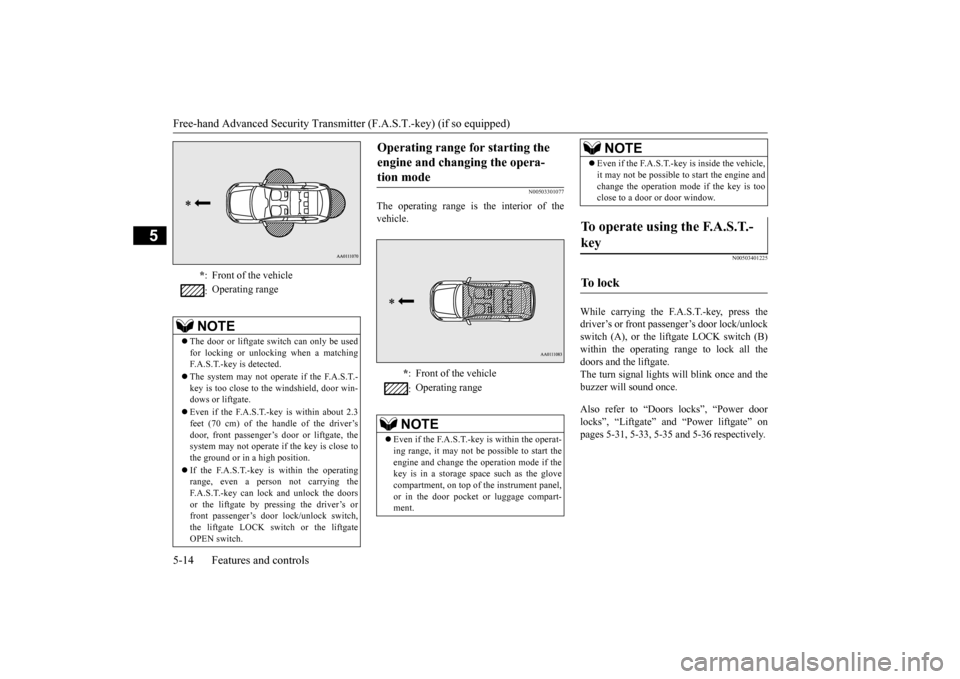
The operating range is the interior of the vehicle.
N00503401225
While carrying the F.A.S.T.-key, press thedriver’s or front passenger’s door lock/unlock switch (A), or the liftgate LOCK switch (B) within the operating range to lock all thedoors and the liftgate. The turn signal lights will blink once and the buzzer will sound once. Also refer to “Doors locks”, “Power door locks”, “Liftgate” and “Power liftgate” on pages 5-31, 5-33, 5-35 and 5-36 respectively.
* : Front of the vehicle : Operating range
NOTE
The door or liftgate switch can only be used for locking or unlocking when a matching F.A.S.T.-key is detected. The system may not operate if the F.A.S.T.- key is too close to the windshield, door win- dows or liftgate. Even if the F.A.S.T.-key is within about 2.3 feet (70 cm) of the handle of the driver’sdoor, front passenger’s door or liftgate, the system may not operate
if the key is close to
the ground or in a high position. If the F.A.S.T.-key is within the operating range, even a person not carrying theF.A.S.T.-key can lock and unlock the doors or the liftgate by pressing the driver’s or front passenger’s door
lock/unlock switch,
the liftgate LOCK switch or the liftgate OPEN switch.
Operating range for starting the engine and changing the opera-tion mode
* : Front of the vehicle : Operating range
NOTE
Even if the F.A.S.T.-key is within the operat- ing range, it may not be
possible to start the
engine and change the
operation mode if the
key is in a storage space such as the glove compartment, on top of the instrument panel,or in the door pocket or luggage compart- ment.
Even if the F.A.S.T.-key is inside the vehicle, it may not be possible to
start the engine and
change the operation mode if the key is tooclose to a door or door window.
To operate using the F.A.S.T.- key
To l o c k
NOTE
BK0211800US.book 14 ページ 2014年3月12日 水曜日 午後2時42分
Page 92 of 446

Free-hand Advanced Securi
ty Transmitter (F.A.S.T.-key) (if so equipped)
Features and controls 5-15
5
While carrying the F.A.S.T.-key within the operating range, you ca
n unlock the doors
and the liftgate by using the F.A.S.T.-key operation. The dome light will turn on for 30 seconds.The turn signal lights wi
ll blink twice and the
buzzer will sound twice. Also refer to “Door locks”, “Power door locks”, “Liftgate” and “Power liftgate” onpages 5-31, 5-33, 5-35 and 5-36 respectively. Press the driver’s door lock/unlock switch (A) to unlock only the driver’s door.
Within about 2 seconds, press the driver’s door lock/unlock sw
itch one more time to
unlock all the doors and the liftgate. Press the front passenger’s door lock/unlock switch (B) or the lift
gate OPEN switch (C) to
unlock all the doors and the liftgate.
NOTE
In cases such as the following, the F.A.S.T.- key does not operate. • There is a F.A.S.T.-key in the passenger compartment • A door or the liftgate is open or ajar • The operation mode is not in OFF.Driver’s and front passenger’s door lock/unlock switchesLiftgate switches
The liftgate OPEN switch (C) can be used to confirm that the vehicl
e is locked properly.
Press the liftgate OPEN
switch within about
3 seconds of locking. If the liftgate OPEN switch is pressed 3 sec- onds or more after the vehicle is locked, the doors and the liftga
te are unlocked.
The time within which locking confirmation is possible can be adjusted. See an autho- rized Mitsubishi Motors
dealer for details.
On a vehicle equippe
d with a Mitsubishi
Multi-Communication System, the function can be adjusted on the screen. For details,refer to the separate operation manual.
To unlock
NOTE
NOTE
Settings can be changed so that all doors and the liftgate are unlocked automatically by pressing the driver’s door lock/unlock switch once.Refer to “Setting of door
and liftgate unlock
function” on page 5-29.Driver’s door lock/unlock switch
BK0211800US.book 15 ページ 2014年3月12日 水曜日 午後2時42分