2015 MITSUBISHI OUTLANDER battery
[x] Cancel search: batteryPage 135 of 446
Starting the engine 5-58 Features and controls
5
Remove the key at
the “LOCK” position.
Turn the steering wheel until it is locked. Turn the key to the “ACC” position while moving the steering
wheel slightly.
N00512601803
[For vehicles equipped with the Free-hand Advanced Security Transmitter (F.A.S.T.- key).] For information on operation for vehiclesequipped with the Free-hand Advanced Secu- rity Transmitter (F.A.S.T.-key), refer to
“Free-hand Advanced
Security Transmitter
(F.A.S.T.-key): Starting” on page5-12. [Except for vehicles equipped with the Free-hand Advanced Se
curity Transmit-
ter (F.A.S.T.-key).] Do not operate the starter motor continu- ously for longer than 15 seconds as this could run the battery
down or damage the
starter motor. If the engine does not start, turn the ignition switch back to the “OFF” or “LOCK” position, wait a few seconds,and then try again. Trying repeatedly with the engine or starter motor still turning will damage the starter mechanism. If the engine will not
start because the bat-
tery is weak or discharged, refer to “Jump-starting the engine” (on page 8-2)for instructions. A longer warm up period will only con- sume extra fuel. The engine is warmed upenough for driving when the bar graph of engine coolant temper
ature display starts
to move or the low coolant temperatureindicator goes out. Refer to “Engine cool- ant temperature display” on page 5-128 or “Low coolant temper
ature indicator” on
page 5-166.
This model is equipped with an electronically controlled fuel injection system. This is a sys-tem that automatically controls fuel injection. There is usually no need to depress the accel- erator pedal when starting the engine.The starter should not be run for more than 15 seconds at a time. To prevent battery drain, wait a few secondsbetween attempts to restart the engine. 1. Make sure all occupants are properly seated with seat belts fastened.
To l o c k
To u n l o c k
CAUTION Remove the key when leaving the vehicle.NOTE
If the front wheels are turned, the anti-theft lock may sometimes make it difficult to turn the key from “LOCK” to “ACC”. Firmlyturn the steering wheel to the left or to the right as you turn the key.
Starting the engine
Tips for starting
WA R N I N G Never run the engine in
a closed or poorly
ventilated area any longer than is neededto move your vehicle
out of the area. Car-
bon monoxide gas, wh
ich is odorless and
extremely poisonous, could build up and cause serious injury or death.CAUTION Do not push-start the vehicle.Do not run the engine at high rpms or drive at high speeds until
the engine has had a
chance to warm up. Release the ignition sw
itch as soon as the
engine starts. Otherwis
e, the starter motor
will be damaged
Starting the engine
BK0211800US.book 58 ページ 2014年3月12日 水曜日 午後2時42分
Page 137 of 446
Automatic transaxle (if so equipped) 5-60 Features and controls
5
N00513200216
Automatic transaxle will automatically change its gear depe
nding on road and driv-
ing conditions. This
helps achieve smooth
driving and excellent fuel efficiency. Also you can manually shift up and shiftdown the transaxle. Refer to “Sports mode” on page 5-64. The transaxle prevents
unnecessary upshifts
even when the accelerator pedal is releasedand ensures smooth driving. According to the condi
tions, the transaxle
will automatically shift to a lower gear to achieve stronger engine braking. This may help reduce your need to use the servicebrake.
N00513801408
As an additional safe
ty precaution, models
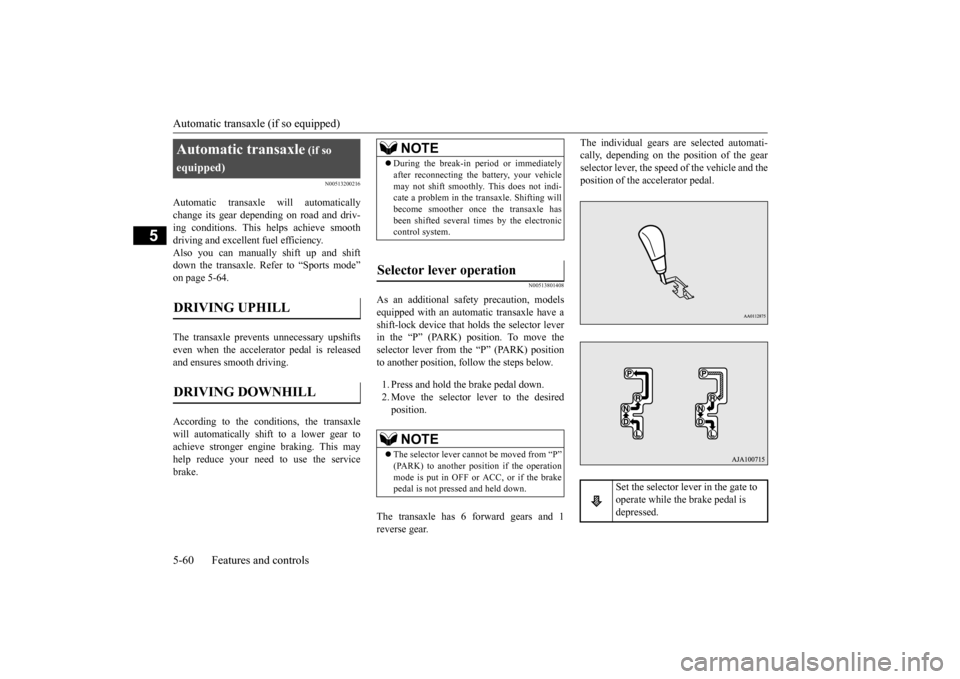
equipped with an automatic transaxle have a shift-lock device that holds the selector lever in the “P” (PARK) position. To move theselector lever from the “P” (PARK) position to another position, follow the steps below. 1. Press and hold the brake pedal down. 2. Move the selector lever to the desiredposition.
The transaxle has 6 forward gears and 1 reverse gear.
The individual gears are selected automati- cally, depending on the position of the gearselector lever, the speed of the vehicle and the position of the ac
celerator pedal.
Automatic transaxle
(if so
equipped)DRIVING UPHILL
DRIVING DOWNHILL
NOTE
During the break-in pe
riod or immediately
after reconnecting the
battery, your vehicle
may not shift smoothly.
This does not indi-
cate a problem in the transaxle. Shifting will become smoother once the transaxle has been shifted several
times by the electronic
control system.
Selector lever operation
NOTE
The selector lever cannot
be moved from “P”
(PARK) to another po
sition if the operation
mode is put in OFF or ACC, or if the brake pedal is not pressed and held down.
Set the selector lever in the gate to operate while the brake pedal is depressed.
BK0211800US.book 60 ページ 2014年3月12日 水曜日 午後2時42分
Page 138 of 446
Automatic transaxle (if so equipped)
Features and controls 5-61
5
N00563101044
When the selector lever cannot be shifted from the “P” (PARK) position to anotherposition while the brake pedal is pressed and held down with the operation mode in ON, the battery may be flat or the shift-lock mech-anism may be malfunctioning. Immediately have your
vehicle checked by an
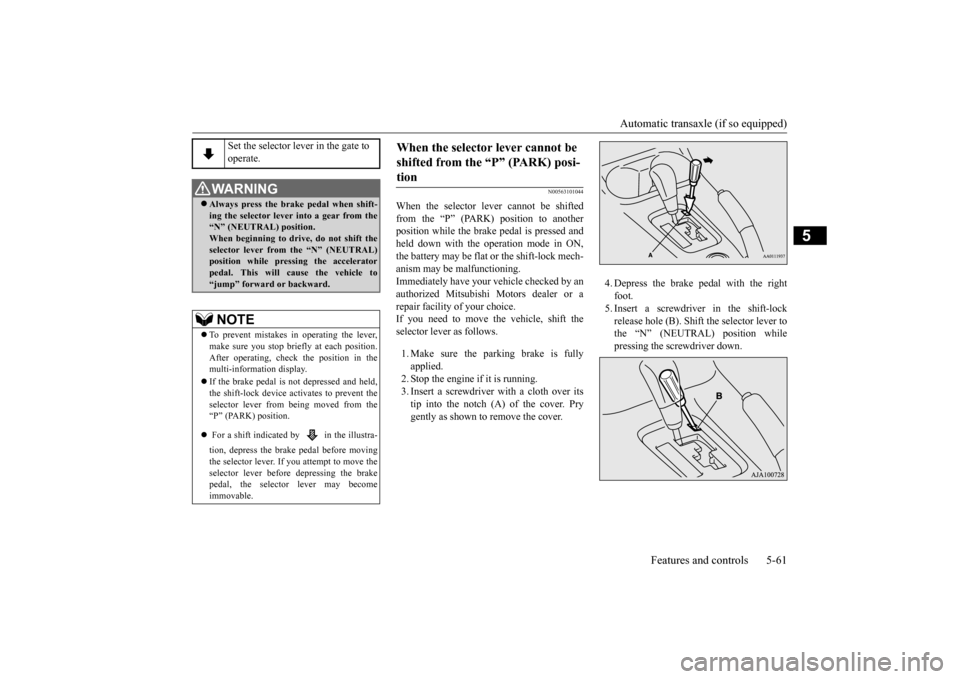
authorized Mitsubishi Motors dealer or a repair facility of your choice. If you need to move the vehicle, shift theselector lever as follows. 1. Make sure the parking brake is fully applied. 2. Stop the engine if it is running.3. Insert a screwdriver
with a cloth over its
tip into the notch (A) of the cover. Pry gently as shown to remove the cover.
4. Depress the brake
pedal with the right
foot.5. Insert a screwdriver in the shift-lock release hole (B). Shift the selector lever to the “N” (NEUTRAL) position whilepressing the screwdriver down.
Set the selector lever in the gate to operate.
WA R N I N G Always press the brake pedal when shift- ing the selector
lever into a gear from the
“N” (NEUTRAL) position. When beginning to drive, do not shift theselector lever from
the “N” (NEUTRAL)
position while pressing the accelerator pedal. This will cause the vehicle to“jump” forward or backward.NOTE
To prevent mistakes in operating the lever, make sure you stop brie
fly at each position.
After operating, chec
k the position in the
multi-information display. If the brake pedal is not depressed and held, the shift-lock device ac
tivates to prevent the
selector lever from being moved from the “P” (PARK) position. For a shift indicated by in the illustra- tion, depress the brake pedal before moving the selector lever. If you attempt to move theselector lever before depressing the brake pedal, the selector lever may become immovable.
When the selector lever cannot be shifted from the “P” (PARK) posi-tion
BK0211800US.book 61 ページ 2014年3月12日 水曜日 午後2時42分
Page 146 of 446
Continuously variable transmission (CVT) (if so equipped)
Features and controls 5-69
5
N00563301059
When the selector lever cannot be shifted from the “P” (PARK) position to anotherposition while the brake
pedal is pressed and
held down with the i
gnition switch at the
“ON” position or the operation mode in ON,the battery may be flat or the shift-lock mech- anism may be malfunctioning. Immediately have your
vehicle checked by an
authorized Mitsubishi Motors dealer or a repair facility
of your choice.
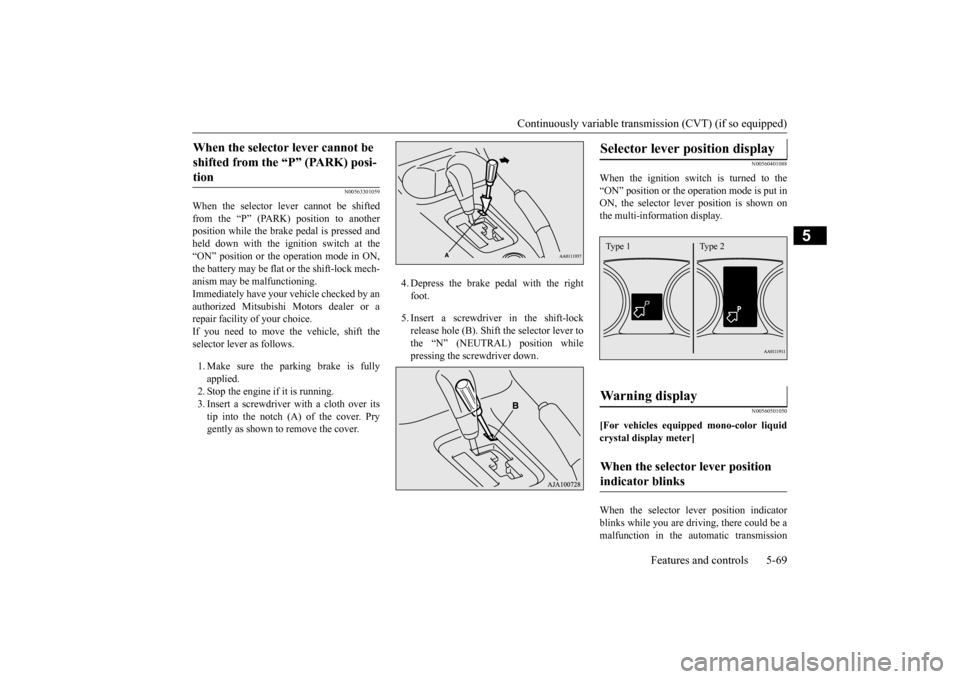
If you need to move the vehicle, shift the selector lever as follows. 1. Make sure the parking brake is fully applied.2. Stop the engine if it is running. 3. Insert a screwdrive
r with a cloth over its
tip into the notch (A) of the cover. Prygently as shown to remove the cover.
4. Depress the brake pedal with the right foot. 5. Insert a screwdriver in the shift-lock release hole (B). Shift the selector lever to the “N” (NEUTRAL) position while pressing the screwdriver down.
N00560401088
When the ignition switch is turned to the “ON” position or the operation mode is put in ON, the selector lever position is shown onthe multi-information display.
N00560501050
[For vehicles equipped mono-color liquidcrystal display meter] When the selector le
ver position indicator
blinks while you are driv
ing, there could be a
malfunction in the automatic transmission
When the selector lever cannot be shifted from the “P” (PARK) posi-tion
Selector lever position display
Warning display
When the selector lever position indicator blinks
Type 1 Type 2
BK0211800US.book 69 ページ 2014年3月12日 水曜日 午後2時42分
Page 168 of 446
Active stability control (ASC) Features and controls 5-91
5
N00546601129
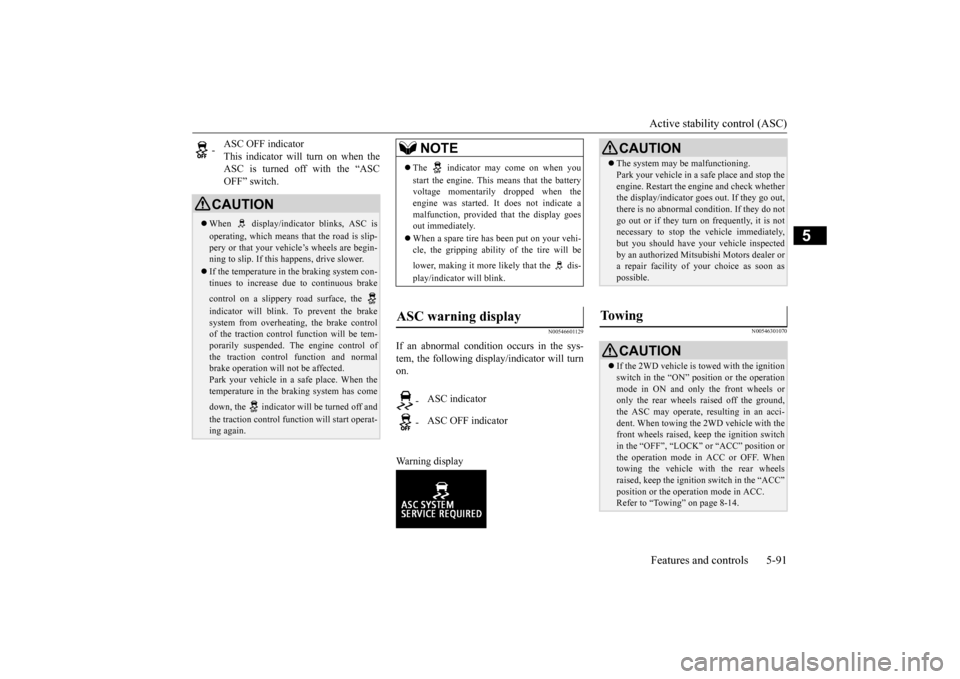
If an abnormal condition occurs in the sys- tem, the following display/indicator will turn on. Warning display
N00546301070
-
ASC OFF indicator This indicator will turn on when the ASC is turned off with the “ASCOFF” switch.
CAUTION When display/indicator blinks, ASC is operating, which means th
at the road is slip-
pery or that your vehi
cle’s wheels are begin-
ning to slip. If this happens, drive slower. If the temperature in the braking system con- tinues to increase due
to continuous brake
control on a slippery road surface, the indicator will blink. To prevent the brake system from overheating, the brake control of the traction control
function will be tem-
porarily suspended. Th
e engine control of
the traction control
function and normal
brake operation will not be affected. Park your vehicle in a safe place. When thetemperature in the braking system has come down, the indicator will be turned off and the traction control function will start operat- ing again.
NOTE
The indicator may come on when you start the engine. This means that the battery voltage momentarily dropped when theengine was started. It
does not indicate a
malfunction, provided th
at the display goes
out immediately. When a spare tire has been put on your vehi- cle, the gripping ability of the tire will be lower, making it more likely that the dis- play/indicator will blink.
ASC warning display
-
ASC indicator
-
ASC OFF indicator
CAUTION The system may be malfunctioning. Park your vehicle in a
safe place and stop the
engine. Restart the engi
ne and check whether
the display/indicator goes out. If they go out, there is no abnormal condition. If they do not go out or if they turn on frequently, it is notnecessary to stop the
vehicle immediately,
but you should have your vehicle inspected by an authorized Mitsubi
shi Motors dealer or
a repair facility of your choice as soon as possible.
To w i n g
CAUTION If the 2WD vehicle is
towed with the ignition
switch in the “ON” pos
ition or the operation
mode in ON and only the front wheels or only the rear wheels raised off the ground, the ASC may operate, resulting in an acci-dent. When towing the 2WD vehicle with the front wheels raised, ke
ep the ignition switch
in the “OFF”, “LOCK” or “ACC” position orthe operation mode in ACC or OFF. Whentowing the vehicle with the rear wheels raised, keep the ignition switch in the “ACC” position or the operation mode in ACC.Refer to “Towing” on page 8-14.
BK0211800US.book 91 ページ 2014年3月12日 水曜日 午後2時42分
Page 194 of 446
Tire pressure monitoring system
Features and controls 5-117
5
allow the TPMS to continue to function prop- erly.
N00532801511
1. If the tire pressure monitoring systemwarning light illumi
nates, avoiding hard
braking, sharp steering maneuvers and high speeds. You should stop and adjust the tires to the proper inflation pressure as soon as possible. Adjust the spare tire atthe same time. Refer to “Tires” on page 9-14.
2. If the tire pressure monitoring system warning light remains illuminated afteryou have been driving for about 20 min- utes after you adjust the tire inflation pres- sure, one or more of the tires may have apuncture. Inspect the tire and if it has a puncture, have it repaired by an autho- rized Mitsubishi Motors dealer as soon aspossible.
The tire pressure monitoring system may not work normally in the following circum- stances: A wireless facility or device using the same frequency is near the vehicle. Snow or ice is stuck inside the fenders and/or on the wheels. The tire inflation pres
sure sensor’s battery
is dead. Wheels other than Mitsubishi genuine wheels are being used. Wheels that are not fitted with tire infla- tion pressure sensors are being used. Wheels whose ID codes are not memo- rized by the vehicle are used. Compact spare tire is fitted as a road wheel.
If the warning light / display illuminates while driving
NOTE
In addition, the warni
ng display is displayed
on the information screen in the multi-infor- mation display. When inspecting or adjusting the tire pres- sure, do not apply excessive force to the valve stem to avoid breakage. After inspecting or adju
sting the tire pres-
sure, always reinstall the valve cap on thevalve stem. Without the valve cap, dirt or moisture could get into the valve, resulting in damage to thetire inflation pressure sensor. Do not use metal valve caps, which may cause a metal reaction, resulting in corrosion and damage of the tire inflation pressure sen- sors.
Once adjustments have
been made, the warn-
ing light will go off after a few minutes ofdriving.WA R N I N G If the warning light / display illuminates while you are driving,
avoid hard braking,
sharp steering maneuvers and high speeds.Driving with an under-inflated tire adversely affects vehicle performance and can result in an accident.CAUTION If a tire has a puncture,
replace that tire with
the spare tire. Driving on a punctured tirecould lead to an accident. The warning light / di
splay may not illumi-
nate immediately in the
event of a tire blow-
out or rapid leak.NOTE
NOTE
To avoid the risk of da
mage to the tire infla-
tion pressure sensors, have any puncturedtire repaired by an authorized MitsubishiMotors dealer. If the tir
e repair is not done by
an authorized Mitsubishi Motors dealer, it is not covered by your warranty. Do not use an aerosol puncture-repair spray on any tire.Such a spray could damage the tire inflation pressure sensors. Have any puncture repaired by an authorizedMitsubishi Motors dealer.
BK0211800US.book 117 ページ 2014年3月12日 水曜日 午後2時42分
Page 207 of 446
Multi Information display - Type 1 5-130 Features and controls
5
To return the display to 0, hold down the multi information display switch for about 2 seconds or more. Only the currently dis- played value will be reset. Example If trip odometer is
displayed, only trip
odometer wi
ll be reset.
Both trip odometers and can count up to 9999.9 m
iles/kilometers.
When a trip odometer goes past 9999.9 miles/kilometers, it returns to 0.0 miles/ kilometers. When disconnecting th
e battery terminal,
the memories of trip odometer displays
and are cleared, and their displays
return to “0.0 miles/kilometers”.
N00556701237
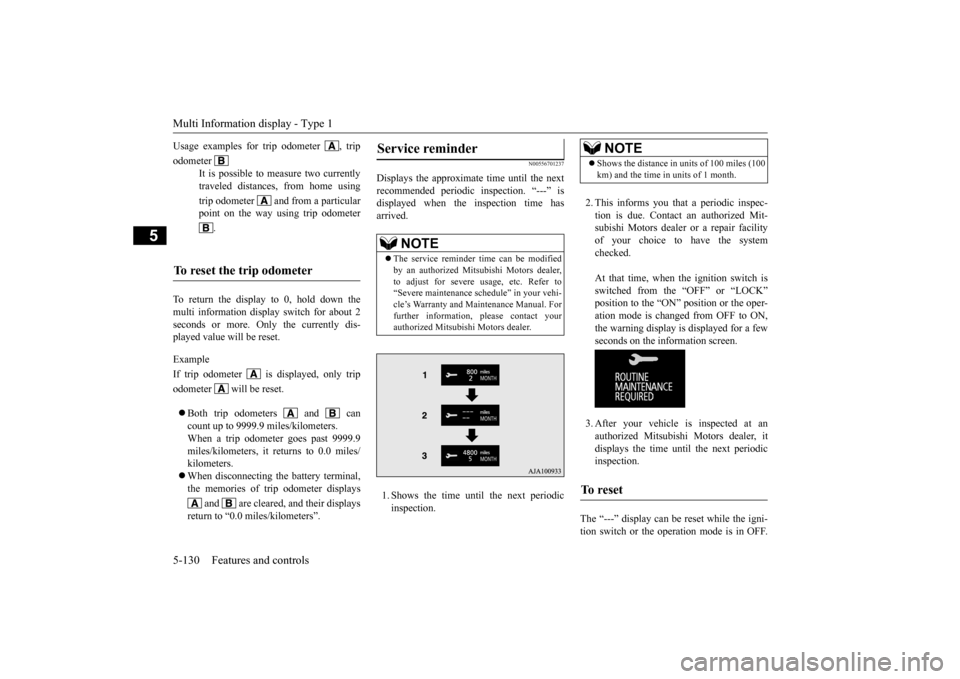
Displays the approximate time until the next recommended periodic inspection. “---” is displayed when the inspection time hasarrived. 1. Shows the time until the next periodic inspection.
2. This informs you that a periodic inspec- tion is due. Contact
an authorized Mit-
subishi Motors dealer or a repair facilityof your choice to have the system checked. At that time, when the ignition switch is switched from the “OFF” or “LOCK” position to the “ON” position or the oper-ation mode is changed from OFF to ON, the warning display is displayed for a few seconds on the information screen. 3. After your vehicle is inspected at an authorized Mitsubishi Motors dealer, it displays the time until the next periodicinspection.
The “---” display can be
reset while the igni-
tion switch or the opera
tion mode is in OFF.
Usage examples for trip odometer , trip odometer
It is possible to measure two currently traveled distances, from home using trip odometer and from a particular point on the way using trip odometer
.
To reset the trip odometer
Service reminder
NOTE
The service reminder ti
me can be modified
by an authorized Mitsubishi Motors dealer,to adjust for severe usage, etc. Refer to “Severe maintenance schedule” in your vehi- cle’s Warranty and Main
tenance Manual. For
further information,
please contact your
authorized Mitsubishi Motors dealer.
NOTE
Shows the distance in units of 100 miles (100 km) and the time in units of 1 month.
To r e s e t
BK0211800US.book 130 ページ 2014年3月12日 水曜日 午後2時42分
Page 212 of 446
Multi Information display - Type 1
Features and controls 5-135
5
Refer to “Changing
the time until “REST
REMINDER” is displayed” on page 5-138.Refer to “Changing the turn signal sound” on page 5-139. Refer to “Changing the momentary fuelconsumption displa
y” on page 5-139.
Refer to “Returning to the factory set- tings” on page 5-139.
N00557001240
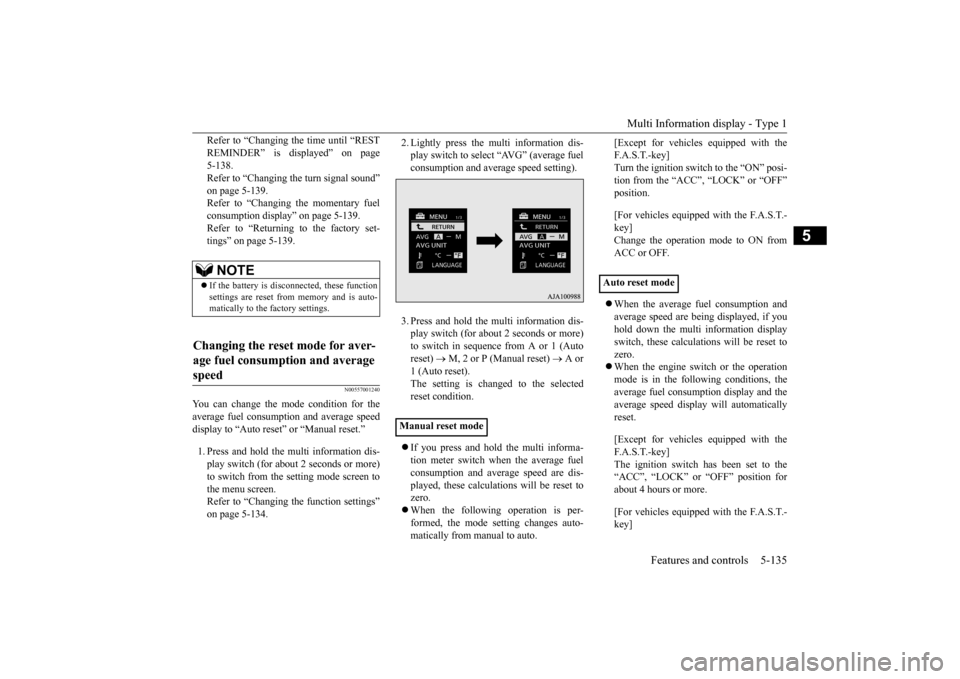
You can change the mode condition for theaverage fuel consumption and average speed display to “Auto reset” or “Manual reset.” 1. Press and hold the mu
lti information dis-
play switch (for about 2 seconds or more)to switch from the setting mode screen to the menu screen. Refer to “Changing th
e function settings”
on page 5-134.
2. Lightly press the multi information dis- play switch to select “AVG” (average fuelconsumption and aver
age speed setting).
3. Press and hold the multi information dis- play switch (for about 2 seconds or more)to switch in sequence from A or 1 (Auto reset)
M, 2 or P (Manual reset)
A or
1 (Auto reset).The setting is changed to the selected reset condition. If you press and hold the multi informa- tion meter switch when the average fuelconsumption and average speed are dis- played, these calculati
ons will be reset to
zero. When the following operation is per- formed, the mode setting changes auto- matically from manual to auto.
[Except for vehicles equipped with the F. A . S . T. - k e y ]Turn the ignition switch to the “ON” posi- tion from the “ACC”, “LOCK” or “OFF” position. [For vehicles equipped with the F.A.S.T.- key] Change the operation mode to ON from ACC or OFF. When the average fuel consumption and average speed are being displayed, if you hold down the multi information displayswitch, these calculations will be reset to zero. When the engine switch or the operation mode is in the following conditions, the average fuel consumption display and the average speed display will automaticallyreset. [Except for vehicles equipped with the F. A . S . T. - k e y ] The ignition switch has been set to the“ACC”, “LOCK” or
“OFF” position for
about 4 hours or more. [For vehicles equipped with the F.A.S.T.- key]
NOTE
If the battery is disc
onnected, these function
settings are reset from memory and is auto- matically to the
factory settings.
Changing the reset mode for aver- age fuel consumption and average speed
Manual reset mode
Auto reset mode
BK0211800US.book 135 ページ 2014年3月12日 水曜日 午後2時42分