2015 MITSUBISHI OUTLANDER display
[x] Cancel search: displayPage 264 of 446

Bluetooth® 2.0 interface (if so equipped)
Features and controls 5-187
5
Press this button when an incoming call is received to answer the telephone. When another call is received during a call, press this button to put the first caller on hold and talk to the new caller. • In such circumstance
s, you can press the
button briefly to switch between callers. You will switch to the first caller and theother caller will
be put on hold.
• To establish a three-way call in such situ- ations, press the SPEECH button to entervoice recognition mode and then say “Join calls.”
Press this button when an incoming call is received to refuse the call. Press this button during a call to end the current call.When another call is on hold, you will switch to that call.
If this button is presse
d in the voice recog-
nition mode, the voi
ce recognition mode
will be deactivated.
Your voice will be
recognized by a micro-
phone in the overhead console, allowing youto make hands-free ca
lls with voice com-
mands.
N00564101113
The Bluetooth
® 2.0 interface is equipped
with a voice recognition function. Simply say voice commands and you can per- form various operations and make or receivehands-free calls. With the Bluetooth
® 2.0 interface, voice rec-
ognition is possible fo
r US English, North
American Spanish, Canadian French and Jap-anese. The factory se
tting is “English.”
PICK-UP button
NOTE
When not receiving in
coming calls, pressing
the PICK-UP button on
vehicles equipped
with the Mitsubishi Multi-Communication System, will activate
the voice recognition of
the Bluetooth
® 2.0 interface.
HANG-UP button
NOTE
When you press the SPEECH button (except for vehicles with Mitsubishi Multi-Commu-nication System) or PICK-UP button (for vehicles with Mitsubishi Multi-Communica- tion System) to enter
voice recognition mode
with a cellular phone pa
ired to the system,
current information on the cellular phone, such as “remaining ba
ttery life,” “signal
strength” or “roaming,”
will be displayed on
the audio display.
*
* : Some cellular phones will not send this information to the Bluetooth
® 2.0 interface.
Call waiting and three-
way calls can be used
by the Bluetooth
® 2.0 interface, only if it is
possible to use those services with your cel- lular phone.
Microphone
NOTE
If a cellular phone is within close proximity of the microphone, it may distort the soundquality. In this case, place the cellular phoneas far as possible from the microphone.
Voice recognition function
NOTE
If the voice command that you say differs from the predefined command or cannot be recognised due to ambient noise or some other reason, the Bluetooth
® 2.0 interface
will ask you for the voice command again up to 3 times.
BK0211800US.book 187 ページ 2014年3月12日 水曜日 午後2時42分
Page 273 of 446
![MITSUBISHI OUTLANDER 2015 3.G Owners Manual Bluetooth® 2.0 interface (if so equipped) 5-196 Features and controls
5
[For vehicles equippe
d with the Mitsubishi
Multi-Communication System (MMCS)]Refer to the separate owner’s manual. [For ve](/manual-img/19/7534/w960_7534-272.png "MITSUBISHI OUTLANDER 2015 3.G Owners Manual Bluetooth® 2.0 interface (if so equipped) 5-196 Features and controls
5
[For vehicles equippe
d with the Mitsubishi
Multi-Communication System (MMCS)]Refer to the separate owner’s manual. [For ve")
Bluetooth® 2.0 interface (if so equipped) 5-196 Features and controls
5
[For vehicles equippe
d with the Mitsubishi
Multi-Communication System (MMCS)]Refer to the separate owner’s manual. [For vehicles equipped with the DISPLAY AUDIO]Refer to the separate owner’s manual.
N00565501097
You can make or receive hands-free calls using a Bluetooth
® compatible cellular phone
connected to the Bluetooth
® 2.0 interface.
You can also use the phonebooks in the Blue- tooth
® 2.0 interface to make calls without
dialing telephone numbers. To make a call P.5-196 Send function P.5-198 Receiving calls P.5-198Mute function P.5-198 Switching between hand
s-free mode and pri-
vate mode P.5-198
N00565601098
You can make a call in the following 3 ways using the Bluetooth
® 2.0 interface:
By saying a telephone number By using the Bluetooth
® 2.0 interface’s
phonebook By redialing a telephone number
You can make a call by saying the telephone number. 1. Press the SPEECH button (except for vehicles with Mitsubishi Multi-Commu-nication System) or PICK-UP button (for vehicles with Mitsubishi Multi-Commu- nication System).2. Say “Dial.” 3. After the voice gui
de says “Number
please,” say the
telephone number.
4. The voice guide wi
ll say “Dialing
® 2.0 interface will then
make the call.
When the confirmation function is on, the system will confirm the telephone numberagain. To continue with that number, answer “Yes.” To change the telephone number, answer“No.” The system
will say “Number
please” then say th
e telephone number
again.
You can make calls using the vehicle phone- book or mobile phonebook of the Bluetooth
®
2.0 interface. For details on the phonebooks, refer to “Phonebook function” on page 5-198.
How to make or receive hands- free calls
NOTE
Hands-free calls may not
operate correctly
when you place or receive the call directly from your cellular phone, instead of using the Bluetooth
® 2.0 interface.
To m a k e a c a l l
Making a call by using the telephone number
NOTE
In the case of English, the system will recog- nise both “zero” and “oh”
(Letter “o”) for the
number “0.” The Bluetooth
® 2.0 interface supports num-
bers (0 to 9) and characters (+, # and
*).
The maximum supporte
d telephone number
length is as follows: • International telephone
number: + and tele-
phone numbers (to 18 digits). • Except for international telephone number: telephone numbers (to 19 digits).
Making a call using a phonebook
BK0211800US.book 196 ページ 2014年3月12日 水曜日 午後2時42分
Page 284 of 446
USB input terminal (if so equipped)
Features and controls 5-207
5
N00566901102
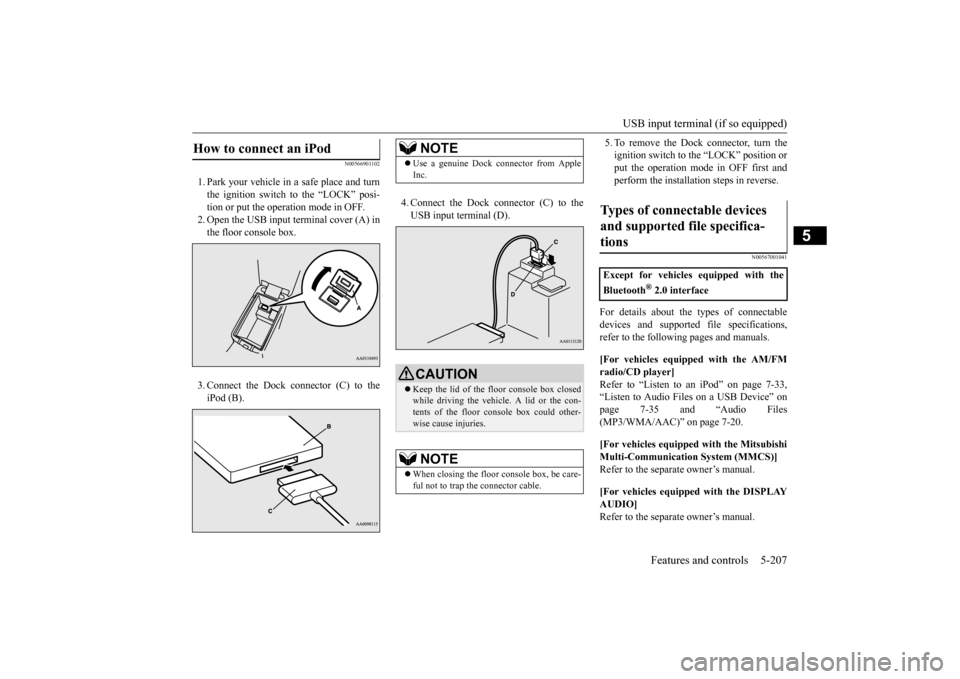
1. Park your vehicle in
a safe place and turn
the ignition switch to the “LOCK” posi-tion or put the opera
tion mode in OFF.
2. Open the USB input
terminal cover (A) in
the floor console box. 3. Connect the Dock connector (C) to the iPod (B).
4. Connect the Dock connector (C) to the USB input terminal (D).
5. To remove the Dock connector, turn the ignition switch to the “LOCK” position orput the operation mode in OFF first and perform the installation steps in reverse.
N00567001041
For details about the
types of connectable
devices and supported fi
le specifications,
refer to the following pages and manuals. [For vehicles equipped with the AM/FM radio/CD player] Refer to “Listen to an
iPod” on page 7-33,
“Listen to Audio File
s on a USB Device” on
page 7-35 and “Audio Files (MP3/WMA/AAC)” on page 7-20. [For vehicles equipped with the Mitsubishi Multi-Communication
System (MMCS)]
Refer to the separa
te owner’s manual.
[For vehicles equipped with the DISPLAY AUDIO] Refer to the separa
te owner’s manual.
How to connect an iPod
NOTE
Use a genuine Dock connector from Apple Inc.CAUTION Keep the lid of the floor console box closed while driving the vehicle. A lid or the con- tents of the floor console box could other-wise cause injuries.NOTE
When closing the floor console box, be care- ful not to trap the connector cable.
Types of connectable devices and supported file specifica-tions
Except for vehicles equipped with the Bluetooth
® 2.0 interface
BK0211800US.book 207 ページ 2014年3月12日 水曜日 午後2時42分
Page 303 of 446

Vehicle preparation before driving 6-4 Driving safety
6
N00629001709
For a safer and more enjoyable trip, always check for the following: Before starting the vehicle, make certain that you and all passengers are seated and wearing their seat
belts properly (with
children in the rear seat, in appropriate restraints), and that all the doors and the liftgate are locked. Move the driver’s seat as far backward as possible, while keep
ing good visibility,
and good control of the steering wheel,brakes, accelerator,
and controls. Check
the instrument panel
indicators and multi-
information display for any possible prob-lem. Similarly, the front
passenger seat should
also be moved as far back as possible. Make sure that infa
nts and small children
are properly restrained in accordance with all laws and regulations.
Check these by selecting the defroster mode, and set the blower swit
ch on high. You should
be able to feel the air blowing against thewindshield. Refer to “Defrosti
ng or defogging (wind-
shield, door windows)” on page 7-13 Check all the tires for heavy tread wear or uneven wear patterns. Look for stones, nails, glass, or other objects
stuck in the tread. Look
for any tread cuts or
sidewall cracks. Check
the wheel nuts for tightness, and the tires (including spare tire) for proper pressure. Replace your tires before they are heavilyworn out. As your vehicle is equi
pped with a tire pres-
sure monitoring system, there is a risk ofdamage to the tire inflation pressure sensors when the tire is replaced on the rim. Tire replacement should, only, be performed by anauthorized Mitsubishi Motors dealer. Have someone watch while you turn all the exterior lights on and off. Also check the turn
signal indicators and hi
gh-beam indicators on
the instrument panel. Check the ground under the vehicle after parking overnight, for
fuel, water, oil, or
other leaks. Make sure
all the fluid levels are
correct. Also, if you
can smell fuel, you need
to find out why imme
diately and have it
fixed.
N00629201134
Even this vehicle’s sa
fety equipment, and
your safest driving, ca
nnot guarantee that you
can avoid an accident or injury. However, ifyou give extra attention to the following areas, you can better protect yourself and your passengers: Drive defensively. Be aware of traffic, road and weather conditions. Leave plenty of stopping distance between your vehicle and the vehicle ahead. Before changing lanes, check your mir- rors, blind spots, and use your turn-signal light. While driving, watch the behavior of other drivers, bicyc
lists, and pedestrians.
Vehicle preparation before driving Seat belts and seats
Defrosters Tires Lights
Fluid leaks Safe driving techniques
BK0211800US.book 4 ページ 2014年3月12日 水曜日 午後2時42分
Page 314 of 446
Trailer towing
Driving safety 6-15
6
Hold the bottom of the steering wheel with one hand. Then, to move the trailer to the left, just move that hand to the left. To move thetrailer to the right, move your hand to the right. Always back up sl
owly and, if possible,
have someone guide you. When you’re turning with a trailer, make wider than normal turns to help prevent the trailer from striking shoulders, curbs, roadsigns, trees or other objects. Avoid jerky or sudde
n maneuvers. Signal
well in advance. Towing a trailer puts a
dditional burden on the
engine and transaxle,
which may cause over-
heating. Following ar
e some suggestions to
reduce overheating: When towing at high al
titudes, engine coolant
and automatic transaxle oil will overheat at a lower temperature than at normal altitudes.If you turn your engine off immediately after towing at high altitude
on steep uphill grades,
your vehicle may show
signs similar to over-
heating. To avoid this
, let the engine run
while parked (preferably on level ground) with the automatic transaxle in the “P”(PARK) position for a few minutes before turning the engine off. If the engine coolant temperature indica- tor flashes on the in
formation screen in
the multi-information display or the engine power drops suddenly, refer to “Engine overheating” on page 8-4.
If the warning display or warning display illuminates, re
fer to “Warning dis-
play” on page 5-62, 5-69.
Reduce speed and downshift before you start down a long or steep downgrade. If you don’t downshift, over using the brakes can cause reduced brake efficiency. You can tow in “D” (DRIVE) position. You may want to shift the selector lever to the 3rd or a lower position, under heavy loads or hillyconditions. Always place chocks or blocks under both the vehicle and trailer wheels when parking. Be sure that the parking brake is firmly set and that the selector lever is in the “P” (PARK)position. Avoid parki
ng on a hill with a
trailer, but if it cannot be avoided, do so only after performing the following: 1. Apply the brakes and keep them applied. 2. Have someone plac
e chocks or blocks
under both the vehicle
and trailer wheels.
Backing up Making turns
CAUTION Making sharp turns while towing a trailer could cause the
trailer to come in contact
with the vehicle. Your
vehicle could be dam-
aged. Avoid making sharp turns while tow- ing a trailer.
Overheating
Cause of overheating
Solution
Air conditioning on Turn off Highway speeds Reduce speed Going up hills Select lower gear posi-
tion
Stop-and-go city traf- fic
With the vehicle stopped, shift to the “N” (NEUTRAL) position and idle the engine at high idle.
Driving on hills Parking
BK0211800US.book 15 ページ 2014年3月12日 水曜日 午後2時42分
Page 316 of 446
7
Comfort controlsVents ................................................................................................7-2 Automatic climate control air conditioner
..............
...........
.........
.....7-5
Important air conditioning operating tips ..
...........
...........
.........
.....7-14
Air purifier .....................................................................................7-14 AM/FM radio/CD player (if so equipped) .....................................7-15 Handling of Discs ..........................................................................7-18Audio Files (MP3/WMA/AAC) ....................................................7-20 Important Points on Safety for the Customer ................................7-24 Operation Keys ..............................................................................7-24Listen to Radio ...............................................................................7-28 Listen to Satellite Radio (if so equipped) .......................................7-29 Listen to CDs .................................................................................7-31Listen to MP3s ...............................................................................7-32 Listen to an iPod ............................................................................7-33 Listen to Audio Files on a USB Device .........................................7-35Listen to Bluetooth Audio (if so equipped) ....................................7-38 Display Indicator ...........................................................................7-40 Audio Quality and Volume Balance Adjustment ...........................7-41System Settings ..............................................................................7-42 Troubleshooting ..........
...........
...........
...........
...........
.........
.........
.....7-45
Antenna ..........................................................................................7-47General information about your radio .....
...........
...........
...........
.....7-48
BK0211800US.book 1 ページ 2014年3月12日 水曜日 午後2時42分
Page 320 of 446
Automatic climate cont
rol air conditioner
Comfort controls 7-5
7
N00731501311
The air conditioner can only be us
ed while the engine is running.
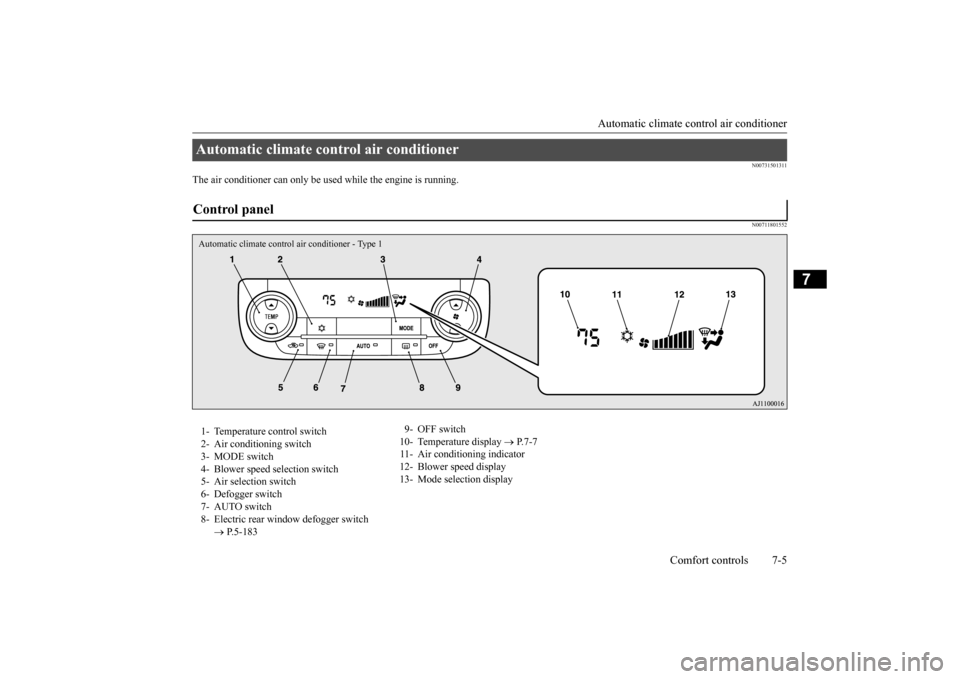
N00711801552
Automatic climate control air conditioner Control panel Automatic climate control air conditioner - Type 11- Temperature control switch 2- Air conditioning switch 3- MODE switch 4- Blower speed
selection switch
5- Air selection switch 6- Defogger switch 7- AUTO switch8- Electric rear wi
ndow defogger switch
P.5-183
9- OFF switch 10- Temperature display
P.7-7
11- Air conditioning indicator 12- Blower speed display 13- Mode selection display
BK0211800US.book 5 ページ 2014年3月12日 水曜日 午後2時42分
Page 321 of 446
Automatic climate cont
rol air conditioner
7-6 Comfort controls
7
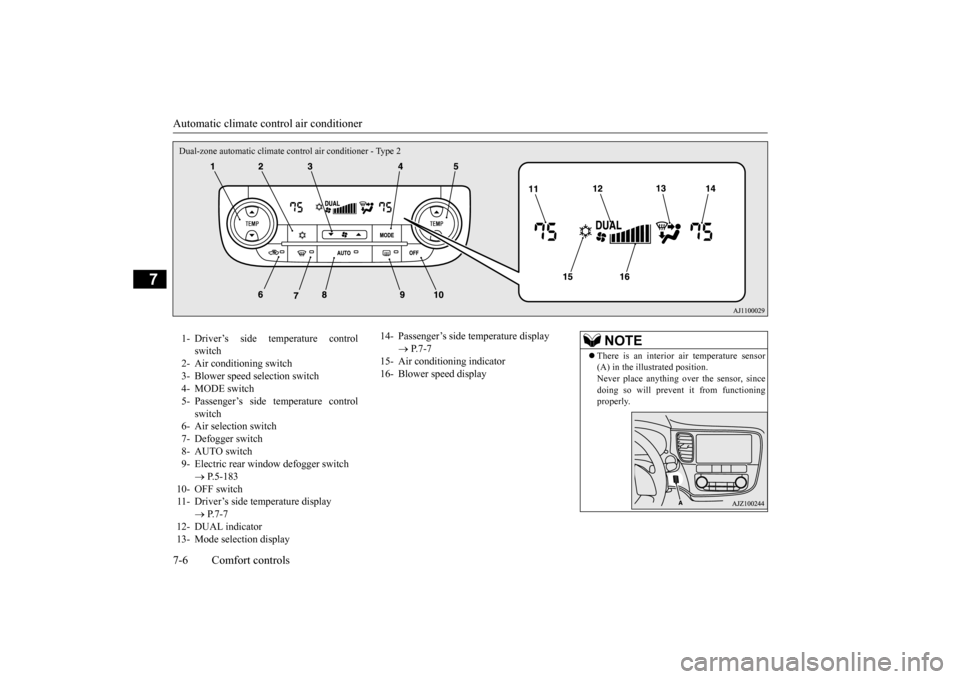
Dual-zone automatic climate c
ontrol air conditioner - Type 2
1- Driver’s side temperature control
switch
2- Air conditioning switch 3- Blower speed selection switch 4- MODE switch5- Passenger’s side temperature control
switch
6- Air selection switch7- Defogger switch 8- AUTO switch 9- Electric rear window
defogger switch
P.5-183
10- OFF switch 11- Driver’s side temperature display
P.7-7
12- DUAL indicator 13- Mode selection display
14- Passenger’s side temperature display
P.7-7
15- Air conditioning indicator16- Blower speed display
NOTE
There is an interior air temperature sensor (A) in the illustrated position.Never place anything ov
er the sensor, since
doing so will prevent it from functioning properly.
BK0211800US.book 6 ページ 2014年3月12日 水曜日 午後2時42分