2015 MITSUBISHI OUTLANDER III ESP
[x] Cancel search: ESPPage 186 of 446
Forward Collision Mitigation System (FCM) (if so equipped)
Features and controls 5-109
5
N00577800032
This switch is used to turn on or off the FCM and also to select the distance which will trig-ger the forward collision warning function.
• When a vehicle ahea
d or an oncoming
vehicle is splashing wa
ter, snow or dirt.
When the system recognizes driver’s steering or accelerati
ng actions as evasive
actions to avoid collision, FCM controland alarm functions
may be canceled.
In certain situations,
though there is little
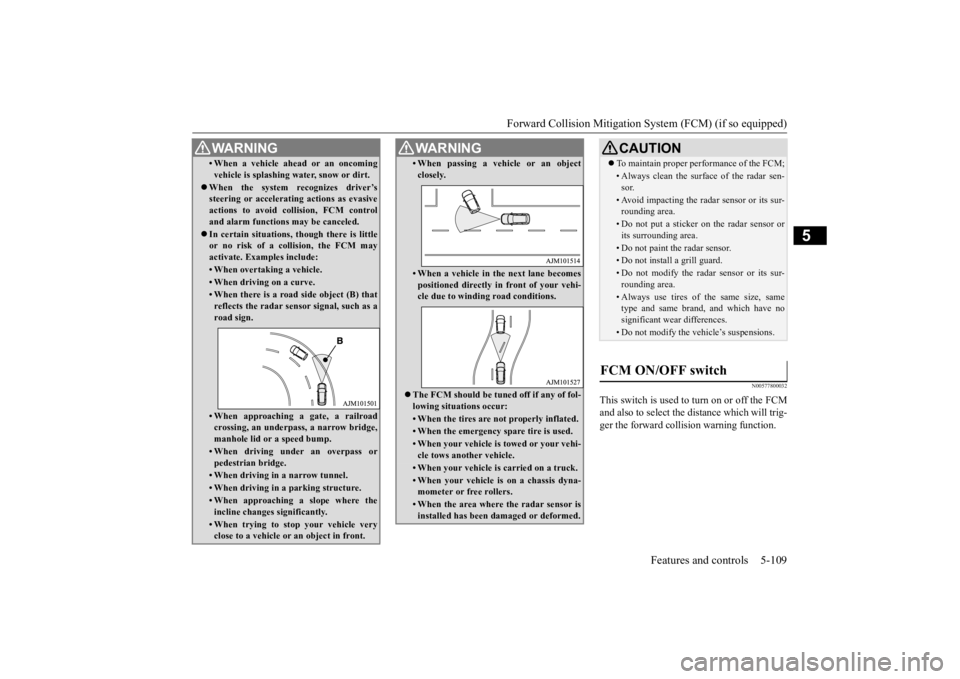
or no risk of a collision, the FCM may activate. Examples include: • When overtaking a vehicle.• When driving on a curve.• When there is a road
side object (B) that
reflects the radar sensor signal, such as aroad sign.• When approaching a gate, a railroadcrossing, an underpa
ss, a narrow bridge,
manhole lid or
a speed bump.
• When driving unde
r an overpass or
pedestrian bridge.• When driving in
a narrow tunnel.
• When driving in a parking structure.• When approaching a slope where the incline changes
significantly.
• When trying to stop your vehicle very close to a vehicle or
an object in front.
WA R N I N G
• When passing a vehicle or an object closely.• When a vehicle in the next lane becomespositioned directly in
front of your vehi-
cle due to winding road conditions.
The FCM should be tuned off if any of fol- lowing situations occur:• When the tires are not properly inflated. • When the emergency spare tire is used.• When your vehicle is
towed or your vehi-
cle tows another vehicle.• When your vehicle is carried on a truck.• When your vehicle is on a chassis dyna- mometer or free rollers.• When the area where the radar sensor isinstalled has been damaged or deformed.WA R N I N G
CAUTION To maintain proper performance of the FCM;• Always clean the surface of the radar sen- sor.• Avoid impacting the radar sensor or its sur-rounding area.• Do not put a sticker on the radar sensor orits surrounding area.• Do not paint the radar sensor.• Do not install a grill guard.• Do not modify the radar sensor or its sur- rounding area.• Always use tires of the same size, sametype and same brand,
and which have no
significant wear differences.• Do not modify the vehicle’s suspensions.
FCM ON/OFF switch
BK0211800US.book 109 ページ 2014年3月12日 水曜日 午後2時42分
Page 193 of 446
Tire pressure monitoring system 5-116 Features and controls
5
Each tire, including the spare (if provided), should be checked monthly when cold and inflated to the inflation pressure recom-mended by the vehicle manufacturer on the vehicle placard or tire in
flation pressure label.
(If your vehicle has tires of a different sizethan the size indicated on the vehicle placard or tire inflation pres
sure label, you should
determine the proper ti
re inflation pressure
for those tires.) As an added safety fe
ature, your vehicle has
been equipped with a ti
re pressure monitoring
system (TPMS) that illuminates a low tire pressure telltale when one or more of your tires is significan
tly under-inflated.
Accordingly, when the low tire pressure tell- tale illuminates, you should stop and check your tires as soon as
possible, and inflate
them to the proper pressure. Driving on a sig- nificantly under-inflated
tire causes the tire to
overheat and can lead to tire failure.
Under-inflation also reduces fuel efficiency and tire tread life, a
nd may affect the vehi-
cle’s handling and stopping ability. Please note that the TPMS is not a substitute for proper tire maintenance, and it is the driver’sresponsibility to mainta
in correct tire pres-
sure, even if under-inf
lation has not reached
the level to trigger illumination of the TPMSlow tire pressure telltale. Your vehicle has also been equipped with a TPMS malfunction indica
tor to indicate when
the system is not operating properly. The TPMS malfunction indicator is combined with the low tire pressure telltale.When the system detects a malfunction, the telltale will flash for approximately one min- ute and then remain continuously illuminated.This sequence will continue upon subsequent vehicle start-ups as
long as the malfunction
exists.When the malfunction indicator is illumi- nated, the system may not
be able to detect or
signal low tire pressure as intended.TPMS malfunctions may
occur for a variety
of reasons, including the installation of replacement or alternate tires or wheels on thevehicle that prevent the TPMS from function- ing properly. Always check the TPMS mal- function telltale after
replacing one or more
tires or wheels on your vehicle to ensure that the replacement or alternate tires and wheels
CAUTION If the tire pressure monitoring system warn- ing light does not illumi
nate when the igni-
tion switch is turned to the “ON” position orthe operation mode is put in ON, it means that the tire pressure monitoring system is not working properly. Have the systeminspected by an authorized Mitsubishi Motors dealer. In such situations,
a malfunctioning of the
system may be preventing the monitoring of the tire pressure. Avoid sudden braking, sharp turning and high-speed driving. If a malfunction is detected in the tire pres- sure monitoring system, the tire pressuremonitoring system warn
ing light will blink
for approximately 1 minute and then remain continuously illuminated. The warning lightwill issue further warnings each time the engine is restarted as
long as the malfunction
exists.Check to see whether
the warning light goes
off after few minutes driving. If it then goes off during driving, there is noproblem. However, if the warning light does not go off, or if it blinks again when the engine isrestarted, have the vehicle inspected by an authorized Mitsubishi Motors dealer. In such situations,
a malfunctioning of the
system may be preventing the monitoring of the tire pressure. For safety reasons, when the warning light appears while driving,avoid sudden braking, sharp turning and high-speed driving.
NOTE
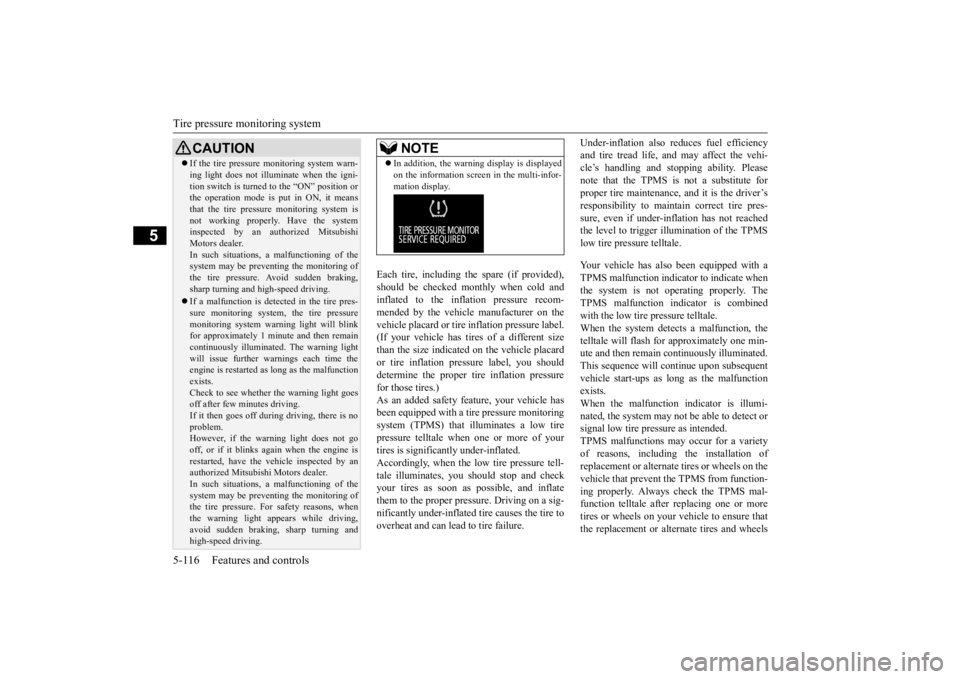
In addition, the warni
ng display is displayed
on the information screen in the multi-infor-mation display.
BK0211800US.book 116 ページ 2014年3月12日 水曜日 午後2時42分
Page 208 of 446
Multi Information display - Type 1
Features and controls 5-131
5
When the display is reset, the time until the next periodic inspection
is displayed and the
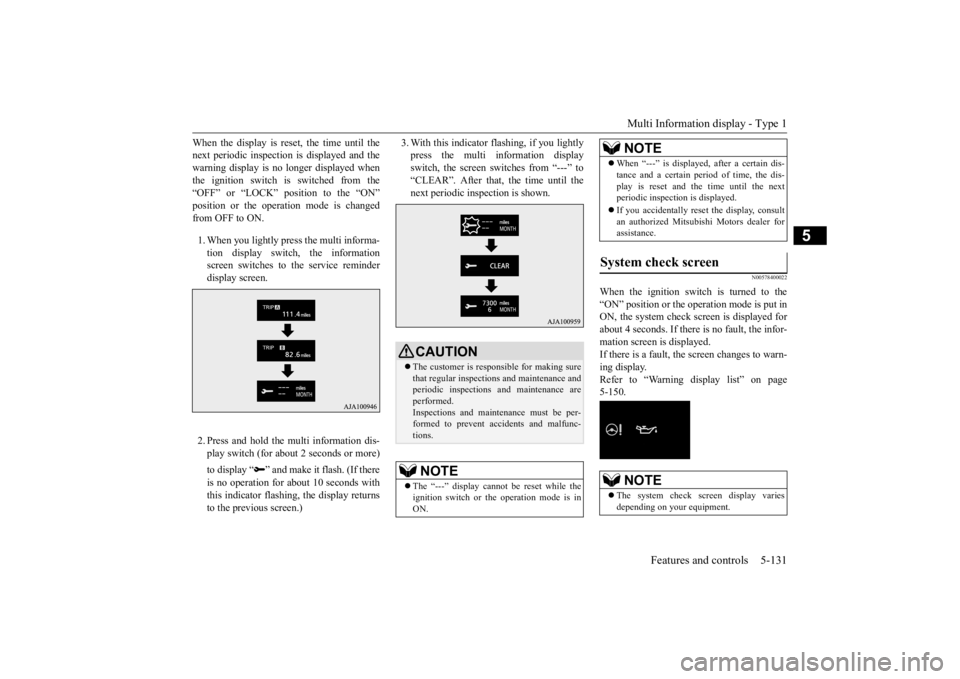
warning display is no longer displayed when the ignition switch is switched from the “OFF” or “LOCK” position to the “ON”position or the operation mode is changed from OFF to ON. 1. When you lightly press the multi informa- tion display switch, the informationscreen switches to the service reminder display screen. 2. Press and hold the mu
lti information dis-
play switch (for about 2 seconds or more) to display “ ” and make
it flash. (If there
is no operation for ab
out 10 seconds with
this indicator flashing,
the display returns
to the previous screen.)
3. With this indicator flashing, if you lightly press the multi information displayswitch, the screen sw
itches from “---” to
“CLEAR”. After that, the time until the next periodic inspection is shown.
N00578400022
When the ignition switch is turned to the “ON” position or the operation mode is put in ON, the system check screen is displayed forabout 4 seconds. If there is no fault, the infor- mation screen is displayed. If there is a fault, the screen changes to warn-ing display. Refer to “Warning display list” on page 5-150.
CAUTION The customer is responsible for making sure that regular inspections
and maintenance and
periodic inspections
and maintenance are
performed.Inspections and mainte
nance must be per-
formed to prevent accidents and malfunc- tions.NOTE
The “---” display cannot
be reset while the
ignition switch or th
e operation mode is in
ON.
When “---” is displaye
d, after a certain dis-
tance and a certain pe
riod of time, the dis-
play is reset and the time until the nextperiodic inspecti
on is displayed.
If you accidentally rese
t the display, consult
an authorized Mitsubishi Motors dealer for assistance.
System check screen
NOTE
The system check screen display varies depending on your equipment.NOTE
BK0211800US.book 131 ページ 2014年3月12日 水曜日 午後2時42分
Page 209 of 446

Multi Information display - Type 1 5-132 Features and controls
5
N00575201026
Shows the approximate driving range (how many more miles or kilometers you can drive). When this driving range falls below30 miles (50 km), “
---” is displayed.
Refuel as soon as possible.
N00575301027
This displays the average fuel consumption from the last reset to the present.There are 2 types of m
ode settings of manual
reset and automatic reset. Refer to “Changing the reset mode for aver-age fuel consumption and average speed” on page 5-135. For information on how to change the aver- age fuel consumption di
splay setting, refer to
“Changing the function settings” on page5-134.
N00578500023
This displays the average speed from the lastreset to the present.There are 2 types of mode setting of manual reset and automatic reset. Refer to “Changing the reset mode for aver-age fuel consumption and average speed” on page 5-135. For the method for changing the averagespeed display setting,
refer to “Changing the
function settings” on page 5-134.
Driving range display
NOTE
The driving range is determined based on the fuel consumption data. This may vary depending on the drivi
ng conditions and hab-
its. Treat the distance
displayed as just a
rough guideline. When you refuel, the driving range display is updated. However, if you only add a small amount offuel, the correct value
will not be displayed.
Fill to a full tank whenever possible. When your vehicle is stopped on an extremely steep hill, th
e driving range value
may, change. This is due to the movement offuel in the tank and does not indicate any breakdown. The display setting can be changed to the preferred units (miles or km). Refer to “Changing th
e function settings” on
page 5-134.
Average fuel consumption dis- play
NOTE
The average fuel cons
umption display can be
reset separately in both auto reset mode and manual reset mode. “---” is displayed when the average fuel con- sumption cannot be measured. The initial (default) setting is “Auto reset mode”. Average fuel consumption may vary depend- ing on the driving conditions (road condi- tions, how you drive, etc.) The actual fuelconsumption may differ from the fuel con- sumption displayed, so treat the fuel con- sumption displayed as
just a rough guideline.
Disconnecting the batt
ery cable will erase
from memory the manual reset mode or autoreset mode setting for the average fuel con-sumption display. The display setting ca
n be changed to the
preferred units {m
pg (US), mpg (UK),
L/100km or km/L}. Refer to “Changing th
e function settings” on
page 5-134.
Average speed display
NOTE
The average speed display can be reset sepa- rately in both auto
reset mode and manual
reset mode. “---” is displayed when the average speed cannot be measured. The initial (default) setting is “Auto reset mode”.NOTE
BK0211800US.book 132 ページ 2014年3月12日 水曜日 午後2時42分
Page 219 of 446

Multi Information display - Type 2 5-142 Features and controls
5
N00574901039
The odometer indicates the total distance the vehicle has traveled.
N00575001037
The trip odometer indicates the distance trav-eled between two points. To return the display to 0, hold down the multi information display switch for about 2 seconds or more. Only the currently dis- played value will be reset. Example If trip odometer is
displayed, only trip
odometer wi
ll be reset.
Both trip odometers and can count up to 9999.9 miles/kilometers. When a trip odometer goes past 9999.9miles/kilometers, it returns to 0.0 miles/ kilometers. When disconnecting the battery terminal, the memories of trip odometer displays
and are cleared, and their displays
return to “0.0 miles/kilometers”.
N00578900027
Each time you press and hold the multi infor- mation display switch
for about 2 seconds or
more, there is a sound and the brightness of the instruments changes.
N00575201039
This displays the approximate driving range (how many more miles
or kilometers you can
drive). When the driving range falls below approximately 30 miles
(50 km), “---” is dis-
played.
Odometer Trip odometer Usage examples for trip odometer , trip odometer
It is possible to measure two currently traveled distances, from home using trip odometer and from a particular point on the way using trip odometer
.
To reset the trip odometer
Meter illumination control 1- Brightness level 2- Multi informati
on display switch
NOTE
You can adjust to 8 di
fferent levels respec-
tively for when the parking lights or head-lights are illuminated a
nd when they are not.
Each time you reduce tw
o brightness levels,
the segment display of the brightness level decreases one by one. If the vehicle is equipped with the automatic light control, when the lamp switch is in aposition other than th
e “OFF” position, the
meter illumination switches automatically to the adjusted bright
ness, depending on the
brightness outside the vehicle. The brightness level
of the instruments is
stored when the ignition switch is turned to the “OFF” position.
Driving range display
NOTE
The driving range is determined based on the fuel consumption data. This may vary depending on the drivi
ng conditions and hab-
its. Treat the distance
displayed as just a
rough guideline.
BK0211800US.book 142 ページ 2014年3月12日 水曜日 午後2時42分
Page 222 of 446
Multi Information display - Type 2
Features and controls 5-145
5
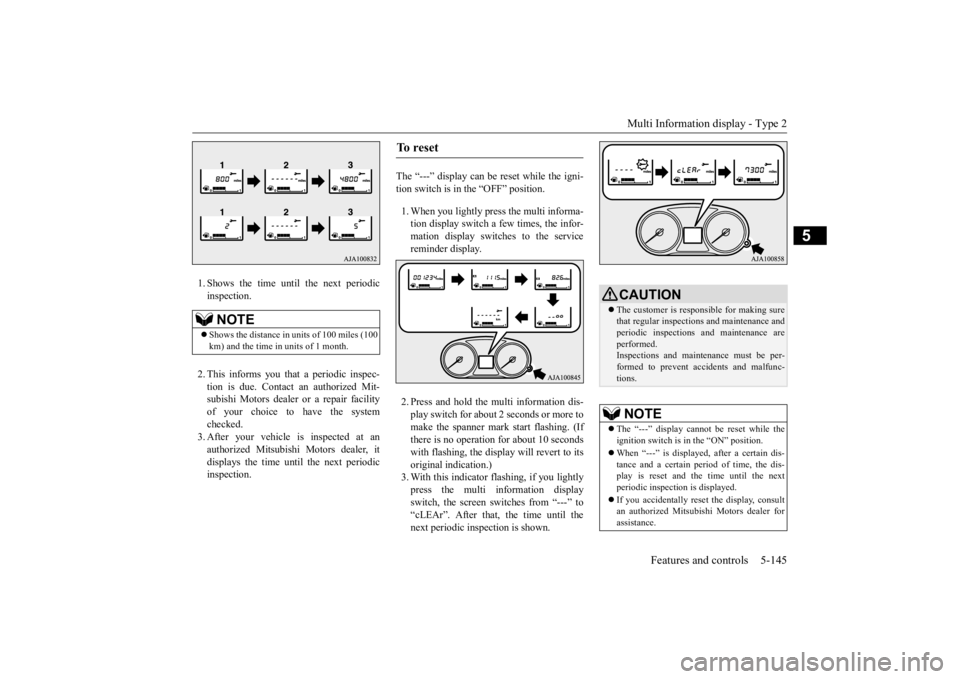
1. Shows the time until the next periodic inspection. 2. This informs you that a periodic inspec- tion is due. Contact
an authorized Mit-
subishi Motors dealer or a repair facilityof your choice to have the system checked. 3. After your vehicle
is inspected at an
authorized Mitsubishi Motors dealer, it displays the time unt
il the next periodic
inspection.
The “---” display can be reset while the igni- tion switch is in the “OFF” position. 1. When you lightly press the multi informa- tion display switch a few times, the infor-mation display switches to the service reminder display. 2. Press and hold the multi information dis- play switch for about
2 seconds or more to
make the spanner mark start flashing. (If there is no operation for about 10 secondswith flashing, the display will revert to its original indication.) 3. With this indicator flashing, if you lightlypress the multi information display switch, the screen sw
itches from “---” to
“cLEAr”. After that, the time until thenext periodic inspection is shown.
NOTE
Shows the distance in
units of 100 miles (100
km) and the time in units of 1 month.
To r e s e t
CAUTION The customer is responsible for making sure that regular inspections and maintenance and periodic inspections
and maintenance are
performed. Inspections and mainte
nance must be per-
formed to prevent accidents and malfunc-tions.NOTE
The “---” display cannot
be reset while the
ignition switch is in
the “ON” position.
When “---” is displaye
d, after a certain dis-
tance and a certain pe
riod of time, the dis-
play is reset and the time until the next periodic inspecti
on is displayed.
If you accidentally rese
t the display, consult
an authorized Mitsubishi Motors dealer forassistance.
BK0211800US.book 145 ページ 2014年3月12日 水曜日 午後2時42分
Page 245 of 446
Warning lights 5-168 Features and controls
5
N00520601323
This light comes on in the event of a malfunc- tion in the charging system or when the igni-tion switch is turned to the “ON” position (engine off) or the operation mode is put in ON. On vehicle equipped with the multiinformation display - Type 1, a warning is also displayed in the multi information dis- play. When the engine is started, the lightshould go out. Check to make sure that the light has gone out before driving.
N00520701278
This light comes on when the engine oil pres- sure is below normal. If the light stays onwhile driving, stop the
engine as soon as pos-
sible. Do not run the engine until the cause of the low oil pressure is corrected.
CAUTION Driving for a long time with the engine mal- function indicator on
may cause more dam-
age to the emission control system. Thiscould also affect fuel economy and drivabil- ity. If this indicator does not come on when the ignition switch is turned to the “ON” posi- tion or the operation mode
is put in ON, have
the system checked at an authorized Mitsubi- shi Motors dealer or a repair facility of your choice. If the engine malfuncti
on indicator comes on
while the engine is running, avoid driving athigh speeds. During vehicle operation
with the indicator
on, the vehicle may not
accelerate when you
depress the accelerator pedal. When the vehicle is stat
ionary with the indi-
cator on, you must depress the brake pedalmore firmly than usual since the engine idling speed is higher than usual and a vehi- cle with an automatic transaxle or CVT has astronger tendency to creep forward.
NOTE
Do not disconnect the ba
ttery cable when the
engine malfunction i
ndicator (“SERVICE
ENGINE SOON” or “Che
ck engine light”) is
on. The engine electronic control module stores critical OBD information (especially exhaustemission data), which ma
y be lost if the bat-
tery cable is disconne
cted while the engine
malfunction indicator is
on. This will make it
difficult to diagnose the cause of future prob- lems.
Charging system warning light
CAUTION If the warning light stays on while the engine is running, park your ve
hicle in a safe place
as soon as possible and
contact an authorized
Mitsubishi Motors dealer
or a repair facility
of your choice to have the system checked.
Oil pressure warning light (Vehicle equipped with the multi information display - Type 2)
CAUTION If this light comes on when the engine oil level is not low, have
your vehicle checked at
an authorized Mitsubish
i Motors dealer or a
repair facility
of your choice.
This warning light does not show the amount of oil in the crankcase. This can only bedetermined by checking th
e oil level with the
dipstick with the engine turned off.
BK0211800US.book 168 ページ 2014年3月12日 水曜日 午後2時42分
Page 257 of 446
Wiper and washer switch 5-180 Features and controls
5
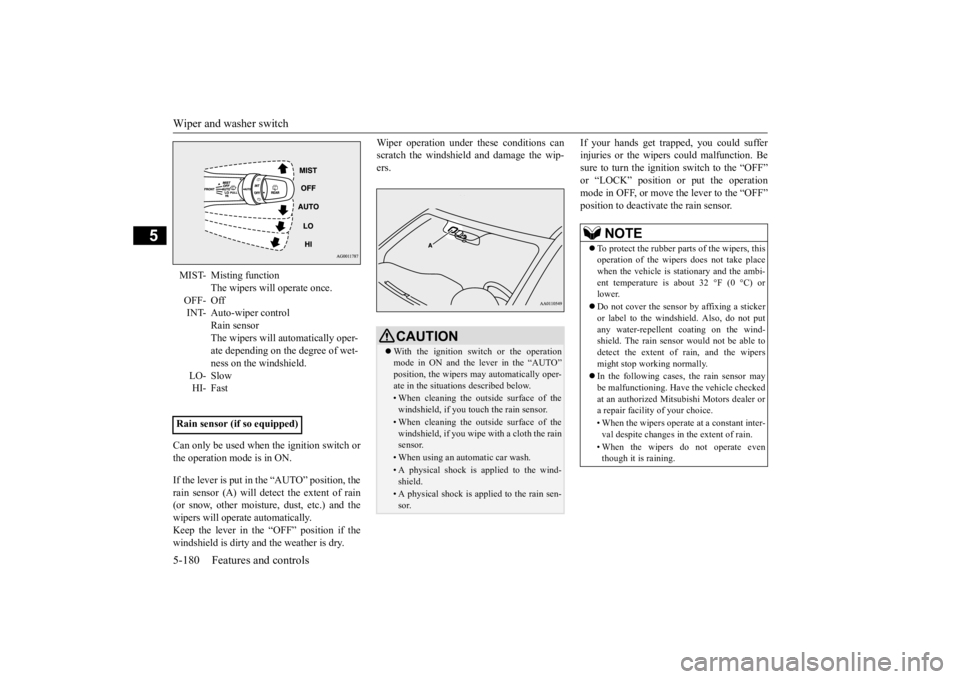
Can only be used when the ignition switch or the operation mode is in ON. If the lever is put in the “AUTO” position, the rain sensor (A) will detect the extent of rain(or snow, other moisture, dust, etc.) and the wipers will operate automatically. Keep the lever in the “OFF” position if thewindshield is dirty a
nd the weather is dry.
Wiper operation under th
ese conditions can
scratch the windshield and damage the wip-ers.
If your hands get trapped, you could suffer injuries or the wipers
could malfunction. Be
sure to turn the ignition switch to the “OFF” or “LOCK” position or put the operation mode in OFF, or move the lever to the “OFF”position to deactivate the rain sensor.
MIST- Misting function
The wipers will operate once.
OFF- Off INT- Auto-wiper control
Rain sensor The wipers will automatically oper- ate depending on the degree of wet-ness on the windshield.
LO- Slow HI- Fast
Rain sensor (if so equipped)
CAUTION With the ignition switch or the operation mode in ON and the lever in the “AUTO” position, the wipers
may automatically oper-
ate in the situati
ons described below.
• When cleaning the outsi
de surface of the
windshield, if you touch the rain sensor.• When cleaning the outsi
de surface of the
windshield, if you wipe with a cloth the rainsensor.• When using an automatic car wash.• A physical shock is
applied to the wind-
shield.• A physical shock is applied to the rain sen-sor.
NOTE
To protect the rubber parts of the wipers, this operation of the wipers
does not take place
when the vehicle is stationary and the ambi- ent temperature is about 32 °F (0 °C) or lower. Do not cover the sensor by affixing a sticker or label to the windshield. Also, do not putany water-repellent
coating on the wind-
shield. The rain sensor would not be able to detect the extent of rain, and the wipersmight stop working normally. In the following cases, the rain sensor may be malfunctioning. Have
the vehicle checked
at an authorized Mitsubishi Motors dealer or a repair facility of your choice. • When the wipers operate
at a constant inter-
val despite changes in the extent of rain. • When the wipers do not operate even though it is raining.
BK0211800US.book 180 ページ 2014年3月12日 水曜日 午後2時42分