2015 MITSUBISHI LANCER EVOLUTION ECU
[x] Cancel search: ECUPage 106 of 338

Sunroof (if so equipped)
Features and controls 5-45
5
Press the switch (3), the sunroof automati- cally closes.To stop the moving sunroof, press the switch. When the switch (2) is pressed, the rear edge of sunroof raises for ventilation. Press the switch (3).
N00544800029
The sunroof can be oper
ated when the igni-
tion switch is in the “ON” position. The sun- roof can be opened or closed for a 30 secondsperiod after the ignition
switch is turned to
the “ACC” or “LOCK” position. However, once the driver’s door or the front passenger’sdoor is opened, the sunroof cannot be oper- ated until the ignition switch is turned on again.
N00544900059
If a hand or head is trapped in the closingsunroof opening, the safety mechanism willcause the sunroof to re-open automatically. The opened sunroof will become operational again after a few seconds.If the safety mechanism is activated 5 or more times consecutively, normal closing of the sunroof will be aborted.As an emergency measure, the sunroof can beclosed in small increments until it is com- pletely closed by repeatedly pressing the switch (2).After performing the emergency measure, consult an authorized Mitsubishi Motors dealer.
To close
To tilt up
To tilt down
Timer function
Safety mechanism
NOTE
The safety mechanism can be activated if the driving conditions or other circumstances cause the sunroof to be subjected to a physi-cal shock similar to that caused by a trapped hand or head.WA R N I N G The safety mechanism is deactivated while the switch (2) is pressed continuously. Therefore be especially careful that handsor head are not trapped in the sunroof opening.
Do not deliberately trap your hands or head in order to activate the safety mecha- nism. Personal injury and malfunction of the sunroof could result.CAUTION The safety mechanism is deactivated just before the sunroof closes. This allows the sunroof to close completely. Therefore be especially careful that fingers are not trappedin the sunroof opening.NOTE
When leaving the vehicle unattended, be sure to close the sunr
oof and if a key was
used to start the engine, remove the key from the ignition switch. Do not try to operate the sunroof if it is fro- zen closed (after snowfall or during extreme cold). Do not sit on or place heavy luggage on the sunroof or roof opening edge. Do not apply any force that may cause dam- age to the sunroof. Release the switch when the sunroof has reached a completely open or completely closed position.WA R N I N G
BK0210800US.bo
ok 45 ページ 2014年4月8日 火曜日 午前11時28分
Page 108 of 338
Steering wheel tilt lock lever Features and controls 5-47
5
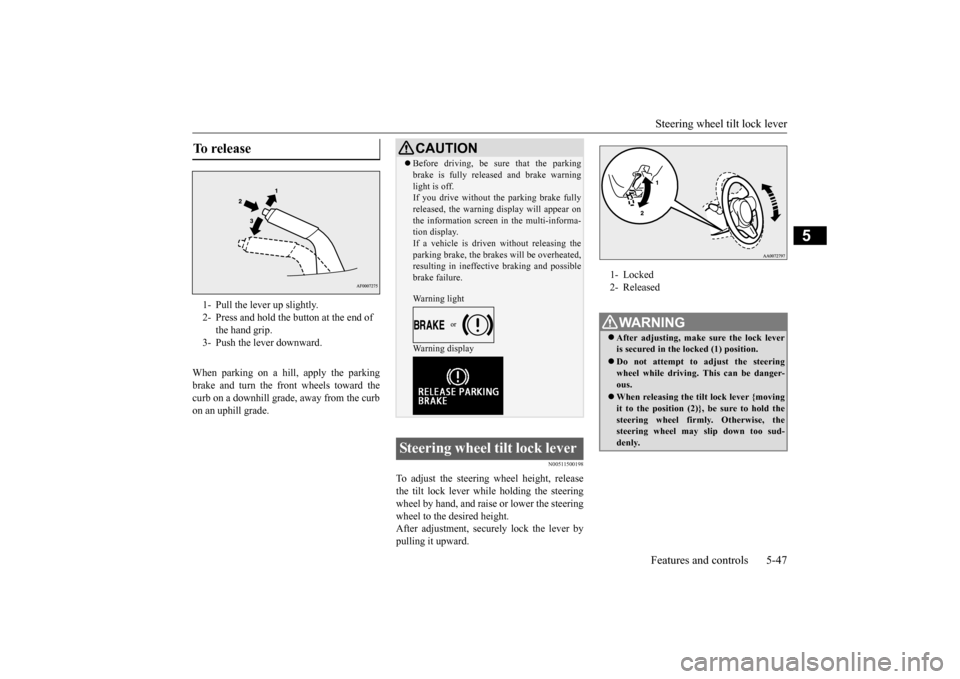
When parking on a hill, apply the parking brake and turn the front wheels toward thecurb on a downhill grade, away from the curb on an uphill grade.
N00511500198
To adjust the steering wheel height, releasethe tilt lock lever while holding the steering wheel by hand, and raise or lower the steeringwheel to the desired height. After adjustment, securely lock the lever by pulling it upward.
To release 1- Pull the lever up slightly. 2- Press and hold the button at the end of
the hand grip.
3- Push the lever downward.
CAUTION Before driving, be sure that the parking brake is fully released and brake warning light is off. If you drive without the parking brake fully released, the warning display will appear onthe information screen in the multi-informa- tion display. If a vehicle is driven without releasing theparking brake, the brakes will be overheated, resulting in ineffective braking and possible brake failure. Warning light Warning display
Steering wheel tilt lock lever
1- Locked 2- ReleasedWA R N I N G After adjusting, make sure the lock lever is secured in the locked (1) position. Do not attempt to adjust the steering wheel while driving. This can be danger- ous. When releasing the tilt lock lever {moving it to the position (2)}, be sure to hold thesteering wheel firmly. Otherwise, the steering wheel may slip down too sud- denly.
ç
BK0210800US.bo
ok 47 ページ 2014年4月8日 火曜日 午前11時28分
Page 140 of 338

Service brake
Features and controls 5-79
5
N00517500291
Overuse of the brake can cause poor brake response and premature wear of the brakepads. When driving down a long or steep hill, use engine braking by downshifting.
N00517600380
Your vehicle is equipped with power brakes for more braking force with minimal brake pedal effort.Your brakes are designe
d to operate at full
capacity, even if the power assist is lost. If the power assist is lost, the effort needed topress the brake pedal is greater. If you lose the power assist for some reason, the brakes will still work. If the power brake unit or either of the two brake hydraulic systems stops working prop-
erly, the rest of the br
ake system will still
work, but the vehicle will not slow down as quickly. You will know this has happened if you findyou need to depress the brake pedal down further, or harder when slowing down or stop- ping, or if the brake
warning light and the
warning display in the multi-information dis- play come on.
N00532500117
The disc brakes have an alarm that makes ametallic squeal when the brake pads have worn down enough to need service. If youhear this sound continuously, have the brake pads inspected at an authorized Mitsubishi Motors dealer or a repair facility of yourchoice.
NOTE
Even if there is a difference in the amount of traction the wheels can get, if both of them are spinning, the limited-slip differential will not be effective.CAUTION Never start the engine while one of the front or rear wheels is jacked up and the other in contact with the ground; doing so may cause the vehicle to jump forward. Continuously attempting to extract the vehi- cle from snow, mud, etc. while using highengine rpm may damage the limited-slip dif- ferential. Using a compact spare wheel will adversely affect the limited-slip differential; replace the compact spare wheel with a standard sizewheel as soon as possible.
Service brake Brake pedal
WA R N I N G Do not leave any objects near the brake pedal or let a floor mat slide under it; doing so could prevent the full pedal stroke that would be necessary in an emergency. Make sure that the pedal canbe operated freely at all times. Make sure the floor mat is securely held in place.CAUTION It is important not to drive the vehicle with your foot resting on the brake pedal when braking is not required. This practice can result in very high brake temperatures, pre-mature pad wear, and possible damage to the brakes.
Power brakes
WA R N I N G Never coast downhill with the engine OFF. Keep the engine running whenever your vehicle is in motion. If you turn off the engine while driving, the power brakebooster will stop working and your brakes will not work as well. If the power assist is
lost or if either brake
hydraulic system stops working properly, take your vehicle to an authorized Mit-subishi Motors dealer or a repair facility of your choice immediately.
Brake pad wear alarm
BK0210800US.bo
ok 79 ページ 2014年4月8日 火曜日 午前11時28分
Page 201 of 338

Bluetooth® 2.0 interface 5-140 Features and controls
5
N00564400018
There are 2 cancel functions. If you are at the main menu, say “Cancel” to exit from the Bluetooth
® 2.0 interface.
If you are anywhere else within the system, say “Cancel” to return to the main menu.
N00564501029
The Bluetooth
® 2.0 interface is equipped
with a confirmation function. With the confirmation function activated, youare given more opportunities than normal to confirm a command when making various settings to the Bluetooth
® 2.0 interface. This
allows you to decrease the possibility that a setting is accidentally changed. The confirmation function can be turned onor off by following the steps below. 1. Press the SPEECH button (except for vehicles with Mitsubishi Multi-Commu- nication System) or PICK-UP button (forvehicles with Mitsubishi Multi-Commu- nication System). 2. Say “Setup.”3. Say “Confirmation prompts.” 4. The voice guide will say “Confirmation prompts are
Answer “Yes” to change the setting or answer “No” to keep the current setting. 5. The voice guide will say “Confirmation prompts are
N00564601121
It is possible to use a passcode as a securityfunction by setting a passcode of your choice for the Bluetooth
® 2.0 interface.
When the security function is turned on, it is necessary to make a voice input of a 4-digitpasscode in order to use all functions of the Bluetooth
® 2.0 interface, except for recep-
tion. Use the following procedure to turn on the security function by setting a passcode. 1. Press the SPEECH button (except for vehicles with Mitsubishi Multi-Commu-nication System) or PICK-UP button (for vehicles with Mitsubishi Multi-Commu- nication System).2. Say “Setup.” 3. Say “Passcode.” 4. The voice guide will say “Passcode is dis-abled. Would you like to enable it?” Answer “Yes.”
Answer “No” to cancel the setting of the passcode and return to the main menu. 5. The voice guide will say “Please say a 4- digit passcode. Remember this passcode.It will be required to use this system.” Say a 4-digit number which you want to set as a passcode.6. For confirmation purposes, the voice guide will say “Passcode <4-digit pass- code>. Is this correct?” Answer “Yes.”Answer “No” to return to the passcodeinput in Step 5. 7. When the registration of the passcode is completed, the voice guide will say “Pass-code is enabled” and the system will return to the main menu.
Canceling Confirmation function setting
Security function Setting the passcode
NOTE
Passcode will be required to access the sys- tem after the next ignition cycle. It is required for a little time after engine stop that the entered passcode is actuallyrecorded in the system. If the ignition switch is made to “ACC” or “ON” or the engine is started immediately after engine stop, there is a case when the entered passcode is not recorded in the sys-tem. At this time, please try to enter the pass- code again.
BK0210800US.book
140 ページ 2014年4月8日 火曜日 午前11時28分
Page 202 of 338

Bluetooth® 2.0 interface
Features and controls 5-141
5
If a passcode has been set and the security function is enabled, the voice guide will say “Hands-free system is locked. State the pass- code to continue” when the SPEECH button(except for vehicles with Mitsubishi Multi- Communication System) or PICK-UP button (for vehicles with Mi
tsubishi Multi-Commu-
nication System) is pressed to enter voice rec- ognition mode. Say the 4-digit passcode number to enter the passcode. If the entered passcode is wrong, the voice guide will say “<4-digit passcode>, Incorrectpasscode. Please try again.” Enter the correct passcode. Use the following procedure to turn off the security function by disabling the passcode.
1. Press the SPEECH button (except for vehicles with Mits
ubishi Multi-Commu-
nication System) or PICK-UP button (for vehicles with Mits
ubishi Multi-Commu-
nication System).2. Say “Setup.”3. Say “Passcode.” 4. The voice guide will say “Passcode is enabled. Would you like to disable it?”Answer “Yes.” Answer “No” to cancel the disabling of the passcode and return to the main menu. 5. When the disabling of the passcode is completed, the voice guide will say “Pass- code is disabled” and the system willreturn to the main menu.
N00564700011
The Bluetooth
® 2.0 interface can use the
speaker enrollment function to create a voice model for one person per language. This makes it easier for the Bluetooth
® 2.0
interface to recognise voice commands said by you.
You can turn a voice model registered with the speaker enrollment function on and off whenever you want.
N00564801107
It takes about 2 to 3 minutes to complete thespeaker enrollment process. To ensure the best results, run through theprocess while in the driver’s seat, in an envi-ronment that is as quiet as possible (when there is no rain or strong winds and the vehi- cle windows are closed). Please turn off yourphone while in speaker enrollment to prevent interruption of the process. Use the following procedure for speakerenrollment. 1. Stop your vehicle in a safe area, put the gearshift lever in the “N” (Neutral) posi- tion (manual transaxle), or the gearshiftlever in the “P” (PARK) position (Twin Clutch SST) and pull the parking brake lever.
Entering the passcode
NOTE
You can reenter the passcode as many times as you want. If you have forgotten your passcode, say “Cancel” to quit the voice input mode andthen check with an authorized Mitsubishi Motors dealer.
Disabling the passcode
NOTE
System must be unlocked to disable the pass- code.
Speaker enrollment function
Speaker enrollment
NOTE
Speaker enrollment is not possible unless the vehicle is parked. Make sure you park the vehicle in a safe area before attempting speaker enrollment.
BK0210800US.book
141 ページ 2014年4月8日 火曜日 午前11時28分
Page 215 of 338

Bluetooth® 2.0 interface 5-154 Features and controls
5
N00580300044
1. Press the SPEECH button (except for vehicles with Mitsubishi Multi-Commu- nication System) or PICK-UP button (for vehicles with Mitsubishi Multi-Commu-nication System). 2. Say “Phonebook.” 3. The voice guide will say “Select one ofthe following: new entry, edit number, edit name, list names, delete, erase all, or import contact.” Say “Delete.”
4. The voice guide will say “Please say the name of the entry you would like to delete, or say list names.” Say the name of the phonebook entry in which the tele-phone number you want to delete is regis- tered. 5. If only one telephone number is registered in the selected phonebook entry, the voice guide will say “Deleting
6. The system will ask if you really want to delete the selected telephone number(s) to go ahead with the deletion, answer “Yes.” Answer “No,” the system will canceldeleting the telephone number(s) and then return to Step 4. 7. When the telephone number deletion iscomplete, the voice guide will say “
N00580400032
You can delete all registered information from the vehicle phonebook. 1. Press the SPEECH button (except for vehicles with Mitsubishi Multi-Commu- nication System) or PICK-UP button (forvehicles with Mitsubishi Multi-Commu- nication System). 2. Say “Phonebook.”3. The voice guide will say “Select one of the following: new entry, edit number, edit name, list names, delete, erase all, orimport contact.” Say “Erase all.”
NOTE
You can call, edit or delete a name that is being read out. Press the SPEECH button and say “Call” to call the name, “Edit name” to edit it, or “Delete” to delete it.The system will beep and then execute your command. If you press the SPEECH button and say “Continue” or “Previous” while the list is being read, the system will advance orrewind the list. Say “Continue” to proceed to the next entry or “Previous” to return to the previous entry.
Deleting a telephone number
NOTE
Say “List names,” and the names registered in the phonebook are read out in order. Refer to “Vehicle phonebook: Listening to the listof registered names” on page 5-153.NOTE
To delete the telephone numbers from all locations, say “All.”
Erasing the phonebook
BK0210800US.book
154 ページ 2014年4月8日 火曜日 午前11時28分
Page 226 of 338
Cup holder
Features and controls 5-165
5
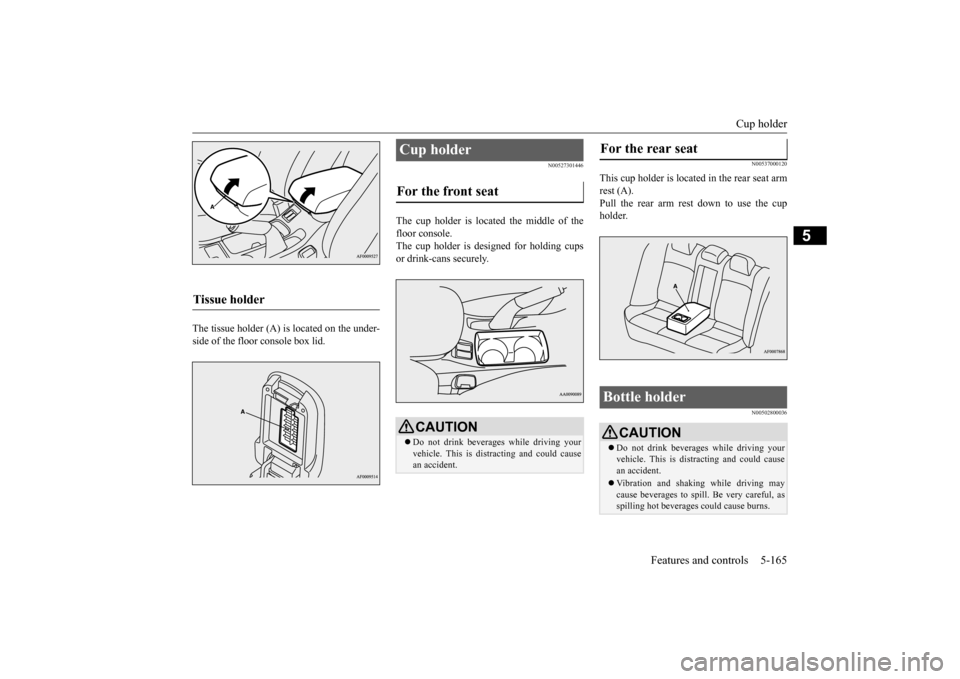
The tissue holder (A) is located on the under- side of the floor console box lid.
N00527301446
The cup holder is located the middle of thefloor console.The cup holder is designed for holding cups or drink-cans securely.
N00537000120
This cup holder is located
in the rear seat arm
rest (A).Pull the rear arm rest down to use the cup holder.
N00502800036
Tissue holder
Cup holder For the front seat
CAUTION Do not drink beverages while driving your vehicle. This is distracting and could causean accident.
For the rear seat Bottle holder
CAUTION Do not drink beverages while driving your vehicle. This is distracting and could cause an accident. Vibration and shaking while driving may cause beverages to spill. Be very careful, as spilling hot beverages could cause burns.
BK0210800US.book
165 ページ 2014年4月8日 火曜日 午前11時28分
Page 231 of 338

Fuel economy 6-2 Driving safety
6
N00628800107
Fuel economy is dependent on many factors. Your personal driving habits can have a sig-nificant effect on your fuel use. Several rec- ommendations for achieving the greatest fuel economy are listed below. Whenever accelerating from a stop, always accelerate slowly and smoothly. When parked for even a short period, do not idle the engine. Shut it off. Plan your trips to avoid unnecessary stops. Keep your tires inflated to the recom- mended pressures. For freeway driving, maintain a speed of approximately 50 mph (80 km/h) when traffic, roadway and weather conditionssafely permit. Keep your air filter clean and your vehicle lubricated according to the recommenda-tions in this manual. Always keep your vehicle well main- tained. A poorly maintained enginewastes fuel and costs money. Do not overload your vehicle.
N00628900010
Drunk driving is one of the most frequent causes of accidents.Your driving ability can be seriously impaired even with blood alcohol levels far below the legal minimum. If you have been drinking,don’t drive. Ride with a designated non- drinking driver, call a cab or a friend, or use public transportation. Drinking coffee or tak-ing a cold shower will not make you sober.Similarly, prescription and nonprescription drugs affect your alertness, perception and reaction time. Consult with your doctor orpharmacist before driving while under the influence of any of these medications.
N00628600017
The original equipment floor mat providedwith your vehicle was specifically designed for your vehicle. Always properly positionthe floor mat and assure it does not interfere with operation of the pedals. Always use the
retaining clip on the driver’s floorboard to secure the floor mat. When used, this clip will help prevent the floor mat from moving for- ward and possibly interfering with the opera-tion of the pedals. To prevent the floor mat from moving forward and possibly interfering with the operation of the pedals, Mitsubishigenuine floor mats are recommended.
N00628700050
1. Place the floor mat to fit the shape of thefloorboard.2. Align the floor mat with the installation holes over the retaining clips. 3. Secure the floor mat with retaining clips.
Fuel economy
Driving, alcohol and drugs
WA R N I N G NEVER DRINK AND DRIVE. Your perceptions are less accurate, yourreflexes are slower and your judgment is impaired.
Floor mat
To install the floor mat
NOTE
The shape of the mat and the number of retaining clips may vary depending on the vehicle model.
BK0210800US.bo
ok 2 ページ 2014年4月8日 火曜日 午前11時28分