2015 MERCEDES-BENZ SPRINTER audio
[x] Cancel search: audioPage 15 of 334

Light switch .....................................92
Low-beam headlamps
...................... 92
Parking lamps .................................. 92
Rear fog lamp .................................. 93
Setting the exterior lighting
delayed switch-off (vehicles with
steering wheel buttons) ................. 193
Switching the daytime running
lamps on/off (switch) ...................... 92
Turn signals ..................................... 94
see Changing a bulb
see Interior lighting
Limited Warranty ................................ 22
Load distribution ............................... 242
Load securing aids
Carrier systems ............................. 245
Loading guidelines
Important safety notes .................. 240
Loading rails
Installing cargo tie-down rings ....... 244
Maximum tensile strength ............. 328
Loads
Securing ........................................ 242
Transporting .................................. 240
Locator lighting
Setting (vehicles with steering
wheel buttons) ............................... 193
Locking
see Central locking
Locking and unlocking manually ....... 71
Locking centrally
see Central locking
Low-beam headlamps
Display message ............................ 208
Driving abroad ............................... 153
Replacing bulb s............................. 100
Switching on/of f.............................. 92
Lumbar support ................................... 83 M
M+S tires ............................................ 286
Maintenance ...................................... 256
Malfunctions
Message memory (on-board com-
puter) ............................................. 198
Maximum speed
Speed limitation ............................. 153 Menu (vehicles with steering
wheel buttons)
Audio ............................................. 187
Operation ....................................... 186
Setting s......................................... 188
Telephone ...................................... 196
Message
see Display message
Message memory (on-board com-
puter) .................................................. 198
Mirrors
Exterior mirrors ................................ 89
Rear-view mirror .............................. 89
Mobile navigation devices ................ 237
Mobile phone ..................................... 237
Important safety notes .................. 236
Pre-installation ............................... 237
Type approval/frequency .............. 316
Mounting wheels
Lowering the vehicle ...................... 310
Mounting a new whee l................... 309
Preparing the vehicle ..................... 306
Raising the vehicl e......................... 307
Removing a whee l.......................... 309
Removing and mounting the spare
wheel ............................................. 313
Securing the vehicle against roll-
ing away ........................................ 306 N
Navigation Fittings for PND mobile navigation
devices .......................................... 237
Notes on breaking-in a new vehi-
cle ....................................................... 136 O
Occupant safety Children in the vehicle ..................... 51
Important safety notes .................... 42
Pets in the vehicle ........................... 56
Odometer
Display (vehicles with steering
wheel buttons) ............................... 187
Display (vehicles without steering wheel buttons) ............................... 182 Index
13
Page 16 of 334

Off-road driving
Checklist after driving off-road ...... 158
Important safety notes .................. 156
Rules for driving off-road ............... 158
Oil
see Engine oil
On-board computer
Display message ............................1 97
Lighting submenu .......................... 192
On-board computer (vehicles with
steering wheel buttons)
Audio menu ................................... 187
Display message ............................ 184
Menu overview .............................. 186
Operating ....................................... 184
Operation menu ............................ .186
Settings menu ............................... 188
Standard displa y............................ 187
Telephone menu ............................ 196
Trip computer menu ...................... 195
On-board computer (vehicles with-
out steering wheel buttons)
Display message ............................ 198
General notes ................................ 182
Setting the clock ............................ 183
Standard display ............................ 182
Operating Instructions
Before the first journey .................... 22
Limited Warranty ............................. 22
Operating safety
Vehicle registration .......................... 28
Operating safety and vehicle
approval
Attachments and bodie s.................. 26
BlueTEC exhaust gas aftertreat-
ment ................................................ 25
Changing the engine power out-
put ................................................... 25
Correct use ...................................... 22
Declaration of conformity ................ 24
Equipment and conversions ............. 26
Important safety notes .................... 24
Information about body/equip-
ment mounting directives ................ 26
Notes on operating the vehicle ........ 24
Qualified specialist worksho p.......... 25
Registering your vehicl e................... 25 Operating system
see On-board computer
Operator's Manual
General notes .................................. 22
Vehicle equipment ........................... 22
Outline lamp
Replacing bulb s............................. 105
Outside temperature display ........... 181
Overhead control panel ...................... 38
Overrevving range ............................. 181
Overrun cutoff ................................... 152 P
Paintwork (cleaning instructions) ... 267
Paper holder ...................................... 233
Parking ............................................... 149
Important safety notes .................. 149
Parking brake ................................ 150
Wheel chock .................................. 151
see PARKTRONIC
Parking aid
see PARKTRONIC
Parking assistance
see PARKTRONIC
Parking brake
Display message ............................ 207
Notes/function .............................. 150
Parking lamps
Replacing bulb s............................. 100
PARKTRONIC
Deactivating/activating ................. 169
Driving system ............................... 167
Function/note s............................. 167
Important safety notes .................. 167
Problem (malfunction) ................... 171
Range of the sensors ..................... 168
Roll-back warning .......................... 169
Trailer towing ................................. 170
Warning display ............................. 169
Partition sliding door
Important safety notes .................... 77
Opening/closing .............................. 77
Passenger compartment air-condi-
tioning system
see Climate control
Passenger compartment heating
see Climate control 14
Index
Page 29 of 334

You alone accept the responsibility if body
manufacturers or dealers make modifications that affect the final certification of the engine,
the vehicle or the equipment. This also
applies to the identification and documenta-
tion of modifications to the affected vehicle
components.
You are responsible for certification and con- firmation that:
R all the applicable standards and regulations
that are affected by the vehicle modifica-
tion are met
R the modified vehicle fulfills the vehicle
safety standards and emissions laws and
regulations
R the modifications or installation of acces-
sories does not affect the safety of the
vehicle
We are not responsible for the final certifica-
tion, product liability or warranty claims
which result from the modifications. This
applies to:
R the modified components, assemblies or
systems
R any resulting noncompliance with any of
the emissions laws and regulations or the
motor vehicle safety standards
R any consequences arising from the
changes that make the vehicle less safe or even render it defective
We do not assume responsibility as the final- stage manufacturer or for the consequential
product liability.
Notes on the radiator Even seemingly small changes to the vehicle,
such as attaching a radiator trim for winter
driving, is not permitted. Do not cover up the radiator. Do not use thermal mats, insect pro-
tection covers or anything similar.
Otherwise, the values of the diagnostic sys-
tem may be affected. Some of these values
are legally prescribed and must always be
correct. Information on the cargo compartment
floor !
The wooden or plastic cargo area floor fit-
ted at the factory is an integral component
of the vehicle structure. The vehicle body
could be damaged if you have the load area floor removed. This then affects the secur-ing of loads and the maximum loading
capacity of the lashing points is no longer
guaranteed.
Therefore, do not have the load area floor
removed. Genuine Mercedes-Benz parts
! Air bags and Emergency Tensioning Devi-
ces, as well as control units and sensors for
these restraint systems, may be installed in the following areas of your vehicle:
R doors
R door pillars
R door sills
R seats
R cockpit
R instrument cluster
R center console
Do not install accessories such as audio
systems in these areas. Do not carry out
repairs or welding. You could impair the
operating efficiency of the restraint sys-
tems.
Have aftermarket accessories installed at a
qualified specialist workshop. H
Environmental note
We supply reconditioned assemblies and
parts which are of the same quality as new
parts. The same New Vehicle Limited War-
ranty applies as for new parts.
The operating safety of the vehicle could be
jeopardized if you use parts, tires and wheels
as well as accessories relevant to safety
which have not been approved by Mercedes-
Benz. This could lead to malfunctions in Introduction
27 Z
Page 34 of 334
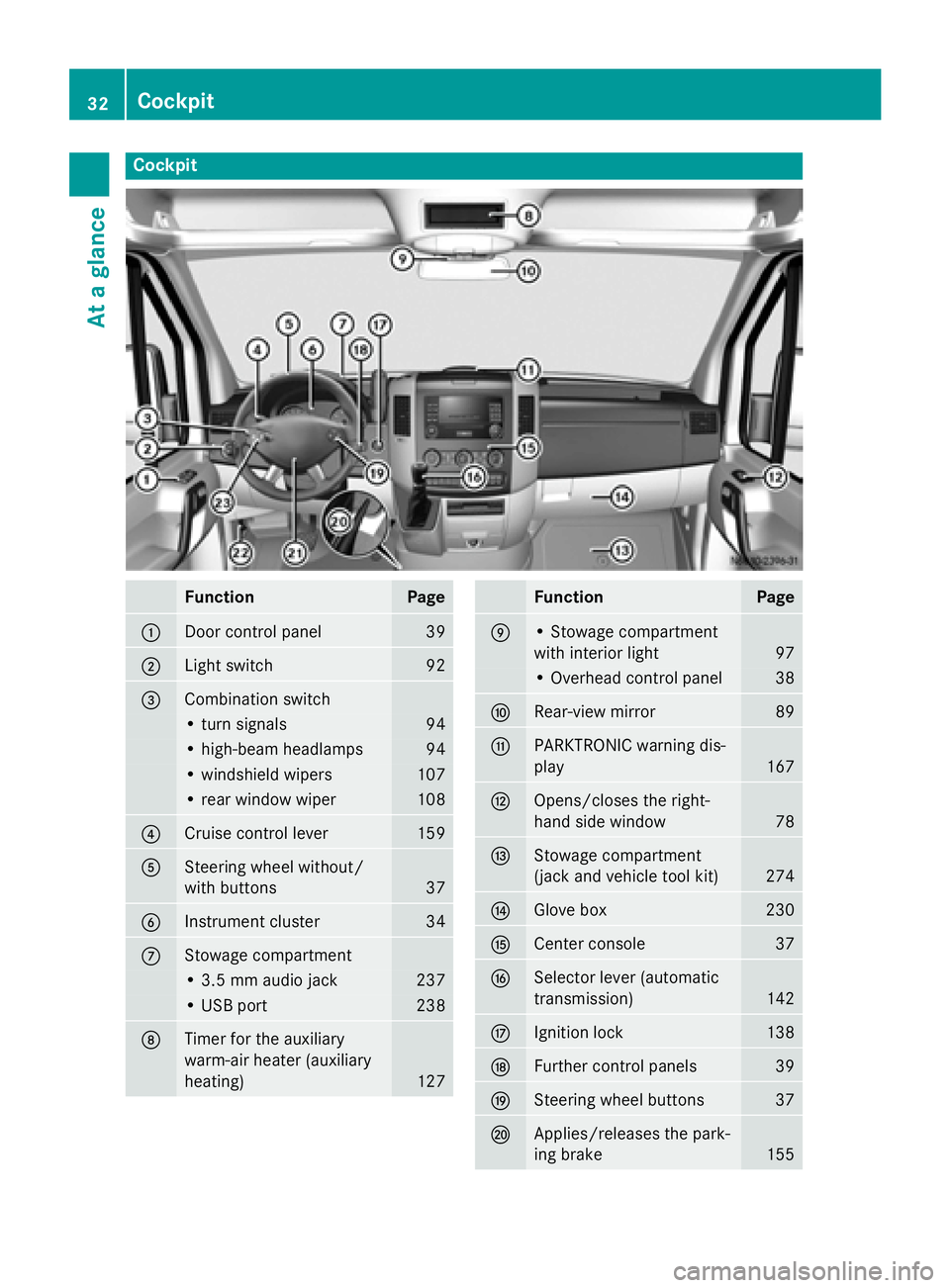
Cockpit
Function Page
0043
Door control panel 39
0044
Light switch 92
0087
Combination switch
• turn signals 94
• high-beam headlamps 94
• windshield wipers 107
• rear window wiper 108
0085
Cruise control lever 159
0083
Steering wheel without/
with buttons
37
0084
Instrument cluster 34
006B
Stowage compartment
• 3.5 mm audio jack 237
• USB port 238
006C
Timer for the auxiliary
warm-air heater (auxiliary
heating)
127 Function Page
006D
• Stowage compartment
with interior light
97
• Overhead control panel 38
006E
Rear-view mirror 89
006F
PARKTRONIC warning dis-
play
167
0070
Opens/closes the right-
hand side window
78
0071
Stowage compartment
(jack and vehicle tool kit)
274
0072
Glove box 230
0073
Center console 37
0074
Selector lever (automatic
transmission)
142
0075
Ignition lock 138
0076
Further control panels 39
0077
Steering wheel buttons 37
0078
Applies/releases the park-
ing brake
15532
CockpitAt a glance
Page 39 of 334

Steering wheel buttons
Function Page
0043
Display 184
On-board computer oper-
ation 0044
Selects a submenu or
adjusts the volume
184
0081
Up/increases the vol-
ume 0082
Down/reduces the
volume Using the telephone 196
0061
Accepts a call/starts
dialing 0076
Ends a call/rejects an
incoming call 0087
Scrolls from one menu to
another
184
0080
Forwards 007F
Back Scrolls within a menu 184
0063
Forwards 0064
Back Center console
Function Page
0043
Stowage compartment 231
0044
Audio 10 or Audio 15 (see
the separate operating
instructions)
0087
Air-conditioning control
panel
112
Paper holder
1 233
0085 Center console control
panel
0072
Switches the left/right-
hand seat heating on/off
87
0085
Switches the windshield
heating on/off
119
0071
Switches the rear window
defroster on/off
119
0069
Activates/deactivates
PARKTRONIC
169
1
Only on vehicles without rear-compartment climate control. Center console
37At a glance
Page 173 of 334

Problems with PARKTRONIC
Problem
Possible causes/consequences and
0050
0050Solutions Only the red segments
in the PARKTRONIC
warning displays are lit.
A warning tone also
sounds for approx-
imately 2 seconds.
PARKTRONIC is deacti-
vated after approx-
imately 20 seconds.
The indicator lamp of
the 0069 button lights
up and the red seg-
ments in the
PARKTRONIC warning
display go out. PARKTRONIC has malfunctioned and has switched itself off.
X If problems persist, have PARKTRONIC checked at a qualified
specialist workshop. The PARKTRONIC
warning displays
implausible distances.
For example, all the
segments may be lit
even though there is no
obstacle present. The PARKTRONIC sensors are dirty or iced up.
X Clean the PARKTRONIC sensors (Y page 268).
X Turn the key to position 2again in the ignition lock. The license plate or other parts attached near the sensors may not
be secured correctly.
X Check the license plate and attachment parts near the sensors
for correct seating. An external radio or ultrasonic source may be causing interfer-
ence.
X Check PARKTRONIC functions in a different location. Rear view camera
Important safety notes !
Objects that are not at ground level
appear further away than they actually are, for example:
R the bumper of the vehicle parked behind
R the drawbar of a trailer
R the ball coupling of a trailer tow hitch
R the tail-end of a truck
R slanted posts Only use the image from the rear view cam-
era as a guide. You may otherwise damageyour vehicle and/or the object.
The rear view camera is only an aid. It cannot
replace your own awareness of the immedi-
ate surroundings. You are responsible for
safe maneuvering, parking and pulling away.
When maneuvering, parking and pulling away, make sure that there are no persons, animals
or objects in the maneuvering area.
The rear view camera is a visual parking aid.
Information on operation can be found in the
separate Audio 15 supplement. Driving systems
171Driving and parking Z
Page 186 of 334

On-board computer (vehicles with
steering wheel buttons) Operating the on-board computer
Overview X
To activate the on-board computer: turn
the key to position 1in the ignition lock.
The on-board computer shows vehicle infor-
mation and settings in the display.
You can control the display and the settings in the on-board computer with the buttons on
the steering wheel. 0043
Display
On-board computer operation 0044
0081
and0082
R Selects submenus
R Changes values
R Adjusts the volume
Using the telephone
0061 Accepts a call
0076 Ends a call 0087
Scrolls from one menu to another
0080
Forwards
007F Back
Scrolls within a menu
0063 Forwards
0064 Back Controls
You can think of the order of the menus and of
the functions within a menu as a circle:
X Press the 0080or007F button repeatedly.
The menus are displayed one after the
other.
X Press the 0064or0063 button repeatedly.
The functions in the menu/submenu are
displayed one after the other.
Several functions are combined thematically
in the menus.
The display changes when you press one of
the buttons on the steering wheel. You can
use a function to call up information or to
change the settings for the vehicle.
For example, the AUDIOmenu has functions
for controlling the radio or CD player.
Unlike in other menus, you will find submenus
in the Settings
Settings menu. For information on
how to use these submenus, see the "Set-
tings menu" section (Y page 188) .
The number of menus depends on your vehi-
cle's equipment.
i Operation of the audio equipment using
the steering wheel buttons and making set-
tings using the AUDIOmenu only function 184
On-board computer (vehicles with steering wheel buttons)On-board computer and displays
Page 187 of 334

with Sprinter audio equipment. If you are
using audio equipment from another man-
ufacturer, the described functions may be
restricted or not available at all. On-board computer (vehicles with steering wheel buttons)
185On-board computer and displays Z