2015 MERCEDES-BENZ SPRINTER fog light
[x] Cancel search: fog lightPage 98 of 334

Highbeam Assist
General notes You can use this function to set the head-
lamps to change between low beam and high beam automatically. The system recognizes
vehicles with their lights on, either approach-
ing from the opposite direction or traveling in front of your vehicle, and consequently
switches the headlamps from high beam to
low beam.
Once the system no longer detects any other
vehicles, it reactivates the high-beam head-
lamps.
The system's optical sensor is located behind the windshield near the overhead control
panel.
Important safety notes G
WARNING
Highbeam Assist does not recognize road
users:
R who have no lights, e.g. pedestrians
R who have poor lighting, e.g. cyclists
R whose lighting is blocked, e.g. by a barrier
In very rare cases, Highbeam Assist may fail to
recognize other road users who have lights, or
may recognize them too late. In this or similar situations, the automatic high-beam head-
lamps will not be deactivated or will be acti-
vated regardless. There is a risk of an acci-
dent.
Always carefully observe the traffic conditions and switch off the high-beam headlamps in
good time.
Highbeam Assist cannot take into account
road, weather or traffic conditions. Highbeam Assist is only an aid. You are responsible for
adjusting the vehicle's lighting to the prevail-
ing light, visibility and traffic conditions. In particular, the detection of obstacles can
be restricted if there is:
R poor visibility, e.g. due to fog, heavy rain or
snow
R dirt on the sensors or anything else cover-
ing the sensors
Activating/deactivating Highbeam
Assist X
To activate: switch on the Highbeam
Assist function using the on-board com-
puter (Y page 192).
X Turn the light switch to the 0058position.
X Press the combination switch beyond the
pressure point in the direction of arrow 0043
(Y page 94).
Highbeam Assist is active.
The 00CE or indicator lamp in the
multifunction display lights up when it is
dark and the light sensor activates the low-
beam headlamps.
If you are driving at speeds above approx-
imately 22 mph (35 km/h) and no other
road users have been detected:
The high-beam headlamps are switched on
automatically. The 0057indicator lamp in
the instrument cluster also lights up.
If you are driving at speeds below approx-
imately 19 mph (30 km/h), other road
users are recognized or the roads are ade-
quately lit:
The high-beam headlamps are switched off automatically. The 0057indicator lamp in
the instrument cluster goes out. The 00CE
or indicator lamp in the multifunc-
tion display remains lit.
X To deactivate: move the combination
switch back to its normal position or move the light switch to another position.
The 00CE or indicator lamp in the
multifunction display goes out. 96
Exterior lightingLights and windshield wipers
Page 99 of 334
Headlamps fogged up on the inside
The headlamps may fog up on the inside if
there is high atmospheric humidity.
X Switch on the low-beam headlamps and
drive off.
The level of moisture diminishes, depend-
ing on the length of the journey and the
weather conditions (humidity and temper-
ature).
If the level of moisture does not diminish:
X Have the headlamps checked at a qualified
specialist workshop. Interior lighting
Switching the dashboard lighting on/
off
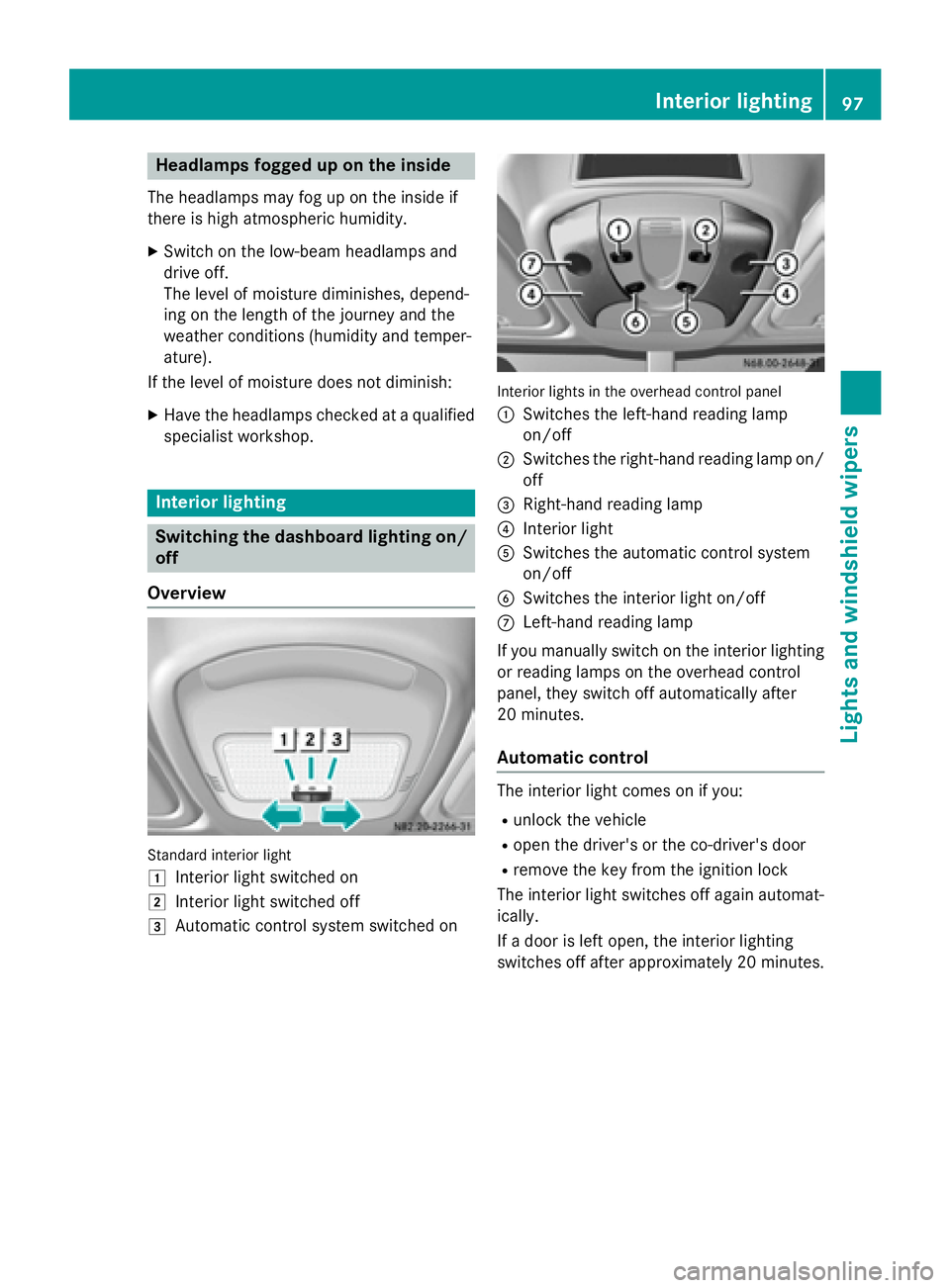
Overview Standard interior light
0047 Interior light switched on
0048 Interior light switched off
0049 Automatic control system switched on Interior lights in the overhead control panel
0043
Switches the left-hand reading lamp
on/off
0044 Switches the right-hand reading lamp on/
off
0087 Right-hand reading lamp
0085 Interior light
0083 Switches the automatic control system
on/off
0084 Switches the interior light on/off
006B Left-hand reading lamp
If you manually switch on the interior lighting
or reading lamps on the overhead control
panel, they switch off automatically after
20 minutes.
Automatic control The interior light comes on if you:
R unlock the vehicle
R open the driver's or the co-driver's door
R remove the key from the ignition lock
The interior light switches off again automat- ically.
If a door is left open, the interior lighting
switches off after approximately 20 minutes. Interior lighting
97Lights and windshield wipers Z
Page 102 of 334

R
Do not use a bulb that has been dropped or
that has scratches on its glass tube.
The bulb could explode.
R Only use bulbs in closed lamps which have
been designed for this purpose.
R Only use spare bulbs of the same type and
with the prescribed voltage
R Protect the bulbs from moisture when in
use.
If the new bulb still does not light up, consult a qualified specialist workshop.
R Have the LEDs and bulbs of the following
lamps changed at a qualified specialist
workshop:
- the additional turn signals in the exterior
mirrors
- the high-mounted brake lamp
- LED daytime running lamps (Bi-Xenon
headlamps)
- Bi-Xenon lamps (Bi-Xenon headlamps)
- front fog lamps
If you require assistance changing bulbs, con-
sult a qualified specialist workshop. Front bulbs
Overview of bulb replacement – bulb
types The following bulbs can be replaced. Bulb
types can be found in the legend. Vehicles with halogen headlamps
0043
Turn signal: PY21W
0044 Daytime running lamps: W21W 0087
Low-beam headlamps: H7 55W
0085 High-beam headlamps: H7 55W
0083 Parking lamps/standing lamps: W5W Vehicles with Bi-Xenon headlamps
0043
Turn-signal: NAK 3457
Additional turn signals in the exterior mir-
ror (not for all-wheel-drive vehicles):
HPC 16WY
Low-beam headlamps and high-beam
headlamps/cornering lamp Example (halogen headlamps)
X Switch off the lighting system.
X Open the hood (Y page 248).
X Turn housing cover 0043in the direction of
the arrow and remove it. 100
Changing bulbsLights and
windshield wipers
Page 104 of 334

Turn signal lamps
X
Switch off the lighting system.
X Open the hood (Y page 248).
X Turn bulb holder 0043counter-clockwise and
remove it.
X Applying light pressure to the bulb, turn it
counter-clockwise and remove it from bulb
holder 0043.
X Press the new bulb into bulb holder 0043and
screw it in clockwise.
X Insert bulb holder 0043into the lamp and turn
it clockwise to tighten.
X Close the hood. Rear bulbs (Cargo Van/Passenger
Van)
Overview of bulb types Lights Bulb type
0043
High-mounted brake
lamp LED
0044
Brake lamp/tail lamp P21W/5W
0087
Turn signal lamps PY 21 W
0085
Tail lamps/standing
lamps R5W
0083
License plate lamp W5W
0084
Rear fog lamps (driver's
side) P21W
006B
Backup lamps P21W102
Changing bulbsLights and
windshield wipers
Page 105 of 334

Tail lamps
X
Switch off the lighting system.
X Open the rear door.
X Undo screws 0043and unclip the lamp lens in
the direction of the arrow.
X Pull the connector off the bulb holder. 0044
Retaining lugs
0087 Brake lamps
0085 Turn signal lamps
0083 Standing lamp/tail lamp
0084 Backup lamps
006B Rear fog lamp X
Release retaining lugs 0044and take the bulb
holder out of the tail lamp.
X Applying light pressure to the bulb, turn it
counter-clockwise and remove it from the
bulb holder.
X Press the new bulb into the bulb holder and
screw it in clockwise.
X Press the connector into the bulb holder.
X Insert the lamp lens.
To do this, clip the bulb holder into the three
holes provided at the side and tighten
screws 0043.
License plate lamp X
Switch off the lighting system.
X Insert a screwdriver or similar implement
into recess 0044and carefully pry off lamp
lens 0043.
X Pull the bulb out of the bulb holder.
X Insert a new bulb.
X Align lamp lens 0043and clip it in so that it
engages. Changing bulbs
103Lights andwindshield wipers Z
Page 106 of 334

Rear bulbs (Cab Chassis)
Overview of bulb types Chassis (example: Cab Chassis)
Lights Bulb type
0043
Perimeter lamp/stand-
ing lamp R 5 W
0044
Tail lamps R 5 W
0087
Brake lamps P 21 W
0085
Turn signal lamps PY 21 W
0083
Backup lamps P 21 W
0084
Rear fog lamps (driver's
side) P 21 W
006B
License plate lamp R 5 W
Tail lamps
0043
Screws
0044 Lamp lens
0087 Perimeter lamp/standing lamp
0085 Turn signal lamps 0083
Brake lamps
0084 Tail lamps
006B Rear fog lamp
006C License plate lamp
006D Backup lamps
X Switch off the lighting system.
X Undo screws 0043and remove lamp lens 0044.
X Applying light pressure to the bulb, turn it
counter-clockwise and remove it from the
bulb holder.
X Press the new bulb into the bulb holder and
screw it in clockwise.
X Position lamp lens 0044and tighten
screws 0043. Additional lamps
Additional turn signal lamp on the roof Type of lamp: P 21 W
X
Switch off the lighting system.
X Undo screws 0043and remove lamp lens 0044.
X Applying light pressure to the bulb, turn it
counter-clockwise and remove it from the
bulb holder.
X Press the new bulb into the bulb holder and
screw it in clockwise.
X Position lamp lens 0044and tighten
screws 0043again. 104
Changing bulbsLights and windshield wipers
Page 116 of 334

Control panel for the air-conditioning system
0043
Sets the temperature (Y page 117)
0085 Defrosts the windshield (Y page 118)
0044 Sets the airflow (Y page 118)
0097 Increases the airflow
0095 Reduces the airflow
0087 008A Switches air-recirculation mode on/off (Y page 120)
0085 0083 Switches the reheat function (window air dehumidification) on/off (Y page 118)
0083 Sets the air distribution (Y page 117)
007E0085 Defrosts the windshield (Y page 118)
0084 005A Switches cooling with air dehumidification on/off (Y page 117)
006B Blower setting bar display
0085 Defrosts the windshield (Y page 118)Information on the air-conditioning
system
Below, you can find a number of notes and
recommendations to help you use the air-
conditioning system optimally.
R Switch on the cooling with air dehumidifi-
cation function. The indicator lamp above
the rocker switch lights up.
R Set the temperature to 72 ‡ (22 †). Only
change the temperature in small incre-
ments.
R Only use the "Windshield defrosting" func-
tion briefly until the windshield is clear
again. R
Only use air-recirculation mode briefly, e.g.
if there are unpleasant outside odors or
when in a tunnel. The windows could oth-
erwise fog up as no fresh air is drawn into
the vehicle in air-recirculation mode.
R Only use the reheat function until the fog-
ged up windows are clear again. 114
Overview of climate control systemsClimate control
Page 119 of 334
Activating/deactivating rear-compart-
ment climate control via the control
panel X
Turn the key to position 2in the ignition
lock.
Vehicle with rear-compartment heating/
rear-compartment air conditioning
X To switch on/off: press the0074switch.
If the indicator lamp in the button lights up, the rear-compartment heating/rear-com-
partment air conditioning is switched on. Switching the cooling with air dehu-
midification function on/off
Important information If you switch off the "Cooling with air dehu-
midification" function, the air inside the vehi- cle will not be cooled (in warm weather) or
dehumidified. The windows could fog up morequickly.
The cooling with air dehumidification function
is only available when the engine is running.
The air inside the vehicle is cooled and dehu- midified according to the temperature selec-
ted.
Condensation may appear on the underside
of the vehicle when in cooling mode. This is
normal and not a sign that there is a malfunc- tion.
Switching on/off Vehicle with air conditioning
X Press the 005Abutton.
If the indicator lamp in the button lights up, cooling with air dehumidification is
switched on. Setting the temperature
Increasing/reducing temperature in
the front compartment via the control
panel Only change the temperature in small incre-
ments. Start at the center position, or at 72 ‡
(22 †).
X Switch on climate control (Y page 116).
X Turn temperature control 0043clockwise to
increase or counterclockwise to reduce the temperature (Y page 114).
Increasing/reducing temperature in
the rear compartment via the control
panel Only change the temperature in small incre-
ments.
X Switch on climate control (Y page 116).
X Turn rear-compartment temperature con-
trol 0087(Ypage 115) or rear-compartment
air-conditioning system 0044(Ypage 116)
clockwise to increase or counterclockwise
to reduce the temperature.
i Vehicles with additional air conditioning
and heating in the rear compartment: if you set the temperature control to the center
position, only one of the two climate con-
trol systems works in the rear compart-
ment and in air-recirculation mode
(Y page 120). Setting the air distribution
Air distribution settings The air distribution symbols have the follow-
ing meanings:
0078
Directs air through the center and
side air vents
007E
0085 Directs air to the windshield and the
air vents Operating the climate control system
117Climate control