2015 MERCEDES-BENZ SLK-Class Distronic
[x] Cancel search: DistronicPage 9 of 358

COMAND display
Cleaning ........................................ .288
Combination switch .......................... 110
Compass Calibrating ..................................... 274
Calling up ....................................... 273
Setting .......................................... .274
Consumption statistics (on-board
computer) .......................................... 197
Convenience closing feature .............. 85
Convenience opening feature see Side windows
Coolant (engine)
Checking the level ......................... 281
Display message ............................ 228
Filling capacity ............................... 351
Important safety notes .................. 351
Temperature (on-board com-
puter) ............................................. 208
Temperature gauge ........................ 194
Warning lamp ................................. 251
Cooling
see Climate control
Copyright ............................................. 28
Cornering light function Display message ............................ 225
Function/notes ............................ .111
Crash-responsive emergency light-
ing ....................................................... 114
Cruise control Cruise control lever ....................... 170
Deactivating ................................... 171
Display message ............................ 235
Driving system ............................... 169
Function/notes ............................ .169
Important safety notes .................. 169
Setting a speed .............................. 171
Storing and maintaining current
speed ............................................. 170
Cup holder
Center console .............................. 259
Important safety notes .................. 258
Customer Assistance Center
(CAC) ..................................................... 26
Customer Relations Department ....... 26 D
Dashboard see Instrument cluster
Data
see Technical data
Daytime running lamps
Display message ............................ 227
Function/notes ............................ .109
Switching on/off (on-board com-
puter) ............................................. 205
Declarations of conformity ................. 25
Delayed switch-off Exterior lighting (on-board com-
puter) ............................................. 206
Interior lighting .............................. 206
Diagnostics connection ......................25
Digital speedometer .........................198
Display messages ASSYST PLUS ................................ 282
Calling up (on-board computer) ..... 212
Driving systems ............................ .231
Engine ............................................ 228
General notes ................................ 212
Hiding (on-board computer) ........... 212
KEYLESS-GO .................................. 242
Lights ............................................. 225
Safety systems .............................. 213
SmartKey ....................................... 242
Tires ............................................... 236
Vehicle .......................................... .238
Distance recorder
see Trip odometer
Distance warning (warning lamp) .... 253
DISTRONIC PLUS Cruise control lever ....................... 173
Deactivating ................................... 178
Display message ............................ 233
Displays in the multifunction dis-
pla y................................................ 177
Driving tips .................................... 179
Function/note s............................. 171
Important safety notes .................. 172
Setting the specified minimum
distance ......................................... 177
Warning lamp ................................. 253 Index
7
Page 10 of 358

Doors
Automatic locking (on-board com-
puter) ............................................ .207
Automatic locking (switch) .............. .79
Central locking/unlocking
(SmartKey) ...................................... .72
Control panel .................................. .37
Display message ............................ 240
Emergency locking ........................... 80
Emergency unlocking ....................... 80
Important safety note s.................... 78
Opening (from inside) ...................... 78
Overview .......................................... 78
Drinking and driving ......................... 165
Drive program Automatic ...................................... 154
Display ........................................... 151
Manual ........................................... 154
Manual (vehicles with Sports
package AMG) ............................... 155
SETUP (on-board computer) .......... 209
Driver's door
see Doors
Driving abroad
Mercedes-Benz Service ................. 283
Symmetrical low beam .................. 108
Driving on flooded roads .................. 168
Driving safety systems ABS (Anti-lock Braking System) ....... 61
ADAPTIVE BRAK E............................. 67
BAS (Brake Assist System) .............. 62
BAS PLUS (Brake Assist System
PLUS) ............................................... 62
EBD (electronic brake force distri- bution) ............................................. 67
ESP ®
(Electronic Stability Pro-
gram) ............................................... 63
ETS (Electronic Traction System) ..... 63
Important safety information ........... 61
Overview .......................................... 61
PRE-SAFE ®
Brake ............................. 67
Driving systems
ATTENTION ASSIST ........................ 188
Blind Spot Assist ............................ 189
Cruise control ................................ 169
Display message ............................ 231
DISTRONIC PLUS ........................... 171 Driving Assistance packag
e........... 189
Dynamic handling package ............ 180
HOLD function ............................... 181
Lane Keeping Assist ...................... 190
Parking Guidance ........................... 185
PARKTRONIC ................................. 182
Driving tips
Automatic transmission ................. 152
Brakes ........................................... 166
Break-in period .............................. 138
DISTRONIC PLUS ........................... 179
Downhill gradient ........................... 166
Drinking and driving ....................... 165
Driving abroad ............................... 108
Driving in winter ............................. 169
Driving on flooded roads ................ 168
Driving on wet roads ...................... 168
Exhaust check ............................... 165
Fuel ................................................ 165
General .......................................... 164
Hydroplaning ................................. 168
Icy road surfaces ........................... 169
Limited braking efficiency on sal-
ted roads ....................................... 167
Snow chains .................................. 313
Symmetrical low beam .................. 108
Wet road surface ........................... 167
DVD video
Operating (on-board computer) ..... 201
Dynamic handling package
Function/note s............................. 180 E
EASY-ENTRY feature Activating/deactivating ................. 207
Function/note s............................. 101
EASY-EXIT feature
Crash-responsive ........................... 102
Function/note s............................. 101
Switching on/of f........................... 207
EBD (electronic brake force distri-
bution) Display message ............................ 215
Function/note s................................ 67
ECO display
Function/note s............................. 165
On-board computer ....................... 198 8
Index
Page 15 of 358

N
Navigation Menu (on-board computer) ............ 199
NECK-PRO head restraints
Important safety note s.................... 56
Operation ......................................... 56
Resetting after being triggered ........ 56
Notes on breaking-in a new vehi-
cle ....................................................... 138 O
Occupant Classification System
(OCS) Conditions ....................................... 49
Faults ............................................... 53
Operation ......................................... 49
System self-test ............................... 51
Occupant safety
Automatic measures after an acci-
dent ................................................. 57
Children in the vehicle ..................... 57
Important safety notes .................... 41
Pets in the vehicle ........................... 60
PRE-SAFE ®
(anticipatory occu-
pant protection) ............................... 56
OCS
Conditions ....................................... 49
Faults ............................................... 53
Operation ......................................... 49
System self-test ............................... 51
Odometer ........................................... 197
Oil see Engine oil
On-board computer
AMG menu ..................................... 208
Assistance menu ........................... 203
Audio menu ................................... 200
Convenience submenu .................. 207
Displaying a service message ........ 283
Display messages .......................... 212
DISTRONIC PLUS ........................... 177
Factory settings submenu ............. 208
Important safety notes .................. 194
Instrument cluster submenu .......... 204
Lighting submenu .......................... 205
Menu overview .............................. 197 Message memory .......................... 212
Navigation menu ............................ 199
Operation ....................................... 195
RACETIMER ................................... 209
Service menu ................................. 204
Settings menu ............................... 204
Standard display ............................ 197
Telephone menu ............................ 201
Trip menu ...................................... 197
Vehicle submenu ........................... 207
Video DVD operation ..................... 201
Operating safety
Declaration of conformity ................ 25
Important safety notes .................... 24
Operating system
see On-board computer
Operator's Manual
Vehicle equipment ........................... 22
Outside temperature display ........... 195
Overhead control panel ...................... 36 P
Paint code number ............................ 346
Paintwork (cleaning instructions) ... 285
Panic alarm .......................................... 40
Parking Important safety notes .................. 161
Parking brake ................................ 162
Position of exterior mirror, front-
passenger sid e............................... 105
see PARKTRONIC
Parking aid
Parking Guidance ........................... 185
see Exterior mirrors
see PARKTRONIC
Parking assistance
see PARKTRONIC
Parking brake
Display message ............................ 215
Electric parking brake .................... 162
Warning lamp ................................. 250
Parking Guidance
Display message ............................ 233
Important safety notes .................. 185
Parking lamps
Switching on/of f........................... 110 Index
13
Page 21 of 358

Trunk partition
Display message ............................ 241
General notes .................................. 89
Opening/closing .............................. 90
Turn signals
Changing bulbs (front) ................... 116
Display message ............................ 225
Switching on/off ........................... 110
Type identification plate
see Vehicle identification plate U
Unlocking Emergency unlocking ....................... 80
From inside the vehicle (central
unlocking button) ............................. 79 V
Vanity mirror (in the sun visor) ........ 260
Vehicle Correct use ...................................... 26
Data acquisition ............................... 27
Display message ............................ 238
Equipment ....................................... 22
Individual settings .......................... 204
Limited Warranty ............................. 27
Loading .......................................... 322
Locking (in an emergency) ............... 80
Locking (SmartKey) .......................... 72
Lowering ........................................ 336
Maintenance .................................... 23
Parking for a long period ................ 164
Pulling away ................................... 142
Raising ........................................... 334
Reporting problems ......................... 26
Securing from rolling away ............ 333
Towing away .................................. 303
Tow-starting ................................... 303
Transporting .................................. 305
Unlocking (in an emergency) ........... 80
Unlocking (SmartKey) ...................... 72
Vehicle data ................................... 353
Vehicle battery
see Battery (vehicle)
Vehicle data ....................................... 353
Vehicle dimensions ........................... 353 Vehicle emergency locking
................ 80
Vehicle identification number see VIN
Vehicle identification plate .............. 346
Vehicle tool kit .................................. 292
Video Operating the DVD ........................ .201
VIN ...................................................... 346 W
Warning and indicator lamps ABS ................................................ 245
Brakes .......................................... .245
Check Engine ................................. 251
Coolant .......................................... 251
Distance warning ........................... 253
DISTRONIC PLUS ........................... 253
ESP ®
.............................................. 247
ESP ®
OFF ....................................... 248
Overview .......................................... 32
PASSENGER AIR BAG OFF .............. .41
Reserve fuel .................................. .251
Restraint system ............................ 250
Seat belt ........................................ 244
SPORT handling mode ................... 248
Tire pressure monitor .................... 254
Warranty .............................................. 22
Washer fluid Display message ............................ 242
Wheel and tire combination
see Tires
Wheel bolt tightening torque ........... 336
Wheel chock ...................................... 333
Wheels Changing a wheel .......................... 332
Checking ........................................ 311
Cleaning ......................................... 286
Cleaning (warning) ......................... 333
Emergency spare wheel ................. 341
Important safety notes .................. 310
Interchanging/changing ................ 332
Mounting a new wheel ................... 336
Mounting a wheel .......................... 333
Overview ........................................ 310
Removing a wheel .......................... 335
Storing .......................................... .332 Index
19
Page 64 of 358

The pulsating brake pedal can be an indica-
tion of hazardous road conditions, and func-
tions as a reminder to take extra care while
driving. BAS (Brake Assist System)
General information BAS operates in emergency braking situa-
tions. If you depress the brake pedal quickly,
BAS automatically boosts the braking force,
thus shortening the stopping distance.
Important safety notes i
Observe the "Important safety notes" sec-
tion (Y page 61). G
WARNING
If BAS is malfunctioning, the braking distance
in an emergency braking situation is
increased. There is a risk of an accident.
In an emergency braking situation, depress
the brake pedal with full force. ABS prevents
the wheels from locking.
Braking X
Keep the brake pedal firmly depressed until
the emergency braking situation is over.
ABS prevents the wheels from locking.
The brakes will function as usual once you
release the brake pedal. BAS is deactivated. BAS PLUS (Brake Assist System
PLUS)
General information i
Observe the "Important safety notes" sec-
tion (Y page 61).
BAS PLUS is only available in vehicles equip-
ped with DISTRONIC PLUS.
For BAS PLUS to assist you, the radar sensor system must be operational. With the help of the radar sensor system, BAS
PLUS can detect obstacles that are in the
path of your vehicle for an extended period of
time.
If the radar sensor system is malfunctioning,
BAS PLUS will not be available. The brake
system is still available with complete brake
boosting effect and BAS.
BAS PLUS can help you to minimize the risk of a collision with a vehicle or reduce the effects
of such a collision. If BAS PLUS detects a
danger of collision, you are assisted when
braking.
Important safety notes G
WARNING
BAS PLUS cannot always clearly identify
objects and complex traffic situations.
In such cases, BAS PLUS may:
R intervene unnecessarily
R not intervene
There is a risk of an accident.
Always pay careful attention to the traffic sit- uation and be ready to brake. Terminate the
intervention in a non-critical driving situation. G
WARNING
BAS PLUS does not react:
R to people or animals
R to oncoming vehicles
R to crossing traffic
R when cornering
As a result, BAS PLUS may not intervene in all
critical situations. There is a risk of an acci-
dent.
Always pay careful attention to the traffic sit-
uation and be ready to brake.
In the event of snowfall or heavy rain, the rec-
ognition can be impaired. 62
Driving safety systemsSafety
Page 69 of 358

EBD (electronic brake force distribu-
tion)
General information EBD monitors and controls the brake pres-
sure on the rear wheels to improve driving
stability while braking.
Important safety notes i
Observe the "Important safety notes" sec-
tion for driving safety systems (Y page 61).G
WARNING
If EBD has malfunctioned, the rear wheels can still lock, e.g. under full braking. This increa-
ses the risk of skidding and an accident.
You should therefore adapt your driving style
to the different handling characteristics. Have the brake system checked at a qualified spe-
cialist workshop.
Observe information regarding indicator and
warning lamps (Y page 245) as well as dis-
play messages (Y page 215). ADAPTIVE BRAKE
i Observe the "Important safety notes" sec-
tion (Y page 61).
ADAPTIVE BRAKE enhances braking safety
and offers increased braking comfort. In addi-
tion to the braking function, ADAPTIVE BRAKE also has the HOLD function (Y page 181) and
hill start assist (Y page 143). PRE-SAFE
®
Brake
General information i
Observe the "Important safety notes" sec-
tion (Y page 61).
PRE-SAFE ®
Brake is only available in vehicles
with DISTRONIC PLUS. For PRE-SAFE
®
Brake to assist you when driv-
ing, the radar sensor system must be opera-
tional.
With the help of the radar sensor system,
PRE-SAFE ®
Brake can detect obstacles that
are in front of your vehicle for an extended
period of time.
PRE-SAFE ®
Brake can help you to minimize
the risk of a collision with a vehicle ahead, and reduce the effects of such a collision. If PRE-
SAFE ®
Brake has detected a risk of collision,
you will be warned visually and acoustically as
well as by automatic braking. PRE-SAFE ®
Brake cannot prevent a collision without your intervention.
Important safety notes G
WARNING
PRE-SAFE ®
Brake will initially brake your vehi-
cle by a partial application of the brakes if a
danger of collision is detected. There may be
a collision unless you also brake. Automatic
emergency braking cannot prevent a colli-
sion. There is a risk of an accident.
Always apply the brakes yourself and try to
take evasive action. G
WARNING
PRE-SAFE ®
Brake cannot always clearly iden-
tify objects and complex traffic conditions.
In these cases, PRE-SAFE ®
Brake may:
R give an unnecessary warning and then
brake the vehicle
R not give a warning or intervene
There is a risk of an accident.
Always pay particular attention to the traffic
situation and be ready to brake, especially if
PRE-SAFE ®
Brake warns you. Terminate the
intervention in a non-critical driving situation.
In order to maintain the appropriate distance
to the vehicle in front and thus prevent a col- lision, you must apply the brakes yourself. Driving safety systems
67Safety Z
Page 151 of 358
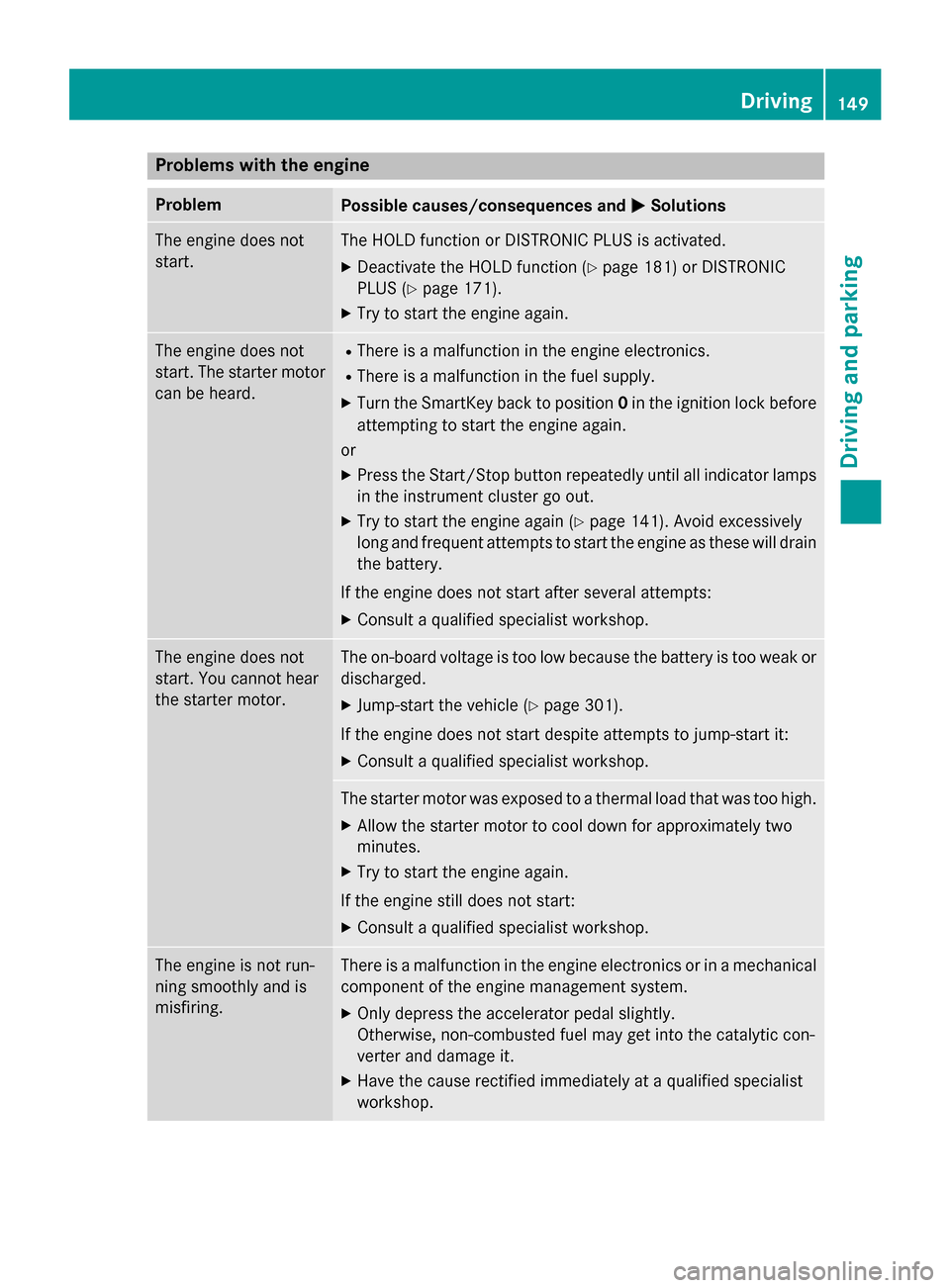
Problems with the engine
Problem
Possible causes/consequences and
0050
0050Solutions The engine does not
start. The HOLD function or DISTRONIC PLUS is activated.
X Deactivate the HOLD function (Y page 181) or DISTRONIC
PLUS (Y page 171).
X Try to start the engine again. The engine does not
start. The starter motor
can be heard. R
There is a malfunction in the engine electronics.
R There is a malfunction in the fuel supply.
X Turn the SmartKey back to position 0in the ignition lock before
attempting to start the engine again.
or
X Press the Start/Stop button repeatedly until all indicator lamps
in the instrument cluster go out.
X Try to start the engine again (Y page 141). Avoid excessively
long and frequent attempts to start the engine as these will drain
the battery.
If the engine does not start after several attempts: X Consult a qualified specialist workshop. The engine does not
start. You cannot hear
the starter motor. The on-board voltage is too low because the battery is too weak or
discharged.
X Jump-start the vehicle (Y page 301).
If the engine does not start despite attempts to jump-start it:
X Consult a qualified specialist workshop. The starter motor was exposed to a thermal load that was too high.
X Allow the starter motor to cool down for approximately two
minutes.
X Try to start the engine again.
If the engine still does not start:
X Consult a qualified specialist workshop. The engine is not run-
ning smoothly and is
misfiring. There is a malfunction in the engine electronics or in a mechanical
component of the engine management system.
X Only depress the accelerator pedal slightly.
Otherwise, non-combusted fuel may get into the catalytic con-
verter and damage it.
X Have the cause rectified immediately at a qualified specialist
workshop. Driving
149Driving and parking Z
Page 165 of 358
The function of the electric parking brake is
dependent on the on-board voltage. If the on-
board voltage is low or there is a malfunction in the system, it may not be possible to apply
the released parking brake.
X If this is the case, only park the vehicle on
level ground and secure it to prevent it roll-
ing away.
X Vehicles with automatic transmission:
shift the automatic transmission to posi-
tion P.
X Vehicles with manual transmission:
engage first gear.
It may not be possible to release an applied
parking brake if the on-board voltage is low or
there is a malfunction in the system. Contact a qualified specialist workshop.
i The electric parking brake performs a
function test at regular intervals while the
engine is switched off. The sounds that can
be heard while this is occurring are normal.
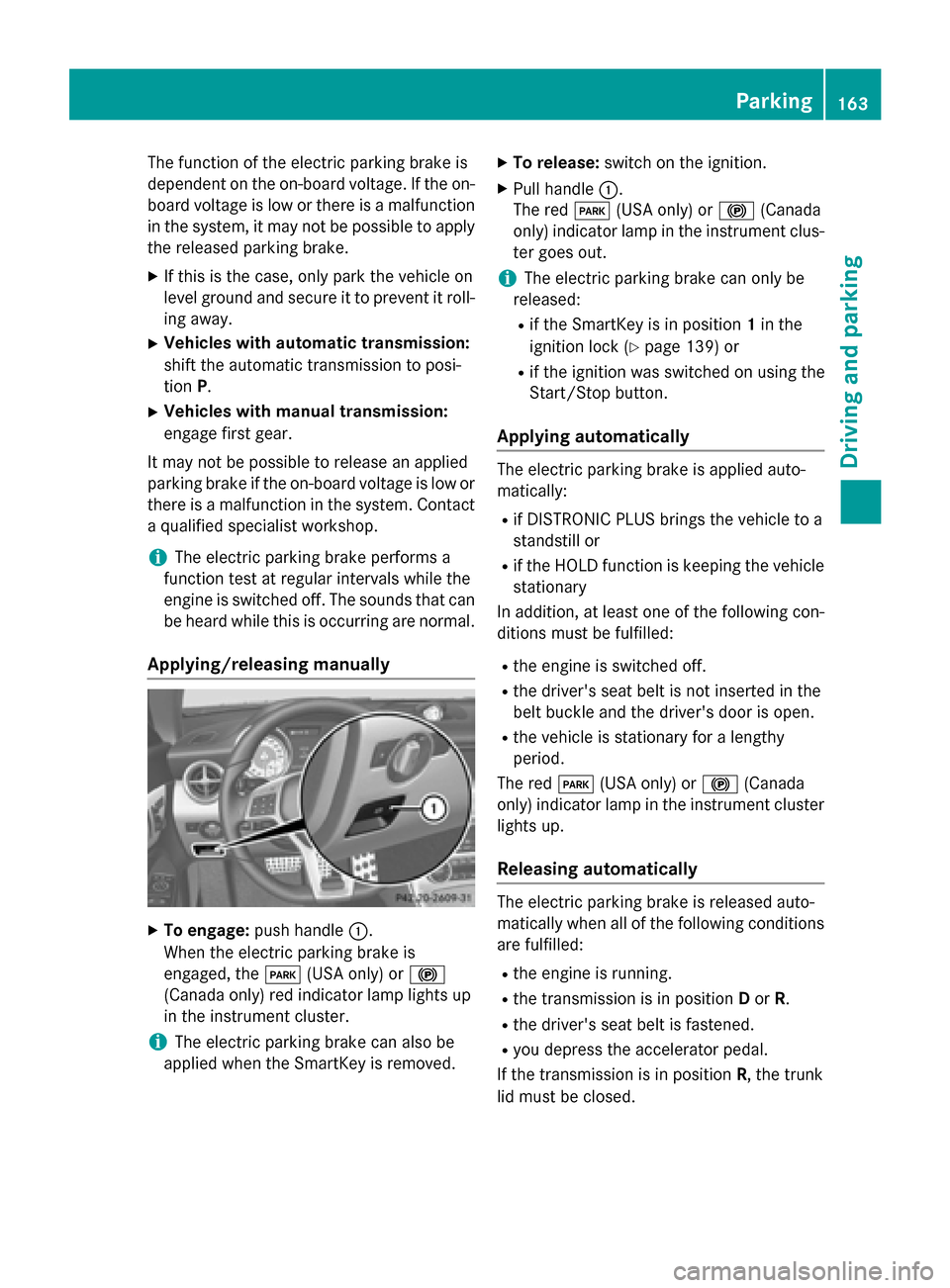
Applying/releasing manually X
To engage: push handle 0043.
When the electric parking brake is
engaged, the 0049(USA only) or 0024
(Canada only) red indicator lamp lights up
in the instrument cluster.
i The electric parking brake can also be
applied when the SmartKey is removed. X
To release: switch on the ignition.
X Pull handle 0043.
The red 0049(USA only) or 0024(Canada
only) indicator lamp in the instrument clus-
ter goes out.
i The electric parking brake can only be
released:
R if the SmartKey is in position 1in the
ignition lock (Y page 139) or
R if the ignition was switched on using the
Start/Stop button.
Applying automatically The electric parking brake is applied auto-
matically:
R if DISTRONIC PLUS brings the vehicle to a
standstill or
R if the HOLD function is keeping the vehicle
stationary
In addition, at least one of the following con-
ditions must be fulfilled:
R the engine is switched off.
R the driver's seat belt is not inserted in the
belt buckle and the driver's door is open.
R the vehicle is stationary for a lengthy
period.
The red 0049(USA only) or 0024(Canada
only) indicator lamp in the instrument cluster
lights up.
Releasing automatically The electric parking brake is released auto-
matically when all of the following conditions
are fulfilled:
R the engine is running.
R the transmission is in position Dor R.
R the driver's seat belt is fastened.
R you depress the accelerator pedal.
If the transmission is in position R, the trunk
lid must be closed. Parking
163Driving and parking Z