2015 MERCEDES-BENZ SLK-Class tire pressure
[x] Cancel search: tire pressurePage 167 of 358
a distance of 44 ft (approximately 14 m) per
second.
Drive sensibly – save fuel Observe the following tips to save fuel:
R The tires should always be inflated to the
recommended tire pressure.
R Remove unnecessary loads.
R Warm up the engine at low engine speeds.
R Avoid frequent acceleration or braking.
R Observe the service intervals in the Main-
tenance Booklet or in the service interval
display. Have all the maintenance work car- ried in accordance with Daimler AG regu-
lations.
Fuel consumption also increases when driv-
ing in cold weather, in stop-start traffic and in
hilly terrain.
Drinking and driving G
WARNING
Drinking and driving and/or taking drugs and driving are very dangerous combinations.
Even a small amount of alcohol or drugs can
affect your reflexes, perceptions and judg-
ment.
The possibility of a serious or even fatal acci-
dent is greatly increased when you drink or
take drugs and drive.
Do not drink or take drugs and drive or allow
anyone to drive who has been drinking or tak-
ing drugs.
Emission control G
WARNING
Combustion engines emit poisonous exhaust
gases such as carbon monoxide. Inhaling
these exhaust gases leads to poisoning. There is a risk of fatal injury. Therefore never leave
the engine running in enclosed spaces with-
out sufficient ventilation. Certain engine systems are designed to keep
the level of poisonous components in exhaust fumes within legal limits.
These systems only work at peak efficiency if they are serviced exactly in accordance with
the manufacturer's specifications. All work
on the engine must be carried out only by
qualified and authorized Mercedes-Benz
technicians.
The engine settings must not be changed
under any circumstances. Furthermore, all
specific service work must be carried out at
regular intervals and in accordance with the
Mercedes-Benz service requirements. Details
can be found in the Maintenance Booklet. ECO display
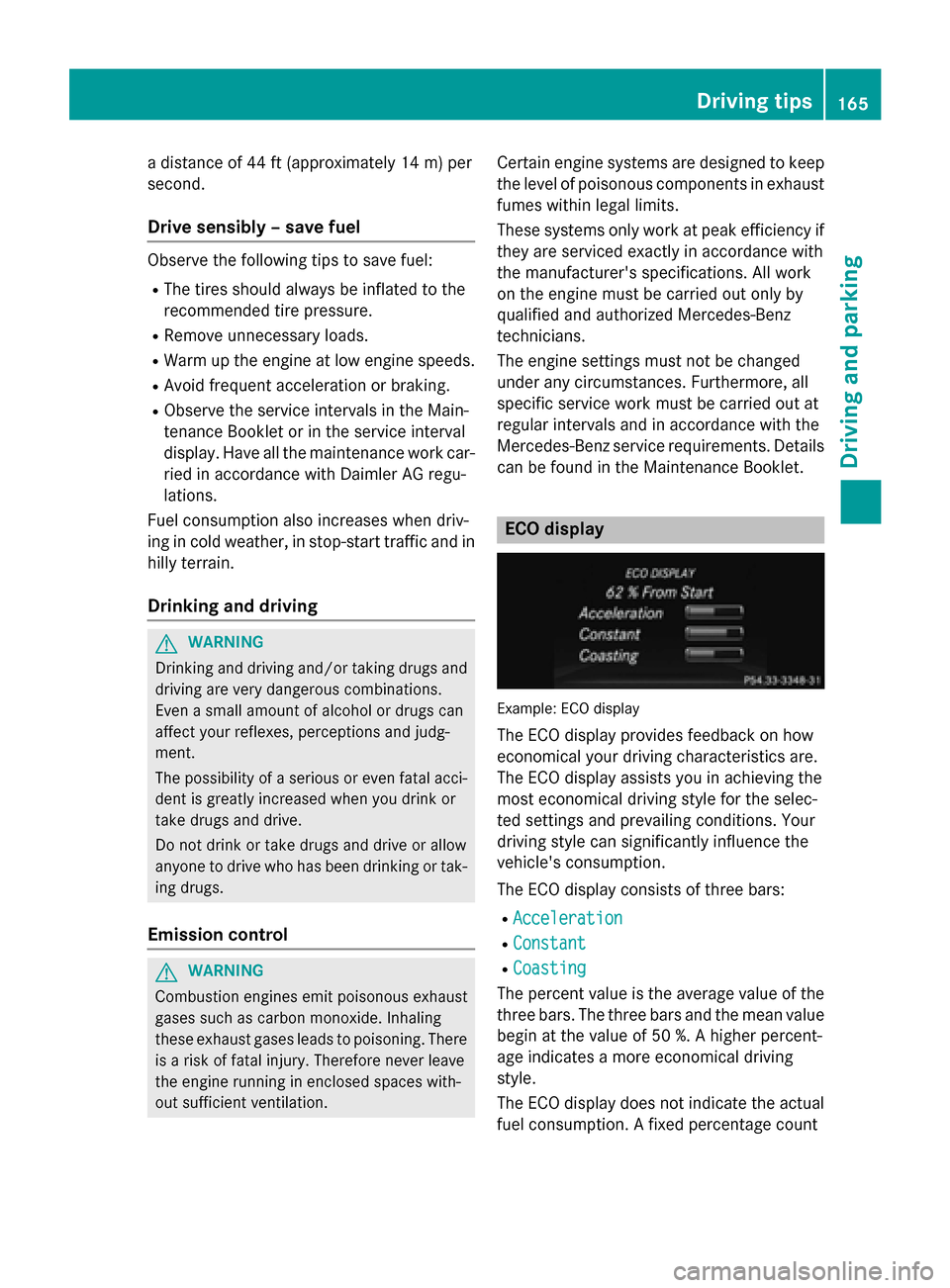
Example: ECO display
The ECO display provides feedback on how
economical your driving characteristics are.
The ECO display assists you in achieving the
most economical driving style for the selec-
ted settings and prevailing conditions. Your
driving style can significantly influence the
vehicle's consumption.
The ECO display consists of three bars:
R Acceleration Acceleration
R Constant
Constant
R Coasting
Coasting
The percent value is the average value of the three bars. The three bars and the mean value
begin at the value of 50 %. A higher percent-
age indicates a more economical driving
style.
The ECO display does not indicate the actual fuel consumption. A fixed percentage count Driving tips
165Driving and parking Z
Page 168 of 358
in the ECO display does not indicate a fixed
consumption.
Apart from driving style, consumption is
dependent on many factors such as, e.g.:
R load
R tire pressure
R cold start
R choice of route
R electrical consumers switched on
These factors are not included in the ECO dis-
play.
The evaluation of your driving style is carried
out using the following three categories:
R Acceleration
Acceleration (evaluation of all accelera-
tion processes):
- The bar fills up: moderate acceleration,
especially at higher speeds
- The bar empties: sporty acceleration
R Constant
Constant (assessment of driving behavior
at all times):
- The bar fills up: constant speed and
avoidance of unnecessary acceleration
and deceleration
- The bar empties: fluctuations in speed
R Coasting Coasting (assessment of all deceleration
processes):
- The bar fills up: anticipatory driving,
keeping your distance and early release
of the accelerator. The vehicle can coast
without use of the brakes.
- The bar empties: frequent braking
i An economical driving style specially
requires driving at moderate engine
speeds.
To achieve a higher value in the categories
Acceleration
Acceleration andConstant Constant :
R observe the gearshift recommendations.
R drive in drive program E(vehicles with an
automatic transmission).
i On long journeys at a constant speed, e.g.
on the highway, only the bar for Constant
Constant
will change. i
The ECO display summarizes the driving
characteristics from the start of the journey
to its completion. For this reason, the bars change dynamically at the beginning of the
journey. On longer journeys, there are
fewer changes. For more dynamic changes, carry out a manual reset.
For further information on the ECO display,
see (Y page 198). Brakes
Important safety notes G
WARNING
If you shift down on a slippery road surface in an attempt to increase the engine's braking
effect, the drive wheels could lose their grip.
There is an increased danger of skidding and
accidents.
Do not shift down for additional engine brak-
ing on a slippery road surface.
Downhill gradients !
On long, steep gradients, you must
reduce the load on the brakes. To use
engine braking, shift to a lower gear in good time. This helps you to avoid overheating
the brakes and wearing them out exces-
sively.
When making use of the engine braking
effect, it is possible that a drive wheel may
not turn for some time, e.g. in the case of
suddenly changing or slippery road surface conditions. This could cause damage to the
drive train. This type of damage is not cov- ered by the Mercedes-Benz warranty.
Change into a lower gear in good time on long
and steep downhill gradients. This is espe-
cially important if the vehicle is laden. 166
Driving tipsDriving and parking
Page 188 of 358

Use Parking Guidance for parking spaces:
R that are parallel to the direction of travel
R that are on straight roads, not bends
R that are on the same level as the road, i.e.
not on the pavement, for example. Parking
Guidance may not detect flat curbs
Parking tips:
R On narrow roads, drive as close to the park-
ing space as possible.
R Parking spaces that are littered or over-
grown might be identified or measured
incorrectly.
R Parking spaces that are partially occupied
by trailer drawbars might not be identified
as such or be measured incorrectly.
R Snowfall or heavy rain may lead to a parking
space being measured inaccurately.
R Pay attention to the PARKTRONIC
(Y page 184) warning messages during the
parking procedure.
R When transporting a load which protrudes
from your vehicle, you must not use Parking
Guidance.
R Never use Parking Guidance with snow
chains or an emergency spare wheel moun-
ted.
R Make sure that the tire pressures are
always correct. This has a direct effect on
the steering instructions.
R The way your vehicle is positioned in the
parking space after parking is dependent
on various factors. These include the posi-
tion and shape of the vehicles parked in
front and behind it and the conditions of the location. In some cases, Parking Guidance
may guide you too far or not far enough into
a parking space. In some cases, it may also
lead you across or onto the curb. If neces-
sary, cancel the parking procedure with
Parking Guidance. Detecting parking spaces 0043
Detected parking space on the left
0044 Parking symbol
0087 Detected parking space on the right
Parking Guidance is automatically activated
when you drive forwards. The system is
operational at speeds of up to approximately
22 mph (35 km/h). While in operation, the
system independently locates and measures
parking spaces on both sides of the vehicle.
When driving at speeds below 19 mph
(30 km/h), you will see parking symbol 0044as
a status indicator in the instrument cluster.
When a parking space has been detected, an arrow towards the right 0087or the left 0043also
appears. Parking Guidance only displays
parking spaces on the front-passenger side
as standard. Parking spaces on the driver's
side are displayed as soon as the turn signal
on the driver's side is activated. To park on
the driver's side, you must leave the driver's
side turn signal switched on until you have
engaged reverse gear.
Parking Guidance will only detect parking
spaces:
R that are parallel to the direction of travel
R that are at least 5 ft (1.5 m) wide
R that are at least 4.3 ft (1.3 m) longer than
your vehicle
A parking space is displayed while you are
driving past it, and until you are approx-
imately 50 ft (15 m) away from it. 186
Driving systemsDriving and parking
Page 206 of 358
Activating/deactivating Blind Spot
Assist X
Press the 0059or0065 button on the steer-
ing wheel to select the DriveAssist
DriveAssist menu.
X Press the 0063or0064 button to select
Blind Spot Assist
Blind Spot Assist .
X Press the 0076button.
The current selection is displayed.
X To activate/deactivate: press the0076
button again.
Further information about Blind Spot Assist
(Y page 189)
Activating/deactivating Lane Keeping
Assist X
Press the 0059or0065 button on the steer-
ing wheel to select the DriveAssist DriveAssistmenu.
X Press 0063or0064 to select Lane Keep‐
Lane Keep‐
ing Assist
ing Assist .
X Press the 0076button.
The current selection is displayed.
X Press 0076to confirm.
X Press 0064or0063 to set Off
Off,Standard
Standard
or Adaptive
Adaptive.
X Press the 0076button to save the setting.
When Lane Keeping Assist is activated, the
multifunction display shows the lane mark- ings as bright lines in the assistance
graphic.
For further information about Lane Keeping
Assist, see (Y page 190). Maintenance menu
In the
Service
Service menu, you have the following
options: R
Calling up display messages
(Y page 212)
R Restarting the tire pressure loss warning
system (Y page 318)
R Checking the tire pressure electronically
(Y page 318)
R Calling up the service due date
(Y page 283) Settings menu
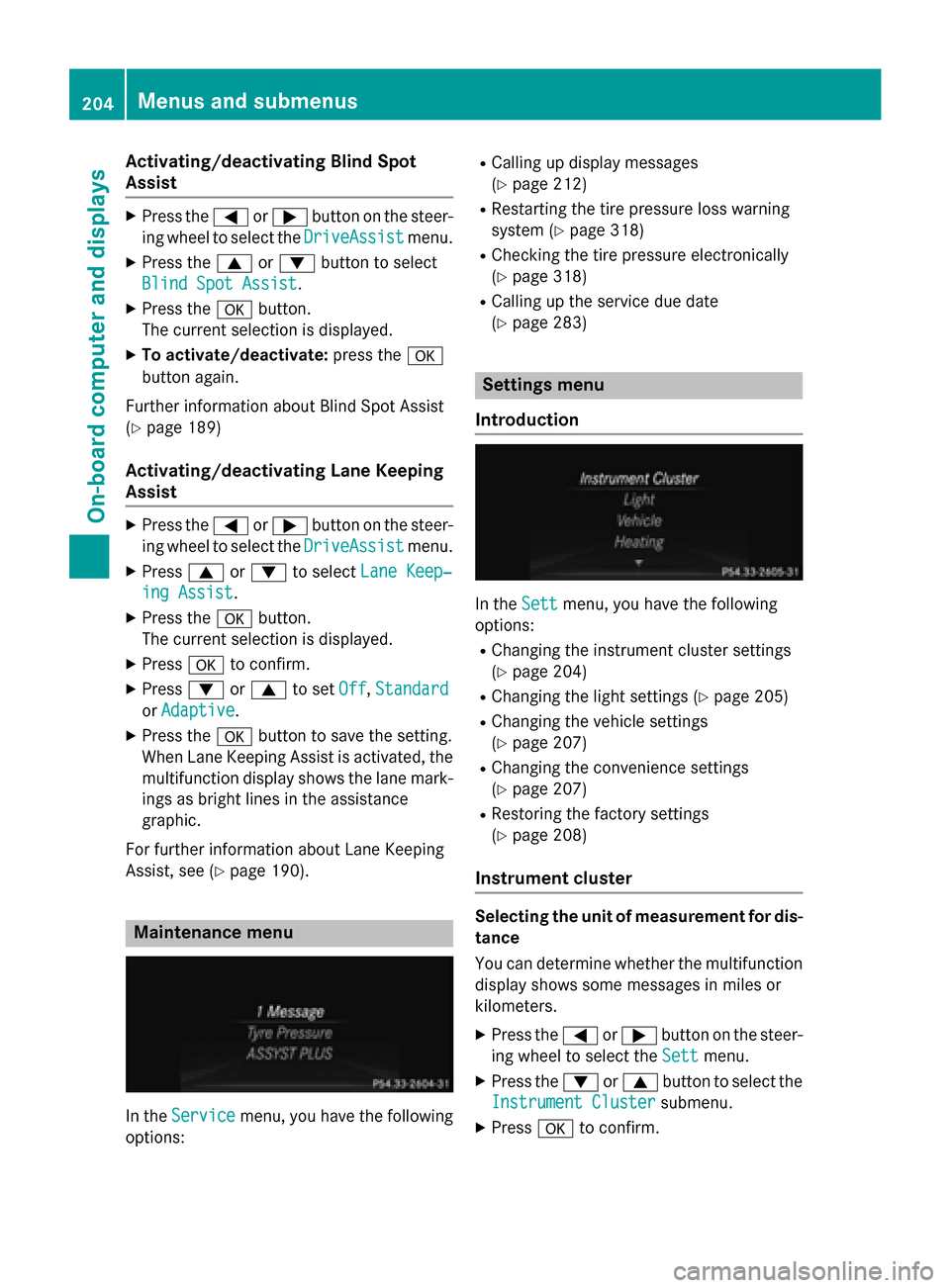
Introduction In the
Sett Settmenu, you have the following
options:
R Changing the instrument cluster settings
(Y page 204)
R Changing the light settings (Y page 205)
R Changing the vehicle settings
(Y page 207)
R Changing the convenience settings
(Y page 207)
R Restoring the factory settings
(Y page 208)
Instrument cluster Selecting the unit of measurement for dis-
tance
You can determine whether the multifunction display shows some messages in miles or
kilometers.
X Press the 0059or0065 button on the steer-
ing wheel to select the Sett Settmenu.
X Press the 0064or0063 button to select the
Instrument Cluster
Instrument Cluster submenu.
X Press 0076to confirm. 204
Menus and sub
menusOn-board computer and displays
Page 238 of 358

Tires
Display messages
Possible causes/consequences and
0050
0050Solutions Check
Check
Tire Pressure Soon Tire Pressure Soon Canada only:
The tire pressure loss warning system has detected a significant
loss in pressure.
A warning tone also sounds.
G WARNING
With tire pressures which are too low, there is a risk of the fol-
lowing hazards:
R they may burst, especially as the load and vehicle speed
increase.
R they may wear excessively and/or unevenly, which may greatly
impair tire traction.
R the driving characteristics, as well as steering and braking, may
be greatly impaired.
There is a risk of an accident.
X Stop the vehicle without making any sudden steering or braking
maneuvers. Pay attention to the traffic conditions as you do so.
X Secure the vehicle against rolling away (Y page 161).
X Check the tires and, if necessary, follow the instructions for a
flat tire (Y page 292).
X Check the tire pressures and, if necessary, correct the tire pres-
sure.
X Restart the tire pressure loss warning system when the tire
pressure is correct (Y page 318).Check Check
Tire
TirePressure
Pressure
Then Restart Run
Then Restart Run
Flat Indicator Flat Indicator Canada only:
The tire pressure loss warning system generated a display mes-
sage and has not been restarted since.
X Set the correct tire pressure in all four tires.
X Restart the tire pressure loss warning system (Y page 318).Run Flat Indicator Run Flat Indicator
Inoperative Inoperative Canada only:
The tire pressure loss warning system is faulty.
X Visit a qualified specialist workshop. Please Correct Please Correct
Tire Pressure Tire Pressure The tire pressure is too low in at least one of the tires, or the tire
pressure difference between the wheels is too great.
X Check the tire pressures at the next opportunity (Y page 318).
X If necessary, correct the tire pressure.
X Restart the tire pressure monitor (Y page 321).236
Display
messagesOn-board computer and displays
Page 239 of 358
Display messages
Possible causes/consequences and
0050
0050Solutions Check
Check
Tires
Tires The tire pressure in one or more tires has dropped significantly.
The wheel position is displayed in the multifunction display.
A warning tone also sounds.
G WARNING
With tire pressures which are too low, there is a risk of the fol-
lowing hazards:
R they may burst, especially as the load and vehicle speed
increase.
R they may wear excessively and/or unevenly, which may greatly
impair tire traction.
R the driving characteristics, as well as steering and braking, may
be greatly impaired.
There is a risk of an accident.
X Stop the vehicle without making any sudden steering or braking
maneuvers. Pay attention to the traffic conditions as you do so.
X Secure the vehicle against rolling away (Y page 161).
X Check the tires and, if necessary, follow the instructions for a
flat tire (Y page 292).
X Check the tire pressure (Y page 318).
X If necessary, correct the tire pressure. Warning Warning
Tire Malfunction Tire Malfunction The tire pressure in one or more tires has dropped suddenly. The
wheel position is shown in the multifunction display.
G WARNING
If you drive with a flat tire, there is a risk of the following hazards: R a flat tire affects the ability to steer or brake the vehicle.
R you could lose control of the vehicle.
R continued driving with a flat tire will cause excessive heat build-
up and possibly a fire.
There is a risk of an accident.
X Stop the vehicle without making any sudden steering or braking
maneuvers. Pay attention to the traffic conditions as you do so.
X Secure the vehicle against rolling away (Y page 161).
X Check the tires and, if necessary, follow the instructions for a
flat tire (Y page 292). Display
messages
237On-board computer and displays Z
Page 240 of 358
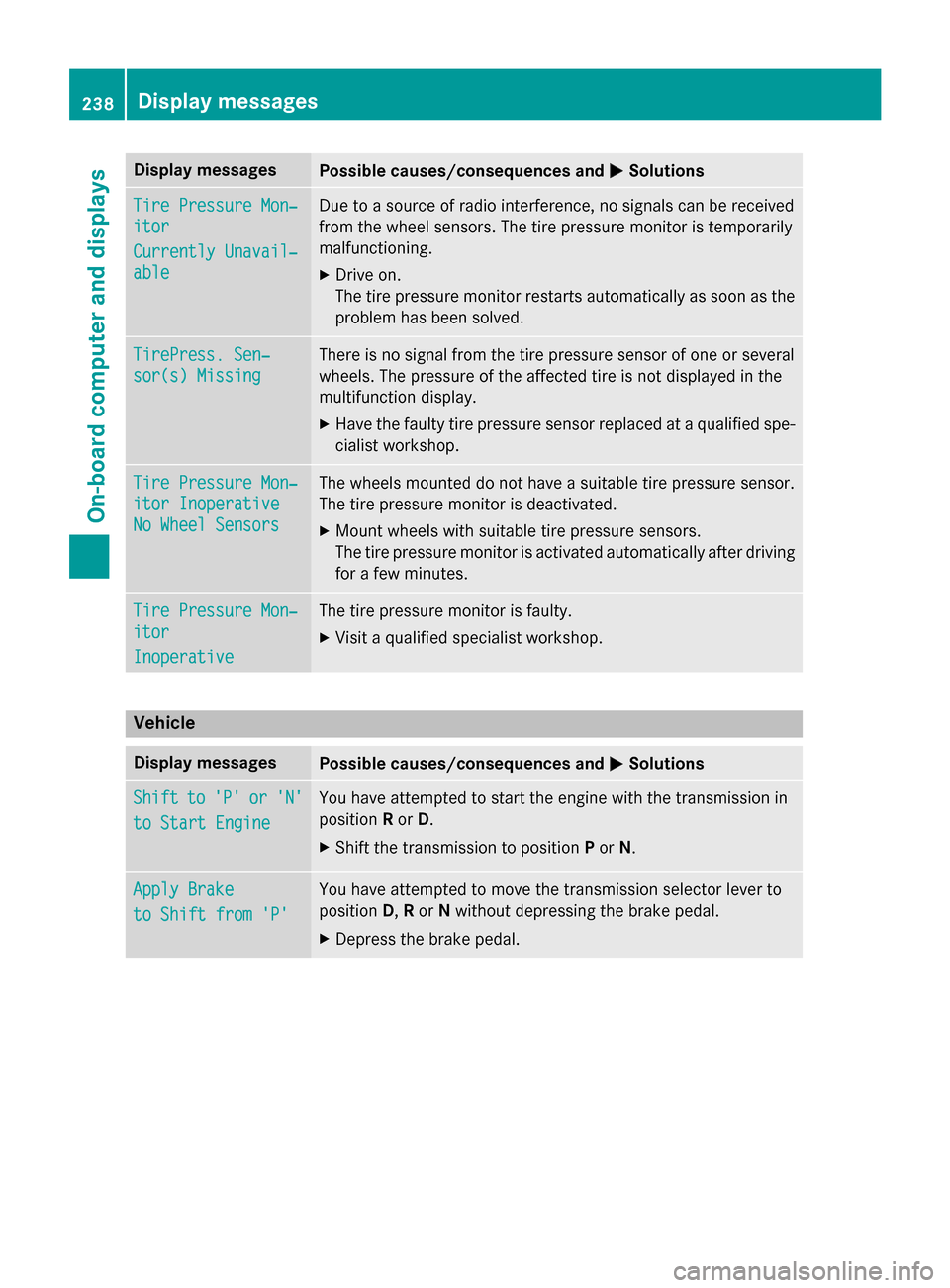
Display messages
Possible causes/consequences and
0050
0050Solutions Tire Pressure Mon‐
Tire Pressure Mon‐
itor itor
Currently Unavail‐ Currently Unavail‐
able able Due to a source of radio interference, no signals can be received
from the wheel sensors. The tire pressure monitor is temporarily
malfunctioning.
X Drive on.
The tire pressure monitor restarts automatically as soon as the
problem has been solved. TirePress. Sen‐ TirePress. Sen‐
sor(s) Missing sor(s) Missing There is no signal from the tire pressure sensor of one or several
wheels. The pressure of the affected tire is not displayed in the
multifunction display.
X Have the faulty tire pressure sensor replaced at a qualified spe-
cialist workshop. Tire Pressure Mon‐ Tire Pressure Mon‐
itor Inoperative itor Inoperative
No Wheel Sensors No Wheel Sensors The wheels mounted do not have a suitable tire pressure sensor.
The tire pressure monitor is deactivated.
X Mount wheels with suitable tire pressure sensors.
The tire pressure monitor is activated automatically after driving
for a few minutes. Tire Pressure Mon‐ Tire Pressure Mon‐
itor itor
Inoperative Inoperative The tire pressure monitor is faulty.
X Visit a qualified specialist workshop. Vehicle
Display messages
Possible causes/consequences and
0050
0050Solutions Shift
Shift
to
to'P'
'P' or
or'N'
'N'
to Start Engine
to Start Engine You have attempted to start the engine with the transmission in
position
Ror D.
X Shift the transmission to position Por N. Apply Brake Apply Brake
to Shift from 'P' to Shift from 'P' You have attempted to move the transmission selector lever to
position
D,Ror Nwithout depressing the brake pedal.
X Depress the brake pedal. 238
Display
messagesOn-board computer and displays
Page 256 of 358
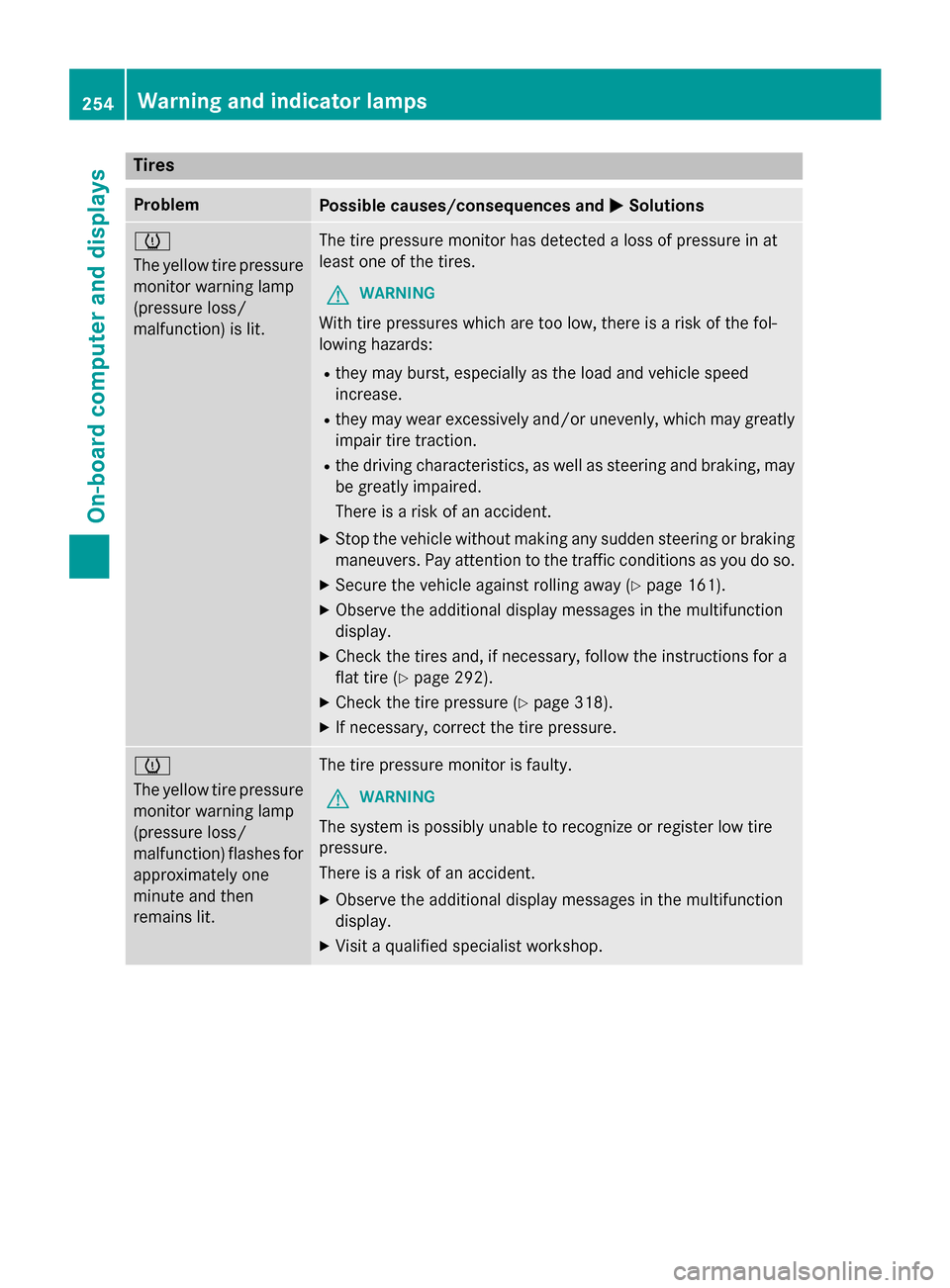
Tires
Problem
Possible causes/consequences and
0050
0050Solutions 0077
The yellow tire pressure
monitor warning lamp
(pressure loss/
malfunction) is lit. The tire pressure monitor has detected a loss of pressure in at
least one of the tires.
G WARNING
With tire pressures which are too low, there is a risk of the fol-
lowing hazards:
R they may burst, especially as the load and vehicle speed
increase.
R they may wear excessively and/or unevenly, which may greatly
impair tire traction.
R the driving characteristics, as well as steering and braking, may
be greatly impaired.
There is a risk of an accident.
X Stop the vehicle without making any sudden steering or braking
maneuvers. Pay attention to the traffic conditions as you do so.
X Secure the vehicle against rolling away (Y page 161).
X Observe the additional display messages in the multifunction
display.
X Check the tires and, if necessary, follow the instructions for a
flat tire (Y page 292).
X Check the tire pressure (Y page 318).
X If necessary, correct the tire pressure. 0077
The yellow tire pressure
monitor warning lamp
(pressure loss/
malfunction) flashes for
approximately one
minute and then
remains lit. The tire pressure monitor is faulty.
G WARNING
The system is possibly unable to recognize or register low tire
pressure.
There is a risk of an accident.
X Observe the additional display messages in the multifunction
display.
X Visit a qualified specialist workshop. 254
Warning and indicator lampsOn-board computer and displays