2015 MERCEDES-BENZ S-Class charging
[x] Cancel search: chargingPage 225 of 502

The electric parking brake is also engaged
automatically if:
R DISTRONIC PLUS brings the vehicle to a
standstill or
R the HOLD function is keeping the vehicle
stationary
R Active Parking Assist is holding the vehicle
at a standstill
In addition, at least one of the following con-
ditions must be fulfilled:
R there is a system malfunction.
R the power supply is insufficient.
R the vehicle is stationary for a lengthy
period.
The red F(USA only) or !(Canada
only) indicator lamp in the instrument cluster
lights up.
The electric parking brake is not automati-
cally engaged if the engine is switched off by the ECO start/stop function.
Releasing automatically The electric parking brake is released auto-
matically when all of the following conditions
are fulfilled:
R the engine is running.
R the transmission is in position Dor R.
R the seat belt has been fastened.
R you depress the accelerator pedal.
If the automatic transmission is in position R,
the trunk lid must be closed.
If your seat belt is not fastened, the following conditions must be fulfilled to automatically
release the electric parking brake:
R the driver's door is closed.
R you have shifted out of transmission posi-
tion Por you have previously driven faster
than 2 mph (3 km/h).
Ensure that you do not depress the acceler-
ator pedal unintentionally. Otherwise the
parking brake will be released and the vehicle
will start to move. Emergency braking The vehicle can also be braked during an
emergency by using the electric parking
brake.
X While driving, push handle :of the electric
parking brake (Y page 222).
The vehicle is braked as long as you keep
handle :of the electric parking brake
pressed. The longer electric parking brake
handle :is depressed, the greater the brak-
ing force.
During braking:
R a warning tone sounds
R the Release parking brake Release parking brake message
appears
R the red F(USA only) or !(Canada
only) indicator lamp in the instrument clus- ter flashes
When the vehicle has been braked to a stand- still, the electric parking brake is engaged. Parking the vehicle for a long period
If you leave the vehicle parked for longer than
four weeks, the battery may be damaged by
exhaustive discharging and further damaged
in the event of this occurring again.
X Connect a trickle charger.
i You can obtain information about trickle
chargers from a qualified specialist work-
shop.
If you leave the vehicle parked for longer than
six weeks, the vehicle may suffer damage as a result of lack of use.
X Visit a qualified specialist workshop and
seek advice.
PLUG-IN HYBRID vehicles: observe the
important safety notes for the high-voltage
battery (Y page 429). Parking
223Driving and parking Z
Page 283 of 502
E-SAVE R
Electric mode or driving
with the internal com-
bustion engine is possi-
ble
R Automatic selection of
drive mode with electric
mode as often as possi-
ble
R The current condition of
charge of the high-volt-
age battery is main-
tained so the electrical
energy can be used at a
later time. CHARGE R
Electric drive is not pos-
sible
R Charging the high-volt-
age battery while driv-
ing using the combus-
tion engine In automatic drive program
S(Y page 285)
and in manual drive program M(Y page 286),
only HYBRID operating mode is available.
If you switch from automatic drive program S
to automatic drive program Eor E+ ,HYBRID
operating mode continues to be selected.
If manual drive program Mis deactivated, the
automatic transmission shifts:
R into the automatic drive program that was
last selected
R into the driving mode that was last selected
Operating the on-board computer You can display the current operating condi-
tion of the hybrid system in the multifunction
display and the COMAND display
(Y page 281).
In the COMAND display, you can also call up a graphic display of the fuel consumption and
generated electricity (Y page 285). Menus and submenus
Selecting displays in the COMAND dis-
play X
Press button Øon the controller.
The vehicle menu is displayed.
X To select Energy EnergyFlow
Flow: turn and press the
controller.
The energy flow is displayed.
X To select Consumption Consumption: turn and press the
controller.
Fuel consumption and the generated elec-
tric energy are displayed.
X To exit the display: press the %button
on the controller.
Selecting the energy flow display in the
multifunction display X
Use Ñ on the steering wheel to call up
the list of menus.
X Press the :or9 button on the steer-
ing wheel to select the Trip Tripmenu.
X Confirm by pressing aon the steering
wheel.
X Use : or9 to select Energy Flow
Energy Flow .
The active hybrid components are highligh-
ted in the energy flow display.
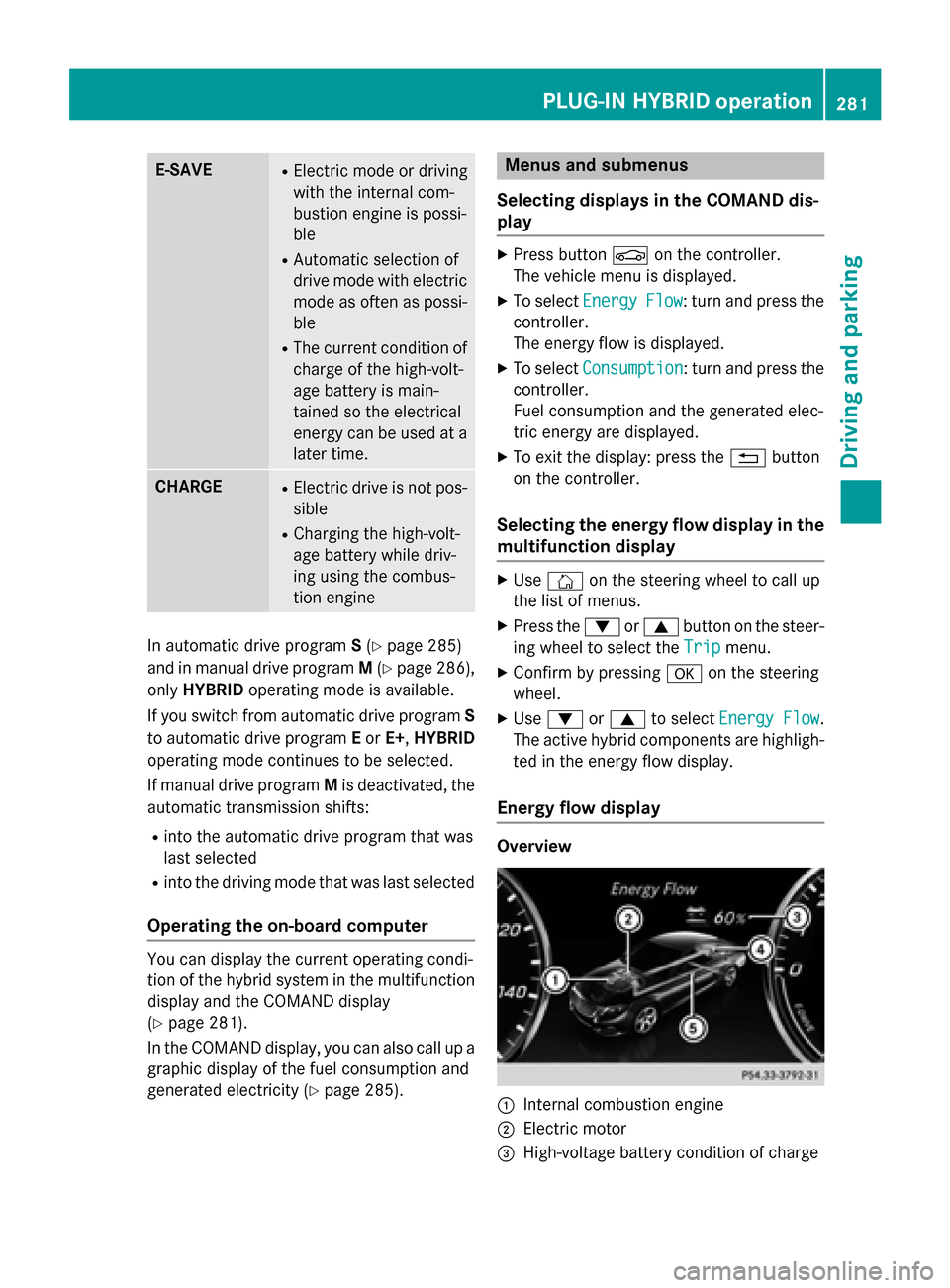
Energy flow display Overview
:
Internal combustion engine
; Electric motor
= High-voltage battery condition of charge PLUG-IN HYBRID operation
281Driving and parking Z
Page 284 of 502
?
High-voltage battery
A Energy flow
The active hybrid components are highligh-
ted.
The energy flow is indicated by arrows. The
arrows have a different color depending on
the operating state.
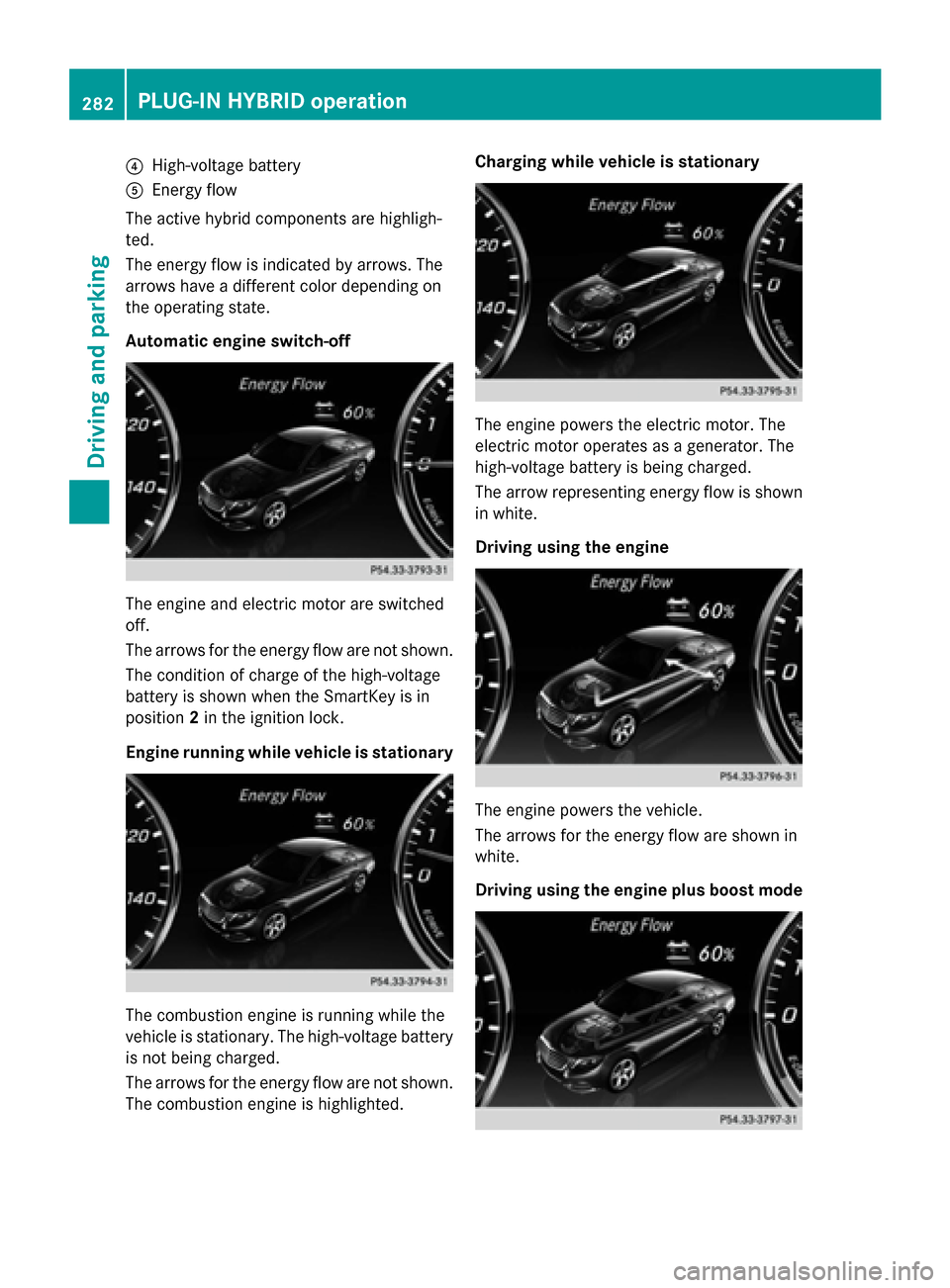
Automatic engine switch-off The engine and electric motor are switched
off.
The arrows for the energy flow are not shown.
The condition of charge of the high-voltage
battery is shown when the SmartKey is in
position 2in the ignition lock.
Engine running while vehicle is stationary The combustion engine is running while the
vehicle is stationary. The high-voltage battery
is not being charged.
The arrows for the energy flow are not shown. The combustion engine is highlighted. Charging while vehicle is stationary
The engine powers the electric motor. The
electric motor operates as a generator. The
high-voltage battery is being charged.
The arrow representing energy flow is shown
in white.
Driving using the engine The engine powers the vehicle.
The arrows for the energy flow are shown in
white.
Driving using the engine plus boost mode282
PLUG-IN HYBRID operationDriving and parking
Page 285 of 502
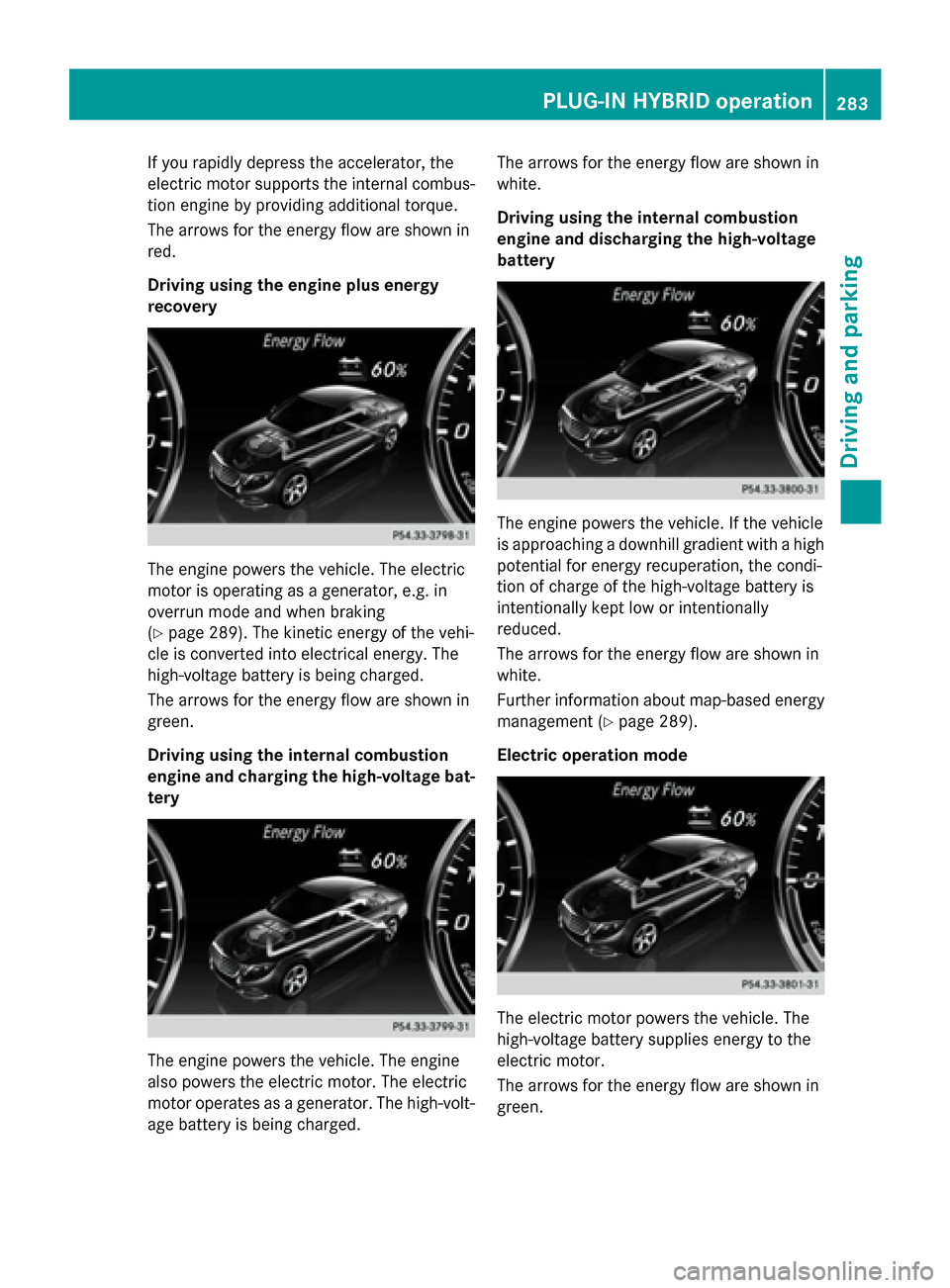
If you rapidly depress the accelerator, the
electric motor supports the internal combus-
tion engine by providing additional torque.
The arrows for the energy flow are shown in
red.
Driving using the engine plus energy
recovery The engine powers the vehicle. The electric
motor is operating as a generator, e.g. in
overrun mode and when braking
(Y page 289). The kinetic energy of the vehi-
cle is converted into electrical energy. The
high-voltage battery is being charged.
The arrows for the energy flow are shown in
green.
Driving using the internal combustion
engine and charging the high-voltage bat-
tery The engine powers the vehicle. The engine
also powers the electric motor. The electric
motor operates as a generator. The high-volt-
age battery is being charged. The arrows for the energy flow are shown in
white.
Driving using the internal combustion
engine and discharging the high-voltage
battery The engine powers the vehicle. If the vehicle
is approaching a downhill gradient with a high
potential for energy recuperation, the condi-
tion of charge of the high-voltage battery is
intentionally kept low or intentionally
reduced.
The arrows for the energy flow are shown in
white.
Further information about map-based energy
management (Y page 289).
Electric operation mode The electric motor powers the vehicle. The
high-voltage battery supplies energy to the
electric motor.
The arrows for the energy flow are shown in
green. PLUG-IN HYBRID operation
283Driving and parking Z
Page 286 of 502
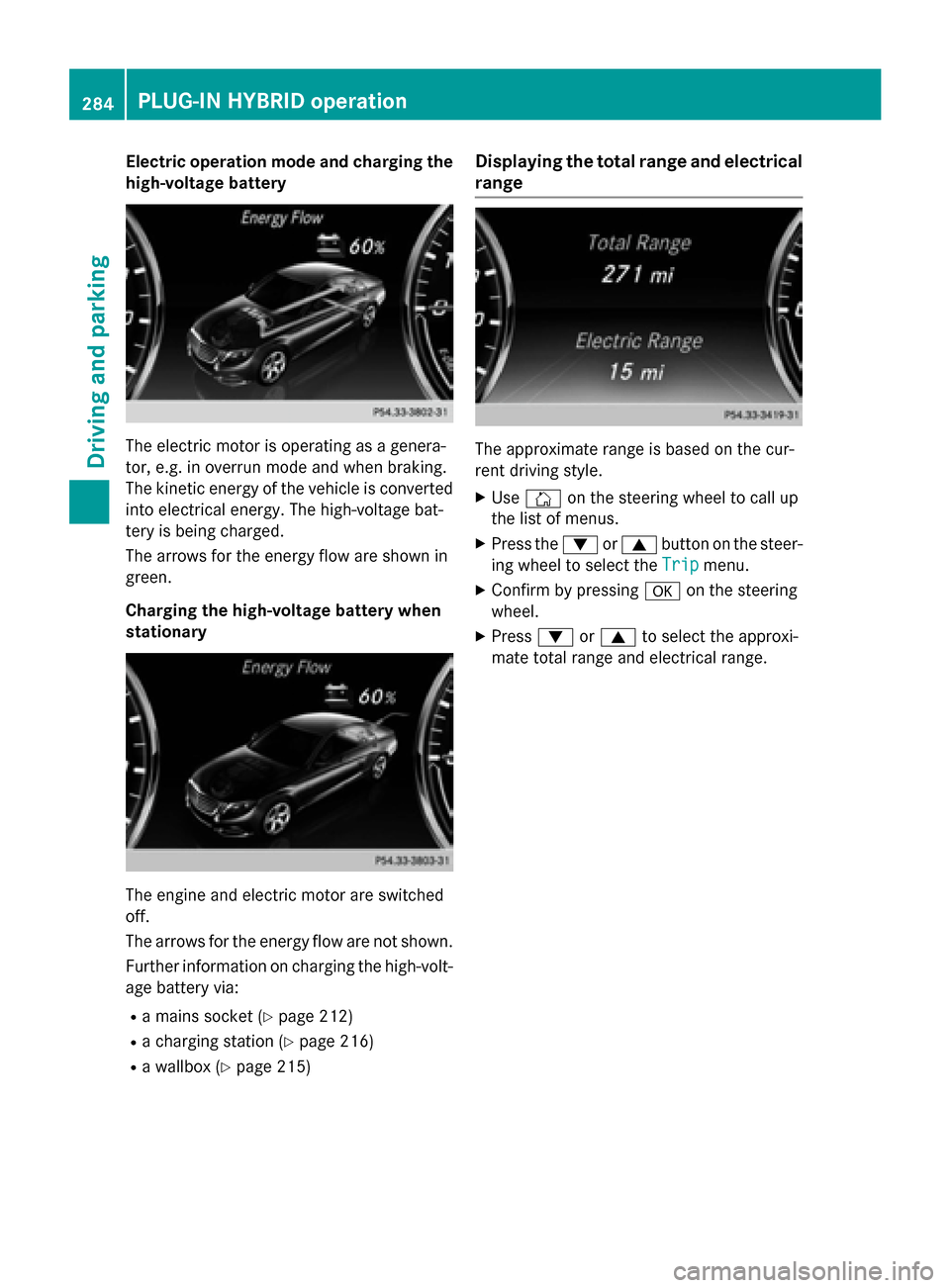
Electric operation mode and charging the
high-voltage battery The electric motor is operating as a genera-
tor, e.g. in overrun mode and when braking.
The kinetic energy of the vehicle is converted into electrical energy. The high-voltage bat-
tery is being charged.
The arrows for the energy flow are shown in
green.
Charging the high-voltage battery when
stationary The engine and electric motor are switched
off.
The arrows for the energy flow are not shown.
Further information on charging the high-volt-
age battery via:
R a mains socket (Y page 212)
R a charging station (Y page 216)
R a wallbox (Y page 215) Displaying the total range and electrical
range The approximate range is based on the cur-
rent driving style.
X Use Ñ on the steering wheel to call up
the list of menus.
X Press the :or9 button on the steer-
ing wheel to select the Trip
Trip menu.
X Confirm by pressing aon the steering
wheel.
X Press :or9 to select the approxi-
mate total range and electrical range. 284
PLUG-IN HYBRID operationDriving and parking
Page 312 of 502
X
Press ato confirm.
The current selection is displayed.
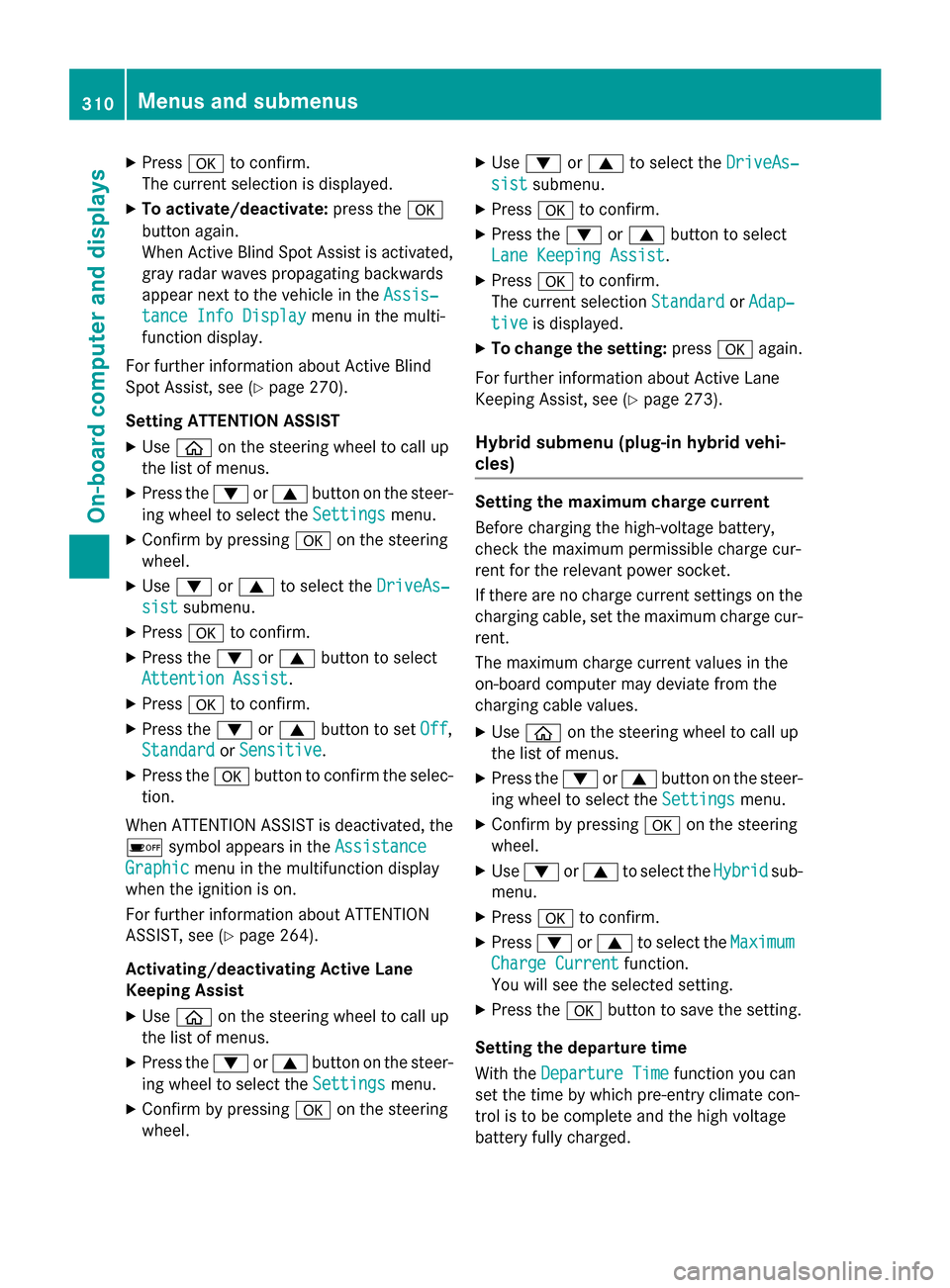
X To activate/deactivate: press thea
button again.
When Active Blind Spot Assist is activated, gray radar waves propagating backwards
appear next to the vehicle in the Assis‐
Assis‐
tance Info Display tance Info Display menu in the multi-
function display.
For further information about Active Blind
Spot Assist, see (Y page 270).
Setting ATTENTION ASSIST X Use ò on the steering wheel to call up
the list of menus.
X Press the :or9 button on the steer-
ing wheel to select the Settings Settingsmenu.
X Confirm by pressing aon the steering
wheel.
X Use : or9 to select the DriveAs‐
DriveAs‐
sist
sist submenu.
X Press ato confirm.
X Press the :or9 button to select
Attention Assist
Attention Assist.
X Press ato confirm.
X Press the :or9 button to set Off
Off,
Standard
Standard orSensitive
Sensitive .
X Press the abutton to confirm the selec-
tion.
When ATTENTION ASSIST is deactivated, the é symbol appears in the Assistance
Assistance
Graphic
Graphic menu in the multifunction display
when the ignition is on.
For further information about ATTENTION
ASSIST, see (Y page 264).
Activating/deactivating Active Lane
Keeping Assist X Use ò on the steering wheel to call up
the list of menus.
X Press the :or9 button on the steer-
ing wheel to select the Settings Settingsmenu.
X Confirm by pressing aon the steering
wheel. X
Use : or9 to select the DriveAs‐
DriveAs‐
sist
sist submenu.
X Press ato confirm.
X Press the :or9 button to select
Lane Keeping Assist
Lane Keeping Assist.
X Press ato confirm.
The current selection Standard
StandardorAdap‐
Adap‐
tive
tive is displayed.
X To change the setting: pressaagain.
For further information about Active Lane
Keeping Assist, see (Y page 273).
Hybrid submenu (plug-in hybrid vehi-
cles) Setting the maximum charge current
Before charging the high-voltage battery,
check the maximum permissible charge cur-
rent for the relevant power socket.
If there are no charge current settings on the charging cable, set the maximum charge cur-
rent.
The maximum charge current values in the
on-board computer may deviate from the
charging cable values.
X Use ò on the steering wheel to call up
the list of menus.
X Press the :or9 button on the steer-
ing wheel to select the Settings
Settings menu.
X Confirm by pressing aon the steering
wheel.
X Use : or9 to select the Hybrid Hybridsub-
menu.
X Press ato confirm.
X Press :or9 to select the Maximum
Maximum
Charge Current
Charge Current function.
You will see the selected setting.
X Press the abutton to save the setting.
Setting the departure time
With the Departure Time Departure Time function you can
set the time by which pre-entry climate con-
trol is to be complete and the high voltage
battery fully charged. 310
Menus and submenusOn-board computer and displays
Page 313 of 502
If a departure time is pre-selected, charging
starts immediately. Further information can
be obtained at any qualified specialist work-
shop.
Pre-entry climate control depends on the
departure time set. Further information on
pre-entry climate control (Y page 182).
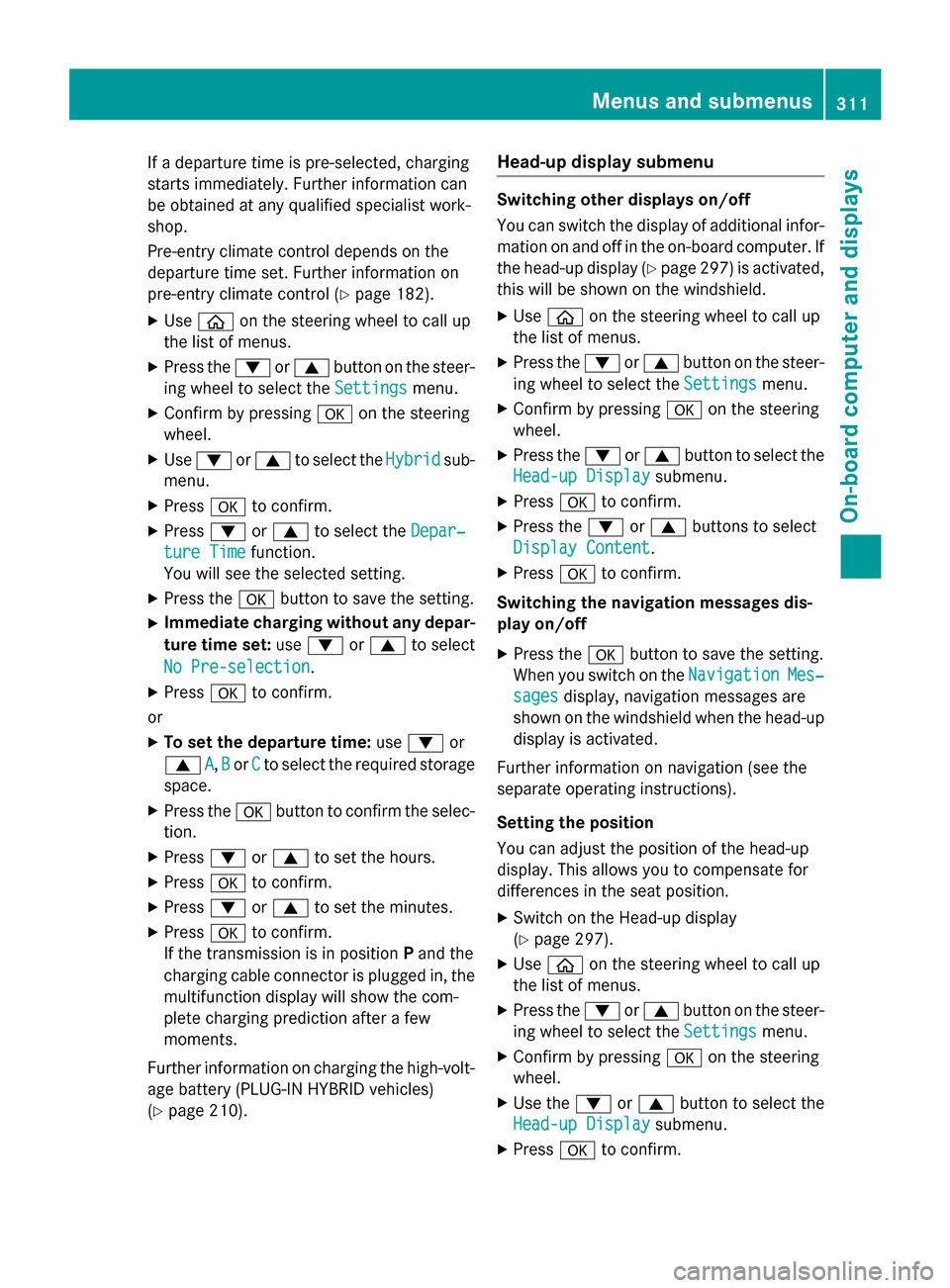
X Use ò on the steering wheel to call up
the list of menus.
X Press the :or9 button on the steer-
ing wheel to select the Settings
Settings menu.
X Confirm by pressing aon the steering
wheel.
X Use : or9 to select the Hybrid Hybridsub-
menu.
X Press ato confirm.
X Press :or9 to select the Depar‐
Depar‐
ture Time
ture Time function.
You will see the selected setting.
X Press the abutton to save the setting.
X Immediate charging without any depar-
ture time set: use: or9 to select
No Pre-selection
No Pre-selection.
X Press ato confirm.
or
X To set the departure time: use: or
9 A
A,B
Bor C
Cto select the required storage
space.
X Press the abutton to confirm the selec-
tion.
X Press :or9 to set the hours.
X Press ato confirm.
X Press :or9 to set the minutes.
X Press ato confirm.
If the transmission is in position Pand the
charging cable connector is plugged in, the
multifunction display will show the com-
plete charging prediction after a few
moments.
Further information on charging the high-volt-
age battery (PLUG-IN HYBRID vehicles)
(Y page 210). Head-up display submenu Switching other displays on/off
You can switch the display of additional infor-
mation on and off in the on-board computer. If
the head-up display (Y page 297) is activated,
this will be shown on the windshield.
X Use ò on the steering wheel to call up
the list of menus.
X Press the :or9 button on the steer-
ing wheel to select the Settings Settingsmenu.
X Confirm by pressing aon the steering
wheel.
X Press the :or9 button to select the
Head-up Display
Head-up Display submenu.
X Press ato confirm.
X Press the :or9 buttons to select
Display Content
Display Content.
X Press ato confirm.
Switching the navigation messages dis-
play on/off
X Press the abutton to save the setting.
When you switch on the Navigation NavigationMes‐
Mes‐
sages
sages display, navigation messages are
shown on the windshield when the head-up display is activated.
Further information on navigation (see the
separate operating instructions).
Setting the position
You can adjust the position of the head-up
display. This allows you to compensate for
differences in the seat position.
X Switch on the Head-up display
(Y page 297).
X Use ò on the steering wheel to call up
the list of menus.
X Press the :or9 button on the steer-
ing wheel to select the Settings
Settings menu.
X Confirm by pressing aon the steering
wheel.
X Use the :or9 button to select the
Head-up Display Head-up Display submenu.
X Press ato confirm. Menus and submenus
311On-board computer and displays Z
Page 325 of 502
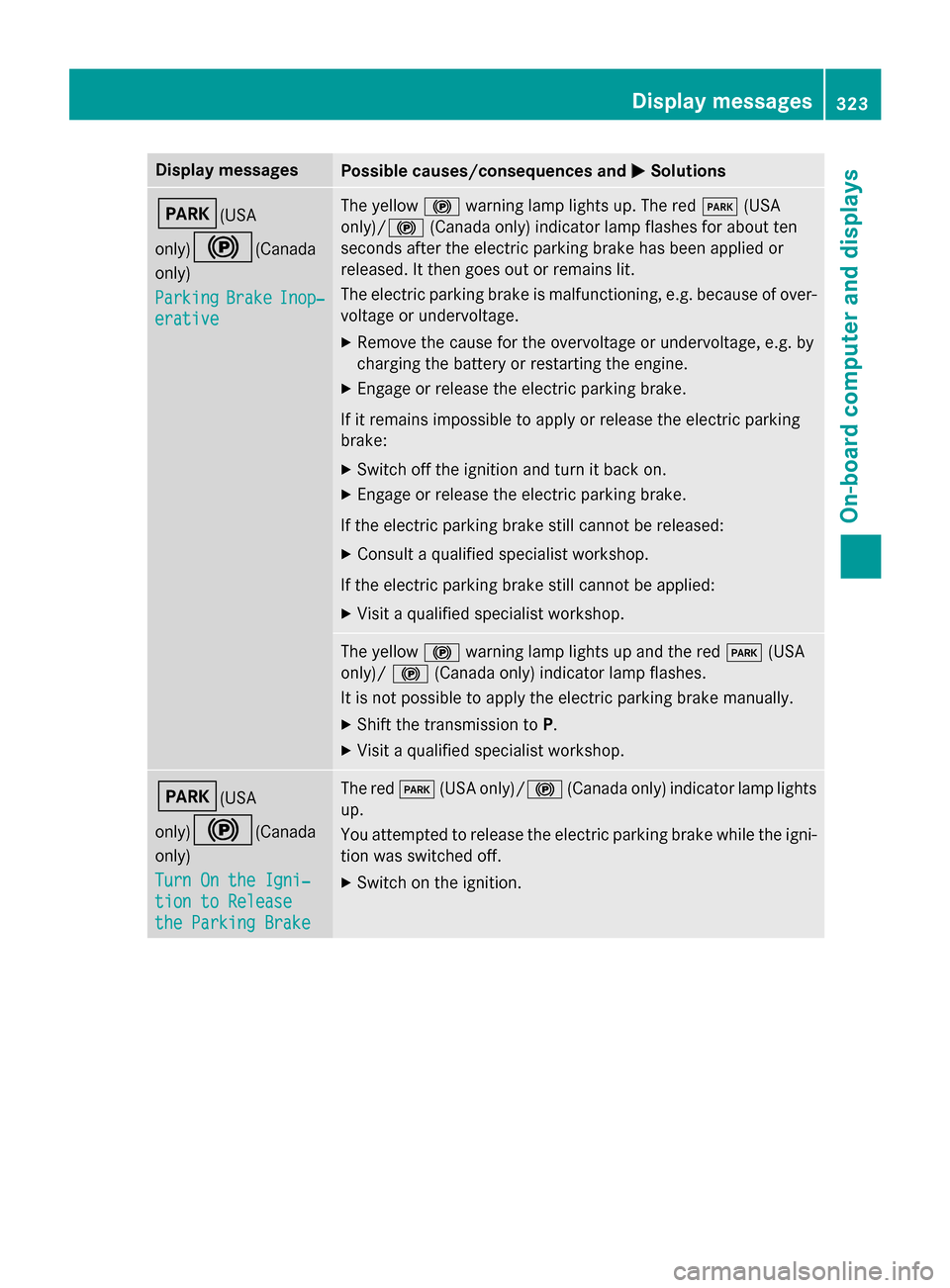
Display messages
Possible causes/consequences and
M
MSolutions F(USA
only)!
(Canada
only)
Parking Parking Brake
BrakeInop‐
Inop‐
erative
erative The yellow
!warning lamp lights up. The red F(USA
only)/ !(Canada only) indicator lamp flashes for about ten
seconds after the electric parking brake has been applied or
released. It then goes out or remains lit.
The electric parking brake is malfunctioning, e.g. because of over-
voltage or undervoltage.
X Remove the cause for the overvoltage or undervoltage, e.g. by
charging the battery or restarting the engine.
X Engage or release the electric parking brake.
If it remains impossible to apply or release the electric parking
brake:
X Switch off the ignition and turn it back on.
X Engage or release the electric parking brake.
If the electric parking brake still cannot be released: X Consult a qualified specialist workshop.
If the electric parking brake still cannot be applied: X Visit a qualified specialist workshop. The yellow
!warning lamp lights up and the red F(USA
only)/ !(Canada only) indicator lamp flashes.
It is not possible to apply the electric parking brake manually.
X Shift the transmission to P.
X Visit a qualified specialist workshop. F(USA
only)!
(Canada
only)
Turn On the Igni‐ Turn On the Igni‐
tion to Release tion to Release
the Parking Brake the Parking Brake The red
F(USA only)/! (Canada only) indicator lamp lights
up.
You attempted to release the electric parking brake while the igni-
tion was switched off.
X Switch on the ignition. Display
messages
323On-board computer and displays Z