2015 MERCEDES-BENZ S-Class Display
[x] Cancel search: DisplayPage 349 of 502

Display messages
Possible causes/consequences and
M
MSolutions DISTRONIC
DISTRONIC
PLUS
PLUSSus‐
Sus‐
pended
pended You have depressed the accelerator pedal. DISTRONIC PLUS is no
longer controlling the speed of the vehicle.
X Remove your foot from the accelerator pedal. DISTRONIC PLUS
DISTRONIC PLUS
- - - mph - - - mph An activation condition for DISTRONIC PLUS is not fulfilled.
X Check the activation conditions for DISTRONIC PLUS
(Y page 231). DTR+: Steering
DTR+: Steering
Assist. Currently Assist. Currently
Unavailable See Unavailable See
Operator's Manual Operator's Manual Steering Assist and Stop&Go Pilot are temporarily inoperative.
Possible causes are:
R the windshield in the camera's field of vision is dirty.
R visibility is impaired due to heavy rain, snow or fog.
R there are no lane markings for a longer period.
R the lane markings are worn, dark or covered, e.g. by dirt or snow.
When the causes stated above no longer apply, the display mes-
sage disappears.
Steering Assist and Stop&Go Pilot are operative again.
If the display message does not disappear:
X Pull over and stop the vehicle safely as soon as possible, paying
attention to road and traffic conditions.
X Secure the vehicle against rolling away (Y page 220).
X Clean the windshield. DTR+: Steering DTR+: Steering
Assist. Inopera‐ Assist. Inopera‐
tive tive Steering Assist and Stop&Go Pilot are faulty.
However, the DISTRONIC PLUS functions are still available.
A warning tone also sounds.
X Visit a qualified specialist workshop. Cruise Control Cruise Control
Inoperative Inoperative Cruise control is defective.
A warning tone also sounds.
X Visit a qualified specialist workshop. Cruise Control Cruise Control
- - - mph - - - mph A condition for activating cruise control has not been fulfilled.
You have tried to store a speed below 20 mph
(30 km/h), for
example.
X If conditions permit, drive faster than 20 mph (30 km/ h)and
store the speed.
X Check the activation conditions for cruise control (Y page 229). Display messages
347On-board computer and displays Z
Page 350 of 502

Tires
Display messages
Possible causes/consequences and
M
MSolutions Check Tire Pres‐
Check Tire Pres‐
sure Soon sure Soon Canada only:
The tire pressure loss warning system has detected a significant
loss in pressure.
A warning tone also sounds.
Possible causes:
R you have changed the positions of the wheels and tires or instal-
led new wheels and tires.
R the tire pressure in one or more tires is not correct.
G WARNING
With tire pressures which are too low, there is a risk of the fol-
lowing hazards:
R they may burst, especially as the load and vehicle speed
increase.
R they may wear excessively and/or unevenly, which may greatly
impair tire traction.
R the driving characteristics, as well as steering and braking, may
be greatly impaired.
There is a risk of an accident.
X Stop the vehicle without making any sudden steering or braking
maneuvers. Pay attention to the traffic conditions as you do so.
X Secure the vehicle against rolling away (Y page 220).
X Check the tires and, if necessary, follow the instructions for a
flat tire (Y page 423).
X Check the tire pressures and, if necessary, correct the tire pres-
sure.
X Restart the tire pressure loss warning system when the tire
pressure is correct (Y page 452).Check Tire Pres‐ Check Tire Pres‐
sure Then Restart sure Then Restart
Run Flat Indicator Run Flat Indicator Canada only:
The tire pressure loss warning system generated a display mes-
sage and has not been restarted since.
X Set the correct tire pressure in all four tires.
X Restart the tire pressure loss warning system (Y page 452).Run Run
Flat
Flat Indicator
Indicator
Inoperative
Inoperative Canada only:
The tire pressure loss warning system is faulty.
X Visit a qualified specialist workshop. 348
Display
messagesOn-board computer and displays
Page 351 of 502

Display messages
Possible causes/consequences and
M
MSolutions Please Correct
Please Correct
Tire Pressure Tire Pressure The tire pressure is too low in at least one of the tires, or the tire
pressure difference between the wheels is too great.
X Check the tire pressures at the next opportunity (Y page 449).
X If necessary, correct the tire pressure.
X Restart the tire pressure monitor (Y page 451).Check Tires
Check Tires The tire pressure in one or more tires has dropped significantly.
The wheel position is displayed in the multifunction display.
A warning tone also sounds.
G WARNING
With tire pressures which are too low, there is a risk of the fol-
lowing hazards:
R they may burst, especially as the load and vehicle speed
increase.
R they may wear excessively and/or unevenly, which may greatly
impair tire traction.
R the driving characteristics, as well as steering and braking, may
be greatly impaired.
There is a risk of an accident.
X Stop the vehicle without making any sudden steering or braking
maneuvers. Pay attention to the traffic conditions as you do so.
X Secure the vehicle against rolling away (Y page 220).
X Check the tires and, if necessary, follow the instructions for a
flat tire (Y page 423).
X Check the tire pressure (Y page 449).
X If necessary, correct the tire pressure. Display
messages
349On-board computer and displays Z
Page 352 of 502

Display messages
Possible causes/consequences and
M
MSolutions Warning Tire Mal‐
Warning Tire Mal‐
function function The tire pressure in one or more tires has dropped suddenly. The
wheel position is shown in the multifunction display.
G WARNING
If you drive with a flat tire, there is a risk of the following hazards: R a flat tire affects the ability to steer or brake the vehicle.
R you could lose control of the vehicle.
R continued driving with a flat tire will cause excessive heat build-
up and possibly a fire.
There is a risk of an accident.
X Stop the vehicle without making any sudden steering or braking
maneuvers. Pay attention to the traffic conditions as you do so.
X Secure the vehicle against rolling away (Y page 220).
X Check the tires and, if necessary, follow the instructions for a
flat tire (Y page 423). Tire Press. Moni‐ Tire Press. Moni‐
tor Currently tor Currently
Unavailable Unavailable Due to a strong source of radio interference, no signals can be
received from the wheel sensors. The tire pressure monitor is
temporarily malfunctioning.
X Drive on.
The tire pressure monitor restarts automatically as soon as the
problem has been solved. TirePress. Sen‐ TirePress. Sen‐
sor(s) Missing sor(s) Missing There is no signal from the tire pressure sensor of one or several
wheels. The pressure of the affected tire is not displayed in the
multifunction display.
X Have the faulty tire pressure sensor replaced at a qualified spe-
cialist workshop. Tire Pressure Mon‐ Tire Pressure Mon‐
itor Inoperative itor Inoperative
No Wheel Sensors No Wheel Sensors The wheels mounted do not have a suitable tire pressure sensor.
The tire pressure monitor is deactivated.
X Mount wheels with suitable tire pressure sensors.
The tire pressure monitor is activated automatically after driving
for a few minutes. Tire Press. Moni‐ Tire Press. Moni‐
tor Inoperative tor Inoperative The tire pressure monitor is faulty.
X Visit a qualified specialist workshop. 350
Display
messagesOn-board computer and displays
Page 353 of 502

Vehicle
Display messages
Possible causes/consequences and
M
MSolutions Shift to 'P' or
Shift to 'P' or
'N' 'N'
to
toStart
Start Engine
Engine You have attempted to start the engine with the transmission in
position
Ror D.
X Shift the transmission to position Por N. Auxiliary Battery Auxiliary Battery
Malfunction Malfunction The auxiliary battery for the transmission is no longer being
charged.
X Visit a qualified specialist workshop. Apply Brake to Apply Brake to
Shift from 'P' Shift from 'P' You have attempted to move the transmission selector lever to
position
D,Ror Nwithout depressing the brake pedal.
X Depress the brake pedal. Transmission Not Transmission Not
in P Risk of Vehi‐ in P Risk of Vehi‐
cle Rolling Away cle Rolling Away The driver's door is open/not completely closed and the trans-
mission is in position
R,Nor D.
A warning tone also sounds.
G WARNING
The vehicle may roll away.
There is a risk of an accident. X Shift the transmission to position P.
X Secure the vehicle against rolling away (Y page 220).
X Close the driver's door completely. Service Required Service Required
Do Do
Not
Not Shift
Shift Gears
Gears
Visit Dealer
Visit Dealer You cannot change the transmission position due to a malfunction.
A warning tone also sounds.
If transmission position Dis selected:
X Drive to a qualified specialist workshop without shifting the
transmission from position D.
If transmission position R,Nor Pis selected:
X Notify a qualified specialist workshop or breakdown service. Transmission Mal‐ Transmission Mal‐
function Stop function Stop A malfunction has occurred in the mechanical transmission com-
ponents.
A warning tone also sounds. The gearbox automatically shifts to
position N.
X Pull over and stop the vehicle safely as soon as possible, paying
attention to road and traffic conditions.
X Shift the transmission to position P.
X Secure the vehicle against rolling away (Y page 220).
X Notify a qualified specialist workshop or breakdown service. Display messages
351On-board computer and displays Z
Page 354 of 502
Display messages
Possible causes/consequences and
M
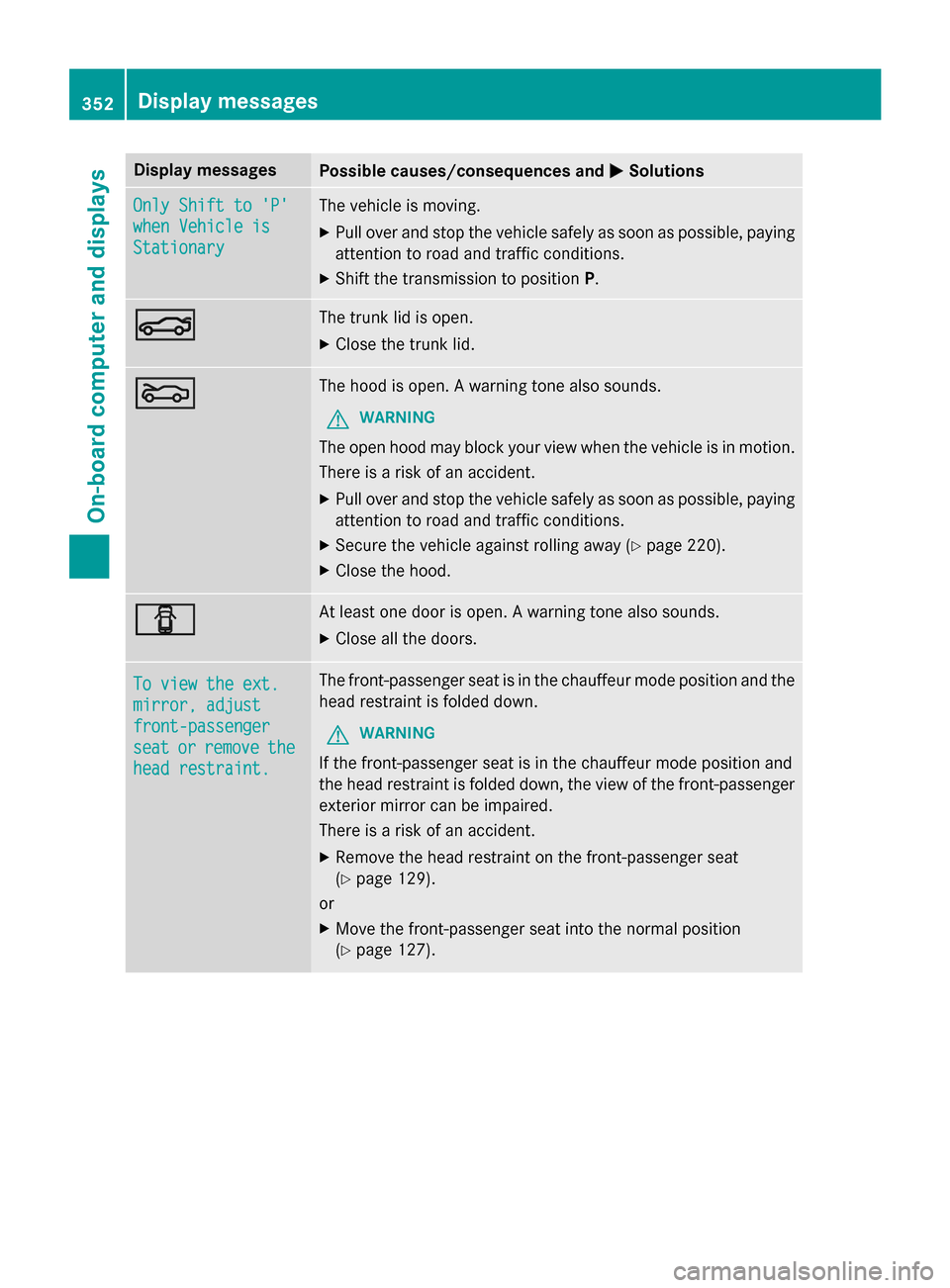
MSolutions Only Shift to 'P'
Only Shift to 'P'
when Vehicle is when Vehicle is
Stationary Stationary The vehicle is moving.
X
Pull over and stop the vehicle safely as soon as possible, paying
attention to road and traffic conditions.
X Shift the transmission to position P.N N The trunk lid is open.
X Close the trunk lid. M
M The hood is open. A warning tone also sounds.
G WARNING
The open hood may block your view when the vehicle is in motion.
There is a risk of an accident.
X Pull over and stop the vehicle safely as soon as possible, paying
attention to road and traffic conditions.
X Secure the vehicle against rolling away (Y page 220).
X Close the hood. C
C At least one door is open. A warning tone also sounds.
X Close all the doors. To view the ext.
To view the ext.
mirror, adjust mirror, adjust
front-passenger front-passenger
seat seat
or
orremove
remove the
the
head restraint.
head restraint. The front-passenger seat is in the chauffeur mode position and the
head restraint is folded down.
G WARNING
If the front-passenger seat is in the chauffeur mode position and
the head restraint is folded down, the view of the front-passenger
exterior mirror can be impaired.
There is a risk of an accident.
X Remove the head restraint on the front-passenger seat
(Y page 129).
or
X Move the front-passenger seat into the normal position
(Y page 127). 352
Display
messagesOn-board computer and displays
Page 355 of 502
Display messages
Possible causes/consequences and
M
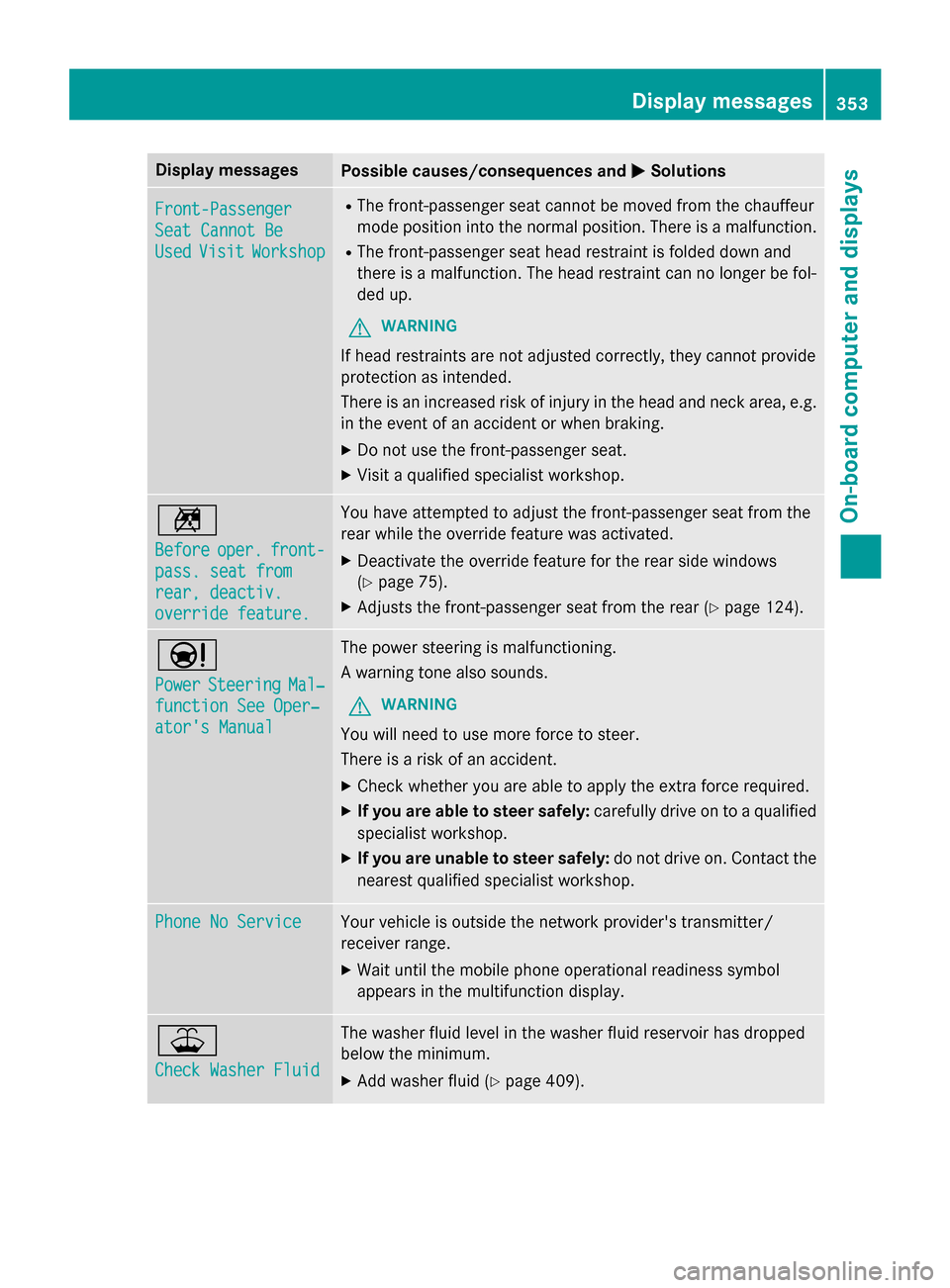
MSolutions Front-Passenger
Front-Passenger
Seat Cannot Be Seat Cannot Be
Used Used
Visit
Visit Workshop
Workshop R
The front-passenger seat cannot be moved from the chauffeur
mode position into the normal position. There is a malfunction.
R The front-passenger seat head restraint is folded down and
there is a malfunction. The head restraint can no longer be fol-
ded up.
G WARNING
If head restraints are not adjusted correctly, they cannot provide
protection as intended.
There is an increased risk of injury in the head and neck area, e.g. in the event of an accident or when braking.
X Do not use the front-passenger seat.
X Visit a qualified specialist workshop. n
Before Before
oper.
oper.front-
front-
pass. seat from
pass. seat from
rear, deactiv. rear, deactiv.
override feature. override feature. You have attempted to adjust the front-passenger seat from the
rear while the override feature was activated.
X Deactivate the override feature for the rear side windows
(Y page 75).
X Adjusts the front-passenger seat from the rear (Y page 124).Ð
Power Power
Steering
Steering Mal‐
Mal‐
function See Oper‐
function See Oper‐
ator's Manual ator's Manual The power steering is malfunctioning.
A warning tone also sounds.
G WARNING
You will need to use more force to steer.
There is a risk of an accident. X Check whether you are able to apply the extra force required.
X If you are able to steer safely: carefully drive on to a qualified
specialist workshop.
X If you are unable to steer safely: do not drive on. Contact the
nearest qualified specialist workshop. Phone No Service Phone No Service Your vehicle is outside the network provider's transmitter/
receiver range.
X Wait until the mobile phone operational readiness symbol
appears in the multifunction display. ¥
Check Washer Fluid Check Washer Fluid The washer fluid level in the washer fluid reservoir has dropped
below the minimum.
X Add washer fluid (Y page 409). Display
messages
353On-board computer and displays Z
Page 356 of 502

SmartKey
Display messages
Possible causes/consequences and
M
MSolutions Â
Key Does Not Key Does Not
Belong to Vehicle Belong to Vehicle You have put the wrong SmartKey in the ignition lock.
X Use the correct SmartKey. Â
Take Take
Your
YourKey
Keyfrom
from
Ignition
Ignition The SmartKey is in the ignition lock.
X Remove the SmartKey. Â
Obtain a New Key Obtain a New Key The SmartKey needs to be replaced.
X Visit a qualified specialist workshop. Â
Replace Replace
Key
KeyBattery
Battery The SmartKey batteries are discharged.
X Change the batteries (Y page 94).Â
Don't Forget Your Don't Forget Your
Key Key The SmartKey is not in the ignition lock. You have opened the
driver's door with the engine switched off.
This display message is displayed for a maximum of 60 seconds
and is simply a reminder.
X Take the SmartKey with you when you leave the vehicle. Â
Key Not Detected Key Not Detected
(white display mes-
sage) The SmartKey is currently undetected.
X Change the location of the SmartKey in the vehicle.
If the SmartKey still cannot be detected:
X Insert the SmartKey into the ignition lock and turn it to the
desired position. Â
Key Not Detected Key Not Detected
(red display message) The SmartKey is not in the vehicle.
A warning tone also sounds.
If the engine is switched off, you can no longer lock the vehicle
centrally or start the engine.
X Pull over and stop the vehicle safely as soon as possible, paying
attention to road and traffic conditions.
X Secure the vehicle against rolling away (Y page 220).
X Locate the SmartKey.
X Press aon the steering wheel to confirm the display mes-
sage. 354
Display messagesOn-board computer and displays