2015 MERCEDES-BENZ S-Class remote control
[x] Cancel search: remote controlPage 192 of 502

key positions in the ignition lock. This is only
the case if you are not depressing the brake
pedal.
If you depress the brake pedal and press the
Start/Stop button, the engine starts immedi-
ately.
A check which periodically establishes a radio
connection between the vehicle and the
SmartKey determines whether a valid Smart- Key is in the vehicle. This occurs, for example, when starting the engine.
To start the vehicle without actively using the
SmartKey:
R the Start/Stop button must be inserted in
the ignition lock.
R the SmartKey must be in the vehicle.
R the vehicle must not be locked with the
SmartKey or KEYLESS-GO (Y page 91).
Do not keep the SmartKey:
R with electronic devices, e.g. a mobile
phone or another SmartKey
R with metallic objects, e.g. coins or metal
foil
R inside metallic objects, e.g. a metal case
This can affect the functionality of the Smart- Key.
Do not keep the SmartKey in the tempera-
ture-controlled cup holder (Y page 380). Oth-
erwise, the SmartKey will not be detected,
e.g. when starting the engine with the Start/ Stop button.
If you lock the vehicle with the SmartKey's
remote control or with KEYLESS-GO, after a
short time:
R you will not be able to switch on the ignition
with the Start/Stop button.
R you will not be able to start the engine with
the Start/Stop button until the vehicle is
unlocked again.
If you lock the vehicle centrally using the but-
ton on the front door (Y page 97), you can
continue to start the engine with the Start/
Stop button. The engine can be turned off while the vehicle
is in motion by pressing and holding the
Start/Stop button for approximately three
seconds. This function operates independ-
ently of the ECO start/stop automatic engine switch-off function.
SmartKey positions with the Start/Stop
button :
Start/Stop button
; Ignition lock
As soon as the ignition is switched on, all the
indicator lamps in the instrument cluster light up. If an indicator lamp does not go out afterstarting the engine or lights up while driving,
see (Y page 357).
If Start/Stop button :has not yet been
pressed, this corresponds to the SmartKey
being removed from the ignition.
X To switch on the power supply: press
Start/Stop button :once.
The power supply is switched on. You can
now activate the windshield wipers, for
example.
The power supply is switched off again if:
R the driver's door is opened and
R you press Start/Stop button :twice when
in this position 190
DrivingDriving an
d parking
Page 221 of 502
Online access to the vehicle
General information G
WARNING
If you operate information systems and com-
munication equipment integrated in the vehi- cle while driving, you will be distracted from
traffic conditions. You could also lose control of the vehicle. There is a risk of an accident.
Only operate the equipment when the traffic
situation permits. If you are not sure that this
is possible, park the vehicle paying attention
to traffic conditions and operate the equip-
ment when the vehicle is stationary.
i Operation of integrated information
systems and communications equip-
ment in the vehicle: you must observe the
legal requirements for the country in which
you are currently driving.
From the "My Mercedes Electric - Vehicle
Homepage", you can call up remote query and
remote configuration functions for your vehi-
cle. This is possible from an Internet-enabled computer, as well as many modern smart-
phones.
You can access the "Vehicle Homepage" via
your web browser.
Please call the Mercedes-Benz Customer
Assistance Center (USA) at the hotline num-
ber
1-800-FOR-MERCedes (1-800-367-6372)
to obtain the relevant Internet address.
In order to use the "Vehicle Homepage", you
must agree to the local terms of use.
The contractual periods of mbrace apply to
the "Vehicle Homepage". To use the "Vehicle Homepage", you require an activated access
to the mbrace emergency call system and a
separate activation/registration for the
"Vehicle Homepage".
More information about how to access the
"Vehicle Homepage" and the terms of use are
available from any authorized Mercedes-Benz Center. The "Vehicle Homepage" is available in the
following languages:
R German
R English
R French
R Italian
R Spanish
R Portuguese
R Dutch
R Chinese
Notes on data protection Bear in mind that the "Vehicle Homepage"
offers access to your data.
Therefore, look after the vehicle verification
code (VVC) provided and your user details
carefully.
The vehicle verification code (VVC) is required when you register for the first time on the
"Vehicle Homepage". This code is used to link
the vehicle and the user access on the "Vehi- cle Homepage" and enables correct use. If
you have any questions, please contact the
Mercedes-Benz Customer Assistance Center
(USA) at the hotline number
1-800-FOR-MERCedes (1-800-367-6372) .
i Prevent unauthorized persons from
accessing this data.
Every person who has access to the infor-
mation stated can use the functions on the
"Vehicle Homepage".
i Information when selling a vehicle or
buying a used vehicle:
R If you sell your vehicle, you are obliged to
delete the vehicle from your personal
area on the "Vehicle Homepage". Addi-
tionally, you must destroy documents
containing the vehicle verification code
(VVC).
R If you have bought a used vehicle, it is
possible that the previous owner still has
access to the "Vehicle Homepage". If in
doubt, have a new vehicle verification Charging the high-voltage battery (plug-in hybrid vehicles)
219Driving and parking Z
Page 222 of 502

code (VVC) issued by the Mercedes-Benz
Center after purchase. With this new
code you can set up the access to your
vehicle. This is described in the "Setting
up a personal area" section on the "Vehi-
cle Homepage". There, you may also
deactivate the existing access of the pre- vious owner.
Calling up functions in the "My
Mercedes Electric - Vehicle Homepage" The "Vehicle Homepage" allows you access to
vehicle information and your vehicle's func-
tions using remote query and remote config-
uration.
The following functions can be accessed via
the "Vehicle Homepage":
R request the current condition of charge of
the high-voltage battery
R program the departure time (Y page 310)
R set/activate the "Pre-entry climate control
at departure time" function (REMOTE CLI-
MATE CONTROL), (see the separate
COMAND operating instructions)
Information on additional functions and oper- ating instructions can be found on the "Vehi-
cle Homepage".
Connecting the vehicle to the Internet i
This function is not available in all coun-
tries and requires activated access to the
mbrace emergency call system.
i This function is only available if the vehi-
cle is equipped with a telephone module.
You can use the "Vehicle Homepage" if the
vehicle has a connection to the Internet via
the telephone module. The telephone module uses CDMA (Code Division Multiple Access)
and transmits the necessary data by radio.
The vehicle automatically recognizes whether a connection to the Internet via the telephone
module is possible or not. No presets are
necessary. i
Restrictions in reception are possible if
the vehicle is in an underground car park,
for example. Restrictions may also occur in areas with poor mobile network coverage.
To enable the transfer of data via the tele-
phone module, you do not need a SIM card. Parking
Important safety notes
G
WARNING
Flammable material such as leaves, grass or
twigs may ignite if they come into contact with hot parts of the exhaust system or exhaust
gas flow. There is a risk of fire.
Park the vehicle so that no flammable mate-
rials come into contact with parts of the vehi-cle which are hot. Take particular care not to
park on dry grassland or harvested grain
fields. G
WARNING
If you leave children unsupervised in the vehi- cle, they could set it in motion by, for example:
R release the parking brake.
R shift the automatic transmission out of the
parking position P.
R start the engine.
In addition, they may operate vehicle equip-
ment and become trapped. There is a risk of
an accident and injury.
When leaving the vehicle, always take the
SmartKey with you and lock the vehicle. Never
leave children unsupervised in the vehicle.
! Always secure the vehicle correctly
against rolling away. Otherwise, the vehicle
or its drivetrain could be damaged.
To ensure that the vehicle is secured against rolling away unintentionally:
R the electric parking brake must be applied.
R the transmission must be in position Pand
the SmartKey must be removed from the
ignition lock. 220
ParkingDriving and parking
Page 375 of 502
R
Close lockable stowage compartments
while driving.
R Stow and secure objects that are heavy,
hard, pointy, sharp-edged, fragile or too
large in the trunk.
Observe the loading guidelines (Y page 372).
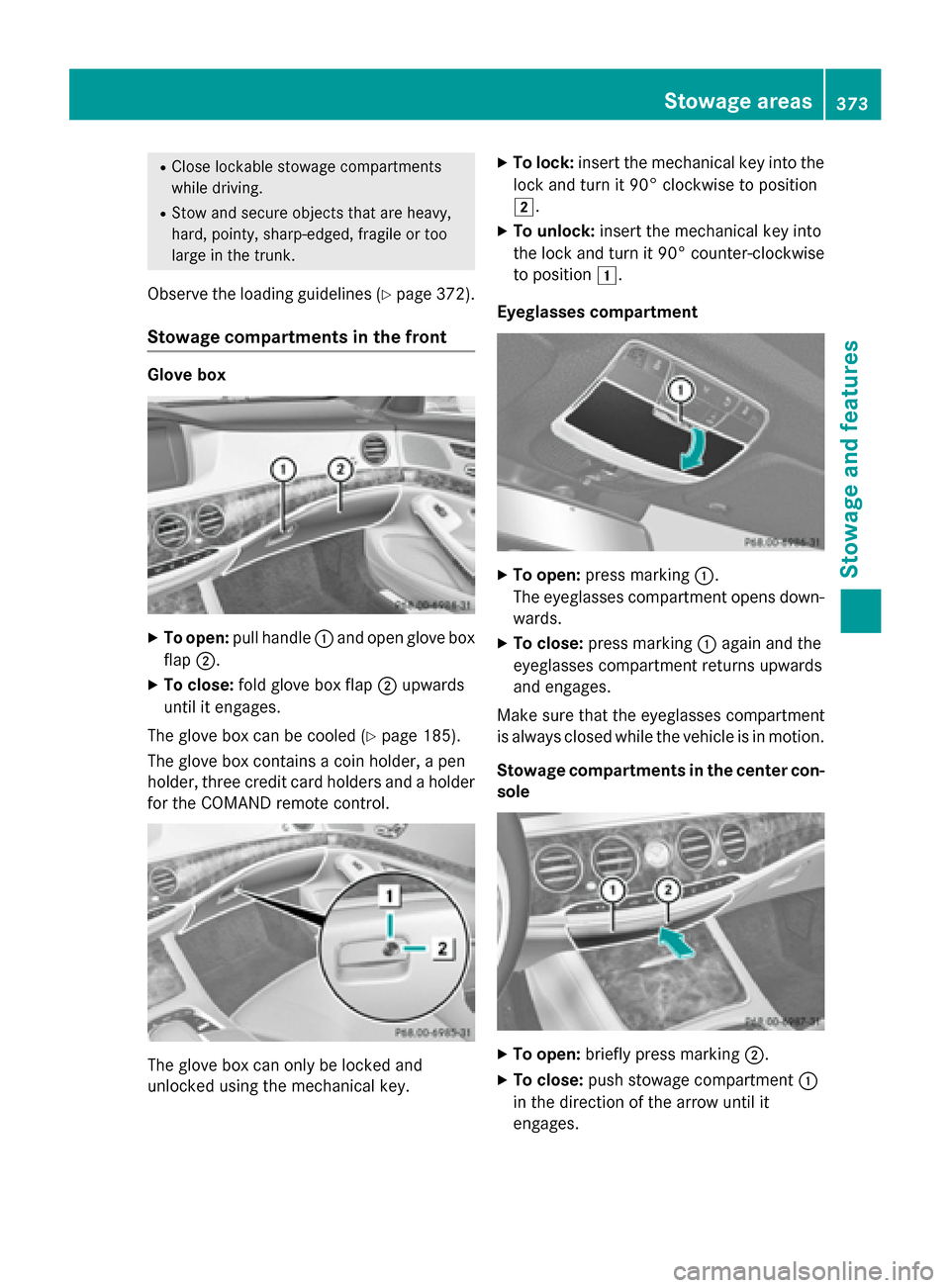
Stowage compartments in the front Glove box
X
To open: pull handle :and open glove box
flap ;.
X To close: fold glove box flap ;upwards
until it engages.
The glove box can be cooled (Y page 185).
The glove box contains a coin holder, a pen
holder, three credit card holders and a holder
for the COMAND remote control. The glove box can only be locked and
unlocked using the mechanical key. X
To lock: insert the mechanical key into the
lock and turn it 90° clockwise to position
2.
X To unlock: insert the mechanical key into
the lock and turn it 90° counter-clockwise
to position 1.
Eyeglasses compartment X
To open: press marking :.
The eyeglasses compartment opens down- wards.
X To close: press marking :again and the
eyeglasses compartment returns upwards
and engages.
Make sure that the eyeglasses compartment
is always closed while the vehicle is in motion.
Stowage compartments in the center con-
sole X
To open: briefly press marking ;.
X To close: push stowage compartment :
in the direction of the arrow until it
engages. Stowage areas
373Stowage and features Z
Page 397 of 502

A display message appears, asking
whether navigation should be started.
X Select Yes Yesby turning cVdor sliding XVY
the controller and confirm with W.
The system calculates the route and sub-
sequently starts the route guidance with
the address entered.
If you select No
No the address can be stored in
the address book.
If you have sent more than one destination address, each individual destination must
be confirmed separately.
Destination addresses are loaded in the same
order as the order in which they were sent.
If you own multiple Mercedes-Benz vehicles
with mbrace and activated mbrace accounts:
If multiple vehicles are registered under the
same e-mail address, the destination will be
sent to all the vehicles.
Vehicle remote opening You can use the vehicle remote opening if you
have unintentionally locked your vehicle and
a replacement SmartKey is not available.
The vehicle can be opened by the Mercedes-
Benz Customer Assistance Center.
The vehicle can be immediately opened
remotely within four days of the ignition being turned off. After this time, the remote unlock-
ing may be delayed by 15 to 60 minutes. After
30 days, the vehicle can no longer be opened remotely.
The vehicle remote unlocking feature is avail-
able if the relevant mobile phone network is
available and a data connection is possible.
X Contact the following service hotlines:
Mercedes-Benz Customer Assistance Cen- ter at 1-800-FOR-MERCedes
(1-800-367-6372) or 1-866-990-9007
You will be asked for your password.
X Return to your vehicle at the time agreed
upon with the Mercedes-Benz Customer
Assistance Center. Alternatively, the vehicle can be opened via:
R the Internet, under the "Owners Online"
section
R the telephone application (e .g. for iPhone ®
,
Android)
To do this, you will need your identification
number and password.
Vehicle remote closing The vehicle remote-closing feature can be
used when you have forgotten to lock the
vehicle and you are no longer nearby.
The vehicle can then be locked by the
Mercedes-Benz Customer Assistance Center.
The vehicle can be immediately remotely
locked within four days of the ignition being
turned off. After this time, remote closing may
be delayed by 15 to 60 minutes. After 30 days the vehicle can no longer be locked remotely.
The vehicle remote closing feature is availa-
ble if the relevant mobile phone network is
available and a data connection is possible.
X Contact the following service hotlines:
Mercedes-Benz Customer Assistance Cen-
ter at 1-800-FOR-MERCedes
(1-800-367-6372) or 1-866-990-9007
You will be asked for your password.
The next time you are inside the vehicle and
you switch on the ignition, the Doors
Doors
Locked Remotely Locked Remotely message appears in the
multifunction display.
Alternatively, the vehicle can be locked via:
R the Internet, under the "Owners Online"
section
R the telephone application (e .g. for iPhone ®
,
Android)
To do this, you will need your identification
number and password. Features
395Stowage and features Z
Page 400 of 502

ate up to three different door and gate sys-
tems.
Use the integrated garage door opener only
on garage doors that:
R have safety stop and reverse features and
R meet current U.S. federal safety standards
Once programed, the integrated garage door opener in the rear-view mirror will assume the
function of the garage door system's remote
control. Please also read the operating
instructions for the garage door system.
When programming a garage door opener,
park the vehicle outside the garage. Do not
run the engine while programming.
Certain garage door drives are incompatible
with the integrated garage door opener. If you have difficulty programing the integrated
garage door opener, contact an authorized
Mercedes-Benz Center.
Alternatively, you can call the following tele-
phone assistance services:
R USA: Mercedes-Benz Customer Assistance
Center at 1-800-FOR-MERCedes
R Canada: Customer Service at
1-800-387-0100
R HomeLink ®
hotline 1-800-355-3515 (free
of charge)
More information on HomeLink ®
and/or
compatible products is also available online
at http://www.homelink.com.
Notes on the declaration of conformity
(Y page 28).
USA: FCC ID: CB2HMIHL4
Canada: IC: 279B-HMIHL4
Important safety notes G
WARNING
When you operate or program the garage door with the integrated garage door opener, per-
sons in the range of movement of the garage
door can become trapped or struck by the
garage door. There is a risk of injury. When using the integrated garage door
opener, always make sure that nobody is
within the range of movement of the garage
door.
G
WARNING
Combustion engines emit poisonous exhaust
gases such as carbon monoxide. Inhaling
these exhaust gases leads to poisoning. There is a risk of fatal injury. Therefore never leave
the engine running in enclosed spaces with-
out sufficient ventilation.
Programming Programming buttons
Pay attention to the "Important safety notes"
(Y page 398). Garage door remote control
Ais not inclu-
ded with the integrated garage door opener.
X Turn the SmartKey to position 2in the igni-
tion lock (Y page 189).
X Select one of buttons ;to? to use to
control the garage door drive.
X To start programming mode: press and
hold one of buttons ;to? on the inte-
grated garage door opener.
The garage door opener is now in program-
ming mode. After a short time, indicator
lamp :lights up yellow.
Indicator lamp :lights up yellow as soon
as button ;,=or? is programmed for
the first time. If the selected button has
already been programmed, indicator 398
FeaturesStowage and features
Page 401 of 502

lamp
:will only light up yellow after ten
seconds have elapsed.
X Release button ;,=or?. Indicator
lamp :flashes yellow.
X To program the remote control: point
garage door remote control Atowards
buttons ;to? on the rear-view mirror at
a distance of 2 to 8 inches (5 to 20 cm).
X Press and hold button Bon remote control
A until indicator lamp :lights up green.
When indicator lamp :lights up green:
programming is finished.
When indicator lamp :flashes green: pro-
gramming was successful. The next step is to synchronize the rolling code
(Y page 399).
X Release button Bon remote control Afor
the garage door drive system.
If indicator lamp :lights up red: repeat the
programing procedure for the correspond-
ing button on the rear-view mirror. When
doing so, vary the distance between remote control Aand the rear-view mirror.
The required distance between remote
control Aand the integrated garage door
opener depends on the garage door drive
system. Several attempts might be neces-
sary. You should test every position for at
least 25 seconds before trying another
position.
Synchronizing the rolling code
Pay attention to the "Important safety notes"
(Y page 398).
If the garage door system uses a rolling code, you will also have to synchronize the garage
door system with the integrated garage door
opener in the rear-view mirror. To do this you
will need to use the programming button on
the door drive control panel. The program-
ming button may be positioned at different
locations depending on the manufacturer. It
is usually located on the door drive unit on the
garage ceiling.
Familiarize yourself with the garage door
drive operating instructions, e.g. under "Pro- gramming of additional remote controls",
before carrying out the following steps.
Your vehicle must be within reach of the
garage door or gate opener drive. Make sure
that neither your vehicle nor any persons/
objects are present within the sweep of the
door or gate.
X Turn the SmartKey to position 2in the igni-
tion lock (Y page 189).
X Get out of the vehicle.
X Press the programming button on the door
drive unit.
Usually, you now have 30 seconds to ini-
tiate the next step.
X Get into the vehicle.
X Press previously programmed button ;,
= or? on the integrated garage door
opener until the door closes.
The rolling code synchronization is then
complete.
Notes on programming the remote con-
trol
Canadian radio frequency laws require a
"break" (or interruption) of the transmission
signals after broadcasting for a few seconds. Therefore, these signals may not last long
enough for the integrated garage door
opener. The signal is not recognized during
programming. Comparable with Canadian
law, some U.S. garage door openers also fea-
ture a "break".
Proceed as follows:
R if you live in Canada
R if you have difficulties programming the
garage door opener (regardless of where
you live) when using the programming
steps
X Press and hold one of buttons ;to? on
the integrated garage door opener.
After a short time, indicator lamp :lights
up yellow.
X Release the button.
Indicator lamp :flashes yellow. Features
399Stowage and features Z
Page 402 of 502

X
Press button Bof garage door remote
control Afor two seconds, then release it
for two seconds.
X Press button Bagain for two seconds.
X Repeat this sequence on button Bof
remote control Auntil indicator lamp :
lights up green.
When indicator lamp :lights up green:
programming is finished.
When indicator lamp :flashes green: pro-
gramming was successful. The next step is to synchronize the rolling code.
X Release button Bof remote control Aof
the garage door drive.
If indicator lamp :lights up red: repeat the
programming process for the correspond-
ing button on the rear-view mirror. When
doing so, vary the distance between remote
control Aand the rear-view mirror.
The required distance between remote
control Aand the integrated garage door
opener depends on the garage door drive
system. Several attempts might be neces-
sary. You should test every position for at
least 25 seconds before trying another
position.
Problems when programming
If you are experiencing problems programing
the integrated garage door opener on the
rear-view mirror, take note of the following
instructions:
R Check the transmitter frequency used by
garage door drive remote control Aand
whether it is supported. The transmitter
frequency can usually be found on the back
of the garage door drive remote control.
The integrated garage door opener is com- patible with devices that have units which
operate in the frequency range of 280 to
433 MHz.
R Replace the batteries in garage door
remote control A. This increases the like-
lihood that garage door remote control A
will transmit a strong and precise signal to
the integrated garage door opener. R
When programming, hold remote control
A at varying distances and angles from the
button which you are programming. Try var- ious angles at a distance between 2and
12 inches (5to 30 cm) or at the same angle
but at varying distances.
R If another remote control is available for the
same garage door drive, repeat the same
programming steps with this remote con-
trol. Before performing these steps, make
sure that new batteries have been installed in garage door drive remote control A.
R Note that some remote controls only trans-
mit for a limited amount of time (the indi-
cator lamp on the remote control goes out). Press button Bon remote control Aagain
before transmission ends.
R Align the antenna cable of the garage door
opener unit. This can improve signal recep- tion/transmission.
Opening/closing the garage door After it has been programmed, the integrated
garage door opener performs the function of
the garage door system remote control.
Please also read the operating instructions
for the garage door system.
X Turn the SmartKey to position 2in the igni-
tion lock (Y page 189).
X Press button ;,=or? which you have
programmed to operate the garage door.
Garage door system with a fixed code: indi-
cator lamp :lights up green.
Garage door system with a rolling code:
indicator lamp :flashes green.
The transmitter will transmit a signal as
long as the button is pressed. The trans-
mission is halted after a maximum of ten
seconds and indicator lamp :lights up
yellow.
X Press button ;,=or? again if neces-
sary. 400
FeaturesStowage and features