2015 MERCEDES-BENZ S-Class two
[x] Cancel search: twoPage 46 of 298

Your COMAND equipment
These operating instructions describe all
standard and optional equipment available
for your COMAND system at the time of pur-
chase. Country-specific differences are pos-
sible. Please note that your COMAND system may not be equipped with all the features
described. This also applies to safety-relevant
systems and functions. Therefore, the equip-
ment on your COMAND system may differ
from that in the descriptions and illustrations. Should you have any questions concerning
equipment and operation, please consult an
authorized Mercedes-Benz Center. Display settings
Setting the brightness
The brightness detected by the display light
sensor affects the setting options for this
function. X
Press the 00D4button.
The vehicle menu is displayed.
X To select System Settings
System Settings : slide005200C5,
turn and press the controller.
A menu appears.
X To select Display
Display : turn and press the con-
troller.
A menu appears.
X Select Brightness Brightness .
A control appears.
X Select the desired brightness. i
The display brightness can be adjusted
individually for the two COMAND displays
at night using the controller. Display design
The COMAND display features optimized
designs for operation during daytime and
night-time hours. You can set the design by
manually selecting day or night design or opt
for an automatic setting.
X Press the 00D4button.
The vehicle menu is displayed.
X To select System Settings System Settings : slide005200C5,
turn and press the controller.
A menu appears.
X To select Display Display: turn and press the con-
troller.
A menu appears.
X Select Day Mode
Day Mode ,Night Mode Night Mode orAuto
Auto .
The 003Bdot indicates the current setting. Design Explanation
Day Mode
Day Mode The display is set perma-
nently to day design. Night Mode
Night Mode The display is set perma-
nently to night design. Auto
Auto If the
Auto
Autosetting is
selected, COMAND eval-
uates the readings from
the automatic vehicle
light sensor and auto-
matically switches
between the display
designs. 44
Display set
tingsSystem settings
Page 49 of 298

Setting Function
Automatic
Automatic The summer and
standard time are
automatically
changed over.
On On The clock is
advanced one hour
ahead of standard
time.
Off Off The standard time
for the chosen time
zone is selected.
Manual time setting
Using the manual time settings, you can set
the time forwards or backwards by up to sev- eral hours.
X Press the 00D4button.
The vehicle menu is displayed.
X To select Time Time: slide 6the controller,
turn and press to confirm.
A menu appears.
X To select Set Time Manually Set Time Manually: turn and
press the controller.
A menu with an analog clock appears.
X To set the hour: turn the controller.
X To highlight minutes: slide 9the con-
troller.
X To set minutes: turn and press the control-
ler.
The time is accepted. The
Automatic Time Settings Automatic Time Settings function
is deactivated 0053.
If Automatic
Automatic is set for the summer time
changeover, a prompt will appear asking
whether the automatic changeover should
be maintained between summer and winter
time.
The Daylight Savings Time (Summer) Daylight Savings Time (Summer)
menu or the Automatic
Automaticoption is not avail-
able in all countries.
i If
Automatic Time Settings
Automatic Time Settings is reacti-
vated, the previous settings for time zone
and summer time changeover are restored. Setting the time and date format
Use this function to set the time and date for-
mat for all displays in the vehicle.
X Press the 00D4button.
The vehicle menu is displayed.
X To select Time Time: slide 6the controller,
turn and press to confirm.
A menu appears.
X To select Format Format: turn and press the con-
troller.
X To select the desired date format: turn and
press the controller.
The 003Bdot indicates the current setting.
X To select the desired time format: turn and
press the controller.
The 003Bdot indicates the current setting. Abbreviation Meaning
YYYY/MM/DD YYYY/MM/DD Year/Month/Day
date format, year (all
four digits) YY/MM/DD YY/MM/DD Year/Month/Day
date format, year
(two digits)
MM/DD/YYYY MM/DD/YYYY Month/Day/Year
date format, year (all
four digits) Time settings
47System settings
Page 50 of 298
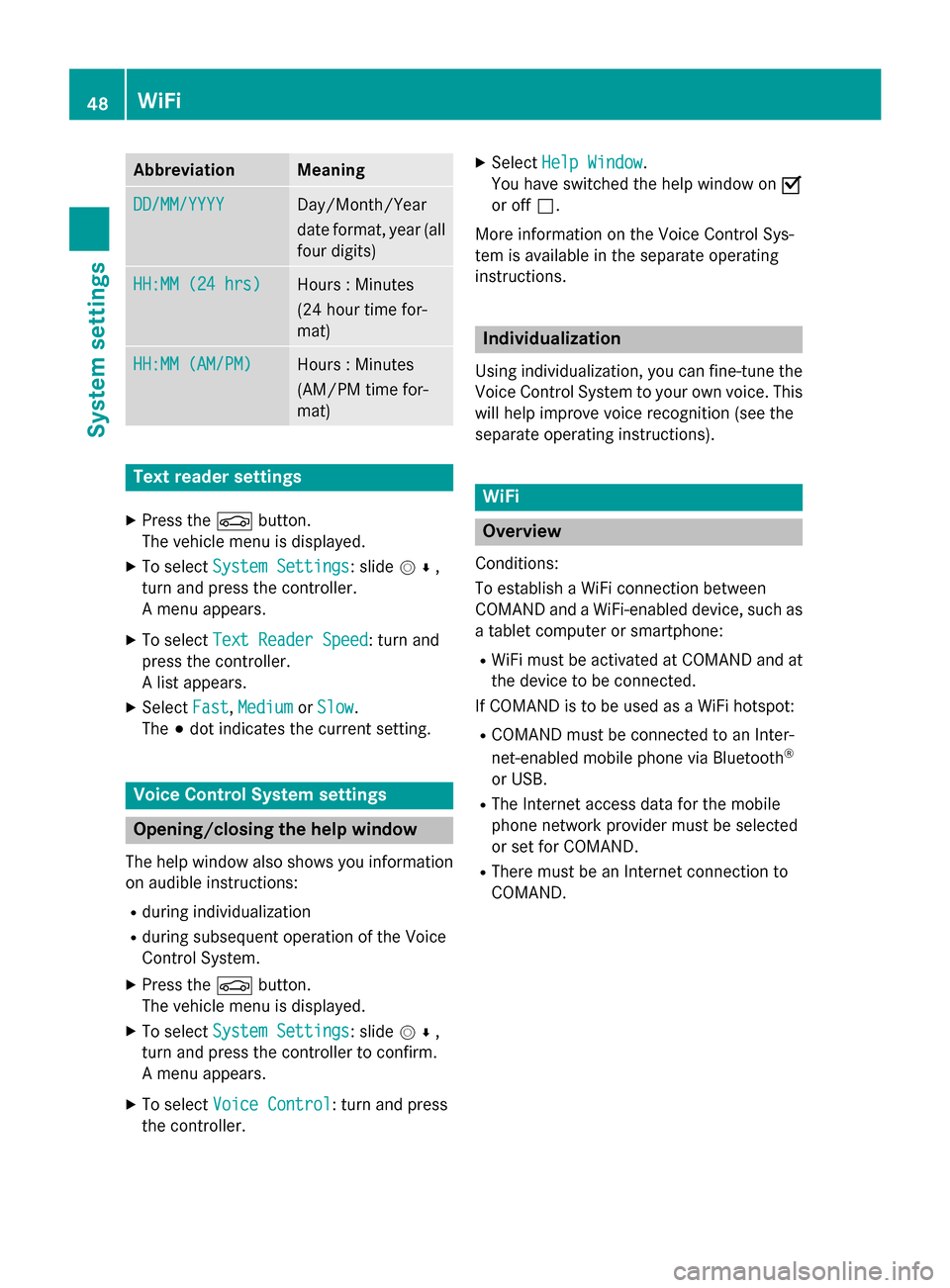
Abbreviation Meaning
DD/MM/YYYY
DD/MM/YYYY Day/Month/Year
date format, year (all
four digits) HH:MM (24 hrs) HH:MM (24 hrs) Hours : Minutes
(24 hour time for-
mat)
HH:MM (AM/PM) HH:MM (AM/PM) Hours : Minutes
(AM/PM time for-
mat)
Text reader settings
X Press the 00D4button.
The vehicle menu is displayed.
X To select System Settings System Settings: slide 005200C5,
turn and press the controller.
A menu appears.
X To select Text Reader Speed Text Reader Speed: turn and
press the controller.
A list appears.
X Select Fast
Fast, Medium Medium orSlow
Slow.
The 003Bdot indicates the current setting. Voice Control System settings
Opening/closing the help window
The help window also shows you information
on audible instructions:
R during individualization
R during subsequent operation of the Voice
Control System.
X Press the 00D4button.
The vehicle menu is displayed.
X To select System Settings
System Settings: slide 005200C5,
turn and press the controller to confirm.
A menu appears.
X To select Voice Control
Voice Control: turn and press
the controller. X
Select Help Window Help Window .
You have switched the help window on 0073
or off 0053.
More information on the Voice Control Sys-
tem is available in the separate operating
instructions. Individualization
Using individualization, you can fine-tune the
Voice Control System to your own voice. This will help improve voice recognition (see the
separate operating instructions). WiFi
Overview
Conditions:
To establish a WiFi connection between
COMAND and a WiFi-enabled device, such as a tablet computer or smartphone:
R WiFi must be activated at COMAND and at
the device to be connected.
If COMAND is to be used as a WiFi hotspot:
R COMAND must be connected to an Inter-
net-enabled mobile phone via Bluetooth ®
or USB.
R The Internet access data for the mobile
phone network provider must be selected
or set for COMAND.
R There must be an Internet connection to
COMAND. 48
WiFiSystem settings
Page 61 of 298

X
To change the brightness value: turn and
press the controller.
X To select a zone: slide 00520096and turn the
controller.
You can find further information in the vehicle
Operator's Manual.
Setting the color i
Once a color is set, it is used for all zones.
The brightness of the color used can be set separately for each zone.
X Call up Vehicle Settings Vehicle Settings (Ypage 58).
X To select Ambient Light: Color
Ambient Light: Color: turn
and press the controller.
The setting element is active.
X To select a color: turn the controller.
You can find further information in the vehicle Operator's Manual.
Switching the display lighting on/off This display lighting adjustment function is
only available if the vehicle is not equipped
with the "Ambient lighting" package.
X Call up Vehicle Settings Vehicle Settings (Ypage 58).
X To select Ambient Light: Display
Ambient Light: Display : turn
the controller and press to confirm.
The function switches on or off, depending on the previous setting.
i The brightness can be changed using the
control between the two displays.
You can find further information on the inter-
ior lighting in the vehicle Operator's Manual. Setting the EASY-ENTRY/EXIT feature
The EASY-ENTRY/EXIT feature makes getting
in and out of your vehicle easier. You can
make the following settings for the EASY-
ENTRY/EXIT feature:
R Steering Column Steering Column
R Steering Column and Seat
Steering Column and Seat
R Off
Off
X Call up Vehicle Settings
Vehicle Settings (Ypage 58).
X To select Easy Entry/Exit
Easy Entry/Exit : turn and
press the controller.
The setting element is active.
X To change the setting: turn the controller.
When you activate the EASY-ENTRY/EXIT fea- ture, the crash-responsive EASY-EXIT feature
is also activated.
You can find further information on the crash- responsive EASY-EXIT feature in the vehicle
Operator's Manual. Activating/deactivating the panel
heating Vehicle settings
59Vehicle functions
Page 84 of 298

Announce
Announce
Street Street
Names Names COMAND announces the
names of the streets to which the impending change of
direction will lead.
The function is not available
in all countries. Audio Audio
Fadeout Fadeout The volume of an active
media source is automati-
cally reduced during a navi-
gation announcement.
Gas on Gas on
Reserve Reserve Function activated: once the
reserve fuel tank level is
reached, a message appears
in COMAND to help you start the search for a gas station. Atten‐ Atten‐
tion tion
Assist Assist Function activated: if ATTEN-
TION ASSIST displays a warn-
ing in the multifunction dis-
play, a message appears in
COMAND to help you start
the search for a rest stop.
If a route contains highways,
a rest stop search is started
in the vicinity. The map is
shown with the message
Searching For a Rest Searching For a Rest
Area in the Vicinity… Area in the Vicinity…. If
service stations are found,
the nearest service station is
highlighted on the map.
Further information about
ATTENTION ASSIST can be
found in the vehicle Opera-
tor's Manual. Using car pool lanes
You can include carpool lanes (HOV or car
sharing lanes) in the route calculation.
If you use HOV or carpool lanes, please
observe the applicable laws as well as the
local and time limitation conditions.
Carpool lanes may only be used under certain
conditions. They can normally be used when there are two people in the vehicle. However,
there are also carpool lanes which can only be
used when there are three or more people in
the vehicle. In California, lone drivers can use
a carpool lane if their vehicle's emission level or fuel consumption is below a fixed thresh-
old.
Carpool lanes may be reserved for specific
times (e.g. during the peak period).
Carpool lanes are indicated by a diamond
symbol on specific road signs and on the road surface. The road signs may also include the
designation CARPOOL. The lanes are
arranged as a separate lane next to the others
or are built as a physically separate lane.
Depending on the setting under Use Car‐ Use Car‐
pool Lanes
pool Lanes, COMAND uses carpool lanes
when calculating the route. COMAND then
guides you in and out of carpool lanes using
visual and acoustic driving directions.
X To switch to navigation mode: press the
00CB button.
X To show the menu: slide6the control-
ler.
X To select Options Options: turn and press the con-
troller.
X Select Route Settings
Route Settings.
X Select Avoid Options
Avoid Options.
X Select Use Carpool Lanes
Use Carpool Lanes.
Carpool lanes will either be used 0073or
avoided 0053when calculating the route. 82
Basic settingsNavigation
Page 105 of 298

Displays during route guidance
Change of direction Changes of direction have three phases:
R preparation phase
R announcement phase
R change-of-direction phase
Changes in direction are also shown in the multifunction display (see the vehicle Operator's
Manual).
Preparation phase: COMAND prepares you for the upcoming change of direction. Based on
the example display below, the change of direction is announced by the "Prepare to turn right message", for instance. You see the full-screen map.
Announcement phase: COMAND announces the imminent change of direction. The change
of direction is announced ahead of time, such as with the announcement "Turn right in
200 meters".
The display is now split into two sectors. The map is shown on the left side of the display, and
a detailed image of the intersection or a 3D image of the imminent change of direction is shown on the right side of the display. 0043
Next road
0044 Point at which the change of direction takes place (white dot)
0087 Change of direction (turn right here)
0085 Distance to the next change of direction
Change-of-direction phase: COMAND announces the immediate change of direction. The
change of direction is announced ahead of time, e.g. with the announcement "Now turn right".
The display is split in two like in the announcement phase. Route guidance
103Navigation Z
Page 107 of 298

Lane recommendations
0043
Lanes not recommended (dark gray)
0044 Possible lane (light gray)
0087 Recommended lanes (white)
If the digital map contains the relevant data, COMAND can display lane recommendations on multilane roads for the next change of direction.
Lane not recommended 0043: you will not be able to complete the next change of direction if you
stay in this lane.
Possible lane 0044: you will be able to complete the next change of direction only in this lane.
Recommended lane 0087: in this lane you will be able to complete the next change of direction
and the one after that.
COMAND shows the lane recommendations for the next two changes of direction. The mul-
tifunction display also shows lane recommendations (see the vehicle Operator's Manual). 0043
Approaching new lane
During the change of direction, new lanes may be added. These will be shown in the display of
lane recommendations with a lower boundary line. Route guidance
105Navigation Z
Page 120 of 298

Storing the destination in the address
book The example shows a POI.
X To select Save
Save: turn and press the control-
ler.
A menu appears.
X New contact: selectAs New Address
As New Address
Book Entry Book Entry.
If the address book already contains con-
tacts, the entry Add to Address Book Add to Address Book
Entry
Entry is also available.
X Select Not Classified
Not Classified, Home
HomeorWork
Work.
An input menu shows the destination
address.
X Enter a surname and first name. Character
entry (Y page 36).
X To select OK
OK: turn and press the controller.
The Saving Successful
Saving Successful message
appears. The destination address is saved
in the address book as a navigable contact.
X To add to a contact: selectAdd to
Add to
Address Book Entry
Address Book Entry.
The address book appears.
X Search for a contact (Y page 163).
X Press the controller.
The Saving Successful Saving Successful message
appears. The destination address is added
to a contact in the address book.
Telephone numbers are not transferred to
the telephone number fields of the address book. After selecting the destination
address from the address book for naviga-
tion, the associated telephone number will
be displayed. If the contact already has two destination
addresses, a prompt will appear asking if a destination address should be overwritten.
X Select Yes YesorNo
No.
If you select Yes
Yes, a list showing both des-
tination addresses appears.
X To select the destination address: turn and
press the controller.
The destination address is overwritten. Saving destination to the SD memory
card
X Insert the SD memory card (Y page 215).
X E.g. display a point of interest
(Y page 118).
X To select Save Save: turn and press the control-
ler.
A menu appears.
X Select To Memory Card To Memory Card.
X Not Classified
Not Classified or, if available, select a
category that you have created yourself.
An input menu appears.
X Enter a surname and first name. Character
entry (Y page 37).
X Select OK
OK.
The Saving Successful Saving Successful message
appears. The destination is saved to the SD memory card. Saving the current vehicle position
X To switch to navigation mode: press the
00CB button.
X To show the menu: slide6the control-
ler.
X To select Position
Position: turn and press the
controller.
X Select Save
Save.
The current vehicle position is saved in
"Last destinations". 118
Storing destinationsNavigation