2015 MERCEDES-BENZ M-Class ad blue
[x] Cancel search: ad bluePage 183 of 466

Important safety notes on the refilling
procedure DEF is a water-soluble fluid for the exhaust
gas aftertreatment of diesel engines. It is:
R not poisonous
R colorless and odorless
R not flammable
When you open the DEF container, small
amounts of ammonia vapor may be released. Ammonia vapors have a pungent odor and are
particularly irritating to the skin, to mucous
membranes and to the eyes. You may expe-
rience a burning sensation in your eyes, nose and throat. Coughing and watering of the
eyes are possible.
Do not inhale ammonia vapors. Fill the DEF
tank only in well-ventilated areas.
DEF must not come into contact with your
skin, eyes or clothing and must not be swal-
lowed. Keep DEF away from children.
If you or other persons come into contact with
DEF, observe the following:
R Rinse DEF from your skin immediately with
soap and water.
R If DEF comes into contact with your eyes,
immediately rinse them thoroughly with
clean water. Seek medical assistance with-
out delay.
R If DEF has been swallowed, rinse your
mouth out immediately. Drink plenty of
water. Seek medical assistance without
delay.
R Change out of clothing contaminated with
DEF immediately.
! Only use DEF in accordance with
ISO 22241. Do not mix any additives with
DEF, and do not dilute DEF with water. This
may destroy the BlueTEC exhaust gas after- treatment system.
! The vehicle must be parked on level
ground to fill the DEF tank. The DEF tank
can only be filled as intended with the vehi-
cle parked on a level surface. This avoids
false level readings. Filling the tank is not permitted if the vehicle is not parked on a
level surface. There is a danger of overfill-
ing, which could result in damage to com-
ponents of the BlueTEC exhaust gas after-
treatment.
! Rinse surfaces that have come into con-
tact with DEF immediately with water or
remove DEF using a damp cloth and cold
water. If the DEF has already crystallized,
use a sponge and cold water to clean it. DEF
residues crystallize after time and contam- inate the affected surfaces.
! DEF is not a fuel additive and must not be
added to the fuel tank. If DEF is added to
the fuel tank, this can lead to engine dam-
age.
For further information on DEF, see
(Y page 451).
You will find further information on DEF in the printed Operator's Manual under "Technical
data".
Opening the DEF filler cap The fuel filler flap is unlocked or locked auto-
matically when you open or close the vehicle
with the SmartKey or with KEYLESS-GO.
X Switch the ignition off.
X Press the fuel filler flap in the direction of
arrow 0043.
The fuel filler flap swings up.
X Turn blue DEF filler cap 0044counter-clock-
wise and remove it.
DEF filler cap 0044is secured with a plastic
strip. Refueling
181Driving and pa rking Z
Page 195 of 466

Check the engine oil level. The engine oil
warning lamp warning must not be ignored. Continuing the journey while the symbol is
displayed could lead to engine damage.
X Engine oil level: check the engine oil level
and add oil if necessary.
When driving on steep gradients, the
engine oil level must be sufficiently high to
ensure a correct oil supply in the vehicle.
X DEF tank (BlueTEC vehicles): check the
level and top up if necessary (Y page 180).
X Tire-changing tool kit: check that the jack
is working and make sure you have the lug
wrench, a robust tow cable and a folding
spade in the vehicle.
X Wheels and tires: check the tire tread
depth and tire pressure.
X Check for damage and remove any foreign
objects, e.g. small stones, from the
wheels/tires.
X Replace any missing valve caps.
X Replace dented or damaged wheels.
X Rims: dented or bent rims can result in a
loss of tire pressure and damage the tire
bead. Therefore, check your rims before
driving off-road and replace them as
required.
Checklist after driving off-road !
If you detect damage to the vehicle after
driving off-road, have the vehicle checked
immediately at a qualified specialist work-
shop.
X Vehicles with the ON&OFFROAD pack-
age: activate the on-road program
(Y page 251).
X Deactivate the LOW RANGE off-road gear
(Y page 253).
X Deactivate DSR (Y page 250).
X Vehicles with the AIRMATIC package:
lower the vehicle to a ride height suitable
for the road conditions, e.g. to the high-
way/high-speed level. X
Clean the headlamps and rear lights and
check for damage.
X Clean the front and rear license plates.
X Clean the wheels/tires with a water jet and
remove any foreign objects.
X Clean the wheels, wheel housings and the
vehicle underside with a water jet; check
for any foreign objects and damage.
X Check whether twigs or other parts of
plants have become trapped. These
increase the risk of fire and can damage
fuel pipes, brake hoses or the rubber bel-
lows of the axle joints and propeller shafts.
X After the trip, examine without fail the
entire undercarriage, wheels, tires, brakes,
bodywork structure, steering, chassis and
exhaust system for damage.
X After driving for extended periods across
sand, mud, gravel, water or in similarly dirty
conditions, have the brake discs, wheels,
brake pads/linings and axle joints checked
and cleaned.
X If you detect strong vibrations after off-road
travel, check for foreign objects in the
wheels and drive train and remove them if
necessary. Foreign objects can disturb the
balance and cause vibrations.
Driving over rough terrain places greater
demands on your vehicle than driving on nor-
mal roads. After driving off-road, check the
vehicle. This allows you to detect damage
promptly and reduce the risk of an accident to
yourself and other road users.
Driving on sand Observe the following rules when driving on
sand:
R Vehicles with the ON&OFFROAD pack-
age: select off-road program 1
(Y page 251).
R Vehicles with the AIRMATIC package:
select a raised vehicle level.
R Avoid high engine speeds. Driving tips
193Driving and pa rking Z
Page 275 of 466

Operating an audio player or audio
media Audio data from various audio devices or
media can be played, depending on the equip- ment installed in the vehicle.
X Switch on COMAND Online and select
audio CD or MP3 mode, see the separate
operating instructions.
X Press the 0059or0065 button on the steer-
ing wheel to select the Audio
Audio menu.
X To select the next/previous track:
briefly press the 0063or0064 button.
X To select a track from the track list
(rapid scrolling): press and hold the 0063
or 0064 button until the desired track has
been reached 0043.
If you press and hold 0063or0064, the
rapid scrolling speed is increased. Not all
audio drives or data carriers support this
function.
If track information is stored on the audio
device or medium, the multifunction display
will show the number and title of the track.
The current track does not appear in audio
AUX mode (Aux iliary audio mode: external
audio source connected).
Video DVD operation Example: CD/DVD changer display X
Switch on COMAND and select video DVD;
see the separate operating instructions.
X Press the 0059or0065 button on the steer-
ing wheel to select the Audio
Audio menu.
X To select the next/previous scene:
briefly press the 0063or0064 button.
X To select a scene from the scene list
(rapid scrolling): press and hold the 0063
or 0064 button until desired scene 0043has
been reached. Telephone menu
Introduction G
WARNING
If you operate information systems and com-
munication equipment integrated in the vehi- cle while driving, you will be distracted from
traffic conditions. You could also lose control of the vehicle. There is a risk of an accident.
Only operate the equipment when the traffic
situation permits. If you are not sure that this
is possible, park the vehicle paying attention
to traffic conditions and operate the equip-
ment when the vehicle is stationary.
When telephoning, you must observe the
legal requirements for the country in which
you are currently driving.
X Switch on the mobile phone (see the sep-
arate operating instructions).
X Switch on COMAND (see the separate
operating instructions).
X Establish a Bluetooth ®
connection to
COMAND; see the separate operating
instructions.
X Press the 0059or0065 button on the steer-
ing wheel to select the Tel Telmenu. Menus and submenus
273On-board computer and displays Z
Page 283 of 466

Restoring the factory settings
X
Press the 0059or0065 button on the steer-
ing wheel to select the Sett.
Sett.menu.
X Press the 0064or0063 button to select the
Factory Setting
Factory Setting submenu.
X Press 0076to confirm.
The Reset All Settings?
Reset All Settings? message
appears.
X Press the 0064or0063 button to select No
No
or Yes
Yes.
X Press 0076to confirm the selection.
If you select Yes
Yes, the multifunction display
shows a confirmation message.
For safety reasons, the Daytime Running
Daytime Running
Lights
Lights function in the Lights
Lightssubmenu is
only reset if the vehicle is stationary. ON&OFFROAD menu
Example: multifunction display
X Press the 0059or0065 button on the steer-
ing wheel to select the ON&OFFROAD
ON&OFFROADmenu.
You can set the current settings to appear in
the ON&OFFROAD ON&OFFROAD menu:
R On-road program (Y page 247)
R Off-road program (Y page 251) AMG menu in AMG vehicles
AMG displays 0043
Digital speedometer
0044 Gear indicator
0087 Upshift indicator
0085 Engine oil temperature
0083 Coolant temperature
0084 Transmission fluid temperature
X Press 0059or0065 on the steering wheel
to select the AMG
AMGmenu.
Upshift indicator UP
UP0087 indicates that the
engine has reached the overrevving range
when in the manual gearshift program.
Upshift indicator UP UP0087 fades out other mes-
sages until you have shifted up.
If the engine oil temperature is below 176 ‡
(80 †), oil temperature 0085is shown in blue.
Avoid driving at full engine output during this time.
If the transmission fluid temperature is below
122 ‡(50 †), oil temperature 0084is shown in
blue. Avoid driving at full engine output during
this time.
SETUP 0043
Drive program (C C/SS/MM)
0044 ESP ®
mode (ON ON/OFFOFF)
0087 Suspension tuning (COMFORT COMFORT/SPORT SPORT/
SPORT+
SPORT+ ) Menus and submenus
281On-board computer and displays Z
Page 348 of 466

Cup holder in the front-compartment
center console 0043
Cup holder
0044 Cover
X To open: slide cover 0044to its foremost
position.
X To close: pull cover 0044back as far as it will
go.
You can remove the cup holder's rubber mat
for cleaning. Clean with clear, lukewarm
water only.
Temperature-controlled cup holder in
the front-compartment center console 0043
Cup holder
0044 Residual heat indicator lamp
0087 Switch
The temperature-controlled cup holder can
be used to keep cold drinks cool and warm
drinks warm. X
Turn the SmartKey to position 2in the igni-
tion lock.
X To switch on the cooling function: press
and hold button 0087until the blue indicator
lamp on the button lights up.
X To switch on the heating function: press
and hold button 0087until the red indicator
lamp on the button lights up.
X To switch off the function: press and hold
button 0087until the indicator lamp on the
button goes out.
When the heating function is used, the metal insert of the cup holder is heated. Once a cer-
tain temperature is reached, residual heat
indicator lamp 0044lights up. This means that
the metal insert of the cup holder is hot. For
this reason, you must not reach into the cup
holder metal insert.
Do not use hard or sharp objects to clean the cup holder. Use only a soft cloth to clean it.
Cup holder in the rear seat armrest !
Do not sit on or support your body weight
on the rear seat armrest when it is folded
down, as you could otherwise damage it. X
Fold down the rear seat armrest.
Cup holder 0043is located in the rear seat
armrest. 346
FeaturesStowage and features
Page 432 of 466
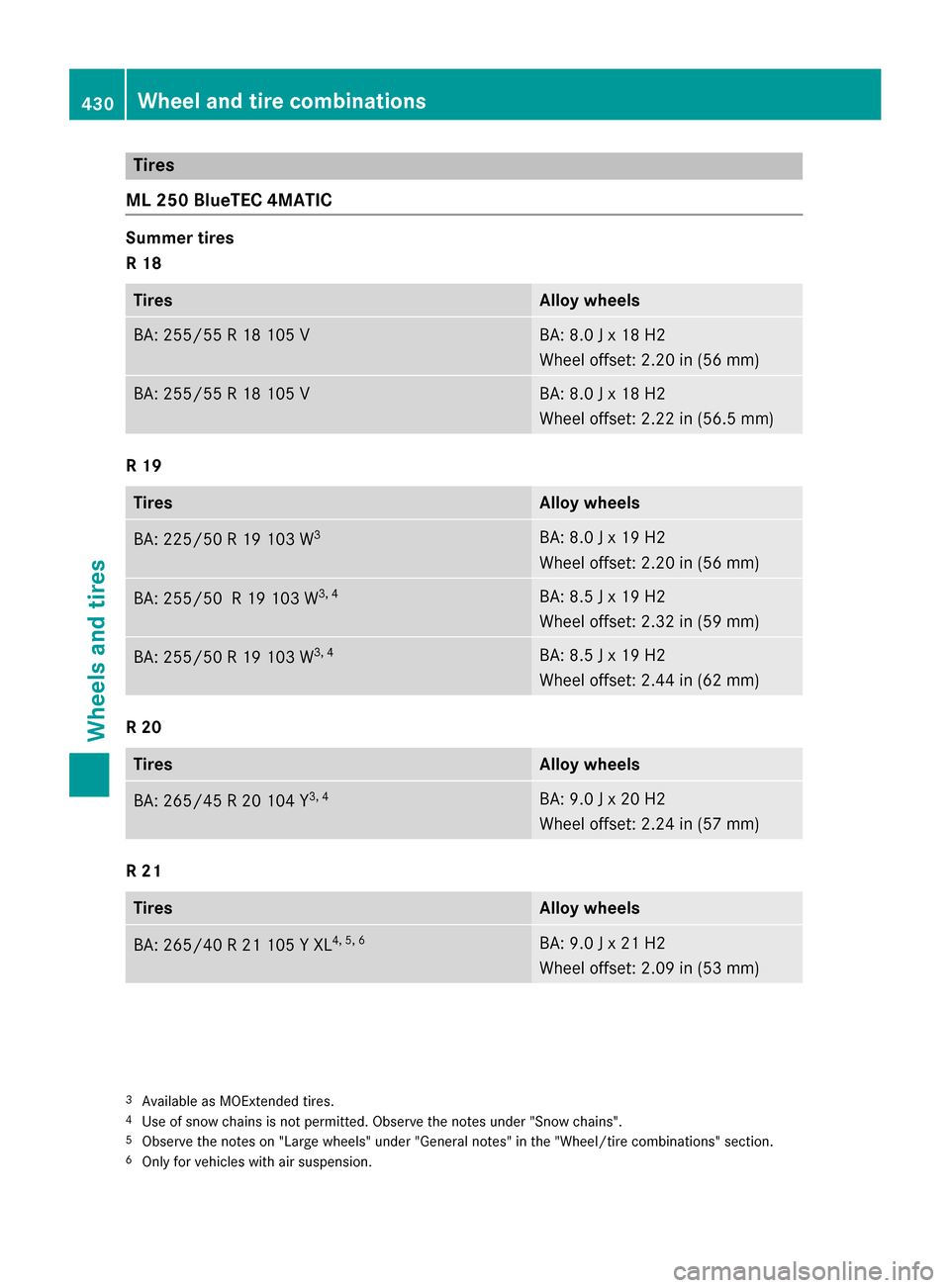
Tires
ML 250 BlueTEC 4MATIC Summer tires
R 18
Tires Alloy wheels
BA: 255/5
5 R 18 105 V BA: 8.0 J x 18 H2
Wheel offset: 2.20 in (56 mm)
BA: 255/55 R 18 105 V BA: 8.0 J x 18 H2
Wheel offset: 2.22 in (56.5 mm)
R 19
Tires Alloy wheels
BA: 225/50 R 19 103 W
3 BA: 8.0 J x 19 H2
Wheel offset: 2.20 in (56 mm)
BA: 255/50 R 19 103 W
3, 4 BA: 8.5 J x 19 H2
Wheel offset: 2.32 in (59 mm)
BA: 255/50 R 19 103 W
3, 4 BA: 8.5 J x 19 H2
Wheel offset: 2.44 in (62 mm)
R 20
Tires Alloy wheels
BA: 265/45 R 20 104 Y
3, 4 BA: 9.0 J x 20 H2
Wheel offset: 2.24 in (57 mm)
R 21
Tires Alloy wheels
BA: 265/40 R 21 105 Y XL
4, 5, 6 BA: 9.0 J x 21 H2
Wheel offset: 2.09 in (53 mm)
3
Available as MOExtended tires.
4 Use of snow chains is not permitted. Observe the notes under "Snow chains".
5 Observe the notes on "Large wheels" under "General notes" in the "Wheel/tire combinations" section.
6 Only for vehicles with air suspension. 430
Wheel and tire combinationsWheels and tires
Page 437 of 466
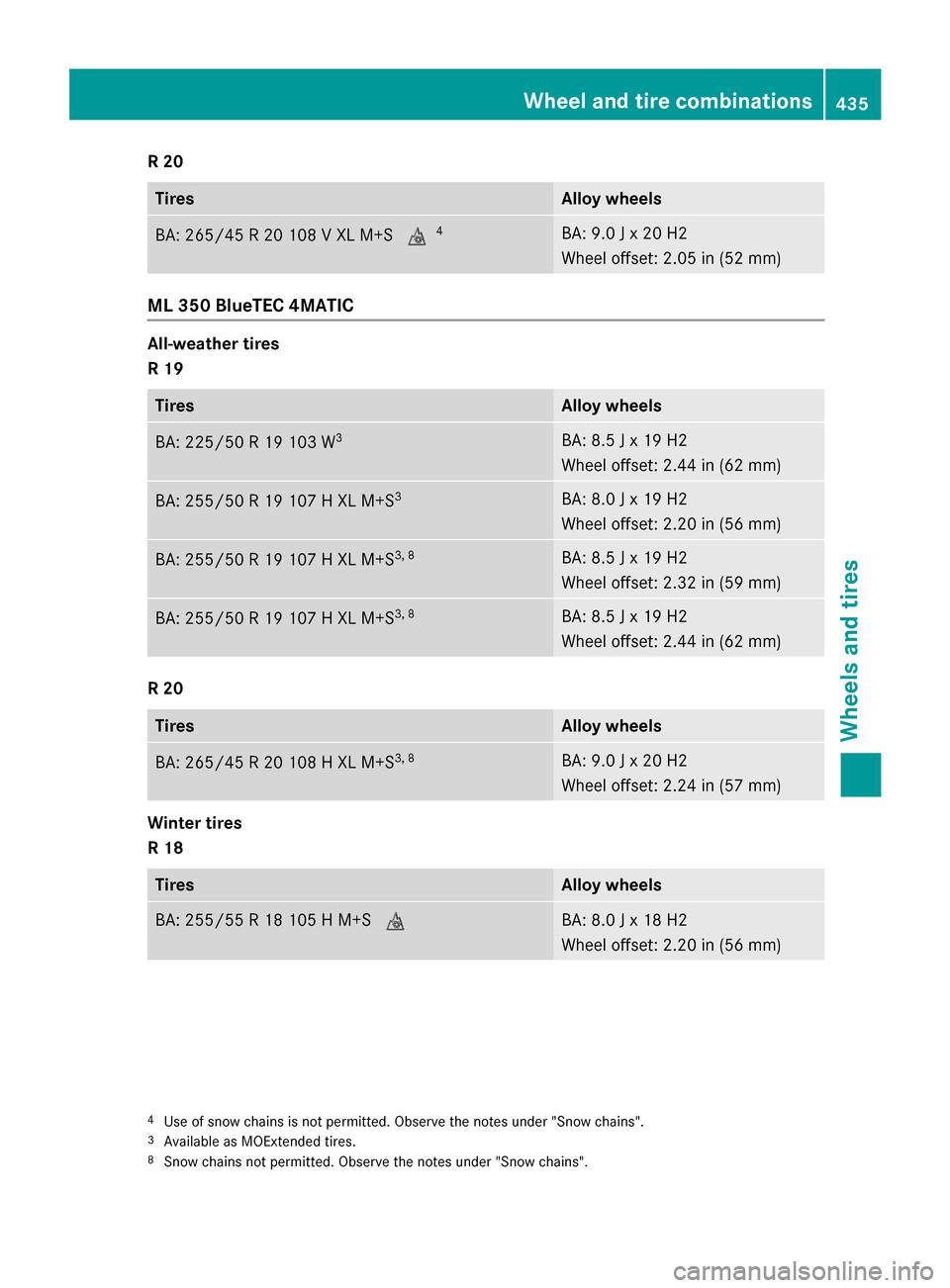
R 20
Tires Alloy wheels
BA: 265/45 R 20 108 V XL M+S
004D4 BA: 9.0 J x 20 H2
Wheel offset: 2.05 in (52 mm)
ML 350 BlueTEC 4MATIC
All-weather tires
R 19
Tires Alloy wheels
BA: 225/50 R 19 103 W
3 BA: 8.5 J x 19 H2
Wheel offset: 2.44 in (62 mm)
BA: 255/50 R 19 107 H XL M+S
3 BA: 8.0 J x 19 H2
Wheel offset: 2.20 in (56 mm)
BA: 255/50 R 19 107 H XL M+S
3, 8 BA: 8.5 J x 19 H2
Wheel offset: 2.32 in (59 mm)
BA: 255/50 R 19 107 H XL M+S
3, 8 BA: 8.5 J x 19 H2
Wheel offset: 2.44 in (62 mm)
R 20
Tires Alloy wheels
BA: 265/45 R 20 108 H XL M+S
3, 8 BA: 9.0 J x 20 H2
Wheel offset: 2.24 in (57 mm)
Winter tires
R 18
Tires Alloy wheels
BA: 255/55 R 18 105 H M+S
004D BA: 8.0 J x 18 H2
Wheel offset: 2.20 in (56 mm)
4
Use of snow chains is not permitted. Observe the notes under "Snow chains".
3 Available as MOExtended tires.
8 Snow chains not permitted. Observe the notes under "Snow chains". Wheel and tire combinations
435Wheels and tires Z
Page 452 of 466

!
Do not use the following:
R marine diesel
R heating oil
R bio-diesel
R vegetable oil
R gasoline
R paraffin
R kerosene
Do not mix such fuels with diesel fuel and
do not use any special additives. This can
otherwise lead to engine damage.
! Vehicles with diesel particle filters:
in
countries outside the EU, only use low sul- fur Euro diesel with a sulfur content of
under 50 ppm. Otherwise, the emission
control system could be damaged.
! Vehicles without a diesel particle fil-
ter: in countries where only diesel fuel with
a high sulfur content is available, you will
need to carry out your vehicle's oil change
at shorter intervals. Further information on
oil change intervals can be obtained at a
qualified specialist workshop.
You will usually find information about the fuel
grade on the pump. If you cannot find the
label on the pump, ask the staff for assis-
tance.
Information on refueling (Y page 178).
Bio-diesel – FAME (fatty acid methyl ester) Mercedes-Benz USA approves the use of bio-diesel B5 for all BlueTEC diesel engines. The
concentration of bio-diesel in the ULSD may
not exceed 5% by volume.
Pure bio-diesel and diesel fuel with a higher
percentage of bio-diesel, such as B20, can
damage the engine and the fuel system. For
this reason, they are not approved.
For more information, consult the gas station
staff. The bio-diesel B5 label on the gasoline
pump must clearly state that the standard for ULSD has been fulfilled. If the label is not
clear, do not refuel the vehicle. Do not refuel your vehicle with fuels unless
they have been approved by Mercedes-Benz.
Information on refueling (Y page 178).
Low outside temperatures
i Diesel fuel with improved cold flow prop-
erties is available during the winter months.
Further information about fuel properties
can be obtained from oil companies, e.g. at gas stations.
Flexible Fuel vehicles Important safety notes
G
WARNING
Fuel is highly flammable. If you handle fuel
incorrectly, there is a risk of fire and explo-
sion.
You must avoid fire, open flames, creating
sparks and smoking. Switch off the engine
and, if applicable, the auxiliary heating before refueling. G
WARNING
Fuel is poisonous and hazardous to health.
There is a risk of injury.
You must make sure that fuel does not come into contact with your skin, eyes or clothing
and that it is not swallowed. Do not inhale fuel
vapors. Keep fuel away from children.
If you or others come into contact with fuel,
observe the following:
R Wash away fuel from skin immediately
using soap and water.
R If fuel comes into contact with your eyes,
immediately rinse them thoroughly with
clean water. Seek medical assistance with-
out delay.
R If fuel is swallowed, seek medical assis-
tance without delay. Do not induce vomit-
ing.
R Immediately change out of clothing which
has come into contact with fuel. 450
Service products and filling capacitiesTechnical data