2015 MERCEDES-BENZ GLK-CLASS SUV Socket
[x] Cancel search: SocketPage 6 of 386

1, 2, 3 ...
4ETSsee ETS/4ETS (Electronic Trac-
tion System)
4MATIC (permanent four-wheel
drive) .................................................. 1 85
12 V socket
see Sockets
115 V socket ...................................... 285
360° camera
Function/notes ............................. 198
A
ABS (Anti-lock Braking System)Display message ............................ 236
Function/notes ................................ 68
Important safety notes .................... 68
Warning lamp ................................. 262
Activating/deactivating cooling
with air dehumidification ................. 137
Active Blind Spot Assist
Activating/deactivating (on-
board computer) ............................ 229
Display message ............................ 252
Function/information .................... 207
Trailer towing ................................. 209
Active Driving Assistance package .. 207
Active Lane Keeping Assist
Activating/deactivating (on-
board computer) ............................ 230
Display message ............................ 251
Function/information .................... 210
Trailer towing ......................... 206, 212
Active light function ......................... 119
Active Parking Assist
Canceling ....................................... 193
Detecting parking spaces .............. 190
Display message ............................ 252
Exiting a parking space .................. 192
Important safety notes .................. 189
Parking .......................................... 19 1
Towing a trailer .............................. 193
Adaptive Highbeam Assist
Function/notes ............................. 120
Switching on/off ................... 120, 121
Additives (engine oil) ........................ 377 Air bag
Occupant Classification System
(OCS) ............................................... 49
Air bags
Display message ............................ 242
Front air bag (driver, front
passenger) ....................................... 46
Important safety notes .................... 44
Knee bag .......................................... 47
PASSENGER AIR BAG OFF indica-
tor lamp ........................................... 4 9
Pelvis air bag ................................... 48
Safety guidelines ............................. 43
Side impact air bag .......................... 47
Window curtain air bag .................... 49
Air filter (display message) .............. 249
AIR FLOW ........................................... 139
Air vents
Glove box ....................................... 144
Important safety notes .................. 144
Rear ............................................... 145
Setting ........................................... 1 44
Setting the center air vents ........... 144
Setting the side air vents ............... 144
Air-conditioning system
see Climate control
Alarm
ATA (Anti-Theft Alarm system) ......... 75
Switching off (ATA) .......................... 75
Switching the function on/off
(ATA) .............................................. .. 75
Alarm system
see ATA (Anti-Theft Alarm system)
Animals in the vehicle ......................... 67
Anti-lock braking system
see ABS (Anti-lock Braking System)
Anti-Theft Alarm system
see ATA (Anti-Theft Alarm system)
Ashtray ............................................... 283
Assistance display (on-board com-
puter) .................................................. 2 29
Assistance menu (on-board com-
puter) .................................................. 2 28
ASSYST PLUS
Displaying a service message ........ 305
Hiding a service message .............. 304
Notes ..................................... 304, 305
4Index
Page 18 of 386

Safety systemsee Driving safety systems
Seat belts
Adjusting the driver's and front-
passenger seat belt ......................... 59
Adjusting the height ......................... 59
Belt force limiters ............................ 60
center rear-compartment seat ......... 59
Cleaning ......................................... 31 2
Correct usage .................................. 57
Emergency Tensioning Devices ........ 60
Fastening ......................................... 58
Important safety guidelines ............. 56
Releasing ......................................... 59
Safety guidelines ............................. 43
Switching belt adjustment on/off
(on-board computer) ...................... 233
Warning lamp ................................. 260
Warning lamp (function) ................... 60
Seats
Adjusting (electrically) ................... 101
Adjusting lumbar support .............. 104
Adjusting the 4-way lumbar sup-
port ............................................... . 104
Adjusting the head restraint .......... 102
Cleaning the cover ......................... 311
Correct driver's seat position ........ 100
Folding the backrest (rear com-
partment) forwards/back .............. 276
Folding the rear bench seat for-
wards/back ................................... 276
Important safety notes .................. 101
Seat heating problem .................... 106
Storing settings (memory func-
tion) .............................................. . 112
Switching seat heating on/off ....... 105
Sensors (cleaning instructions) ....... 309
Service menu (on-board com-
puter) .................................................. 2 30
Service products
Brake fluid ..................................... 377
Coolant (engine) ............................ 378
DEF special additives ..................... 376
Engine oil ....................................... 377
Fuel ............................................... . 373
Important safety notes .................. 373
Refrigerant (air-conditioning sys-
tem) ............................................... 379Washer fluid ................................... 379
Setting the air distribution ............... 140
Setting the airflow ............................ 141
Settings
Factory (on-board computer) ......... 234
On-board computer ....................... 230
Side impact air bag ............................. 47
Side marker lamp (display mes-
sage) ................................................... 245
Side windows
Cleaning ......................................... 30 8
Convenience closing feature ............ 93
Convenience opening feature .......... 93
Important safety information ........... 91
Opening/closing .............................. 92
Problem (malfunction) ..................... 94
Resetting ......................................... 94
Sliding sunroof
see Panorama roof with power
tilt/sliding panel
SmartKey
Changing the battery ....................... 81
Changing the programming ............. 80
Checking the battery ....................... 81
Convenience closing feature ............ 93
Convenience opening feature .......... 93
Display message ............................ 258
Door central locking/unlocking ....... 78
Important safety notes .................... 78
Loss ................................................. 83
Mechanical key ................................ 80
Positions (ignition lock) ................. 149
Problem (malfunction) ..................... 83
Starting the engine ........................ 151
Snow chains ...................................... 335
Sockets
Center console .............................. 285
General notes ................................ 284
Rear compartment ......................... 285
Special seat belt retractor .................. 64
Specialist workshop ............................ 27
Speed, controlling
see Cruise control
Speedometer
Digital ............................................ 224
In the Instrument cluster ................. 33
Segments ...................................... 221
16Index
Page 39 of 386
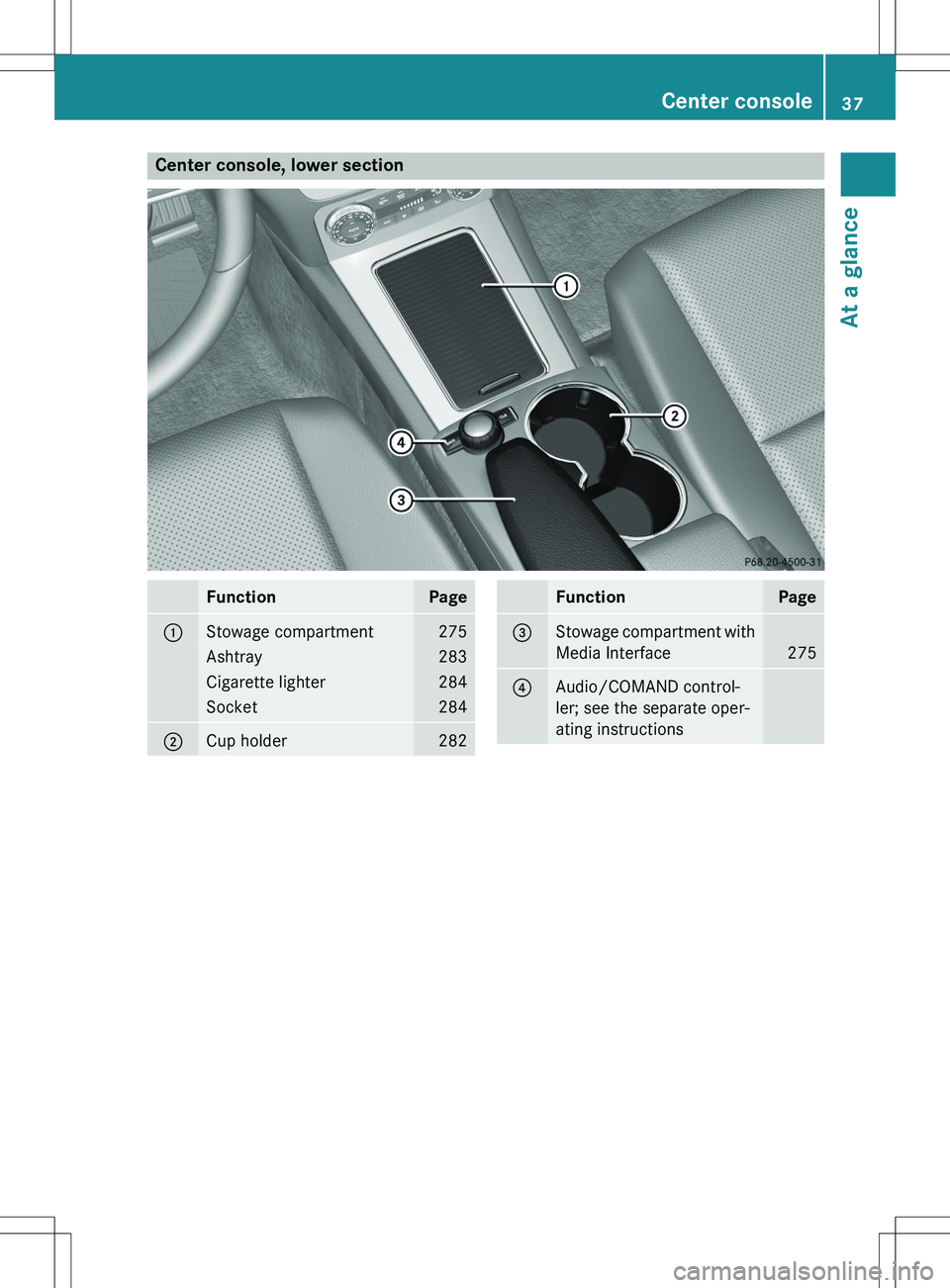
Center console, lower section
FunctionPage
:Stowage compartment275
Ashtray283
Cigarette lighter284
Socket284
;Cup holder282
FunctionPage
=Stowage compartment with
Media Interface
275
?Audio/COMAND control-
ler; see the separate oper-
ating instructions
Center console37
At a glance
Page 219 of 386
iThe weight of other accessories, passen-
gers and loads reduces:
R the permissible trailer load
R the permissible noseweight that your
vehicle can tow
Checking the vehicle and trailer weight
RTo ensure compliance of the weight of the
towing vehicle and the trailer with the max-
imum permissible values, have the vehicle/
trailer combination (towing vehicle includ-
ing driver, passenger, load and fully laden
trailer) weighed on a calibrated weigh-
bridge.
R Check the gross axle weight rating of the
front and rear axles, the gross weight of the
trailer and trailer drawbar load.
Removing the ball coupling
X Observe the manufacturer's installation
instructions.
X Press the protective cap into the ball cou-
pling recess.
X Make sure that the protective cap is firmly
in place.
Storing the ball coupling
X Observe the manufacturer's installation
instructions.
Observe the loading guidelines ( Y page 274)
and the safety notes regarding stowage
spaces ( Y page 275).
Trailer power supply
The trailer socket of your vehicle is equipped
at the factory with a permanent power supply.
The permanent power supply is supplied via
trailer socket pin 4.
! You can connect accessories with a max-
imum power consumption of 240 W to the
permanent power supply.
You must not charge a trailer battery using the power supply.
The trailer's permanent power supply is
switched off in the event of low vehicle supply
voltage and after six hours at the latest.
A qualified specialist workshop can provide
more information about installing the trailer
electrics.
Towing a trailer217
Driving and parking
Z
Page 286 of 386
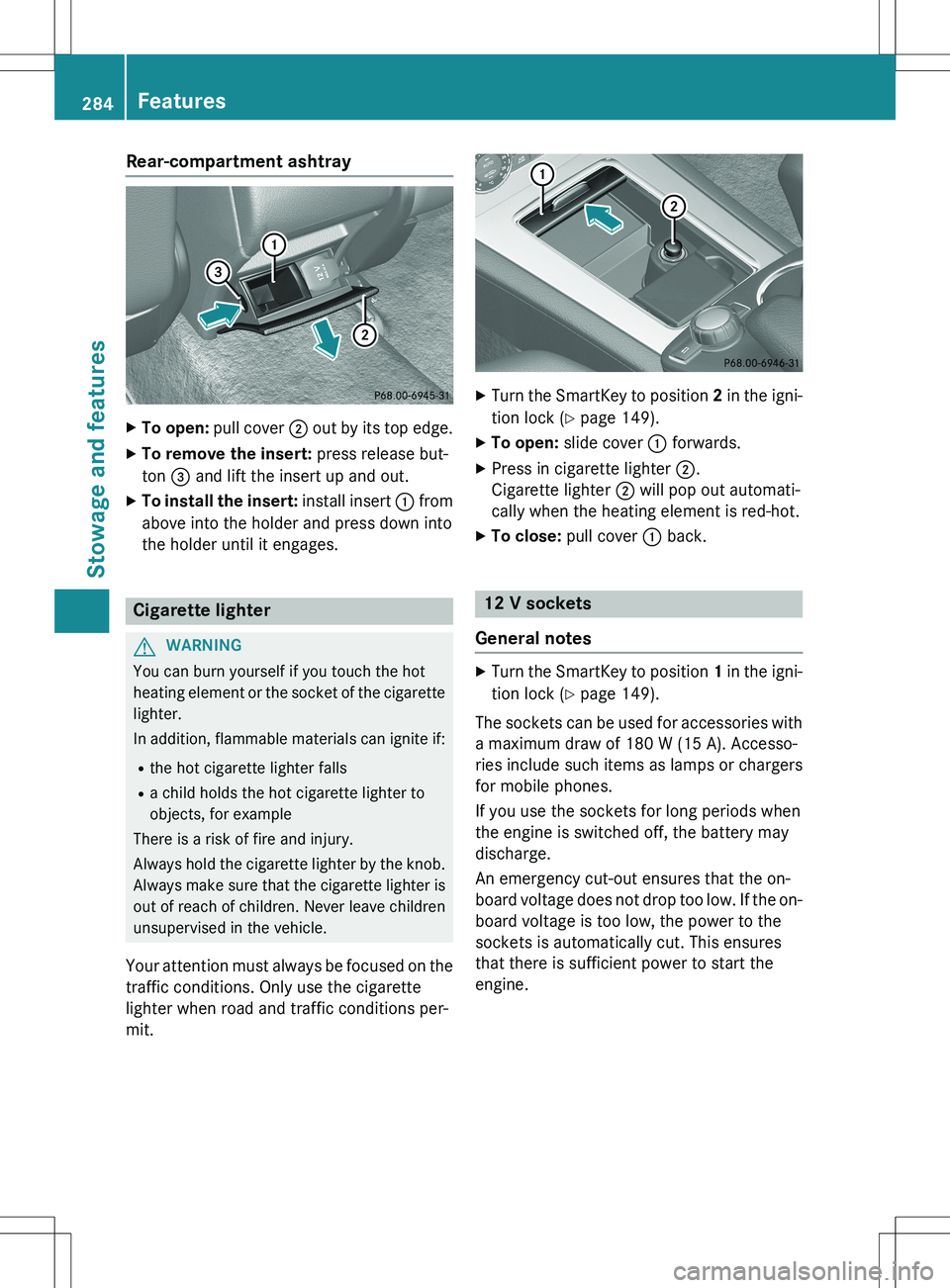
Rear-compartment ashtray
XTo open: pull cover ; out by its top edge.
X To remove the insert: press release but-
ton = and lift the insert up and out.
X To install the insert: install insert : from
above into the holder and press down into
the holder until it engages.
Cigarette lighter
GWARNING
You can burn yourself if you touch the hot
heating element or the socket of the cigarette lighter.
In addition, flammable materials can ignite if:
R the hot cigarette lighter falls
R a child holds the hot cigarette lighter to
objects, for example
There is a risk of fire and injury.
Always hold the cigarette lighter by the knob.
Always make sure that the cigarette lighter is
out of reach of children. Never leave children unsupervised in the vehicle.
Your attention must always be focused on the traffic conditions. Only use the cigarette
lighter when road and traffic conditions per-
mit.
X Turn the SmartKey to position 2 in the igni-
tion lock ( Y page 149).
X To open: slide cover : forwards.
X Press in cigarette lighter ;.
Cigarette lighter ; will pop out automati-
cally when the heating element is red-hot.
X To close: pull cover : back.
12 V sockets
General notes
X Turn the SmartKey to position 1 in the igni-
tion lock ( Y page 149).
The sockets can be used for accessories with a maximum draw of 180 W (15 A). Accesso-
ries include such items as lamps or chargers
for mobile phones.
If you use the sockets for long periods when
the engine is switched off, the battery may
discharge.
An emergency cut-out ensures that the on-
board voltage does not drop too low. If the on-
board voltage is too low, the power to the
sockets is automatically cut. This ensures
that there is sufficient power to start the
engine.
284Features
Stowage and features
Page 287 of 386
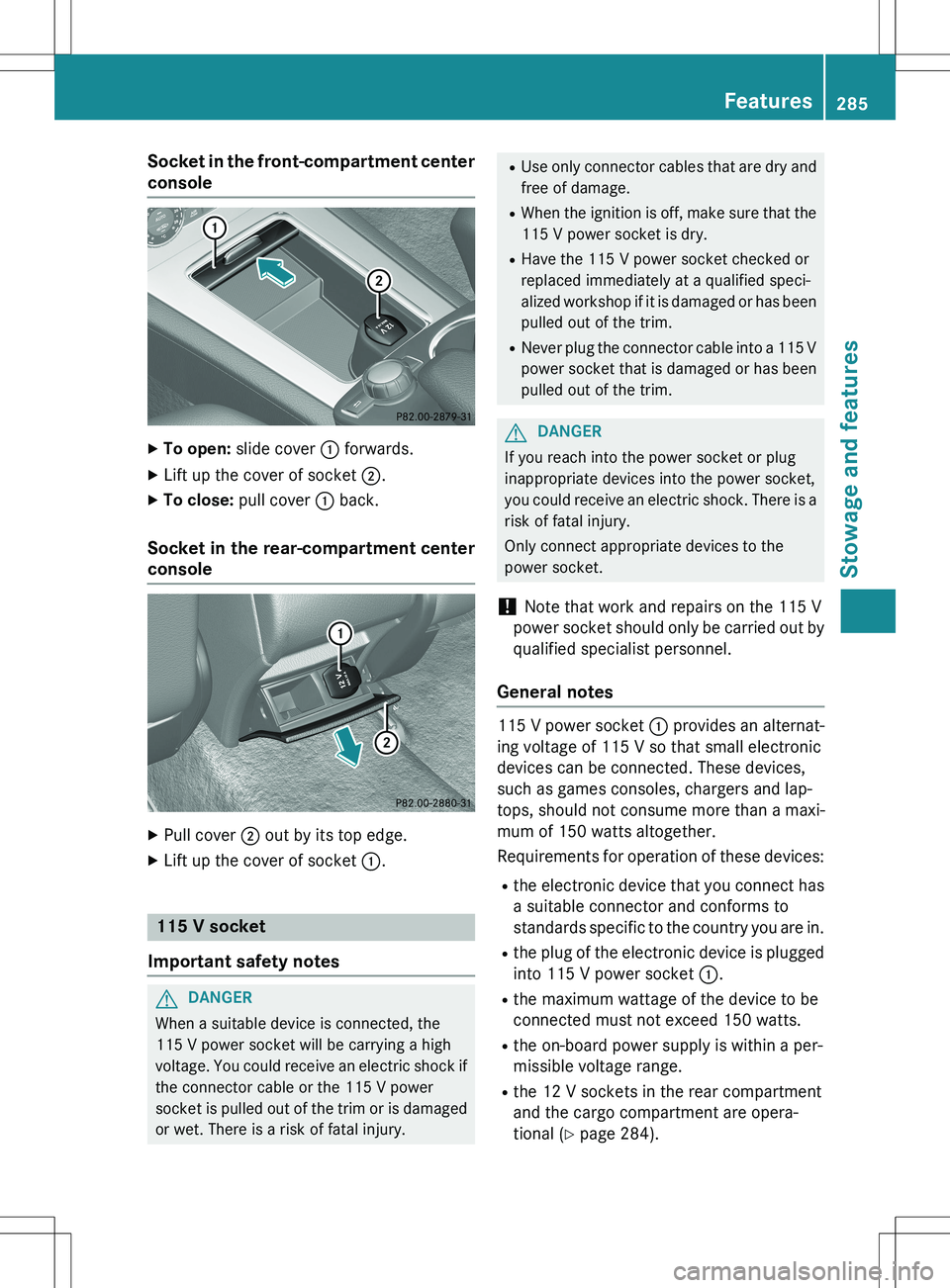
Socket in the front-compartment center
console
X To open: slide cover : forwards.
X Lift up the cover of socket ;.
X To close: pull cover : back.
Socket in the rear-compartment center
console
X
Pull cover ; out by its top edge.
X Lift up the cover of socket :.
115 V socket
Important safety notes
GDANGER
When a suitable device is connected, the
115 V power socket will be carrying a high
voltage. You could receive an electric shock if the connector cable or the 115 V power
socket is pulled out of the trim or is damaged
or wet. There is a risk of fatal injury.
R Use only connector cables that are dry and
free of damage.
R When the ignition is off, make sure that the
115 V power socket is dry.
R Have the 115 V power socket checked or
replaced immediately at a qualified speci-
alized workshop if it is damaged or has been
pulled out of the trim.
R Never plug the connector cable into a 115 V
power socket that is damaged or has been pulled out of the trim.
GDANGER
If you reach into the power socket or plug
inappropriate devices into the power socket,
you could receive an electric shock. There is a risk of fatal injury.
Only connect appropriate devices to the
power socket.
! Note that work and repairs on the 115 V
power socket should only be carried out by
qualified specialist personnel.
General notes
115 V power socket : provides an alternat-
ing voltage of 115 V so that small electronic
devices can be connected. These devices,
such as games consoles, chargers and lap-
tops, should not consume more than a maxi-
mum of 150 watts altogether.
Requirements for operation of these devices:
R the electronic device that you connect has
a suitable connector and conforms to
standards specific to the country you are in.
R the plug of the electronic device is plugged
into 115 V power socket :.
R the maximum wattage of the device to be
connected must not exceed 150 watts.
R the on-board power supply is within a per-
missible voltage range.
R the 12 V sockets in the rear compartment
and the cargo compartment are opera-
tional ( Y page 284).
Features285
Stowage and features
Z
Page 288 of 386
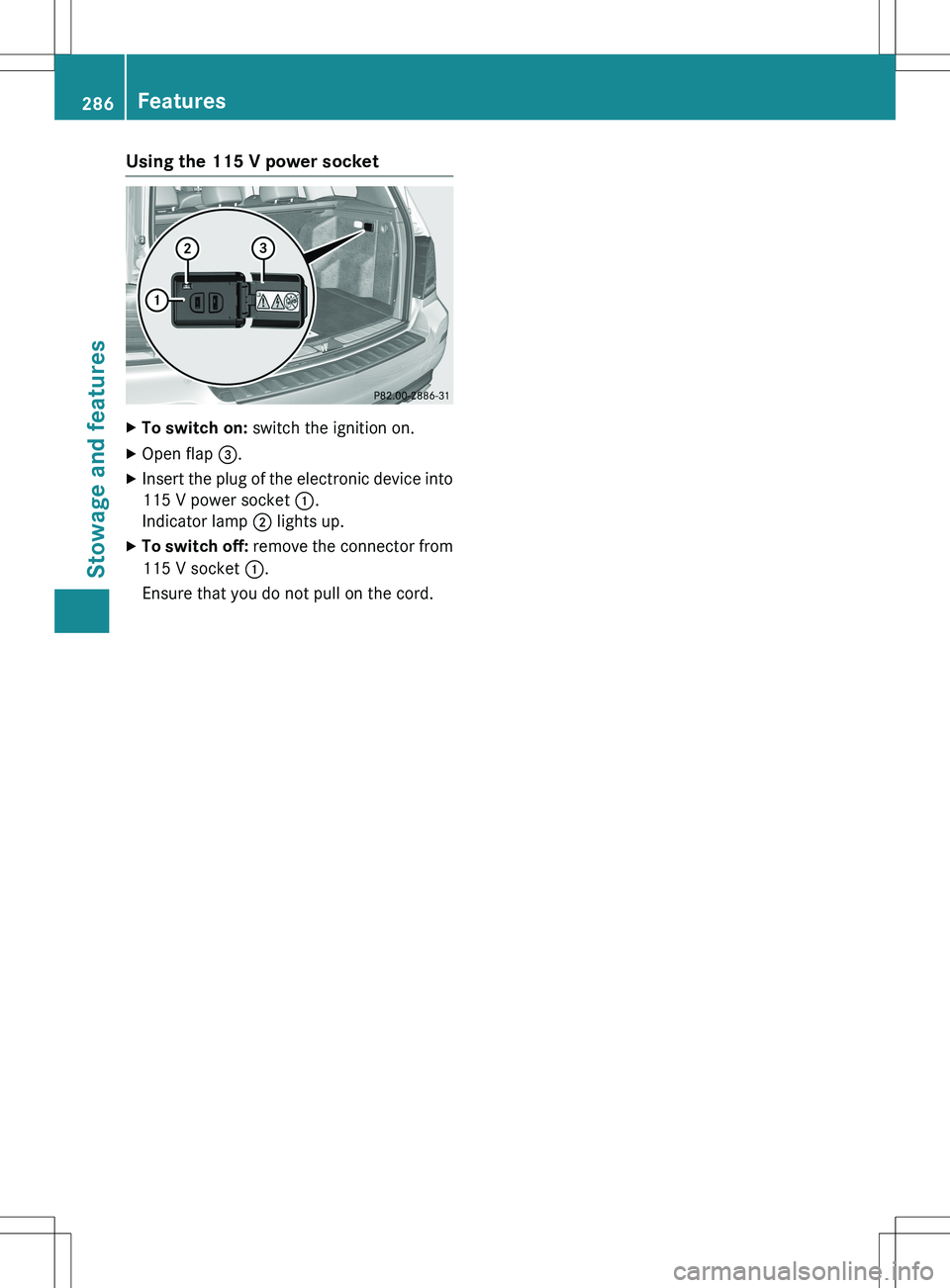
Using the 115 V power socket
XTo switch on: switch the ignition on.
X Open flap =.
X Insert the plug of the electronic device into
115 V power socket :.
Indicator lamp ; lights up.
X To switch off: remove the connector from
115 V socket :.
Ensure that you do not pull on the cord.
286Features
Stowage and features
Page 289 of 386
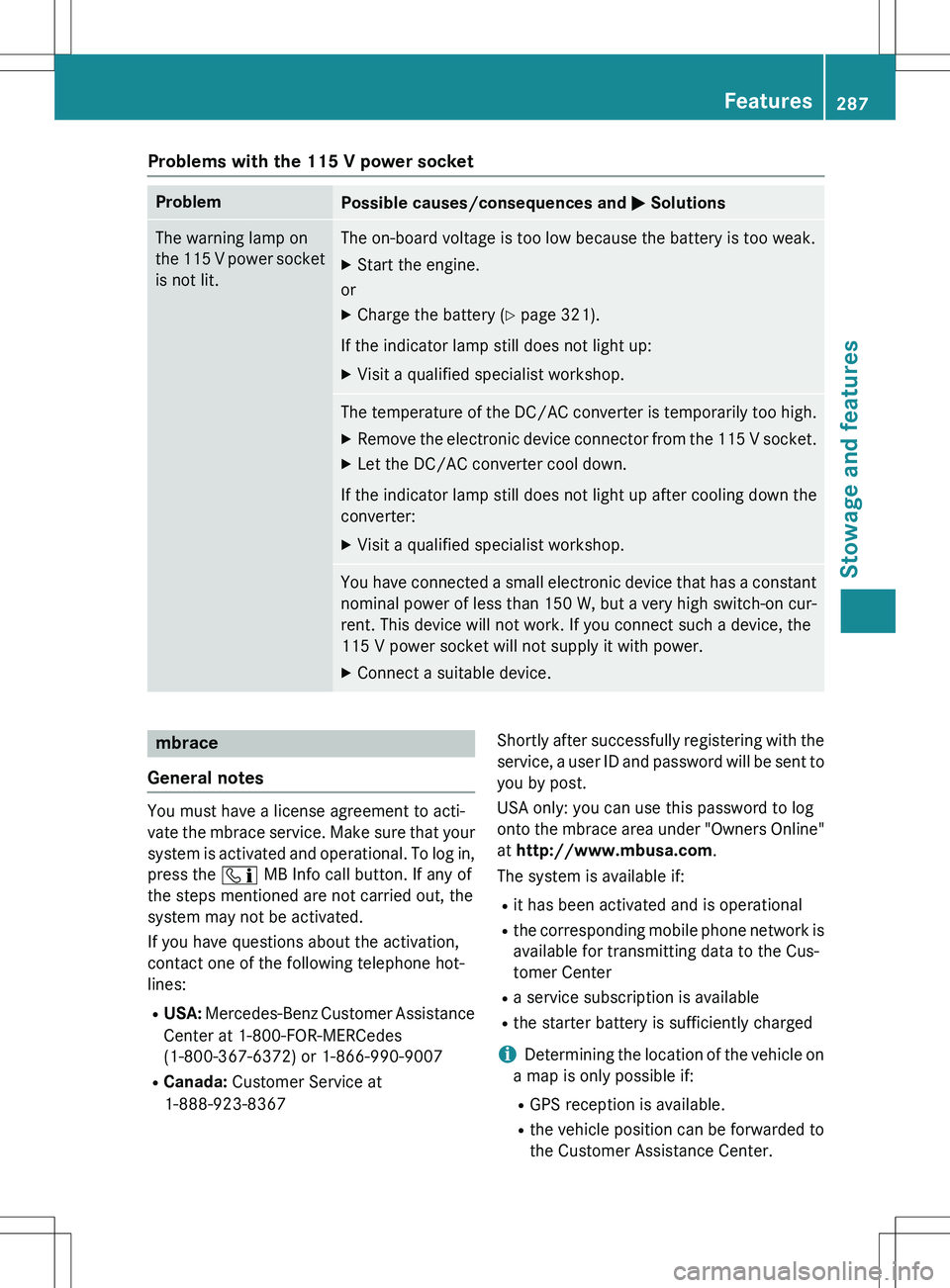
Problems with the 115 V power socket
ProblemPossible causes/consequences and M Solutions
The warning lamp on
the 115 V power socket
is not lit.The on-board voltage is too low because the battery is too weak.
X Start the engine.
or
X Charge the battery ( Y page 321).
If the indicator lamp still does not light up: X Visit a qualified specialist workshop.
The temperature of the DC/AC converter is temporarily too high.
X Remove the electronic device connector from the 115 V socket.
X Let the DC/AC converter cool down.
If the indicator lamp still does not light up after cooling down the
converter: X Visit a qualified specialist workshop.
You have connected a small electronic device that has a constant
nominal power of less than 150 W, but a very high switch-on cur -
rent. This device will not work. If you connect such a device, the
115 V power socket will not supply it with power. X Connect a suitable device.
mbrace
General notes
You must have a license agreement to acti-
vate the mbrace service. Make sure that your system is activated and operational. To log in,
press the ï MB Info call button. If any of
the steps mentioned are not carried out, the
system may not be activated.
If you have questions about the activation,
contact one of the following telephone hot-
lines:
R USA: Mercedes-Benz Customer Assistance
Center at 1-800-FOR-MERCedes
(1-800-367-6372) or 1-866-990-9007
R Canada: Customer Service at
1-888-923-8367 Shortly after successfully registering with the
service, a user ID and password will be sent to you by post.
USA only: you can use this password to log
onto the mbrace area under "Owners Online"
at http://www.mbusa.com .
The system is available if:
R it has been activated and is operational
R the corresponding mobile phone network is
available for transmitting data to the Cus-
tomer Center
R a service subscription is available
R the starter battery is sufficiently charged
iDetermining the location of the vehicle on
a map is only possible if: R GPS reception is available.
R the vehicle position can be forwarded to
the Customer Assistance Center.
Features287
Stowage and features
Z