2015 MERCEDES-BENZ GLK-CLASS SUV keyless
[x] Cancel search: keylessPage 95 of 386

available for up to five minutes or until the
driver's or front-passenger door is opened.
Convenience opening
You can ventilate the vehicle before you startdriving. To do this, the SmartKey is used to
carry out the following functions simultane-
ously:
R unlock the vehicle
R open the side windows
R open the panorama roof with power tilt/
sliding panel and the roller sunblinds
iThe convenience opening feature can
only be operated using the SmartKey. The
SmartKey must be close to the driver's
door handle.
X Point the tip of the SmartKey at the driver's
door handle.
X Press and hold the % button until the
side windows and the panorama roof with
power tilt/sliding panel are in the desired
position.
If the roller sunblinds of the panorama roof
with power tilt/sliding panel are closed, the
roller sunblinds are opened first.
X Press and hold the % button again until
the panorama roof with power tilt/sliding
panel is in the desired position.
X To interrupt convenience opening:
release the % button.
Convenience closing feature
General notes
When you lock the vehicle, you can simulta-
neously: R close the side windows
R close the panorama roof with power tilt/
sliding panel
On vehicles with a panorama roof with power tilt/sliding panel, you can then close the
roller sunblinds.
GWARNING
When the convenience closing feature is oper- ating, parts of the body could become trapped
in the closing area of the side window and the
sliding sunroof. There is a risk of injury.
Observe the complete closing procedure
when the convenience closing feature is oper-
ating. Make sure that no body parts are in
close proximity during the closing procedure.
Proceed as follows if someone is trapped:
With the SmartKey:
R release the & button.
R press and hold the % button until the
side windows and the sliding sunroof or the
panorama roof with power tilt/sliding
panel open again.
Using KEYLESS-GO:
R release the sensor surface on the door han-
dle.
R pull the door handle immediately and hold
it.
The side windows and the sliding sunroof or
the panorama roof with power tilt/sliding
panel open.
Using the SmartKey
iThe SmartKey must be close to the driv-
er's door handle.
X Point the tip of the SmartKey at the driver's
door handle.
X Press and hold the & button until the
side windows and the panorama roof with
power tilt/sliding panel are fully closed.
X Make sure that all the side windows and the
panorama roof with power tilt/sliding
panel are closed.
On vehicles with a panorama roof with power
tilt/sliding panel:
X Press and hold the & button again until
the roller sunblinds of the panorama roof
with power tilt/sliding panel close.
Side windows93
Opening and closing
Z
Page 96 of 386

XTo interrupt convenience closing:
release the & button.
Using KEYLESS-GO
The KEYLESS-GO key must be outside the
vehicle. All the doors must be closed.
X
Touch recessed sensor surface : on the
door handle until the side windows and the panorama roof with power tilt/sliding
panel are fully closed.
iMake sure you only touch recessed sen-
sor surface :.
X Make sure that all the side windows and the
panorama roof with power tilt/sliding
panel are closed.
On vehicles with a panorama roof with power tilt/sliding panel:
X Touch recessed sensor surface : on the
door handle again until the roller sunblinds of the panorama roof with power tilt/slid-
ing panel close.
X To interrupt convenience closing:
release recessed sensor surface : on the
door handle.
Resetting the side windows
You must reset each side window if a side
window can no longer be closed fully.
X Close all the doors.
X Turn the SmartKey to position 1 or 2 in the
ignition lock. X
Pull the corresponding switch on the door
control panel until the side window is com-
pletely closed ( Y page 92).
X Hold the switch for an additional second.
If the side window opens again slightly: X Immediately pull the corresponding switch
on the door control panel until the side win-
dow is completely closed ( Y page 92).
X Hold the switch for an additional second.
X If the corresponding side window remains
closed after the button has been released,
the side window has been reset correctly. If
this is not the case, repeat the steps aboveagain.
Problems with the side windows
Problem: a side window cannot be closed
because it is blocked by objects, e.g.
leaves in the window guide.
X Remove the objects.
X Close the side window.
Problem: a side window cannot be closed
and you cannot see the cause.
GWARNING
If you close a side window again immediately
after it has been blocked or reset, the side
window closes with increased or maximum
force. The reversing feature is then not active. Parts of the body could be trapped in the clos-
ing area in the process. This poses an
increased risk of injury or even fatal injury.
Make sure that no parts of the body are in the closing area. To stop the closing process,
release the switch or push the switch again toreopen the side window.
If a side window is obstructed during closing
and reopens again slightly: X Immediately after the window blocks, pull
the corresponding switch again until the
side window has closed.
The side window is closed with increased
force.
94Side windows
Opening and closing
Page 109 of 386
wheel up or down or try to move it in the
fore-and-aft direction.
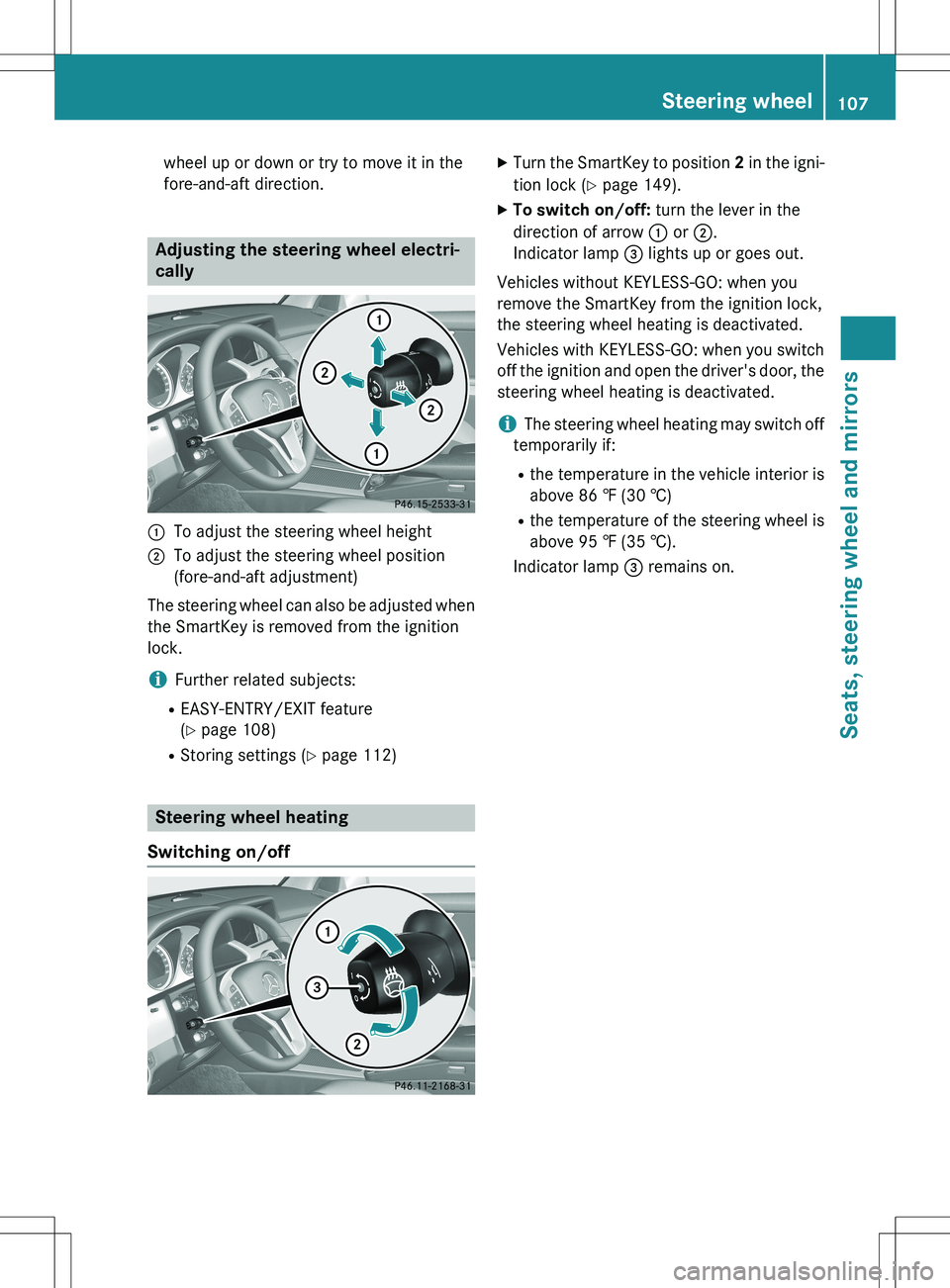
Adjusting the steering wheel electri-
cally
:To adjust the steering wheel height
;To adjust the steering wheel position
(fore-and-aft adjustment)
The steering wheel can also be adjusted when the SmartKey is removed from the ignition
lock.
iFurther related subjects:
R EASY-ENTRY/EXIT feature
(Y page 108)
R Storing settings ( Y page 112)
Steering wheel heating
Switching on/off
X Turn the SmartKey to position 2 in the igni-
tion lock ( Y page 149).
X To switch on/off: turn the lever in the
direction of arrow : or ;.
Indicator lamp = lights up or goes out.
Vehicles without KEYLESS-GO: when you
remove the SmartKey from the ignition lock,
the steering wheel heating is deactivated.
Vehicles with KEYLESS-GO: when you switch
off the ignition and open the driver's door, the steering wheel heating is deactivated.
iThe steering wheel heating may switch off
temporarily if:
R the temperature in the vehicle interior is
above 86 ‡ (30 †)
R the temperature of the steering wheel is
above 95 ‡ (35 †).
Indicator lamp = remains on.
Steering wheel107
Seats, steering wheel and mirrors
Z
Page 110 of 386
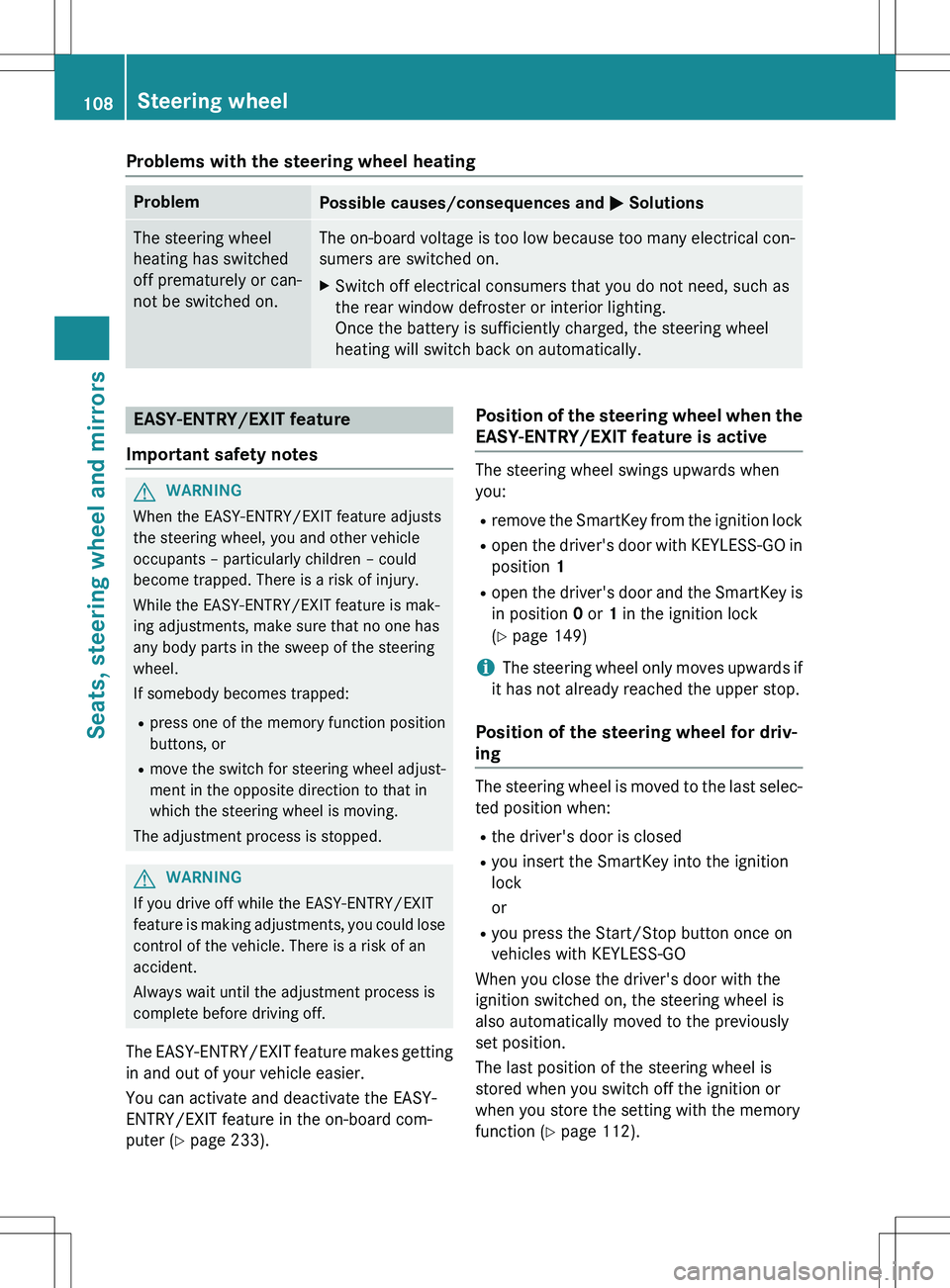
Problems with the steering wheel heating
ProblemPossible causes/consequences and M Solutions
The steering wheel
heating has switched
off prematurely or can-
not be switched on.The on-board voltage is too low because too many elect rical con-
sumers are switched on.
X Switch off electrical consumers that you do not need, such as
the rear window defroster or interior lighting.
Once the battery is sufficiently charged, the steering wheel
heating will switch back on automatically.
EASY-ENTRY/EXIT feature
Important safety notes
GWARNING
When the EASY-ENTRY/EXIT feature adjusts
the steering wheel, you and other vehicle
occupants – particularly children – could
become trapped. There is a risk of injury.
While the EASY-ENTRY/EXIT feature is mak-
ing adjustments, make sure that no one has
any body parts in the sweep of the steering
wheel.
If somebody becomes trapped: R press one of the memory function position
buttons, or
R move the switch for steering wheel adjust-
ment in the opposite direction to that in
which the steering wheel is moving.
The adjustment process is stopped.
GWARNING
If you drive off while the EASY-ENTRY/EXIT
feature is making adjustments, you could lose
control of the vehicle. There is a risk of an
accident.
Always wait until the adjustment process is
complete before driving off.
The EASY-ENTRY/EXIT feature makes getting in and out of your vehicle easier.
You can activate and deactivate the EASY-
ENTRY/EXIT feature in the on-board com-
puter ( Y page 233).
Position of the steering wheel when the
EASY-ENTRY/EXIT feature is active
The steering wheel swings upwards when
you:
R remove the SmartKey from the ignition lock
R open the driver's door with KEYLESS-GO in
position 1
R open the driver's door and the SmartKey is
in position 0 or 1 in the ignition lock
( Y page 149)
iThe steering wheel only moves upwards if
it has not already reached the upper stop.
Position of the steering wheel for driv-
ing
The steering wheel is moved to the last selec-
ted position when:
R the driver's door is closed
R you insert the SmartKey into the ignition
lock
or
R you press the Start/Stop button once on
vehicles with KEYLESS-GO
When you close the driver's door with the
ignition switched on, the steering wheel is
also automatically moved to the previously
set position.
The last position of the steering wheel is
stored when you switch off the ignition or
when you store the setting with the memory
function ( Y page 112).
108Steering wheel
Seats, steering wheel and mirrors
Page 129 of 386
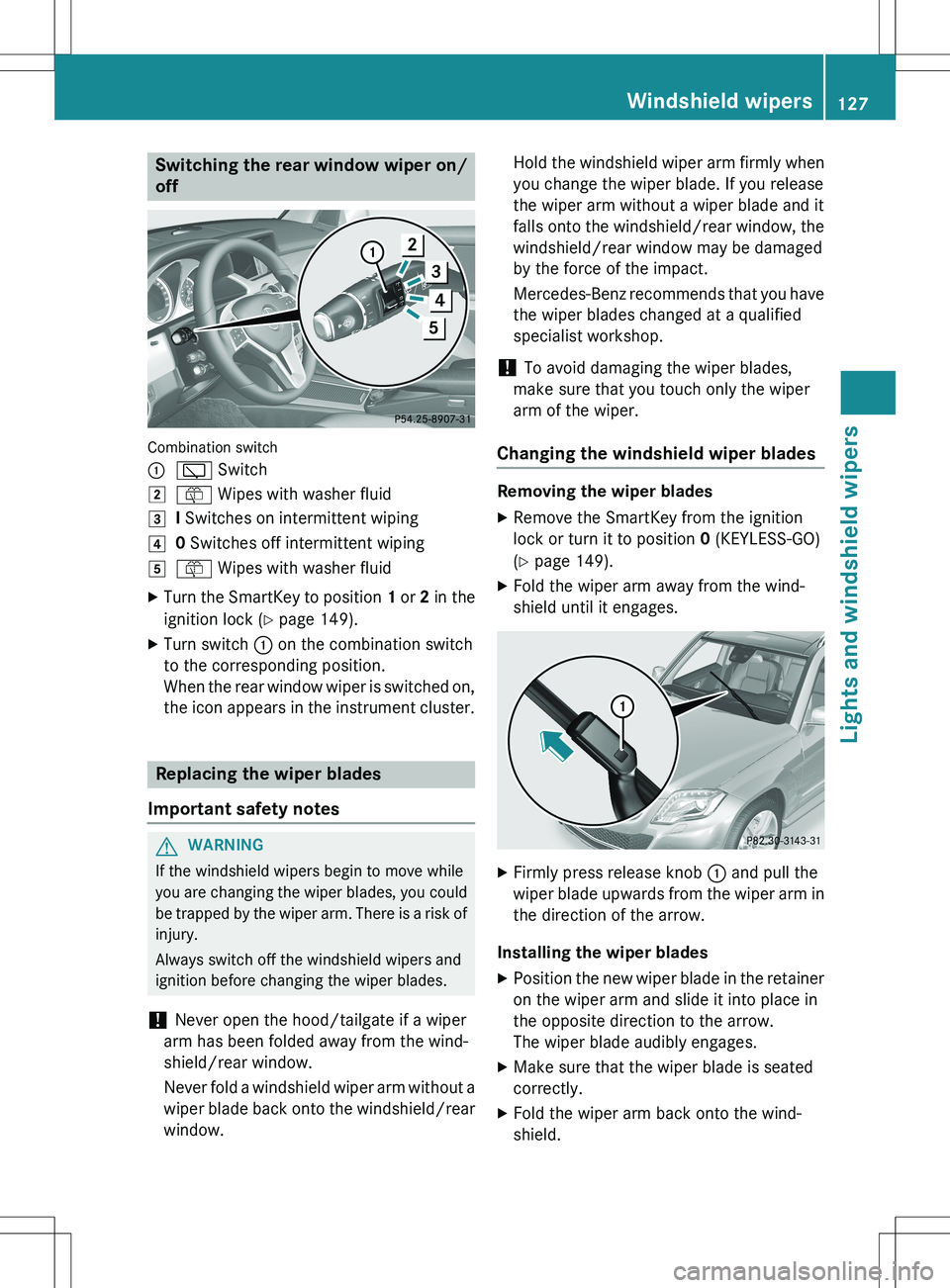
Switching the rear window wiper on/
off
Combination switch :
è Switch
2ô Wipes with washer fluid
3I Switches on intermittent wiping
40 Switches off intermittent wiping
5ô Wipes with washer fluid
X Turn the SmartKey to position 1 or 2 in the
ignition lock ( Y page 149).
X Turn switch : on the combination switch
to the corresponding position.
When the rear window wiper is switched on,
the icon appears in the instrument cluster.
Replacing the wiper blades
Important safety notes
GWARNING
If the windshield wipers begin to move while
you are changing the wiper blades, you could be trapped by the wiper arm. There is a risk of
injury.
Always switch off the windshield wipers and
ignition before changing the wiper blades.
! Never open the hood/tailgate if a wiper
arm has been folded away from the wind-
shield/rear window.
Never fold a windshield wiper arm without a
wiper blade back onto the windshield/rear window. Hold the windshield wiper arm firmly when
you change the wiper blade. If you release
the wiper arm without a wiper blade and it
falls onto the windshield/rear window, the
windshield/rear window may be damaged
by the force of the impact.
Mercedes-Benz recommends that you have the wiper blades changed at a qualified
specialist workshop.
! To avoid damaging the wiper blades,
make sure that you touch only the wiper
arm of the wiper.
Changing the windshield wiper blades
Removing the wiper blades
X Remove the SmartKey from the ignition
lock or turn it to position 0 (KEYLESS-GO)
( Y page 149).
X Fold the wiper arm away from the wind-
shield until it engages.
XFirmly press release knob : and pull the
wiper blade upwards from the wiper arm in the direction of the arrow.
Installing the wiper blades
X Position the new wiper blade in the retainer
on the wiper arm and slide it into place in
the opposite direction to the arrow.
The wiper blade audibly engages.
X Make sure that the wiper blade is seated
correctly.
X Fold the wiper arm back onto the wind-
shield.
Windshield wipers127
Lights and windshield wipers
Z
Page 151 of 386
GWARNING
If you switch off the ignition while driving,
safety-relevant functions are only available
with limitations, or not at all. This could affect,for example, the power steering and the brake
boosting effect. You will require considerably
more effort to steer and brake. There is a risk
of an accident.
Do not switch off the ignition while driving.
GWARNING
If the parking brake has not been fully
released when driving, the parking brake can:
R overheat and cause a fire
R lose its hold function.
There is a risk of fire and an accident. Release
the parking brake fully before driving off.
! Do not warm up the engine with the vehi-
cle stationary. Drive off immediately. Avoid high engine speeds and driving at full throt-
tle until the engine has reached its operat-
ing temperature.
Only shift the automatic transmission to
the desired drive position when the vehicle is stationary.
Where possible, avoid spinning the drive
wheels when pulling away on slippery
roads. You could otherwise damage the
drive train.
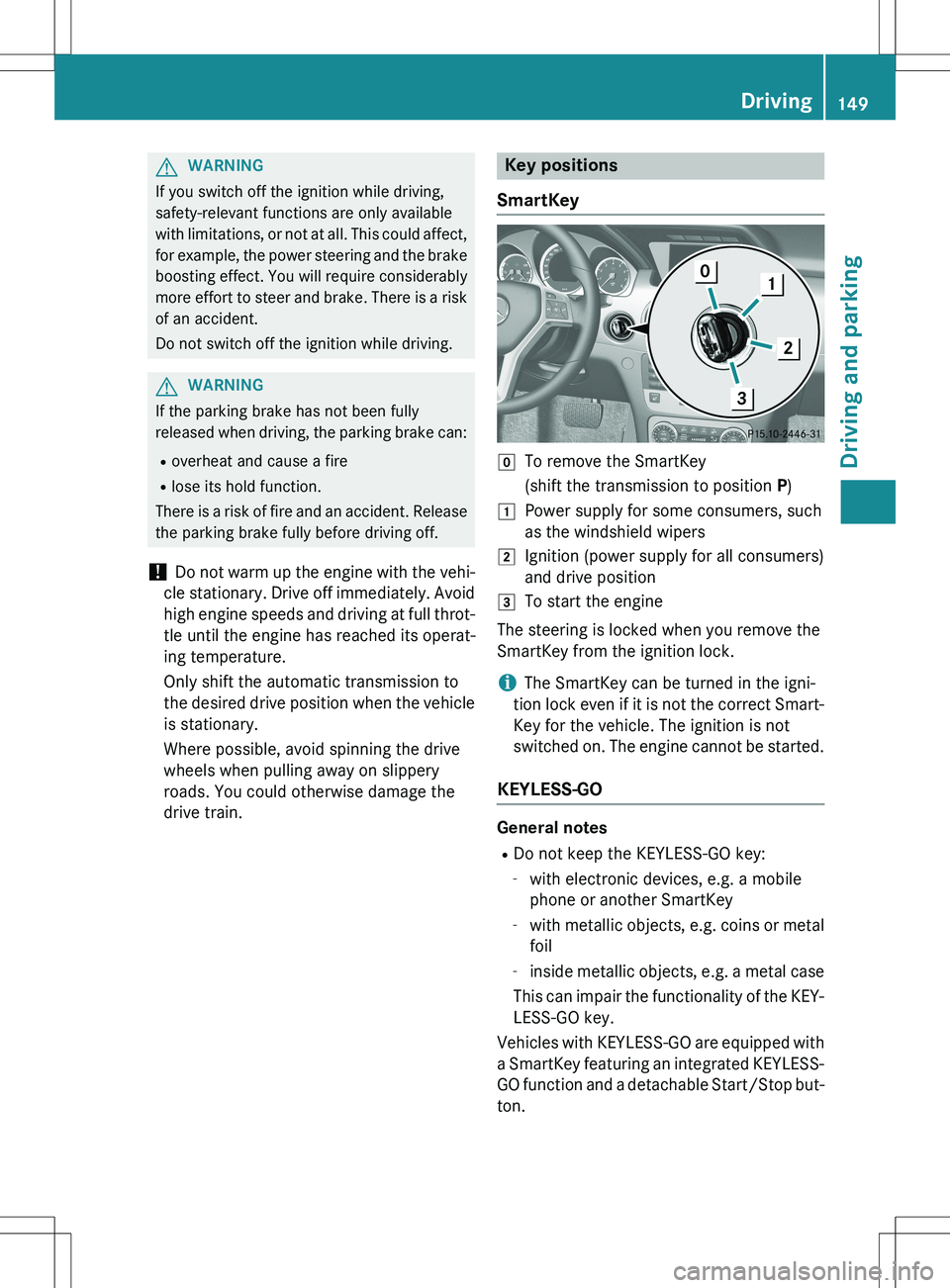
Key positions
SmartKey
gTo remove the SmartKey
(shift the transmission to position P)
1Power supply for some consumers, such
as the windshield wipers
2Ignition (power supply for all consumers)
and drive position
3To start the engine
The steering is locked when you remove the
SmartKey from the ignition lock.
iThe SmartKey can be turned in the igni-
tion lock even if it is not the correct Smart-
Key for the vehicle. The ignition is not
switched on. The engine cannot be started.
KEYLESS-GO
General notes
R Do not keep the KEYLESS-GO key:
- with electronic devices, e.g. a mobile
phone or another SmartKey
- with metallic objects, e.g. coins or metal
foil
- inside metallic objects, e.g. a metal case
This can impair the functionality of the KEY- LESS-GO key.
Vehicles with KEYLESS-GO are equipped with
a SmartKey featuring an integrated KEYLESS- GO function and a detachable Start/Stop but-
ton.
Driving149
Driving and parking
Z
Page 153 of 386
Starting the engine
Important safety notes
GWARNING
If children are left unsupervised in the vehicle, they could:
R open the doors, thus endangering other
people or road users.
R get out and disrupt traffic.
R operate the vehicle's equipment.
Additionally, children could set the vehicle in
motion if, for example, they:
R release the parking brake.
R shifting the automatic transmission out of
park position P
R Start the engine.
There is a risk of an accident and injury.
When leaving the vehicle, always take the
SmartKey with you and lock the vehicle. Never
leave children or animals unattended in the
vehicle. Always keep the SmartKey out of
reach of children.
GWARNING
Combustion engines emit poisonous exhaust
gases such as carbon monoxide. Inhaling
these exhaust gases leads to poisoning. There is a risk of fatal injury. Therefore never leave
the engine running in enclosed spaces with-
out sufficient ventilation.
GWARNING
Flammable materials introduced through
environmental influence or by animals can
ignite if in contact with the exhaust system orparts of the engine that heat up. There is a risk
of fire.
Carry out regular checks to make sure that
there are no flammable foreign materials in
the engine compartment or in the exhaust
system.
! Do not depress the accelerator when
starting the engine.
General notes
iVehicles with a gasoline engine: the
catalytic converter is preheated for up to
30 seconds after a cold start. The sound of the engine may change during this time.
Automatic transmission
X Shift the transmission to position P.
The transmission position display in the
multifunction display shows P.
iYou can also start the engine when the
transmission is in position N.
Starting procedure with the SmartKey
iTo start the engine using the SmartKey
instead of KEYLESS-GO, pull the Start/
Stop button out of the ignition lock.
X To start a gasoline engine: turn the
SmartKey to position 3 in the ignition lock
( Y page 149) and release it as soon as the
engine is running.
X To start a diesel engine: turn the Smart-
Key to position 2 in the ignition lock
( Y page 149).
The % preglow indicator lamp in the
instrument cluster lights up.
X When the % preglow indicator lamp
goes out, turn the SmartKey to position 3
( Y page 149) and release it as soon as the
engine is running.
iYou can start the engine without preglow
if the engine is warm.
Using KEYLESS-GO to start the engine
You can start the engine if a valid SmartKey
with the integrated KEYLESS-GO function is in the vehicle. Always take the SmartKey with
you when leaving the vehicle, even if you only
leave it for a short time. Pay attention to the
important safety notes.
iThe Start/Stop button can be used to
start the vehicle without inserting the
SmartKey into the ignition lock. The Start/
Driving151
Driving and parking
Z
Page 160 of 386
XIf the transmission is in position D or R:
push the DIRECT SELECT lever up or down to the first point of resistance.
X If the transmission is in position P: depress
the brake pedal and push the DIRECT
SELECT lever up or down to the first point of resistance.
If you switch the engine off with the trans-
mission in position R or D, the automatic
transmission shifts to N automatically.
With the SmartKey: if you then open the
driver's door or the front-passenger door or
remove the key from the ignition, the auto-
matic transmission shifts to P.
With KEYLESS-GO: if you then open the driv-
er's or front-passenger door, the automatic
transmission shifts to P.
If you want the automatic transmission to
remain in neutral N, e.g. when having the
vehicle cleaned in an automatic car wash with
a towing system:
Using the SmartKey:
X Switch on the ignition.
X Depress the brake pedal and keep it
depressed.
X Shift to neutral N.
X Release the brake pedal.
X Release the electric parking brake.
X Switch off the ignition and leave the Smart-
Key in the ignition lock.
Using KEYLESS-GO:
X Pull the Start/Stop button out of the igni-
tion.
X Insert the SmartKey into the ignition lock.
X Switch on the ignition.
X Depress the brake pedal and keep it
depressed.
X Shift to neutral N.
X Release the brake pedal.
X Release the electric parking brake.
X Switch off the ignition and leave the Smart-
Key in the ignition lock.Engaging drive position D
X If the transmission is in position R or N:
push the DIRECT SELECT lever down past
the first point of resistance.
X If the transmission is in position P: depress
the brake pedal and push the DIRECT
SELECT lever down past the first point of
resistance.
Transmission positions
BPark position
Do not shift the transmission into
position P (Y page 168) unless the
vehicle is stationary. The parking
lock should not be used as a brake when parking. Always apply the
parking brake in addition to the
parking lock in order to secure the
vehicle.
If the vehicle electronics are mal-
functioning, the transmission may
be locked in position P. Have the
vehicle electronics checked imme-
diately at a qualified specialist
workshop.
Park position P is automatically
engaged if:
R you switch off the engine using
the SmartKey and remove the
SmartKey
R you switch off the engine using
the key or the Start/Stop button
and open the driver's or front-
passenger door
R the driver's door is opened when
the vehicle is stationary or driv-
ing at very low speed and the
transmission is in position D or R
CReverse gear
Only shift the transmission to R
when the vehicle is stationary.
158Automatic transmission
Driving and parking