2015 MERCEDES-BENZ GLE SUV fuel
[x] Cancel search: fuelPage 223 of 453
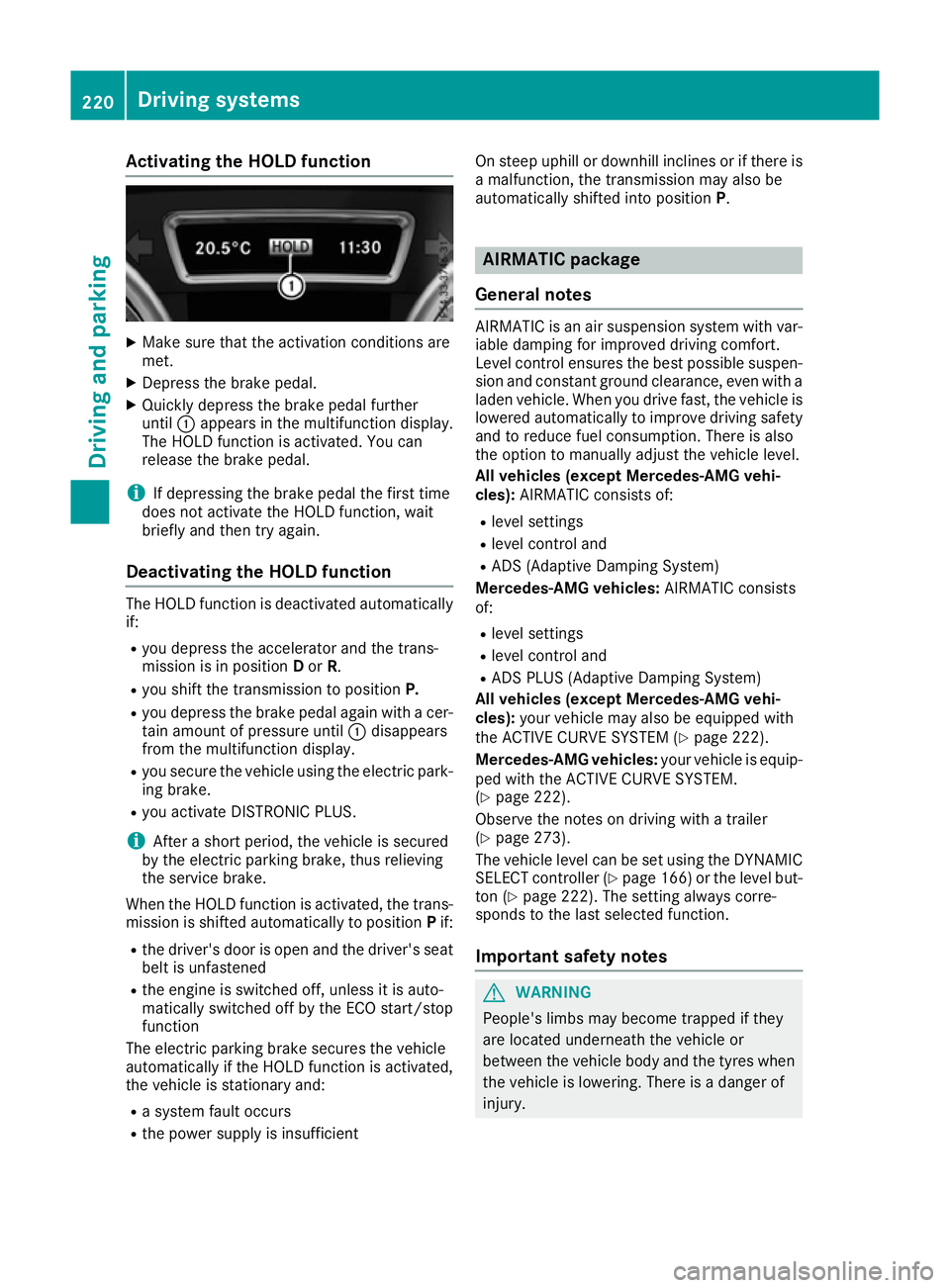
Activating the HOLD function
X
Make sure that the activation conditions are
met.
X Depress the brake pedal.
X Quickly depress the brake pedal further
until :appears in the multifunction display.
The HOLD function is activated. You can
release the brake pedal.
i If depressing the brake pedal the first time
does not activate the HOLD function, wait
briefly and then try again.
Deactivating the HOLD function The HOLD function is deactivated automatically
if:
R you depress the accelerator and the trans-
mission is in position Dor R.
R you shift the transmission to position P.
R you depress the brake pedal again with a cer-
tain amount of pressure until :disappears
from the multifunction display.
R you secure the vehicle using the electric park-
ing brake.
R you activate DISTRONIC PLUS.
i After a short period, the vehicle is secured
by the electric parking brake, thus relieving
the service brake.
When the HOLD function is activated, the trans-
mission is shifted automatically to position Pif:
R the driver's door is open and the driver's seat
belt is unfastened
R the engine is switched off, unless it is auto-
matically switched off by the ECO start/stop
function
The electric parking brake secures the vehicle
automatically if the HOLD function is activated,
the vehicle is stationary and:
R a system fault occurs
R the power supply is insufficient On steep uphill or downhill inclines or if there is
a malfunction, the transmission may also be
automatically shifted into position P. AIRMATIC package
General notes AIRMATIC is an air suspension system with var-
iable damping for improved driving comfort.
Level control ensures the best possible suspen- sion and constant ground clearance, even with a laden vehicle. When you drive fast, the vehicle is
lowered automatically to improve driving safety
and to reduce fuel consumption. There is also
the option to manually adjust the vehicle level.
All vehicles (except Mercedes-AMG vehi-
cles): AIRMATIC consists of:
R level settings
R level control and
R ADS (Adaptive Damping System)
Mercedes-AMG vehicles: AIRMATIC consists
of:
R level settings
R level control and
R ADS PLUS (Adaptive Damping System)
All vehicles (except Mercedes-AMG vehi-
cles): your vehicle may also be equipped with
the ACTIVE CURVE SYSTEM (Y page 222).
Mercedes-AMG vehicles: your vehicle is equip-
ped with the ACTIVE CURVE SYSTEM.
(Y page 222).
Observe the notes on driving with a trailer
(Y page 273).
The vehicle level can be set using the DYNAMIC
SELECT controller (Y page 166) or the level but-
ton (Y page 222). The setting always corre-
sponds to the last selected function.
Important safety notes G
WARNING
People's limbs may become trapped if they
are located underneath the vehicle or
between the vehicle body and the tyres when the vehicle is lowering. There is a danger of
injury. 220
Driving systemsDriving and pa
rking
Page 226 of 453
If this vehicle is not driven in a safe manner, it
can lead to an accident, to the vehicle over-
turning as well as serious or even fatal inju-
ries.
R In the event of an accident with the vehicle
overturning, passengers who are not wearing
their seat belt are considerably more likely to die than passengers wearing their seat belt.
You and all vehicle occupants should always
wear your seat belts.
General notes
Only select raised level if this is appropriate for
the road conditions. Otherwise, fuel consump-
tion may increase and handling may be affected.
Make changes to the vehicle level while the
vehicle is in motion. This enables the vehicle to
adjust to the new level as quickly as possible.
The vehicle level may change visibly if you park
the vehicle and the outside temperature
changes. If the temperature drops, the vehicle
level lowers; with an increase in temperature,
the vehicle level rises.
If you unlock the vehicle or open a door, the
vehicle begins to compensate for load discrep-
ancies while still parked. However, for signifi-
cant level changes, e.g. after the vehicle has
been stationary for a long period, the engine
must be running. For safety reasons, the vehicle is only lowered when the doors are closed. Low-
ering is interrupted if a door is opened; it con-
tinues once the door has been closed.
Vehicles without a trailer coupled: below a
speed of 65 km/h, you can select between the
normal and raised vehicle level. Select the nor-
mal vehicle level for normal road conditions and
the raised vehicle level when using snow chains or if the road conditions are very poor. Your
selection remains stored even if you remove the
key from the ignition lock. If you try to select
raised level at a speed above 65 km/h, the
Please
Please reduce reducespeed
speedmessage appears in the
multifunction display.
Vehicles with a trailer coupled: below a speed
of 30 km/h, you can select between the normal
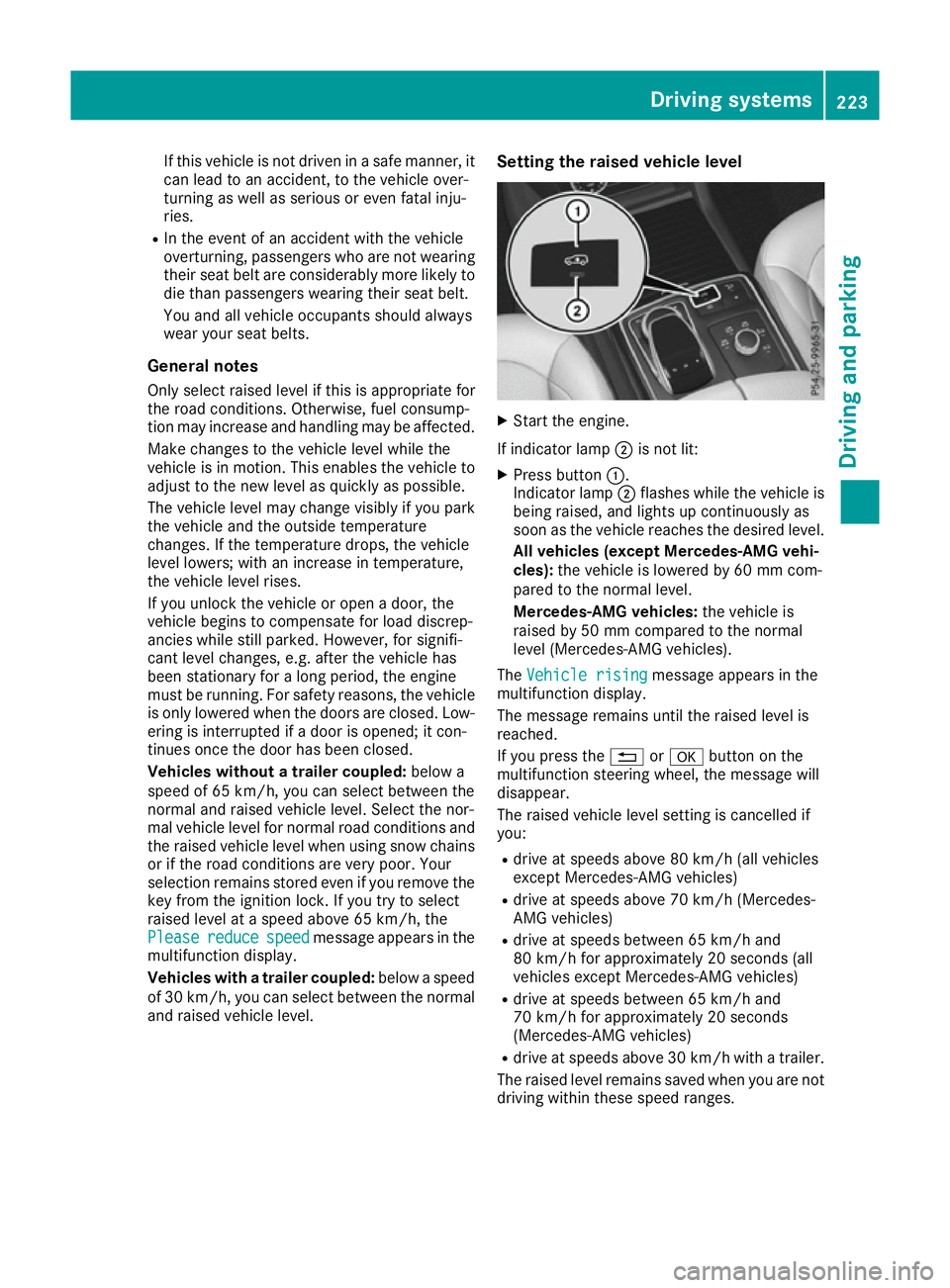
and raised vehicle level. Setting the raised vehicle level X
Start the engine.
If indicator lamp ;is not lit:
X Press button :.
Indicator lamp ;flashes while the vehicle is
being raised, and lights up continuously as
soon as the vehicle reaches the desired level.
All vehicles (except Mercedes-AMG vehi-
cles): the vehicle is lowered by 60 mm com-
pared to the normal level.
Mercedes-AMG vehicles: the vehicle is
raised by 50 mm compared to the normal
level (Mercedes-AMG vehicles).
The Vehicle rising Vehicle rising message appears in the
multifunction display.
The message remains until the raised level is
reached.
If you press the %ora button on the
multifunction steering wheel, the message will
disappear.
The raised vehicle level setting is cancelled if
you:
R drive at speeds above 80 km/h (all vehicles
except Mercedes-AMG vehicles)
R drive at speeds above 70 km/h (Mercedes-
AMG vehicles)
R drive at speeds between 65 km/h and
80 km/h for approximately 20 seconds (all
vehicles except Mercedes-AMG vehicles)
R drive at speeds between 65 km/h and
70 km/h for approximately 20 seconds
(Mercedes-AMG vehicles)
R drive at speeds above 30 km/h with a trailer.
The raised level remains saved when you are not driving within these speed ranges. Driving systems
223Driving and parking Z
Page 262 of 453
E
Level control
F Compass with angle scale
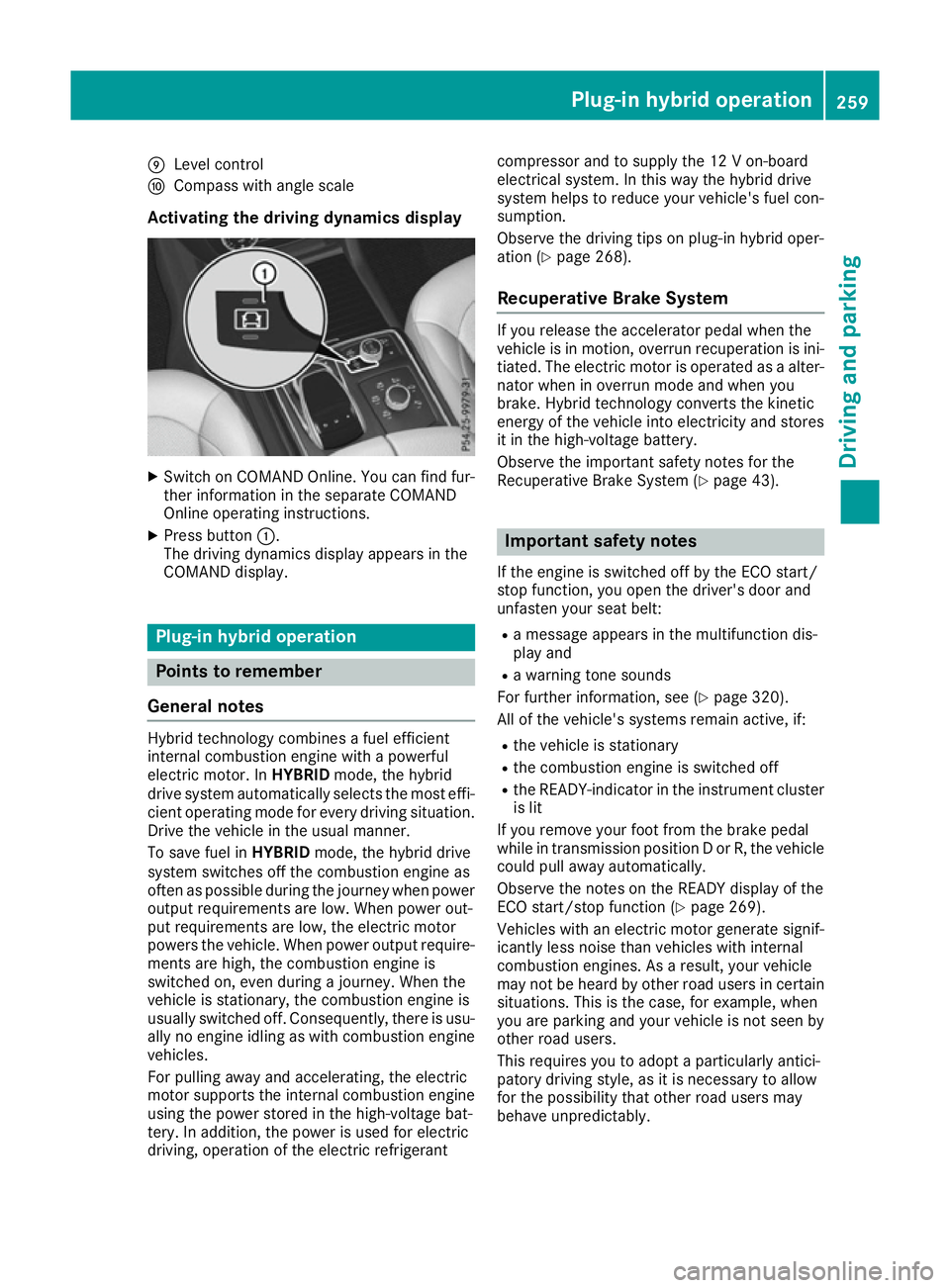
Activating the driving dynamics display X
Switch on COMAND Online. You can find fur-
ther information in the separate COMAND
Online operating instructions.
X Press button :.
The driving dynamics display appears in the
COMAND display. Plug-in hybrid operation
Points to remember
General notes Hybrid technology combines a fuel efficient
internal combustion engine with a powerful
electric motor. In HYBRIDmode, the hybrid
drive system automatically selects the most effi-
cient operating mode for every driving situation. Drive the vehicle in the usual manner.
To save fuel in HYBRIDmode, the hybrid drive
system switches off the combustion engine as
often as possible during the journey when power
output requirements are low. When power out-
put requirements are low, the electric motor
powers the vehicle. When power output require- ments are high, the combustion engine is
switched on, even during a journey. When the
vehicle is stationary, the combustion engine is
usually switched off. Consequently, there is usu-
ally no engine idling as with combustion engine
vehicles.
For pulling away and accelerating, the electric
motor supports the internal combustion engine using the power stored in the high-voltage bat-
tery. In addition, the power is used for electric
driving, operation of the electric refrigerant compressor and to supply the 12 V on-board
electrical system. In this way the hybrid drive
system helps to reduce your vehicle's fuel con-
sumption.
Observe the driving tips on plug-in hybrid oper-
ation (Y
page 268).
Recuperative Brake System If you release the accelerator pedal when the
vehicle is in motion, overrun recuperation is ini- tiated. The electric motor is operated as a alter-
nator when in overrun mode and when you
brake. Hybrid technology converts the kinetic
energy of the vehicle into electricity and stores
it in the high-voltage battery.
Observe the important safety notes for the
Recuperative Brake System (Y page 43). Important safety notes
If the engine is switched off by the ECO start/
stop function, you open the driver's door and
unfasten your seat belt: R a message appears in the multifunction dis-
play and
R a warning tone sounds
For further information, see (Y page 320).
All of the vehicle's systems remain active, if:
R the vehicle is stationary
R the combustion engine is switched off
R the READY-indicator in the instrument cluster
is lit
If you remove your foot from the brake pedal
while in transmission position D or R, the vehicle
could pull away automatically.
Observe the notes on the READY display of the
ECO start/stop function (Y page 269).
Vehicles with an electric motor generate signif-
icantly less noise than vehicles with internal
combustion engines. As a result, your vehicle
may not be heard by other road users in certain situations. This is the case, for example, when
you are parking and your vehicle is not seen by
other road users.
This requires you to adopt a particularly antici-
patory driving style, as it is necessary to allow
for the possibility that other road users may
behave unpredictably. Plug-in hybrid operation
259Driving and parking Z
Page 266 of 453
If manual gearshifting is deactivated, the auto-
matic transmission shifts:
R into the drive program that was last selected,
and
R into the driving mode that was last selected
If you change the drive program, the operating
mode that was last selected is stored for approx-
imately 60 seconds. After this time, the HYBRID
operating mode is automatically activated.
Operating the on-board computer You can display the current operating condition
of the hybrid drive system in the multifunction
display and the multimedia system in the form of
an energy flow display (Y page 263).
In the display of the multimedia system, you can
also call up a graphic display of the fuel con-
sumption and generated electricity
(Y page 266). Menus and submenus
Selecting displays in the display of the
multimedia system X
Press the Øbutton on the multimedia sys-
tem.
The vehicle menu appears.
X To select Energy flow
Energy flow: turn and press the
controller.
The energy flow is displayed.
or X To select Consumption
Consumption: turn and press the
controller.
Fuel consumption and the electric energy
generated are displayed.
X To exit the display: press the %button on
the controller.
Selecting the energy flow display in the multifunction display X
Press the =or; button on the steering
wheel to select the Trip Tripmenu.
X Use : or9 to select Energy flow
Energy flow.
X Confirm by pressing aon the steering
wheel.
The active components of the hybrid drive
system are highlighted in the energy flow dis-
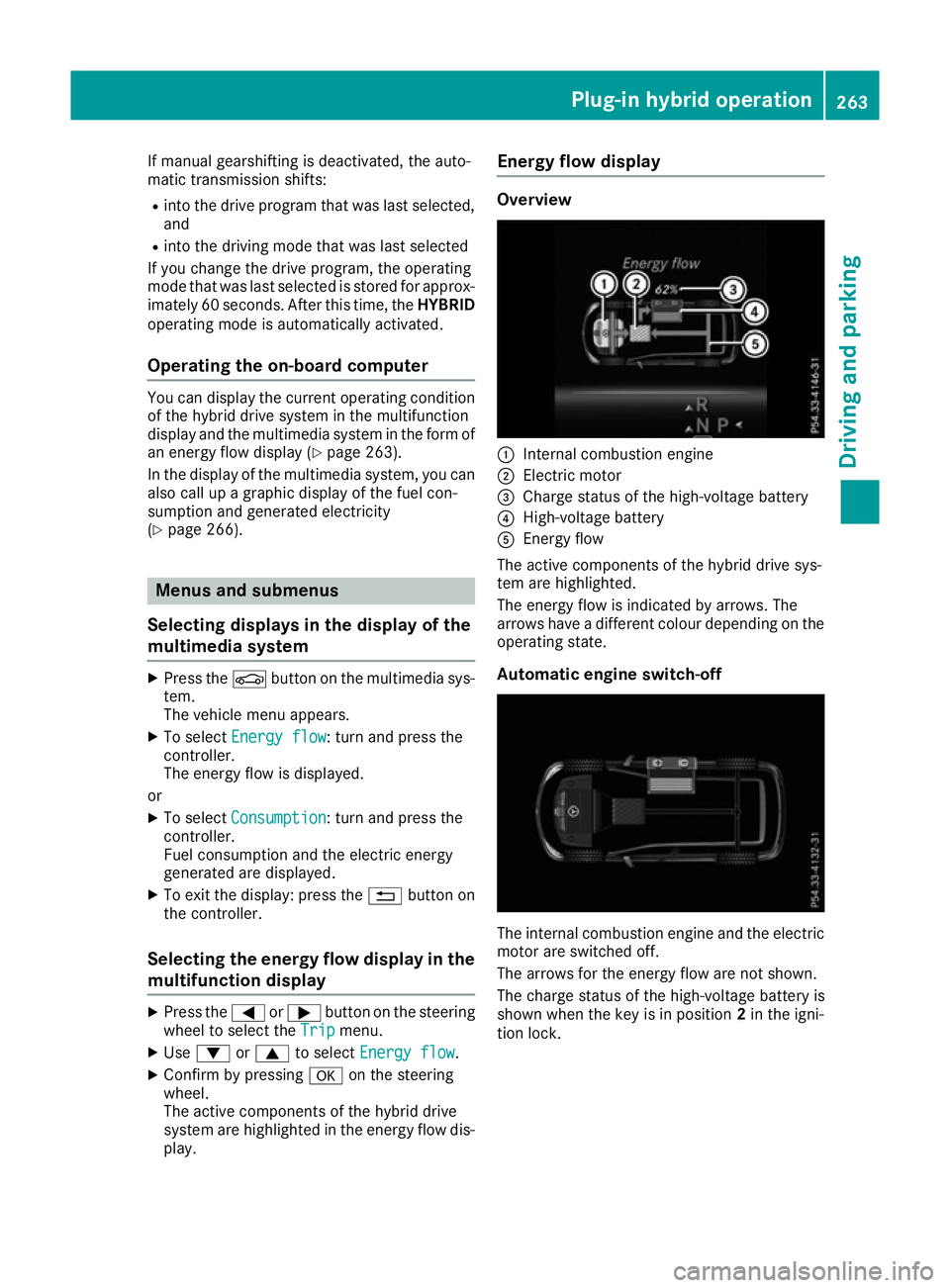
play. Energy flow display Overview
:
Internal combustion engine
; Electric motor
= Charge status of the high-voltage battery
? High-voltage battery
A Energy flow
The active components of the hybrid drive sys-
tem are highlighted.
The energy flow is indicated by arrows. The
arrows have a different colour depending on the operating state.
Automatic engine switch-off The internal combustion engine and the electric
motor are switched off.
The arrows for the energy flow are not shown.
The charge status of the high-voltage battery is
shown when the key is in position 2in the igni-
tion lock. Plug-in hybrid operation
263Driving and parking Z
Page 269 of 453
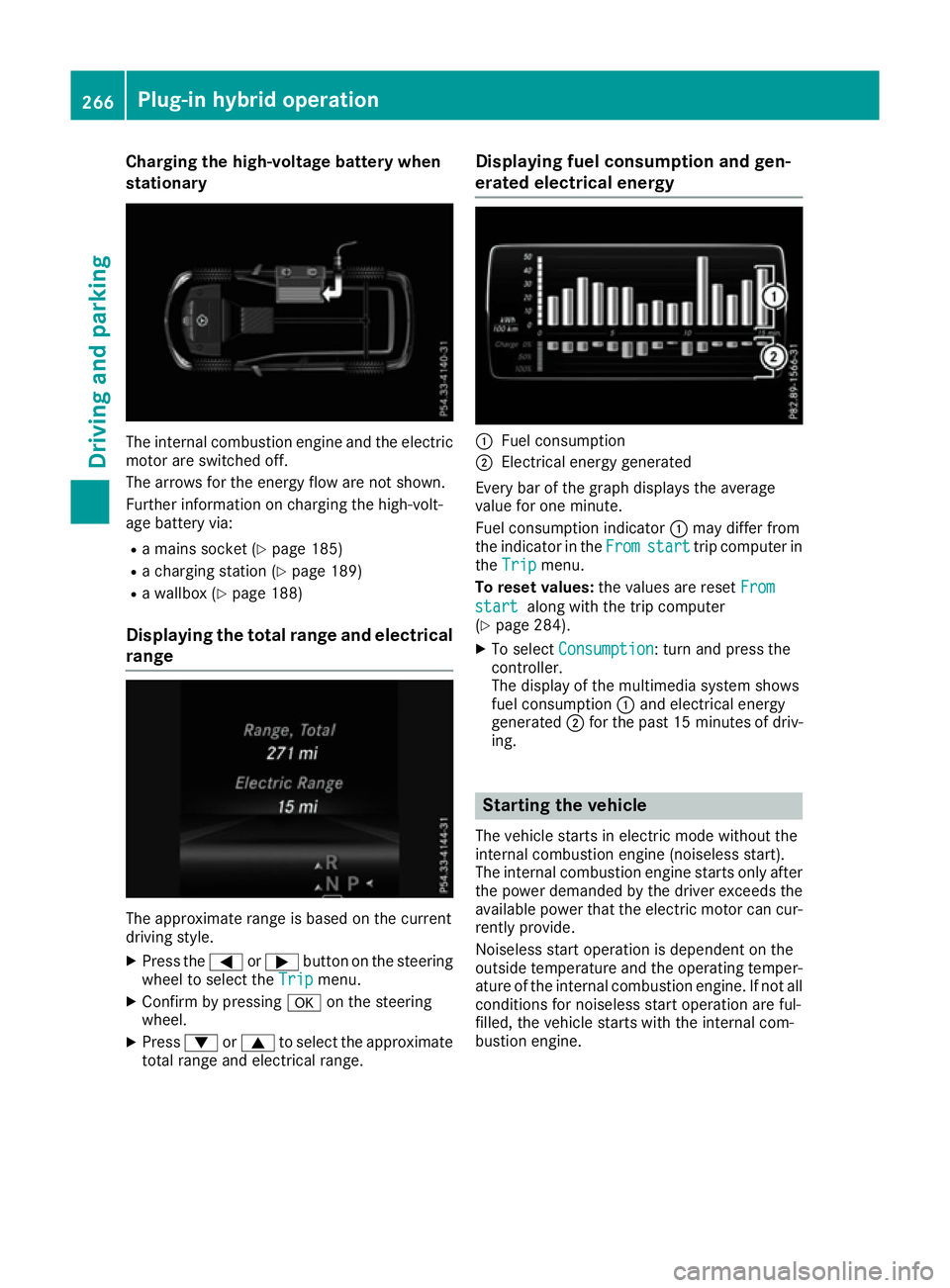
Charging the high-voltage battery when
stationary The internal combustion engine and the electric
motor are switched off.
The arrows for the energy flow are not shown.
Further information on charging the high-volt-
age battery via:
R a mains socket (Y page 185)
R a charging station (Y page 189)
R a wallbox (Y page 188)
Displaying the total range and electrical range The approximate range is based on the current
driving style.
X Press the =or; button on the steering
wheel to select the Trip
Trip menu.
X Confirm by pressing aon the steering
wheel.
X Press :or9 to select the approximate
total range and electrical range. Displaying fuel consumption and gen-
erated electrical energy :
Fuel consumption
; Electrical energy generated
Every bar of the graph displays the average
value for one minute.
Fuel consumption indicator :may differ from
the indicator in the From
From start start trip computer in
the Trip
Trip menu.
To reset values: the values are reset From
From
start start along with the trip computer
(Y page 284).
X To select Consumption Consumption: turn and press the
controller.
The display of the multimedia system shows
fuel consumption :and electrical energy
generated ;for the past 15 minute sof driv-
ing. Starting the vehicle
The vehicle starts in electric mode without the
internal combustion engine (noiseless start).
The internal combustion engine starts only after
the power demanded by the driver exceeds the
available power that the electric motor can cur- rently provide.
Noiseless start operation is dependent on the
outside temperature and the operating temper-
ature of the internal combustion engine. If not all
conditions for noiseless start operation are ful-
filled, the vehicle starts with the internal com-
bustion engine. 266
Plug-in hybrid operationDriving and parking
Page 272 of 453
Driving on the motorway
When driving on a motorway, switching off the
combustion engine has a particularly positive
effect on fuel consumption and emissions.
If the driver removes his/her foot from the
accelerator pedal in the Comfortdrive program
and a speed of 130 km/h is not exceeded, the
combustion engine is automatically switched
off.
Further information on the automatic engine
switch-off (Y page 269).
ECO start/stop function General notes
The ECO start/stop function switches the com-
bustion engine off automatically when the vehi-
cle stops moving and at speeds below
130 km/h (Y page 269).
All vehicle systems remain active, e.g. the auto-
matic climate control.
The ECO start/stop function is neither available
in the Sport drive program nor during manual
shifting.
Automatic engine switch-off
The internal combustion engine is switched off
automatically if:
R the driver removes his/her foot from the
accelerator in the Comfortdrive program and
a speed of 130 km/h is not exceeded
(Y page 269)
R the internal combustion engine has reached
its operating temperature
R the driver only slightly depresses the accel-
erator pedal in order to, for example, maintain the current speed for a limited distance
R the bonnet is closed and engaged properly
R the high-voltage battery is charged suffi-
ciently
R no malfunctions are present in the hybrid
drive system
The internal combustion engine will not be
switched off automatically, if:
R the self-diagnosis function of the engine man-
agement is active
R there is a malfunction in the hybrid drive sys-
tem R
the climate control of the vehicle requires it
R the high-voltage battery is charging
(Y page 264).
Automatic engine start
The internal combustion engine, which has been automatically switched-off, starts automatically
in certain situations, when:
R the power demand from the driver via the
accelerator pedal is greater than the electric
motor alone can provide
R the driver switches to the Sportdrive pro-
gram or to manual gearshifting
R the charge level of the high-voltage battery
has reached the lower limit
R the driver has selected the CHARGE operating
mode
Overrun mode
In overrun mode, the combustion engine is
switched off and is disconnected from the drive
train. The electric motor:
R generates low thrust, which corresponds to
the overrun mode of an active combustion
engine
R functions as an alternator and produces the
necessary energy for the auxiliary consumers
and charges the high-voltage battery
Overrun mode is available in the Comfortdrive
program at speeds below 130 km/h.
Route-based operating strategy For the route-based operating strategy, the sys-
tem factors in information about the expected
route when route guidance is active.
The information on the route is provided by the
multimedia system and includes the following:
R road categories
R speed limitations
The use of electric energy is automatically opti- mally distributed from the beginning to the end
of the journey, using information about the
route. The distribution is pre-emptive and takes
into consideration:
R the sections of the journey ahead
R the energy consumption on the whole route Plug-in hybrid operation
269Driving and parking Z
Page 273 of 453
The charge status of the high-voltage battery is
thus systematically controlled. In addition, the
control function takes into account that:
R the fuel saving through the use of electrical
energy can vary, dependent on the route (e.g.
urban, interurban or motorway)
R the use of electrical energy is held available
for electric driving, particularly for urban
routes
The vehicle thus automatically selects the opti-
mum driving mode for the respective section of
the route.
The route-based operating strategy is available
under the following conditions:
R the Individual drive program is selected
R in the Individual drive program, the ECO set-
ting is selected under Drive
R HYBRID driving mode is selected
R active route guidance is activated
R suitable map data is available
When the route-based operating strategy is
being used, the area in front of the vehicle is
shown as green in the multifunction display. Parking
X Apply the electric parking brake.
The red !indicator lamp in the instrument
cluster lights up.
X Use the DIRECT SELECT lever to shift the
automatic transmission to P.
X Switch the ignition off.
The READY indicator in the instrument cluster
goes out.
Further information on parking and switching off the internal combustion engine (Y page 191).270
Plug-in hybrid operationDriving and parking
Page 276 of 453
To avoid hazardous situations:
R make sure to check the noseweight before
each journey
R use a drawbar noseweight as close as possi-
ble to the maximum noseweight
R do not exceed the maximum permissible
noseweight
R do not use a noseweight lower than the min-
imum noseweight
When reversing the vehicle towards the trailer,
make sure there is nobody between the trailer
and the vehicle.
Couple and uncouple the trailer carefully. If you do not couple the trailer to the towing vehicle
correctly, the trailer could become detached.
Make sure that the following values are not
exceeded:
R the permissible trailer drawbar noseweight
R the permissible trailer load
R the permissible rear axle load of the towing
vehicle
R the maximum permissible gross vehicle
weight of both the towing vehicle and the
trailer
The applicable permissible values, which must
not be exceeded, can be found:
R in your vehicle documents
R on the identification plates of the trailer tow
hitch and the trailer
R on the vehicle identification plate
If the values differ, the lowest value applies.
You will find the values approved by the manu-
facturer on the vehicle identification plates and
those for the towing vehicle under "Technical
data" (Y page 447).
When towing a trailer, your vehicle's handling
characteristics will be different in comparison to
when driving without a trailer.
The vehicle/trailer combination:
R is heavier
R is restricted in its acceleration and gradient-
climbing capability
R has an increased braking distance
R is affected more by strong crosswinds
R demands more sensitive steering
R has a larger turning circle
This can impair the vehicle's handling charac-
teristics. Adapt your driving style accordingly.
Maintain a safe distance. Drive carefully. When towing a trailer, always adjust your speed
to the current road and weather conditions. Do
not exceed the maximum permissible speed for
your vehicle/trailer combination. Notes on towing a trailer
General notes Check the tyre pressures when towing a trailer.
You will find the values in the tyre pressure table in the vehicle fuel filler flap (Y page 408).
Please note that when towing a trailer, the fol-
lowing driving systems have limited availability
or are not available at all.
R PARKTRONIC (Y page 225)
R Blind Spot Assist (Y page 244)
R Active Lane Keeping Assist (Y page 250)
R Active Parking Assist (Y page 228)
On vehicles without level control, the height of
the ball coupling will alter according to the load
placed on the vehicle. If necessary, use a trailer with a height-adjustable drawbar.
You will find fitting dimensions and loads under
"Technical data" (Y page 446).
Driving tips Observe the information on ESP
®
trailer stabili-
sation (Y page 77) and on pulling away with a
trailer (Y page 161).
Select the Comfortdrive program using the
DYNAMIC SELECT controller (Y page 166).
The maximum permissible speed for vehicle/
trailer combinations depends on the type of
trailer. Before beginning the journey, check the
trailer's documents to see what the maximum
permitted speed is. Observe the legally prescri-
bed maximum speed in the relevant country.
For certain Mercedes-Benz vehicles, the maxi-
mum permissible rear axle load is increased
when towing a trailer. See the "Technical data"
section to find out whether this applies to your
vehicle (Y page 447). If you utilise any of the
added maximum rear axle load when towing a
trailer, the vehicle/trailer combination may not
exceed a maximum speed of 100 km/hf or rea-
sons concerning the operating permit. This also
applies in countries in which the permissible
maximum speed for vehicle/trailer combina-
tions is above 100 km/h. Towing a trailer
273Driving and parking Z