2015 MERCEDES-BENZ G-CLASS SUV brake pads
[x] Cancel search: brake padsPage 10 of 274

DISTRONICDisplay message ............................ 148
DISTRONIC PLUS
Activating ...................................... .119
Activation conditions ..................... 119
Cruise control lever ....................... 119
Deactivating ................................... 122
Display message ............................ 148
Displays in the multifunction dis-
play ................................................ 119
Driving tips ................................... .122
Function/notes ............................ .117
Important safety notes .................. 117
Selecting ........................................ 119
Setting the specified minimum
distance ......................................... 119
Warning lamp ................................. 169
Door control panel
Overview .......................................... 39
Doors
Automatic locking (on-board com-
puter) ............................................. 147
Automatic locking (switch) .............. .75
Central locking/unlocking
(SmartKey) ...................................... .72
Display message ............................ 148
Emergency locking ........................... 75
Emergency unlocking ....................... 75
Important safety note s.................... 75
Opening (from inside) ...................... 75
Overview .......................................... 75
Drinking and driving ......................... 112
Drive program
Automatic ...................................... 107
Display ................................... 106, 107
Manual ........................................... 107
SETUP (on-board computer) .......... 147
Driver's door
see Doors
Driving abroad
Symmetrical low beam .................... 90
Driving in mountainous terrain
Approach/departure angle ............ 112
Driving off-road
see Off-road driving
Driving safety systems
4ETS (Electronic Traction Sys-
tem) ................................................. 66 ABS (Anti-lock Braking System) ....... 65
ADAPTIVE BRAK
E............................. 68
Adaptive brake lights ....................... 66
BAS (Brake Assist System) .............. 65
Electronic brake force distribu-
tion .................................................. 68 ESP ®
(Electronic Stability Pro-
gram) ............................................... 66
Important safety information ........... 64
Overview .......................................... 64
Driving systems
Blind Spot Assist ............................ 124
Cruise control ................................ 112
Display message .................... 148, 156
DISTRONIC PLUS ........................... 117
HOLD function ............................... 126
PARKTRONIC ................................. 128
Rear view camera .......................... 131
SPEEDTRONIC ............................... 115
Variable SPEEDTRONIC ................. 115
Driving tips
Automatic transmission ................. 107
Brakes ........................................... 112
DISTRONIC PLUS ........................... 122
Downhill gradient ........................... 112
Drinking and driving ....................... 112
Driving abroad ................................. 90
Driving in winter ............................. 112
Driving on sand .............................. 112
Driving on wet roads ...................... 112
Driving over obstacles ................... 112
Exhaust check ............................... 112
Fuel ................................................ 112
General .......................................... 112
Hydroplaning ................................. 112
Icy road surfaces ........................... 112
Limited braking efficiency on sal-
ted roads ....................................... 112
New brake pads/linings ................ 112
Off-road driving .............................. 112
Off-road fording ............................. 112
Snow chains .................................. 232
Symmetrical low beam .................... 90
Tire ruts ......................................... 112
Towing a trailer .............................. 137
Wet road surface ........................... 112
DVD video
Operating (on-board computer) ..... 147
8Index
Page 104 of 274
Useful information
iThis Operator's Manual describes all
models and all standard and optional equip- ment of your vehicle available at the time of
publication of the Operator's Manual.
Country-specific differences are possible.
Please note that your vehicle may not be
equipped with all features described. This
also applies to safety-related systems and
functions.
iRead the information on qualified special-
ist workshops: ( Ypage 28).
Notes on breaking-in a new vehicle
Important safety notes
New and replaced brake pads and discs only
reach their optimum braking effect after sev-
eral hundred kilometers of driving. Compen-
sate for this by applying greater force to the
brake pedal.
The first 1000 miles (1500 km)
The more you look after the engine when it is
new, the more satisfied you will be with its
performance in the future. R You should therefore drive at varying vehi-
cle and engine speeds for the first
1,000 miles (1,500 km).
R Avoid heavy loads, e.g. driving at full throt-
tle, during this period.
R Change gear in good time, before the tach-
ometer needle is Ôof the way to the red
area of the tachometer.
R Do not manually shift to a lower gear to
brake the vehicle.
R Try to avoid depressing the accelerator
pedal beyond the point of resistance (kick-
down).
R Only select shift ranges 3,2 or 1when driv-
ing slowly, e.g. in mountainous terrain. After 1,000 miles (1,500 km), you can
increase the engine speed gradually and bring
the vehicle to full speed.
Additional breaking-in notes for AMG vehi- cles:
R Do not drive faster than 85 mph
(140 km/h) for the first 1,000 miles
(1,500 km).
R Only allow the engine to reach a maximum
engine speed of 4,500 rpm briefly.
R Change gear in good time.
R Avoid driving off-road before the differen-
tial oil change at 2,000 miles (3,000 km).
R Ideally, for the first 1,000 miles (1,500 km),
drive in program C.
iYou should also observe these breaking-
in notes if the engine or parts of the drive
train on your vehicle have been replaced.
iAlways observe the respective speed lim-
its.
AMG vehicles with self-locking rear
axle differential
Change the oil after a breaking-in period of
2,000 miles (3,000 km) to improve protection
of the differential. This oil change prolongs
the service life of the differential. Have the oil change carried out at a qualified specialist
workshop. Mercedes-Benz recommends that
you use an authorized Mercedes-Benz Center for this purpose.
Driving
Important safety notes
GWARNING
Objects in the driver's footwell can restrict thepedal travel or obstruct a depressed pedal.
The operating and road safety of the vehicle is
jeopardized. There is a risk of an accident.
Make sure that all objects in the vehicle are
stowed correctly, and that they cannot enter
102Driving
Driving and parking
Page 114 of 274
XTo release: depress the brake pedal and
keep it depressed.
The selector lever lock is released.
X Pull parking brake ;up firmly.
X Press release button :on parking
brake ;and move parking brake ;down
to the stop.
When the ignition is switched on or the
engine is running, the F(USA only)
or ! (Canada only) indicator lamp goes
out in the instrument cluster.
iIf you pull away with parking brake ;
applied, a warning tone sounds.
Parking the vehicle for a long period
If you leave the vehicle parked for longer than
four weeks, the battery may be damaged by
exhaustive discharge.
X Connect a trickle charger.
iYou can obtain information about trickle
chargers from a qualified specialist work-
shop.
If you leave the vehicle parked for longer than
six weeks, the vehicle may suffer damage as a result of lack of use.
X Visit a qualified specialist workshop and
seek advice.
Driving tips
Information in the Digital Operator's
Manual
In the Digital Operator's Manual you will find
information on the following topics: R
General driving tips
R Engine oil R
Braking
- Important safety notes
- Downhill gradients
- Heavy and light loads
- Wet roads
- Limited braking performance on salt-
treated roads
- New brake pads/linings
- Servicing the brakes
- AMG high-performance and ceramic
brakes
R Driving on wet roads
R Winter driving
- General notes
- Driving with summer tires
- Slippery road surfaces
R Off-road driving
- General notes
- Driving on sand
- Tire ruts and gravel roads
- Driving over obstacles
R Traveling uphill
- Approach/departure angle
- Maximum gradient-climbing capability
- Hilltops
- Driving downhill
Driving systems
Cruise control
Important safety notes
GWARNING
The brake pedal moves when cruise control
brakes the vehicle. A foot in the area under
the brake pedal could become trapped. The
movement of the pedal, and therefore the
vehicle's ability to brake, may be restricted by objects in the area under the brake. There is a
risk of an accident and injury.
112Driving systems
Driving an d parking
Page 117 of 274
Deactivating cruise control
There are several ways to deactivate cruise
control:X Briefly press the cruise control lever for-
wards B.
or X Brake.
or X Briefly press the cruise control lever in the
direction of arrow A.
Variable SPEEDTRONIC is selected. LIM
indicator lamp ;in the cruise control lever
lights up.
Cruise control is automatically deactivated if: R you apply the parking brake
R you are driving at less than 20 mph
(30 km/ h)
R ESP ®
intervenes or you deactivate ESP ®
R you shift the transmission to position N
while driving
iThe last speed stored is cleared when you
switch off the engine.
SPEEDTRONIC
Important safety notes
GWARNING
If you rest your foot on the brake pedal while
driving, the braking system can overheat. This increases the stopping distance and can even
cause the braking system to fail. There is a
risk of an accident.
Never use the brake pedal as a footrest. Never
depress the brake pedal and the accelerator
pedal at the same time.
!Depressing the brake pedal constantly
results in excessive and premature wear to
the brake pads.
If you fail to adapt your driving style, SPEED-
TRONIC can neither reduce the risk of acci-
dent nor override the laws of physics. SPEED- TRONIC cannot take account of road, weather
and traffic conditions. SPEEDTRONIC is only
an aid. You are responsible for the distance to
the vehicle in front, for vehicle speed, for
braking in good time and for staying in lane.
Only engage SPEEDTRONIC when the current road, weather and traffic conditions permit it
to be done safely. Drive carefully and main-
tain a suitable distance to the vehicle in front.
General notes
SPEEDTRONIC brakes automatically so that
you do not exceed the set speed. On long andsteep downhill gradients, especially if the
vehicle is laden or towing a trailer, you must
select shift range 1,2 or 3in good time. By
doing so, you will make use of the braking
effect of the engine, which relieves the load
on the brake system and prevents the brakes
from overheating and wearing too quickly. If
you need additional braking, depress the
brake pedal repeatedly rather than continu-
ously.
iThe speed indicated in the speedometer
may differ slightly from the limit speed
stored.
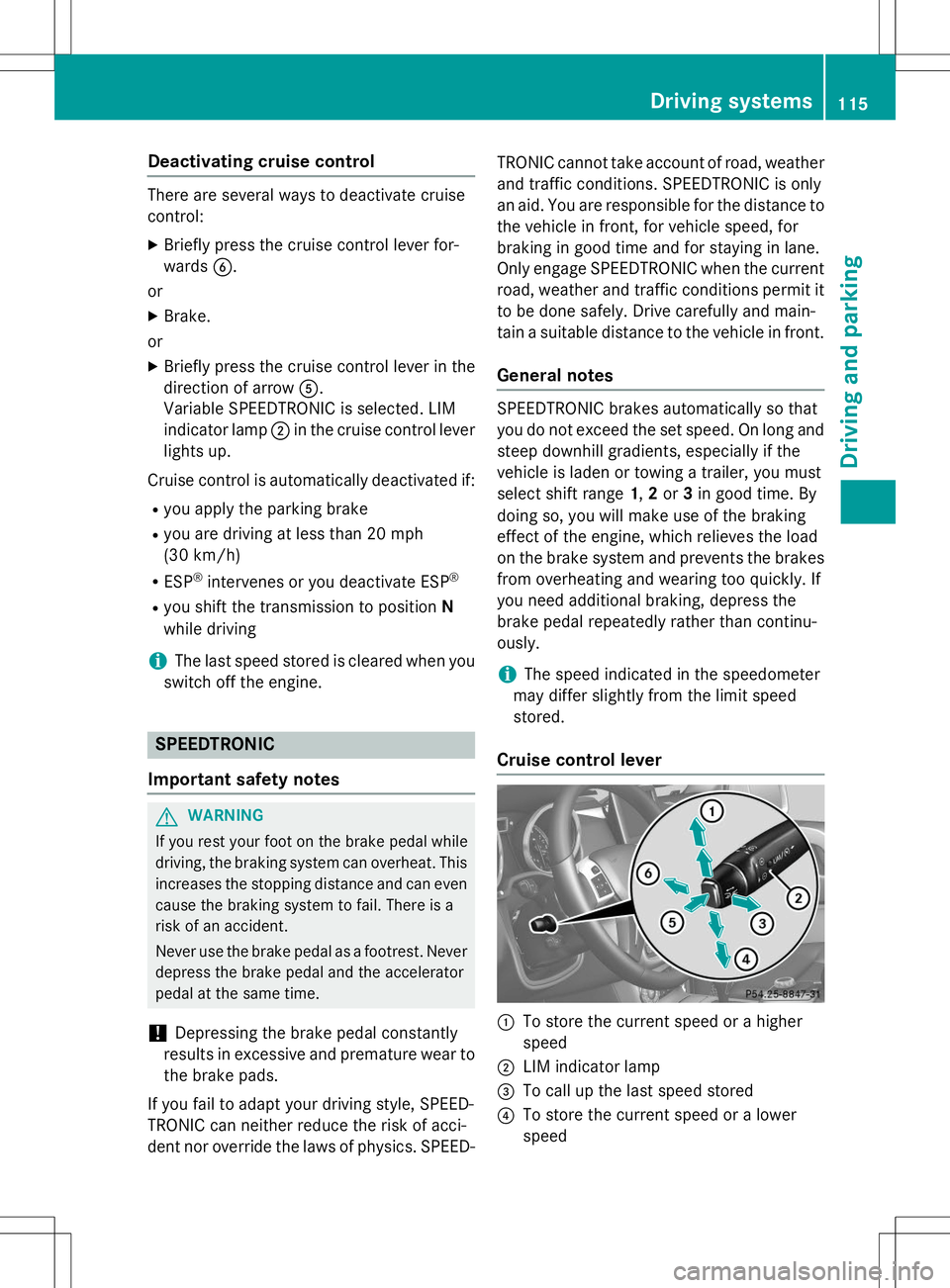
Cruise control lever
:To store the current speed or a higher
speed
;LIM indicator lamp
=To call up the last speed stored
?To store the current speed or a lower
speed
Driving systems115
Driving an d parking
Z
Page 213 of 274

XVisit a qualified specialist workshop as
soon as possible.
Care
General notes
GWARNING
Many cleaning products can be hazardous.
Some are poisonous, others are flammable.
Always follow the instructions on the particu-
lar container. Always open your vehicle's
doors or windows when cleaning the inside.
Never use fluids or solvents that are not
designed for cleaning your vehicle.
Always lock away cleaning products and keep
them out of reach of children.
!For cleaning your vehicle, do not use any
of the following:
R dry, rough or hard cloths
R abrasive cleaning agents
R solvents
R cleaning agents containing solvents
Do not scrub.
Do not touch the surfaces or protective
films with hard objects, e.g. a ring or ice
scraper. You could otherwise scratch or
damage the surfaces and protective film.
!Do not park the vehicle for an extended
period straight after cleaning it, particularly
after having cleaned the wheels with wheel
cleaner. Wheel cleaners could cause
increased corrosion of the brake discs and
brake pads/linings. For this reason, you
should drive for a few minutes after clean-
ing. Braking heats the brake discs and the
brake pads/linings, thus drying them. The
vehicle can then be parked.
HEnvironmental note
Dispose of empty packaging and cleaning
cloths in an environmentally responsible man-
ner. Regular care of your vehicle is a condition for
retaining the quality in the long term.
Use care products and cleaning agents rec-
ommended and approved by Mercedes-Benz.
Exterior care
Information in the Digital Operator's Manual
In the Digital Operator's Manual you will find
information on the following topics: R Washing by hand
R Power washers
R Cleaning the wheels
R Cleaning the paintwork
R Matte finish care
R Cleaning the windows
R Cleaning wiper blades
R Cleaning the headlamps
R Cleaning the sensors
R Cleaning the rear view camera
R Cleaning the exhaust pipes
R Cleaning chrome parts
R Cleaning the trailer tow hitch
Automatic car wash
GWARNING
Braking efficiency is reduced after washing
the vehicle. There is a risk of an accident.
After the vehicle has been washed, brake
carefully while paying attention to the traffic
conditions until full braking power is restored.
!Never clean your vehicle in a Touchless
Automatic Car Wash as these use special
cleaning agents. These cleaning agents can damage the paintwork or plastic parts.
!Make sure that the automatic car wash is
suitable for the size of the vehicle. Fold in
the exterior mirrors before the vehicle is
washed. The exterior mirrors could other-
wise be damaged.
Care211
Maintenance and care
Z