2015 MERCEDES-BENZ E-CLASS SALOON steering
[x] Cancel search: steeringPage 230 of 497
In
as peed range from 0-60km/h,Stop&Go
Pilotf ocuses on the vehicle in front, taking
into account lane markings, e.g. when follow- ing vehicle sinatraffic jam.
At speedsofm ore than 60 km/h ,Steering
Assist focuses on detected lane markings
(left and right), only focusing on the vehicle in
front if detected lane markings are not pres-
ent.
If these conditions are not present, Steering
Assist and Stop&Go Pilotc annot provide
assistance.
DISTRONIC PLUS must be active in order for
the function to be available.
Important safety notes
If you fail to adapt yourd riving style,
DISTRONIC PLUS with Steering Assist and
Stop&Go Pilotc an neither reduce the risk of
an accident nor override the lawsofp hysics.
It cannot take into account road, weather or
traffic conditions. DISTRONIC PLUS with
Steering Assist and Stop&Go Pilotiso nly an
aid.Y ou are responsible for the distance to
the vehicle in front, for vehicle speed,f or
braking in good time, and for staying in lane.
DISTRONIC PLUS with Steering Assist and
Stop&Go Pilotd oes not detect road and traf-
fic conditions and does not detect all road
users. If you are following avehicle which is
driving towards the edge of the carriageway,
yourv ehicle could come into contact with the
kerb or other road boundaries. Be particularly
aware of other road users, e.g. cyclists, that
are directly next to yourv ehicle.
Obstacles such as traffic pylons on the lane or
projecting out into the lane are not detected.
An inappropriate steering intervention, e.g.
after intentionally driving over alane marking,
can be corrected at any time if you steer
slightly in the opposite direction.
DISTRONIC PLUS with Steering Assist and
Stop&Go Pilotc annot continuousl ykeep your
vehicle in lane. In some cases, the steering
intervention is not sufficient to bring the vehi-
cle back to the lane. In such cases, you must steer the vehicle yourself to ensure that it
does not leave the lane.
The support offered by the system may be
impaired if:
R
there is poor visibility, e.g. due to insuffi-
cient illumination of the road, or due to
snow, rain, fog or spray
R there is glare, e.g. from oncoming traffic,
the sun or reflection from other vehicles
(e.g. if the road surface is wet)
R the windscree nisdirty, misted up, dam-
aged or covered, for instance by asticker,
in the vicinity of the camera
R no, or several ,unclea rlane markings are
present for one lane, e.g. in aconstruction
area
R the lane markings are worn away, dark or
covered up, e.g. by dirt or snow
R the distance to the vehicle in front is too
small and the lane markings thus cannot be
detected
R the lane markings change quickly, e.g.
lanes branch off, cross one another or
merge
R the road is narrow and winding
R there are highlyv ariable shade conditions
on the road
The system is switched to passive and no lon-
ger assists you by performing steering inter-
ventions if:
R you actively change lanes
R you switch on the turn signal
R you take yourh ands off the steering wheel
or do not steer for aprolonge dperio dof
time
i After you have finished changing lanes,
Steering Assist and Stop&Go Pilota re auto-
matically active again. Driving systems
227Driving and parking Z
Page 231 of 497
DISTRONI
CPLUSS teering Assist does not
provide assistance:
R on ver ysharp corners
R when towing atrailer
R al ossoft yrep ressure or adefective tyre
ha sb eend etecte dand displayed
Pa ya ttentio nalsotot he important safety
note sfor DISTRONI CPLUS(Ypage 218).
Th es teering interventions ar ecarried out
with alimit ed steering moment. Th esystem
requires the driver to kee phishands on the
steering whee land to steer himself.
If yo udon ot steer yourself or if yo utake your
hands off the steering whee lfor ap rolonged
period of time, the syste mwillf irst alert you
with avisual warning. Asteering whee lsym-
bo lappears in the multifunctio ndisplay .Ifyou
have still not started to steer and have not
take nholdoft he steering whee lafter five
second satthe latest, awarning tone also
sounds to remind yo utotake contro lofthe
vehicle. Steering Assist and Stop&G oPilot
switch to passive mode. DISTRONI CPLUS
remains active.
Activatin gSteering Assist and Stop&Go
Pilot
X Activate the DISTRONI CPLUSw ithS teer-
ing Assist and Stop&G oPilot functio nusing
the on-board compute r(Ypage 288).
The DTR+:
DTR+: steering steering assistant
assistant On
Onmes-
sage appear sinthe multifunctio ndisplay.
Steering Assist and Stop&G oPilot are
active.
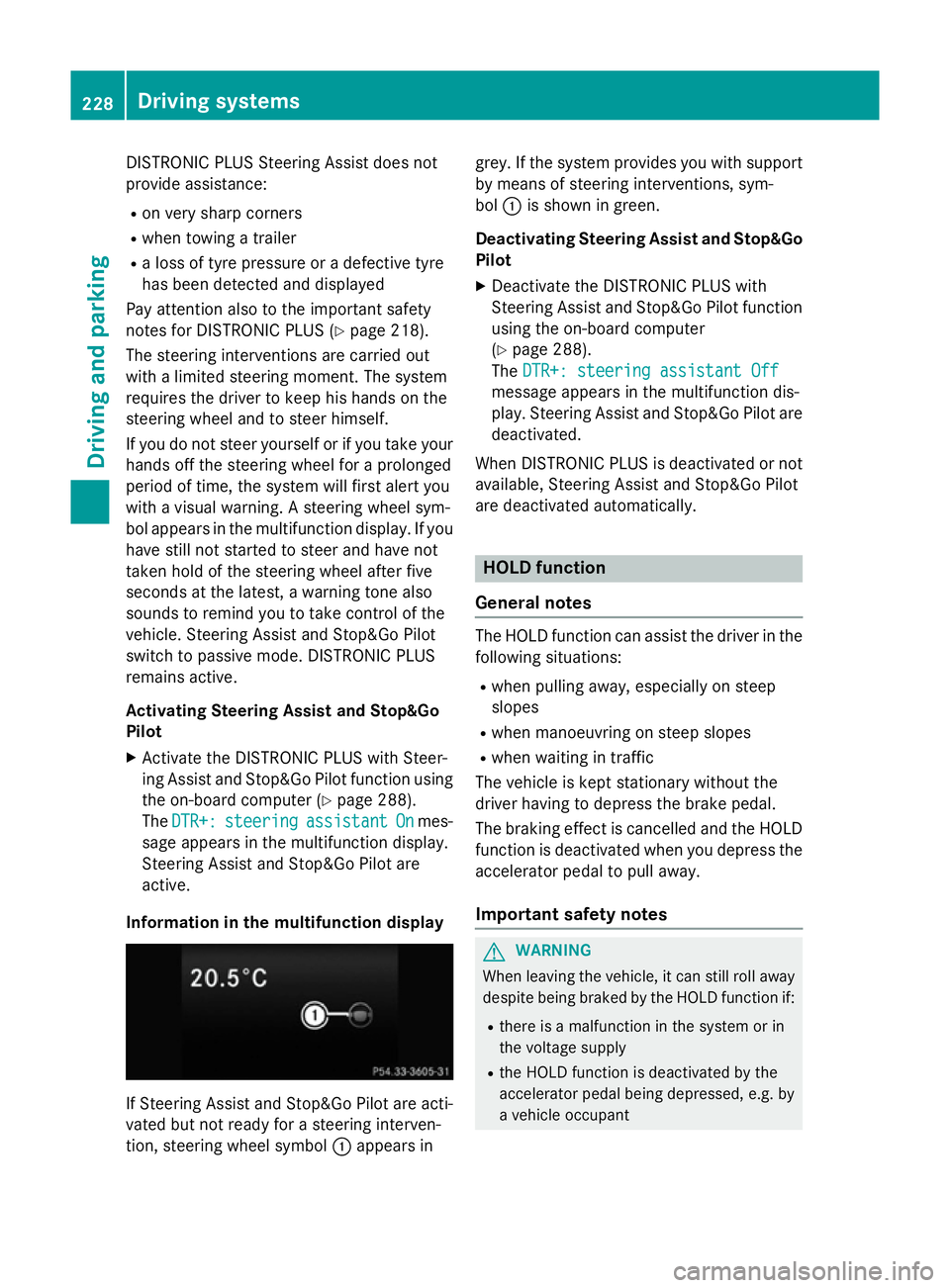
Informatio ninthe multifunction display If Steering Assist and Stop&G
oPilot area cti-
vated bu tnot ready for asteering interven-
tion, steering whee lsym bol :appear sin grey. If the syste
mprovide syou with support
by means of steering interventions, sym-
bol :is shown in green.
Deactivatin gSteering Assist and Stop&Go
Pilot
X Deactivate the DISTRONI CPLUSw ith
Steering Assist and Stop&G oPilot function
using the on-board computer
(Y page 288).
The DTR+: steering assistant Off DTR+: steering assistant Off
message appear sinthe multifunctio ndis-
play .Steering Assist and Stop&G oPilot are
deactivated.
When DISTRONI CPLUSisd eactivated or not
available, Steering Assist and Stop&G oPilot
ar ed eactivated automatically. HOL
Dfunction
General notes Th
eH OLD functio ncan assist the driver in the
following situations:
R when pulling away ,especially on steep
slopes
R when manoeuvring on steep slopes
R when waiting in traffic
Th ev ehicl eisk epts tationar ywithout the
driver having to depress the brake pedal.
Th eb raking effect is cancelle dand the HOLD
functio nisd eactivated when yo udepress the
accelerator peda ltopulla way.
Important safety notes G
WARNING
When leaving the vehicle, it can still rol laway
despite being braked by the HOLD functio nif:
R there is amalfunctio ninthe syste morin
the voltag esupply
R the HOLD functio nisd eactivated by the
accelerator peda lbeing depressed, e.g .by
av ehicl eoccupant 228
Driving systemsDriving an
dparking
Page 233 of 497
On vehicles with
amanual transmission, you
will also hear ahorn at regulari ntervals if the
HOLD function is activated and you:
R switch the engine off, open the driver's
door and take off your seat belt
The sounding of the horn alerts you to the fact
that the vehicle has been parked while the
HOLD function is still activated. If you attempt to lock the vehicle, the tone becomes louder.
The vehicle is not locked until the HOLD func- tion is deactivated.
i If the engine has been switched off, it
cannot be started againu ntil the HOLD
function has been deactivated. RACE START
Important safety notes i
Observe the safety notes for the SPORT
handling mode (Y page 85).
Only activate RACE START on dedicated race
circuits.
RACE START enables optimum acceleration
from astanding start. The precondition for
this is asuitableh igh-grip road surface.
i RACE START is only available in AMG vehi-
cles.
Activation conditions You can activate RACE START if:
R the doors are closed
R the engine is running and it has reached an
operating temperature of approximately
80 †. This is the case when the engine oil
temperature in the multifunction display
stops flashing.
R SPORT handling mode is activated
(Y page 85).
R the steering wheel is in the straight-ahead
position R
the vehicle is stationary and the brake
pedal is depressed (left foot)
R the transmission is in position D
Activating RACE START X
Depress the brake pedal with your left foot
and keep it depressed.
X Turn the drive program selector clockwise
(Y page 195) until the RSlamp lights up.
The RACE START Confirm: Paddle UP RACE START Confirm: Paddle UP
Cancel: Paddle DOWN
Cancel: Paddle DOWN message appears
in the multifunction display.
i If the activation conditions are no longer
fulfilled, RACE START is cancelled. The
RACE RACE START
START cancelled
cancelled message appears
in the multifunction display.
X To cancel: pull the left steering wheel shift
paddle( Ypage 195).
or
X To confirm: pull the right steering wheel
shift paddle( Ypage 195).
The RACE START available Depress RACE START available Depress
accelerator
accelerator message appears in the mul-
tifunction display.
i If you do not depress the accelerator
pedal fully within two seconds, RACE
START is cancelled. The RACE RACESTART
START not
not
possible
possible See
SeeOwner's
Owner's Manual
Manual message
appears in the multifunction display.
X Fully depress the accelerator pedal.
The engine speed rises to approximately
3,500 rpm.
The RACE START Release brake to RACE START Release brake to
start
start message appears in the multifunc-
tion display.
i If you do not release the brake pedal
within five seconds, RACE START is cancel-
led. The RACE
RACESTART
START cancelled
cancelled message
appears in the multifunction display.
X Take your foot off the brake, but keep the
accelerator pedal depressed.
The vehicle pullsa wayatmaximum accel-
eration. 230
Driving systemsDriving and parking
Page 242 of 497

Problems with PARKTRONIC
Problem
Possible causes/consequences and
M
MSolutions Only the red segments
in the PARKTRONIC
warning displaysa
re lit.
You also hear awarning
tone for approximately
two seconds.
PARKTRONIC is then
deactivated and the
indicator lamp on the
PARKTRONIC button
lights up. PARKTRONIC has malfunctioned and has switched off.
X If problems persist, have PARKTRONIC checked at aqualified
specialist workshop. Only the red segments
in the PARKTRONIC
warning displaysa
re lit.
PARKTRONIC is then
deactivated. The PARKTRONIC sensors are dirty or there is interference.
X Cleant he PARKTRONIC sensors (Y page 389).
X Switch the ignition back on. The problem may be caused by an external source of radio or
ultrasound waves.
X See if PARKTRONIC functions in adifferent location. Active Parking Assist
General notes Active Parking Assist is an electronic parking
aid with ultrasound. It measures the road on
both sides of the vehicle. Aparking symbol
indicates asuitable parking space. Active
steering intervention and brake application
can assist you during parking. You may also
use PARKTRONIC (Y page 235).
i The active braking application is only
available on vehicles with automatic trans- mission.
Important safety notes Active Parking Assist is only an aid. It is not a
substitute for your attention to the immediate surroundings. The responsibility for safe
manoeuvring and parking remains with you.
Make sure that no persons, animals or
objectsa re in the manoeuvring range. When PARKTRONIC is switched off, Active
Parking Assist is also unavailable. G
WARNING
While parking or pulling out of aparking
space, the vehicle swings out and can drive
onto areas of the oncomingl ane. This could
cause you to collide with other road users.
There is arisk of an accident.
Pay attention to other road users. Stop the
vehicle if necessary or cancel the Active Park- ing Assist parking procedure.
! If unavoidable, you should drive over
obstacles such as kerbs slowly and not at a
sharp angle. Otherwise, you may damage
the wheels or tyres.
Active Parking Assist may also display spaces not suitable for parking, e.g.:
R parking or stopping prohibitions
R in front of drivewaysore ntrances and exits
R unsuitable surfaces Driving systems
239Driving and parking Z
Page 246 of 497
cel the parking procedure with Active Park-
ing Assist.
R You can also preselect transmissio nposi-
tion D.The vehicle redirects and doe snot
drive as far into the parking space. Should a gea rbec hanged too early ,the parking pro-
cedure will be cancelled. Asensible parking
position can no longer be achieved from
this position.
Exiting aparkin gspace In order that Active Parking Assist can sup-
por tyou when exiting the parking space:
R the border of the parking space mus tbe
hig he nough at the front and the rear. A
kerb stone is too small ,for example.
R the border of the parking space mus tnot be
too wide, as the position of the vehicle must
not excee danangle of 45° to the starting
position as it is manoeuvred into the park-
ing space.
R am anoeuvring distance of at leas t1.0 m
mus tbea vailable.
i Vehicles with automatic transmission:
If PARKTRONIC detects obstacles, Active
Parking Assist brakes automaticall ywhilst
the vehicle exits the parking space. You are responsibl efor braking in goo dtime.
Active Parking Assist can only assis tyou with
exiting aparking space if yo uhavep arked the
vehicle paralle ltothe direction of trave lusing
Active Parking Assist.
X Start the engine.
X Releas ethe parking brake.
X Switch on the turn signal in the direction
yo ua re pulling away.
X Vehicles with manual transmission:
engage firs torreverse gear.
Vehicles with automati ctransmission:
shift the transmissio ntoposition Dor R.
The Star tPark Assist? Yes: OK No:
Star tPark Assist? Yes: OK No:
% messag eappears in the multifunction
display. X
To cance lthe procedure: press the%
button on the multifunction steering wheel or pull away.
or
X To exi taparkin gspac eusing Active
Parking Assist: press theabutton on
the multifunction steering wheel.
The Park Assist active Accelerate Park Assist active Accelerate
and and brake
brake Observe
Observe surroundings
surroundings mes-
sage appears in the multifunction display.
X Releas ethe multifunction steering wheel.
X Pull away ,being ready to brake at al ltimes.
Do not excee damaximum speed of
approximately 10 km/h when exiting a
parking space. Otherwise, Active Parking
Assist will be cancelled.
X Vehicles with manual transmission:
stop ,att he latest when PARKTRONIC
sounds the continuou swarning tone.
X Vehicles with manual transmission:
engage firs tgearorr everse gea rwhent he
vehicle is stationary, depending on the
messag eorrequirement.
Vehicles with automati ctransmission:
shift the transmission to position Dor R
when the vehicle is stationary, depending
on the messag eorrequirement.
Active Parking Assist immediately steers in
the othe rdirection. The Park Assist
Park Assist
active Accelerate and brake active Accelerate and brake
Observe Observe surroundings
surroundings messageappears
in the multifunction display.
i You will achieve the bes
tresults by wait-
ing for the steering procedure to complete before pulling away.
If yo ureverse afte ractivation, the steering
wheel is move dtothe straight-ahead posi-
tion.
X Drive forward sand reverse as prompte dby
the PARKTRONIC warning displays, several
time sifn ecessary.
X Vehicles with manual transmission:
stop as soo nasPARKTRONIC sounds the
continuou swarning tone, if not before. Drivin
gsystems
243Drivingand parking Z
Page 247 of 497
Once you have exited the parking space com-
pletely,t he steering wheel is moved to the
straight-ahead position. You hear atone and
the Park Assist switched off
Park Assist switched off message
appears in the multifunction display. You will
then have to steer and merge into traffic on
your own. PARKTRONIC is still available. You
can take over the steering before the vehicle has exited the parking space completely. This
is useful,f or example when you recognise
that it is already possibletop ull out of the
parking space.
Cancelling Active Parking Assist You can cancel Active Parking Assist at any
time.
X Stop the movement of the multifunction
steering wheel or steer yourself.
Active Parking Assist will be cancelled at
once. The Park Assist cancelled
Park Assist cancelled mes-
sage appears in the multifunction display
and you hear atone.
or X Press the PARKTRONIC button on the
centre console (Y page 237).
PARKTRONIC is switched off and Active
Parking Assist is immediately cancelled.
The Park Assist cancelled
Park Assist cancelled message
appears in the multifunction displaya nd
you hear atone.
Active Parking Assist is cancelled automati-
cally if:
R the transmission is shifted too early
R transmission position Pis selected
R parking using Active Parking Assist is no
longer possible
R you are driving faster than 10 km/h
R aw heel spins and ESP ®
intervenes or fails.
In such cases the ÷warning lamp lights
up in the instrument cluster.
Aw arning tone sounds. The parking symbol
disappears and the multifunction display
shows the Park Assist cancelled Park Assist cancelled mes-
sage. When Active Parking Assist is cancelled, you
must steer and brake againy
ourself.
Vehiclesw ith automatic transmission: if a
system malfunction occurs, the vehicle is
braked to astandstill. To drive on, depress the
accelerator pedal again.
Towing atrailer For vehicles with
atrailer tow hitch, the min-
imum length for parking spaces is slightly
increased.
If you have attached atrailer to your vehicle,
you should not use Active Parking Assist.
Once the electrical connection is established between your vehicle and the trailer, Active
Parking Assist is no longer available.
PARKTRONIC is deactivated for the rear area. Reversing camera
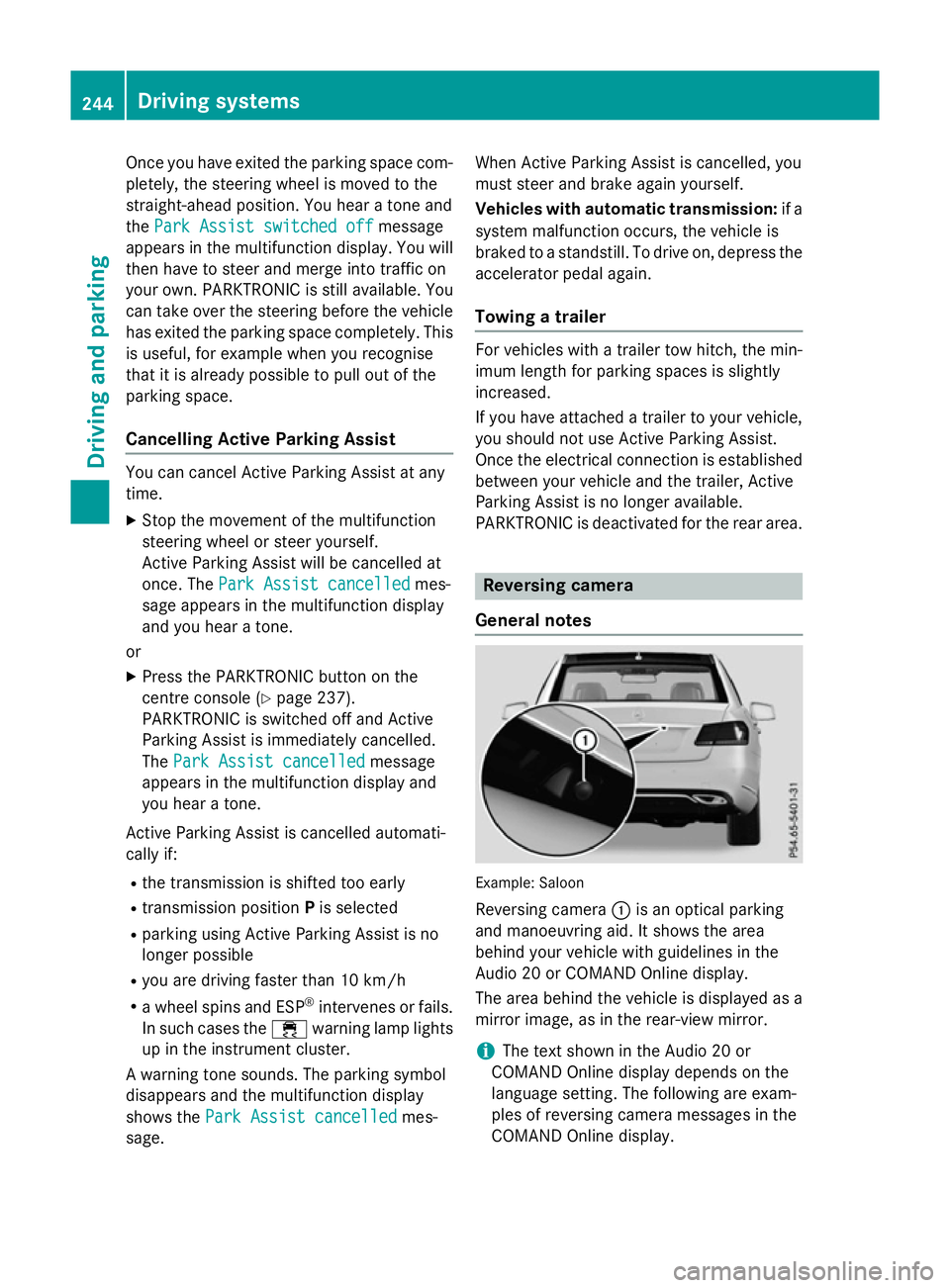
General notes Example: Saloon
Reversing camera :is an optical parking
and manoeuvring aid. It shows the area
behind your vehicle with guidelines in the
Audio 20 or COMAND Online display.
The area behind the vehicle is displayed as a
mirror image, as in the rear-view mirror.
i The text shown in the Audio 20 or
COMAND Online displayd epends on the
language setting. The following are exam-
ples of reversing camera messages in the
COMAND Online display. 244
Driving systemsDriving and parking
Page 249 of 497
Display
sintheAudio 20/COMAND
Online display The reversin
gcamera may sho wadistorted
vie wofo bstacles or sho wthemi ncorrectly or
no tata ll. Obstacles are no tshown by the
reversin gcamera in th efollowing locations:
R ver yclose to th erearb umper
R under th erearb umper
R in th eareai mmediately abov ethe tailgate
handle
! Objects no
tatgroun dlevel may appear to
be further away than they actually are ,e.g.:
R theb umper of aparke dvehicle
R thed rawbar of atrailer
R theb all couplin gofatrailer to whitch
R ther ears ection of an HGV
R as lante dpost
Use th eguidelines only fo rorientation.
Approach objects no further than th ebot-
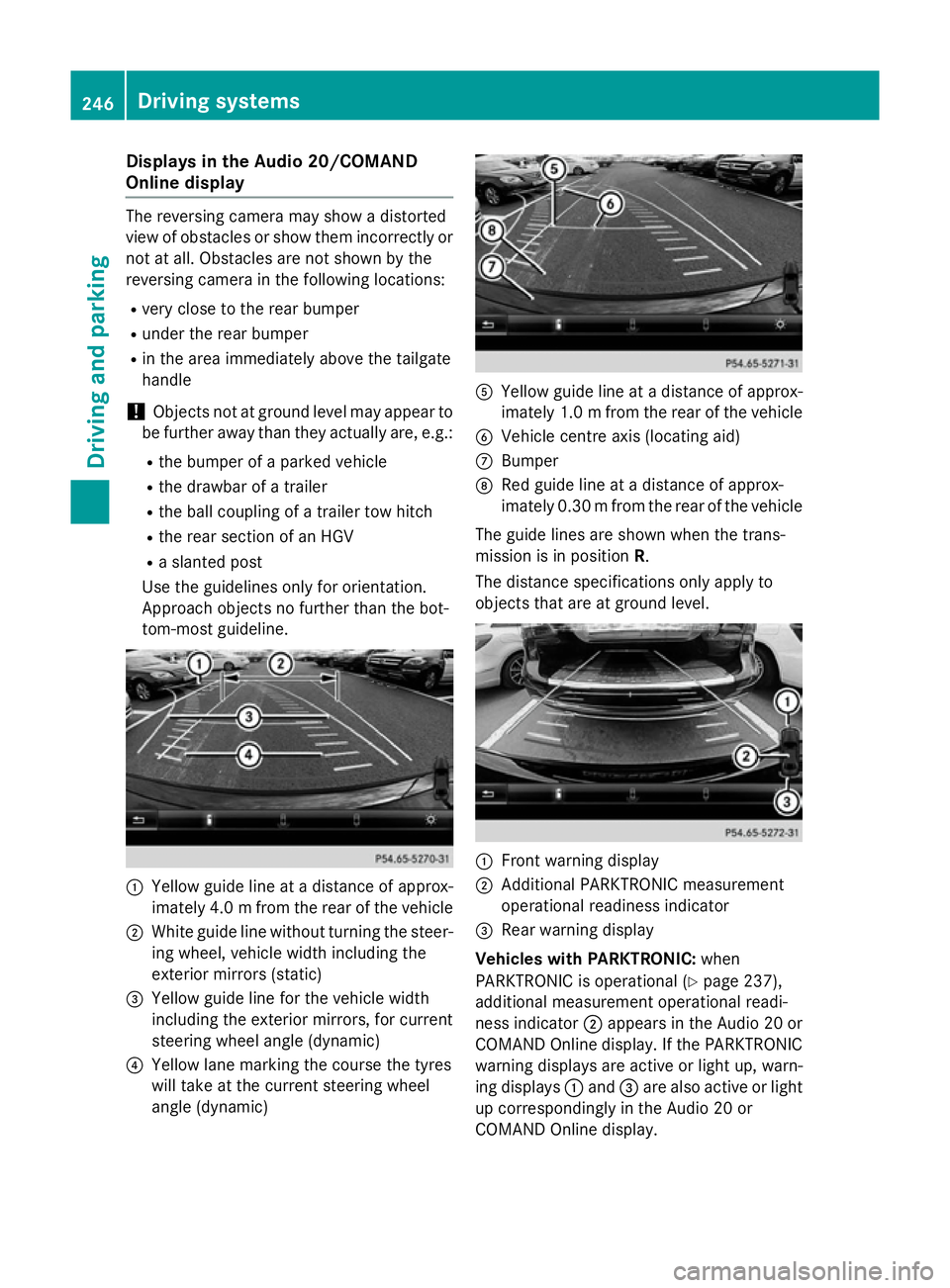
tom-most guideline. :
Yello wguidelineatad istanceofapprox-
imately 4. 0mfrom the rear of the vehicle
; White guide line without turning the steer-
ing wheel, vehicl ewidth including the
exterior mirrors (static)
= Yellow guide line for the vehicl ewidth
including the exterior mirrors, for current
steering whee langle (dynamic)
? Yellow lane marking the course the tyres
willt ake at the current steering wheel
angle (dynamic) A
Yellow guide line at adistance of approx-
imatel y1.0mf rom the rear of the vehicle
B Vehicle centre axis (locating aid)
C Bumper
D Red guide line at adistance of approx-
imatel y0.30 mfrom the rear of the vehicle
The guide lines are show nwhen the trans-
mission is in position R.
The distance specifications only apply to
objects that are at ground level. :
Front warning display
; Additional PARKTRONIC measurement
operational readiness indicator
= Rearw arning display
Vehicles with PARKTRONIC: when
PARKTRONIC is operational (Y page237),
additiona lmeasurement operational readi-
ness indicator ;appears in the Audi o20or
COMAND Online display.Ift he PARKTRONIC
warning displaysa re active or light up, warn-
ing displays :and =are alsoa ctive or light
up correspondingly in the Audi o20or
COMAND Online display. 246
Driving systemsDriving and parking
Page 250 of 497
"Reverse parking" function
Reversing straight into
aparking space
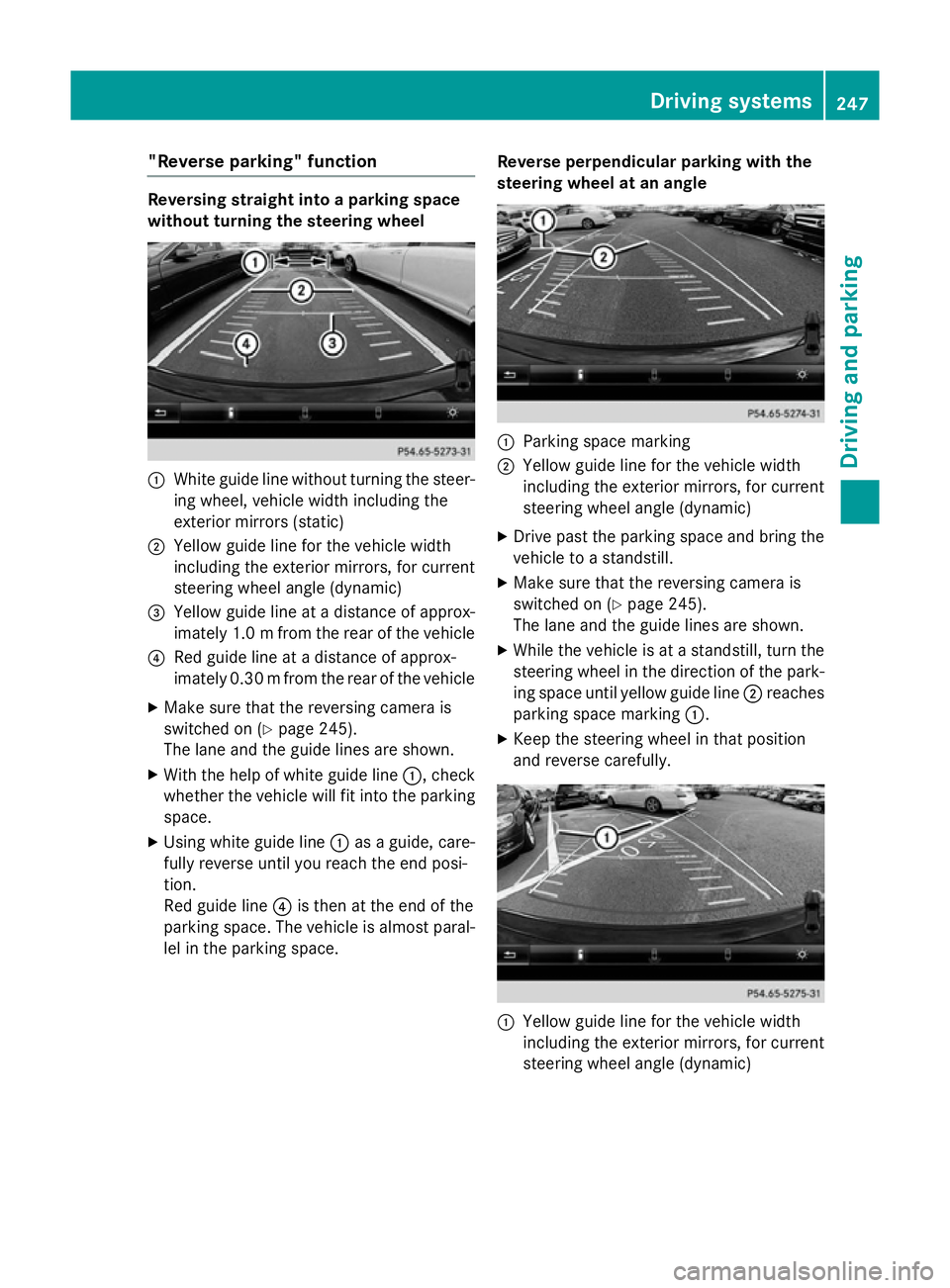
without turning the steering wheel :
White guide line without turning the steer-
ing wheel, vehicle width including the
exterior mirrors (static)
; Yellowg uide line for the vehicle width
including the exterior mirrors, for current
steering wheel angle (dynamic)
= Yellowg uide line at adistance of approx-
imately 1.0 mfrom the rear of the vehicle
? Red guide line at adistance of approx-
imatel y0.30 mfrom the rear of the vehicle
X Make sure that the reversing camera is
switched on (Y page245).
The lane and the guide lines are shown.
X With the help of white guide line :,check
whethe rthe vehicl ewillf it into the parking
space.
X Using white guide line :asag uide, care-
full yreverse until you reach the end posi-
tion.
Red guide line ?is then at the end of the
parking space. The vehicl eisalmost paral-
lel in the parking space. Reverse perpendicular parking with the
steering wheel at an angle :
Parking space marking
; Yellow guide line for the vehicl ewidth
including the exterior mirrors, for current
steering whee langle (dynamic)
X Drive pastt he parking space and bring the
vehicl etoas tandstill.
X Make sure that the reversing camera is
switched on (Y page245).
The lane and the guide lines are shown.
X Whil ethe vehicl eisatas tandstill, turn the
steering whee linthe direction of the park-
ing space until yellow guide line ;reaches
parking space marking :.
X Keep the steering whee linthat position
and reverse carefully. :
Yellow guide line for the vehicl ewidth
including the exterior mirrors, for current
steering whee langle (dynamic) Driving systems
247Driving and parking Z