2015 MERCEDES-BENZ E-CLASS ESTATE ESP
[x] Cancel search: ESPPage 226 of 497
When DISTRONIC PLUS is activated, the
transmission is shifted automatically to posi- tion Pif:
R the driver's door is open and the driver's
seat belt is unfastened
R the engine is switched off, unless it is auto-
matically switched off by the ECO start/
stop function
R as ystem fault occurs
R the power supply is insufficient
Setting aspeed X
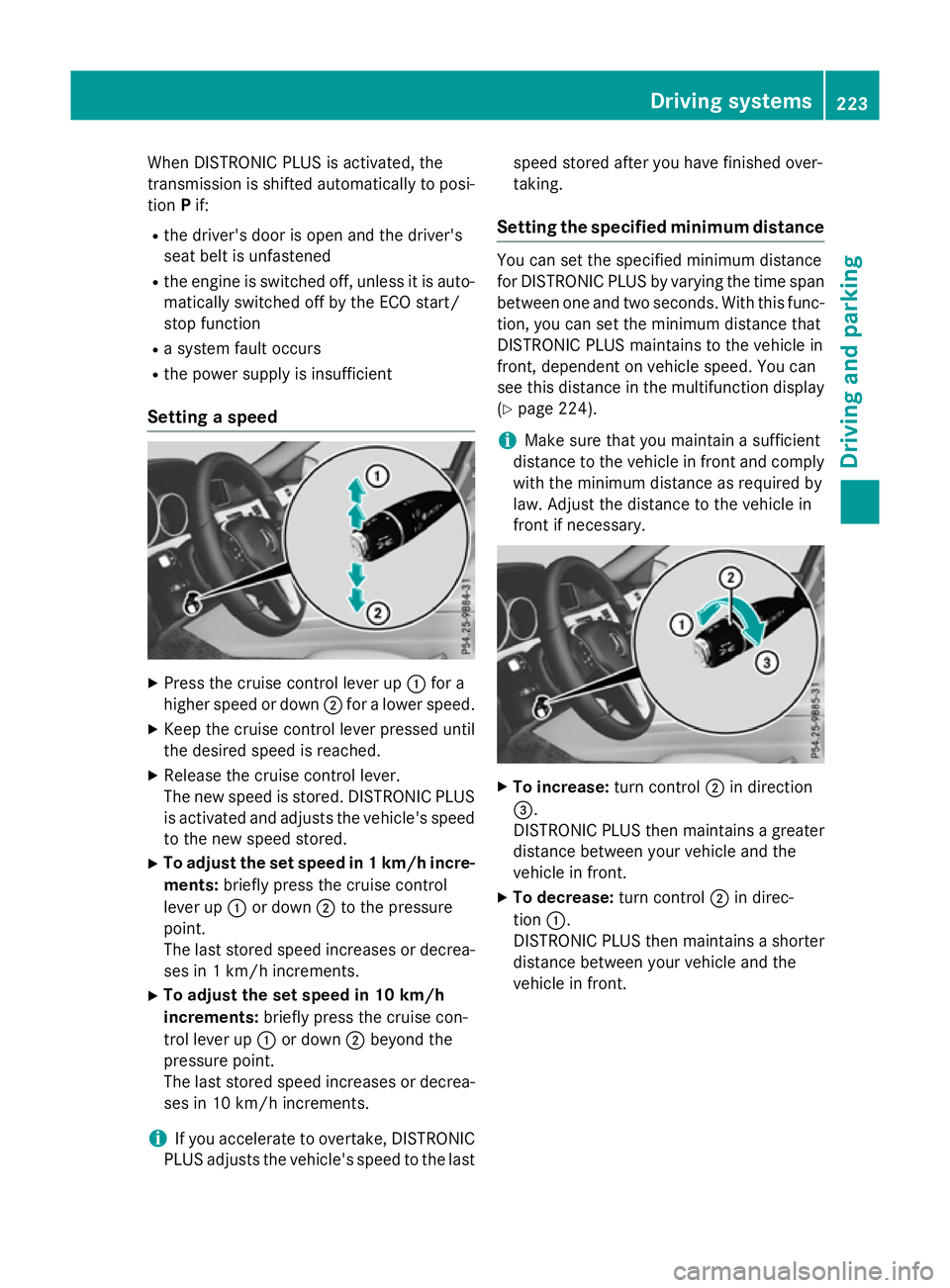
Press the cruise control lever up :for a
higher speed or down ;for alower speed.
X Keep the cruise control lever pressed until
the desired speed is reached.
X Release the cruise control lever.
The new speed is stored. DISTRONIC PLUS
is activated and adjusts the vehicle's speed to the new speed stored.
X To adjust the set speed in 1km/h incre-
ments: briefly press the cruise control
lever up :or down ;to the pressure
point.
The last stored speed increases or decrea- ses in 1km/ hincrements.
X To adjust the set speed in 10 km/h
increments: briefly press the cruise con-
trol lever up :or down ;beyond the
pressure point.
The last stored speed increases or decrea- ses in 10 km/hi ncrements.
i If you accelerat
etoovertake, DISTRONIC
PLUS adjust sthe vehicle's speed to the last speed stored after you have finished over-
taking.
Setting th especified minimum distance You can set the specified minimum distance
for DISTRONIC PLUS by varyin gthe tim espan
between one and two seconds .With this func-
tion ,you can set the minimum distanc ethat
DISTRONIC PLUS maintains to the vehicle in
front ,dependent on vehicle speed. You can
see this distanc einthe multifunction display
(Y page 224).
i Make sure that you maintain
asufficient
distanc etothe vehicle in front and comply
with the minimum distanc easrequire dby
law. Adjust the distanc etothe vehicle in
front if necessary. X
To increase: turnc ontrol ;in direction
=.
DISTRONIC PLUS the nmaintains agreater
distanc ebetween your vehicle and the
vehicle in front.
X To decrease: turnc ontrol ;in direc-
tion :.
DISTRONIC PLUS the nmaintains ashorter
distanc ebetween your vehicle and the
vehicle in front. Driving systems
223Driving and parking Z
Page 227 of 497
Displaying DISTRONI
CPLUS in the
speedometer Example: vehicles featurin
gautomatic transmis-
sio nw ithaD IREC TS ELEC Tlever
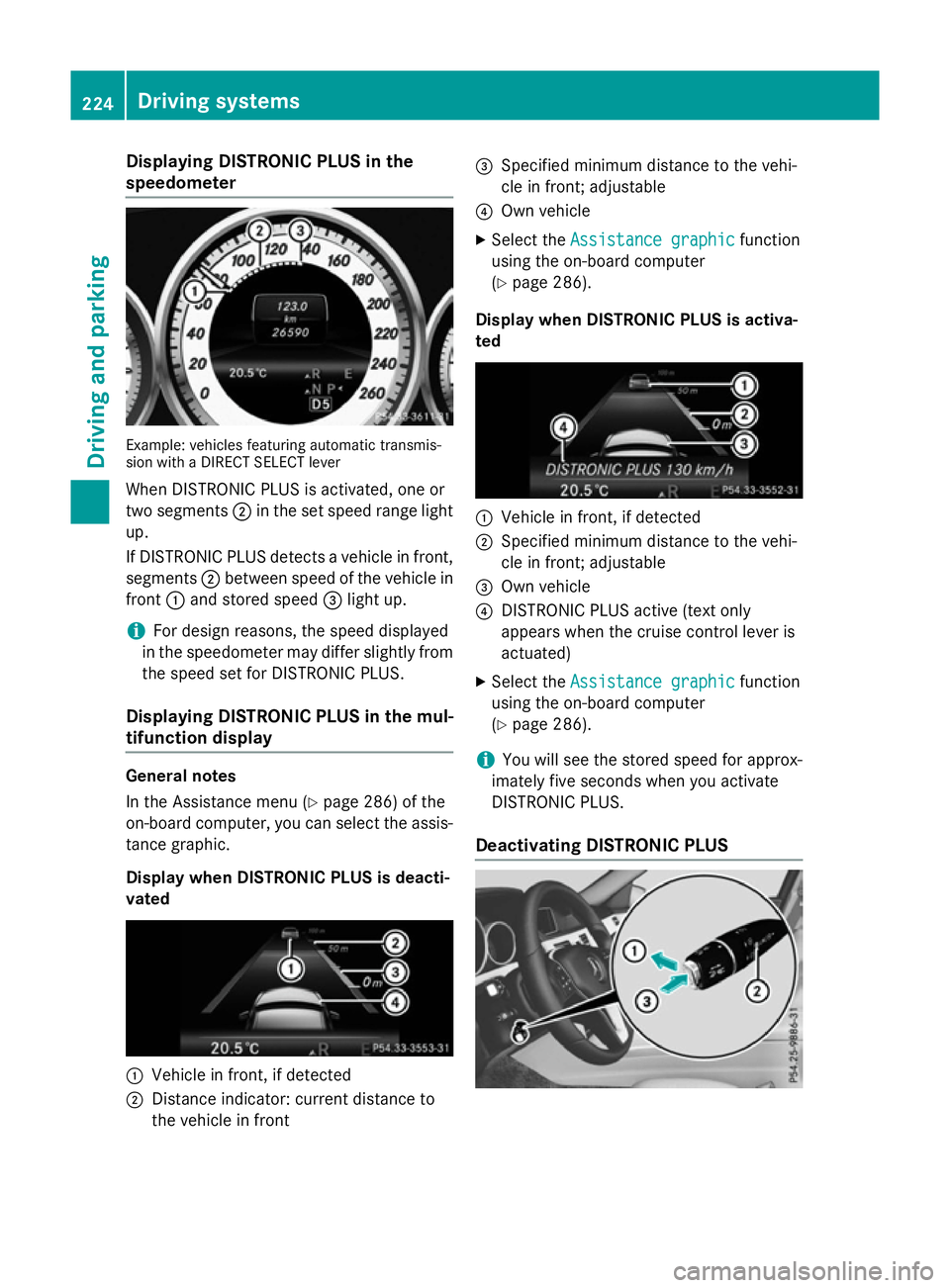
Whe nDISTR ONIC PLU Sisactivated, on eor
tw os egments ;in th eset speed range light
up.
If DISTRONIC PLU Sdetects avehicle in front,
segments ;between speed of th evehicle in
front :and stored speed =ligh tup.
i Fo
rd esign reasons, th espeed displayed
in th espeedometer may diffe rslightly from
th es peed set fo rDISTR ONIC PLUS.
Displaying DISTRONI CPLUS in th emul-
tifunction display General notes
In th
eAssistanc emenu( Ypage 286) of the
on-boar dcom puter, you can selec tthe assis-
tanc egraphic.
Display when DISTRONI CPLUS is deacti-
vated :
Vehicle in front, if detected
; Distanc eind icator :curren tdistanc eto
th ev ehicle in front =
Specified minimum distanc etot he vehi-
cl einf ront;adjustable
? Own vehicle
X Selec tthe Assistanc egraphic
Assistanc egraphic function
usin gthe on-boar dcom puter
(Y page 286).
Display when DISTRONI CPLUS is activa-
ted :
Vehicle in front, if detected
; Specified minimum distanc etot he vehi-
cl einf ront;adjustable
= Own vehicle
? DISTRONIC PLU Sactive (tex tonly
appears when th ecruise contro llever is
actuated)
X Selec tthe Assistanc egraphic
Assistanc egraphic function
usin gthe on-boar dcom puter
(Y page 286).
i You will see th
estore dspeed fo rapprox-
imately fiv eseconds when you activate
DISTRONIC PLUS.
Deactivating DISTRONI CPLUS 224
Driving syste
msDriving andparking
Page 228 of 497
There are several ways to deactivate
DISTRONIC PLUS:
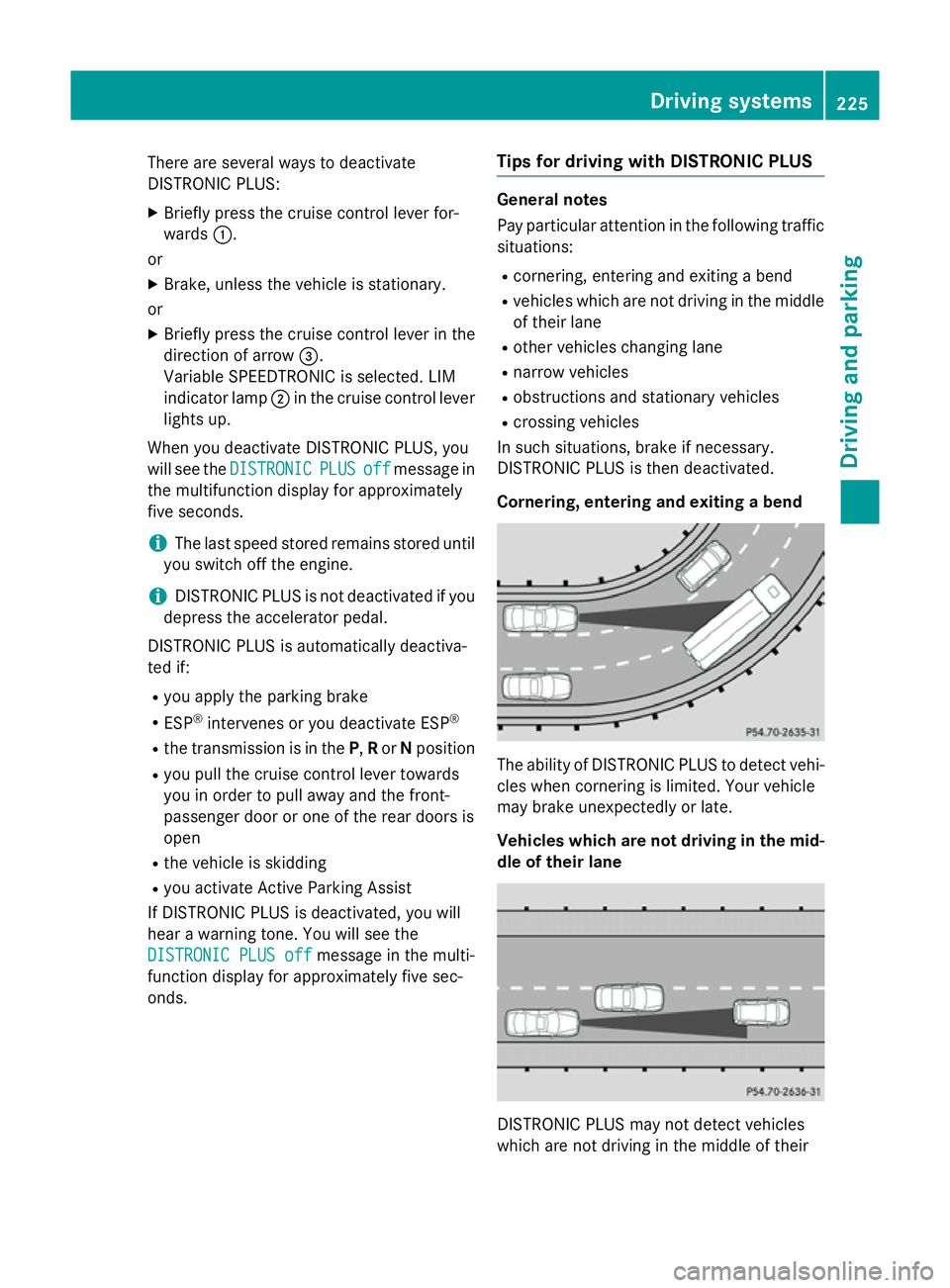
X Briefly press the cruise control lever for-
wards :.
or
X Brake, unless the vehicle is stationary.
or X Briefly press the cruise control lever in the
direction of arrow =.
Variable SPEEDTRONIC is selected. LIM
indicator lamp ;in the cruise control lever
lights up.
When you deactivate DISTRONIC PLUS, you
will see the DISTRONIC
DISTRONIC PLUS PLUSoff
offmessage in
the multifunction display for approximately
five seconds.
i The last speed stored remains stored until
you switch off the engine.
i DISTRONIC PLUS is not deactivated if you
depress the accelerator pedal.
DISTRONIC PLUS is automatically deactiva-
ted if: R you apply the parking brake
R ESP ®
intervenes or you deactivate ESP ®
R the transmission is in the P,Ror Nposition
R you pull the cruise control lever towards
you in order to pull away and the front-
passenger door or one of the rear doors is
open
R the vehicle is skidding
R you activat eActive Parking Assist
If DISTRONIC PLUS is deactivated, you will
hear awarning tone. You will see the
DISTRONIC PLUS off DISTRONIC PLUS off message in the multi-
function display for approximately five sec-
onds. Tips for driving with DISTRONIC PLUS General notes
Pay particular attention in the following traffic
situations:
R cornering, entering and exitin gabend
R vehicles which are not driving in the middle
of their lane
R other vehicles changin glane
R narrow vehicles
R obstructions and stationary vehicles
R crossin gvehicles
In such situations, brake if necessary.
DISTRONIC PLUS is then deactivated.
Cornering, entering and exiting abend The ability of DISTRONIC PLUS to detect vehi-
cles when cornering is limited. Your vehicle
may brake unexpectedly or late.
Vehicles which are not driving in the mid- dle of their lane DISTRONIC PLUS may not detect vehicles
which are not driving in the middle of their Driving systems
225Driving and parking Z
Page 230 of 497
In
as peed range from 0-60km/h,Stop&Go
Pilotf ocuses on the vehicle in front, taking
into account lane markings, e.g. when follow- ing vehicle sinatraffic jam.
At speedsofm ore than 60 km/h ,Steering
Assist focuses on detected lane markings
(left and right), only focusing on the vehicle in
front if detected lane markings are not pres-
ent.
If these conditions are not present, Steering
Assist and Stop&Go Pilotc annot provide
assistance.
DISTRONIC PLUS must be active in order for
the function to be available.
Important safety notes
If you fail to adapt yourd riving style,
DISTRONIC PLUS with Steering Assist and
Stop&Go Pilotc an neither reduce the risk of
an accident nor override the lawsofp hysics.
It cannot take into account road, weather or
traffic conditions. DISTRONIC PLUS with
Steering Assist and Stop&Go Pilotiso nly an
aid.Y ou are responsible for the distance to
the vehicle in front, for vehicle speed,f or
braking in good time, and for staying in lane.
DISTRONIC PLUS with Steering Assist and
Stop&Go Pilotd oes not detect road and traf-
fic conditions and does not detect all road
users. If you are following avehicle which is
driving towards the edge of the carriageway,
yourv ehicle could come into contact with the
kerb or other road boundaries. Be particularly
aware of other road users, e.g. cyclists, that
are directly next to yourv ehicle.
Obstacles such as traffic pylons on the lane or
projecting out into the lane are not detected.
An inappropriate steering intervention, e.g.
after intentionally driving over alane marking,
can be corrected at any time if you steer
slightly in the opposite direction.
DISTRONIC PLUS with Steering Assist and
Stop&Go Pilotc annot continuousl ykeep your
vehicle in lane. In some cases, the steering
intervention is not sufficient to bring the vehi-
cle back to the lane. In such cases, you must steer the vehicle yourself to ensure that it
does not leave the lane.
The support offered by the system may be
impaired if:
R
there is poor visibility, e.g. due to insuffi-
cient illumination of the road, or due to
snow, rain, fog or spray
R there is glare, e.g. from oncoming traffic,
the sun or reflection from other vehicles
(e.g. if the road surface is wet)
R the windscree nisdirty, misted up, dam-
aged or covered, for instance by asticker,
in the vicinity of the camera
R no, or several ,unclea rlane markings are
present for one lane, e.g. in aconstruction
area
R the lane markings are worn away, dark or
covered up, e.g. by dirt or snow
R the distance to the vehicle in front is too
small and the lane markings thus cannot be
detected
R the lane markings change quickly, e.g.
lanes branch off, cross one another or
merge
R the road is narrow and winding
R there are highlyv ariable shade conditions
on the road
The system is switched to passive and no lon-
ger assists you by performing steering inter-
ventions if:
R you actively change lanes
R you switch on the turn signal
R you take yourh ands off the steering wheel
or do not steer for aprolonge dperio dof
time
i After you have finished changing lanes,
Steering Assist and Stop&Go Pilota re auto-
matically active again. Driving systems
227Driving and parking Z
Page 231 of 497
DISTRONI
CPLUSS teering Assist does not
provide assistance:
R on ver ysharp corners
R when towing atrailer
R al ossoft yrep ressure or adefective tyre
ha sb eend etecte dand displayed
Pa ya ttentio nalsotot he important safety
note sfor DISTRONI CPLUS(Ypage 218).
Th es teering interventions ar ecarried out
with alimit ed steering moment. Th esystem
requires the driver to kee phishands on the
steering whee land to steer himself.
If yo udon ot steer yourself or if yo utake your
hands off the steering whee lfor ap rolonged
period of time, the syste mwillf irst alert you
with avisual warning. Asteering whee lsym-
bo lappears in the multifunctio ndisplay .Ifyou
have still not started to steer and have not
take nholdoft he steering whee lafter five
second satthe latest, awarning tone also
sounds to remind yo utotake contro lofthe
vehicle. Steering Assist and Stop&G oPilot
switch to passive mode. DISTRONI CPLUS
remains active.
Activatin gSteering Assist and Stop&Go
Pilot
X Activate the DISTRONI CPLUSw ithS teer-
ing Assist and Stop&G oPilot functio nusing
the on-board compute r(Ypage 288).
The DTR+:
DTR+: steering steering assistant
assistant On
Onmes-
sage appear sinthe multifunctio ndisplay.
Steering Assist and Stop&G oPilot are
active.
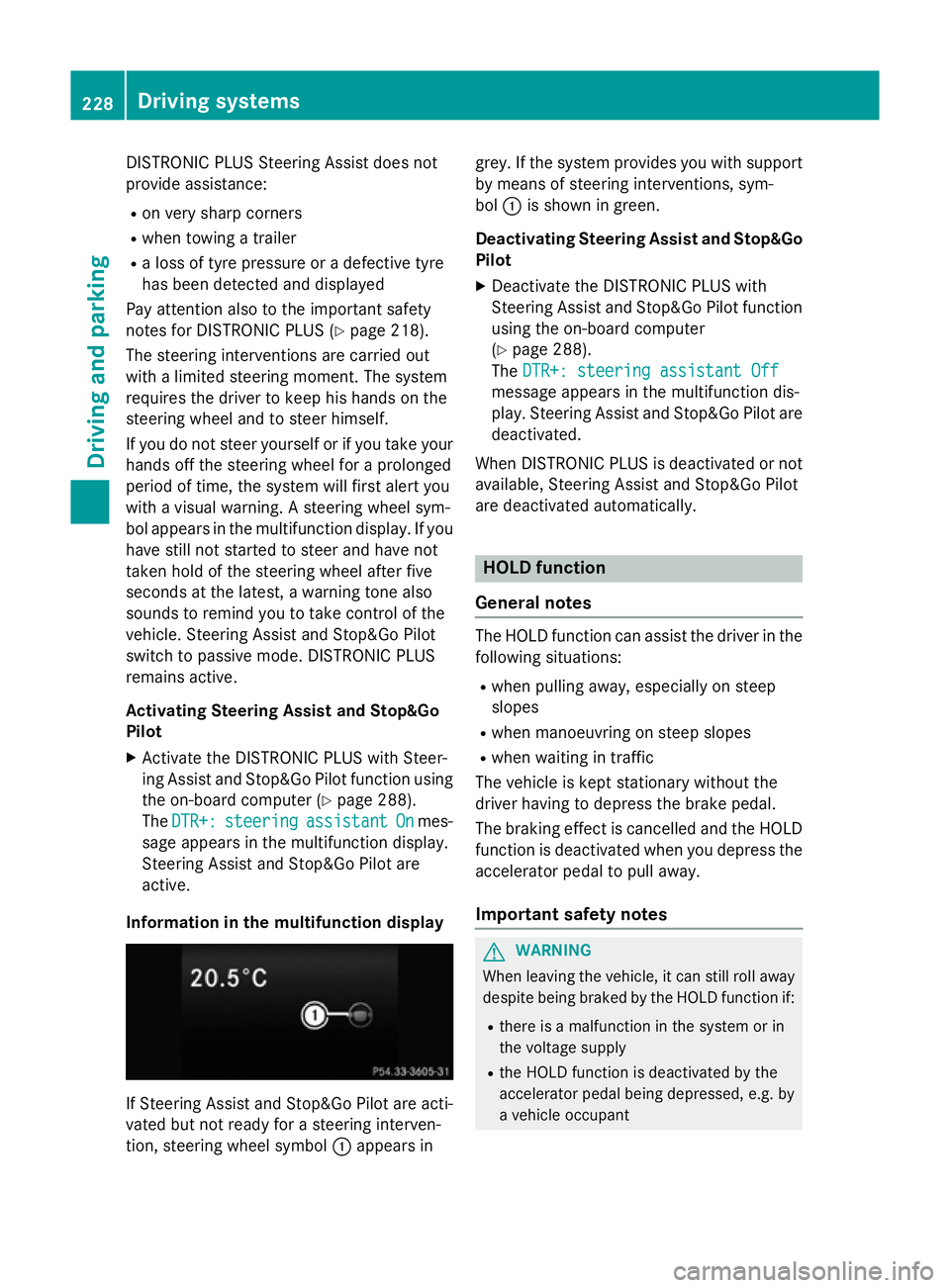
Informatio ninthe multifunction display If Steering Assist and Stop&G
oPilot area cti-
vated bu tnot ready for asteering interven-
tion, steering whee lsym bol :appear sin grey. If the syste
mprovide syou with support
by means of steering interventions, sym-
bol :is shown in green.
Deactivatin gSteering Assist and Stop&Go
Pilot
X Deactivate the DISTRONI CPLUSw ith
Steering Assist and Stop&G oPilot function
using the on-board computer
(Y page 288).
The DTR+: steering assistant Off DTR+: steering assistant Off
message appear sinthe multifunctio ndis-
play .Steering Assist and Stop&G oPilot are
deactivated.
When DISTRONI CPLUSisd eactivated or not
available, Steering Assist and Stop&G oPilot
ar ed eactivated automatically. HOL
Dfunction
General notes Th
eH OLD functio ncan assist the driver in the
following situations:
R when pulling away ,especially on steep
slopes
R when manoeuvring on steep slopes
R when waiting in traffic
Th ev ehicl eisk epts tationar ywithout the
driver having to depress the brake pedal.
Th eb raking effect is cancelle dand the HOLD
functio nisd eactivated when yo udepress the
accelerator peda ltopulla way.
Important safety notes G
WARNING
When leaving the vehicle, it can still rol laway
despite being braked by the HOLD functio nif:
R there is amalfunctio ninthe syste morin
the voltag esupply
R the HOLD functio nisd eactivated by the
accelerator peda lbeing depressed, e.g .by
av ehicl eoccupant 228
Driving systemsDriving an
dparking
Page 238 of 497
25 mm
.The leve lchange also occurs when
stationary.
If you drive faster than 170 km/h, the rear
axle leve lisset to amiddle level. Thi sincrea-
ses road safety and reduces airr esistance. If
you then drive slower than 150 km/h, the
leve loft he rear axle is again adjusted to cor-
respond to the selected suspension mode.
Load compensation
The vehicle can compensate differences in
the vehicle leve lbyraising or lowering the
rear axle .Thisist he case ,for example, when
people get out of the vehicle or whe nlug gage
is removed.
Al oadc ompensation occurs if:
R ad oor, the boot lid or the tailgate is opened
R the parked vehicle is unlocked
The engine needs to be running for larger level
changes. 4MATIC (permanent all-whee
ldrive)
If you fai ltoadapt you rdriving style, 4MATIC
can neither reduce the risk of an accident nor override the laws of physics. 4MATIC cannot
take account of road ,weather and traffic con-
ditions. 4MATIC is only an aid. You are
responsibl efor the distance to the vehicle in
front, for vehicle speed, for braking in good
time, and for staying in lane.
If ad rive wheel spins due to insufficient grip:
R whe npulling away,o nly depress the accel-
erato rpedal as far as is necessary.
R accelerate les swhend riving.
! Never tow the vehicle with one axle
raised. Thi smay damage the transfer case.
Damag eofthis sort is not covered by the
Mercedes-Benz implied warranty. All
wheels must remain eithe ronthe ground or
be fully raised. Observe the instructions for towing the vehicle with allw heels in full
contact with the ground.
i In wintry driving conditions, the maximum
effect of 4MATIC can only be achieved if you use winter tyres
(M+S tyres), with snow
chains if necessary.
4MATIC ensures that allf our wheels are per-
manently driven. Together with ESP ®
,it
improves the traction of you rvehicle when-
ever adrive wheel spins due to insufficient
grip. PARKTRONIC
Important safety notes PARKTRONI
Cisanelectronic parking aidw ith
ultrasoni csensors .Itmonitors the area
around you rvehicle using six sensors in the
front bumper and six sensors in the rear
bumper. PARKTRONI Cindicates visually and
audibly the distance between you rvehicle
and an object.
PARKTRONI Cisonly an aid. It is not asubsti-
tute for you rattention to the immediate sur-
roundings. The responsibility for safe
manoeuvring and parking remains with you.
Make sure that there are no persons, animals
or objects in range while manoeuvring and
parking.
! When parking, pay particular attention to
objects above or below the sensors ,such
as flower pots or trailer drawbars.
PARKTRONI Cdoes not detect such objects
whe nthey are in the immediate vicinity of
the vehicle. You coul ddamage the vehicle
or the objects.
The sensors may not detect snow and
objects which absorb ultrasoni csources.
Ultrasonic sources, such as an automatic
car wash, alorry's compressed-air brakes
or ap neumatic drill, coul dcause
PARKTRONI Ctomalfunction.
PARKTRONI Cmay not function correctly on
uneve nterrain. Driving systems
235Driving and parking Z
Page 242 of 497
Problems with PARKTRONIC
Problem
Possible causes/consequences and
M
MSolutions Only the red segments
in the PARKTRONIC
warning displaysa
re lit.
You also hear awarning
tone for approximately
two seconds.
PARKTRONIC is then
deactivated and the
indicator lamp on the
PARKTRONIC button
lights up. PARKTRONIC has malfunctioned and has switched off.
X If problems persist, have PARKTRONIC checked at aqualified
specialist workshop. Only the red segments
in the PARKTRONIC
warning displaysa
re lit.
PARKTRONIC is then
deactivated. The PARKTRONIC sensors are dirty or there is interference.
X Cleant he PARKTRONIC sensors (Y page 389).
X Switch the ignition back on. The problem may be caused by an external source of radio or
ultrasound waves.
X See if PARKTRONIC functions in adifferent location. Active Parking Assist
General notes Active Parking Assist is an electronic parking
aid with ultrasound. It measures the road on
both sides of the vehicle. Aparking symbol
indicates asuitable parking space. Active
steering intervention and brake application
can assist you during parking. You may also
use PARKTRONIC (Y page 235).
i The active braking application is only
available on vehicles with automatic trans- mission.
Important safety notes Active Parking Assist is only an aid. It is not a
substitute for your attention to the immediate surroundings. The responsibility for safe
manoeuvring and parking remains with you.
Make sure that no persons, animals or
objectsa re in the manoeuvring range. When PARKTRONIC is switched off, Active
Parking Assist is also unavailable. G
WARNING
While parking or pulling out of aparking
space, the vehicle swings out and can drive
onto areas of the oncomingl ane. This could
cause you to collide with other road users.
There is arisk of an accident.
Pay attention to other road users. Stop the
vehicle if necessary or cancel the Active Park- ing Assist parking procedure.
! If unavoidable, you should drive over
obstacles such as kerbs slowly and not at a
sharp angle. Otherwise, you may damage
the wheels or tyres.
Active Parking Assist may also display spaces not suitable for parking, e.g.:
R parking or stopping prohibitions
R in front of drivewaysore ntrances and exits
R unsuitable surfaces Driving systems
239Driving and parking Z
Page 244 of 497
Activ
eParking Assist is activated automati-
cally when driving forwards .The system is
operational at speeds of up to approximately 35 km/h .While in operation, the system inde-
pendently locate sand measures parking
space sonb oths ides of the vehicle.
Activ eParking Assist will onl ydetect parking
spaces:
R parallel or at right angle stothe direction of
travel.
R tha tare parallel to the direction of travel
and ar eatleast1.5mw ide
R that are parallel to the direction of travel
and at leas t1.0ml onger than your vehicle
R that are at right angles to the direction of
travel and at least 1.0 mwider than your
vehicle
i Note that Active Parking Assist cannot
measure the size of aparking space if it is at
right angles to the direction of travel. You
will need to judge whether your vehicle will
fit in the parking space.
When driving at speeds below 30 km/h, you
will see parking symbol ;asas tatus indi-
cator in the instrument cluster. When apark-
ing space has been detected, an arrow
towards the right or the left also appears.
Active Parking Assist only display sparking
spaces on the front-passenger side as stand- ard. Parking spaces on the driver's side are
displayed as soon as the turn signal on the
driver's side is activated. When parking on the driver's side, this must remain activated untilyou confirm the use of Active Parking Assist
by pressing the abutton on the multi-
function steerin gwheel. The system auto-
matically determines whether the parking
space is parallel or at right angles to the direc-
tion of travel.
Ap arking space is displayed while you are
driving past it, and until you are approx-
imately 15 maway from it. Parking G
WARNING
If you leave the vehicle when it is only being
braked by Active Parking Assist it could roll
away if:
R there is amalfunction in the system or in
the voltage supply.
R the electrical system in the engine com-
partment ,the battery or the fuses are tam-
pered with.
R the battery is disconnected.
R the vehicle is accelerated, e.g. by avehicle
occupant.
There is arisk of an accident.
Before leaving the vehicle, alwayss ecure it
against rolling away.
i Vehicles with automatic transmission:
When PARKTRONIC detect sobstacles,
Active Parking Assist brakes automatically
during the parking process. You are respon-
sible for braking in good time.
X Stop the vehicle when the parking symbol
shows the desired parking space in the
instrument cluster.
X Vehicles with manual transmission: shift to
reverse gear.
Vehicles with automatic transmission: shift
to position R.
The Start
Start Park ParkAssist?
Assist? Yes:
Yes:OK
OKNo:
No:
% message appears in the multifunction
display.
X To cancel the procedure: press the%
button on the multifunction steerin gwheel
or pull away.
or
X To parku sing Active Parking Assist:
press the abutton on the multifunction
steerin gwheel.
The Park Assist active Accelerate
Park Assist active Accelerate
and
and brake
brake Observe
Observe surroundings
surroundings mes-
sage appears in the multifunction display. Driving systems
241Driving and parking Z