2015 MERCEDES-BENZ E-CLASS ESTATE instrument cluster
[x] Cancel search: instrument clusterPage 244 of 497
Activ
eParking Assist is activated automati-
cally when driving forwards .The system is
operational at speeds of up to approximately 35 km/h .While in operation, the system inde-
pendently locate sand measures parking
space sonb oths ides of the vehicle.
Activ eParking Assist will onl ydetect parking
spaces:
R parallel or at right angle stothe direction of
travel.
R tha tare parallel to the direction of travel
and ar eatleast1.5mw ide
R that are parallel to the direction of travel
and at leas t1.0ml onger than your vehicle
R that are at right angles to the direction of
travel and at least 1.0 mwider than your
vehicle
i Note that Active Parking Assist cannot
measure the size of aparking space if it is at
right angles to the direction of travel. You
will need to judge whether your vehicle will
fit in the parking space.
When driving at speeds below 30 km/h, you
will see parking symbol ;asas tatus indi-
cator in the instrument cluster. When apark-
ing space has been detected, an arrow
towards the right or the left also appears.
Active Parking Assist only display sparking
spaces on the front-passenger side as stand- ard. Parking spaces on the driver's side are
displayed as soon as the turn signal on the
driver's side is activated. When parking on the driver's side, this must remain activated untilyou confirm the use of Active Parking Assist
by pressing the abutton on the multi-
function steerin gwheel. The system auto-
matically determines whether the parking
space is parallel or at right angles to the direc-
tion of travel.
Ap arking space is displayed while you are
driving past it, and until you are approx-
imately 15 maway from it. Parking G
WARNING
If you leave the vehicle when it is only being
braked by Active Parking Assist it could roll
away if:
R there is amalfunction in the system or in
the voltage supply.
R the electrical system in the engine com-
partment ,the battery or the fuses are tam-
pered with.
R the battery is disconnected.
R the vehicle is accelerated, e.g. by avehicle
occupant.
There is arisk of an accident.
Before leaving the vehicle, alwayss ecure it
against rolling away.
i Vehicles with automatic transmission:
When PARKTRONIC detect sobstacles,
Active Parking Assist brakes automatically
during the parking process. You are respon-
sible for braking in good time.
X Stop the vehicle when the parking symbol
shows the desired parking space in the
instrument cluster.
X Vehicles with manual transmission: shift to
reverse gear.
Vehicles with automatic transmission: shift
to position R.
The Start
Start Park ParkAssist?
Assist? Yes:
Yes:OK
OKNo:
No:
% message appears in the multifunction
display.
X To cancel the procedure: press the%
button on the multifunction steerin gwheel
or pull away.
or
X To parku sing Active Parking Assist:
press the abutton on the multifunction
steerin gwheel.
The Park Assist active Accelerate
Park Assist active Accelerate
and
and brake
brake Observe
Observe surroundings
surroundings mes-
sage appears in the multifunction display. Driving systems
241Driving and parking Z
Page 247 of 497
Once you have exited the parking space com-
pletely,t he steering wheel is moved to the
straight-ahead position. You hear atone and
the Park Assist switched off
Park Assist switched off message
appears in the multifunction display. You will
then have to steer and merge into traffic on
your own. PARKTRONIC is still available. You
can take over the steering before the vehicle has exited the parking space completely. This
is useful,f or example when you recognise
that it is already possibletop ull out of the
parking space.
Cancelling Active Parking Assist You can cancel Active Parking Assist at any
time.
X Stop the movement of the multifunction
steering wheel or steer yourself.
Active Parking Assist will be cancelled at
once. The Park Assist cancelled
Park Assist cancelled mes-
sage appears in the multifunction display
and you hear atone.
or X Press the PARKTRONIC button on the
centre console (Y page 237).
PARKTRONIC is switched off and Active
Parking Assist is immediately cancelled.
The Park Assist cancelled
Park Assist cancelled message
appears in the multifunction displaya nd
you hear atone.
Active Parking Assist is cancelled automati-
cally if:
R the transmission is shifted too early
R transmission position Pis selected
R parking using Active Parking Assist is no
longer possible
R you are driving faster than 10 km/h
R aw heel spins and ESP ®
intervenes or fails.
In such cases the ÷warning lamp lights
up in the instrument cluster.
Aw arning tone sounds. The parking symbol
disappears and the multifunction display
shows the Park Assist cancelled Park Assist cancelled mes-
sage. When Active Parking Assist is cancelled, you
must steer and brake againy
ourself.
Vehiclesw ith automatic transmission: if a
system malfunction occurs, the vehicle is
braked to astandstill. To drive on, depress the
accelerator pedal again.
Towing atrailer For vehicles with
atrailer tow hitch, the min-
imum length for parking spaces is slightly
increased.
If you have attached atrailer to your vehicle,
you should not use Active Parking Assist.
Once the electrical connection is established between your vehicle and the trailer, Active
Parking Assist is no longer available.
PARKTRONIC is deactivated for the rear area. Reversing camera
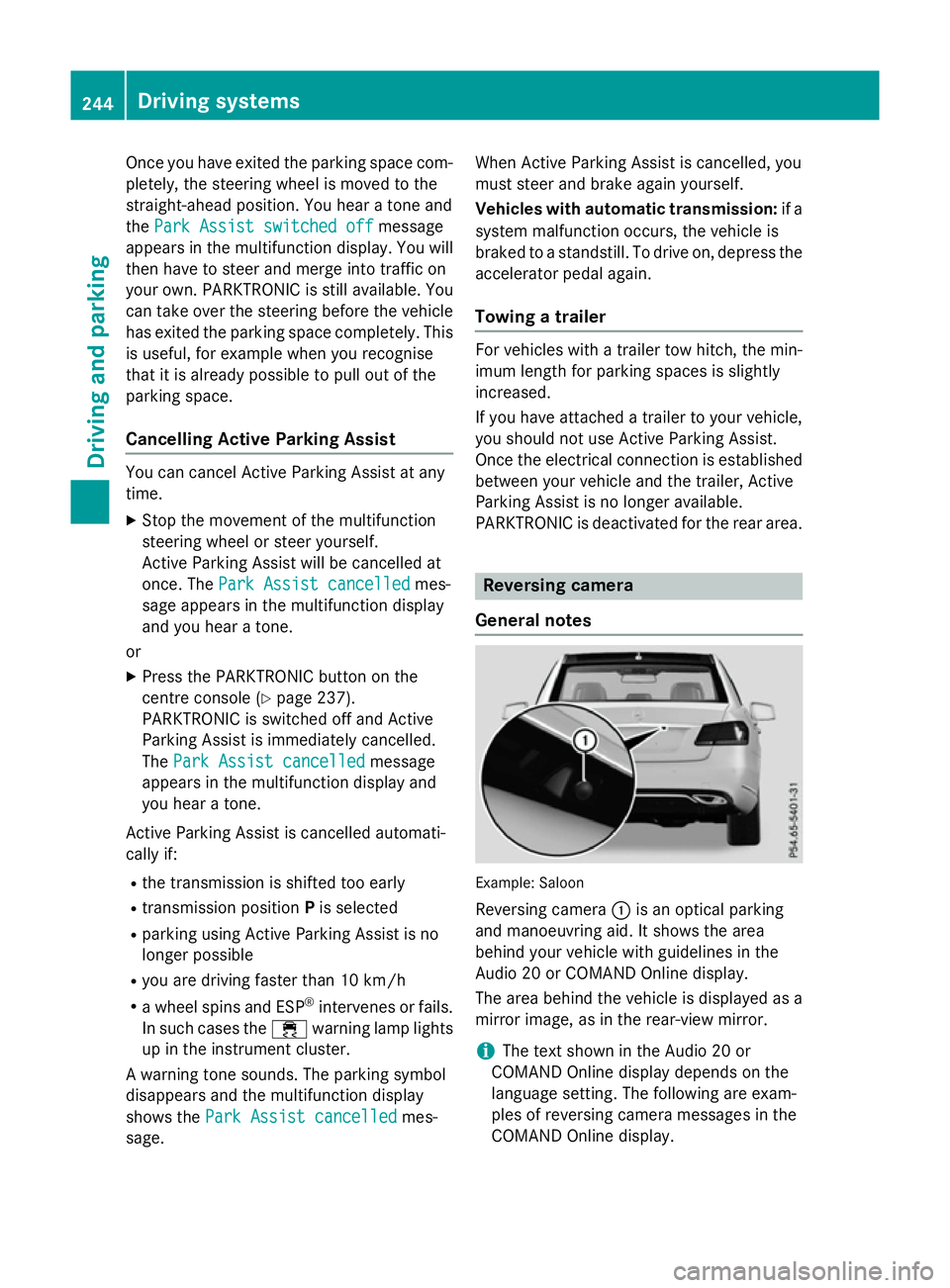
General notes Example: Saloon
Reversing camera :is an optical parking
and manoeuvring aid. It shows the area
behind your vehicle with guidelines in the
Audio 20 or COMAND Online display.
The area behind the vehicle is displayed as a
mirror image, as in the rear-view mirror.
i The text shown in the Audio 20 or
COMAND Online displayd epends on the
language setting. The following are exam-
ples of reversing camera messages in the
COMAND Online display. 244
Driving systemsDriving and parking
Page 258 of 497
Warning in the multifunction display
If fatigu
eorincreasing lapses in concentra-
tion are detected, awarning appears in the
multifunction display: Attention Assist:
Attention Assist:
Take abreak!
Take abreak!
In addition to the message show ninthe mul-
tifunction display, you wil lthen hea rawarn-
ing tone.
X If necessary, take abreak.
X Confirm the message by pressing the a
button on the steering wheel.
On long journeys, take regularb reaks in good
time that allow for adequate recuperation. If
you do not take abreak, you wil lbewarned
again after 15 minutes at the earliest. This will only happen if ATTENTION ASSIST still
detects typical indicators of fatigu eor
increasing lapses in concentration. Traffic SignA
ssist
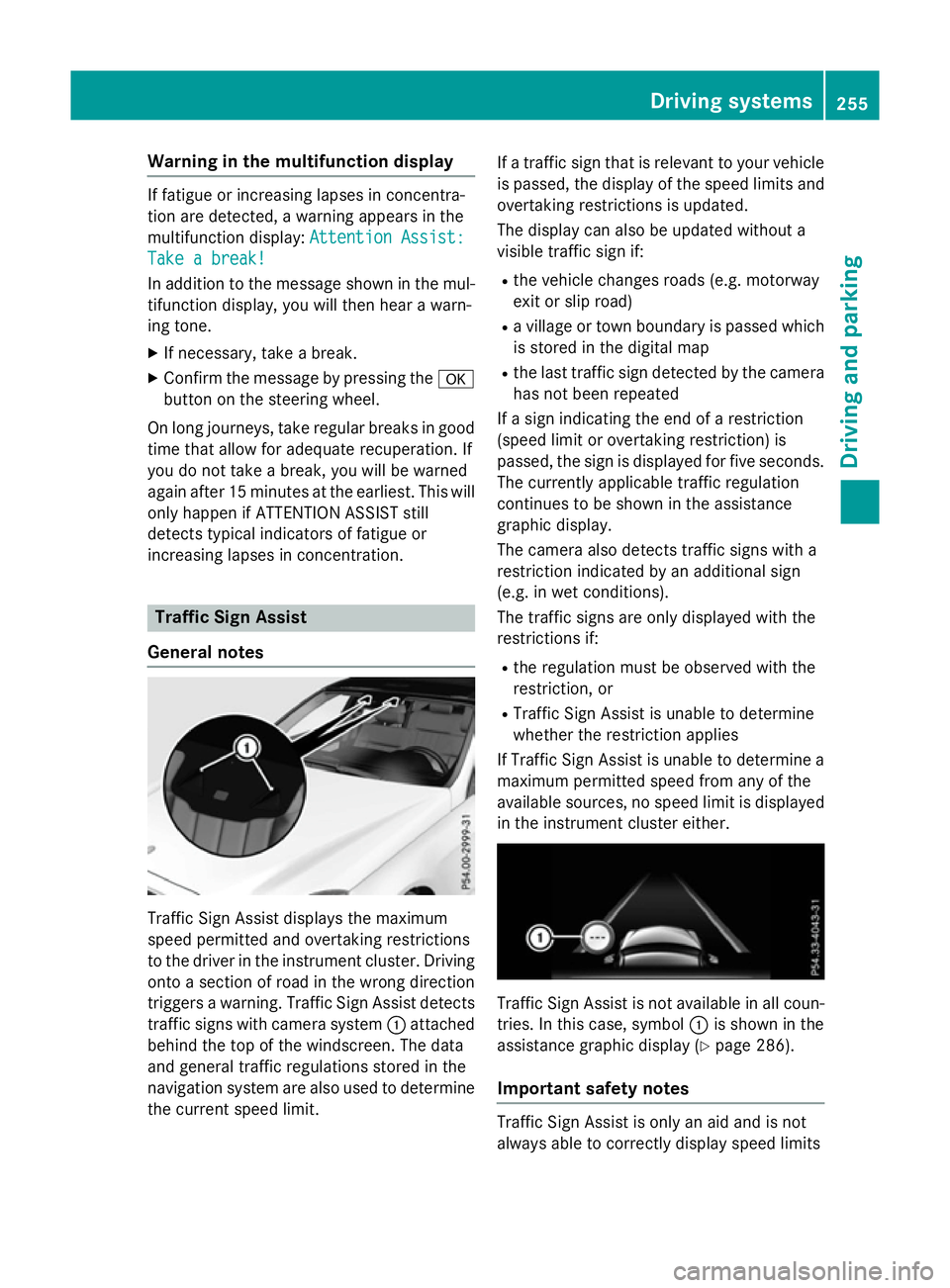
General notes Traffi
cSign Assist displays the maximum
spee dpermitted and overtaking restrictions
to the drive rinthe instrument cluster. Driving
onto asection of road in the wrong direction
trigger sawarning. Traffi cSign Assist detects
traffic signs with camera system :attached
behind the top of the windscreen. The data
and genera ltraffic regulations stored in the
navigation syste mare also use dtodetermine
the current spee dlimit. If
at raffic sign that is relevant to you rvehicle
is passed, the displayoft he speedlimits and
overtaking restrictions is updated.
The displayc an also be updated without a
visible traffic sign if:
R the vehicl echanges road s(e.g. motorway
exit or sli proad)
R av illage or town boundary is passed which
is stored in the digital map
R the last traffic sign detected by the camera
has not been repeated
If as ign indicating the end of arestriction
(speed limi torovertaking restriction) is
passed, the sign is displayed for five seconds.
The currently applicable traffic regulation
continues to be show ninthe assistance
graphic display.
The camera also detects traffic signs with a
restriction indicated by an additiona lsign
(e.g. in wet conditions).
The traffic signs are only displayed with the
restrictions if:
R the regulation must be observed with the
restriction, or
R Traffi cSign Assist is unable to determine
whether the restriction applies
If Traffi cSign Assist is unable to determine a
maximu mpermitted spee dfrom any of the
available sources, no spee dlimi tisd isplayed
in the instrument cluster either. Traffi
cSign Assist is not available in allc oun-
tries. In this case, symbol :is show ninthe
assistance graphic display( Ypag e286).
Important safety notes Traffi
cSign Assist is only an aida nd is not
always abl etocorrectly displays peedlimits Driving systems
255Driving and parking Z
Page 259 of 497
and overtakin
grestrictions. Traffic signs
always have priorit yoverthe Traffic Sign
Assist display.
The system may be either functionally
impaired or temporarily unavailable if:
R visibilit yispoor,e.g.d ue to snow, rain ,fog
or spray
R there is glare ,e.g.fro mt hesun bein glow in
th es ky
R there is dirt ,ice or mistin gonthewind-
scree ninthevicinity of th ecamera
R traffic sign sare hard to detect (dirt, ice,
snow)
R thet raffic sign sare insufficiently lit at night
R sign sare ambiguous (e.g. traffic sign son
construction sites or in adjacen tlanes)
R thei nformatio ninthedigital stree tmap of
th en avigation system is incorrect or out of
date
Switching th emessag efun ction on/off If you have activated th
eTraffic Sig nAssist
display in th eon-bo ard computer, th etraffic
regulation s(speed limit sand overtaking
restrictions) are displayed in th einstrument
cluste rfor fiv eseconds respectively. The
wrong-way warning and th etraffic sign dis-
play for spee dlimit sand overtakin grestric-
tions remain active eve nwhen th edisplay has
been deactivated.
X Switch on th eTraffic Sig nAssist message
function via th eon-bo ard computer
(Y page 286).
Instrumen tcluster display Showing th
eassistance graphic
X Call up th eassistance graphic sdisplay
function usin gthe on-board computer
(Y page 286).
X Select th eTraffic Sig nAssist display.
Detected traffic sign sare displayed in the
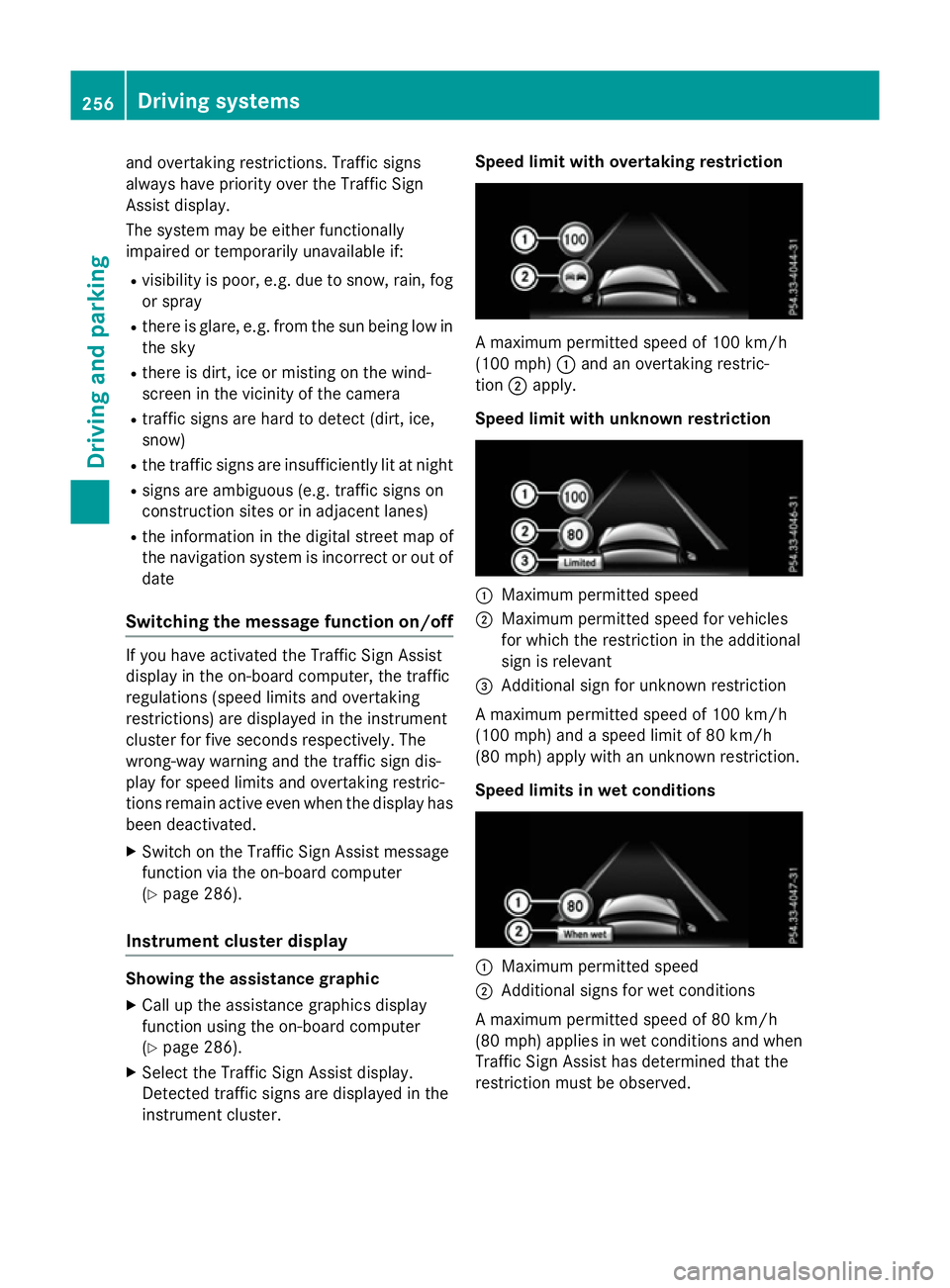
instrumen tcluster. Speed limit with overtaking restriction
Am
aximum permitted spee dof100km/h
(10 0m ph):and an overtakin grestric-
tion ;apply.
Speed limit with unknown restriction :
Maximum permitted speed
; Maximum permitted spee dfor vehicles
for whic hthe restriction in th eadditional
sign is relevant
= Additional sign for unknown restriction
Am aximum permitted spee dof100km/h
(10 0m ph)and aspee dlimit of 80 km/h
(80 mph )apply wit hanunknown restriction.
Speed limits in wet conditions :
Maximum permitted speed
; Additional sign sfor wet conditions
Am aximum permitted spee dof80km/h
(80 mph )applies in wet condition sand when
Traffic Sig nAssist has determine dthatthe
restriction must be observed. 256
Driving systemsDriving and parking
Page 278 of 497
Useful information
............................276
Importan tsafet ynotes ..................... 276
Displays and operation ....................276
Menus and submenus ......................279
Display messages ............................. 299
Warning and indicator lamp sinthe
instrument cluster ............................329 275On-boar
dcomputer and displays
Page 290 of 497
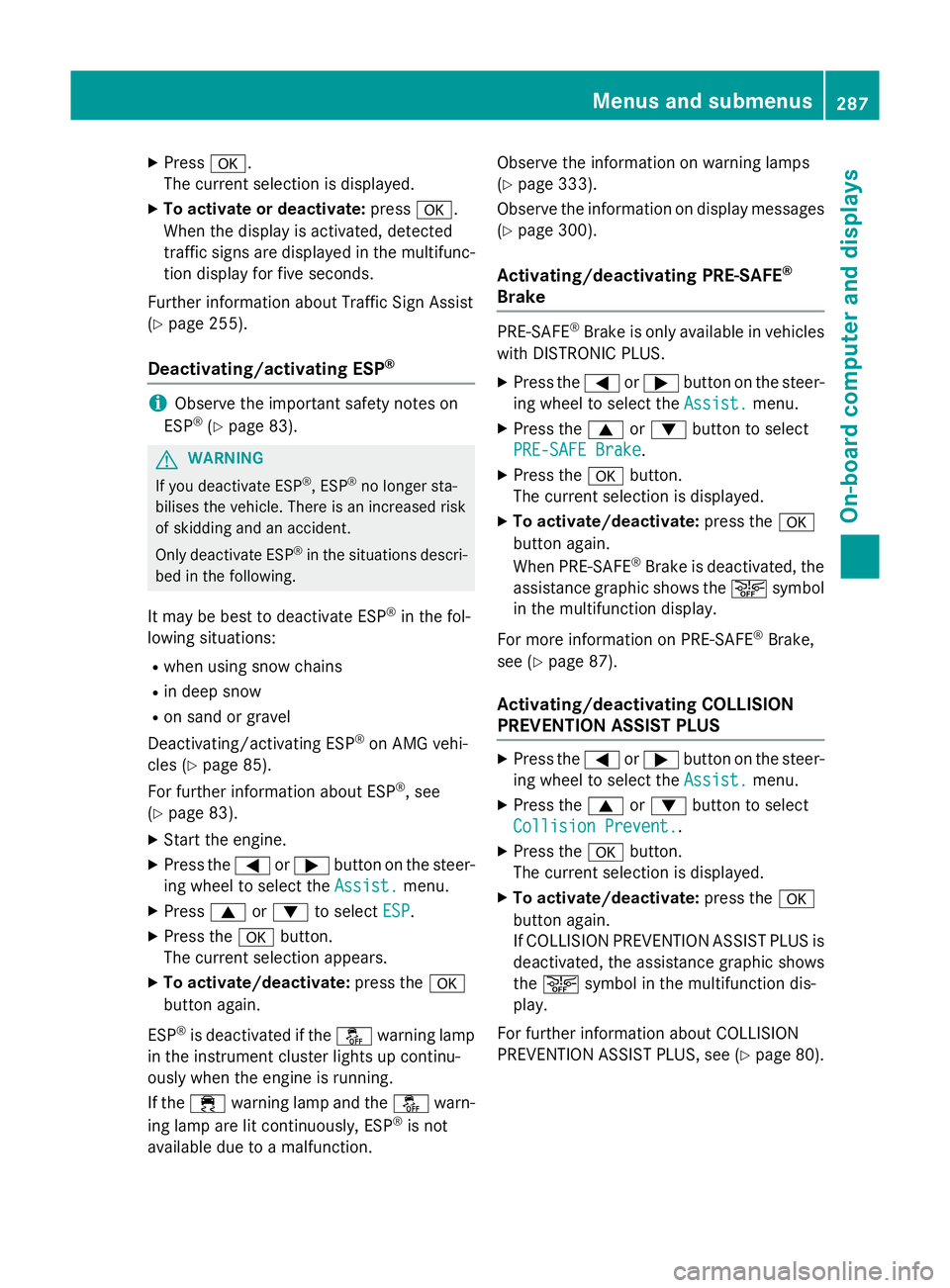
X
Press a.
The curren tselection is displayed.
X To activat eordeactivate: pressa.
When the display is activated, detected
traffic signs are displaye dinthe multifunc-
tion display for five seconds.
Further information about Traffic Sign Assist
(Y page 255).
Deactivating/activating ESP ®i
Observe the importan
tsafety notes on
ESP ®
(Y page 83). G
WARNING
If you deactivat eESP®
,E SP ®
no longer sta-
bilises the vehicle. There is an increased risk
of skidding and an accident.
Only deactivate ESP ®
in the situations descri-
bed in the following.
It may be best to deactivate ESP ®
in the fol-
lowing situations:
R when using snow chains
R in deep snow
R on sand or gravel
Deactivating/activating ESP ®
on AMG vehi-
cles (Y page 85).
For further information about ESP ®
,s ee
(Y page 83).
X Start the engine.
X Press the =or; button on the steer-
ing wheel to select the Assist.
Assist.menu.
X Press 9or: to select ESP
ESP.
X Press the abutton.
The curren tselection appears.
X To activate/deactivate: press thea
button again.
ESP ®
is deactivated if the åwarning lamp
in the instrument cluster lights up continu-
ously when the engine is running.
If the ÷ warning lamp and the åwarn-
ing lamp are lit continuously, ESP ®
is not
availabl edue to amalfunction. Observe the information on warning lamps
(Y
page 333).
Observe the information on display messages (Y page 300).
Activating/deactivating PRE-SAFE ®
Brake PRE‑SAFE
®
Brake is only availabl einvehicles
with DISTRONIC PLUS.
X Press the =or; button on the steer-
ing wheel to select the Assist. Assist.menu.
X Press the 9or: button to select
PRE-SAFE Brake
PRE-SAFE Brake.
X Press the abutton.
The curren tselection is displayed.
X To activate/deactivate: press thea
button again.
When PRE-SAFE ®
Brake is deactivated, the
assistanc egraphic shows the æsymbol
in the multifunction display.
For more information on PRE‑SAFE ®
Brake,
see (Y page 87).
Activating/deactivating COLLISION
PREVENTION ASSIST PLUS X
Press the =or; button on the steer-
ing wheel to select the Assist. Assist.menu.
X Press the 9or: button to select
Collision Prevent.
Collision Prevent..
X Press the abutton.
The curren tselection is displayed.
X To activate/deactivate: press thea
button again.
If COLLISION PREVENTION ASSIST PLUS is deactivated, the assistanc egraphic shows
the æ symbol in the multifunction dis-
play.
For further information about COLLISION
PREVENTION ASSIST PLUS, see (Y page 80). Menus and submenus
287On-board computer and displays Z
Page 293 of 497
![MERCEDES-BENZ E-CLASS ESTATE 2015 Owners Manual X
Press ato confirm.
X Press the :or9 button to select the
Addit. speedo [mph]:
Addit. speedo [mph]: orAddit.
Addit.
speedo [km/h]:
speedo [km/h]: function.
Press the :or9 button to select the
Addit.](/manual-img/4/55507/w960_55507-292.png "MERCEDES-BENZ E-CLASS ESTATE 2015 Owners Manual X
Press ato confirm.
X Press the :or9 button to select the
Addit. speedo [mph]:
Addit. speedo [mph]: orAddit.
Addit.
speedo [km/h]:
speedo [km/h]: function.
Press the :or9 button to select the
Addit.")
X
Press ato confirm.
X Press the :or9 button to select the
Addit. speedo [mph]:
Addit. speedo [mph]: orAddit.
Addit.
speedo [km/h]:
speedo [km/h]: function.
Press the :or9 button to select the
Addit. speedo [mph]:
Addit. speedo [mph]: function.
You will see the selected setting: on
onoroff
off.
X Press the abutton to save the setting.
Selecting the permanent display function
Vehicles for the United Kingdom: this func-
tion is unavailable.
You can determin ewhether the multifunction
display permanently shows your speed or the
outside temperature.
X Press the =or; button on the steer-
ing wheel to select the Settings Settingsmenu.
X Press the :or9 button to select the
Inst. cluster
Inst. cluster submenu.
X Press ato confirm.
X Press the :or9 button to select the
Permanent display
Permanent display function.
You will see the selected setting: outside
outside
temperature
temperature orAddit.
Addit. speedo
speedo[km/h]
[km/h]/
Addit. speedo [mph]
Addit. speedo [mph].
X Press the abutton to save the setting.
i The speed is highlighted in km/ho
rin
mph inverse to your speedometer.
Lights Setting the brightness for the instrument
cluster lighting and switches
The lighting in the instrument cluster, in the
displays and the controls in the vehicle inte-
rior can be adjusted with the Brightness Brightness
Display/switches:
Display/switches: function.
X Press the =or; button on the steer-
ing wheel to select the Settings
Settingsmenu.
X Press the :or9 button to select the
Lights
Lights submenu.
X Press ato confirm. X
Press the :or9 button to select the
Brightnes sDisplay/switches:
Brightnes sDisplay/switches: func-
tion.
You will see the selected setting.
X Press ato confirm.
X Press the :or9 button to adjust the
brightness to any level from Level 1 Level 1to
Level 5
Level 5 (bright).
X Press the aor% button to save the
setting.
If the light switch is set to Ã,Tor
L,t he brightness is dependent upon
the brightness of the ambient light.
i The light sensor in the instrument cluster
automatically controls the brightness of
the multifunction display.
In daylight, the displays in the instrument
cluster are not illuminated.
Switching the daytime driving lights
on/off
The Day lights Day lights function can only be
switched on with the engine turned off.
X Press the =or; button on the steer-
ing wheel to select the Settings
Settingsmenu.
X Press the :or9 button to select the
Light
Light submenu.
X Press ato confirm.
X Press the :or9 button to select the
Day lights
Day lights function.
If the Day lights
Day lights function has been
switched on, the cone of light and the W
symbol in the multifunction display are
shown in orange.
X Press the abutton to save the setting.
Further information on daytime driving lights
(Y page 143).
Switching the Intelligent Light System
on/off
X Press the =or; button on the steer-
ing wheel to select the Settings Settingsmenu.
X Press the :or9 button to select the
Light
Light submenu.
X Press ato confirm. 290
Menus and submenusOn-board computer and displays
Page 306 of 497
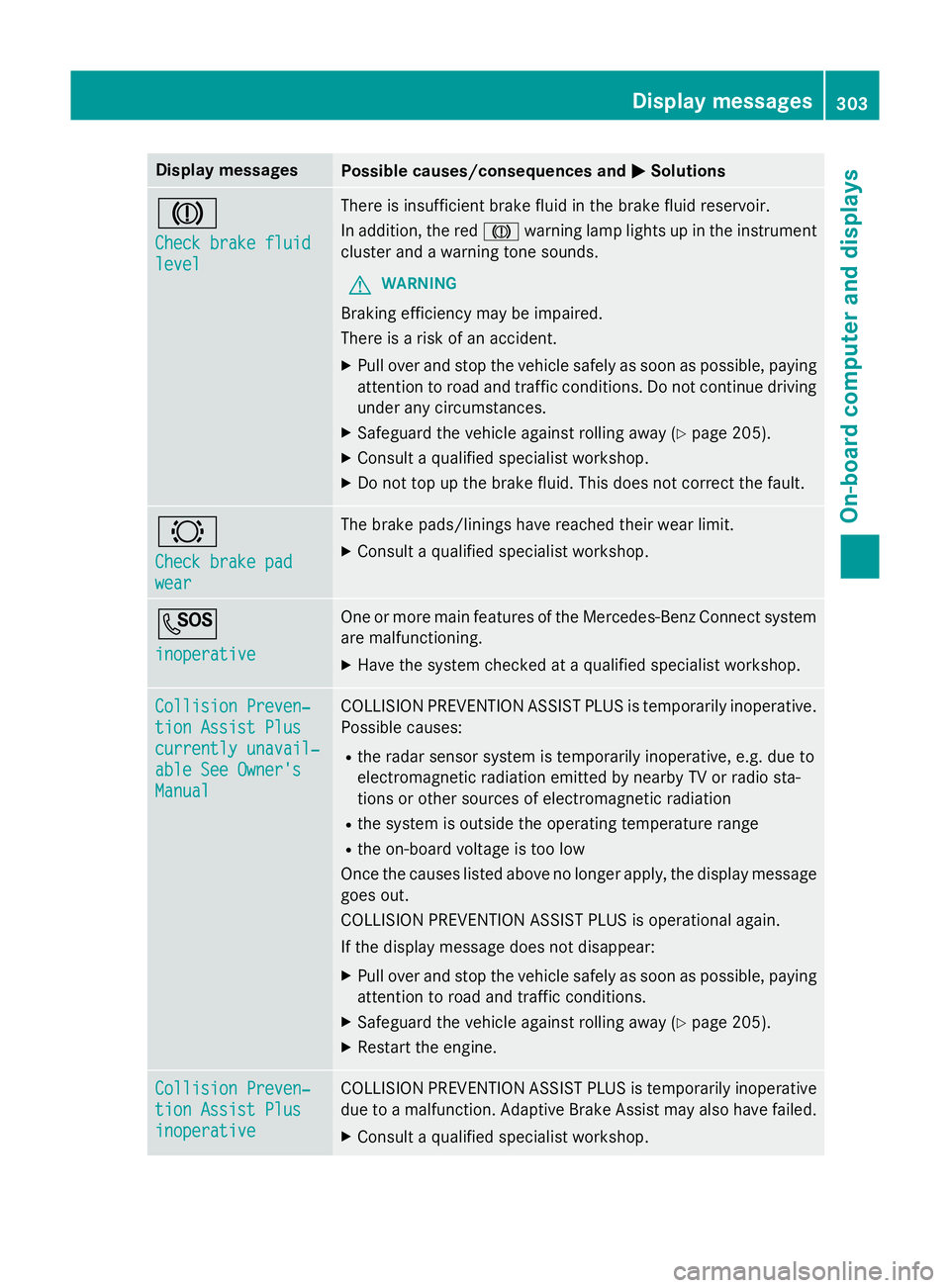
Display messages
Possible causes/consequences and
M
MSolutions J
Check brake fluid Check brake fluid
level level There is insufficien
tbrak efluidint hebrak efluidr eservoir.
In addition ,the red J warnin glamp lights up in th einstrument
cluster and awarnin gtones ounds.
G WARNING
Braking efficiency may be impaired.
There is ariskofana ccident.
X Pull ove rand stop th evehicl esafely as soo naspossible, paying
attention to roa dand traffic conditions. Do no tcontinu edriving
under any circumstances.
X Safeguar dthe vehicl eagainst rollin gaway (Y page 205).
X Consult aqualified specialist workshop.
X Do no ttop up th ebrak efluid. This does no tcorrect thef ault. #
Check brake pad Check brake pad
wear wear The brak
epads/lining shaver eached their wear limit.
X Consult aqualified specialist workshop. G
inoperative inoperative On
eorm orem ain features of th eMercedes-Ben zConnect system
are malfunctioning.
X Hav ethe system checke dataqualified specialist workshop. Collision Preven‐
Collision Preven‐
tio
nA ssist Plus
tio nA ssist Plus
currently unavail‐ currently unavail‐
abl eS ee Owner's
abl eS ee Owner's
Manual Manual COLLISION PREVENTION ASSIST PLU
Sistemporarily inoperative.
Possibl ecauses:
R ther ada rsensor system is temporarily inoperative, e.g. due to
electromagnetic radiation emitted by nearby TV or radi osta-
tion soro ther source sofelectromagnetic radiation
R thes ystem is outside th eoperating temperature range
R theo n-bo ardv oltag eistoolow
Once th ecauses listed abov enolonger apply, th edisplay message
goe sout.
COLLISION PREVENTION ASSIST PLU Sisoperational again.
If th edisplay message does no tdisappear:
X Pull ove rand stop th evehicl esafely as soo naspossible, paying
attention to roa dand traffic conditions.
X Safeguar dthe vehicl eagainst rollin gaway (Y page 205).
X Restart th eengine. Collision Preven‐
Collision Preven‐
tio
nA ssist Plus
tio nA ssist Plus
inoperative inoperative COLLISION PREVENTION ASSIST PLU
Sistemporarily inoperative
due to amalfunction .Adaptive Brake Assis tmay also hav efailed.
X Consult aqualified specialist workshop. Display
messages
303On-boardcomputer an ddisplays Z