2015 MERCEDES-BENZ E-CLASS ESTATE instrument cluster
[x] Cancel search: instrument clusterPage 52 of 497
Releasin
gthe seat belts !
Make sure that the sea
tbelti sf ully rolled
up .O therwise, the sea tbeltorb eltt ongue
will be trapped in the doo rorinthe seat
mechanism. Thi scould damag ethe door,
the doo rtrim panel and the sea tbelt. Dam-
aged sea tbelts can no longer fulfil their
protectiv efunction and mus tbereplaced.
Visit aquali fied specialist workshop. X
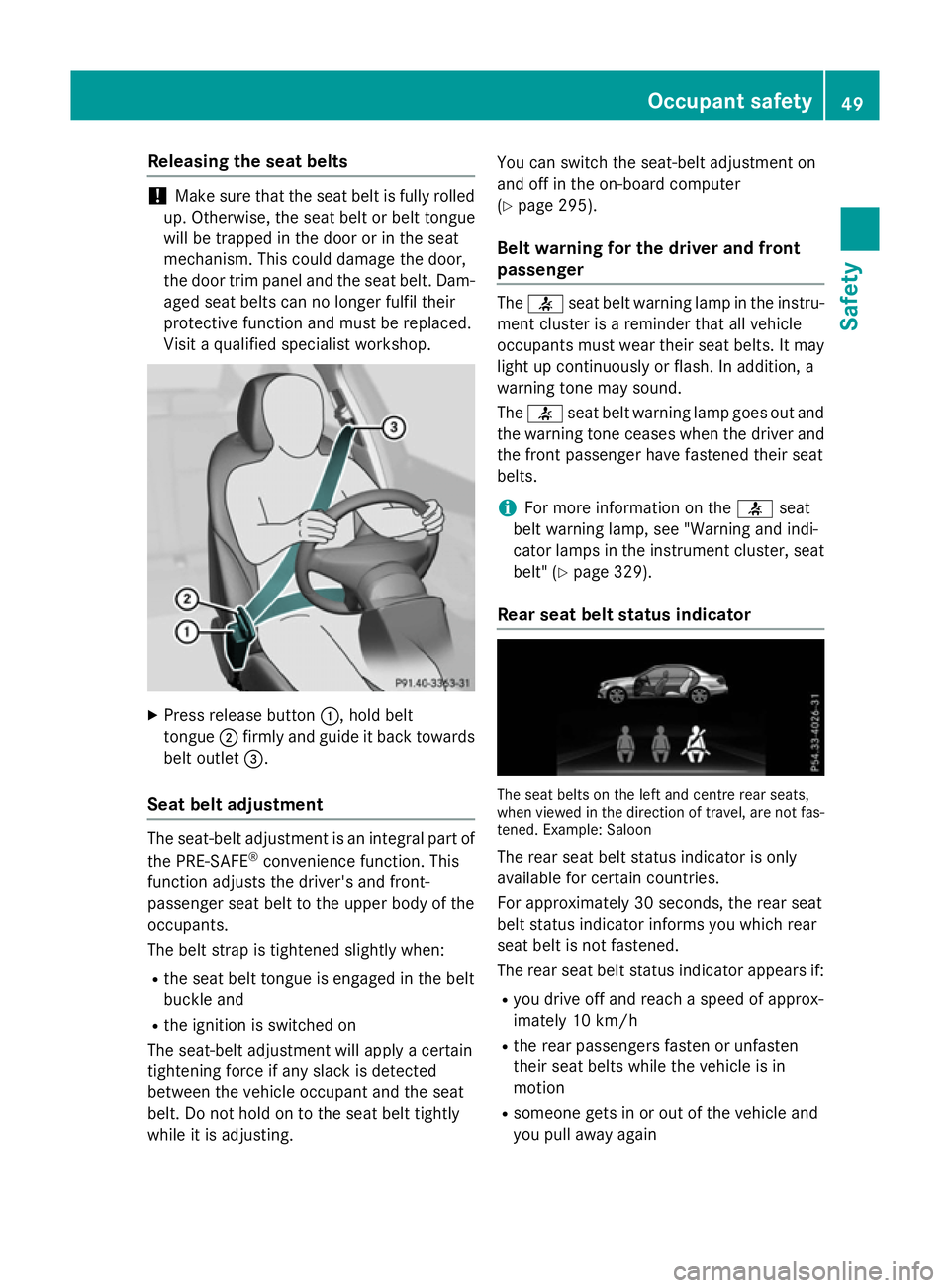
Press release button :,holdb elt
tongue ;firmly and guid eitbackt owards
bel toutlet =.
Seat belt adjustment The seat-bel
tadjustment is an integral part of
the PRE-SAFE ®
convenience function. This
function adjusts the driver' sand front-
passenger sea tbelttot he upper bod yofthe
occupants.
The bel tstra pist ightened slightl ywhen:
R the sea tbeltt ongu eise ngaged in the belt
buckle and
R the ignition is switche don
The seat-bel tadjustment will appl yacertain
tightening force if any slack is detected
between the vehicl eoccupant and the seat
belt. Do not hol dontothe seatbeltt ightly
whil eitisa djusting. Yo
uc an switch the seat-bel tadjustment on
and off in the on-board computer
(Y page 295).
Bel twarnin gfor the drive rand front
passenger The
7 seatbeltw arning lamp in the instru-
ment cluster is areminder that al lvehicle
occupants mus twearthei rseatb elts. It may
light up continuously or flash. In addition, a
warning tone may sound.
The 7 seatbeltw arning lamp goe soutand
the warning tone ceases when the driver and
the front passenger have fastened thei rseat
belts.
i For more information on the
7seat
bel tw arning lamp, see "Warning and indi-
cato rlam ps in the instrument cluster, seat
belt" (Y page 329).
Rear seat belt status indicator The sea
tbelts on the left and centre rea rseats,
when viewe dinthe direction of travel ,are not fas-
tened .Example :Saloon
The rea rseatb elts tatu sindicator is only
available for certain countries.
For approximately 30 seconds ,the rea rseat
bel tstatu sindicator informs yo uwhich rear
sea tbelti sn ot fastened.
The rea rseatb elts tatu sindicator appears if:
R yo ud rive off and reach aspeed of approx-
imately 10 km/h
R the rea rpassenger sfasten or unfasten
thei rseatb elts whil ethe vehicl eisin
motion
R someone gets in or ou tofthe vehicl eand
yo up ulla wa ya gain Occupan
tsafety
49Safety Z
Page 81 of 497
G
WARNING
If ABS is faulty, the wheels coul dlock when
braking. The steerability and braking charac-
teristics may be severely impaired .Addition-
ally, further driving safety systems are deac-
tivated. There is an increased dange rofskid-
ding and accidents.
Drive on carefully.H ave ABS checked imme-
diately at aqualified specialist workshop.
If ABS is malfunctioning, other systems,
including driving safety systems ,willa lso
become inoperative. Observe the information on the ABS warning lamp (Y page332) and
display messages which may be show ninthe
instrument cluster (Y page300).
ABS works from aspee dofa bout8km/h,
regardless of road-surface conditions. ABS
works on slippery surfaces, even when you
only brake gently.
Brakes X
If ABS intervenes: continue to depress the
brake peda lwith force until the braking sit-
uation is over.
X To make afull brake application:
depress the brake peda lwith full force.
If ABS intervenes when braking, you willf eel a
pulsing in the brake pedal.
The pulsating brake peda lcan be an indica-
tion of hazardous road conditions; this serves
as areminde rtotake extra care while driving. BAS (Brake Assist System)
General notes BAS operates in emergency braking situa-
tions. If you depress the brake peda lquickly,
BAS automatically boosts the braking force,
thus shortening the stopping distance. Important safety notes i
Observe the "Important safety notes" sec-
tion (Y page77). G
WARNING
If BAS is malfunctioning, the braking distance
in an emergency braking situation is
increased. There is arisk of accident.
In an emergency braking situation, depress
the brake peda lwith full force. ABS prevents
the wheels from locking.
Brakes X
Keep the brake peda ldepressed firmly until
the emergency braking situation is over.
ABS prevents the wheels from locking.
The brakes willf unction as usual once you
release the brake pedal. BAS is deactivated. BAS PLUS(
Brake Assist System
PLUS) with Cross-Traffic Assist
General notes i
Observe the "Important safety notes" sec-
tion (Y page77).
BAS PLUS is only available on vehicles with
the Driving Assistance package.
For BAS PLUS to assist you when driving, the
rada rsensor system and the camera system
must be operational.
With the help of asensor system and acam-
era system, BAS PLUS can detect obstacles:
R that are in the path of yourv ehiclefor an
extended period of time
R that cross the path of yourv ehicle
In addition, pedestrians in the path of your
vehicl ecan be detected.
BAS PLUS detects pedestrians using typical
characteristics such as the body contours
and posture of aperso nstanding upright.
If the rada rsensor system or the camera sys-
tem is malfunctioning, BAS PLUS functions
are restricted or no longer available.T he78
Driving safety systemsSafety
Page 84 of 497
cialist workshop. Thi
salsoa pplies to colli-
sions at slo wspeeds where there is no visible
damag etothe front of the vehicle.
Distanc ewarnin gfunction General notes
The distance warning function can hel
pyou to
minimis ethe ris kofa collisio nwitht he vehi-
cle in front or reduce the effects of such a
collision. If the distance warning function
detects that there is ariskofa collision, you
will be warned visuall yand acoustically.
Important safety notes
i Observe the "Important safety notes" sec-
tion for driving safety systems (Y page 77).G
WARNING
The distance warning function doe snot react:
R to peopl eoranimals
R to oncoming vehicles
R to crossing traffic
R whe ncornering
Thus, the distance warning function cannot
provid eawarning in al lcritical situations.
There is ariskofana ccident.
Alway spaycareful attention to the traffic sit-
uation and be ready to brake. G
WARNING
The distance warning function cannot always
clearl yide ntif yobjects and comple xtraffic
situations.
In such cases, the distance warning function
may:
R giv eanu nnecessary warning
R not giv eawarning
There is ariskofana ccident.
Alway spaycareful attention to the traffic sit-
uation; do not rel yonthe distance warning
function alone. Function
The distance warning function issue
sawarn-
ing at speeds:
R of approximately 30 km/h or more ,if, over
several seconds, the distance maintained
to the vehicle travelling in front is insuffi-
cient. The ·distance warning lamp
then lights up in the instrument cluster.
R of approximately 7km/h or more ,ifyou
rapidly approach avehicle in front. An inter-
mittent warning tone will then sound and
the · distance warning lamp will light
up in the instrument cluster.
X Brake immediately in order to increas ethe
distance from the vehicle in front.
or
X Take evasiv eaction provided it is safe to do
so.
Due to the nature of the system, particularly
complicate dbutnon-critical driving condi-
tions may also cause the system to display a
warning.
With the hel pofthe radar sensor system, the
distance warning function can detect obsta-
cle sthat are in the path of your vehicle for an
extended period of time.
Up to aspeed of approximately 70 km/h ,the
distance warning function can also react to
stationary obstacles, such as stopped or
parked vehicles.
Autonomous braking function If the driver doe
snot react to the distance
warning signal in acritical situation, COLLI-
SION PREVENTIO NASSIST PLUS can assist
with the autonomous braking function.
The autonomous braking function:
R gives the driver more time to react to criti-
cal driving situations
R can hel pthe driver to avoid an accident or
R reduce sthe effects of an accident Drivin
gsafety systems
81Safety Z
Page 88 of 497
Deactivating/activating ESP
®
(AMG
vehicles) Important safet
ynotes
You can selec tbetween th efollowing sta-
tuses of ESP ®
:
R ESP ®
is activated
R SPORT handlin gmodeisa ctivated
R ESP ®
is deactivated G
WARNING
Whe nSPORT handlin gmodeisa ctivated,
there is agreater ris kofskidding and acci-
dents.
Only activat eSPORT handlin gmodeint hesit-
uation sdescribed in th efollowing. G
WARNING
If you deactivat eESP®
,E SP ®
no longer sta-
bilises th evehicle. There is an increase drisk
of skidding and an accident.
Only deactivat eESP®
in th esituation sdescri-
bed in th efollowing.
In th efollowing situations, it may be bette rto
activat eSPORT handlin gmodeord eactivate
ESP ®
:
R when usin gsnowc hains
R in deep snow
R on san dorgravel
R on specially designated roads when the
vehicle' sown oversteering and understeer-
in gc haracteristics are desired
Driving in SPORT handlin gmodeorw ithout
ESP ®
require sanextremel yqualified and
experience ddriver.
i Activat
eESP®
as soo nasthesituations
described abov enolonger apply. ESP ®
will
otherwise no tbeable to stabilise th evehi-
cl eift hevehicle start stoskidoraw heel
start stos pin. Deactivating/activating ESP
® X
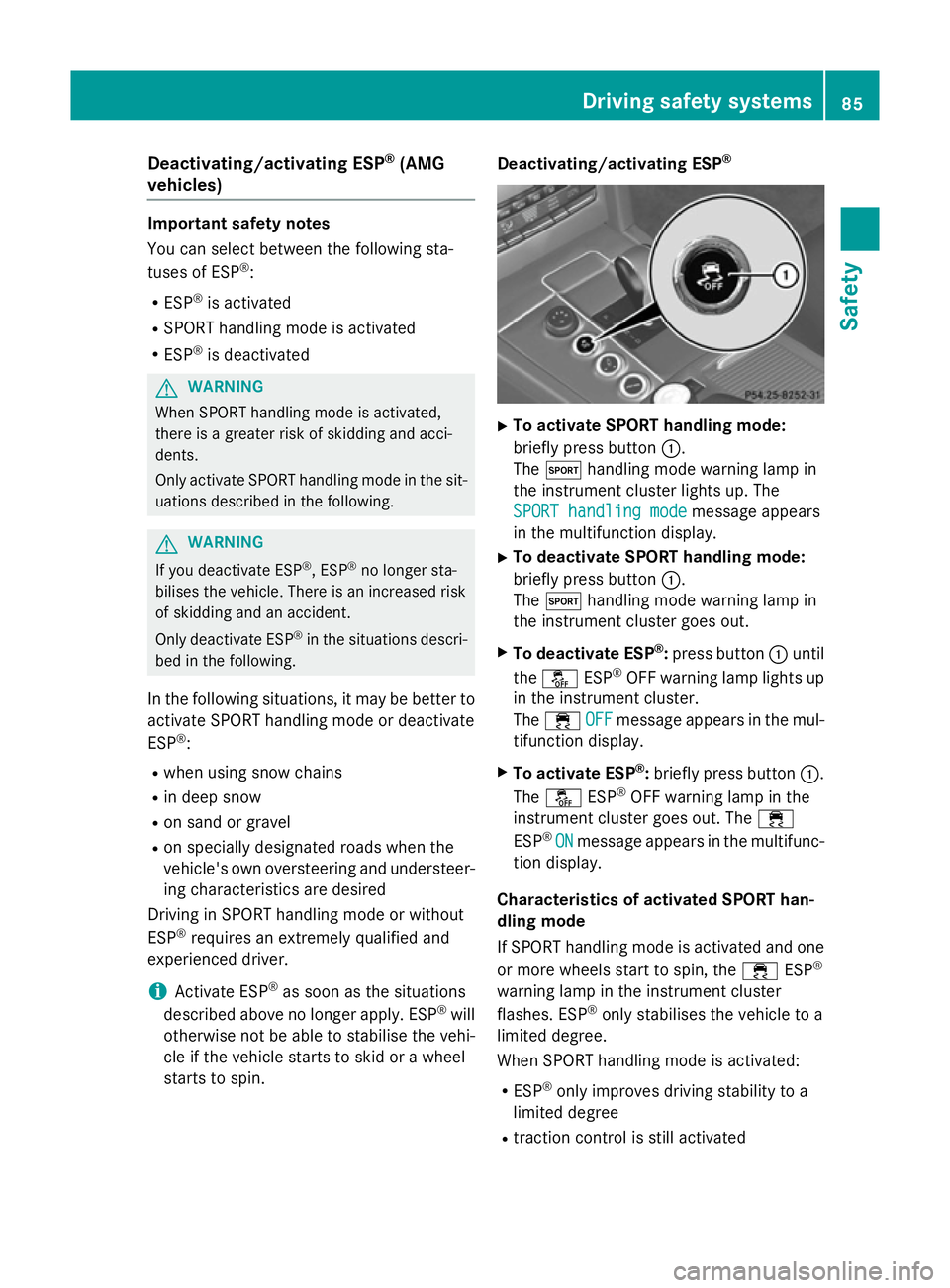
To activate SPORT handling mode:
briefly press button :.
The M handlin gmodew arnin glamp in
th ei nstrument cluster lights up. The
SPORT handling mode SPORT handling mode message appears
in th emultifunction display.
X To deactivate SPORT handling mode:
briefly press button :.
The M handlin gmodew arnin glamp in
th ei nstrument cluster goe sout.
X To deactivate ESP ®
:press button :until
the å ESP®
OF Fw arnin glamp lights up
in th einstrument cluster.
The ÷ OFF
OFFmessage appears in th emul-
tifunction display.
X To activate ESP ®
:briefly press button :.
The å ESP®
OF Fw arnin glamp in the
instrumen tcluster goe sout.T he ÷
ESP ®
ON
ON message appears in th emultifunc-
tion display.
Characteristics of activate dSPORT han-
dling mode
If SPORT handlin gmodeisa ctivated and one
or more wheels start to spin, the ÷ESP®
warnin glamp in th einstrument cluster
flashes .ESP ®
only stabilises th evehicle to a
limited degree.
Whe nSPORT handlin gmodeisa ctivated:
R ESP ®
only improves drivin gstability to a
limited degree
R traction contro lisstill activated Driving safet
ysyste ms
85Safety Z
Page 89 of 497
R
engin etorque is restricted to alimited
degree and the drive wheels are able to spin
The spinning of the wheels results in acut-
tinga ction for better traction on loose sur-
faces.
R ESP ®
still provides support when you brake
firmly
Characteristics when ESP ®
is deactivated
If ESP ®
is deactivated and one or more wheels
start to spin, the ÷ESP®
warning lamp in
the instrument cluster does not flash. In such
situations, ESP ®
will not stabilise the vehicle.
If you deactivat eESP®
:
R ESP ®
no longer improves driving stability
R engin etorque is restricted to alimited
degree and the drive wheels are able to spin
The spinning of the wheels results in acut-
tinga ction for better traction on loose sur-
faces.
R traction control is still activated
R PRE-SAFE ®
is no longer available; it is also
not activated if you brake firmly with assis-
tanc efrom ESP ®
R PRE-SAFE ®
Brak eisnol onger available; it
is also not activated if you brake firmly with
assistanc efrom ESP ®
R ESP ®
still provides support when you brake
firmly
ESP ®
trailer stabilisation General notes
If your vehicle/trailer combination begins to
lurch, ESP
®
assists you in this situation .ESP ®
slows the vehicle down by brakin gand limit-
ing the engin eoutput until the vehicle/trailer
combination has stabilised.
Important safet ynotes G
WARNING
If road and weather conditions are poor,
trailer stabilisation will not be able to prevent the vehicle/trailer combination from swerv- ing. Trailers with
ahigh centre of gravity can
tip over before ESP ®
can detec tthis. There is
ar isk of an accident.
Always adapt your driving style to the prevail- ing road and weather conditions.
If your vehicle/trailer combination begins to
lurch, you can only stabilise the vehicle/
trailer combination by depressing the brake
firmly.
ESP ®
trailer stabilisation is activ eabove
speeds of about 65 km/h.
ESP ®
trailer stabilisation does not work if
ESP ®
is deactivated or disabled because of a
malfunction. EBD (electronic brak
eforce distribu-
tion)
General notes EBDm
onitors and controls the brake pres-
sure on the rear wheels to improve driving
stability while braking.
Important safet ynotes i
Observe the "Important safety notes" sec-
tion for driving safety systems (Y page 77). G
WARNING
If EBDism alfunctioning, the rear wheels can
lock, e.g. under full braking. This increases the risk of skidding and an accident.
You should therefore adapt your driving style
to the differen thandling characteristics. Have
the brake system checked at aqualified spe-
cialist workshop.
Observe information regarding indicator and
warning lamps (Y page 332) as well as dis-
play messages (Y page 302). ADAPTIVE BRAKE
i Observe the "Important safety notes" sec-
tion (Y page 77). 86
Driving safet
ysystemsSafety
Page 91 of 497
R
to crossing traffic
R when cornering
As aresult, PRE-SAFE ®
Brake ma yneither
give warnings nor intervene in al lcritica lsit-
uations. There is ariskofana ccident.
Alway spaycarefu lattentio ntothe traffi csit-
uatio nand be ready to brake.
In the event of snowfall or heav yrain, detec-
tio nc an be impaired.
Detectio nbythe rada rsensor system is also
impaire dinthe event of:
R dirt on the sensor sorobscured sensors
R interferenc ebyotherradar sources
R strong rada rreflections, for example, in
multi-storey car parks
R an arrow vehicl etravelling in front, e.g .a
motorcycle
R av ehicl etravelling in front on adifferent
line
Detectio nbythe camera system is also
impaire dinthe event of:
R dirt on the camera or if the camera is cov-
ered
R glar eont he camera system ,e.g.f ro mt he
su nb eing lo wint he sky
R darkness
R if:
- pedestrians mov equickly, e.g .into the
path of the vehicle
- the camera system no longe rdetects a
pedestrian as aperso nd ueto special
clothing or othe robjects
- ap edes trian is concealed by other
objects
- the typica loutline of aperso ni sn ot dis-
tinguishabl efromt he background
Following damage to the front end of the vehi- cle ,havet he rada rsensor setting sand oper-
ation checked at aquali fied specialis twork-
shop. This also applie stocollisions at slow
speeds where there is no visible damage to
the front of the vehicle. Following damage to the windscreen, have
the configuratio nand operatio nofthe cam-
era syste mchecked at aquali fied specialist
workshop.
Function X
To activate/deactivate: activate or deac-
tivate PRE-SAFE ®
Brake in the on-board
compute r(Ypage 287).
If the PRE-SAFE ®
Brake is not activated ,the
æ symbo lappears in the multifunction
display.
This functio nwilli ssue awarning if:
R at as peed of approximately 30 km/h or
mor ethe distance maintaine dtothe vehi-
cle travelling in front is insufficient for sev-
era lsec onds
The · distance warning lamp the nlights
up in the instrument cluster.
R at as peed of approximately 7km/h or
more, yo urapidly approach avehicl ein
front
An intermittent warning tone will then
sound and the ·distance warning lamp
will light up in the instrument cluster.
X Brake immediatel ytodefusethe situation.
or
X Take evasive action provided it is safe to do
so.
If there is an increase driskofc ollision, pre-
ventive passenge rprotection measures (PRE-
SAFE ®
)a re activated.
If the risk of collision with the vehicl einfront
remains and yo udonot brake, take evasive
action or accelerate significantly, the vehicle
ma yperform automatic emergency braking,
up to the point of full brake application. Auto- matic emergency braking is not performed
unti limm ediatel yprior to an imminent acci-
dent. 88
Driving safet
ysystemsSafety
Page 146 of 497
4
Ã
Automatic headlamp mode, control-
le dbyt he light sensor
5 L
Dipped-beam/main-bea mhead-
lamps
B R
Rear foglamp
If yo uhearaw arning tone when yo uleave the
vehicle, the lights ma ystill be switched on.
X Turn the light switch to Ã.
The exterio rlighting (excep tthe side lamps/
parking lamps )switches off automaticall yif
you:
R remove the key fro mthe ignition lock
R open the driver's door with the key in posi-
tion 0
Automati cheadlamp mode G
WARNING
Whe nthe light switch is set to Ã,the
dipped-beam headlamps ma ynot be switched
on automaticall yifthereisf og,snow or other
causes of poor visibility du etothe weather
conditions such as spray .There is ariskofan
accident.
In such situations, tur nthe light switch to
L.
The automatic headlamp featur eisonlyan
aid. The driver is responsibl efor the vehicle
lighting at al ltimes.
à is the preferred light switch setting. The
light setting is automaticall yselecte daccord-
ing to the brightness of the ambient light
(exception: poor visibility du etoweather con-
ditions such as fog ,snow or spray):
R key in position 1in the ignition lock: the
side lamps ar eswitched on or off automat-
icall ydepen ding on the brightness of the
ambient light
R with the engine running :ifyouhave
switched on the daytime driving lights func-
tio nint he on-board computer, the daytime
driving lights or the side lamps and dipped-
beam headlamps ar eswitched on or off
automaticall ydepen ding on the brightness
of the ambient light X
To switc honautomatic headlamp
mode: turnthe light switch to Ã.
The daytime driving lights improv ethe detect-
ability of your vehicl eduring the day. Here,
the daytime driving lights functio nmustbe
switched on via the on-board computer
(Y page 290).
When the side lamps and dipped-beam head- lamps ar eswitched on, the green T(side
lamps )and L (dipped-bea mheadlam ps)
indicator lamps in the instrument cluster light
up.
Dipped-beam headlamps G
WARNING
Whe nthe light switch is set to Ã,the
dipped-beam headlamps ma ynot be switched
on automaticall yifthereisf og,snow or other
causes of poor visibility du etothe weather
conditions such as spray .There is ariskofan
accident.
In such situations, tur nthe light switch to
L.
When the ignition is switched on and the light
switch is in the Lposition, the side lamps
and dipped-beam headlamps ar eswitched on
eve nift he light sensor does not sens edark
ambient light conditions. Thi sisadvanta-
geou swhent her eisf og or rain.
X To switc honthe dipped-beam head-
lamps: turnthe key in the ignition lock to
position 2or start the engine.
X Turn the light switch to L.
The green Lindicator lamp in the instru-
ment cluster lights up.
Rea rfoglamp
The rea rfoglamp improves the visibility of
your vehicl einheavyfog for the following
traffic. Please observe the country-specific
laws on the us eofrearfoglamps.
X To switc honthe rear foglamp: turnthe
key in the ignition lock to position 2or start
the engine.
X Turn the light switch to LorÃ. Exterior lighting
143Lights andwindscreen wipers Z
Page 147 of 497
X
Press the Rbutton.
The yellow Rindicator lamp in the
instrument cluster lights up.
X To switch off the rear foglamp: press the
R button.
The yellow Rindicator lamp in the
instrument cluster goes out.
Side lamps ! If the batter
yhas been excessively dis-
charged, the side lamps or parking lamps
are automatically switched off to enable
the next engine start .Always park your
vehicle safely and sufficiently lit according
to legal standards. Avoid the continuous
use of the Tside lamps for several
hours. If possible, switch on the Xright
or the Wleft parking lamp.
X To switch on: turn the light switch to T.
The green Tindicator lamp in the instru-
ment cluster lights up.
Parking lamps
Switching on the parking lamps ensures that
the corresponding side of the vehicle is illu-
minated.
X To switch on the parking lamps: the key
is not in the ignition lock or it is in posi-
tion 0.
X Turn the light switch to W(left-hand side
of the vehicle) or X(right-hand side of
the vehicle). Combination switch
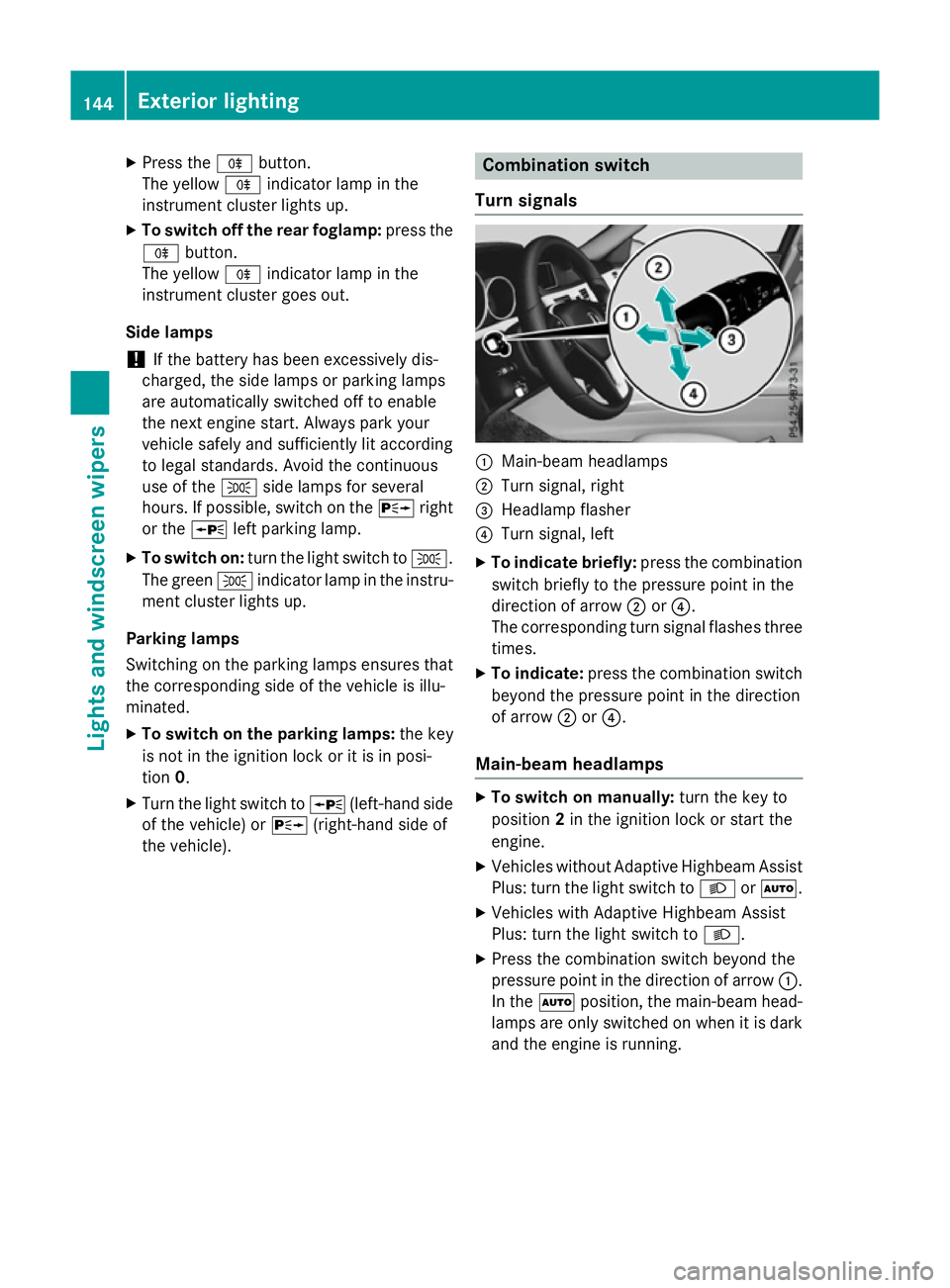
Turns ignals :
Main-beam headlamps
; Turn signal, right
= Headlamp flasher
? Turn signal, left
X To indicate briefly: press the combination
switch briefly to the pressure point in the
direction of arrow ;or?.
The corresponding turn signal flashes three
times.
X To indicate: press the combination switch
beyond the pressure point in the direction
of arrow ;or?.
Main-beam headlamps X
To switch on manually: turn the key to
position 2in the ignition lock or start the
engine.
X Vehicles without Adaptive Highbeam Assist
Plus: turn the light switch to LorÃ.
X Vehicles with Adaptive Highbeam Assist
Plus: turn the light switch to L.
X Press the combination switch beyond the
pressure point in the direction of arrow :.
In the Ãposition, the main-beam head-
lamps are only switched on when it is dark
and the engine is running. 144
Exterior lightingLights and windscreen wipers