2015 MERCEDES-BENZ E-CLASS ESTATE instrument cluster
[x] Cancel search: instrument clusterPage 151 of 497
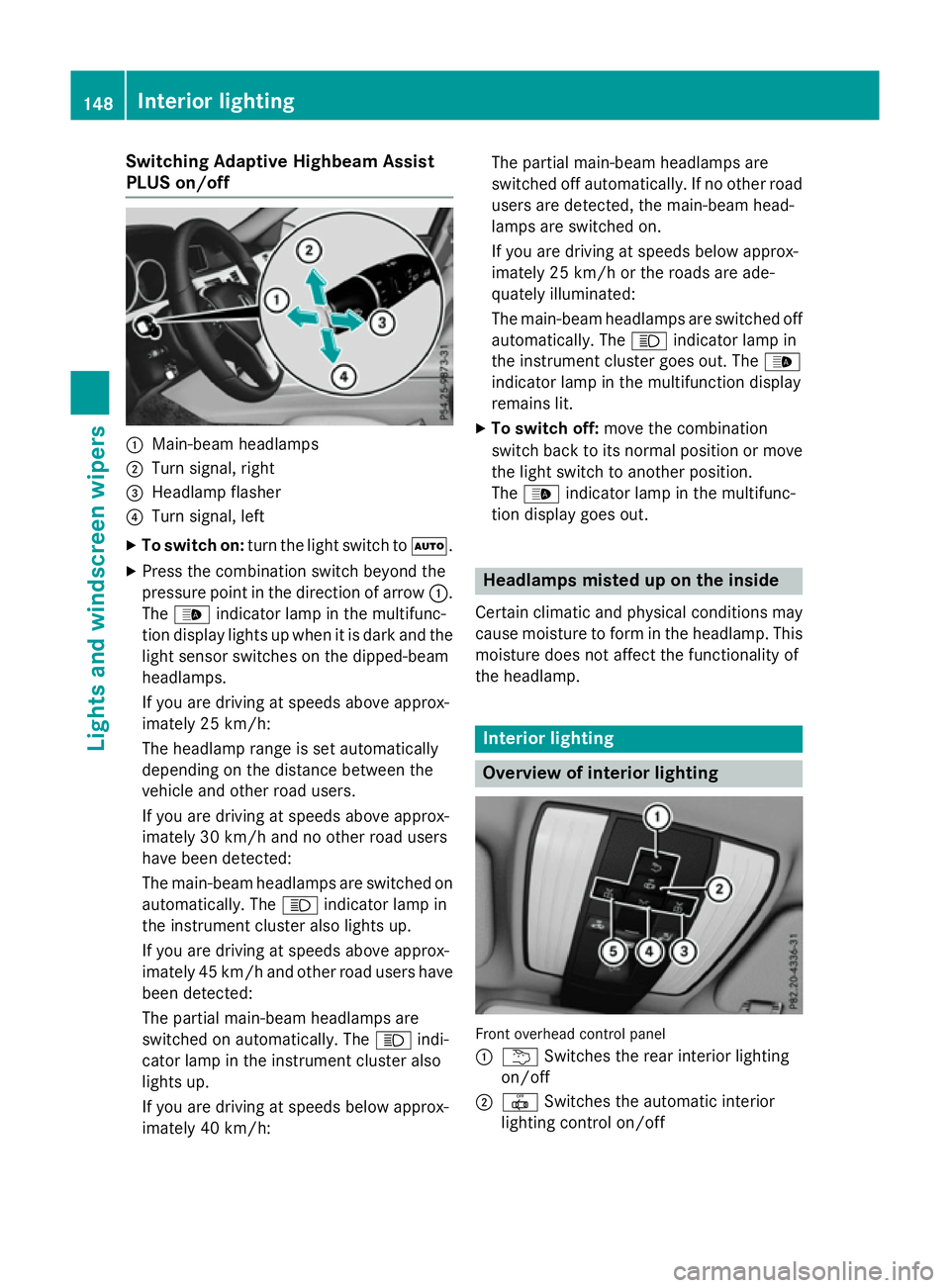
Switching Adaptive Highbeam Assist
PLUS on/off :
Main-beam headlamps
; Turn signal, right
= Headlamp flasher
? Turn signal, left
X To switch on: turn the light switch to Ã.
X Press the combination switch beyond the
pressure point in the direction of arrow :.
The _ indicator lamp in the multifunc-
tion display lights up when it is dark and the
light sensor switches on the dipped-beam
headlamps.
If you are driving at speeds above approx-
imately 25 km/h:
The headlamp range is set automatically
depending on the distance between the
vehicle and other road users.
If you are driving at speeds above approx-
imately 30 km/ha nd no other road users
have been detected:
The main-beam headlamps are switched on automatically. The Kindicator lamp in
the instrumen tcluster also lights up.
If you are driving at speeds above approx-
imately 45 km/ha nd otherroa du sers have
been detected:
The partia lmain-bea mheadlamps are
switched on automatically. The Kindi-
cato rlam pint he instrument cluster also
lights up.
If yo uaredriving at speed sbelow approx-
imatel y40k m/h: The partia
lmain-bea mheadlamps are
switched off automatically. If no othe rroad
users ar edetected, the main-bea mhead-
lamps ar eswitched on.
If yo uaredriving at speed sbelow approx-
imatel y25k m/h or the roads ar eade-
quately illuminated:
The main-bea mheadlamps ar eswitched off
automatically. The Kindicator lamp in
the instrument cluster goe sout.T he _
indicator lamp in the multifunctio ndisplay
remains lit.
X To switc hoff:mov ethe combination
switch back to its normal positio normove
the light switch to another position.
The _ indicator lamp in the multifunc-
tio nd isplay goe sout. Headlamps misted up on the inside
Certai nclimatic and physica lconditions may
cause moisture to form in the headlamp. This
moisture does not affect the functionality of
the headlamp. Interior lighting
Overview of interior lighting
Front overhead contro
lpan el
: u Switche sthe rea rinterio rlighting
on/off
; | Switche sthe automatic interior
lighting contro lon/off 148
Interior lightingLights and
windscreen wipers
Page 155 of 497
If the wiper blades are worn, the windscreen
willnol onger be wiped properly. This could
prevent you from observing the traffic condi-
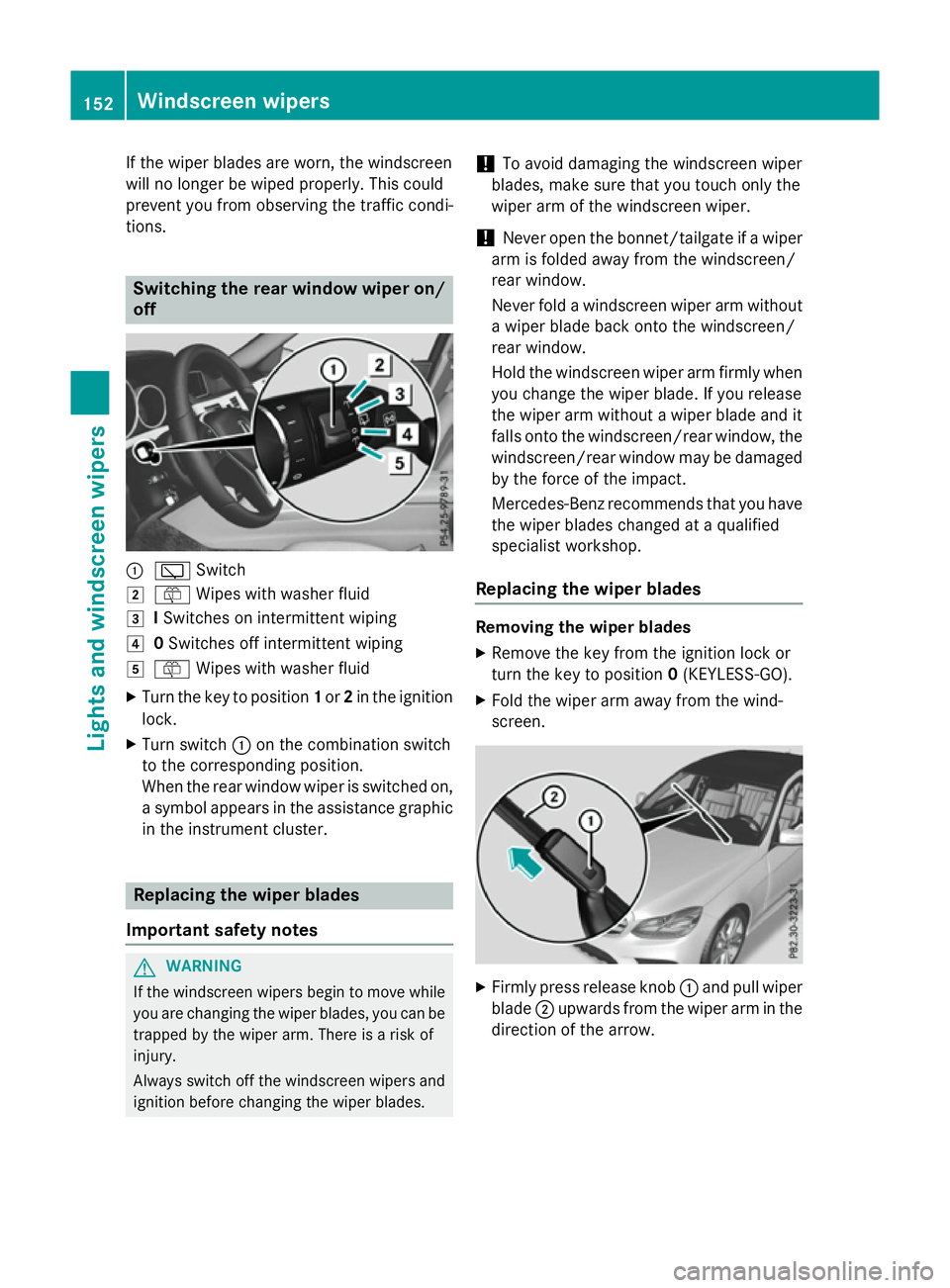
tions. Switching the rear window wipero
n/
off :
è Switch
2 ô Wipesw ith washer fluid
3 ISwitches on intermittent wiping
4 0Switches off intermittent wiping
5 ô Wipesw ith washer fluid
X Turn the key to position 1or 2in the ignition
lock.
X Turn switch :on the combination switch
to the corresponding position.
When the rear window wiper is switched on,
as ymbola ppears in the assistance graphic
in the instrument cluster. Replacing the wiperb
lades
Important safety notes G
WARNING
If the windscree nwipers begintom ove while
you are changing the wiper blades, you can be trapped by the wiper arm. There is arisk of
injury.
Alwayss witch off the windscree nwipers and
ignition before changing the wiper blades. !
To avoid damaging the windscree
nwiper
blades, make sure that you touch only the
wiper arm of the windscree nwiper.
! Never open the bonnet/tailgate if
awiper
arm is folded awayf rom the windscreen/
rear window.
Never fold awindscree nwiper arm without
aw iper blade back onto the windscreen/
rear window.
Hold the windscree nwiper arm firmly when
you change the wiper blade. If you release
the wiper arm withou tawiper blade and it
fallso nto the windscreen/rear window ,the
windscreen/rear window may be damaged
by the force of the impact.
Mercedes-Benz recommends that you have
the wiper blades changed at aqualified
specialist workshop.
Replacing the wiperb lades Removing the wiperb
lades
X Remove the key from the ignition lock or
turn the key to position 0(KEYLESS-GO).
X Fold the wiper arm awayf rom the wind-
screen. X
Firmly press release knob :and pullw iper
blade ;upwards from the wiper arm in the
direction of the arrow. 152
Windscreen wipersLights and windscreenw
ipers
Page 183 of 497
The Start/Stop button must be inserted in the
ignition lock and the key must be in the vehi-
cle.
When you insert the Start/Stop button into
the ignition lock, the system needs approx-
imately two seconds recognition time. You
can then use the Start/Stop button.
Pressing the Start/Stop button several times
in succession corresponds to the different
key positions in the ignition lock. This is only
the case if you are not depressing the brake
pedal.
If you depress the brake pedal and press the
Start/Stop button ,the engine start simmedi-
ately.
Ac heck which periodically establishes aradio
connection between the vehicle and the key
determines whether avalid key is in the vehi-
cle. This occurs, for example, when starting
the engine.
To start the vehicle without actively using the
key:
R the Start/Stop button must be inserted in
the ignition lock
R the key must be in the vehicle
R the vehicle must not be locked with the key
or KEYLESS-GO (Y page 95)
Do not keep the KEYLESS-GO key:
R with electronic devices, e.g. amobile
phone or another key
R with metallic objects, e.g. coins or metal
film
R inside metallic objects, e.g. ametal case
This can affect the functionality of KEYLESS-
GO.
If you lock the vehicle with the key's remote
control or with KEYLESS-GO, after ashort
time:
R you will not be able to switch on the ignition
with the Start/Stop button
R you will not be able to start the engine with
the Start/Stop button until the vehicle is
unlocked again If you lock the vehicle centrally using the but-
ton on the frontd oor (Ypage 101), you can
continue to start the engine with the Start/
Stop button.
The engine can be switched off while the vehi-
cle is in motion by pressing and holding the
Start/Stop button for three seconds. This
function operates independently of the ECO
start/stop automatic engine switch-off func-
tion.
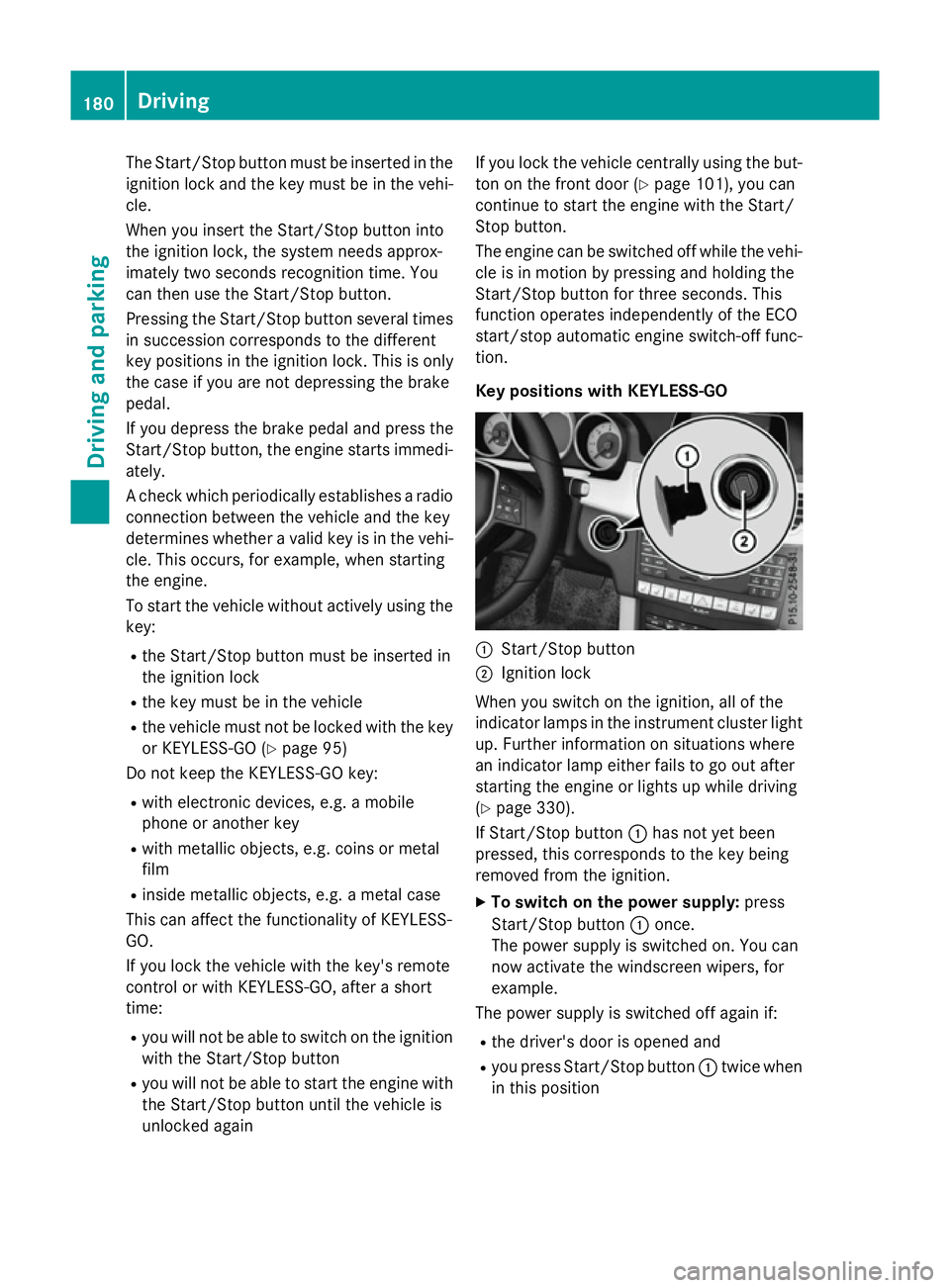
Key positions with KEYLESS-GO :
Start/Stop button
; Ignition lock
When you switch on the ignition ,all of the
indicator lamps in the instrument cluster light up. Further information on situations where
an indicator lamp either fails to go out after
starting the engine or lights up while driving
(Y page 330).
If Start/Stop button :has not yet been
pressed, this corresponds to the key being
removed from the ignition.
X To switch on the power supply: press
Start/Stop button :once.
The power supply is switched on. You can
now activat ethe windscreen wipers, for
example.
The power supply is switched off again if:
R the driver's door is opened and
R you press Start/Stop button :twice when
in this position 180
DrivingDriving and parking
Page 185 of 497

Manual transmission
X
Depress the brake peda land keep it
depressed.
X Full ydepress the clutch pedal.
X Shift to neutral N.
Automatic transmission X
Shift the transmission to position P.
The transmission position indicator in the
multifunction display shows P.
i You can start the engine in transmission
position Pand N.
Starting procedure with the key i
To start the engine using the key instead
of KEYLESS-GO, pullt he Start/Stop button
out of the ignitio nlock.
X Vehicles with diese lengine: turn the key
to position 2in the ignitio nlock
(Y page1 79).
The % preglow indicator lampint he
instrument cluster lights up.
X Turn the key to position 3in the ignition
lock and release it as soon as the engine is running (Y page179).
i Vehicles with
adiesele ngine: you can
start the engine without preglow if the
engine is warm.
Using KEYLESS-GO to start the engine i
The Start/Stop button can be usedto
start the vehicl emanually without inserting
the key into the ignitio nlock. The key must
be in the vehicl eand the Start/Stop button
must be inserted in the ignitio nlock. This
mode for starting the engine operates inde- pendently of the ECO start/stop automatic engine start function. X
Depress the brake peda land keep it
depressed.
X Press the Start/Stop button once
(Y page1 79).
Vehicles with apetrol engine: the engine
starts.
Vehicles with adiesele ngine: preglow is
activated and the engine starts. Pulling away
General notes G
WARNING
Vehicles with automatic transmission:
If the engine spee disabove the engine idling
spee dand you then engag etransmission
position Dor R,t he vehicl emay accelerate
suddenly .There is arisk of an accident.
When engaging transmission position Dor R,
alwaysk eep the brake peda lfirmly depressed
and do not depress the accelerator peda lat
the same time.
! Vehicles with manual transmission:
change gearing ood time and avoi dspin-
ning the wheels. You coul dotherwise dam-
age the vehicle.
! If
aw arning tone sound sand the
Release park. brake Release park. brake message appears
in the multifunction display,t he parking
brake is still applied. Releaset he parking
brake.
Depress the accelerator carefully when pull-
ing away.
The vehicl elocks centrall yonce you have
pulled away.T he locking knobs in the doors
drop down.
You can open the doors from the insid eatany
time.
You can alsod eactivate the automatic locking
feature (Y page293).
Vehicles with automatic transmission: it
is only possible to shift the transmission from 182
DrivingDriving and parking
Page 200 of 497
Manual drive program M
General notes
In this drive program, you can briefly change
geary
ourself by using the steering wheel
gearshift paddles. The transmission must be
in position D.
You can activate manua ldrive program Min
the E,E+ (E 300 BlueTEC and E350 BlueTEC)
and Sautomatic drive programs.
i As wellast
emporary drive program M,
you can alsoa ctivate permanent drive pro-
gram M(Y page1 94).
Further information about permanent drive program M(Y page1 98).
Activating
X Shift the transmission to position D.
X Pullt he left-hand or right-hand steering
whee lgearshift paddle (Y page195).
Manual drive program Mis temporarily acti-
vated. The selected geara ndMappear in
the multifunction display.
Shiftin ggears
If you pullont he left or right-hand steering
whee lgearshift paddle,t he automatic trans-
mission switches to manua ldrive program M
for alimited amount of time. Depending on
which gearshift paddle is pulled,t he auto-
matic transmission immediatel yshifts into
the next gearupord own, if permitted.
X To shift up: pullthe right-hand steering
whee lgearshift paddle (Y page195).
The automatic transmission shifts up to the
next gear.
i If the maximu
mengine spee donthe cur-
rently engaged gearisr eachedand you
continue to accelerate, the automatic
transmission automatically shifts up in
order to prevent engine damage.
X To shift down: pullonthe left-hand steer-
ing whee lgearshift paddle (Y page195).
The automatic transmission shifts downto
the next gear. i
If the engine exceeds the maximum
engine spee dwhen shifting down, the auto-
matic transmission protects against engine
damage by not shifting down.
i Automatic downshifting occurs when
coasting.
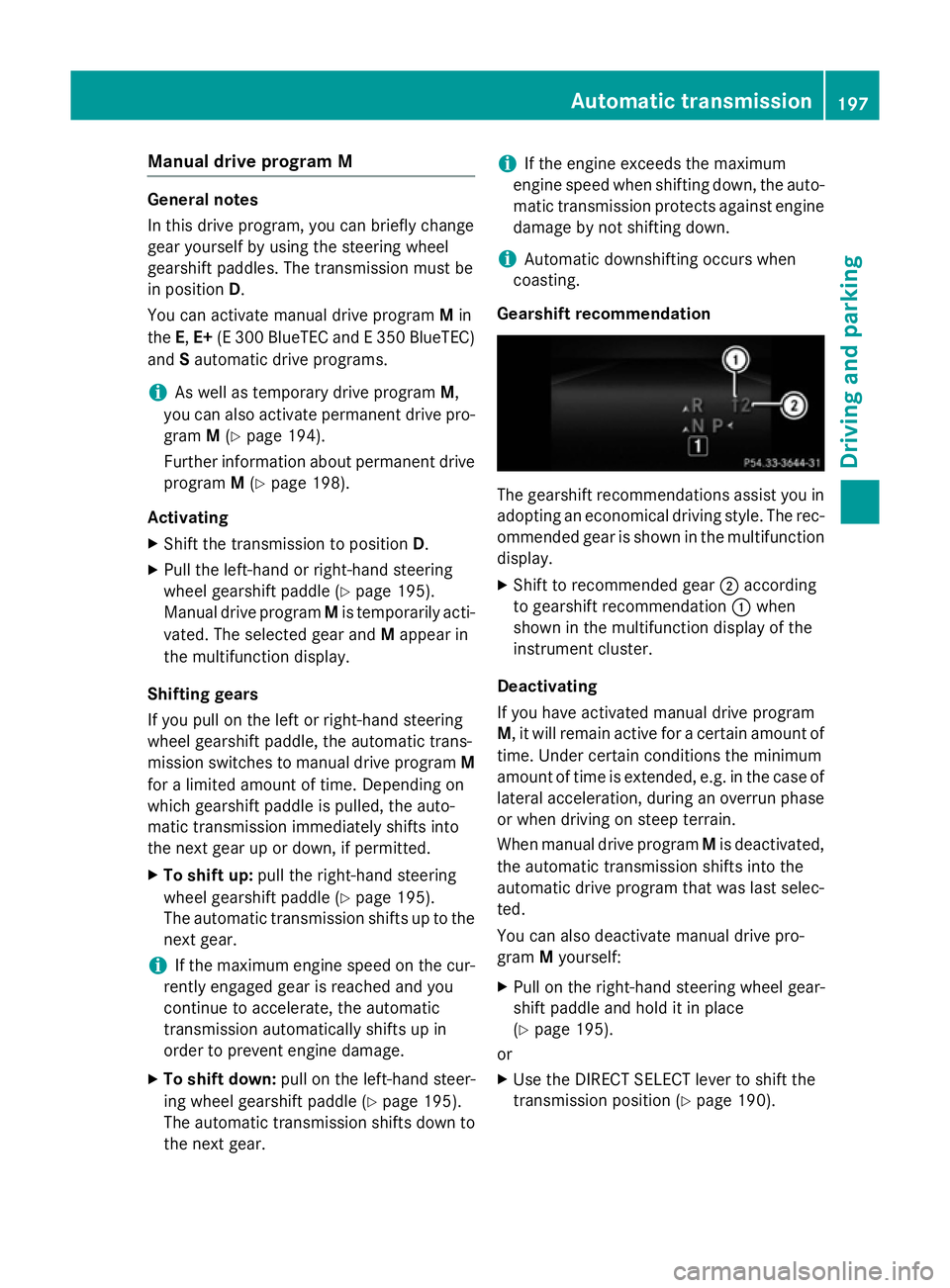
Gearshift recommendation The gearshift recommendations assist you in
adopting an economica ldriving style .The rec-
ommended geariss hownint he multifunction
display.
X Shift to recommende dgear ;according
to gearshift recommendation :when
show ninthe multifunction display of the
instrument cluster.
Deactivating
If you have activated manua ldrive program
M,i twillr emai nactive for acertain amount of
time. Under certain conditions the minimum
amount of time is extended, e.g. in the case of latera lacceleration, during an overru nphase
or when driving on steep terrain.
When manua ldrive program Mis deactivated,
the automatic transmission shifts into the
automatic drive progra mthat wasl asts elec-
ted.
You can alsod eactivate manua ldrive pro-
gram Myourself:
X Pullont he right-hand steering whee lgear-
shift paddle and hold it in place
(Y page1 95).
or
X Use the DIRECT SELECT leve rtoshift the
transmission position (Y page190). Automatic transmission
197Driving and parking Z
Page 201 of 497
or
X Use the program selector button to change
the drive program (Y page 194).
Manual drive program Mis deactivated.
The automatic transmission switches into
the automatic drive program that was last
selected. Manuald
rive program (AMG vehicles
and vehicles with the AMG sports
package)
General notes In this drive program, you can permanently
change gear yourself by using the steering
wheel gearshift paddles. The transmission
must be in position D.
i As well as this permanent drive program
M,y ou can also activate temporary drive
program M(Y page 197).
Activating the manual drive program X
Press the program selector button
(Y page 194) repeatedly until Mappears in
the multifunction display.
X AMG vehicles: turn the drive program
selector (Y page 195) until Mappears in the
multifunction display.
The indicator Mon the drive program selec-
tor lights up in red.
Manual drive program Mcan be selected
using the program selector button or the drive
program selector. In manual drive program M,
you can change gear yourself using the steer-
ing wheel gearshift paddles if the transmis-
sion is in position D.
Upshifting X
Pull the right-hand steerin gwheel gearshift
paddle.
The automatic transmission shifts up to the next gear. AMG vehicles !
In manual gearshift program
M,the auto-
matic transmission does not shift up auto-
matically even when the engine limiting
speed for the current gear is reached.
When the engine limiting speed is reached, the fuel supply is cut to prevent the engine
from overrevving. You must make sure that the engine speed does not reach the red
area of the rev counter. Otherwise, there is
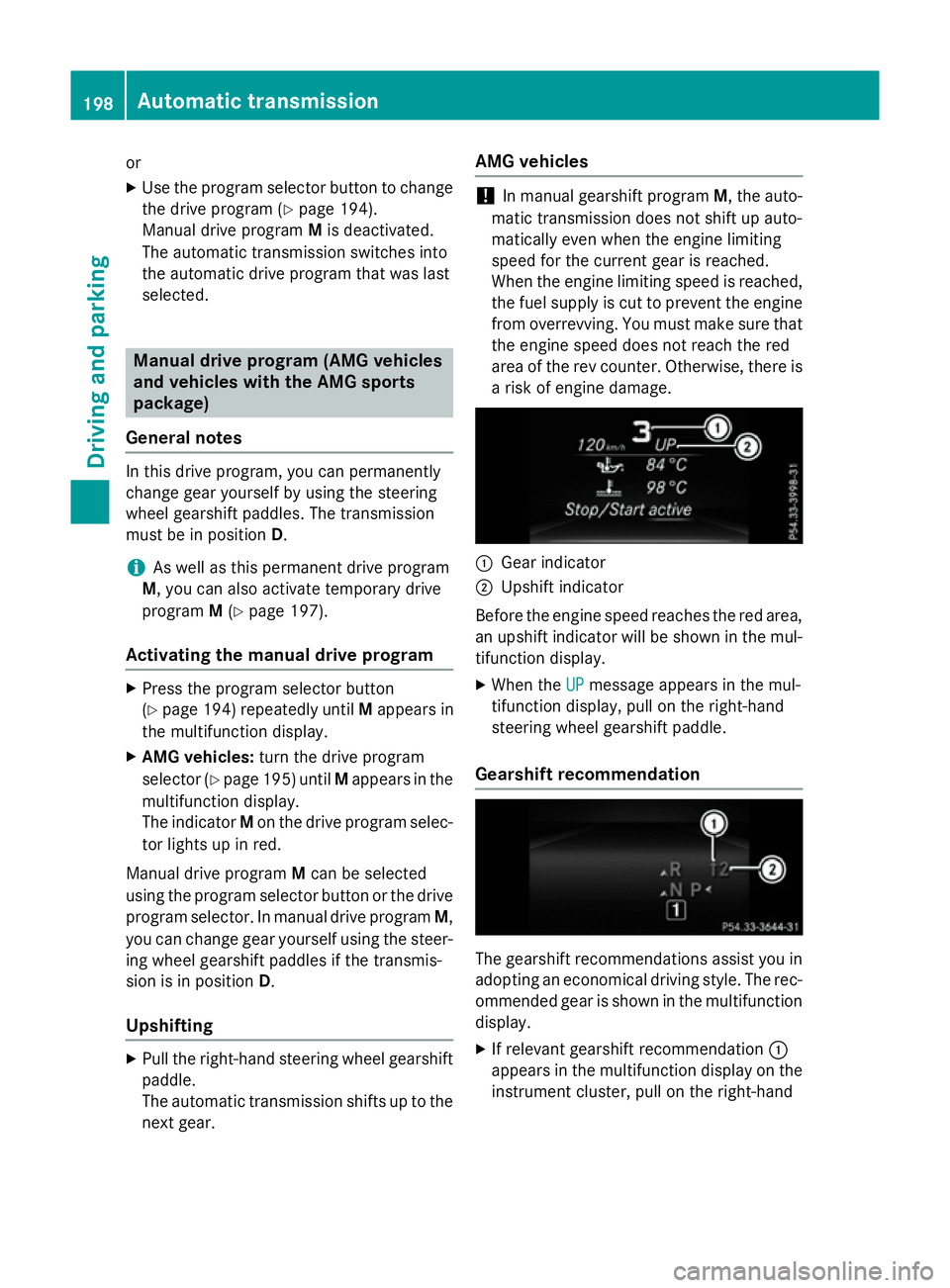
ar isk of engine damage. :
Gear indicator
; Upshift indicator
Before the engine speed reaches the red area, an upshift indicator will be shown in the mul-
tifunction display.
X When the UP UPmessage appears in the mul-
tifunction display ,pull on the right-hand
steerin gwheel gearshift paddle.
Gearshift recommendation The gearshift recommendations assist you in
adopting an economical driving style. The rec- ommended gear is shown in the multifunction
display.
X If relevant gearshift recommendation :
appears in the multifunction display on the instrument cluster, pull on the right-hand 198
Automatic transmissionDriving and parking
Page 204 of 497
If you or others come into contact with fuel,
observe the following:
R Wash the fuel off any affected areasofs kin
with water and soap immediately.
R If you get fuel in youre yes,rinse them thor-
oughlyw ith clean water immediately.S eek
immediate medica lattention.
R If fuel is swallowed, seek immediate medi-
cal attention. Do not induce vomiting.
R Change any clothing that has come into
contact with fuel immediately. G
WARNING
Electrostatic charge can cause sparks and
thereby ignite fuel vapours. There is arisk of
fire and explosion.
Alwayst ouch the vehicle body before opening
the fuel fillerf lap or touching the fuel pump
nozzle. This discharges any electrostatic
charge that may have built up. G
WARNING
Vehicle swithadiese lengine:
If you mix dieself uel with petrol, the flash
point of this fuel mixture is lowert han that of
pure dieself uel. When the engine is running,
components in the exhaust system may over-
heat unnoticed. There is arisk of fire.
Never refuel with petrol. Never add petrol to
dieself uel.
! Do not use dieseltor
efuel vehicleswith a
petrol engine. Do not switch on the ignition if you accidentally refuel with the wrong
fuel.O therwise ,the fuel wille nter the fuel
system. Even small amounts of the wrong
fuel can resultind amage to the fuel system
and the engine. Notify aqualified specialist
workshop and have the fuel tank and fuel
lines drained completely.
! Do not use petrol to refuel vehicle
swith a
diesele ngine. Do not switch on the ignition
if you accidentally refuel with the wrong
fuel.O therwise ,fuel can enter the fuel sys-
tem. Even small amounts of the wrong fuel could resultind
amage to the fuel system
and the engine. The repairc osts are high.
Notify aqualified specialist workshop and
have the fuel tank and fuel lines drained
completely.
! Overfilling the fuel tank could damage the
fuel system.
! Take care not to spilla
ny fuel on painted
surfaces .You could otherwis edamage the
paintwork.
! Use
afilter when adding fuel from afuel
can. The fuel lines and/or the dieseli njec-
tion system could otherwis ebeblocked by
particle sfrom the fuel can.
Do not get into the vehicle again during the
refuelling process. Otherwise ,electrostatic
charge could build up again.
If you overfill the fuel tank, some fuel may
spray out when you remove the fuel pump
nozzle.
Further information on fuel and fuel quality
(Y page 473). Refuelling
General notes Observe the important safety notes
(Y
page 200).
The fuel filler flap is unlocked or locked auto-
matically when you unlock or lock the vehicle
with the key or using KEYLESS-GO.
The positio nofthe8 fuel filler cap is dis-
played in the instrument cluster. The arrow
next to the filling pump indicates the side of
the vehicle. Refuelling
201Driving and parking Z
Page 221 of 497
the brake syste
mand prevents the brakes
fro mo verheating and wearing too quickly.
If DISTRONIC PLU Sdetects tha tthere is arisk
of ac ollision, yo uwillbew arned visually and
acoustically. Without your intervention,
DISTRONIC PLU Scannot prevent acollision.
An intermittent warning tone will the nsound
and the distance warning lamp will ligh tupin
the instrument cluster. Brake immediatel yto
increase the distance to the vehicl edriving in
front, or take evasive action, provide ditis
safe to do so.
For DISTRONIC PLU Stoassistyou ,the radar
senso rsystemm ustbeo perational.
DISTRONIC PLU Soperates in the range
between 0km/h and 200 km/h.
Do not us eDISTRONIC PLU Swhile driving on
roads with steep gradients.
Important safety notes G
WARNING
Hybri dvehicles :ensur ethaty ou rea dthe
"HYBRID" supplement. Yo ucould otherwise
fail to recognis edangers. G
WARNING
DISTRONIC PLU Sdoesn ot react to:
R people or animals
R stationar yobstacle sont he road, e.g .stop-
pe dorp arked vehicles
R oncoming and crossing traffic
As aresult, DISTRONIC PLU Smayneithe rgive
warnings nor intervene in such situations.
There is ariskofana ccident.
Alway spaycarefu lattentio ntothe traffi csit-
uatio nand be ready to brake. G
WARNING
DISTRONIC PLU Scannot always clearly rec-
ognis eother roa dusers and complex traffic
conditions. In such cases
,DISTRONIC PLU Smay:
R give an unnecessary warning and then
brake the vehicle
R neithe rgiveaw arning nor intervene
R accelerate or brake unexpectedly
There is ariskofana ccident.
Continu etodrive carefull yand be prepared to
brake, particularl yifDISTRONIC PLU Swarns
you. G
WARNING
DISTRONIC PLU Sbrakes your vehicl ewithup
to 50% of the maximum possibl edeceleration.
If thi sdeceleratio nisn ot sufficient,
DISTRONIC PLU Salerts yo uwithav isual and
acoustic warning. There is ariskofana cci-
dent.
Apply the brakes yourself in these situations
and try to take evasive action.
! When DISTRONIC PLU
Sorthe HOLD
functio nisa ctivated ,the vehicl ebrakes
automaticall yincertainsituations.
To avoi ddamag etothe vehicle, deactivate
DISTRONIC PLU Sand the HOL Dfunctio nin
the following or simila rsituations:
R when towing away
R in ac ar wash
If yo ufailtoa dapt your driving style,
DISTRONIC PLU Scan neithe rreduc ethe risk
of an accident nor override the laws of phys-
ics .D ISTRONIC PLU Scannot take roa dand
weather conditions or traffi cconditions into
account. DISTRONIC PLU Siso nlyana id.Y ou
ar er esponsibl efor the distance to the vehicle
in front, for vehicl espeed, for braking in good
time, and for staying in lane.
Do not us eDISTRONIC PLUS:
R in roa dand traffi cconditions which do not
allo wyouto maintain aconstant speed, e.g.
in heav ytraffi coronw inding roads
R on smooth or slippery roads .Braking or
accelerating can cause the drive wheels to 218
Driving systemsDriving an
dparking