2015 MERCEDES-BENZ E-CLASS COUPE tow
[x] Cancel search: towPage 21 of 345

Sound
Switching on/off ........................... 257
Specialist workshop ............................26
Speed, controlling
see Cruise control
Speedometer
Activating/deactivating the addi-
tional speedometer ........................ 216
Digital ............................................ 209
In the Instrument cluster ................. 30
Segments ...................................... 206
Selecting a display unit .................. 216
SPEEDTRONIC
Deactivating variable ..................... 160
Display message ............................2 37
Function/notes ............................ .158
Important safety notes .................. 158
LIM indicator lamp ......................... 159
Permanent ..................................... 161
Selecting ........................................ 159
Storing the current spee d.............. 159
Variabl e......................................... 159
Start/stop function
see ECO start/stop function
Starting (engine) ................................ 133
STEER CONTROL .................................. 71
Steering
Display message ............................ 245
Steering Assist and Stop&Go Pilot
(DISTRONIC PLUS)
Activating/deactivating ................. 215
Display message ............................ 238
Steering assistant STEER CON-
TROL
see STEER CONTROL
Steering wheel
Adjusting (electrically) ................... 100
Adjusting (manually) ........................ 99
Button overview ............................... 31
Buttons (on-board computer) ......... 207
Cleaning ......................................... 295
Gearshift paddle s........................... 144
Important safety notes .................... 99
Steering wheel heating .................. 100
Storing settings (memory func-
tion) ............................................... 104
Steering wheel gearshift paddles .... 144Steering wheel heating
Problem (malfunction) ................... 101
Switching on/of f........................... 100
Stowage areas ................................... 265
Stowage compartments
Armrest (under) ............................. 267
Centre console .............................. 266
Cup holde r..................................... 270
Glove compartment ....................... 266
Important safety information ......... 265
Under driver's seat/front-
passenger sea t.............................. 267
Stowage net ....................................... 267
Stowage space
Stowage net ................................... 267
Stowage well beneath the boot
floor .................................................... 269
Summer tyres .................................... 315
Sun visor ............................................ 272
Surround lighting (on-board com-
puter) .................................................. 218
Switching on media mode
Via the device list .......................... 263 T
Tail lamps Display message ............................ 229
Tank
see Fuel tank
Technical data
Capacities ...................................... 329
Emergency spare wheel ................. 326
Information .................................... 327
Trailer load s................................... 336
Tyres/wheels ................................. 325
Vehicle data ................................... 335
Telephone
Accepting a call (multifunction
steering wheel) .............................. 212
Authorising a mobile phone (con-
necting) ......................................... 259
Connecting a Mobile phone (gen-
eral information) ............................ 259
Display message ............................ 244
Menu (on-board computer) ............ 212
Number from the phone book ........ 213
Redialling ....................................... 213 18
Index
Page 22 of 345

Rejecting/ending a call ................
.213
See also Digital Owner's Manual ... 256
Switching between mobile
phones .......................................... .260
Telephone compartment ................ 267
Telephone module with Bluetooth ®
(SAP profile) Activating and connecting the
module .......................................... .261
Charging a mobile phone .............. .263
Connecting the mobile phone ....... .262
Connecting the module using a
USB cable ...................................... 261
Data modem mode ........................ 262
Installing the module ..................... 261
Introduction ................................... 260
Saving/deleting the PIN for the
SIM card ........................................ 262
Settings ......................................... 262
SIM card mode .............................. 261
Text messages ............................... 263
Transferring the phone book .......... 262
Temperature
Coolant .......................................... 206
Outside temperature ..................... .206
Setting (climate control) ................ 120
TEMPOMAT
Function/notes ............................ .156
Text messages
Telephone module with Blue-
tooth ®
(SAP profile) ....................... 263
Through-loading feature ................... 268
TIREFIT kit .......................................... 299
Important safety notes .................. 299
Storage location ............................ 297
Tyre pressure not reached ............. 301
Tyre pressure reached ................... 301
Top Tether ............................................ 50
Total distance recorder .................... 208
Tow-away protection
Activating ......................................... 72
Deactivating ..................................... 72
Function .......................................... .72
Tow-starting
Emergency engine starting ............ 310
Important safety notes .................. 307 Towing
Important safety notes .................. 307
Transporting the vehicle ................ 309
With the rear axle raised ................ 309
Towing a trailer
Active Blind Spot Assist ................. 198
Active Lane Keeping Assist ............ 201
Active Parking Assist ..................... 180
Axle load, permissibl e.................... 336
ESP ®
(Electronic Stability Pro-
gram) ............................................... 68
Failure check for LEDs ................... 204
General notes ................................ 202
Trailer tow hitch display message .. 244
Towing away
Fitting the towing ey e.................... 308
Removing the towing eye ............... 309
With both axles on the ground ....... 309
Towing eye ......................................... 297
Traffic Sign Assist
Activating/deactivating the warn-ing function .................................... 214
Display message ............................ 234
Function/note s............................. 190
Important safety notes .................. 191
Instrument cluster display ............. 191
Trailer
Folding the ball coupling in/out ..... 203
Trailer coupling
see Towing a trailer
Trailer towing
7-pin connecto r............................. 205
Blind Spot Assist ............................ 195
Cleaning the trailer tow hitch ......... 294
Coupling up a traile r...................... 204
Decoupling a trailer ....................... 204
Driving tips .................................... 202
Folding in the ball coupling ............ 203
Folding out the ball coupling .......... 203
Important safety notes .................. 201
Lights display message .................. 229
Mounting dimensions .................... 335
Parktronic ...................................... 174
Power supply ................................. 204
Trailer load s................................... 336
Transmission
see Automatic transmission
see Manual transmission Index
19
Page 23 of 345

Transmission position display
......... 140
Transmission position display
(DIRECT SELECT lever) ...................... 140
Transporting the vehicle .................. 309
Trim pieces (cleaning instruc-
tions) .................................................. 295
Trip computer (on-board com-
puter) .................................................. 209
Trip meter
Calling up ....................................... 208
Resetting (on-board computer) ...... 209
Turn signals
Switching on/off ........................... 108
TV
Operating (on-board computer) ..... 212
see Separate operating instructions
Two-way radio
Frequencies ................................... 327
Installation ..................................... 327
Transmission output (maximum) .... 327
Type identification plate
see Vehicle identification plate
Tyre changing tool kit ....................... 297
Tyre inflation compressor
see TIREFIT kit
Tyre pressure
Calling up (on-board computer) ..... 318
Display message ............................ 239
Not reached (TIREFIT) .................... 301
Reached (TIREFIT) .......................... 301
Recommended ............................... 316
Tyre pressure loss warning
General notes ................................ 317
Important safety notes .................. 318
Restarting ...................................... 318
Tyre pressure monitor
Checking the tyre pressure elec-
tronically ........................................ 319
Function/note s............................. 318
General notes ................................ 318
Important safety notes .................. 319
Restarting ...................................... 320
Warning lamp ................................. 255
Warning message .......................... 320
Tyres
Changing a whee l.......................... 320
Checking ........................................ 313 Direction of rotation ...................... 321
Display message ............................ 239
Important safety notes .................. 313
Information on driving .................... 313
MOExtended tyre s......................... 315
Replacing ....................................... 321
Service life ..................................... 314
Storing ........................................... 321
Tyre size (data ).............................. 325
Tyre tread ...................................... 314
Wheel and tyre combinations ........ 325
see Flat tyre U
Unlocking Emergency unlocking ....................... 82
From inside the vehicle (central
unlocking button) ............................. 81
USB devices
Connecting to the Media Inter-
face ............................................... 264 V
Vanity mirror (in sun visor) .............. 272
Variable SPEEDTRONIC
see SPEEDTRONIC
Vehicle
Correct use ...................................... 26
Data acquisition ............................... 26
Display message ............................ 241
Electronics ..................................... 327
Equipment ....................................... 24
Implied warranty .............................. 26
Individual settings .......................... 216
Leaving parked up ......................... 152
Locking (in an emergency) ............... 82
Locking (key) ................................... 74
Lowering ........................................ 324
Pulling away ................................... 134
Raising ........................................... 322
Registration ..................................... 26
Securing from rolling away ............ 322
Tow-starting ................................... 307
Towing away .................................. 307
Transporting .................................. 309
Unlocking (in an emergency) ........... 82
Unlocking (key) ................................ 74 20
Index
Page 28 of 345

Always have work on electrical and electronic
components carried out at a qualified special-ist workshop.
If you make any changes to the vehicle elec-
tronics, the general operating permit is ren-
dered invalid.
! There is a risk of damage to the vehicle if:
R the vehicle becomes stuck, e.g. on a high
kerb or an unpaved road
R you drive too fast over an obstacle, e.g. a
kerb or a pothole in the road
R a heavy object strikes the underbody or
parts of the chassis
In situations like this, the body, the under-
body, chassis parts, wheels or tyres could be
damaged without the damage being visible.
Components damaged in this way can unex-
pectedly fail or, in the case of an accident, no
longer withstand the strain they are designed for.
If the underbody panelling is damaged, com-
bustible materials such as leaves, grass or
twigs can gather between the underbody and
the underbody panelling. If these materials
come in contact with hot parts of the exhaust
system, they can catch fire.
In such situations, have the vehicle checked
and repaired immediately at a qualified spe-
cialist workshop. If, upon continuing your
journey, you notice that driving safety is
impaired, pull over and stop the vehicle imme- diately, paying attention to road and traffic
conditions. In such cases, consult a qualified
specialist workshop. Declarations of conformity
Wireless vehicle components The following information applies to all compo-
nents of the vehicle and the information sys-
tems and communication devices integrated
into the vehicle which receive and/or transmit
radio waves:
The components of this vehicle that receive
and/or transmit radio waves are compliant with
the basic requirements and all other relevant
conditions of Directive 1999/5/EC. You can
obtain further information from any Mercedes-
Benz Service Centre. Electromagnetic compatibility The electromagnetic compatibility of the vehicle
components has been checked and certified
according to the currently valid version of Reg-
ulation ECE-R 10. Diagnostics connection
The diagnostics connection is only intended for the connection of diagnostic equipment at a
qualified specialist workshop. G
WARNING
If you connect equipment to a diagnostics
connection in the vehicle, it can affect the
operation of the vehicle systems. This may
affect the operating safety of the vehicle.
There is a risk of an accident.
Do not connect any equipment to a diagnos-
tics connection in the vehicle. G
WARNING
Objects in the driver's footwell may restrict
the clearance around the pedals or block a
depressed pedal. This jeopardises the oper-
ating and road safety of the vehicle. There is a risk of an accident.
Stow all objects securely in the vehicle so that
they do not get into the driver's footwell.
Always fit the floormats securely and as pre-
scribed in order to ensure that there is always sufficient room for the pedals. Do not use
loose floormats and do not place several floor-mats on top of one another.
! If the engine is switched off and equipment
on the diagnostics connection is used, the
starter battery may discharge.
Connecting equipment to the diagnostics con-
nection can lead to emissions monitoring infor-
mation being reset, for example. This may lead
to the vehicle failing to meet the requirements of
the next emissions test during the main inspec- tion. Operating safety
25Introduction Z
Page 36 of 345
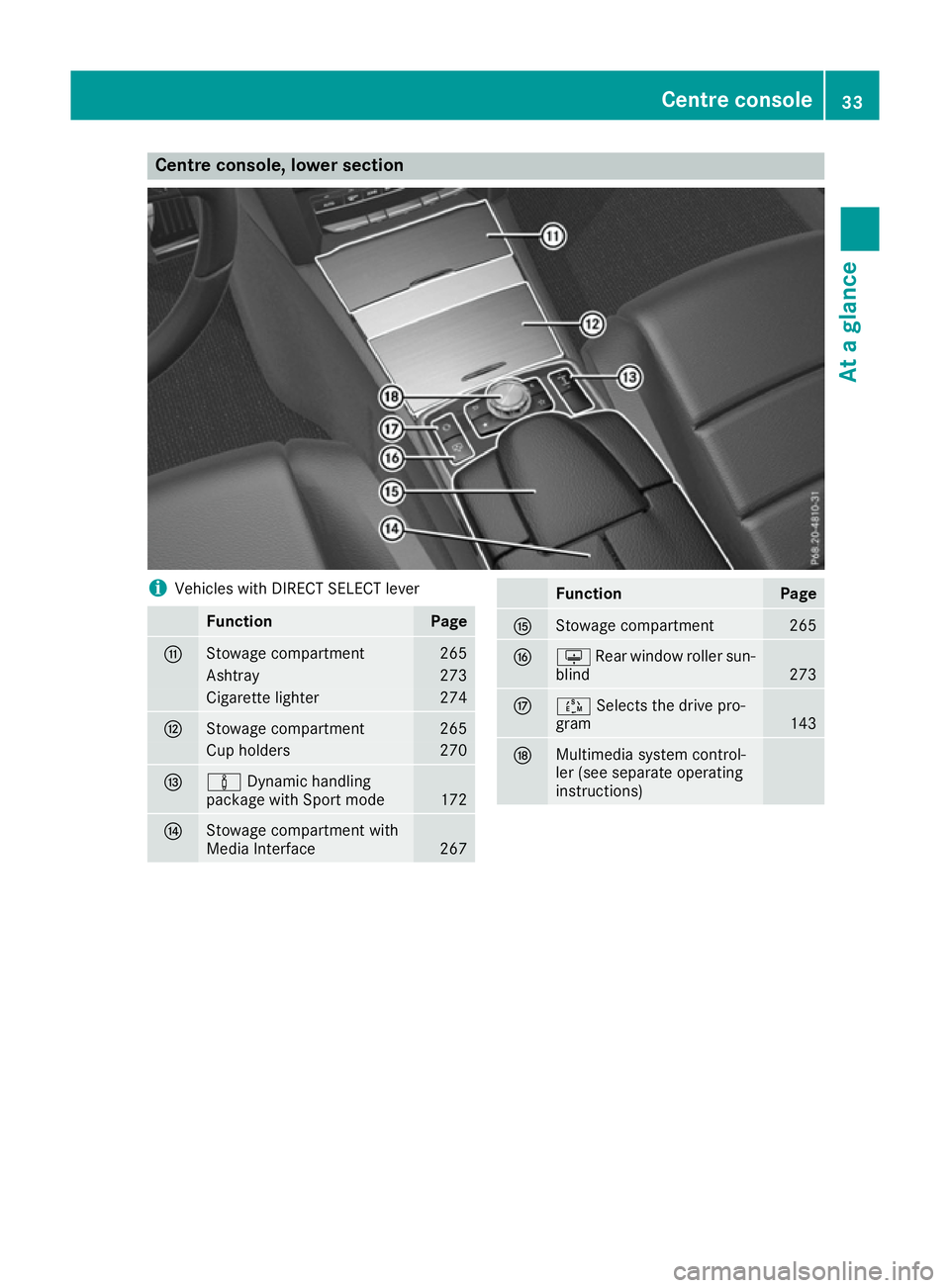
Centre console, lower section
i
Vehicles with DIRECT SELECT lever Function Page
G
Stowage compartment 265
Ashtray 273
Cigarette lighter 274
H
Stowage compartment 265
Cup holders 270
I
à
Dynamic handling
package with Sport mode 172
J
Stowage compartment with
Media Interface
267 Function Page
K
Stowage compartment 265
L
u
Rear window roller sun-
blind 273
M
Ú
Selects the drive pro-
gram 143
N
Multimedia system control-
ler (see separate operating
instructions) Centre console
33At a glance
Page 37 of 345

Overhead control panel
Function Page
:
u
Switches the rear inte-
rior lighting on/off 110
;
|
Switches the automatic
interior lighting control
on/off 110
=
p
Switches the right-
hand reading lamp on/off 110
?
ë
Deactivates tow-away
protection 72
A
3
Opens/closes the pan-
orama sliding sunroof with
roller sunblinds 89 Function Page
B
G
SOS button (Mercedes-
Benz emergency call system) 275
C
Rear-view mirror 103
D
Buttons for the garage door
opener
277
E
ê
Deactivates the interior
motion sensor 72
F
p
Switches the left-hand
reading lamp on/off 110
G
c
Switches the front inte-
rior lighting on/off 11034
Overhead control panelAt a glance
Page 42 of 345
tentionally or fail to be deployed when
required. There is an increased risk of injury,
possibly even fatal.
Never modify safety belts, seat belt tension-
ers, seat belt anchorages and inertia reels.
Ensure that seat belts are not damaged or
worn and are clean. After an accident, have
the seat belts checked immediately at a quali- fied specialist workshop.
Mercedes-Benz recommends that you only use
seat belts which have been approved specifi-
cally for your vehicle by Mercedes-Benz. Other-
wise, your vehicle's general operating permit
could be invalidated.
Correct seat belt use Pay attention to the safety notes about the seat
belt (Y page 38).
All vehicle occupants must fasten their seat
belts correctly before you start driving. You
must also make sure that all vehicle occupants
have fastened their seat belts correctly during
the journey.
When fastening your seat belt, always make
sure that:
R the seat belt tongue is inserted into the belt
buckle that belongs to the seat.
R the seat belt is tightened across your body.
Avoid wearing bulky clothing, e.g. a winter
coat.
R the seat belt is not twisted.
Only then can the forces which occur be dis-
tributed over the area of the belt.
R the shoulder section of the belt is routed
across the centre of your shoulder.
The shoulder section of the belt must not
come into contact with your neck or be routed
under your arm.
R The lap belt must be taut and as low as pos-
sible over your lap.
The lap belt must always be routed across
your hip joints and not across your abdomen.
Pregnant women must take particular care
with this. If necessary, push the lap belt down to your hip joint and pull it tight using the
shoulder section of the belt.
R The seat belt is not routed over sharp, pointed
or fragile objects. If such objects are located on or in your cloth-
ing, e.g. pens, keys, spectacles, etc. stow
these in a suitable location.
R Only one person should use each seat belt at
any one time.
Babies and children must never travel sitting
on the lap of another vehicle occupant. In the
event of an accident, they could be crushed
between the vehicle occupant and seat belt.
R Do not secure any objects with a seat belt if
the seat belt is being used by one of the vehi- cle's occupants.
Also ensure that no objects are placed
between a person and the seat. e.g. a cush-
ion.
Seat belts are solely intended to secure and
restrain persons. To secure objects, luggage or
loads, always observe the "Loading guidelines"
(Y page 265).
Fastening a seat belt Observe the safety notes on the seat belt
(Y
page 38) and the information on the correct
use of the seat belt (Y page 39). G
WARNING
If the seat-belt extender extends during the
journey, the seat belt is not sitting correctly
across your body. The seat belt then cannot
perform its intended protective function.
There is an increased risk of injury, possibly
even fatal.
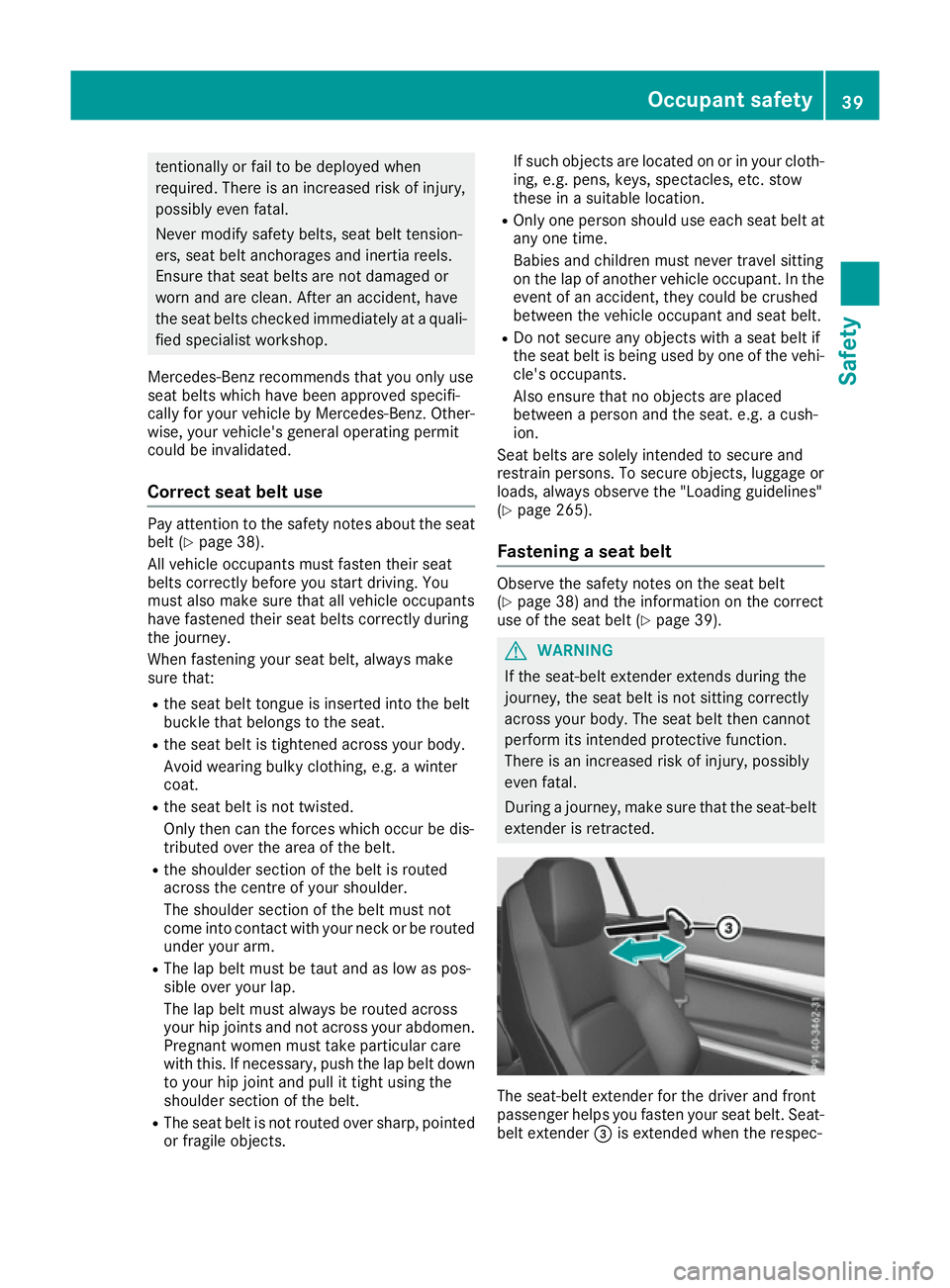
During a journey, make sure that the seat-belt extender is retracted. The seat-belt extender for the driver and front
passenger helps you fasten your seat belt. Seat- belt extender =is extended when the respec- Occupant safety
39Safety Z
Page 47 of 345

Windowbags
:are integrated into the side of
the roof frame and deploy in the area from the A-
pillar to the C-pillar.
When deployed, the windowbag enhances the
level of protection for the head. However, it does
not protect the chest or arms.
In the event of a side impact, the windowbag is
deployed on the side which the impact occurs.
If the system determines that it can offer addi-
tional protection to that provided by the seat
belt, a windowbag may be deployed in other
accident situations (Y page 44).Deployment of belt tensioners and air-
bags
Important safety notes G
WARNING
After the airbag deploys, the airbag parts are
hot. There is a risk of injury.
Do not touch the airbag parts. Have a
deployed airbag replaced at a qualified spe-
cialist workshop as soon as possible. G
WARNING
Pyrotechnic seat belt tensioners that have
been deployed are no longer operational and
are unable to perform their intended protec-
tive function. This poses an increased risk of
injury or even fatal injury.
Therefore, have pyrotechnic belt tensioners
which have been triggered immediately
replaced at a qualified specialist workshop.
Mercedes-Benz recommends that you have the
vehicle towed to a qualified specialist workshop
after an accident. Take this into account, par-
ticularly if a seat belt tensioner was triggered or
an airbag was deployed.
An electric motor is used by PRE-SAFE ®
to trig-
ger the tightening of the seat belt in hazardous
situations. This procedure is reversible.
If the belt tensioners are triggered or an airbag is deployed, you will hear a bang, and a small
amount of powder may also be released. The
6 restraint system warning lamp lights up.
Only in rare cases will the bang affect your hear-
ing. In general, the powder released is not haz- ardous to health but may cause short-term
breathing difficulties to persons suffering from
asthma or other pulmonary conditions. Provided
it is safe to do so, you should leave the vehicle
immediately or open the window in order to pre- vent breathing difficulties.
Operation During the first stage of a collision, the restraint
system control unit evaluates important physi-
cal data relating to vehicle deceleration or accel-
eration, such as:
R duration
R direction
R intensity
Based on the evaluation of this data, the
restraint system control unit triggers the seat
belt tensioners in the event of a head-on or rear
collision.
A seat belt tensioner can only be triggered if:
R the ignition is switched on
R the components of the restraint system are
operational. You can find further information
under: "Restraint system warning lamp"
(Y page 37)
R the belt tongue has engaged in the belt buckle
of the respective front seat
The seat belt tensioners in the rear compart-
ment are triggered independently of the lock
status of the seat belts.
If the restraint system control unit detects a high severity accident, in certain head-on collisions,
additional components of the restraint system
are deployed independently of each other:
R front airbags and driver's kneebag
R windowbag, if the system determines that
deployment can offer additional protection to
that provided by the seat belt
Depending on the person in the front-passenger seat, the front-passenger front airbag is either
disabled or enabled. The front-passenger front
airbag can only be deployed in an accident if the PASSENGER AIR BAG OFF indicator lamp is off.
Observe the information on the PASSENGER AIR
BAG OFF indicator lamp (Y page 37).
Your vehicle has two-stage front airbags. In the
first deployment stage, the front airbag is filled
with propellant gas to reduce the risk of injuries.
The front airbag is fully deployed if the second
deployment stage is activated within a few mil-
liseconds. 44
Occupant safetySafety