2015 MERCEDES-BENZ E-CLASS CABRIOLET buttons
[x] Cancel search: buttonsPage 21 of 349
Skibag
................................................ 275
SMS
See also Digital Owner's Manual ... 263
Snow chains ...................................... 324
Sockets
General notes ................................ 280
Rear compartment .........................2 81
Soft top
AIRCAP ............................................ 95
Cleaning ......................................... 298
Closing manually in an emer-
gency ............................................... 90
Display message ............................ 252
Draught stop ................................... .94
Fitting/removing the AIRCAP
draught stop .................................... 96
Important safety notes .................... 88
Opening/closing (with key) .............. 90
Opening/closing (with soft-top
switch) ............................................. 89
Problem (malfunction) ..................... 98
Re-locking ........................................ 94
Soft-top switch .................................... 89
Sound
Switching on/off ........................... 264
Specialist workshop ............................ 27
Speed, controlling
see Cruise control
Speedometer
Activating/deactivating the addi-
tional speedometer ........................ 223
Digital ............................................ 216
In the Instrument cluster ................ .31
Segments ...................................... 213
Selecting a display uni t.................. 223
SPEEDTRONIC
Deactivating variable ..................... 167
Display message ............................ 244
Function/note s............................. 165
Important safety notes .................. 165
LIM indicator lamp ......................... 166
Permanent ..................................... 168
Selecting ........................................ 166
Storing the current speed .............. 166
Variabl e......................................... 166
Start/stop function
see ECO start/stop function Starting (engine)
................................ 140
STEER CONTROL .................................. 71
Steering
Display message ............................ 251
Steering Assist and Stop&Go Pilot
(DISTRONIC PLUS)
Activating/deactivating ................. 222
Display message ............................ 245
Steering assistant STEER CON-
TROL
see STEER CONTROL
Steering wheel
Adjusting (electrically) ................... 107
Adjusting (manually) ...................... 107
Button overview ............................... 32
Buttons (on-board computer) ......... 214
Cleaning ......................................... 302
Gearshift paddle s........................... 151
Important safety notes .................. 106
Steering wheel heating .................. 107
Storing settings (memory func-
tion) ............................................... 112
Steering wheel gearshift paddles .... 151
Steering wheel heating
Problem (malfunction) ................... 109
Switching on/of f........................... 107
Stowage areas ................................... 272
Stowage compartments
Armrest (under) ............................. 274
Centre console .............................. 273
Cup holde r..................................... 277
Glove compartment ....................... 273
Important safety information ......... 272
Under driver's seat/front-
passenger sea t.............................. 274
Stowage net ....................................... 274
Stowage space
Stowage net ................................... 274
Stowage well beneath the boot
floor .................................................... 277
Summer tyres .................................... 323
Sun visor ............................................ 279
Surround lighting (on-board com-
puter) .................................................. 225
Switching on media mode
Via the device list .......................... 270 18
Index
Page 26 of 349
Introduction
The printed Owner's Manual provides informa-
tion about the safe operation of your vehicle.
The Digital Owner's Manual additionally
describes further functions and equipment fit-
ted in your vehicle. The functions of the vehicle
and multimedia system are described in the Dig-
ital Owner's Manual. You can call up the Digital
Owner's Manual via the multimedia system.
i You will not incur any costs when calling up
the Digital Owner's Manual. The Digital Own-
er's Manual works without connecting to the
Internet.
There are three ways to access the topics of the Digital Owner's Manual:
R Visual search
The visual search allows you to explore your
vehicle "virtually". Starting from either the
vehicle exterior view or interior view, you can access many of the different topics covered
by the Digital Owner's Manual. To access the
vehicle interior section, select the "Vehicle
interior" view.
R Keyword search
The keyword search allows you to search for a
keyword by entering characters. Further
information can be found in the Digital Own-
er's Manual in the "Audio 20" or "COMAND
Online" section under the "Character entry
(telephony)" keyword.
R Contents
You can select individual sections in the con-
tents.
i The Digital Owner's Manual is deactivated
for safety reasons while driving. Operation
Calling up the Digital Owner's Manual
X Press the Øbutton in the centre console.
The overview relating to the vehicle appears.
X Select the "Owner's Manual" menu item by
turning 3or pressing 7the controller.
X Confirm 7the message about the warning
and safety notes.
The basic menu for the Digital Owner's Man-
ual appears. Operating the Digital Owner's Manual
General notes Please observe the information about the oper-
ation of the controller (Y page 264).
Content pages You can access the content pages by means of
a visual search, a keyword search or using the
contents.
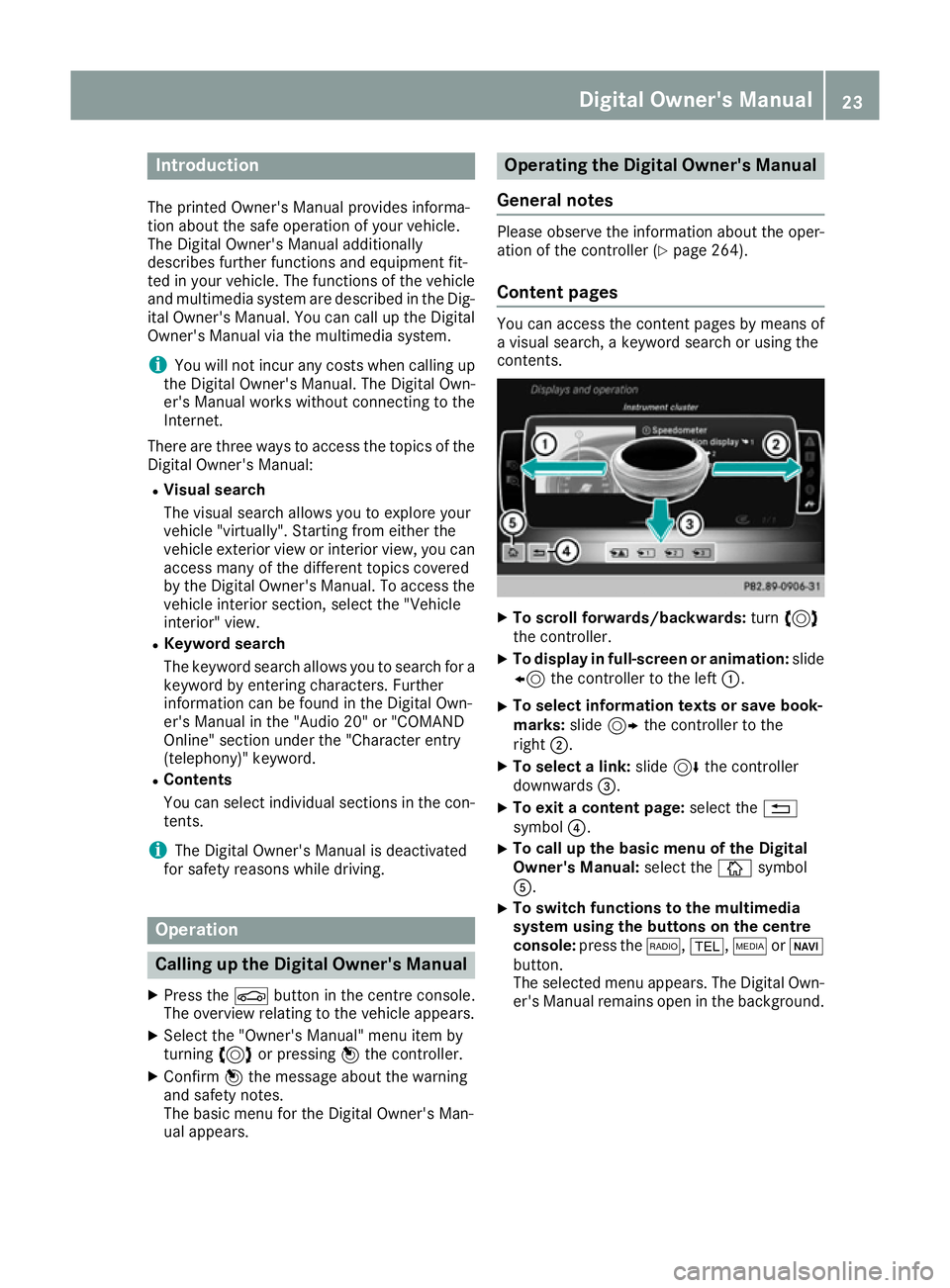
X
To scroll forwards/backwards: turn3
the controller.
X To display in full-screen or animation: slide
8 the controller to the left :.
X To select information texts or save book-
marks:
slide9 the controller to the
right ;.
X To select a link: slide6the controller
downwards =.
X To exit a content page: select the%
symbol ?.
X To call up the basic menu of the Digital
Owner's Manual:
select theÞsymbol
A.
X To switch functions to the multimedia
system using the buttons on the centre
console: press the $,%,ÕorØ
button.
The selected menu appears. The Digital Own- er's Manual remains open in the background. Digital Owner's Manual
23
Page 38 of 349

Overhead control panel
Function Page
:
u
Switches the rear inte-
rior lighting on/off 118
;
|
Switches the automatic
interior lighting control
on/off 118
=
p
Switches the right-
hand reading lamp on/off 118
?
ë
Deactivates tow-away
protection 72
A
G
SOS button (Mercedes-
Benz emergency call system) 281 Function Page
B
Rear-view mirror 111
C
Buttons for the garage door
opener
283
D
ê
Deactivates the interior
motion sensor 72
E
p
Switches the left-hand
reading lamp on/off 118
F
c
Switches the front inte-
rior lighting on/off 118Overhead control panel
35At a glance
Page 79 of 349

X
To deactivate: press the&button on the
key twice in rapid succession.
The battery indicator light of the key
(Y page 77) flashes twice briefly and lights
up once. KEYLESS-GO is then deactivated.
X To activate: press any button on the key.
or X Insert the key into the ignition lock.
KEYLESS-GO and all of its associated features
are available again. Changing the settings of the locking
system
You can change the settings of the locking sys-
tem. This means that only the driver's door and
the fuel filler flap are unlocked when the vehicle is unlocked. This is useful if you frequently travelon your own.
X To change the setting: simultaneously press
the % and& buttons on the key for
approximately six seconds until the battery
check lamp flashes twice (Y page 77).
If the setting of the locking system is changed
within the signal range of the vehicle, pressing
the & or% button:
R locks or
R unlocks the vehicle
The key now functions as follows:
X To unlock: press the%button once.
X To unlock centrally: press the%button
twice.
X To lock centrally: press the&button.
The KEYLESS-GO function is changed as fol-
lows:
X To unlock the driver's door: touch the inner
surface of the door handle on the driver's
door.
X To unlock centrally: touch the inner surface
of the front-passenger door handle.
X To lock centrally: touch the outer sensor
surface on one of the door handles.
X To restore the factory settings: press and
hold down the %and& buttons simul-
taneously for approximately six seconds until
the battery check lamp flashes twice
(Y page 77). Emergency key element
General notes If the vehicle can no longer be locked or
unlocked with the key, use the emergency key
element.
If you use the emergency key element to unlock
and open the driver's door or the boot lid, the
anti-theft alarm system will be triggered. Switch
off the alarm (Y page 71).
If you unlock the vehicle using the emergency
key element, the fuel filler flap will not be
unlocked automatically.
X To unlock the fuel filler flap: insert the key
into the ignition lock.
Removing the emergency key element X
Push release catch :in the direction of the
arrow and, at the same time, remove emer-
gency key element ;from the key.
Further information about: R Unlocking the driver's door (Y page 82)
R Unlocking the boot (Y page 84)
R Locking the vehicle (Y page 82)
Inserting the emergency key element X
Push emergency key element ;fully into the
key until it engages and release catch :
returns to its basic position. 76
KeyOpening and closing
Page 81 of 349
X
Repeatedly tap the key against your palm until
battery =falls out.
X Insert the new battery with the positive ter-
minal facing upwards. Use a lint-free cloth to
do so.
X Make sure that the surface of the battery is
free of lint, grease and other contamination.
X Insert the front tabs of battery compartment
cover :into the housing and then press to
close it.
X Insert emergency key element ;into the key
(Y page 76).
X Check the function of all key buttons on the
vehicle. 78
KeyOpening and closing
Page 85 of 349

function has been deactivated. You can deacti-
vate the double lock function by deactivating the
interior motion sensor (Y page 72).
For all countries: when a locked door is opened
from inside the vehicle, the previous unlocking
process will be observed if the vehicle has been:
R locked with the locking button for the central
locking or
R locked automatically
The vehicle will be fully unlocked if it had previ-
ously been fully unlocked. Only the door which
has been opened from the inside is unlocked if
only the driver's door had been previously
unlocked. Automatic locking feature
X
To deactivate: press and hold button :for
about five seconds until a tone sounds.
X To activate: press and hold button ;for
about five seconds until a tone sounds.
If you press one of the two buttons and do not
hear a tone, the relevant setting has already
been selected.
The vehicle is locked automatically when the
ignition is switched on and the wheels are turn-
ing.
You could therefore be locked out if:
R the vehicle is being pushed.
R the vehicle is being towed.
R the vehicle is being tested on a dynamometer.
You can also activate and deactivate the auto-
matic locking function using the on-board com- puter (Y page 225). Unlocking/locking the driver's door
using the emergency key element
i If you want to centrally lock the vehicle using
the emergency key element, begin by press-
ing the locking button for the interior locking
mechanism while the driver's door is open.
Then proceed to lock the driver's door using
the emergency key element. X
To unlock: turn the emergency key element
anti-clockwise as far as it will go to position
1.
X To lock: turn the emergency key element
clockwise as far as it will go to position 1.
Right-hand-drive vehicle: turn the emergency
key element in the opposite direction in both
cases.
If you use the emergency key element to unlock
and open the driver's door, the anti-theft alarm
system will be triggered. Switch off the alarm
(Y page 71). Boot
Important safety notes
G
WARNING
Combustion engines emit poisonous exhaust
gases such as carbon monoxide. Exhaust
gases can enter the vehicle interior if the boot
lid is open when the engine is running, espe-
cially if the vehicle is in motion. There is a risk of poisoning.
Always switch off the engine before opening
the boot lid. Never drive with the boot lid
open. 82
BootOpening and closing
Page 103 of 349
Observe the safety notes on "Airbags"
(Y
page 42) and "Children in the vehicle"
(Y page 49). G
WARNING
You could lose control of the vehicle while
driving if you:
R adjust the driver's seat, steering wheel or
mirrors
R fasten the seat belt
There is a risk of an accident.
Adjust the driver's seat, head restraint, steer-
ing wheel and mirrors and fasten your seat
belt before starting the engine. G
WARNING
If you adjust the seat height carelessly, you or other vehicle occupants could be trapped andthereby injured. Children in particular could
accidentally press the electrical seat adjust-
ment buttons and become trapped. There is a
risk of injury.
While moving the seats, make sure that your
hands or other body parts do not get under the
lever assembly of the seat adjustment sys-
tem. G
WARNING
When adjusting a seat, you or another vehicle occupant could become trapped by the guiderail of the seat, for instance. There is a risk of
injury.
Make sure that no one has any part of their
body within the sweep of the seat when
adjusting it.
! To avoid damage to the seats and the seat
heating, observe the following information:
R do not spill any liquids on the seats. If liquid
is spilled on the seats, dry them as soon as possible.
R if the seat covers are damp or wet, do not
switch on the seat heating. The seat heat-
ing should also not be used to dry the seats.
R clean the seat covers as recommended;
see "Interior care".
R do not transport heavy loads on the seats.
Do not place sharp objects on the seat cushions, e.g. knives, nails or tools. The
seats should only be occupied by passen-
gers, if possible.
R when the seat heating is in operation, do
not cover the seats with insulating materi-
als, e.g. blankets, coats, bags, seat covers,
child seats or booster seats.
! Make sure that there are no objects in the
footwell under or behind the seats when mov- ing the seats back. There is a risk that the
seats and/or the objects could be damaged.
i The head restraints in the front seats are
fitted with the NECK-PRO system (Y page 47).
For this reason, it is not possible to remove
the head restraints from the front seats.
For more information, contact a qualified spe-
cialist workshop. Adjusting the seats manually and
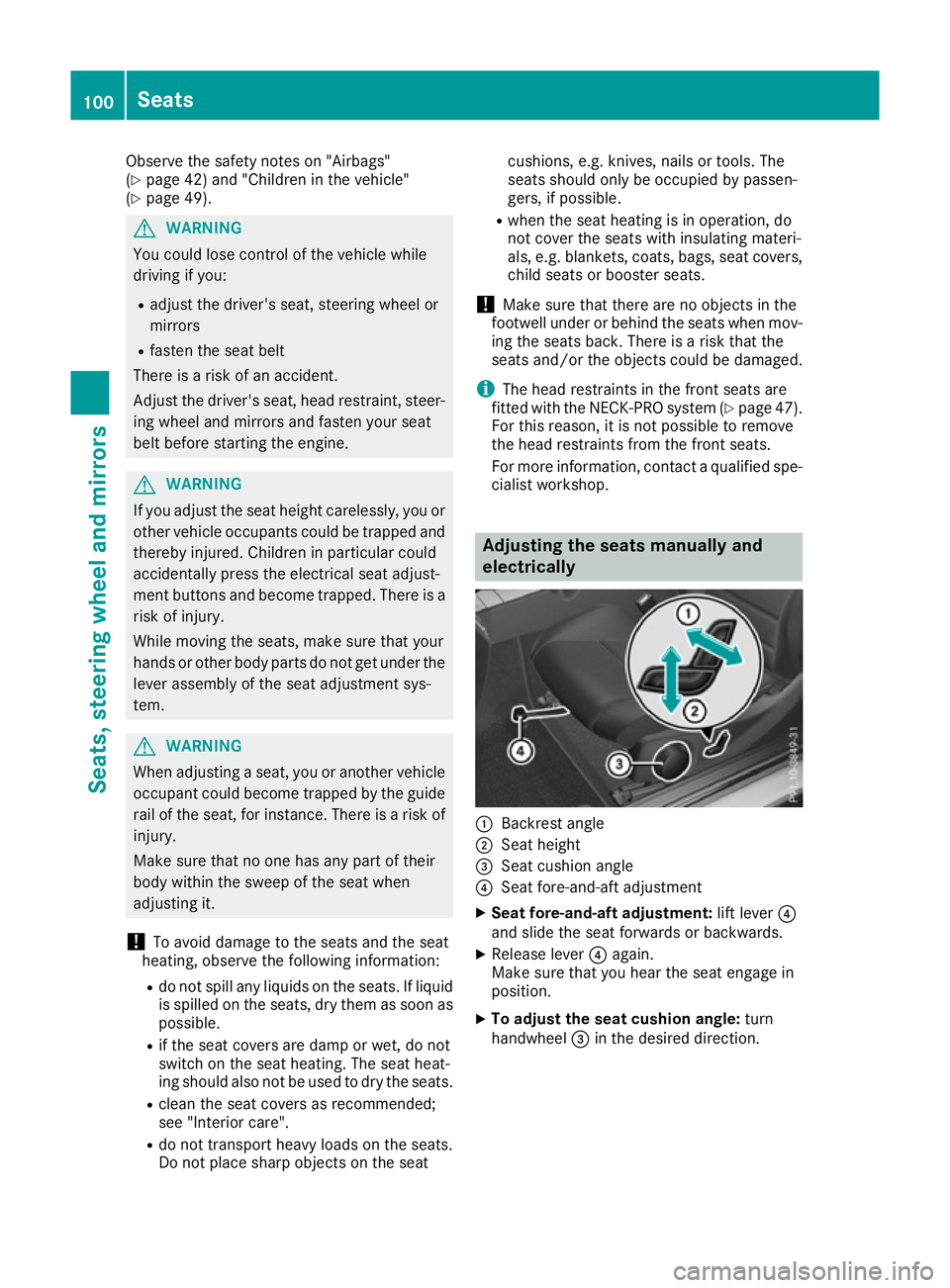
electrically :
Backrest angle
; Seat height
= Seat cushion angle
? Seat fore-and-aft adjustment
X Seat fore-and-aft adjustment: lift lever?
and slide the seat forwards or backwards.
X Release lever ?again.
Make sure that you hear the seat engage in
position.
X To adjust the seat cushion angle: turn
handwheel =in the desired direction. 100
SeatsSeats, steering wheel and mirrors
Page 108 of 349
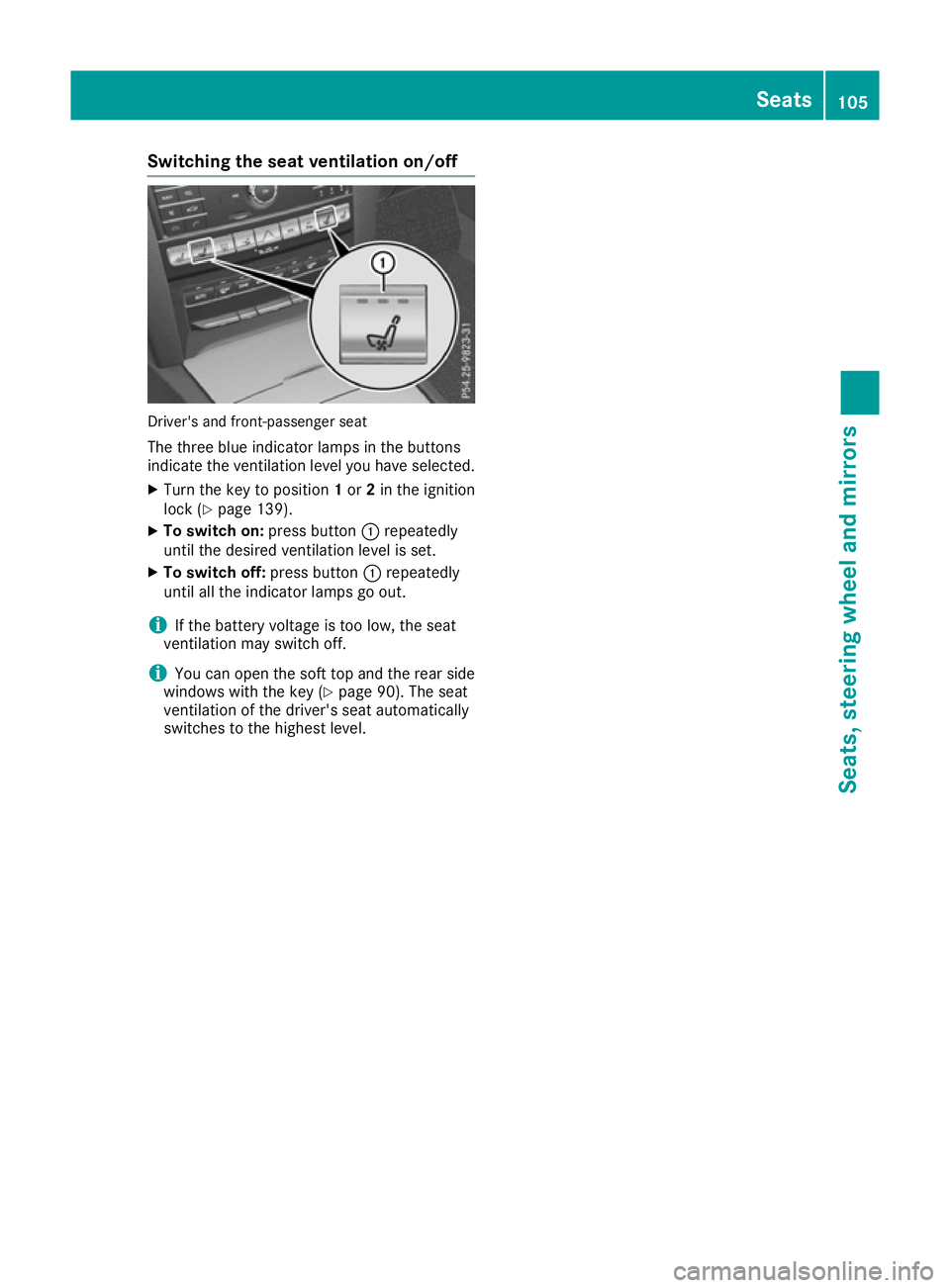
Switching the seat ventilation on/off
Driver's and front-passenger seat
The three blue indicator lamps in the buttons
indicate the ventilation level you have selected.
X Turn the key to position 1or 2in the ignition
lock (Y page 139).
X To switch on: press button:repeatedly
until the desired ventilation level is set.
X To switch off: press button:repeatedly
until all the indicator lamps go out.
i If the battery voltage is too low, the seat
ventilation may switch off.
i You can open the soft top and the rear side
windows with the key (Y page 90). The seat
ventilation of the driver's seat automatically
switches to the highest level. Seats
105Seats, steering wheel and mirrors Z