2015 MERCEDES-BENZ CLS-Class light
[x] Cancel search: lightPage 145 of 398

MAX COOL maximum cooling
The MAX COOL function is only available in
vehicles for the USA.
MAX COOL is only operational when the
engine is running. X To activate: press theÙbutton.
The indicator lamp in the Ùbutton lights
up.
X To deactivate: press theÙbutton.
The indicator lamp in the Ùbutton goes
out. The previously selected settings are
restored.
When you activate MAX COOL, climate con-
trol switches to the following functions: R maximum cooling
R maximum airflow
R air-recirculation mode on Defrosting the windows
Windows fogged up on the inside X
Activate the ¿cooling with air dehu-
midification function.
X Activate automatic mode Ã.
X Adjust the side air vents so that the warmed
air is directed to the side windows.
X If the windows continue to fog up, activate
the "windshield defrosting" function ¬.
i You should only select this setting until
the windshield is clear again.
Windows fogged up on the outside X
Press the _button repeatedly until the
P orO symbol appears in the dis-
play.
X Adjust the side air vents so that no air is
directed to the side windows. Rear window defroster
General notes The rear window defroster has a high current
draw. You should therefore switch it off as
soon as the rear window is clear. Otherwise,
the rear window defroster switches off auto-
matically after several minutes.
If the battery voltage is too low, the rear win-
dow defroster may switch off.
Activating/deactivating X
Turn the SmartKey to position 2in the igni-
tion lock (Y page 149).
X Press the ¤button.
The indicator lamp in the ¤button lights
up or goes out. Operating the climate control systems
143Climate control
Page 146 of 398

Problems with the rear window defroster
Problem
Possible causes/consequences and
M
MSolutions The rear window
defroster has deactiva-
ted prematurely or can-
not be activated. The battery has not been sufficiently charged.
X Switch off any consumers that are not required, e.g. reading
lamps, interior lighting or the seat heating.
When the battery is sufficiently charged, the rear window
defroster can be activated again. Switching air-recirculation mode
on/off
General notes You can deactivate the flow of fresh air if
unpleasant odors are entering the vehicle
from outside. The air already inside the vehi-
cle will then be recirculated.
If you switch on air-recirculation mode, the
windows can fog up more quickly, in particu-
lar at low temperatures. Only use air-recircu-
lation mode briefly to prevent the windows
from fogging up.
Activating/deactivating X
Turn the SmartKey to position 2in the igni-
tion lock (Y page 149).
X To activate: press thegbutton.
The indicator lamp in the gbutton lights
up.
i Dual-zone automatic climate control: air-
recirculation mode is automatically activa-
ted at high outside temperatures.
3-zone automatic climate control: air-recir- culation mode is automatically activated at
high levels of pollution or at high outside
temperatures.
When air-recirculation mode is activated
automatically, the indicator lamp above the g button does not light up. Outside air is
added after about 30 minutes.
X To deactivate: press thegbutton.
The indicator lamp in the gbutton goes
out. i
Air-recirculation mode deactivates auto-
matically:
R after approximately five minutes at out-
side temperatures below approximately
41 ‡ (5 †)
R after approximately five minutes if cool-
ing with air dehumidification is deactiva-
ted
R after approximately 30 minutes at out-
side temperatures above approximately
41 ‡ (5 †) if the "Cooling with air dehu-
midification" function is activated Switching the residual heat on or off
General notes The residual heat function is only available
with 3-zone automatic climate control.
It is possible to make use of the residual heat
of the engine to continue heating the vehicle
for approximately 30 minutes after the engine
has been switched off. The heating time
depends on the set interior temperature.
Activating/deactivating X
Turn the key to position 0in the ignition
lock or remove it (Y page 149).
X To activate: press theÌbutton.
The indicator lamp in the Ìbutton lights
up.
i If the residual heat function is activated,
the windows may fog up on the inside. 144
Operating the climate control systemsClimate control
Page 152 of 398
KEYLESS-GO
General notes
Vehicles with KEYLESS-GO are equipped with
SmartKeys featuring the integrated KEYLESS-
GO function and a detachable Start/Stop but-
ton.
The Start/Stop button must be inserted in the ignition lock and the SmartKey must be in the
vehicle.
When you insert the Start/Stop button into
the ignition lock, the system needs approx-
imately two seconds recognition time. You
can then use the Start/Stop button.
Pressing the Start/Stop button several times
in succession corresponds to the different
key positions in the ignition lock. This is only
the case if you are not depressing the brake
pedal.
If you depress the brake pedal and press the
Start/Stop button, the engine starts immedi-
ately.
A check which periodically establishes a radio connection between the vehicle and the
SmartKey determines whether a valid Smart-
Key is in the vehicle. This occurs, for example, when starting the engine.
To start the vehicle without actively using the
SmartKey:
R the Start/Stop button must be inserted in
the ignition lock.
R the SmartKey must be in the vehicle.
R the vehicle must not be locked with the
SmartKey or KEYLESS-GO (Y page 85).
Do not keep the KEYLESS-GO key:
R with electronic devices, e.g. a mobile
phone or another SmartKey.
R with metallic objects, e.g. coins or metal
foil.
R inside metallic objects, e.g. a metal case.
This can affect the functionality of KEYLESS-
GO. If you lock the vehicle with the SmartKey's
remote control or with KEYLESS-GO, after a
short time:
R you will not be able to switch on the ignition
with the Start/Stop button.
R you will not be able to start the engine with
the Start/Stop button until the vehicle is
unlocked again.
The engine can be switched off while the vehi-
cle is in motion by pressing and holding the
Start/Stop button for three seconds. This
function operates independently of the ECO
start/stop automatic engine switch-off func-
tion.
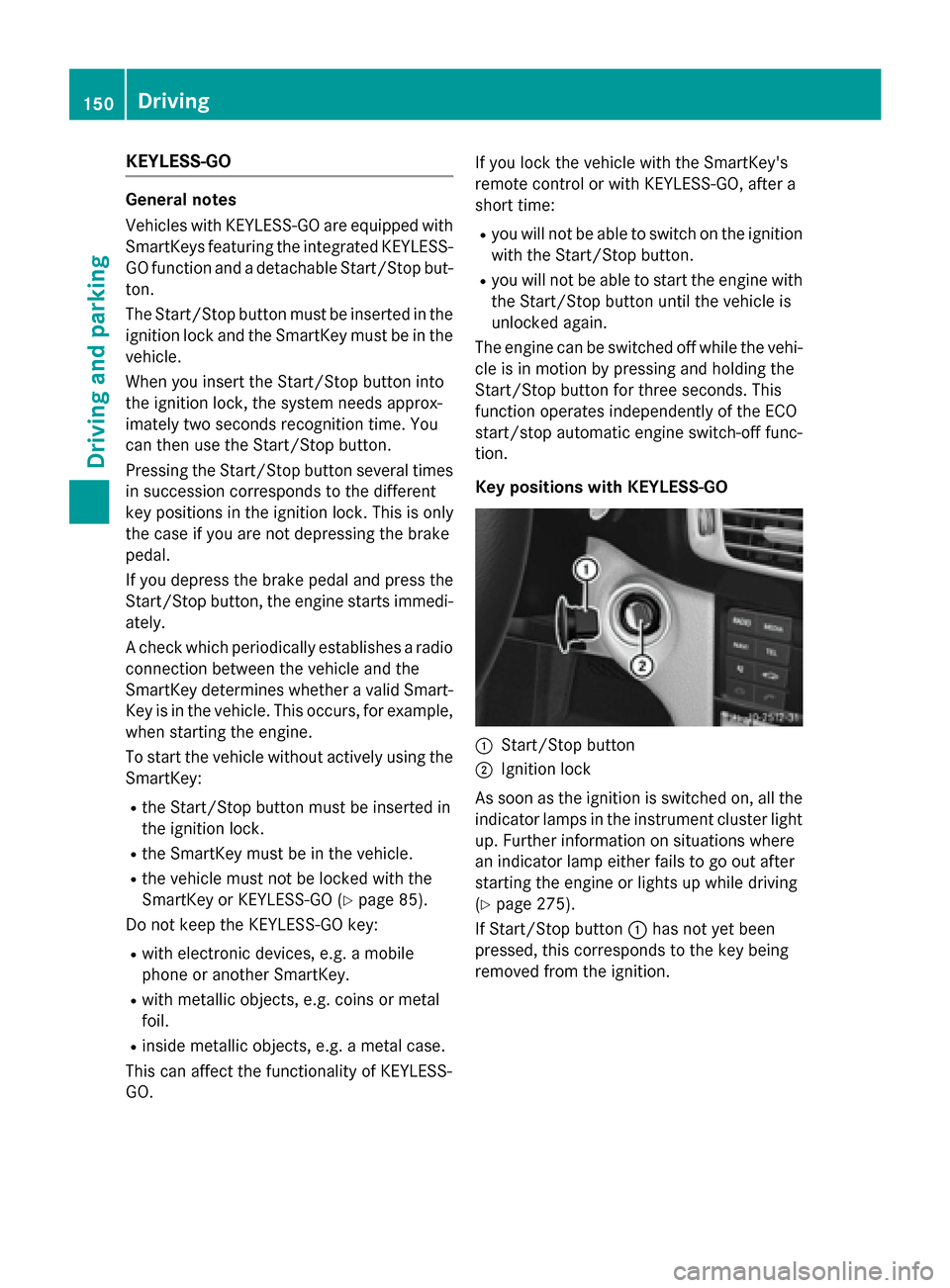
Key positions with KEYLESS-GO :
Start/Stop button
; Ignition lock
As soon as the ignition is switched on, all the
indicator lamps in the instrument cluster light up. Further information on situations where
an indicator lamp either fails to go out after
starting the engine or lights up while driving
(Y page 275).
If Start/Stop button :has not yet been
pressed, this corresponds to the key being
removed from the ignition. 150
DrivingDriving and pa
rking
Page 156 of 398

i
All of the vehicle's systems remain active
when the engine is stopped automatically.
i The HOLD function can also be activated
if the engine has been switched off auto-
matically. It is then not necessary to con-
tinue applying the brakes during the auto-
matic stop phase. When you depress the
accelerator pedal, the engine starts auto-
matically and the braking effect of the
HOLD function is deactivated.
i All vehicles (apart from AMG vehicles):
automatic engine switch-off can take place
a maximum of four times consecutively (ini-
tial stop then repeated three times).
i AMG vehicles:
times which the engine
can be automatically switched off.
Automatic engine start The engine starts automatically if:
R you switch off the ECO start/stop function
by pressing the ECO button
R in transmission position Dor Nthe brake
pedal is released and the HOLD function is not active
R you depress the accelerator pedal
R you engage reverse gear R
R you move the transmission out of position
P
R you switch to drive program S,S+ orM
(AMG vehicles)
R you unfasten your seat belt or open the
driver's door
R the vehicle starts to roll
R the brake system requires this
R the temperature in the vehicle interior devi-
ates from the set range
R the system detects moisture on the wind-
shield when the air-conditioning system is
switched on
R the battery's condition of charge is too low
i Shifting the transmission to position
P
does not start the engine. Deactivating or activating the ECO
start/stop function All vehicles (except AMG vehicles)
X
To deactivate: press ECO button :.
Indicator lamp ;goes out.
X To activate: press ECO button :.
Indicator lamp ;lights up.
If the indicator lamp on the ECO button is off, the ECO start/stop function has been deac-
tivated manually or as the result of a mal-
function.
AMG vehicles X
To deactivate: in drive program C, press
ECO button :.
or X Switch to drive program S,S+ orM
(Y page 163).
Indicator lamp ;goes out.
X To activate: press ECO button :.
Indicator lamp ;lights up. 154
DrivingDriving an
d parking
Page 159 of 398

Problem
Possible causes/consequences and
M
MSolutions The engine is not run-
ning smoothly and is
misfiring. There is a malfunction in the engine electronics or in a mechanical
component of the engine management system.
X Only depress the accelerator pedal slightly.
Otherwise, non-combusted fuel may get into the catalytic con-
verter and damage it.
X Have the cause rectified immediately at a qualified specialist
workshop. The coolant tempera-
ture gauge shows a
value above 248 ‡
(120 †). The coolant level is too low. The coolant is too hot and the engine
is no longer being cooled sufficiently.
X Stop as soon as possible and allow the engine and the coolant to
cool down.
X Check the coolant level (Y page 315). Observe the warning
notes as you do so and add coolant if necessary. Automatic transmission
Important safety notes
G
WARNING
If the engine speed is above the idling speed
and you engage transmission position Dor R,
the vehicle could pull away suddenly. There is a risk of an accident.
When engaging transmission position Dor R,
always firmly depress the brake pedal and do not simultaneously accelerate. G
WARNING
The automatic transmission switches to neu-
tral position Nwhen you switch off the engine.
The vehicle may roll away. There is a risk of an
accident.
After switching off the engine, always switch
to parking position P. Prevent the parked vehi-
cle from rolling away by applying the parking
brake. Selector lever (AMG vehicles)
Overview of transmission positions j
Park position with parking lock
k Reverse gear
i Neutral
h Drive
Transmission position and drive pro-
gram display !
If the transmission position display in the
multifunction display is not working, you
should pull away carefully to check whether the desired transmission position is
engaged. Ideally, you should select trans-
mission position Dand automatic drive pro-
gram Cor S. Automatic transmission
157Driving and parking Z
Page 160 of 398

:
Transmission position display
; Drive program display
The current transmission position and drive
program appear in the multifunction display.
The current position of the selector lever is
shown by the indicators next to the selector
lever.
The indicators light up when the SmartKey is inserted into the ignition lock. The indicators go out when the SmartKey is removed from
the ignition lock.
Engaging park position P X
When the vehicle is stationary, press but-
ton :. DIRECT SELECT lever
Overview of transmission positions j
Park position with parking lock
k Reverse gear
i Neutral
h Drive
The DIRECT SELECT lever is on the right of the
steering column.
The DIRECT SELECT lever always returns to
its original position. The current transmission position P,R, Nor Dappears in the transmis-
sion position display in the multifunction dis- play (Y page 158).
Transmission position and drive pro-
gram display !
If the transmission position display in the
multifunction display is not working, you
should pull away carefully to check whether
the desired transmission position is
engaged. Ideally, you should select trans-
mission position Dand drive program Eor
S.
The current transmission position and drive
program appear in the multifunction display.
The arrows in the transmission position dis-
play show how and into which transmission
positions you can change using the DIRECT
SELECT lever. 158
Automatic transmissionDriving and parking
Page 165 of 398

E
Economy Comfortable, economical
driving
S
Sport Sporty driving style
M
Manual Manual gear shifting
i
For further information on the automatic
drive program, see (Y page 164).
i The automatic transmission shifts to
automatic drive program Eeach time the
engine is started.
AMG vehicles Drive program selector with manual drive program
X Turn drive program selector :until the
desired drive program appears in the mul-
tifunction display in the speedometer.
The drive program indicator on drive pro-
gram selector :lights up in red.
i Further information about permanent
drive program M(Y page 165).
As well as this permanent drive program M,
you can also activate temporary drive pro-
gram M(Y page 164). C
Controlled
Efficiency Comfortable, economical
driving
S
Sport Sporty driving style
S+
SportPlus Extremely sporty driving
style M
Manual Manual gear shifting
RS
RACE
START Optimal vehicle accelera-
tion from a standstill
i
For further information on the automatic
drive program, see (Y page 164).
i The automatic transmission shifts to
automatic drive program Ceach time the
engine is started.
i RS
cannot be selected during normal driv-
ing. For further information on RACE
START, see (Y page 192). Steering wheel paddle shifters
In the manual drive program, you can change
gears manually using steering wheel paddle
shifters :and ;.
Further information about permanent drive
program M(Y page 165).
Further information about temporary drive
program M(Y page 164).
i You can only change gear with the steer-
ing wheel paddle shifters when the trans-
mission is in position D. Automatic transmission
163Driving and parking Z
Page 167 of 398

Shift recommendation
The gearshift recommendations assist you in
adopting an economical driving style. The rec- ommended gear is shown in the multifunction
display.
X Shift to recommended gear ;according
to gearshift recommendation :when
shown in the multifunction display of the
instrument cluster.
Deactivating
If you have activated manual drive program
M, it will remain active for a certain amount of time. Under certain conditions the minimum
amount of time is extended, e.g. in the case oflateral acceleration, during an overrun phase
or when driving on steep terrain.
If manual drive program Mhas been deacti-
vated, the automatic transmission shifts into
the automatic drive program that was last
selected, i.e. Eor S.
You can also deactivate manual drive pro-
gram Myourself:
X Pull on the right-hand steering wheel pad-
dle shifter and hold it in place (Y page 163).
or X Use the DIRECT SELECT lever to switch the
transmission position (Y page 158).
or
X Use the program selector button to change
the drive program (Y page 162).
Manual drive program Mis deactivated.
The automatic transmission switches into
the automatic drive program that was last
selected, i.e. Eor S. Manual drive program (AMG vehicles
and vehicles with Sports package
AMG)
General information In this drive program, you can permanently
change gear yourself by using the steering
wheel paddle shifters. The transmission must
be in position D.
i As well as this permanent drive program
M, you can also activate temporary drive
program M(Y page 164).
Switching on the manual drive program X
Press the program selector button
(Y page 162) repeatedly until Mappears in
the multifunction display.
X AMG vehicles: turn the drive program
selector (Y page 163) until Mappears in the
multifunction display.
The indicator Mon the drive program selec-
tor lights up in red.
Manual drive program Mis different from
drive programs Sand S+with regard to spon-
taneity, responsiveness and smoothness of
gear changes.
Manual drive program Mcan be selected
using the drive program selector. In manual
drive program M, you can change gear using
the steering wheel paddle shifters if the trans-
mission is in position D. The gear currently
selected and engaged is shown in the multi-
function display.
Upshifting X
Pull the right-hand steering wheel paddle
shifter.
The automatic transmission shifts up to the
next gear.
AMG vehicles !
In manual drive program
M, the automatic
transmission does not shift up automati- Automatic transmission
165Driving and parking Z