2015 MERCEDES-BENZ B-Class ELECTRIC brake
[x] Cancel search: brakePage 104 of 338
Combination switch
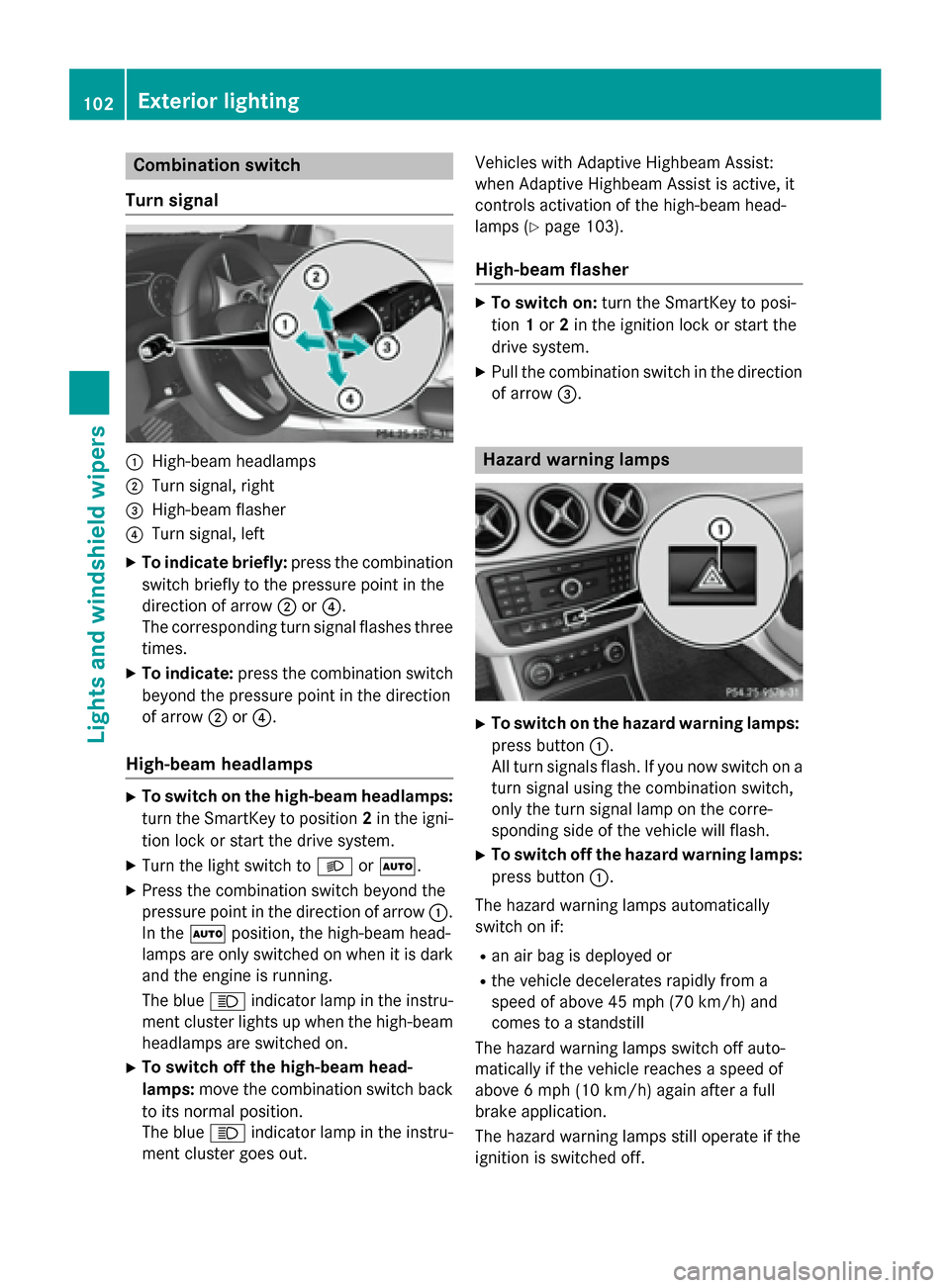
Turn signal :
High-beam headlamps
; Turn signal, right
= High-beam flasher
? Turn signal, left
X To indicate briefly: press the combination
switch briefly to the pressure point in the
direction of arrow ;or?.
The corresponding turn signal flashes three
times.
X To indicate: press the combination switch
beyond the pressure point in the direction
of arrow ;or?.
High-beam headlamps X
To switch on the high-beam headlamps:
turn the SmartKey to position 2in the igni-
tion lock or start the drive system.
X Turn the light switch to LorÃ.
X Press the combination switch beyond the
pressure point in the direction of arrow :.
In the Ãposition, the high-beam head-
lamps are only switched on when it is dark
and the engine is running.
The blue Kindicator lamp in the instru-
ment cluster lights up when the high-beam headlamps are switched on.
X To switch off the high-beam head-
lamps: move the combination switch back
to its normal position.
The blue Kindicator lamp in the instru-
ment cluster goes out. Vehicles with Adaptive Highbeam Assist:
when Adaptive Highbeam Assist is active, it
controls activation of the high-beam head-
lamps (Y page 103).
High-beam flasher X
To switch on: turn the SmartKey to posi-
tion 1or 2in the ignition lock or start the
drive system.
X Pull the combination switch in the direction
of arrow =. Hazard warning lamps
X
To switch on the hazard warning lamps:
press button :.
All turn signals flash. If you now switch on a turn signal using the combination switch,
only the turn signal lamp on the corre-
sponding side of the vehicle will flash.
X To switch off the hazard warning lamps:
press button :.
The hazard warning lamps automatically
switch on if:
R an air bag is deployed or
R the vehicle decelerates rapidly from a
speed of above 45 mph (70 km/h) and
comes to a standstill
The hazard warning lamps switch off auto-
matically if the vehicle reaches a speed of
above 6 mph (10 km/h)again after a full
brake application.
The hazard warning lamps still operate if the
ignition is switched off. 102
Exterior lightingLights and windshield wipers
Page 132 of 338
Useful information
i This Operator's Manual describes all
models and all standard and optional equip- ment of your vehicle available at the time of
publication of the Operator's Manual.
Country-specific differences are possible.
Please note that your vehicle may not be
equipped with all features described. This
also applies to safety-related systems and
functions.
i Read the information on qualified special-
ist workshops (Y page 25). Notes on breaking-in a new vehicle
The sensor system of some driving and driv-
ing safety systems adjusts automatically
while a certain distance is being driven after
the vehicle has been delivered or after
repairs. Full system effectiveness is not
reached until the end of this teach-in proce-
dure.
New and replaced brake pads and discs only
reach their optimum braking effect after sev-
eral hundred kilometers of driving. Compen-
sate for this by applying greater force to the
brake pedal. Driving
Important safety notes
G
WARNING
Objects in the driver's footwell can restrict the pedal travel or obstruct a depressed pedal.
The operating and road safety of the vehicle is
jeopardized. There is a risk of an accident.
Make sure that all objects in the vehicle are
stowed correctly, and that they cannot enter
the driver's footwell. Install the floormats
securely and as specified in order to ensure
sufficient clearance for the pedals. Do not use loose floormats and do not place floormats on
top of one another. G
WARNING
Unsuitable footwear can hinder correct usage of the pedals, e.g.:
R shoes with thick soles
R shoes with high heels
R slippers
There is a risk of an accident.
Wear suitable footwear to ensure correct
usage of the pedals. G
WARNING
If you switch off the ignition while driving,
safety-relevant functions are only available
with limitations, or not at all. This could affect, for example, the power steering and the brake
boosting effect. You will require considerably
more effort to steer and brake. There is a risk of an accident.
Do not switch off the ignition while driving. G
WARNING
If the parking brake has not been fully
released when driving, the parking brake can:
R overheat and cause a fire
R lose its hold function.
There is a risk of fire and an accident. Release
the parking brake fully before driving off.
! Before driving away, you must ensure
that, for your own safety and to avoid dam-
age, the charging cable has been removed
from the vehicle socket. Otherwise, you
cannot shift the transmission out of posi-
tion P.
The braking performance of the electric
motor using recuperative braking is, in some
operating modes, either reduced or not effec-
tive:
R when the condition of charge of the high-
voltage battery increases
R if the high-voltage battery is not yet at a
normal operating temperature
R when driving close to the maximum speed
R when the vehicle is almost stationary 130
DrivingDriving and parking
Page 133 of 338
R
in transmission position N
R during and after ESP stability control
If you do not make an additional effort to
apply the brake yourself, the braking effect
may not be sufficient. If necessary, counter-
act the reduced regenerative braking effect
by applying the brake yourself.
Before commencing your journey, ensure that the charging cable required for charging the
high-voltage battery is in the vehicle. Key positions
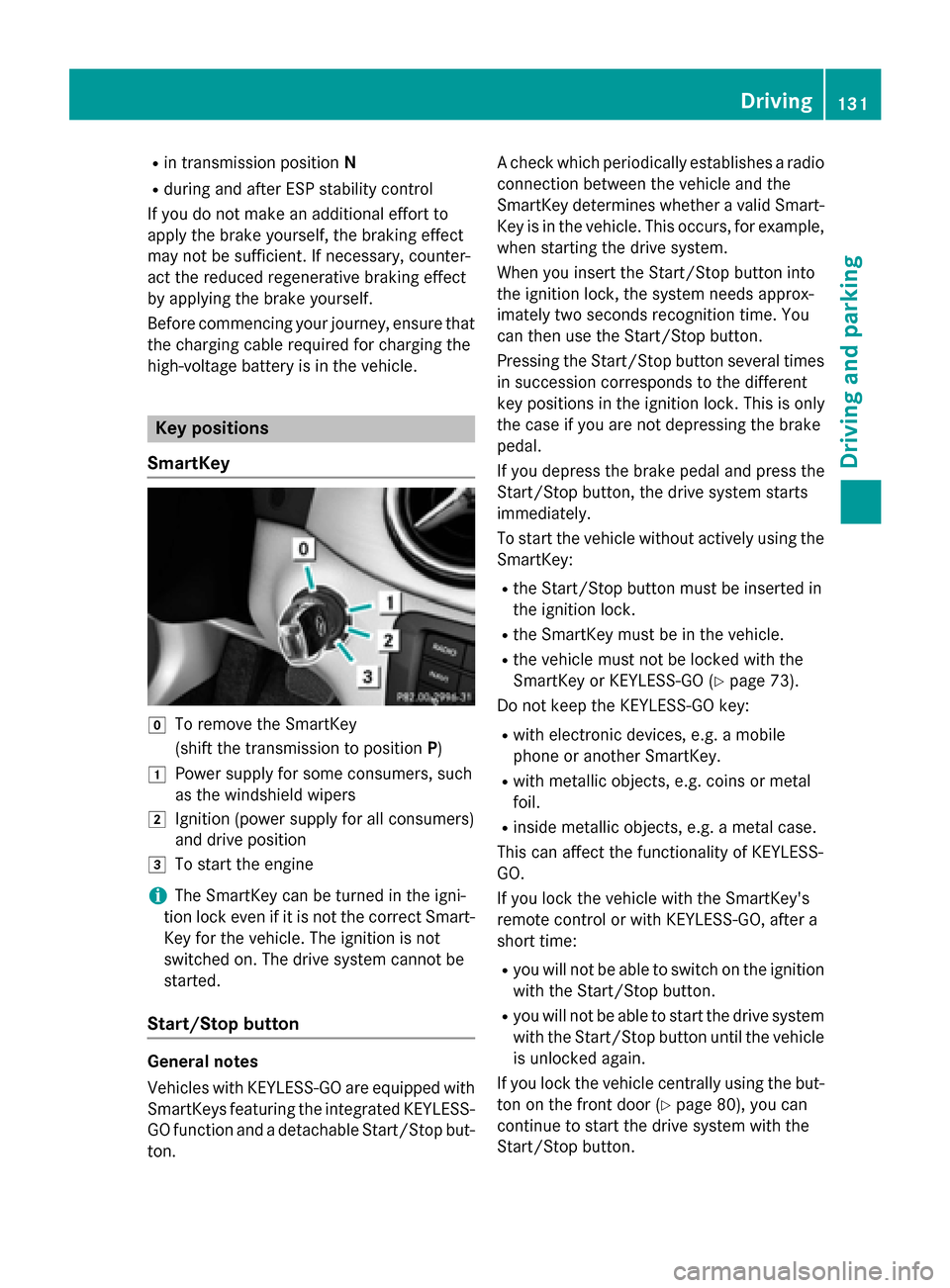
SmartKey g
To remove the SmartKey
(shift the transmission to position P)
1 Power supply for some consumers, such
as the windshield wipers
2 Ignition (power supply for all consumers)
and drive position
3 To start the engine
i The SmartKey can be turned in the igni-
tion lock even if it is not the correct Smart- Key for the vehicle. The ignition is not
switched on. The drive system cannot be
started.
Start/Stop button General notes
Vehicles with KEYLESS-GO are equipped with
SmartKeys featuring the integrated KEYLESS- GO function and a detachable Start/Stop but-
ton. A check which periodically establishes a radio
connection between the vehicle and the
SmartKey determines whether a valid Smart- Key is in the vehicle. This occurs, for example,
when starting the drive system.
When you insert the Start/Stop button into
the ignition lock, the system needs approx-
imately two seconds recognition time. You
can then use the Start/Stop button.
Pressing the Start/Stop button several times
in succession corresponds to the different
key positions in the ignition lock. This is only
the case if you are not depressing the brake
pedal.
If you depress the brake pedal and press the
Start/Stop button, the drive system starts
immediately.
To start the vehicle without actively using the SmartKey:
R the Start/Stop button must be inserted in
the ignition lock.
R the SmartKey must be in the vehicle.
R the vehicle must not be locked with the
SmartKey or KEYLESS-GO (Y page 73).
Do not keep the KEYLESS-GO key:
R with electronic devices, e.g. a mobile
phone or another SmartKey.
R with metallic objects, e.g. coins or metal
foil.
R inside metallic objects, e.g. a metal case.
This can affect the functionality of KEYLESS-
GO.
If you lock the vehicle with the SmartKey's
remote control or with KEYLESS-GO, after a
short time:
R you will not be able to switch on the ignition
with the Start/Stop button.
R you will not be able to start the drive system
with the Start/Stop button until the vehicle is unlocked again.
If you lock the vehicle centrally using the but-
ton on the front door (Y page 80), you can
continue to start the drive system with the
Start/Stop button. Driving
131Driving and parking Z
Page 135 of 338
Additionally, children could set the vehicle in
motion if, for example, they:
R release the parking brake.
R shift the transmission out of park position P
R start the vehicle's drive system.
There is a risk of an accident and injury.
When leaving the vehicle, always take the
SmartKey with you and lock the vehicle. Never leave children or animals unattended in the
vehicle. Always keep the SmartKey out of
reach of children.
Vehicles with an electric motor generate
much less driving noise than vehicles with
internal combustion engines. As a result, your vehicle may not be heard by other road users
in certain situations. This can happen, for
example, when you are parking and your vehi-
cle is not seen by other road users. This
requires you to adopt a particularly anticipa-
tory driving style, as it is necessary to allow
for the possibility that other road users may
behave erratically.
The vehicle is equipped with a sound gener-
ator. The sound generator is activated so that
other road users can hear your vehicle better. The sound generator is activated at speeds of under 20 mph (30 km/h) and switches off
automatically at higher speeds.
Starting procedure with the Start/Stop button The Start/Stop button can be used to start
the vehicle manually without inserting the
SmartKey into the ignition lock. The Start/
Stop button must be inserted in the ignition
lock and the SmartKey must be in the vehicle.
You can start the drive system if a valid key isin the vehicle. Switch off the drive system and
always take the key with you when leaving the vehicle, even if you only leave it for a short
time. Pay attention to the important safety
notes. X
Depress the brake pedal and keep it
depressed.
X Press the Start/Stop button once
(Y page 131).
The drive system is started. Once the vehi-
cle is ready to be driven, the Ready Readydisplay
(Y page 182) appears in the lower part of
the multifunction display.
Starting procedure with the SmartKey To start the drive system using the key
instead of the Start/Stop button, pull the
Start/Stop button out of the ignition lock.
X
Turn the SmartKey to position 3
(Y page 131 )in the ignition lock and release
it.
The drive system is started. Once the vehi-
cle is ready to be driven, the Ready Readydisplay
(Y page 182) appears in the lower part of
the multifunction display. Pulling away
The vehicle is equipped with a sound gener-
ator. At low speeds, an electric vehicle makes less noise than a vehicle with a combustion
engine. The sound generator is activated so
that other road users can hear your vehicle
better. The sound generator is activated at
speeds of under 20 mph (30 km/h) and
switches off automatically at higher speeds.
X Depress the brake pedal and keep it
depressed.
X Move the DIRECT SELECT lever to position
D or R.
X Release the brake pedal.
X Carefully depress the accelerator pedal.
The electric parking brake is automatically
released (Y page 155).
The red F(USA only) or !(Canada
only) indicator lamp in the instrument clus-
ter goes out.
The vehicle locks centrally once you have
pulled away. The locking knobs in the doors Driving
133Driving an d parking Z
Page 136 of 338
drop down. You can open the doors from the
inside at any time.
It is only possible to move the DIRECT SELECT
selector lever from position Pto the desired
selector lever position if you depress the
brake pedal. The parking lock is then deacti-
vated and the electrical parking brake is
released automatically. If the brake pedal is
not depressed, the DIRECT SELECT lever can still be moved but the parking lock remains
engaged.
Make sure that no charging cable is plugged
in. The parking lock cannot be released if a
charging cable is plugged in. Hill start assist
Hill start assist will aid you when pulling away
on a hill. It holds the vehicle for a short time
after you have removed your foot from the
brake pedal. This gives you enough time to
move your foot from the brake pedal to the
accelerator pedal and depress it before the
vehicle begins to roll. G
WARNING
After a short time, hill start assist will no lon-
ger brake your vehicle and it could roll away.
There is a risk of an accident and injury.
Therefore, quickly move your foot from the
brake pedal to the accelerator pedal. Never
leave the vehicle when it is held by hill start
assist.
Hill start assist is not active if: R you are pulling away on a level road or on a
downhill gradient.
R the DIRECT SELECT lever is in position N.
R the electric parking brake is applied.
R ESP ®
is malfunctioning.
Further information on holding the vehicle
stationary on uphill gradients (Y page 137). Transmission
Important safety notes
Shift the DIRECT SELECT lever to position P
when the drive system is switched off and the
vehicle is stationary. Park position Pis
engaged and the electric parking brake is
applied automatically:
If the DIRECT SELECT lever cannot be
engaged in park position P, the parking brake
is engaged automatically.
Observe the important safety notes on
switching ESP ®
on and off (Y page 67). DIRECT SELECT lever
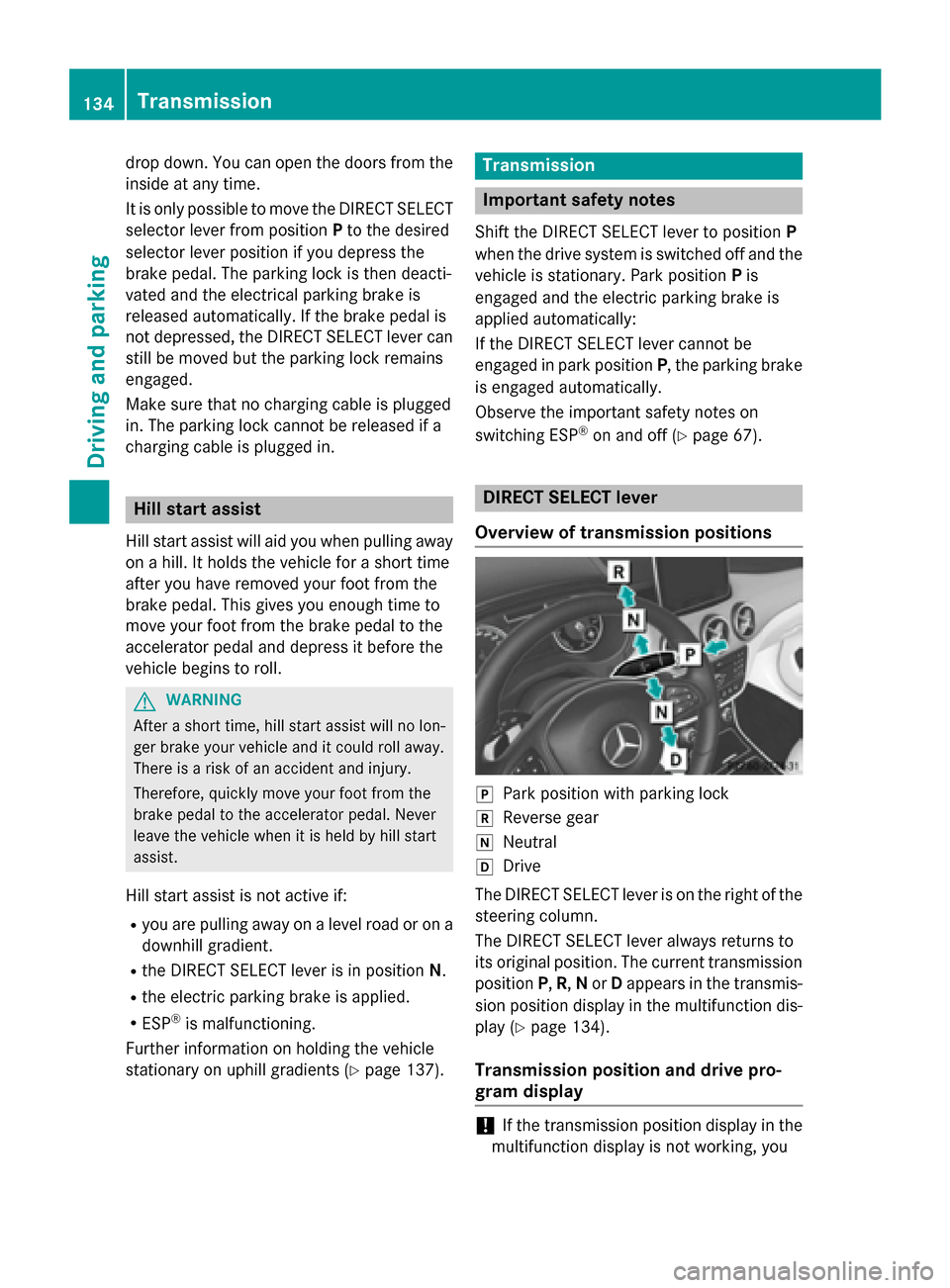
Overview of transmission positions j
Park position with parking lock
k Reverse gear
i Neutral
h Drive
The DIRECT SELECT lever is on the right of the
steering column.
The DIRECT SELECT lever always returns to
its original position. The current transmission position P,R, Nor Dappears in the transmis-
sion position display in the multifunction dis- play (Y page 134).
Transmission position and drive pro-
gram display !
If the transmission position display in the
multifunction display is not working, you 134
TransmissionDriving and parking
Page 137 of 338
should pull away carefully to check whether
the desired transmission position is
engaged. it is advisable to select transmis-
sion position D. :
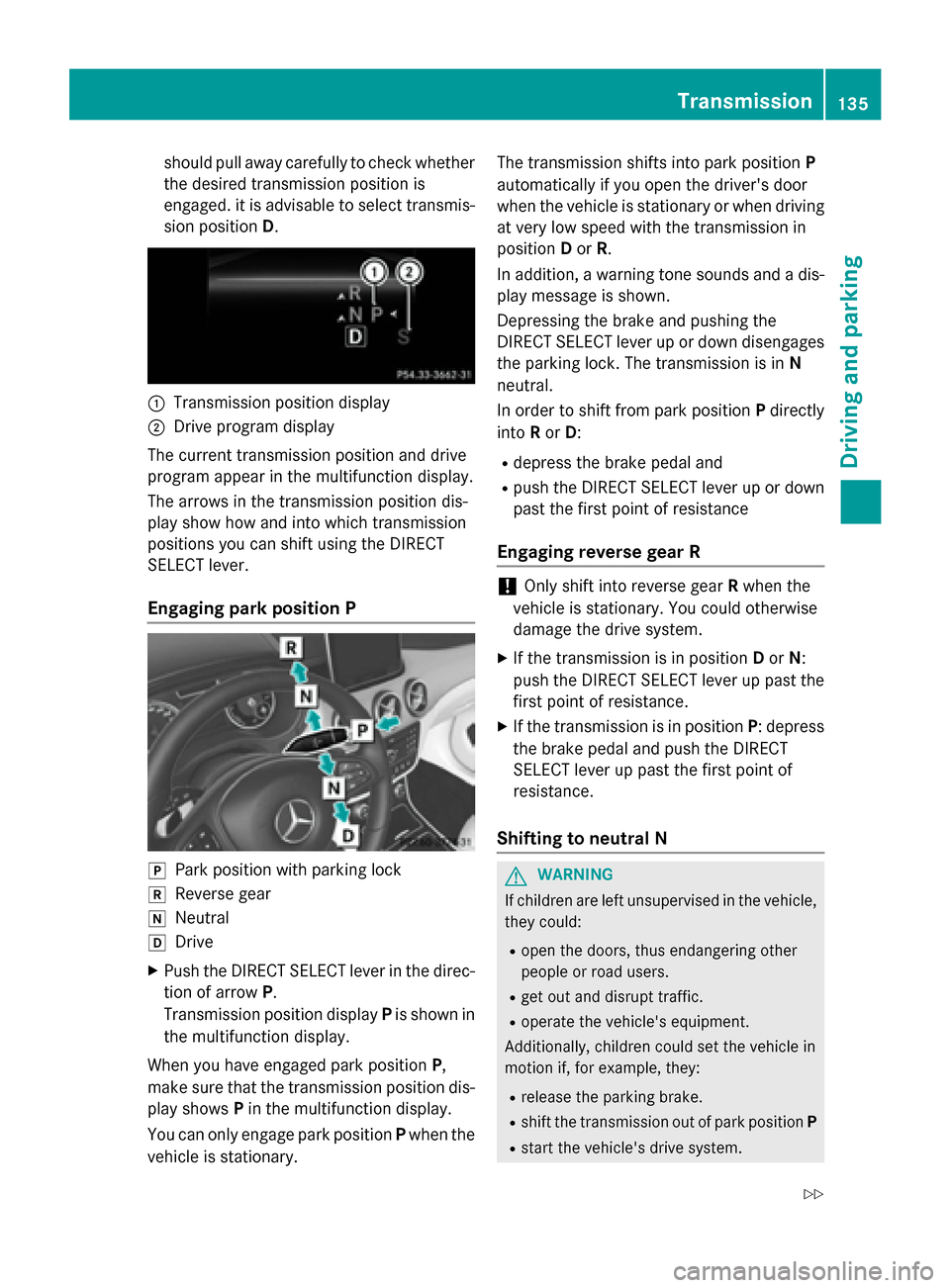
Transmission position display
; Drive program display
The current transmission position and drive
program appear in the multifunction display.
The arrows in the transmission position dis-
play show how and into which transmission
positions you can shift using the DIRECT
SELECT lever.
Engaging park position P j
Park position with parking lock
k Reverse gear
i Neutral
h Drive
X Push the DIRECT SELECT lever in the direc-
tion of arrow P.
Transmission position display Pis shown in
the multifunction display.
When you have engaged park position P,
make sure that the transmission position dis- play shows Pin the multifunction display.
You can only engage park position Pwhen the
vehicle is stationary. The transmission shifts into park position
P
automatically if you open the driver's door
when the vehicle is stationary or when driving at very low speed with the transmission in
position Dor R.
In addition, a warning tone sounds and a dis- play message is shown.
Depressing the brake and pushing the
DIRECT SELECT lever up or down disengages
the parking lock. The transmission is in N
neutral.
In order to shift from park position Pdirectly
into Ror D:
R depress the brake pedal and
R push the DIRECT SELECT lever up or down
past the first point of resistance
Engaging reverse gear R !
Only shift into reverse gear
Rwhen the
vehicle is stationary. You could otherwise
damage the drive system.
X If the transmission is in position Dor N:
push the DIRECT SELECT lever up past the first point of resistance.
X If the transmission is in position P: depress
the brake pedal and push the DIRECT
SELECT lever up past the first point of
resistance.
Shifting to neutral N G
WARNING
If children are left unsupervised in the vehicle, they could:
R open the doors, thus endangering other
people or road users.
R get out and disrupt traffic.
R operate the vehicle's equipment.
Additionally, children could set the vehicle in
motion if, for example, they:
R release the parking brake.
R shift the transmission out of park position P
R start the vehicle's drive system. Transmission
135Driving and parking
Z
Page 138 of 338
There is a risk of an accident and injury.
When leaving the vehicle, always take the
SmartKey with you and lock the vehicle. Never leave children or animals unattended in the
vehicle. Always keep the SmartKey out of
reach of children.
X If the transmission is in position Dor R:
push the DIRECT SELECT lever up or down
to the first point of resistance.
X If the transmission is in position P: depress
the brake pedal and push the DIRECT
SELECT lever up or down to the first point of
resistance.
When the drive system is switched off, the
transmission shifts to Nautomatically.
With the SmartKey: if you then open the
driver's door or the front-passenger door or
remove the SmartKey from the ignition, the
transmission automatically shifts to P.
With the Start/Stop button: if you then
open the driver's door or the front-passenger
door, the transmission automatically shifts to P.
If you want the transmission to remain in neu-
tral N, e.g. when having the vehicle cleaned in
an automatic car wash with a towing system:
Using the SmartKey:
X Switch on the ignition.
X Depress the brake pedal and keep it
depressed.
X Shift to neutral N.
X Release the brake pedal.
X Release the electric parking brake.
X Switch off the ignition and leave the Smart-
Key in the ignition lock.
With the Start/Stop button:
X Remove the Start/Stop button from the
ignition lock.
X Insert the SmartKey into the ignition lock.
X Switch on the ignition.
X Depress the brake pedal and keep it
depressed. X
Shift to neutral N.
X Release the brake pedal.
X Release the electric parking brake.
X Switch off the ignition and leave the Smart-
Key in the ignition lock.
Engaging drive position D X
If the transmission is in position Ror N:
push the DIRECT SELECT lever down past
the first point of resistance.
X If the transmission is in position P: depress
the brake pedal and push the DIRECT
SELECT lever down past the first point of
resistance. Transmission positions
B Park position
This prevents the vehicle from roll-
ing away when stopped. Only move
the DIRECT SELECT lever to Pwhen
the vehicle is stationary.
The SmartKey can only be removed when the DIRECT SELECT lever is in
position P. When there is no Smart-
Key in the ignition lock, the DIRECT
SELECT lever is locked in position
P. C Reverse gear
Only move the DIRECT SELECT
lever to
Rwhen the vehicle is sta-
tionary. 136
TransmissionDriving and parking
Page 139 of 338
A Neutral
No power is transmitted from the
drive system to the drive wheels.
Releasing the brakes will allow you
to move the vehicle freely.
If ESP ®
is faulty: only move the
DIRECT SELECT lever to Nif the
vehicle is in danger of skidding, e.g. on icy roads. 7 Drive
For driving forwards
Driving tips
Holding the vehicle stationary on uphill
gradients Do not hold the vehicle stationary on uphill
gradients by depressing the accelerator
pedal. Instead, only ever hold the vehicle sta-
tionary on uphill gradients by:
R depressing the brake pedal
R engaging the electric parking brake
Kickdown Use kickdown for maximum acceleration.
X Depress the accelerator pedal beyond the
pressure point.
The needle in the power display points to
the boost area (Y page 183).
X Ease off the accelerator pedal once the
desired speed is reached.
i Maximum acceleration is available for a
limited time.
Rocking the vehicle free Shifting the transmission repeatedly between
gears Dand Rmay help to free the vehicle if it
has become stuck in slush or snow. The vehi- cle's engine management system limits the
speed to a maximum of 5 mph (9 km/h) when shifting back and forth. To shift back and forth
between transmission positions Dand R, move the DIRECT SELECT lever up and down
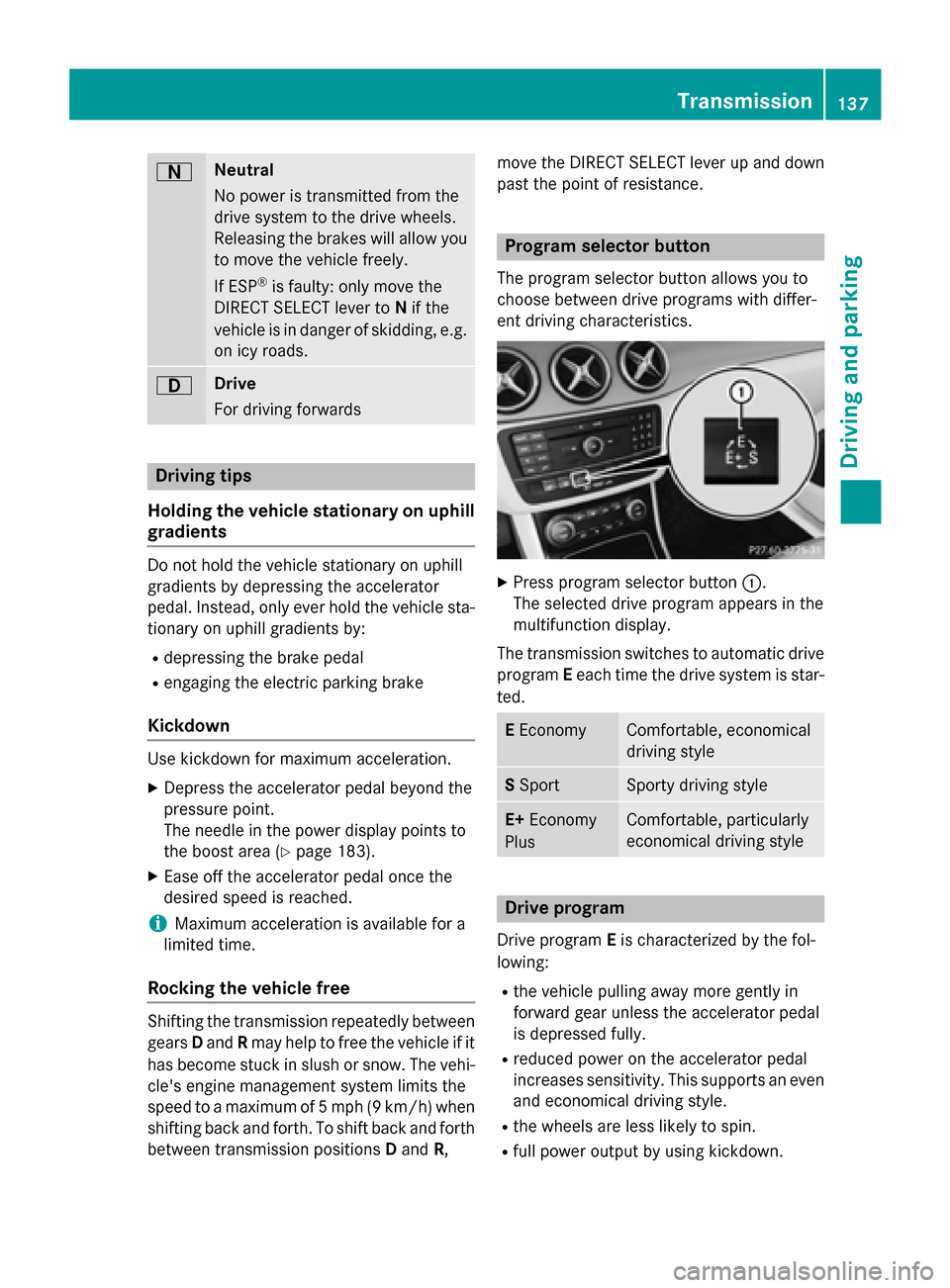
past the point of resistance. Program selector button
The program selector button allows you to
choose between drive programs with differ-
ent driving characteristics. X
Press program selector button :.
The selected drive program appears in the
multifunction display.
The transmission switches to automatic drive program Eeach time the drive system is star-
ted. E
Economy Comfortable, economical
driving style
S
Sport Sporty driving style
E+
Economy
Plus Comfortable, particularly
economical driving style
Drive program
Drive program Eis characterized by the fol-
lowing:
R the vehicle pulling away more gently in
forward gear unless the accelerator pedal
is depressed fully.
R reduced power on the accelerator pedal
increases sensitivity. This supports an even
and economical driving style.
R the wheels are less likely to spin.
R full power output by using kickdown. Transmission
137Driving and parking Z