Page 527 of 878
5273-4. Using the audio system
3
Interior features ■
When using a voice command
For numbers, say a combination of si ngle digits from zero to nine.
Say the command correctly and clearly.■
Situations in which the system may not recognize your voice ●
When driving on rough roads●
When driving at high speeds●
When air is blowing out of the vents onto the microphone●
When the air conditioning fan emits a loud noise■
Operations that cannot be performed while driving●
Operating the system using ●
Registering a portable player to the system■
Changing the passkey
P. 5 3 6
Page 548 of 878

5483-4. Using the audio system
■
Conditions under which the system will not operate ●
If using a mobile phone that does not support Bluetooth ®
●
If the mobile phone is switched off●
If you are outside service range●
If the mobile phon e is not connected●
If the mobile phone's battery is low●
If the mobile phone is behind the seat or in the glove box or console box●
If metal is covering or touching the phone■
When using the hands-free system ●
The audio system and voice guidance are muted when making a call.●
If both parties speak at the same time, it may be difficult to hear.●
If the incoming call volume is overly loud, an echo may be heard.●
Try to face toward the microphone as much as possible when speaking.●
In the following circumstances, it may be difficult to hear the other party:
• When driving on unpaved roads
• When driving at high speeds
• When a window is open
• When the air conditioning is blowing directly on the microphone
• When the air conditioning is set to high■
When transferring ownership of the vehicle
Be sure to initialize the system to prev ent personal data from being improperly
accessed. ( P. 5 74 )■
About Bluetooth ®
Bluetooth is a registered trademark of
Bluetooth SIG. Inc.
Page 559 of 878
5593-4. Using the audio system
3
Interior features ■
Automatic volume adjustment
When vehicle speed reaches 50 mph (80 km/h) or more, the volume automati-
cally increases. The volume returns to the previous volume setting when vehicle
speed drops to 43 mph (70 km/h) or less.■
When using a voice command
For numbers, say a combinatio n of single digits from zero to nine, # (pound),
(star), and + (plus).
Say the command correctly and clearly.■
Situations in which the system may not recognize your voice ●
When driving on rough roads●
When driving at high speeds●
When air is blowing out of the vents onto the microphone●
When the air conditioning fan emits a loud noise■
Operations that cannot be performed while driving
●
Operating the system using ●
Registering a mobile phone to the system■
Changing the passkey
P. 5 6 8
Page 598 of 878
5983-7. Other interior features
Outside temperature display The temperature display shows temperatures within the range of -40°F
(-40°C) and 122°F (50°C).
With a navigation system
Refer to the “Navigation System Owner’s Manual”.
With the Lexus Display Audio system
The outside temperature is dis-
played on the air conditioning
operation screen. ( P. 3 4 2 )
Without a navigation system or the Lexus Display Audio system
Page 605 of 878
6053-7. Other interior features
3
Interior features Seat heaters and ventilators
■
Operating condition
The “POWER” switch is in ON mode.■
When not in use
Set the knob at “0”. The indicator light turns off.
CAUTION■
Burns ●
Use caution when seating the following pers ons in a seat with the seat heater on
to avoid the possibility of burns:
• Babies, small children, the elderly, the sick and the physically challenged
• Persons with sensitive skin
• Persons who are fatigued
• Persons who have taken alcohol or drugs that induce sleep (sleeping drugs,
cold remedies, etc.)
●
Do not cover the seat with anything when using the seat heater.
Using the seat heater with a blanket or cushion increases the temperature of the
seat and may lead to overheating.
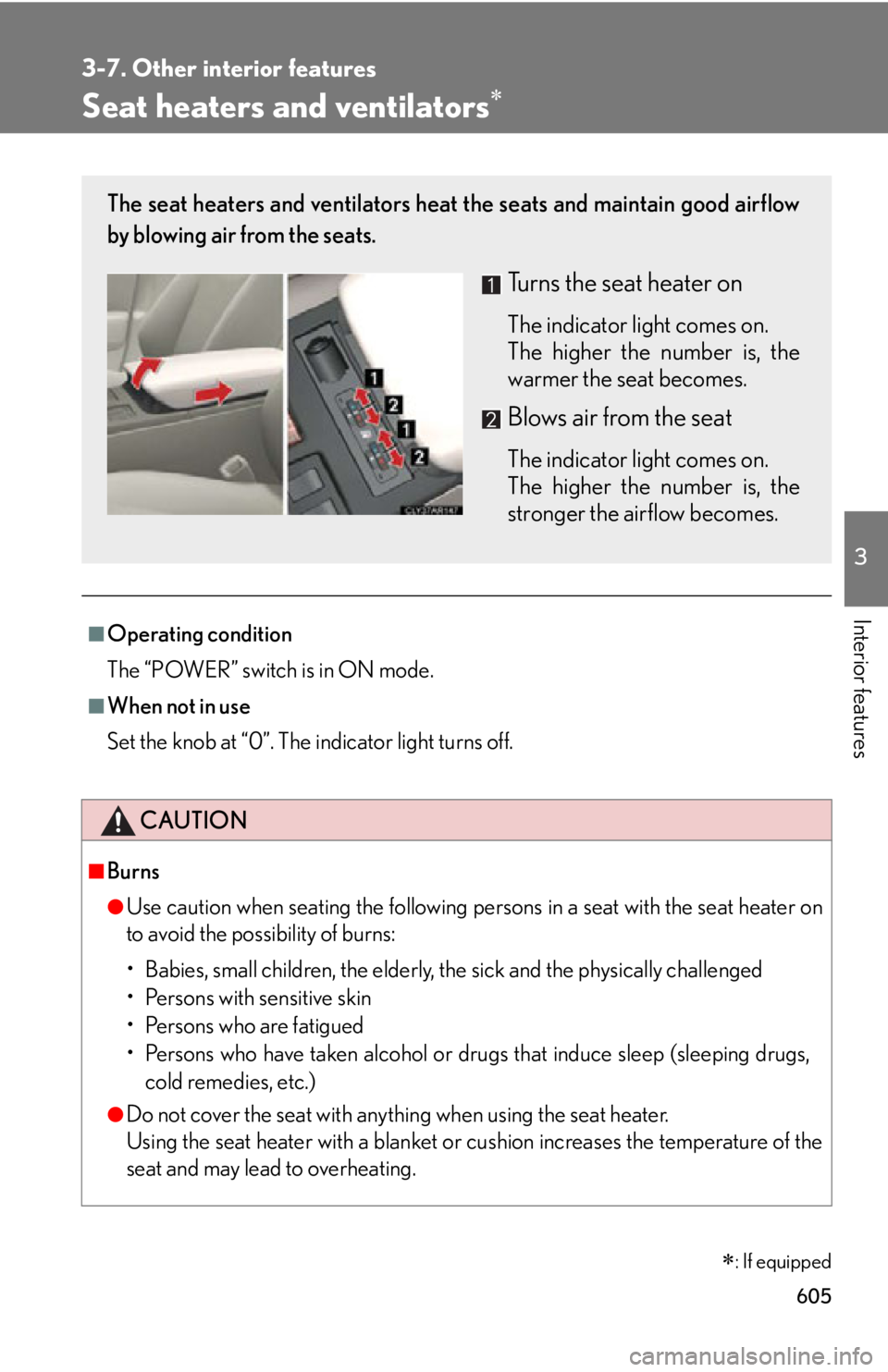
: If equippedThe seat heaters and ventilators heat the seats and maintain good airflow
by blowing air from the seats.
Turns the seat heater on The indicator light comes on.
The higher the number is, the
warmer the seat becomes.
Blows air from the seat The indicator light comes on.
The higher the number is, the
stronger the airflow becomes.
Page 629 of 878

6293-7. Other interior features
3
Interior features Safety Connect LED light Indicators
● When the “POWER” switch is turn ed to ON mode, the red indicator
light comes on for 2 seconds then turns off. Afterward, the green indi-
cator light comes on, indicating that the service is active.
● The following indicator light patterns indica te specific system usage
conditions:
• Green indicator light on = Active service
• Green indicator light flashing = Safety Connect call in process
• Red indicator light (except at vehicle start-up) = System malfunction
(contact your Lexus dealer)
• No indicator light (off) = Saf ety Connect service not active
Safety Connect services
■ Automatic Collision Notification
In case of either airbag deployment or severe rear-end collision, the
system is designed to automatically call the response center. The
responding agent receives the vehicl e’s location and attempts to speak
with the vehicle occupants to asse ss the level of emergency. If the
occupants are unable to communicate, the agent automatically treats
the call as an emergency, contacts the nearest emergency services
provider to describe the situation, and requests that assistance be sent
to the location.
Page 633 of 878

Maintenance and care
4
6334-1. Maintenance and care
Cleaning and protecting
the vehicle exterior............. 634
Cleaning and protecting
the vehicle interior .............. 637
4-2. Maintenance
Maintenance
requirements ........................ 640
General maintenance .......... 643
Emission inspection and
maintenance (I/M)
programs................................ 647 4-3. Do-it-yourself
maintenance
Do-it-yourself service
precautions ........................... 648
Hood ........................................... 651
Positioning a floor jack ......... 652
Engine compartment ........... 654
12-volt battery ........................ 664
Tires............................................. 670
Tire inflation pressure............ 679
Wheels ...................................... 683
Air conditioning filter ........... 685
Electronic key battery.......... 687
Checking and replacing
fuses ........................................ 689
Headlight aim ......................... 705
Light bulbs ................................ 708
Page 650 of 878

6504-3. Do-it-yourself maintenance
CAUTIONThe engine compartment contains many mechanisms and fluids that may move sud-
denly, become hot, or become electrically energized. To avoid death or serious injury,
observe the following precautions: ■
When working on the engine compartment ●
Make sure that the indicator on the “POWER” switch and the “READY” indicator
are both off.●
Keep hands, clothing and tools away from the moving fans and engine drive belt.●
Be careful not to touch the engine, power control unit, radiator, exhaust manifold,
etc. right after driving as they may be hot. Oil and other fluids may also be hot.●
Do not leave anything that may burn easi ly, such as paper and rags, in the engine
compartment.●
Do not smoke, cause sparks or expose an open flame to fuel. Fuel fumes are flam-
mable■
When working near the electric cooling fans or radiator grille
Be sure the “POWER” switch is off.
With the “POWER” switch in ON mode, the electric cooling fans may automati-
cally start to run if the air conditioning is on and/or the coolant temperature is high.
( P. 6 6 1 )■
Safety glasses
Wear safety glasses to prevent flying or falling material, fluid spray, etc. from getting
in your eyes.
NOTICE■
If you remove the air cleaner filter
Driving with the air cleaner filter removed may cause excessive engine wear due to
dirt in the air.