Page 49 of 878

4911-1. Hybrid system
Before driving Hybrid vehicle driving tips For economical and ecological driving, pay attention to the following
points:
■ Use of Hybrid System Indicator More Eco-friendly driving is possib le by keeping the indicate of Hybrid
System Indicator within Eco area.
■ When braking the vehicle Make sure to operate the brakes ge ntly and in good time. A greater
amount of electrical energy can be retained when slowing down.
■ Delays Repeated acceleration and deceleration, as well as long waits at traffic
lights, will lead to bad fu el consumption. Check traffic reports before leav-
ing and avoid delays as much as possible. When encountering a delay,
gently release the brake pedal to allow the vehicle to move forward slightly
while avoiding overuse of the accelerato r pedal. Doing so can help control
excessive gasoline consumption.
■ Highway driving Control your speed and keep at a constant speed. Also, before stopping at
a toll booth or similar, allow plenty of time to release the accelerator and
gently apply the brakes. A greater amount of electrical energy can be
retained when slowing down.
■ Air conditioning Use the air conditioning only when necessary. Doing so can help control
excessive gasoline consumption.
In summer: In high temperatures, use the recirculated air mode. Doing so
will help to reduce the burden on the air conditioning and reduce fuel con-
sumption as well.
In winter: Because the gasoline engine will not automatically cut out until
the gasoline engine and the interior of the vehicle are warm, it will con-
sume fuel. Also, fuel consumption can be improved by avoiding overuse of
the heater.
Page 190 of 878

1902-1. Driving procedures
Changing shift ranges in S mode
When the shift lever is in the S position, the shift lever can be operated as
follows:
Upshifting
Downshifting
The initial shift range in S mode is set automatically to “5” or “4” accord-
ing to vehicle speed.
■ Shift ranges and their functions
● You can choose from 6 levels of engine braking force.
● A lower shift range will provide gr eater engine braking force than a
higher shift range, and the engi ne speed will also increase.■
Operation of the air conditioning system in Eco drive mode
Eco drive mode controls the heating/cooling operations and fan speed of the air
conditioning system to enhance fuel efficiency. ( P. 342, 350) To improve air con-
ditioning performance, adjust the fa n speed or turn off Eco drive mode. ■
Automatic return to normal driving mode
If snow mode or sport mode is selected , the driving mode will automatically return
to normal mode when the hybrid system is turned off.
■
S mode
●
When the shift range is “5” or lower, holding the shift lever toward “+” sets the
shift range to “6”.
●
To prevent the engine from over-revving, upshifting may automatically occur.
Page 317 of 878

3172-5. Driving information
2
When driving ● Avoid jerky steering and sharp turns, and slow down before making a
turn.
● Note that when making a turn, the tr ailer wheels will be closer than the
vehicle wheels to the inside of th e turn. Compensate by making a
wider than normal turning radius.
● Slow down before making a turn, in cross winds, on wet or slippery sur-
faces, etc.
Increasing vehicle speed can destabilize the trailer.
● Take care when passing other vehi cles. Passing requires considerable
distance. After passing a vehicle, do not forget the length of your
trailer, and be sure you have plenty of room before changing lanes.
● To maintain engine braking efficiency and charging system perfor-
mance when using engine braking, do not put the transmission in D.
● Instability happens more frequently when descending steep or long
downhill grades. Before descending, slow down and downshift. Do not
make sudden downshifts while descending steep or long downhill
grades.
● Avoid holding the brake pedal down too long or applying the brakes
too frequently. This could cause th e brakes to overheat and result in
reduced braking efficiency.
● Due to the added load of the trailer, your vehicle’s engine may overheat
on hot days (at temperatures over 85°F [30°C]) when driving up a
long or steep grade. If the eng ine coolant temperature gauge indicates
overheating, immediately turn off th e air conditioning (if in use), pull
your vehicle off the road and stop in a safe spot. ( P. 7 8 8 )
Page 325 of 878
Interior features
3
3253-1. Lexus Display Audio
system
Lexus Display Audio
system..................................... 328
Display settings ...................... 332
Setup menu ............................. 334
Mobile Assistant .................... 340
3-2. Using the air conditioning
system and defogger
Automatic air conditioning
system (with the Lexus
Display Audio system) ....... 342
Automatic air conditioning
system (without a
navigation system or
the Lexus Display Audio
system) ................................... 350
Rear window defogger
switch ...................................... 358
Windshield wiper de-icer .... 360
Page 329 of 878
3293-1. Lexus Display Audio system
3
Interior features ■ “Menu” screen
To display the “Menu” screen, pres s the “MENU” button on the Lexus
Display Audio controller.
Button Function
“Climate” Automatic air conditioning system
( P. 3 4 2 )
“Phone” Hands-free system ( P. 4 2 9 )
“Car ” Energy monitor/consumption screen
( P. 3 9 )
“Setup” Setup menu ( P. 3 3 4 )
“Display” Display settings ( P. 3 3 2 )
Page 341 of 878

3413-1. Lexus Display Audio system
3
Interior features ■
Adjusting the volume
The volume of the Mobile Assistant can be adjusted using the
“ PWR·VOL
” knob or
steering wheel volume switches. The Mobile Assistant and phone call volumes are
synchronized.■
Microphone
●
Wait for the listening beeps befo re using the Mobile Assistant.●
The Mobile Assistant may not recognize commands in the following situations:
• When spoken too quickly.
• When spoken at a low or high volume.
• When the roof or windows are open.
• When passengers are talking while the Mobile Assistant is being used.
• When the air conditioning system’s fan speed is set high.
• When the air conditioning vents are turned toward the microphone.■
Mobile Assistant precautions ●
The available features and functions may vary based on the iOS version
installed on the connected device.●
Some Siri features are limited in Eyes Free mode. If you attempt to use an
unavailable function, Siri will inform you that the function is not available.●
If Siri is not enabled on the cell ular phone connected via Bluetooth ®
, an error
message will be displayed on the screen.
●
While a phone call is active, the Mo bile Assistant cannot be used.
●
If using the navigation feature of the cellular phone, ensure the active audio
source is Bluetooth ®
audio or iPod in order to hear turn by turn direction
prompts. It is not necessary to speak directly into the
microphone when using the Mobile Assis-
tant.
Page 342 of 878
3423-2. Using the air conditio ning system and defogger
Automatic air conditioning system (with the Lexus Display Audio system) Air outlets and fan speed are automati cally adjusted according to the tem-
perature setting.
To display the air conditioning oper ation screen, press the “MENU” button
on the Lexus Display Audio controller and then select “Climate”.
■ Control panel Air conditioning operation screen
Outside temperature display
Windshield
defogger
button
Air outlet
selector
button
Outside/
recircu-
lated air
mode but-
tonPassenger's side temperature
control buttons“OFF” button
Automatic
mode button
Fan speed
control button
Driver's side temperature
control buttons
Page 343 of 878
3433-2. Using the air conditio ning system and defogger
3
Interior features
Using the automatic air conditioning system
Press .
The air conditioning system begins to operate. Air outlets and fan
speed are automatically adjusted according to the temperature
setting.
Press or select of the “TEMP” to increase the tempera-
ture and or to decrease the temperature.
When is selected (the indicator on is on) or the pas-
senger’s side temperature control bu tton is pressed, the temperature
for the driver and passenger seat s can be adjusted separately.
■ Automatic mode indicator
If fan speed setting or air flow modes are operated, the automatic
mode indicator goes off. However, automatic mode for functions other
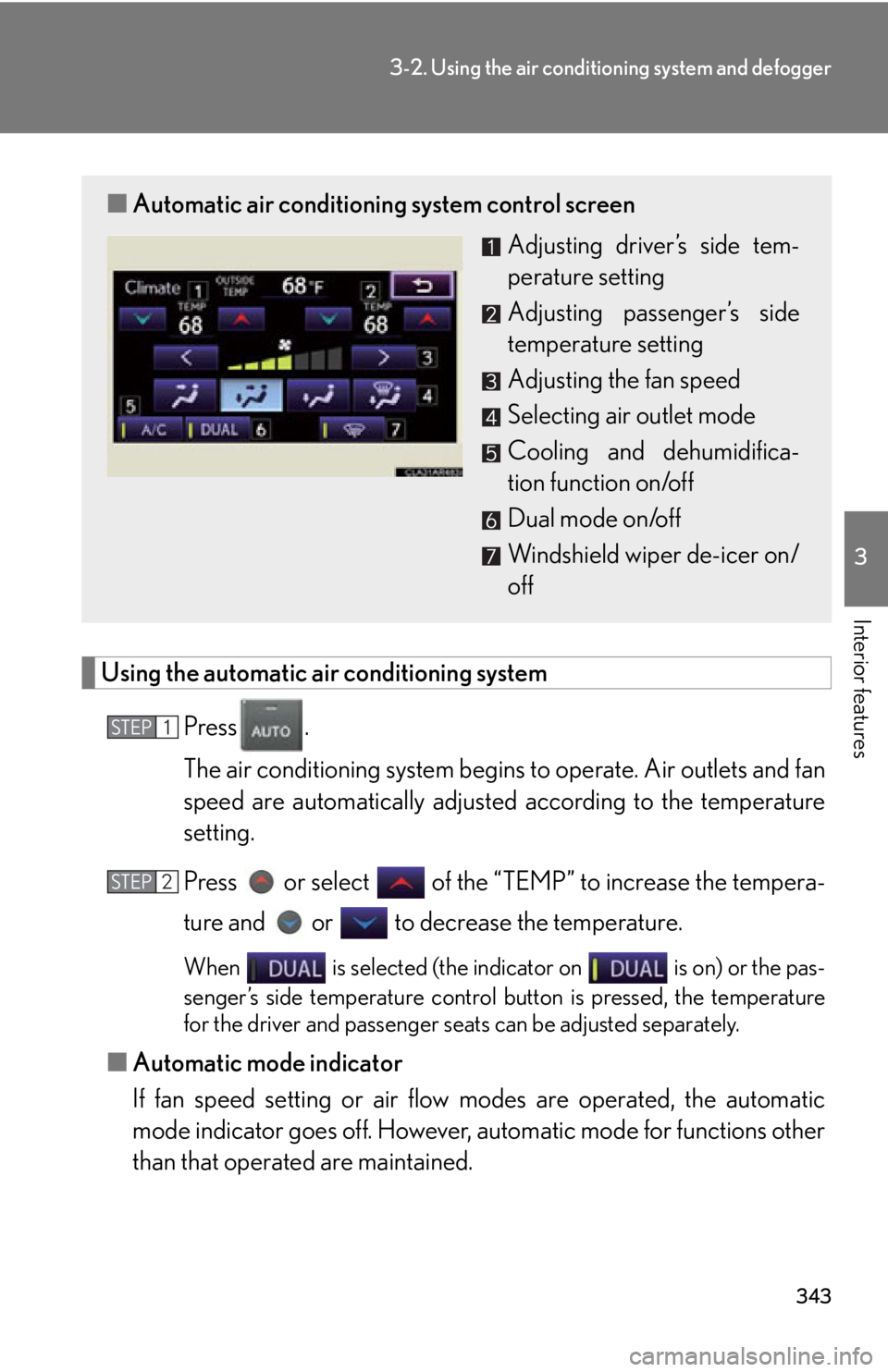
than that operated are maintained.■ Automatic air conditioning system control screen
Adjusting driver’s side tem-
perature setting
Adjusting passenger’s side
temperature setting
Adjusting the fan speed
Selecting air outlet mode
Cooling and dehumidifica-
tion function on/off
Dual mode on/off
Windshield wiper de-icer on/
offSTEP 1
STEP 2


