Page 400 of 886

4003-3. Using the Lexus Display Audio system
■
iPod problems
To resolve most problems encountered when using your iPod, disconnect your iPod
from the vehicle iPod connection and reset it. For instructions on how to reset your
iPod, refer to your iPod Owner’s Manual.■
Error messages
“Connection error. Please consult your Ow ner’s Manual for instructions on how to
connect the iPod.”:
This indicates a problem in the iPod or its connection.
“There are no songs available for playback . Please load compatible media to your
iPod.”:
This indicates that there is no music data in the iPod.■
Compatible models
The following iPod
, iPod nano
, iPod classic
, iPod touch
and iPhone
devices
can be used with this system. ●
Made for
• iPod touch (4th generation)
• iPod touch (3rd generation)
• iPod touch (2nd generation)
• iPod touch (1st generation)
•iPod classic
•iPod with video
• iPod nano (6th generation)
• iPod nano (5th generation)
• iPod nano (4th generation)
• iPod nano (3rd generation)
• iPod nano (2nd generation)
• iPod nano (1st generation)
•iPhone 4
•iPhone 3GS
•iPhone 3G
•iPhone
Depending on differences between models or software versions etc., some models
might be incompatible with this system.
Page 483 of 886
4833-4. Using the audio system
3
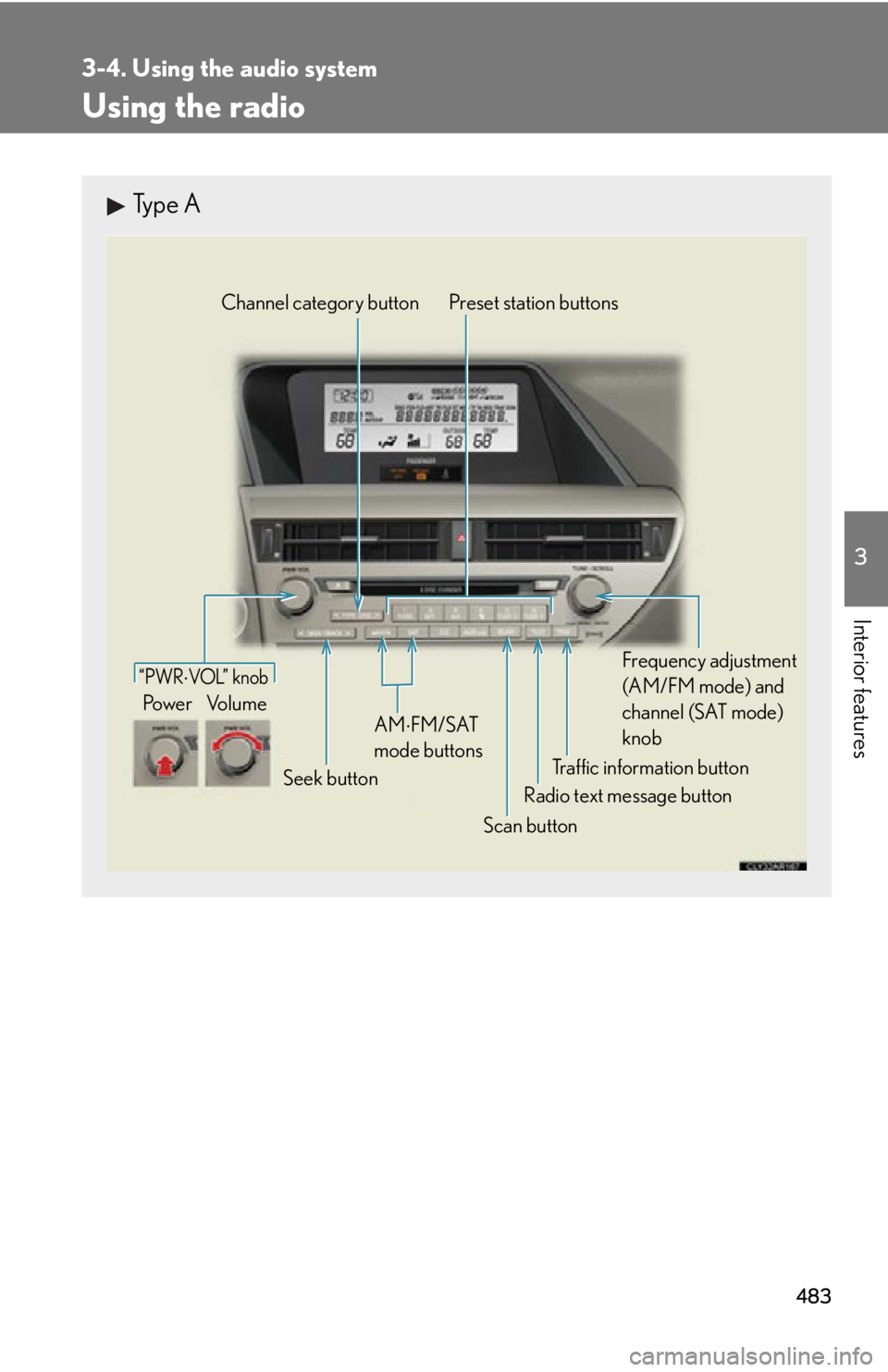
Interior features Using the radio Type A
Traffic information buttonPreset station buttons
Radio text message button
Scan buttonSeek buttonChannel category button
Frequency adjustment
(AM/FM mode) and
channel (SAT mode)
knobAM FM/SAT
mode buttons“PWR VOL” k nob
Po w e r Vo l u m e
Page 484 of 886
4843-4. Using the audio system
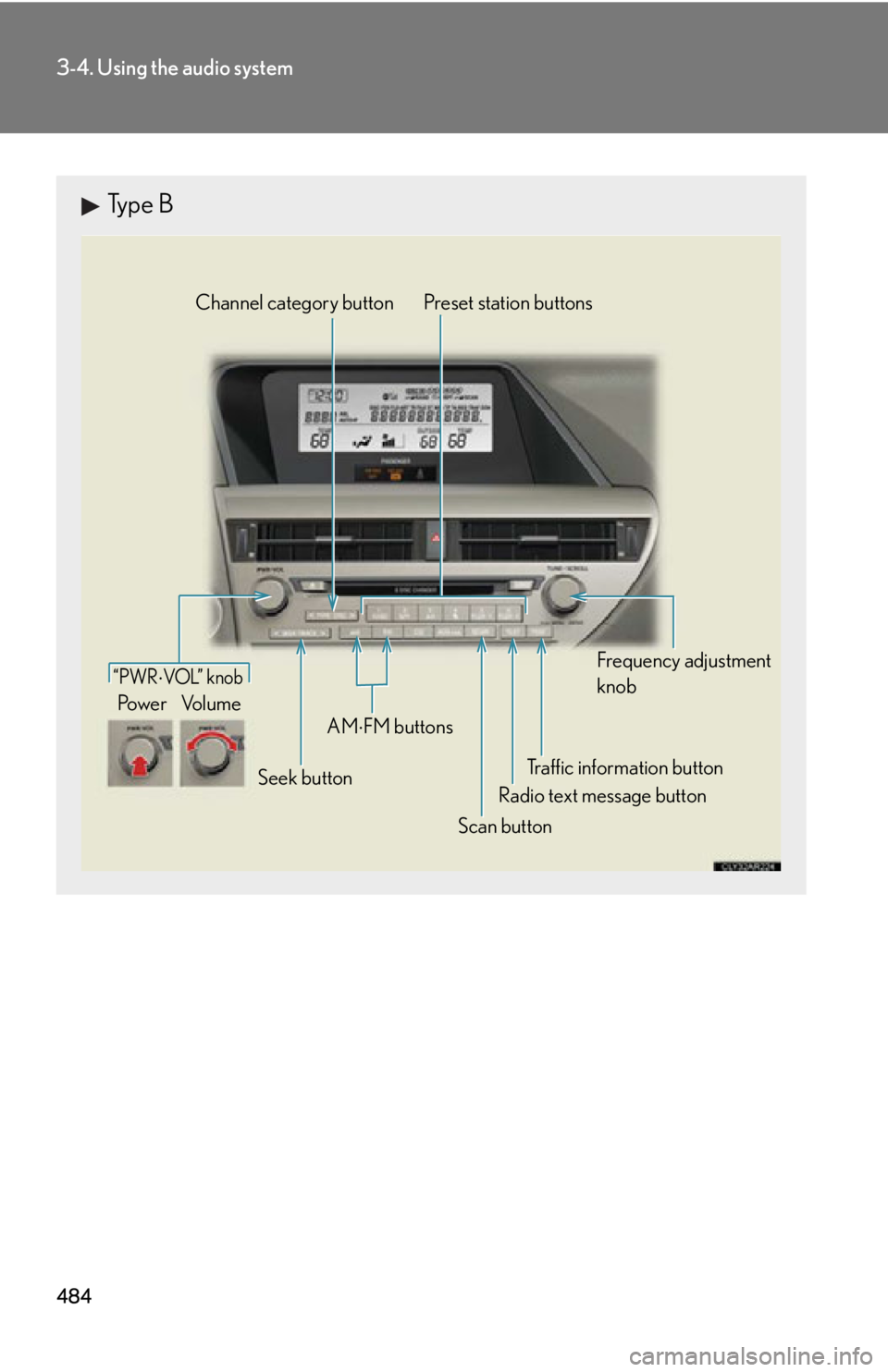
Type B
Traffic information buttonPreset station buttons
Radio text message button
Scan buttonSeek buttonChannel category button
Frequency adjustment
knob
AM
FM buttons“PWR VOL” k nob
Po w e r Vo l u m e
Page 485 of 886
4853-4. Using the audio system
3
Interior features Setting station presets (excluding XM ®
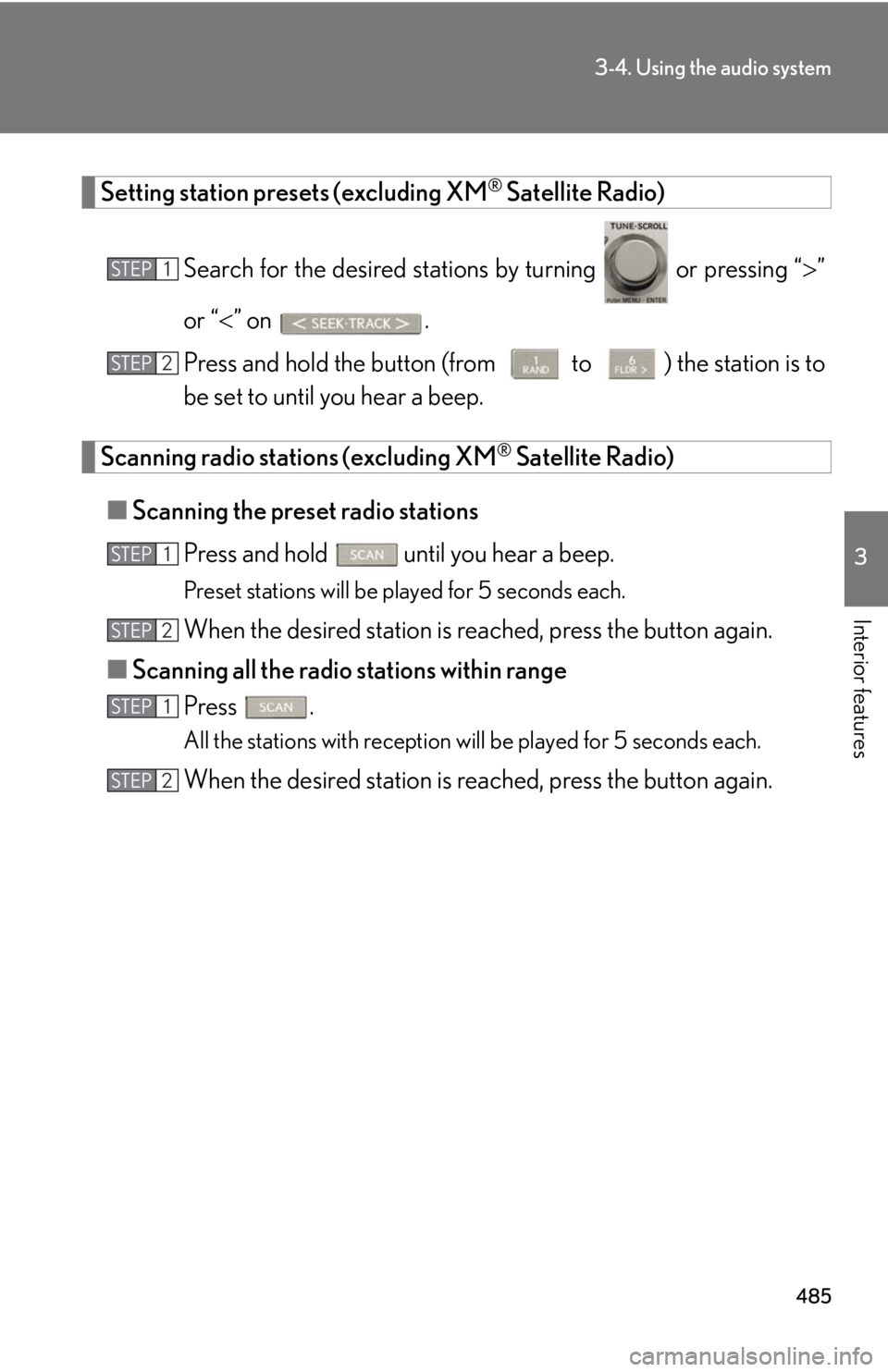
Satellite Radio)
Search for the desired stations by turning or pressing “ ”
or “ ” on .
Press and hold the button (from
to ) the station is to
be set to until you hear a beep.
Scanning radio stations (excluding XM ®
Satellite Radio)
■ Scanning the preset radio stations
Press and hold
until you hear a beep.Preset stations will be played for 5 seconds each.
When the desired station is reached, press the button again.
■ Scanning all the radio stations within range
Press . All the stations with reception will be played for 5 seconds each.
When the desired station is reached, press the button again.STEP 1
STEP 2
STEP 1
STEP 2
STEP 1
STEP 2
Page 487 of 886
4873-4. Using the audio system
3
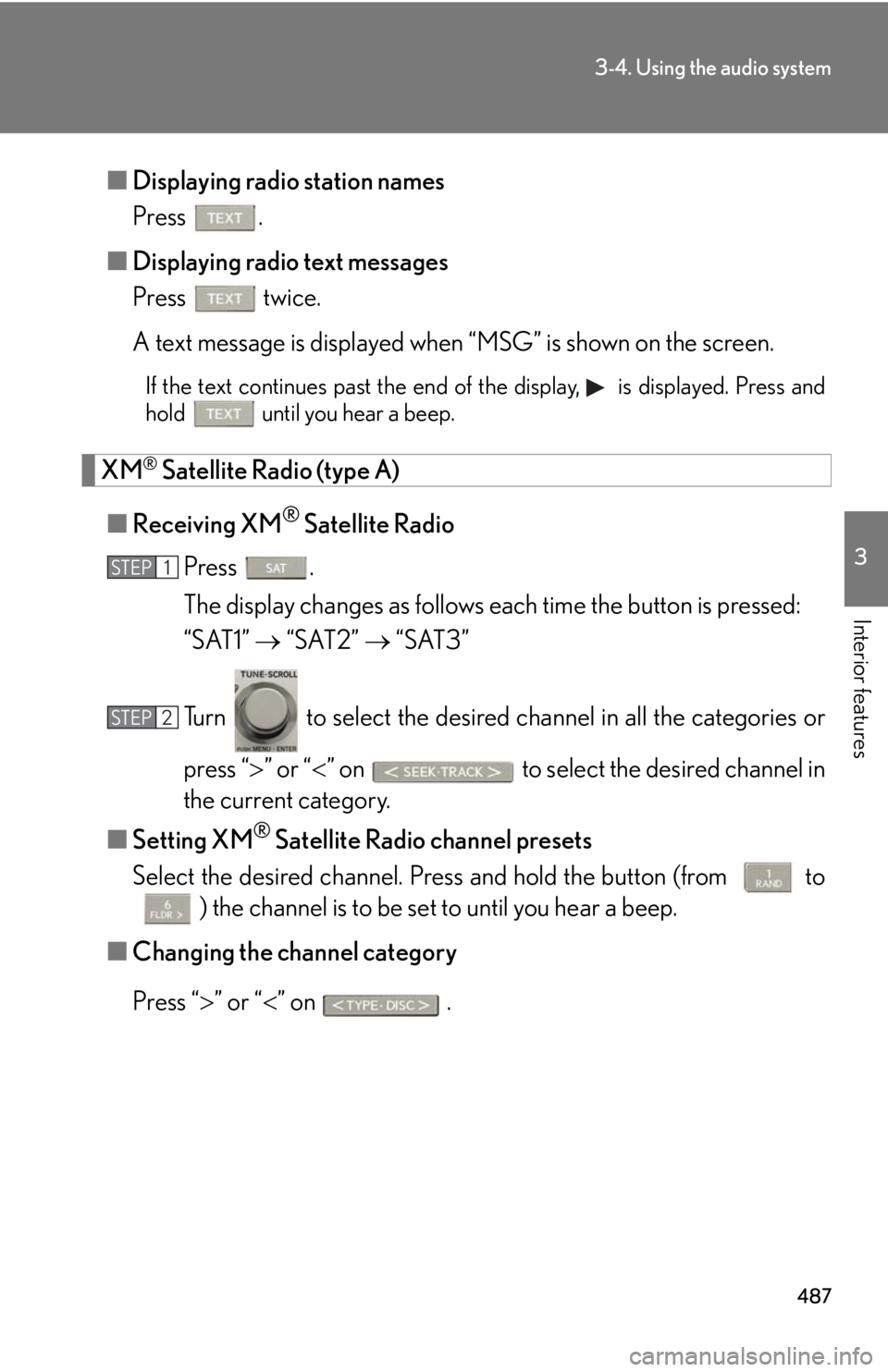
Interior features ■ Displaying radio station names
Press .
■ Displaying radio text messages
Press twice.
A text message is displayed when “MSG” is shown on the screen. If the text continues past the end of the display, is displayed. Press and
hold until you hear a beep.
XM ®
Satellite Radio (type A)
■ Receiving XM ®
Satellite Radio
Press .
The display changes as follows each time the button is pressed:
“SAT1” “SAT2” “SAT3”
Turn to select the desired channel in all the categories or
press “ ” or “ ” on to select the desired channel in
the current category.
■ Setting XM ®
Satellite Radio channel presets
Select the desired channel. Pr ess and hold the button (from
to
) the channel is to be set to until you hear a beep.
■ Changing the channel category
Press “ ” or “ ” on .STEP 1
STEP 2
Page 488 of 886
4883-4. Using the audio system
■ Scanning the XM ®
Satellite Radio channels
● Scanning the channels in the current category
Press .
When the desired channel is reached, press the button
again.
● Scanning the preset channels
Press and hold until you hear a beep.
When the desired channel is reached, press the button
again.
■ Displaying text information
Press . The display will show up to 10 characters.
The display changes as follows each time the button is pressed:
● CH NAME
● TITLE (SONG/PROGRAM TITLE)
● NAME (ARTIST NAME/FEATURE)
● CH NUMBER STEP 1
STEP 2
STEP 1
STEP 2
Page 489 of 886
4893-4. Using the audio system
3
Interior features ■
When the battery is disconnected
All preset stations are erased.■
Reception sensitivity ●
Cargo loaded on the roof luggage carrier, especially metal objects, may
adversely affect the reception of XM ®
Satellite Radio.●
It is difficult to maintain perfect radio re ception at all times due to the continually
changing position of the an tenna, differences in signal strength and surrounding
objects, such as trains and transmitters.●
The radio antenna is mounted inside th e rear spoiler and the rear window. To
maintain clear radio reception, do not attach metallic window tinting or other
metallic objects to the antenna wire mounted inside the rear window.■
Receiving XM ®
Satellite Radio
An XM ®
Satellite Radio is a tuner designed exclusively to receive broadcasts pro-
vided under a separate subscription. Availa bility is limited to the 48 contiguous
states and 10 Canadian provinces. ●
XM ®
subscriptions
For detailed information about XM ®
Satellite Radio or to subscribe:
U.S.A.
Visit on the web at www.siriusxm.com or call 1-877-515-3987.
Canada
Visit on the web at www.xmradio.ca or call 1-877-438-9677.●
Radio ID
You will need the radio ID when activating XM ®
service or reporting a problem.
Select “CH000” using , and the rece iver's 8-character ID number will
appear.
●
Satellite tuner
The tuner supports only Audio Services (Music and Talk) and the accompanying
Text Information of XM ®
Satellite Radio.
Page 517 of 886
5173-4. Using the audio system
3
Interior features ■
iPod functions ●
When an iPod is connected and the audio source is changed to iPod mode, the
iPod will resume play from the same point in which it was last used.●
Depending on the iPod that is connecte d to the system, certain functions may
not be available. If a function is unavailable due to a malfunction (as opposed to
a system specification), disconnecting the device and reconnecting it once
again may resolve the problem. ●
While connected to the system, the iPod cannot be operated with its own con-
trols. It is necessary to use the controls of the vehicle's audio system instead. ●
When the battery level of an iPod is very low, the iPod may not operate. If so,
charge the iPod before use.●
Supported models ( P. 5 1 8 )■
iPod problems
To resolve most problems encountered when using your iPod, disconnect your iPod
from the vehicle iPod connection and reset it.
For instructions on how to reset your iP od, refer to your iPod Owner's Manual.■
Display
P. 4 9 7■
Error messages
“ERROR”: This indicates a problem in the iPod or its connection.
“NO MUSIC”: This indicates that ther e is no music data in the iPod.
“EMPTY”: This indicates that some avai lable songs are not found in a selected
playlist.
“UPDATE”: This indicates that the version of the iPod is not compatible.
Upgrade your iPod software to the latest version.