Page 389 of 886
3893-3. Using the Lexus Display Audio system
3
Interior features ■
Lens cleaners
Do not use lens cleaners. Doing so may damage the CD player.■
MP3 and WMA files
MP3 (MPEG Audio LAYER 3) is a standard audio compression format.
Files can be compressed to approximately 1 /10 of their original size by using MP3
compression.
WMA (Windows Media Audio) is a Microsoft audio compression format.
This format compresses audio data to a size smaller than that of the MP3 format.
There is a limit to the MP3 and WMA file standards that can be used and to the
media/formats on which the files are recorded. ●
MP3 file compatibility
• Compatible standards
MP3 (MPEG1 LAYER3, MPEG2 LSF LAYER3)
• Compatible sampling frequencies
MPEG1 LAYER3: 32, 44.1, 48 (kHz)
MPEG2 LSF LAYER3: 16, 22.05, 24 (kHz)
• Compatible bit rates (compatible with VBR)
MPEG1 LAYER3: 32—320 (kbps)
MPEG2 LSF LAYER3: 8—160 (kbps)
• Compatible channel modes: stereo, joint stereo, dual channel and monaural●
WMA file compatibility
• Compatible standards
WMA Ver. 7, 8, 9
• Compatible sampling frequencies
32, 44.1, 48 (kHz)
Compatible bit rates (only compatible with 2-channel playback)
Ver. 7, 8: CBR 48—192 (kbps)
Ver. 9: CBR 48—320 (kbps)
●
Compatible media
Media that can be used for MP3 and WMA playback are CD-Rs and CD-RWs.
Playback in some instances may not be possible if the CD-R or CD-RW is not
finalized. Playback may not be possible or the audio may jump if the disc is
scratched or marked with fingerprints.
Page 392 of 886
3923-3. Using the Lexus Display Audio system
NOTICE■
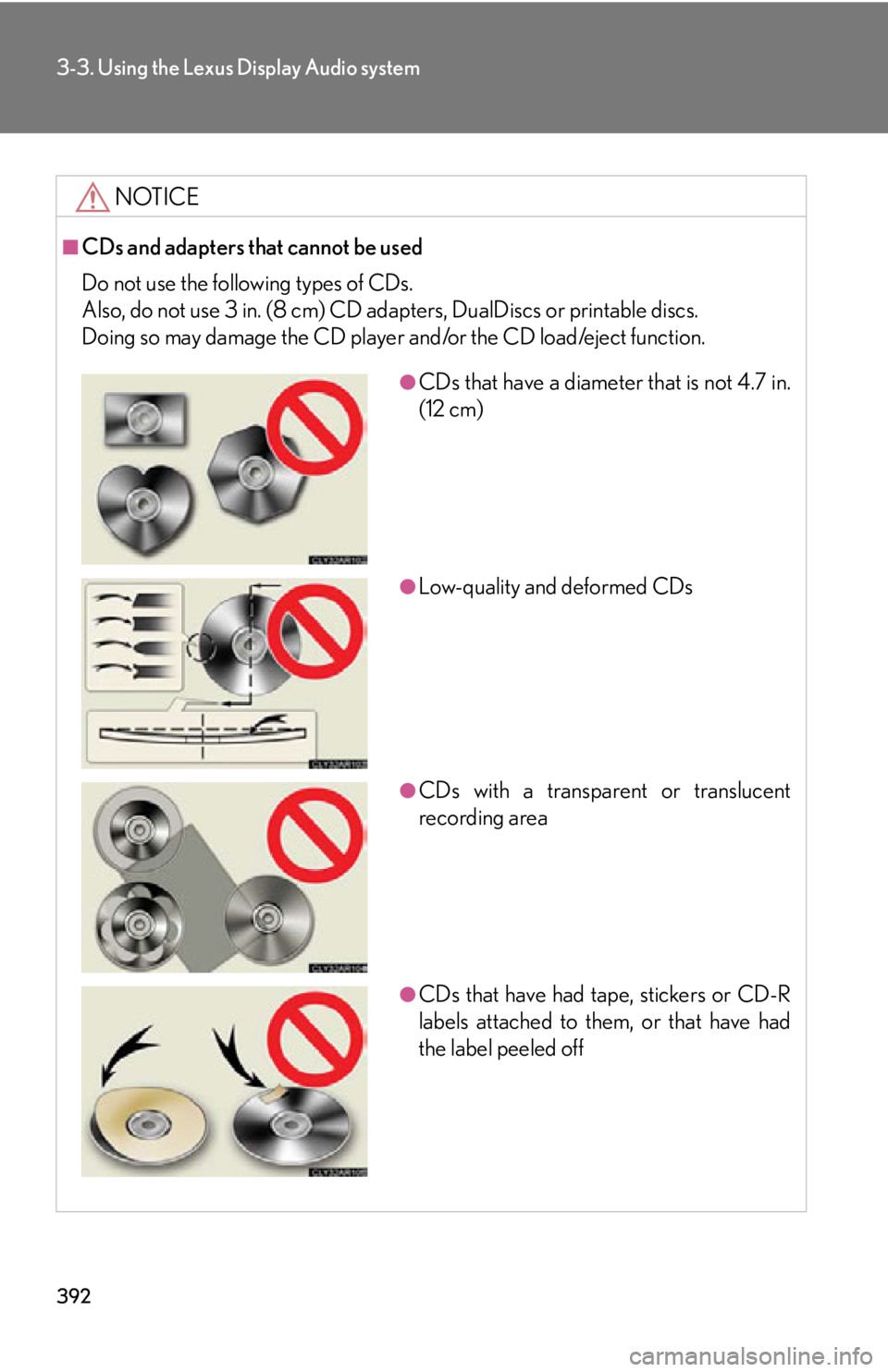
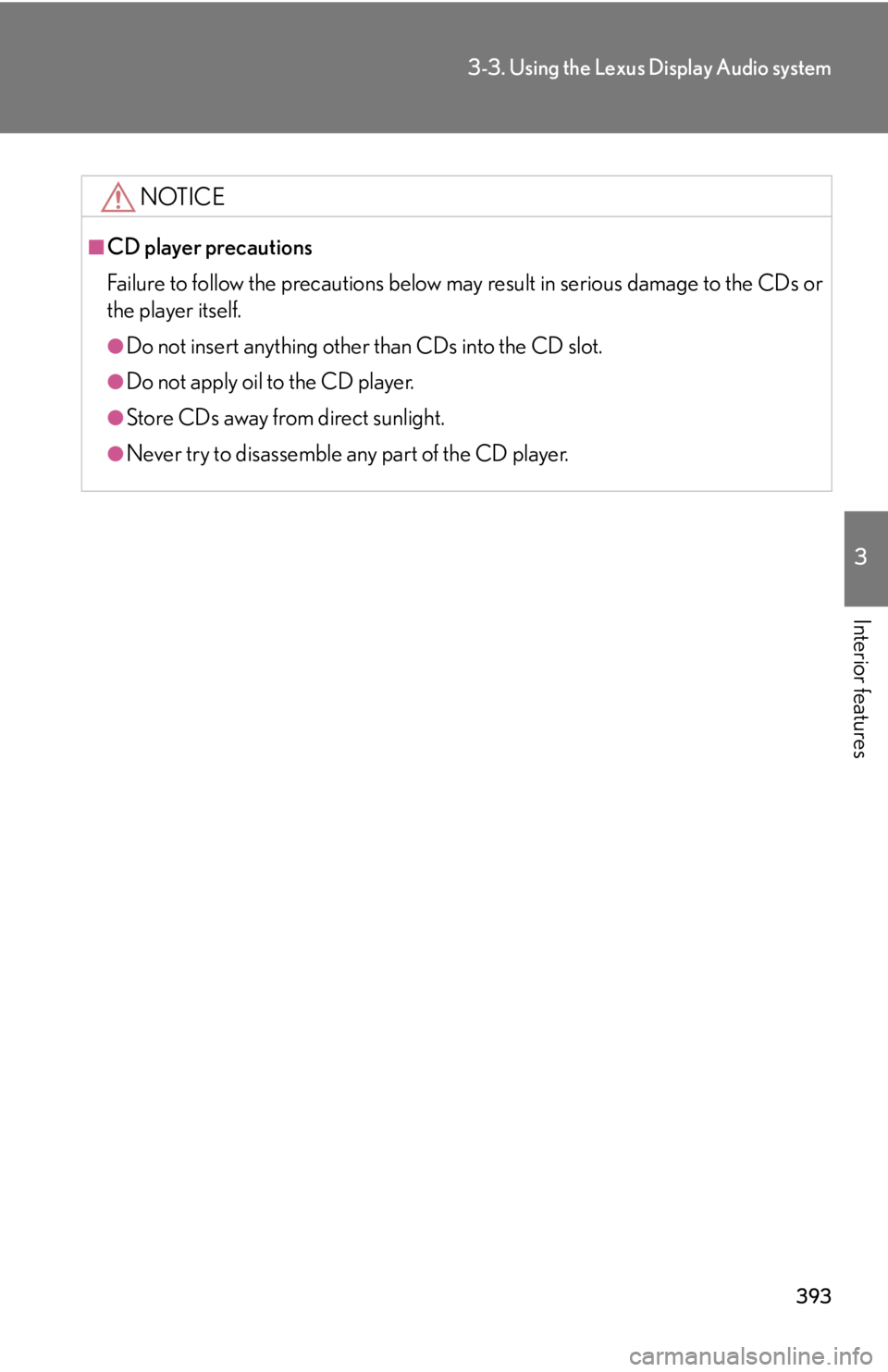
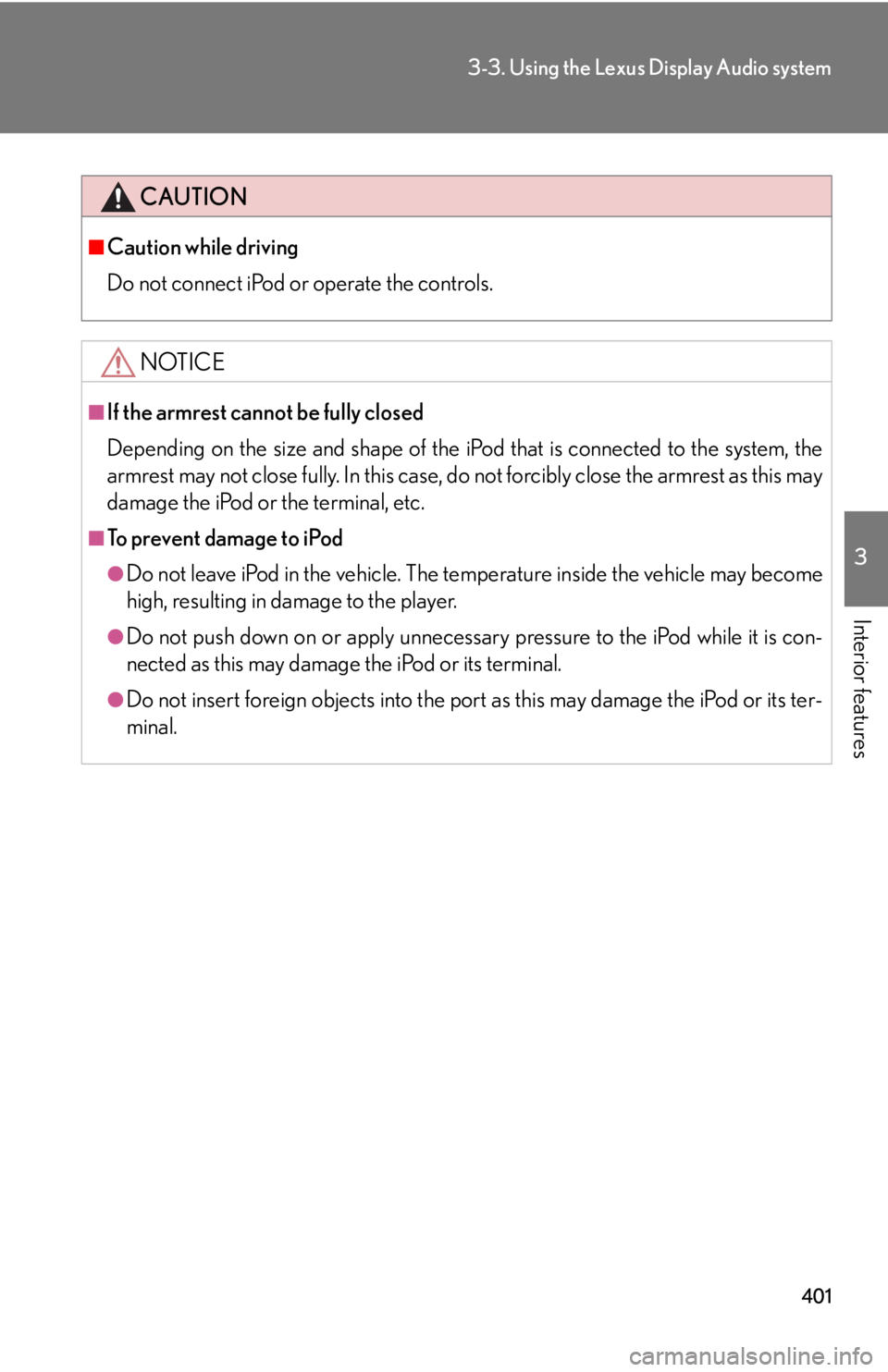
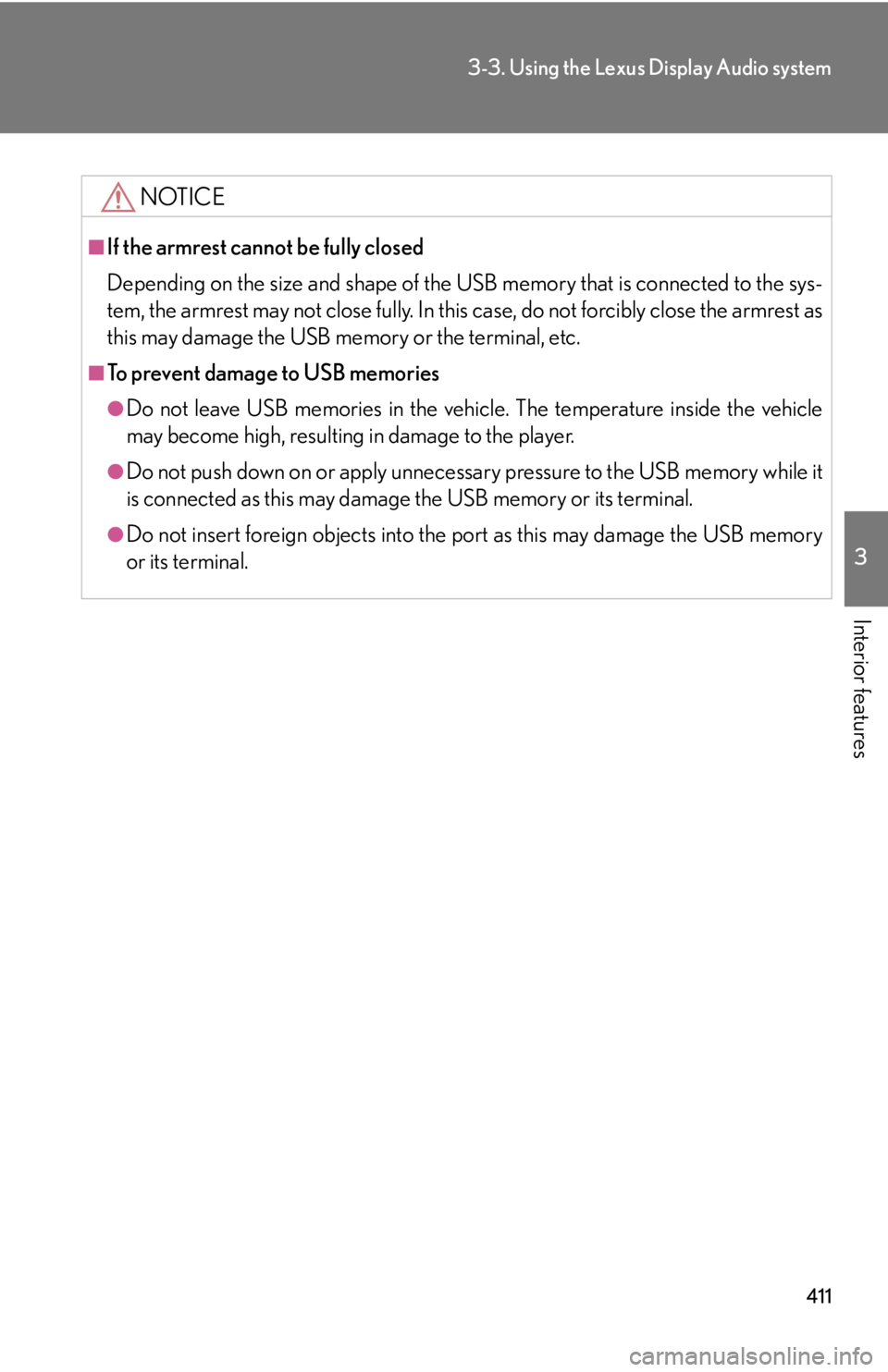
CDs and adapters that cannot be used
Do not use the following types of CDs.
Also, do not use 3 in. (8 cm) CD adap ters, DualDiscs or printable discs.
Doing so may damage the CD player and/or the CD load/eject function. ●
CDs that have a diameter that is not 4.7 in.
(12 cm)
●
Low-quality and deformed CDs
●
CDs with a transparent or translucent
recording area
●
CDs that have had tape, stickers or CD-R
labels attached to them, or that have had
the label peeled off
Page 393 of 886
3933-3. Using the Lexus Display Audio system
3
Interior features NOTICE■
CD player precautions
Failure to follow the precautions below ma y result in serious damage to the CDs or
the player itself. ●
Do not insert anything other than CDs into the CD slot.●
Do not apply oil to the CD player.●
Store CDs away from direct sunlight.●
Never try to disassemble any part of the CD player.
Page 401 of 886
4013-3. Using the Lexus Display Audio system
3
Interior features CAUTION■
Caution while driving
Do not connect iPod or operate the controls.
NOTICE■
If the armrest cannot be fully closed
Depending on the size and shape of the iP od that is connected to the system, the
armrest may not close fully. In this case, do not forcibly close the armrest as this may
damage the iPod or the terminal, etc.■
To prevent damage to iPod ●
Do not leave iPod in the vehicle. The temperature inside th e vehicle may become
high, resulting in damage to the player.●
Do not push down on or apply unnecessary pressure to the iPod while it is con-
nected as this may damage the iPod or its terminal.●
Do not insert foreign objects into the port as this may damage the iPod or its ter-
minal.
Page 411 of 886
4113-3. Using the Lexus Display Audio system
3
Interior features NOTICE■
If the armrest cannot be fully closed
Depending on the size and shape of the US B memory that is connected to the sys-
tem, the armrest may not close fully. In this case, do not forcibly close the armrest as
this may damage the USB me mory or the terminal, etc.■
To prevent damage to USB memories ●
Do not leave USB memories in the vehicle. The temperature inside the vehicle
may become high, resulting in damage to the player.●
Do not push down on or apply unnecess ary pressure to the USB memory while it
is connected as this may damage the USB memory or its terminal.●
Do not insert foreign objects into the port as this may damage the USB memory
or its terminal.
Page 413 of 886
4133-3. Using the Lexus Display Audio system
3
Interior features CAUTION■
Caution while driving
Do not connect portable audio device or operate the controls.
NOTICE■
If the armrest cannot be fully closed
Depending on the size and shape of the portable audio device that is connected to
the system, the armrest may not close fully. In this case, do not forcibly close the
armrest as this may damage the portable audio device or the terminal, etc.■
To prevent damage to portable audio device ●
Do not leave portable audio device in the vehicle. The temperature inside the
vehicle may become high, resulting in damage to the player.●
Do not push down on or apply unnece ssary pressure to the portable audio
device while it is connected as this may damage the portable audio device or its
terminal. ●
Do not insert foreign objects into the port as this may damage the portable audio
device or its terminal.
Page 414 of 886
4143-3. Using the Lexus Display Audio system
Listening to Bluetooth ®
audioThe Bluetooth ®
audio system enables users to enjoy music played on a por-
table player from the vehicle speaker via wireless communication. This
audio system supports Bluetooth ®
, a wireless data system capable of play-
ing portable audio music without cables . If your portable player does not
support Bluetooth ®
, the Bluetooth ®
audio system will not function.
Press the “MEDIA” button or the “AUDIO” button on the Lexus Display
Audio controller and then select “Bluetooth*”.
*: Bluetooth is a registered trademark of Bluetooth SIG. Inc.
■ Control panel Audio control screen
Playback/
Pa u s e b u t t o n
Track selector knob
Track selector button
Audio source selector button“PWR·VOL” knob
Po w e r Vo l u m e
Page 415 of 886
4153-3. Using the Lexus Display Audio system
3
Interior features ■ Audio control screen
Pressing the “MEDIA” button or the “AUDIO” button on the Lexus Dis-
play Audio controller displays the audio control screen from any
screens of the selected source.
Audio source selection
screen appears
Displaying the list
Connecting a Bluetooth ®
audio player
Displaying the track list
Select: Playing the previous
track
Select and hold: Reversing a
track
Playback
Pa u s e
Select: Playing the next track
Select and hold: Fast-for-
warding a track
Repeat play
Random playback
Setting the sound ( P. 4 2 8 )
Some titles and controls may
not be displayed depending on
the type of portable audio
player.